Master Your Cash Flow with an Accounts Receivable Aging Report Template
accounts receivable aging report template to track overdue balances, categorize aging buckets, and boost cash flow - download now.
For finance leaders at professional services firms, the standard accounts receivable aging report is a historical document. It lists who owes what and for how long. The real operational control comes from transforming that report from a simple collections list into a forward-looking cash flow management tool.
This guide provides a clear framework for building and using an AR aging report that delivers strategic financial control.
Why Your Standard AR Aging Report Falls Short
The default AR aging report from a system like QuickBooks is a rearview mirror. It shows what is already late but offers zero intelligence for proactive financial strategy. For a firm billing on projects, retainers, and milestones, this basic view is insufficient.
It lacks the operational context needed to make informed decisions about client profitability, resource allocation, and risk management. The core problem is that a standard report treats every overdue dollar equally.
It cannot differentiate between a high-value, long-term client who is 45 days late and a new, low-margin client who is also 45 days late. This limitation forces the finance team into a reactive, inefficient collections cycle.
From Reactive Collections to Strategic Control
A purpose-built accounts receivable aging report template changes the dynamic. It shifts the focus from chasing overdue invoices to managing financial outcomes. By integrating project-specific data, client history, and communication logs, you gain a clearer picture of your receivables.
This allows you to identify payment patterns and forecast client behavior before it negatively impacts your cash flow. Instead of just seeing a balance in the “61-90 days” column, you can answer critical operational questions:
- Is this delay tied to a specific project manager or service line?
- Does this client have a history of seasonal payment delays?
- What was the outcome of our last communication with their AP department?
This level of detail is the first step toward improving cash flow with surgical precision. It empowers you to tailor collection strategies, protecting client relationships while accelerating payment.
The Limitations of Manual Reporting
While an enhanced spreadsheet is a significant improvement, it still relies on manual data exports and updates. The process is slow and prone to human error. A single formula mistake can lead to decisions based on flawed data. For a firm in the $3M–$50M range, this manual friction becomes a major operational bottleneck.
The objective is to create a system where financial data automatically drives action. A well-structured template is the blueprint, but automation is the end state for achieving a dynamic, integrated approach.
Ultimately, the deficiencies of manual reports demonstrate the value of accounts receivable automation. Systems that integrate directly with your accounting software provide real-time aging data without manual intervention. This moves your firm from periodic check-ins to continuous financial oversight.
The power of an advanced AR report is not just in identifying debt, but in providing the intelligence to prevent it. It becomes a central tool for managing the financial health of your client relationships and the firm itself.
Building Your High-Impact AR Aging Template
Building an effective AR aging report is an operational control task, not merely an accounting exercise. The goal is to create a tool in Excel or Google Sheets that transcends a simple data dump from QuickBooks and provides actionable intelligence. A well-designed template is the foundation of predictable cash flow.
For an experienced Controller or CFO, this should take less than an hour. We are not just replicating a standard report; we are layering in crucial context specific to a professional services firm. The result is a clear, dynamic view of receivables that informs strategy.
Core Data Fields Beyond the Basics
To begin, export a standard "A/R Aging Detail" report. For a professional services firm, columns like Invoice Number and Amount Due are insufficient. Your template requires fields that track the operational context behind each invoice.
This infographic illustrates the necessary shift—from using a report as a reactive list to a strategic financial tool.
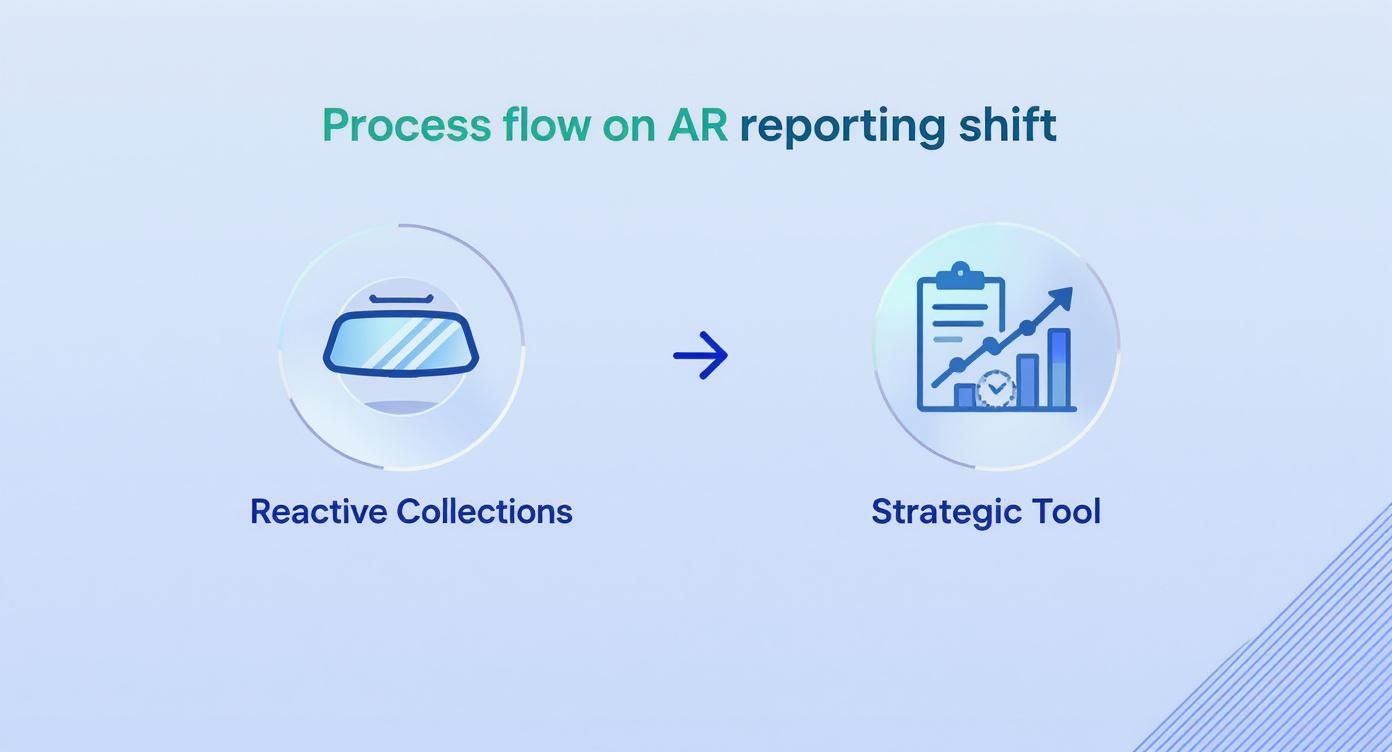
It is about evolving from a historical record into a dynamic tool that drives proactive cash management. The key is adding columns that provide answers to anticipated questions. Consider what your team needs to make an intelligent follow-up call.
Adding these fields transforms a list of debts into a central command center for your firm's revenue cycle. This table breaks down the essential columns to add to your template.
Essential Fields for a Professional Services AR Aging Template
Field Name | Purpose in Template | Data Type / Example |
|---|---|---|
Project ID or Name | Links the invoice to a specific engagement, helping you spot issues tied to certain projects or service lines. | Text / "Q3 Brand Strategy" |
Project Manager | Assigns internal responsibility. This tells you who owns the client relationship and the project's financial outcome. | Text / "Jane Doe" |
Client Contact | Puts the name, email, and phone number right in the report, removing friction from the collections process. | Text, Email, Phone / "John Smith, john@client.com" |
Last Contact Date | A manually updated field that creates a running log of communication, preventing redundant or poorly timed follow-ups. | Date / "2024-05-15" |
Notes | A brief summary of the last interaction or next steps. Critical context for anyone on the team. | Text / "Spoke to John, payment confirmed for next check run." |
With this structure, you are not just tracking numbers; you are managing relationships and accountability.
Setting Up the Aging Buckets with Formulas
The purpose of an accounts receivable aging report is to categorize outstanding invoices by their due date. Standard buckets are Current (0–30 days), 31–60 days, 61–90 days, and 90+ days.
For a firm with $35,000 in receivables, the report might show $10,000 as current but $2,000 as over 90 days past due. That $2,000 carries a significantly higher risk of becoming bad debt. For more on why these buckets are vital for financial health, check out this guide on AR reporting.
To automate this categorization, use key spreadsheet formulas. First, calculate the age of each invoice using =TODAY() - [Invoice Date Cell] to determine the number of days outstanding.
To populate your aging buckets, the SUMIFS formula is indispensable. It sums amounts that meet multiple criteria—in this case, the client's name and the age of their invoices.
For example, to calculate the total for "Client A" in the 31-60 day bucket, the formula would be: =SUMIFS(Data!$D:$D, Data!$A:$A, "Client A", Data!$E:$E, ">=31", Data!$E:$E, "<=60")
Operator's Insight: Create a dedicated column in your data sheet named "Days Overdue" using theTODAY()function. This simplifies theSUMIFSformulas and makes the template faster and easier to troubleshoot. It also allows for sorting by the oldest invoices with a single click.
This formula-driven approach ensures the report updates automatically. Each time you paste fresh data from your accounting system, the summary provides a live, accurate snapshot of your cash position.
A Practical Example from a $10M Firm
Consider a $10M consulting firm. They export AR data from QuickBooks, which provides the basics. In their custom Google Sheets template, they have added columns for "Lead Consultant" and "Last Follow-Up."
Their Controller has configured SUMIFS formulas to populate the aging buckets. At a glance, the CFO can see that 70% of the balance in the 90+ day column belongs to projects managed by a single consultant. This indicates a potential client management or scope creep issue, not just a collections problem.
The "Last Follow-Up" column reveals that the highest-value invoices in the 61-90 day bucket have not been addressed in over three weeks, flagging a breakdown in their internal process. The data points directly to why and who, not just what is late. This is the insight required to reduce DSO.
This structured template is the first step toward a disciplined financial system. It serves as the blueprint for transitioning to accounts receivable automation, as the logic and data fields map directly into the workflows of dedicated AR software for professional services.
Translating Aging Data into a Collection Strategy
An accounts receivable aging report is only as valuable as the action it drives. With the template built, the next step is to use the data to actively improve cash flow. This is where you shift from identifying late payments to systematically managing your firm's liquidity.
Analysis begins with segmenting accounts by risk, not just age. A well-built template provides sharper insight than a standard QuickBooks report, allowing you to separate high-risk accounts—large, aging invoices from new clients—from reliable ones who are merely slow to pay.

Collection efforts should be a function of both the balance and the client's payment behavior. A $50,000 invoice at 45 days from a key strategic partner requires a different approach than a $15,000 invoice at 75 days from a client with a history of payment issues.
Prioritizing Accounts for Maximum Impact
Effective prioritization balances financial risk against the value of the client relationship. This calculated approach deploys your team’s limited time where it will have the greatest impact on Days Sales Outstanding (DSO).
When building your follow-up list, weigh these factors:
- Invoice Age and Amount: The largest balances in the oldest buckets represent the most immediate threat to cash flow and are the obvious starting point.
- Client Payment History: Distinguish between a one-off delay and a recurring pattern. A consistently slow-paying client may require a discussion about revised payment terms.
- Relationship Value: A personal check-in from a partner is appropriate for a key client. A direct approach from the finance team is better suited for a more transactional relationship.
- Dispute Status: A disputed invoice signals a service or communication breakdown, not a collections issue. It must be escalated internally for resolution before payment can be expected.
This multi-factor approach ensures you are managing the financial health of your entire client portfolio, not just chasing dollars. For more tactical ideas, these eight real-world ways to clean up your accounts receivable offer practical steps.
Implementing a Tiered Communication Strategy
Once priorities are set, a systematic communication plan creates a predictable, repeatable process. This removes emotion and guesswork from collections. The goal is to apply the right amount of pressure at the right time to secure payment without damaging the client relationship.
A tiered strategy assigns specific actions to each aging bucket:
- 31-60 Days Overdue: A gentle, professional touch. An automated reminder or a personal note from the project manager is usually sufficient. The tone is collaborative, assuming an oversight.
- 61-90 Days Overdue: A firmer, more direct approach. Your AR specialist or finance team should call to confirm invoice receipt and secure a firm payment date. Log all conversations in the report's "Notes" column.
- 91+ Days Overdue: Clear escalation. A formal communication from a Controller or CFO should state the total due and provide a final deadline before further action is taken.
The urgency for the final tier is supported by data: once an invoice is 90 days past due, there is only an 18% chance of collection. This statistic justifies a swift, decisive response. For deeply delinquent accounts, engaging specialized support from a debt collection call center may be necessary.
Systemizing your follow-up transforms collections from ad-hoc conversations into a standard business process. This consistency sets clear expectations for clients and provides your team with a clear playbook.
This structured approach is the foundation of effective AR management. It is a process that can be managed manually with a strong template but is optimized through accounts receivable automation. Automation executes this strategy flawlessly, freeing up senior finance personnel for strategic work.
Common Pitfalls in Manual AR Management
Even a perfectly designed accounts receivable aging report template is vulnerable to human error. For professional services firms where precision is paramount, the frictions of manual processes can escalate into significant cash flow problems.
The most common point of failure is data entry. A misplaced note, a typo in a payment date, or a missed follow-up slowly degrades the report's integrity. The intended single source of truth becomes another spreadsheet requiring constant validation.
The Risk of Stale Data
Manual reports are static. The moment data is exported from QuickBooks, it is outdated. A client may submit payment minutes later, but the finance team continues to work from an old report, creating redundant and unnecessary follow-ups.
This lag is more than an inconvenience; it means strategic decisions are based on a financial picture that is hours or days old. This directly undermines efforts to reduce DSO.
An aging report should be a live snapshot of your receivables. A manual process degrades this dynamic tool into a historical document.
The problem extends beyond inefficiency. Industry data from Q2 2022 showed that in 16 different sectors, over 10% of accounts receivable was more than 90 days past due, underscoring how quickly small delays can signal larger credit risks. You can see the full findings on credit risk management to understand these trends.
Mismanaging Disputes and Partial Payments
Handling exceptions reveals the robustness of your process. A common mistake is leaving a disputed invoice in its aging bucket without notation, leading to inappropriate collection calls that damage client relationships.
Disputed invoices are service problems, not collection problems. They must be escalated internally for resolution.
Partial payments are equally problematic. A manual update might reduce the invoice total without resetting the aging clock or adding context, masking the delinquency of the remaining balance and distorting the true AR picture.
This is where manual processes break down and AR software for professional services demonstrates its value. The limitations of manual tracking highlight the need for AI AR automation, which handles these complex scenarios systematically and ensures data is categorized correctly in real time.
Beyond the Template to AR Automation
The AR aging template you have built is an excellent starting point. It provides a static snapshot of receivables in a dynamic environment. True financial control, however, is not achieved with a better spreadsheet but with a system that operates autonomously.
This is the transition from a manual task to a fully automated AR operation.

Manual templates, regardless of formula sophistication, have inherent friction. Each update requires data extraction, error checking, and pivot table refreshes. This lag means decisions are always based on outdated information.
For a growing firm, this manual drag becomes an unsustainable bottleneck. A single formula error can misrepresent your entire receivables position, leading to flawed collection efforts.
The Shift to Systemized Collections
This is where you graduate from the template to accounts receivable automation. Modern AR platforms integrate directly with your accounting system, like QuickBooks, creating a live, dynamic view of receivables without manual intervention.
The hours a controller spends updating a spreadsheet are eliminated. This time is reallocated from data entry to strategic analysis.
The primary benefit is how an AR platform executes your collections strategy with perfect consistency. The tiered communication plans—gentle reminders, firm follow-ups, and escalations—are programmed directly into the system.
Executing Strategy with AI AR Automation
AI AR automation provides a significant competitive advantage for professional services firms. The system executes nuanced workflows based on predefined rules, not generic templates.
- Precision Timing: It sends reminders at the optimal moment, considering invoice age, client payment history, and past email engagement.
- Consistent Follow-Up: The system ensures no invoice is overlooked, maintaining steady, professional pressure that is impossible to replicate manually.
- Automated Escalation: Once an invoice reaches 90 days, the platform can automatically flag it for review or send a pre-approved escalation notice.
This systematic approach removes the emotional and administrative burden from your team. Collections becomes a predictable, data-driven process that sets clear client expectations and helps improve cash flow.
For a deeper analysis of these platforms, this guide to accounts receivable automation software is a valuable resource. The objective is to build a system that reduces DSO while protecting client relationships.
To ensure data integrity from the start, consider how to automate invoice processing. Automation transforms the logic of your template into a living system, executing your strategy flawlessly and freeing your team for high-value work.
Questions We Hear All the Time
As a CFO or Controller, you have likely encountered these questions. Here are direct answers.
How Often Should We Be Looking at This Report?
For any active professional services firm, a weekly review is mandatory. This cadence allows you to identify payment delays before they become significant cash flow problems, enabling proactive rather than reactive measures.
Monthly reports are still necessary for closing the books and board meetings, but the weekly operational review is what effectively manages DSO.
What’s a “Good” DSO for a Services Firm?
A healthy Days Sales Outstanding (DSO) target for most professional services firms is under 45 days. A firm that collects in 38 days, for example, has a significant cash flow advantage over a competitor collecting in 55 days.
A DSO consistently exceeding 60 days is a red flag indicating a systemic issue in your invoice-to-cash cycle. This requires immediate investigation into your collections process, client onboarding, or invoice accuracy.
***
Visual Idea: A clean line graph comparing two firms. Firm A's DSO hovers around a stable 40 days. Firm B's DSO fluctuates erratically between 55 and 70 days, illustrating instability.
***
Can I Use This Template with Our QuickBooks Data?
Yes. This template is designed to work with data exported directly from accounting software, including QuickBooks. Run an “A/R Aging Detail” report, export it to Excel or Google Sheets, and paste the data into the template.
The purpose is to achieve a more powerful, context-rich analysis than native reports provide. However, this is a manual step. QuickBooks AR automation eliminates this by creating a live, two-way sync between your systems.
How Does a System Help Client Relationships During Collections?
Systematized collections depersonalize the follow-up process in a way that makes it more effective and less confrontational. Communications become consistent and professional, triggered by data—like an invoice's age—not a collector's availability or mood. This establishes a clear, predictable rhythm for payment expectations.
This consistency treats every client fairly and transparently. It protects the relationship by separating the necessary financial conversation from the project work. With AI AR automation, this process is not only consistent but also maintains a human, respectful tone.
***
Visual Idea: A cinematic image of a CFO calmly reviewing a clean dashboard on a tablet during a commute, conveying a sense of control and untethered oversight.
***
--- Resolut automates AR for professional services—consistent, accurate, and human.