A CFO's Guide to Automated Billing Software
Discover how automated billing software improves cash flow, reduces DSO, and drives financial control. A practical guide for CFOs and finance leaders.
Automated billing software is more than a tool for sending invoices faster. It's the central nervous system for your firm's revenue cycle.
It governs the process from invoice creation to final reconciliation with minimal human intervention. The objective is to reduce errors, improve cash flow, and provide a clear, real-time view of your firm's financial position.
Moving Beyond Manual Invoicing for Financial Control
For any finance leader, the billing cycle is the engine of cash flow. A manual process introduces friction at every turn. Errors creep in. Delays become the norm. Financial clarity is lost.
Traditional accounts receivable isn't a controlled process; it’s a reactive, administrative burden defined by a constant chase.
This is a strategic weakness. Manual invoicing is a direct cause of high Days Sales Outstanding (DSO), revenue leakage from unbilled work, and the steep administrative cost of collections.
Shifting from Administration to Automation
Accounts receivable automation reframes this dynamic. It installs a financial governor on your revenue engine, ensuring it runs smoothly and predictably.
The goal is to build a scalable, accurate financial workflow. This transforms a high-touch, variable process into a low-touch, consistent one.
Your finance team can then shift from tactical invoice chasing to strategic cash flow optimization, addressing the core challenges that concern CFOs and controllers.
For professional services firms, the cost of an error is not just the incorrect dollar amount. It's the eroded client trust and the administrative hours spent on reconciliation—resources that should be focused on forward-looking financial analysis.
The Foundation of Financial Control
Implementing accounts receivable automation provides the structure needed to regain control. It standardizes communications, enforces payment terms without emotion, and ensures every billable minute is captured and invoiced.
This creates a reliable system that minimizes human error and maximizes efficiency.
Of course, true financial control requires more than just automating invoices; systems must also boost overall business efficiency through real-time data integration.
By leaving manual invoicing behind, you lay a foundation for predictable revenue, better financial visibility, and stronger client relationships built on accuracy and transparency.
What AR Automation Actually Does for Your Bottom Line
Features are irrelevant until they impact the balance sheet. For CFOs and controllers, the value of automated billing isn't a slick interface; it's the direct impact on working capital, revenue leakage, and operating costs.
The conversation must move past operational convenience to strategic financial control. It's time to quantify the return of replacing a manual, high-friction AR process with an automated, low-touch system.
Compressing Your Cash Conversion Cycle
The most immediate impact of AR automation is on your Days Sales Outstanding (DSO). For any professional services firm, every day an invoice remains unpaid is trapped working capital.
Consider a firm with $10 million in annual revenue. A manual AR process might yield a DSO of 60 days. On any given day, $1.64 million of your cash is tied up in receivables.
A 15-day reduction in DSO—from 60 down to 45—unlocks over $410,000 in cash. This is a permanent improvement to your firm's liquidity, achieved simply by accelerating collections.
Accounts receivable automation achieves this by systematically eliminating delays. Invoices are sent instantly. Reminders are deployed on a precise schedule. Clients receive simple, digital payment options. These are the core accounts receivable automation benefits.
Plugging Revenue Leakage
Accelerating payment on issued invoices is one part of the equation. Automation also addresses a quieter, more damaging problem: revenue leakage.
In professional services, leakage occurs when billable hours or expenses are not captured, are billed late, or are invoiced with incorrect details.
Manual processes are prone to these errors. An unbilled expense or a delayed timesheet translates directly to lost revenue. An effective automated billing platform, especially one with strong QuickBooks AR automation, closes these gaps.
Reallocating Your Team to Higher-Value Work
Finally, consider the cost of manual AR—the hours your finance team spends on administrative work instead of strategic analysis. Chasing payments and reconciling accounts are low-value, repetitive tasks.
A finance professional spending just 15 hours a week on collections costs the firm hundreds of hours per year—time that could be allocated to financial planning, forecasting, or profitability analysis.
AI AR automation doesn't replace your team; it elevates their function. It frees them from clerical work to focus on analysis that grows the business. This is a significant, though often unmeasured, component of the ROI.
According to market analysis, firms see payment recovery improvements of 10–30% on revenue that might otherwise be lost. You can read more about these billing software market findings on fortunebusinessinsights.com.
The business case is clear. This is an investment in a more resilient, predictable, and efficient revenue cycle.
Core Capabilities Your Billing Platform Must Have
When evaluating automated billing software, it's easy to get distracted. Not all platforms are built for the complexities of professional services. A simple subscription tool designed for a SaaS company will fail when faced with project-based billing and complex retainers.
The right AR software for professional services is about control, accuracy, and predictable cash flow. These core capabilities are foundational.
Seamless Accounting System Integration
Your accounting system is the source of truth. Any billing platform that doesn’t integrate deeply with it is a non-starter, especially for firms running on QuickBooks.
Effective QuickBooks AR automation requires a bi-directional sync. When a payment is recorded in the billing platform, it must be instantly and accurately reflected in QuickBooks. Anything less creates a reconciliation burden for your team.
This integration is about maintaining a clean, reliable financial record you can trust.
Intelligent Delivery and Adaptive Reminders
Sending an invoice is simple. Getting it seen and paid is the objective. An effective accounts receivable automation platform manages the entire communication arc with intelligence.
It should allow you to build automated reminder schedules that adapt in tone and frequency as an invoice ages.
A system that sends the same generic reminder to every client isn't smart; it's just loud. True AI AR automation learns what works, adapting its approach to a specific client without manual intervention.
This transforms collections from a reactive, often awkward task to a proactive, methodical process. The follow-up is consistent and unemotional, which helps you get paid while preserving the client relationship. For a deeper look, check out our guide on how to choose AR automation software that works for professional services firms.
Flexible Payment Processing
Often, the biggest obstacle to on-time payment is a difficult payment process. Forcing clients to mail a physical check introduces unnecessary delay and increases DSO.
Your billing software must make paying simple by offering a client portal with modern, flexible options.
- ACH Transfers: A simple, low-cost method for direct bank payments.
- Credit Card Processing: A necessary convenience for many clients.
- Digital Wallets: Options like Apple Pay or Google Pay that remove friction.
The more payment options you offer, the fewer excuses clients have for being late.
Centralized Dashboards and Communication Logs
You cannot manage what you cannot see. A centralized dashboard that provides a real-time, high-level view of your entire receivables portfolio is non-negotiable.
A finance leader needs to see key metrics at a glance:
- AR Aging: Instantly see what’s in the 30, 60, and 90+ day buckets.
- DSO Trends: Track your Days Sales Outstanding over time to measure impact.
- Collection Effectiveness: See how well your team is collecting what's owed.
The system must also keep a time-stamped log of every touchpoint—every invoice sent, reminder delivered, and note added. This creates an unshakeable audit trail that resolves disputes and keeps everyone informed.
Manual vs Automated AR Workflow Comparison
AR Stage | Manual Process (Typical Firm) | Automated Process (with Resolut) | Financial Impact of Automation |
|---|---|---|---|
Invoice Creation | Manually created in Word/Excel; prone to errors. | Automatically generated from project data; consistent and accurate. | Eliminates costly human errors and administrative overhead. |
Invoice Delivery | Sent manually via email; no delivery confirmation. | Emailed automatically with tracking; confirmed client receipt. | Reduces "lost invoice" claims and accelerates the payment cycle. |
Payment Reminders | Ad-hoc, inconsistent follow-ups via email or phone. | Automated, personalized reminder sequences based on rules. | Lowers DSO by 10-20%; ensures consistent, professional follow-up. |
Payment Processing | Manual check processing; requires bank trips and reconciliation. | Online portal with ACH & credit card options; auto-reconciliation. | Accelerates cash collection by 3-5 days; reduces processing costs. |
Reporting & Visibility | Manual spreadsheet tracking; outdated aging reports. | Real-time dashboards on AR aging, DSO, and cash flow. | Provides immediate financial insight for better strategic decision-making. |
Client Communication | Disjointed email threads; no central record of communication. | Centralized log of all invoices, reminders, and notes. | Creates a clear audit trail, resolving disputes faster. |
The transition from manual to automated workflow is about reclaiming financial control. It frees your team from low-value tasks and provides the data needed to protect the firm's cash flow.
Managing Subscription and Usage-Based Billing
The billable hour is no longer the only pricing model for professional services.
Firms are moving toward retainers, subscriptions, and usage-based pricing to create predictable, recurring revenue. This shift drives stable cash flow and a healthier business valuation.
However, these models introduce billing complexity that manual processes cannot handle efficiently. You are now tracking pricing tiers, calculating prorations, and ensuring hundreds of recurring invoices are accurate.
The Problem with Manual Recurring Billing
Managing recurring revenue manually is a contradiction. The predictability gained from the subscription model is lost to the operational risk of a human-driven process.
A single spreadsheet error can create an incorrect invoice, damaging client trust and requiring hours of non-billable time to correct.
For any finance leader, the real issue is the lack of control and scalability. As your firm grows its subscription client base, the administrative burden increases proportionally. This is not a scalable model.
How Automation Restores Control
Automated billing software is designed to manage the logic of recurring revenue without manual intervention. The system becomes the single source of truth for each client’s billing arrangement, executing complex rules with perfect accuracy.
This control solves the headaches of modern pricing models:
- Proration and Adjustments: The system automatically calculates charges for mid-cycle upgrades, downgrades, or cancellations.
- Tiered and Usage-Based Logic: For consumption models, the software tracks usage and applies the correct pricing tier, eliminating manual calculation and revenue leakage.
- Scheduled Invoicing: Invoices are generated and sent on a predetermined schedule, making cash flow forecasting more reliable.
This trend is reflected in market data. One report projects the subscription billing market will grow from USD 4.18 billion in 2023 to USD 19.87 billion by 2033. You can discover more insights about usage-based billing software on 360iresearch.com.
More Than Billing—It's a Strategic Shift
Adopting a recurring revenue model aligns your firm’s success with your clients' success. It shifts the conversation from hours logged to value delivered.
An automated billing platform is the operational backbone that makes this strategic shift possible. It ensures the financial execution is as seamless as the services you deliver, protecting client relationships from the friction of billing errors.
This transition requires a system that can handle complexity without creating administrative overhead. Automating subscription billing frees your finance team to focus on analyzing revenue trends, not wrestling with spreadsheets. The result is a more resilient and valuable business.
A Practical Roadmap for Implementing Automation
Software implementation should be a controlled project, not a chaotic overhaul. For finance leaders, a successful rollout of automated billing software requires a clear plan that minimizes risk and maintains control.
The goal is a smooth transition that protects data integrity, secures team buy-in, and delivers immediate improvements in financial visibility. A rushed implementation creates more problems than it solves.
Phase 1: Discovery and Goal Setting
First, define what success looks like in measurable terms. Analyze your current AR process to identify the primary points of friction.
Is the main issue a high DSO? Revenue leakage from unbilled time? Or the administrative cost of collections?
Set a clear, quantifiable goal, such as “reduce DSO by 15% within six months.” This provides a North Star for all subsequent decisions and ensures alignment among your finance team, partners, and client-facing managers.
Phase 2: System Integration and Data Hygiene
Next, address the technical groundwork. The critical piece is ensuring the new system integrates seamlessly with your existing accounting software, particularly for firms requiring QuickBooks AR automation. A clean, two-way sync is non-negotiable.
This is also the time to address data hygiene. Migrating messy client data into a new system is a common mistake.
Before migration, audit your client records. Standardize contact information, verify billing terms, and clean up historical AR data. This upfront effort ensures the automation runs on accurate information from day one.
Phase 3: Workflow Configuration and a Pilot Program
Once the systems are connected, configure the software to match your firm's rules. Set up automated workflows, such as custom invoice reminder cadences. For example, a gentle nudge 3 days past due, a more direct notice at 15 days, and an escalation at 30 days.
Before a firm-wide rollout, run a pilot program with a small, representative group of clients. This controlled test allows you to resolve workflow kinks and gather feedback in a low-risk environment. The pilot proves the concept and builds internal confidence.
To learn more about optimizing this entire workflow, consider reviewing this guide on what the order-to-cash process is for financial operators.
Phase 4: Team Training and Full Deployment
The final phase focuses on your people. Training must be practical and role-specific, showing how the AI AR automation tool makes their jobs more strategic. Your collections specialist needs to manage exceptions, while your controller needs to interpret the new real-time dashboards.
With the system tested and the team ready, you can proceed with full deployment. A methodical approach ensures your accounts receivable automation delivers control, clarity, and improved cash flow from the start.
Measuring the ROI of Your AR Automation
You cannot manage what you do not measure. Automated billing software is an investment, and you must track its performance. This means moving beyond qualitative assessments to hard numbers that show the real impact on your cash flow and bottom line.
When you can present clear, data-driven proof of improvement to stakeholders, you are demonstrating a direct, positive financial impact.
Key Metrics for Professional Services Firms
For a professional services firm, AR health is measured by a few key metrics. Tracking these before and after implementation provides a clear picture of your return.
- Days Sales Outstanding (DSO): The most direct measure of collection speed. A lower DSO means you're converting invoices to cash faster, freeing up working capital.
- Collection Effectiveness Index (CEI): This metric shows the percentage of collectible revenue you are actually collecting. A CEI approaching 100% indicates a highly efficient collections process.
- AR Aging Velocity: Tracks how quickly invoices move out of older aging buckets (e.g., 31-60 days) and into the "paid" column.
The global market for this software was valued at USD 11.28 billion in 2024 and is expected to reach USD 23.69 billion by 2035. This growth is fueled by real, measurable efficiency gains.
Calculating the True Cost of Collections
Beyond standard KPIs, consider the internal "cost of collections." This is the fully-loaded cost of the time your team spends manually chasing invoices, matching payments, and resolving disputes.
By tracking these hours and multiplying them by an average hourly rate, you can put a hard dollar amount on the administrative savings from AI AR automation. It's an overlooked metric that represents a significant, recurring financial win.
Another angle is the impact on Customer Lifetime Value (LTV) in SaaS. A smooth, error-free billing experience is a powerful tool for client retention.
This simple, three-step process is how you implement automation to hit these kinds of measurable goals.
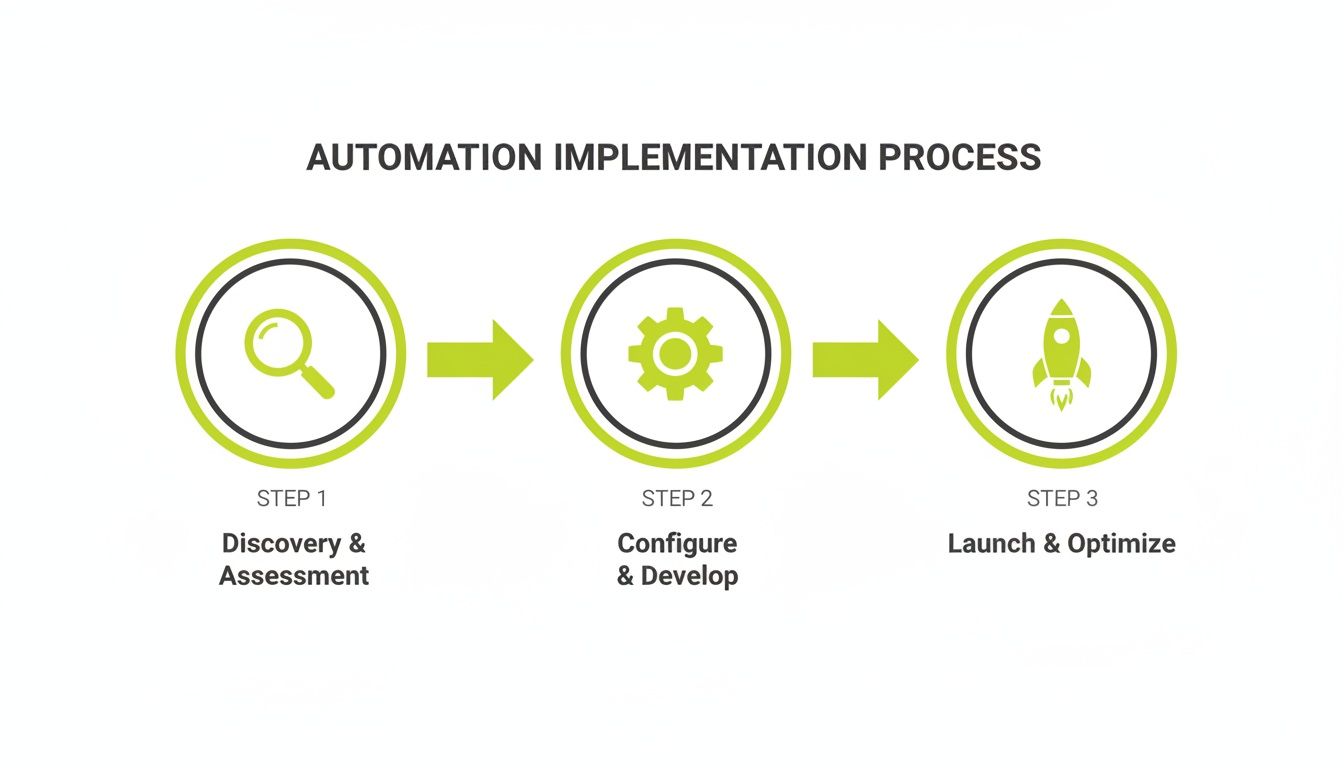
This structured approach ensures the technology delivers on its promise. When you establish your KPIs from day one, you create a direct link between the software and your firm’s financial health.
Got Questions? We've Got Answers.
Here are answers to common questions from finance leaders considering a move to automated accounts receivable.
Is This Just a Replacement for My Finance Team?
No. Think of automated billing software as a force multiplier. It automates repetitive tasks—generating invoices, sending reminders, matching payments—that consume your team's time.
This frees your best people for high-value work: financial analysis, cash flow forecasting, and strategic client account management. It elevates them from processors to analysts.
How Does It Integrate with QuickBooks?
A proper QuickBooks AR automation tool creates a seamless, two-way sync. When an invoice is created or a payment is recorded, the data is reflected instantly and accurately in your QuickBooks general ledger.
This bi-directional sync is non-negotiable. It eliminates manual data entry and reconciliation, ensuring your accounting system remains the undisputed source of truth.
Can We Really Reduce DSO with Software?
Yes. The primary driver of high Days Sales Outstanding (DSO) is friction: delays in sending invoices, inconsistent follow-ups, and cumbersome payment processes. Accounts receivable automation addresses all three.
Invoices are sent immediately. Reminders follow a precise schedule. A client payment portal removes friction. Firms often see a 10-20% drop in DSO within the first few quarters.
What’s the Difference Between Standard and AI AR Automation?
Standard automation is rule-based and rigid. It follows preset commands, like "send a reminder every 7 days." It is helpful but not adaptive.
AI AR automation, in contrast, learns. It analyzes payment histories and communication patterns to determine what works for each client. It might learn one client responds to a polite email, while another requires an SMS notification.
This intelligent approach improves cash flow while preserving the client relationship.
--- Resolut automates AR for professional services—consistent, accurate, and human.