
How Do Invoices Work to Optimize Your Cash Flow
A complete guide on how do invoices work, from creation to collection. Learn to reduce DSO and improve cash flow with proven AR strategies.
An invoice isn't just a request for payment. It's the operational control that converts billable hours into cash on the balance sheet. For professional services firms, a well-managed invoicing process is the primary driver of cash flow and financial predictability.
When this process falters, the entire firm feels the impact.
The Invoice Lifecycle From Creation to Collection
The invoice lifecycle is the operational sequence that dictates when and how a firm gets paid. Each stage is a control point; a failure in one creates a bottleneck in the next, extending the cash conversion cycle.
It begins with accurate time and materials tracking. That data is used to generate an invoice, which is then delivered to the client, officially starting the payment clock and creating an entry in the accounts receivable ledger.
This flow is the core of the order-to-cash process.
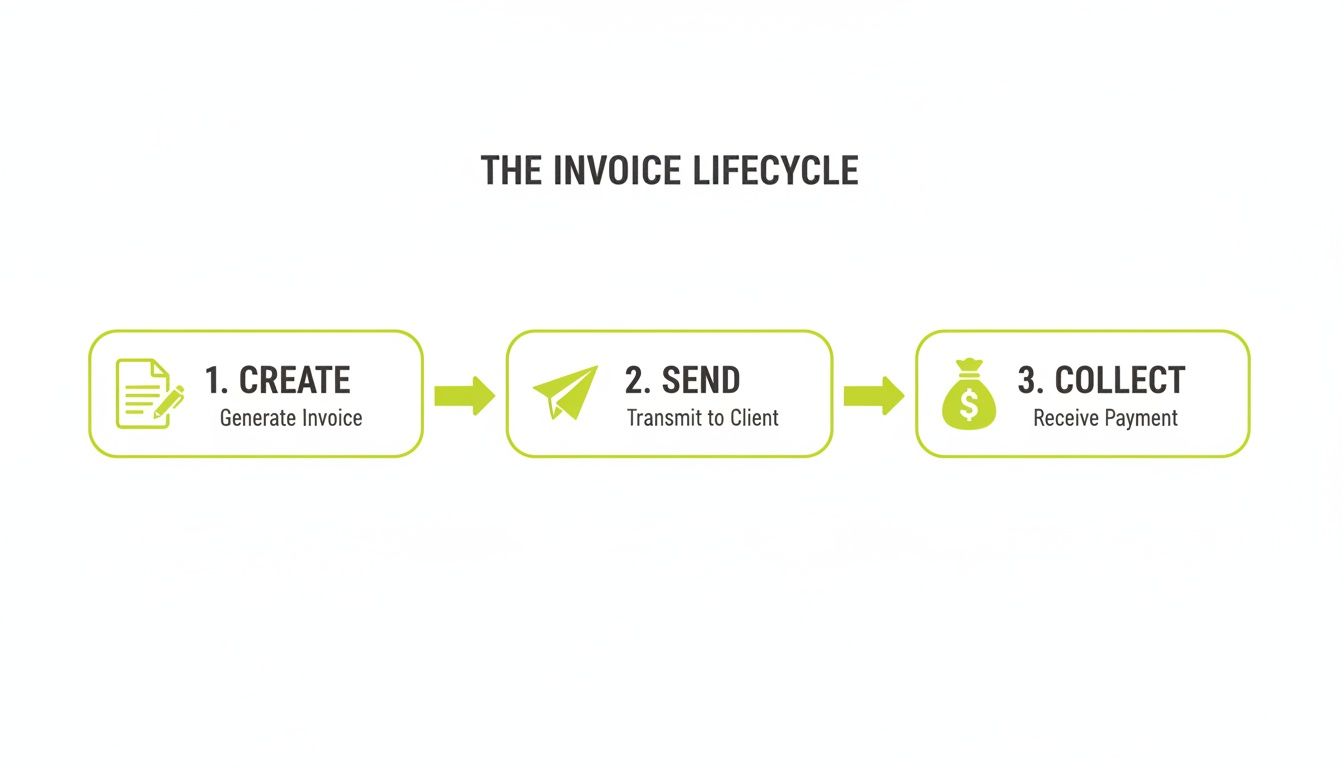
A delay in invoice creation directly pushes back its delivery date. This, in turn, extends Days Sales Outstanding (DSO). It is a direct cause-and-effect relationship impacting working capital.
Invoices detail services delivered, costs, payment terms like ‘net 30’, and a unique invoice number for tracking. To manage cash flow effectively, the ability to automate invoice processing is a prerequisite for scalable financial operations.
The final steps—payment and reconciliation—are where receivables become cash. Funds are received, matched to the correct invoice, and the entry is closed in the general ledger.
This cycle is the most critical component of the order-to-cash process. Identifying and resolving bottlenecks here is the most direct way to reduce DSO and improve the efficiency of your firm’s capital.
What Makes an Effective Invoice?
Clarity is the fastest path to payment. An ambiguous invoice invites questions, disputes, and delays—all of which strain cash flow and client relationships.
An effective invoice is an operational tool engineered to make the transaction seamless for the client's accounts payable department. Every component on the document must serve a purpose. Missing or unclear information creates friction, giving the client a valid reason to pause payment.
Core Informational Components
These components are non-negotiable. They establish the who, what, and when of the transaction, creating a clear audit trail.
- Unique Invoice Number: Essential for tracking and referencing specific bills. A sequential system prevents confusion.
- Dates: The Invoice Date and the Due Date must be prominent and unambiguous.
- Company Information: Full legal names, addresses, and contact details for both your firm and the client are required for routing and compliance.
- Detailed Service Descriptions: "Consulting Services" is a red flag for any AP team. Line items must be specific: specify the project, service period, and deliverables.
Financial and Payment Directives
This section details the financial terms and provides clear payment instructions. Ambiguity here directly adds days to your DSO. A well-designed invoice removes all guesswork for the client.
An invoice should answer every question before it’s asked. By including multiple payment options and a direct contact for billing inquiries, firms can resolve 80% of the common friction points that stall payment before they even occur.
Proactive measures, like including a direct link to a payment portal, can significantly reduce the payment cycle. For firms using tools like QuickBooks, AR automation can sync these portals directly for instant reconciliation.
Payment terms like Net 30 must be stated clearly, not buried. The goal is to design a document that doesn't just ask for payment but actively orchestrates it.
Below is a checklist of essential versus optional components. Consistency here is the foundation of a healthy collections process.
Essential Invoice Components Checklist
Component | Purpose | Impact if Missing or Unclear |
|---|---|---|
Unique Invoice # | Internal tracking and client reference. | Makes it difficult to discuss or locate the specific invoice, causing communication delays. |
Invoice & Due Dates | Sets clear expectations for the payment timeline. | Client has no clear deadline, often pushing your invoice to the back of the queue. |
Your & Client's Info | Establishes legal parties and ensures correct delivery. | Invoice may get lost, rejected by AP, or fail to meet legal requirements for record-keeping. |
Detailed Line Items | Justifies the charges with clear service descriptions. | Invites scrutiny, questions, and disputes, putting an immediate halt on payment. |
Subtotal, Taxes, Total | Provides a clear, transparent breakdown of the amount owed. | Leads to confusion and requires the client to do their own math, creating a reason to delay. |
Payment Terms | Defines the "contract" of when payment is expected (e.g., Net 30). | Without clear terms, the client defaults to their own payment schedule, which is rarely in your favor. |
Payment Instructions | Tells the client exactly how to pay you (bank info, portal link). | Creates a barrier to payment. If they have to ask how to pay, you’ve already lost time. |
Contact for Questions | Gives the client a direct person to contact for billing issues. | Minor questions become major delays as the client tries to find the right person to talk to. |
Getting these components right isn't just about good bookkeeping; it's about removing every possible justification for late payment.
The Hidden Costs of Manual Invoice Processing
Manual invoicing is more than a bottleneck; it is a persistent drain on the firm’s financial health. The true damage comes from inefficiencies that delay cash flow, introduce errors, and consume the time of senior finance personnel.
These are not administrative headaches. They are tangible costs that limit growth.
Every manual step—from data entry to sending a follow-up email—is an opportunity for error. A misplaced decimal, a miskeyed invoice number, or a forgotten follow-up can snowball into payment delays and disputes. This operational drag directly impairs forecasting and capital allocation.
Manual processing costs the average firm $22.75 per invoice in labor and error correction. In contrast, firms with best-in-class automation reduce that cost to just $2.78 per invoice—an 88% reduction.
Yet, nearly 68% of companies still rely on manual invoicing, with finance teams losing over 10 hours per week to these repetitive tasks.
Visual Idea: A cinematic shot of a controller's desk at night, illuminated only by a monitor. A single invoice is on screen, with the cursor blinking. The controller looks exhausted, rubbing their eyes. This visual captures the human cost of manual AR.
Quantifying The True Financial Drag
The costs extend beyond salaries. The true financial impact is measured in opportunity cost and longer collection cycles, which directly inflate Days Sales Outstanding (DSO).
When a controller spends their day chasing payments instead of performing strategic financial analysis, the firm loses value.
Consider the compounding effect of these factors:
- Human Error: Incorrect data entry leads to rejected invoices, restarting the payment clock. A single typo can add 30 days to collection time.
- Delayed Delivery: The time between completing work and sending the invoice is pure float. Manual processes often add days, pushing back the payment timeline.
- Inefficient Collections: Manual follow-up is inconsistent. Invoices are missed, receivables age, and client relationships are strained by awkward collection calls. You can learn more by reading about the true cost of AR inefficiency in professional services.
The real cost isn't the price of a stamp or an hour of an admin’s time. It's the cost of capital tied up in unpaid invoices for an extra 15, 30, or 60 days—capital that could be funding growth.
Shifting From Administrative Burden To Strategic Advantage
Relying on manual processes limits your firm’s financial potential. As invoice volume grows with the business, the cracks in a manual system widen into significant financial leaks.
The objective is not merely to process invoices faster. It's to transform the AR function from a reactive cost center into a predictable, data-driven engine for cash flow.
This is where QuickBooks AR automation and dedicated AR software for professional services become critical. Accounts receivable automation replaces inconsistency with precision. An AI AR automation platform orchestrates the entire collections process, improving cash flow and freeing up the finance team for high-value work.
The Invoicing Metrics That Actually Matter
You cannot improve what you do not measure. To understand how invoicing impacts your firm's financial health, you must focus on the core metrics that define the invoice-to-cash cycle.
These are not vanity numbers for a presentation; they are diagnostic tools. They pinpoint operational friction, measure the velocity of cash conversion, and determine whether working capital is being deployed effectively.

Tracking these metrics shifts accounts receivable from a reactive task to a strategic function.
Days Sales Outstanding (DSO)
The primary metric is Days Sales Outstanding (DSO). It measures the average number of days it takes to collect payment after an invoice has been sent. A low DSO indicates a tight collections process and efficient access to cash.
The formula is:
DSO = (Total Accounts Receivable / Total Credit Sales) x Number of Days in Period
For example, a firm with $500,000 in outstanding invoices and $1,500,000 in credit sales over a 90-day quarter has a DSO of 30 days. This is the vital sign of your AR health. A rising DSO is a clear signal of process failure and a direct drag on your ability to improve cash flow.
The AR Aging Report
While DSO provides a high-level view, the AR Aging Report offers granular intelligence. It categorizes unpaid invoices into buckets based on how long they have been outstanding—typically 0-30 days, 31-60 days, 61-90 days, and 90+ days.
This report tells you precisely which clients are current and which are late. Analyzing it enables you to:
- Identify At-Risk Accounts: Pinpoint clients with developing payment delays to intervene before the problem escalates.
- Forecast Cash Flow: Use aging data to project realistic collection timelines instead of relying on assumptions.
- Evaluate Credit Policies: A crowded 60+ day column may indicate that credit terms are too lenient or are not being enforced.
Inefficiencies here have a significant impact. Top-performing firms process an invoice in just 3.1 days, while laggards take 17.4 days. As you can learn more about accounts payable statistics, these delays contribute to enterprises wasting $200 billion annually on unpaid invoices.
The goal is to keep the vast majority of receivables in the 0-30 day column. This is where accounts receivable automation provides a distinct advantage. Platforms that offer AI AR automation, including QuickBooks AR automation, can systematically reduce DSO by ensuring consistent, timely follow-up on every invoice.
Accelerating Collections with AR Automation
Modern accounts receivable is not about chasing payments. It is about orchestrating them with precision. The operational shift from manual follow-up to an intelligent accounts receivable automation platform is transformative.
This converts AR from a reactive cost center into a strategic asset that protects cash flow. It replaces human inconsistency with a predictable, data-driven collections engine that executes the optimal strategy for every invoice.
From Manual Effort to Systematized Orchestration
Intelligent automation does more than send email reminders. It deploys personalized, multi-step outreach sequences that adapt based on client behavior and invoice risk.
For example, the system can escalate from a polite email reminder to a more direct notification, all without manual intervention.
At its core, AI AR automation executes your ideal collections process flawlessly, every time. Key components include:
- Automated Outreach: The system sends precisely timed, personalized reminders through appropriate channels.
- Dynamic Reminders: The tone and frequency of follow-ups adjust as an invoice ages, preserving client relationships.
- Frictionless Payment Portals: Integrating an online portal allows clients to pay instantly via ACH or credit card, removing a primary barrier to on-time payment.
These components create an environment where timely payment is the path of least resistance. For firms on QuickBooks, AR automation layers directly onto existing accounting software. You can dive deeper into the benefits of accounts receivable automation.
Predictive Insights and Measurable Outcomes
The most advanced AR software for professional services does not just react to late payments—it predicts them. By analyzing payment histories, these platforms flag at-risk invoices before they become critical problems.
This allows your finance team to intervene strategically, focusing their expertise only where it is most needed.
Adopting AI-driven platforms that unify billing and collections can cut invoice processing time by 62%, shrinking the cycle from 20.8 to 7.9 days. Top performers achieve 60% touchless processing, see 59% faster payment cycles, and slash average processing costs from $12.88 to just $2.78.
This data-driven approach delivers tangible results. Firms implementing this level of automation see a direct and measurable impact on their ability to reduce DSO. It creates a reliable system that secures cash flow and frees up senior personnel for higher-value work.
Putting It All Together: A Fully Orchestrated AR System
The endgame is not to assemble disparate tools, but to build an orchestrated system where the entire invoice lifecycle—from creation to collection—functions as a single, cohesive unit.
This is how accounts receivable evolves from a back-office task into a core driver of firm value.
A unified platform integrates billing, intelligent collections, and cash application. This creates a single source of truth for receivables, aligning finance, sales, and client management toward the shared objective of healthy cash flow.
A well-orchestrated invoice and collections process is a competitive advantage. It systematically reduces DSO, improves cash flow predictability, and frees senior talent to focus on strategic financial oversight rather than administrative follow-up.
Unifying the Process for Maximum Impact
An orchestrated system makes every action trigger the next.
When an invoice is issued, an AI AR automation workflow initiates, scheduling personalized reminders based on client history. When payment is received, it is instantly reconciled, updating the client's account and financial dashboards in real-time.
This level of accounts receivable automation provides complete visibility. It ensures no invoice is forgotten and every client interaction is consistent and professional. This is how high-performing professional services firms manage their receivables—as a strategic asset.
Frequently Asked Questions
What Is the Fastest Way to Reduce Our Firm's DSO?
The most direct way to reduce DSO is to shorten the time between invoice delivery and payment receipt. Implementing an accounts receivable automation platform with an integrated online payment portal is the most effective lever.
This removes payment friction. Clients can pay instantly with a credit card or ACH, preventing your invoice from being buried.
Automated reminders ensure consistent, professional follow-up without manual effort. Firms adopting this technology often see their DSO drop by 10-20% within the first quarter. This provides a direct boost to cash flow.
Visual Idea: A chart showing DSO over a six-month period. A vertical line marks "AR Automation Implemented" at month three. The line graph shows a stable, high DSO for the first three months, followed by a sharp, sustained decline in the subsequent three months.
How Can We Handle Invoice Disputes Without Damaging Client Relationships?
Managing disputes requires separating the operational issue from the client relationship through a clear, centralized process.
Utilize AR software for professional services that includes a client portal where specific line items can be flagged directly on the invoice. This centralizes the conversation and creates a clear audit trail.
This approach allows the client to pay the undisputed portion of the invoice while the specific issue is resolved. It demonstrates transparency and a commitment to accuracy, turning a potential conflict into an opportunity to build trust.
When Should We Consider Automating Our Accounts Receivable?
The tipping point is when your finance team spends more than 5-10 hours per week on manual AR tasks—sending reminders, chasing payments, or reconciling accounts. A rising DSO or an increase in invoices aging past 60 days are clear indicators.
For most professional services firms in the $3M–$50M revenue range, the invoice volume and complexity justify the ROI of AI AR automation.
It's about more than time savings. It's about reallocating your most skilled personnel to strategic work, tightening financial controls, and transforming a cost center into a reliable driver to improve cash flow. For firms on QuickBooks, layering on QuickBooks AR automation creates a powerful, unified system without replacing your core ERP.
***
Resolut automates AR for professional services—consistent, accurate, and human.