
How to Automate Accounts Receivable and Improve Cash Flow
Learn how to automate accounts receivable with a practical guide for CFOs and Controllers. Reduce DSO, improve cash flow, and achieve operational control.
Automating accounts receivable is a strategic decision to gain control over your firm's cash conversion cycle. It is not about sending emails faster.
It’s about deploying software to manage invoicing, collections, and cash application with precision. This frees your finance team for higher-value analysis.
The process begins by quantifying the operational drag from your manual system. From there, you map your ideal workflows and select the right tools.
Success is measured by tangible outcomes, primarily the reduction of Days Sales Outstanding (DSO) and the improvement of working capital.
Why Manual AR Is a Drag on Working Capital
For many professional services firms, the accounts receivable process is accepted as a cost center. Invoices are sent, payments are awaited, and collections are chased.
The true cost, however, extends beyond the salaries of collections staff. It's a persistent drag on resources, profitability, and strategic capacity.
This operational friction is quantifiable. Consider a typical $10M professional services firm. A senior finance associate may spend 15 hours a week on manual collections.
That represents nearly 800 hours a year dedicated to follow-ups, payment matching, and dispute resolution. This is time diverted from essential financial analysis and forecasting.
Quantifying the Hidden Costs
The direct costs are only part of the equation. The indirect costs—opportunity costs—are far more damaging to a growing firm.
- Delayed Cash Flow: Manual processes are inherently slow. Inconsistent follow-up often results in a DSO of 60 days. A systematic, automated approach can reduce this to 45 days. For a $10M firm, a 15-day DSO improvement unlocks over $400,000 in working capital.
- Increased Error Rates: Manual cash application is prone to error. A single misapplied payment can require hours of reconciliation, eroding client trust and delaying cash recognition.
- Inconsistent Client Communication: Ad-hoc collections create a chaotic client experience. One client may receive multiple aggressive reminders, while another receives none. This appears unprofessional and can strain established relationships.
The objective of accounts receivable automation is not just to accelerate payments. It is to build a predictable, controlled cash conversion cycle, transforming AR from a reactive task into a strategic financial function.
The Financial Impact of Automation
Implementing AR software for professional services delivers a clear, measurable return. Forrester research indicates that end-to-end automation can reduce invoicing costs by over 70%.
More critically, it directly impacts core financial health. Many firms achieve a 15-30 day reduction in DSO. You can explore further insights on AR automation trends on Forrester.com.
This is about regaining financial control. Systematizing outreach and providing clients with self-service payment portals removes the friction that impedes cash flow.
This establishes a stable foundation for growth, where working capital is not constrained by manual process limitations. Before implementing a solution, understanding these foundational benefits is critical. See our guide on accounts receivable automation benefits.
Gauging Your Firm’s Automation Readiness
Jumping directly to technology selection is a common mistake. A successful implementation begins with a clear assessment of your current state.
Before evaluating how to automate accounts receivable, you must assess your firm's operational maturity. This is about diagnosing the specific bottlenecks that automation can solve.

Begin with an internal review. Are your invoicing and collections processes documented and consistently followed? Or do they rely on tribal knowledge? Inconsistency is a primary indicator for needing structured workflows.
Next, examine your data integrity. Is the client contact information in your CRM or QuickBooks reliable? Automation is only as effective as the data it uses.
Outdated billing contacts will result in automated invoices sent to dead ends, creating more manual work, not less.
Establishing Your Financial Baseline
Beyond process review, you must quantify your current performance. This transforms general frustrations into measurable problems that justify investment.
Without a baseline, you cannot prove the ROI of any AR software for professional services.
Key metrics to establish include:
- Days Sales Outstanding (DSO): What is your current DSO, and what has the 12-month trend been?
- Collection Effectiveness Index (CEI): This metric provides a clearer picture than DSO by showing the percentage of receivables collected within a specific period.
- Average Days Delinquent (ADD): On average, how many days past due are client payments?
These metrics provide a starting point. A firm with a DSO of 75 days and a CEI of 80% has a clear cash flow problem that AI AR automation is designed to address.
The goal is to pinpoint specific pain points—like manual cash application or inconsistent dunning cadences—that automation can solve. This ensures you select a tool that addresses your actual problems, not just a list of generic features.
A Scorecard for Operational Readiness
Evaluating your firm across technology, process, and people can expose critical gaps before you commit to a new system. This simple self-assessment highlights areas needing foundational work.
Use this scorecard to assess your position.
AR Automation Readiness Scorecard
Assessment Area | Low Readiness (1-3) | Moderate Readiness (4-6) | High Readiness (7-10) |
|---|---|---|---|
Data Quality (Client Contacts, Invoice Data) | Data is fragmented, outdated, and requires manual cleanup. | Data is mostly accurate but exists in separate systems (e.g., CRM, QB). | Data is centralized, clean, and syncs automatically across systems. |
Process Standardization (Invoicing, Collections) | Each team member follows their own process; no documentation. | Basic workflows exist but are not consistently enforced or tracked. | Clearly documented and consistently followed SOPs for all AR functions. |
Technology Integration (ERP/Accounting) | Systems are siloed; data transfer is manual export/import. | Basic API connections exist but require manual oversight. | Seamless, real-time, two-way sync with primary financial systems. |
Team Skillset and Buy-in | High resistance to new technology; focus on manual tasks. | Some team members are tech-savvy, but general skepticism exists. | Team is eager to adopt tools that eliminate manual work and focus on strategy. |
A low score is not a barrier; it is a roadmap. It indicates the need for foundational work, such as a data cleanup project or documenting collection procedures.
Addressing these fundamentals ensures that when you implement an accounts receivable automation tool, it delivers the promised control and clarity.
Mapping Out Your Automated Collection Workflows
Before selecting software, a blueprint is required. Effective accounts receivable automation is not about plugging in a tool; it is about designing every interaction in your cash conversion cycle.
The technology must adapt to your strategy, not the other way around.
A robust automation plan is built on four pillars: client onboarding, invoicing, collections, and cash application. Each step presents an opportunity to accelerate cash flow and reduce manual effort.
The objective is to build dynamic, segmented workflows that respond to client behavior.
Client Onboarding and Credit
Collections begin at client onboarding. This is the opportunity to set clear expectations and establish the foundation for timely payments.
Standardizing credit checks and payment terms from the outset mitigates future collection issues.
A new client with no payment history should not receive the same terms as a 10-year partner. Your workflow should automatically flag accounts requiring a formal credit review or deposit based on predefined rules.
Invoicing and Billing Accuracy
The most common reason for payment delays is invoice error. An automated system must ensure every invoice is accurate, includes required data like a PO number, and is delivered to the correct contact on schedule.
This simple control eliminates the common excuse of a lost or incorrect invoice.
Consider using an AI Agent for Finance Invoice Processing for data entry and validation. Ensuring data accuracy before an invoice is sent is one of the fastest ways to reduce disputes that delay payment.
Intelligent Collections and Communications
This is the core of smart automation. A generic, one-size-fits-all dunning notice is ineffective and can damage client relationships. Your system should execute different collection playbooks for different client segments.
- High-Value, Long-Term Clients: These accounts receive gentle, relationship-focused reminders. Automation might simply create a task for the account manager to place a personal call.
- Newer or Higher-Risk Clients: These accounts are placed on a structured schedule with firm reminders that escalate in tone and frequency according to policy.
- Clients with Disputed Invoices: The system should automatically remove these invoices from the standard collections cycle and route them for internal resolution.
The objective is strategic persistence, not robotic pestering. Effective automation triggers the right action for the right account at the right time. For a key client, that action may be a human touch. For a small overdue bill, automated emails are more efficient.
The market for accounts receivable automation is projected to grow from $3.79 billion to $6.57 billion by 2031. Platforms now manage entire workflows, from invoice generation to payment reconciliation, delivering DSO reductions of 15–30 days. You can find out how AR automation is reshaping finance operations.
Cash Application and Reconciliation
The final step is closing the loop once payment is received. Manual cash application is slow and error-prone.
A robust AI AR automation system will match incoming payments from ACH, wire, and credit cards to the correct open invoices, a process known as QuickBooks AR automation.
This is a critical function in the financial close process. To understand its role in the broader context, review our guide on the order-to-cash process.
By designing each of these workflow pillars, you build a system that not only accelerates cash flow but also strengthens financial controls and frees your team for high-value analysis.
Selecting the Right AR Software for Your Firm
The market for accounts receivable automation is crowded. For a professional services firm, the goal is not to find a platform with the most features.
The objective is to find a tool designed to produce specific, measurable outcomes that strengthen your firm's financial position.
To do this, you must look past marketing claims and focus on three non-negotiable criteria: depth of integration, workflow flexibility, and reporting intelligence.
Core Evaluation Criteria
The foundation of any effective AR software for professional services is its integration with your accounting system. A shallow, one-way data sync is insufficient.
You need a native, two-way integration that treats your accounting software—whether QuickBooks or NetSuite—as the single source of truth.
When vetting platforms, ask specific questions:
- Real-Time Sync: Does the system pull new invoices and customer data instantly, or does it rely on delayed batch updates?
- Automatic Reconciliation: Does a payment automatically post back to the general ledger, closing the correct invoice without manual intervention? This is the core function of QuickBooks AR automation.
- Data Integrity: How does the platform handle credit memos, custom fields, or multi-entity accounting? Data must remain clean.
A seamless integration is the bedrock of reliable automation. Without it, your team will waste time reconciling data between systems, defeating the purpose of the investment.
This flowchart illustrates the key stages a well-integrated system manages, from onboarding to reconciliation.
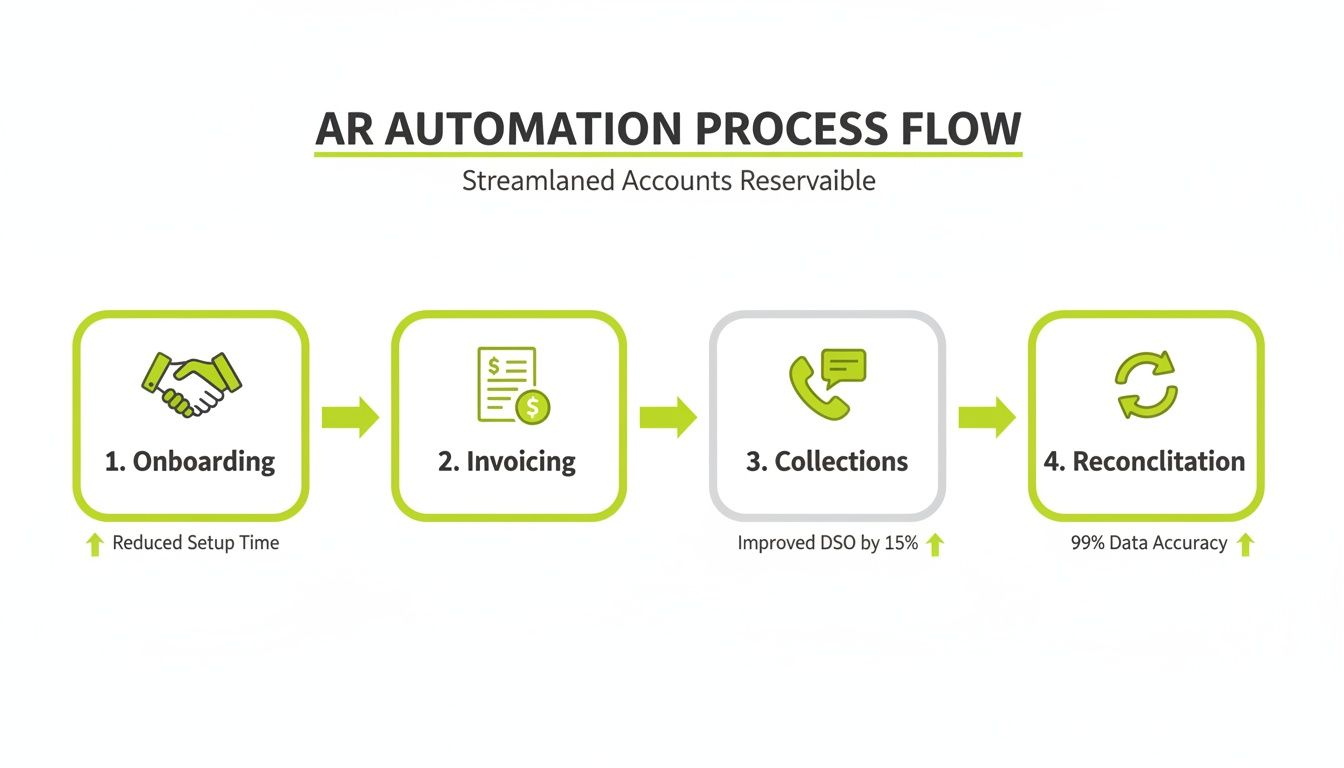
True AR automation is an end-to-end process. Each stage should flow logically to the next, removing friction and manual work.
Specialized Solutions vs. Monolithic Platforms
Another key decision is choosing between a specialized AR platform and an AR module within a large ERP system. Most firms in the $3M–$50M revenue range gain more value from a specialized solution.
ERP modules are often rigid, while dedicated AR platforms are built for flexibility. They allow for nuanced communication strategies for different client segments.
A specialized tool makes it simple to ensure a strategic client never receives the same generic email as a new client with a small project. This guide on how to choose accounting software provides a useful framework, as your AR solution is a core part of this toolkit.
The Power of a Phased Rollout
Once you select a software partner, avoid a "big bang" implementation. A methodical, phased rollout is less disruptive and leads to better long-term adoption.
This approach allows you to prove the system's effectiveness in a controlled environment before a full-scale deployment.
A successful phased rollout typically includes these steps:
- Start with a Pilot Group: Select 10-15 accounts with a mix of payment behaviors to test the new system.
- Validate Communication Cadences: Monitor automated reminders to fine-tune messaging based on real-world feedback.
- Confirm Cash Application Accuracy: Meticulously verify that every payment from the pilot group is applied and reconciled correctly in your accounting system.
This methodical process ensures the technology delivers on its promise to improve cash flow and reduce DSO, minimizing risk and building team confidence.
Measuring Success and Optimizing Performance
Implementing an AR automation system is the beginning, not the end. The true ROI comes from using the data to continuously improve financial operations.
This requires moving beyond a single metric like Days Sales Outstanding (DSO). You must build a dashboard of KPIs that provides a real-time view of your firm's financial health.
This creates a cycle of measurement, analysis, and optimization, transforming your AR function into a source of business intelligence.
Establishing Your Core AR Health Metrics
To accurately gauge performance, your dashboard must provide a comprehensive view. While DSO is a critical metric, it can mask underlying issues when viewed in isolation.
These are the metrics I recommend firms monitor closely:
- Collection Effectiveness Index (CEI): This metric measures the percentage of receivables collected within a given period. A CEI consistently above 90% indicates a healthy collections process.
- Average Days Delinquent (ADD): This measures the average number of days payments are past due. It is more effective than DSO for identifying patterns with habitually late payers.
- Promise-to-Pay Tracking: This tracks the percentage of clients who fulfill payment promises by an agreed-upon date. A declining rate is an early warning indicator of rising credit risk.
Tracking these KPIs together provides a clearer picture. For example, a stable DSO combined with a rising ADD suggests that while new clients are paying on time, older accounts are falling further behind. This signals the need for a change in collection strategy for that specific segment.
Turning Data Into Business Intelligence
A modern AI AR automation platform is more than a collections tool. The data it collects reflects the entire client journey, from proposal to service delivery.
This enables the finance department to evolve from a cost center into a strategic partner.
Your AR platform is more than a collections tool—it is a diagnostic engine for your business. It highlights friction points in your client lifecycle, from scoping and billing to service delivery, that directly impact cash flow.
If your dashboard shows a spike in invoice disputes tied to a specific service line, the issue likely originates upstream—perhaps in project scoping or client expectation setting.
Armed with this data, you can address the root cause, which not only accelerates payments but also improves client satisfaction.
This strategic value is driving market growth. The U.S. accounts receivable automation market is projected to grow from USD 760.7 million in 2025 to over USD 1.7 billion by 2034. Firms are replacing spreadsheets with integrated platforms that provide real-time visibility and quantifiable results. You can discover more insights about the AR automation market on imarcgroup.com.
This feedback loop—monitor KPIs, identify anomalies, trace to the source—is how you optimize the process and maximize your return on investment.
From Tactical Collections to Strategic Finance
Automating accounts receivable elevates your finance team from administrative work to a strategic, forward-looking role.
This shift enables your firm to scale without the typical operational friction.
A systematic collections process creates predictable cash flow, which is critical for a professional services business. Client communications become consistent and professional.
Data-driven processes replace awkward, manual collection calls.
Automating AR turns finance from a reactive cost center into a proactive team that actually drives business value. It gives you the control and visibility to make smarter decisions, faster.
This frees your experienced finance professionals to focus on higher-value work. Their time is no longer consumed by chasing invoices.
Instead, they can focus on financial forecasting, client profitability analysis, and strategic cash management. They become true business partners.
Moving From Manual Effort to Measurable Outcomes
This is a practical shift with tangible results. The clarity provided by AI AR automation offers a live view of your financial health, enabling you to:
- Improve Cash Flow: Systematically lowering DSO frees up working capital for reinvestment into business growth.
- Reduce Credit Risk: Data provides an early warning system, flagging at-risk accounts before they become significant problems.
- Strengthen Client Trust: A smooth, professional payment process demonstrates reliability and builds client confidence.
This move provides the financial control and operational clarity required to guide the business forward. Your finance team transitions from a back-office function to an engine for sustainable growth.
Answering Your Top Questions About AR Automation
Discussions with finance leaders about automating accounts receivable consistently raise a few key questions. These concerns address client relationships and operational efficiency.
The primary concern is the potential impact on client relationships. Will automation make our collections feel impersonal?
It is a myth that automation is inherently impersonal. When implemented correctly, it has the opposite effect. Thoughtful accounts receivable automation replaces inconsistent manual follow-ups with a professional, predictable process.
Modern tools allow for client segmentation. Key partners can receive a gentle, relationship-focused nudge, while newer accounts follow a more standard cadence. Every communication is consistent and professional.
"Will This Even Work with QuickBooks?"
This is a common operational question for firms running their back office on QuickBooks. The answer is yes. The best AR software for professional services is designed for this integration.
The key is a deep, two-way integration, not a simple data dump. A true QuickBooks AR automation sync should provide:
- Live Data Flow: An invoice created in QuickBooks should appear instantly in the AR platform, ready for its collection workflow.
- Hands-Free Reconciliation: A payment received through the platform's portal should automatically post back to QuickBooks, marking the correct invoice as paid.
This tight integration eliminates duplicate data entry, reduces human error, and maintains your accounting system as the single source of truth.
Automation that creates more manual work is a failure. A certified, two-way sync is non-negotiable. It’s the only way to truly reduce manual effort and keep your data clean.
"Okay, But What’s a Realistic Timeline and Payoff?"
A well-managed rollout for a mid-sized services firm is fast—weeks, not months. Initial setup involves connecting systems and configuring workflows.
ROI is typically realized within the first two quarters.
Financially, a 15–30 day reduction in DSO is a realistic outcome. This provides a direct injection of cash into the business.
Operationally, your team can reclaim 50–70% of the time previously spent on manual collections and cash application. This time can be reallocated to strategic financial analysis.
--- Resolut automates AR for professional services—consistent, accurate, and human. Learn more about our approach.