What is an aging report? A guide to mastering AR and cash flow
Learn what is an aging report and how CFOs use it to reduce DSO and boost cash flow.
For a professional services firm, the accounts receivable aging report is more than a list of outstanding invoices. It is a direct, unfiltered diagnostic of your firm’s financial health.
This report reveals the payment habits of your clients, the effectiveness of your collections process, and the stability of your cash flow. It provides a clear, operational snapshot.
Your Aging Report Unlocks Financial Clarity
As a finance leader, you understand this report is not simply for tracking debt. It’s for forecasting and control. By bucketing unpaid invoices into aging categories—current, 1–30 days past due, 31–60 days—you convert a list of numbers into a strategic instrument.
This guide is an operator's manual for mastering it. We will break down how to interpret it, what its data signifies, and how to use those insights to make calculated financial decisions.
Why This Report Matters for Your Firm
Mastering the AR aging report is the first step toward building a predictable business. It is the primary data source that tells you when to act, who to contact, and where cracks are forming in your cash flow cycle.
At its core, the aging report turns a reactive collections process into a proactive cash flow management strategy. It answers not just "who owes us money?" but "where are our collections efforts breaking down?"
The insights from this report are critical inputs for broader financial planning. For a deeper look at how this data feeds into larger strategies, it's worth understanding the different finance FPA data analysis tools for forecasting and scenario planning.
The most efficient approach is to automate the entire process. The right tools can generate these reports and act on their findings instantly. To see how, explore the benefits of accounts receivable automation.
How to Turn Your Aging Report Into Action
An accounts receivable aging report that is not acted upon is a liability. It is a list of problems without solutions. Its purpose is to provide a clear path to protecting your firm’s cash flow. Moving from data to decision requires a system.
For a controller or partner, this means looking beyond the total receivables balance. The real story is in how that capital is distributed across aging buckets and the trends visible month-over-month. A sudden spike in the 61–90 day column is not just a number; it’s a warning light. It may signal a breakdown in client communication or an inefficiency in your collections workflow.
This infographic breaks down the basic flow, from the moment you deliver your work to the point where an invoice lands on your aging report.
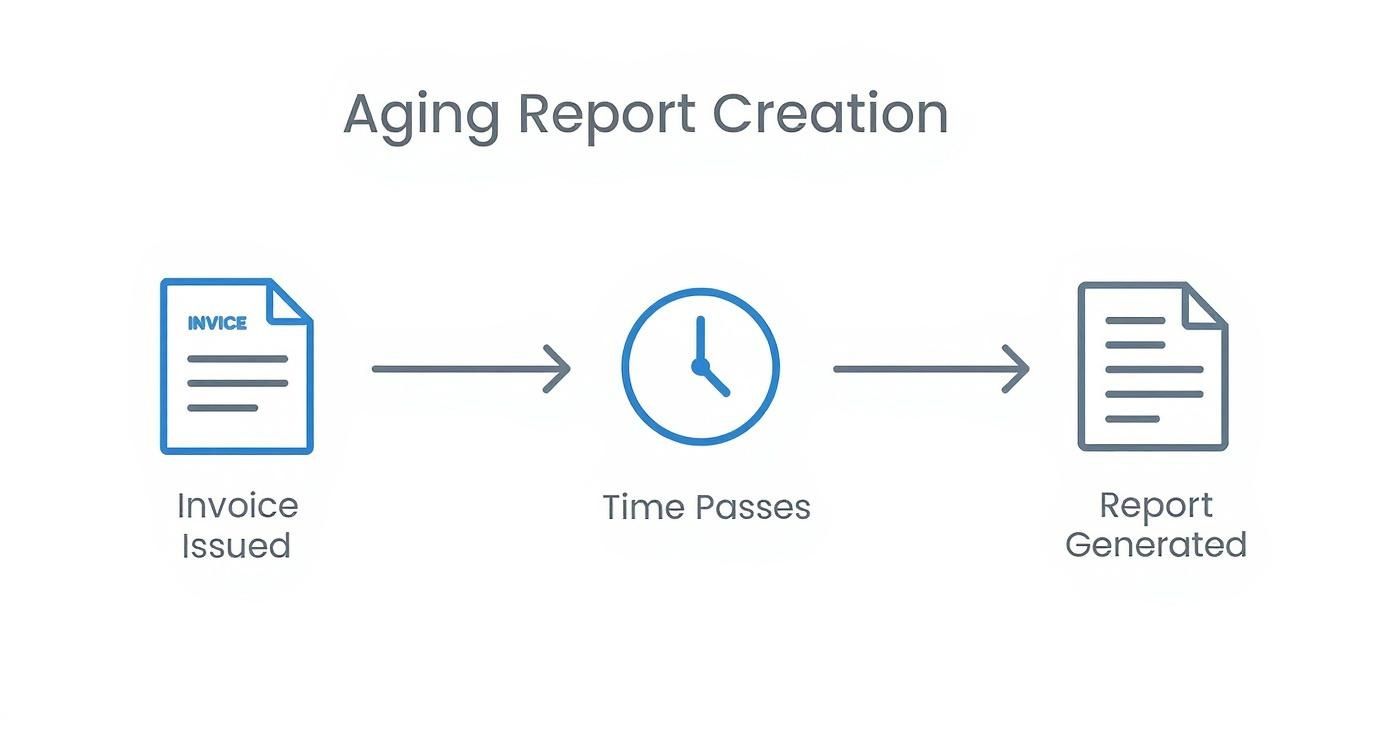
As you can see, time is the critical variable. It transforms a simple invoice list into a strategic tool for maintaining your firm's financial stability.
Prioritizing High-Risk Accounts
First, identify the accounts that pose the greatest threat to your working capital. These are typically the largest dollar amounts in the oldest aging buckets. The longer an invoice remains unpaid, the lower the probability of collection.
The objective of analyzing an aging report is to identify and resolve the highest-impact delinquencies first. This prevents minor issues from escalating into significant write-offs.
For example, a $75,000 invoice in the 90+ day column requires a direct, personal phone call today. In contrast, five smaller invoices totaling $5,000 in the 1–30 day bucket can be managed with an automated reminder. This approach focuses your team’s limited time where it has the greatest financial impact.
Calculating Bucket Percentages to Spot Trends
To transition from reactive problem-solving to strategic oversight, you must calculate the percentage of total receivables in each aging bucket. This KPI provides a high-level view of your collections process efficacy.
Here is a sample breakdown:
- Current: 70%
- 1–30 Days: 15%
- 31–60 Days: 8%
- 61–90 Days: 5%
- 90+ Days: 2%
If the percentage in the 61–90 day bucket increases from 5% to 10% in one quarter, it signals a systemic issue. Is a new service line causing billing disputes? Did a major client alter their AP process? Monitoring these trends helps you address the root cause, not just chase individual late payments.
The data is clear. Timely payments are a strong indicator of a company's solvency. In fact, businesses with over 30% of their receivables past 90 days have significantly higher default rates. During a recession, overdue invoices past 60 days can climb by 15-20%, constricting your cash flow when it is most needed.
When pursuing overdue invoices, it is also prudent to understand the legal framework of navigating debt collection. This context ensures your escalation process is both firm and compliant. By converting raw data into clear directives, your aging report becomes a powerful tool for financial control.
Using Aging Data to Systematically Reduce DSO
The data in an aging report is a starting point. Its primary function is to provide a clear, repeatable plan to reduce your Days Sales Outstanding (DSO). It is about turning aging buckets into specific actions that shorten your cash cycle with discipline.
An aging report provides the exact information needed to build a structured collections cadence. This is how your team moves from pursuing subjectively "old" invoices to a defined process where invoice age dictates the response. It brings consistency and control to a chaotic process.

Building a Collections Cadence from Aging Data
An effective collections cadence applies appropriate pressure at the correct time. The goal is to secure payment while preserving client relationships, which requires a tiered approach that escalates as an invoice ages.
This is a simple, effective model for professional services firms:
- 1–30 Days Past Due: A gentle, automated email reminder is sufficient. For simple oversights, this light touch resolves the issue without manual intervention.
- 31–60 Days Past Due: This stage requires a personal touch. A phone call from your AR team or the client’s main contact signals that the invoice is a priority.
- 61–90 Days Past Due: A formal escalation is now necessary. This may involve outreach from a senior finance leader or a formal letter of demand.
- 90+ Days Past Due: At this point, a decision is required. The strategy may involve a final demand, engaging a collections agency, or writing off the debt.
This structured approach, driven by your aging report, creates predictability. It removes emotion from collections and transforms it into a core operational function. You can explore more strategies for cleaning up your accounts receivable to maintain healthy cash flow.
Calculating and Reducing DSO
Days Sales Outstanding is the definitive metric for your collections performance. It measures the average number of days it takes to collect payment after service delivery. The formula is straightforward:
DSO = (Total Accounts Receivable / Total Credit Sales) x Number of Days in Period
A lower DSO means you are converting billable work into cash faster. For a firm with $10 million in annual revenue, reducing DSO from 60 to 50 days frees up approximately $274,000 in cash flow. This is working capital for growth, payroll, or investment.
The most direct path to achieve this is through accounts receivable automation. Modern AR software for professional services can execute an entire collections cadence without manual effort. Platforms offering QuickBooks AR automation sync data in real time, send communications based on your aging rules, and provide analytics that measure the impact of your efforts.
With AI AR automation, these systems can even adapt the tone and timing of reminders for each client, optimizing for faster payment while maintaining positive relationships. This turns your aging report from a static document into a blueprint for an automated cash generation engine.
Avoiding Common Traps in AR Aging Management
Even disciplined finance teams can develop inefficient habits. These habits slowly erode the utility of your aging report until it becomes another spreadsheet that lacks credibility.
Effective AR management requires clean data and a team that acts on it. Recognizing these common pitfalls is the first step to building a collections process that delivers results.
The Messy Data Trap
A primary issue is inaccurate data entry. A single mistyped invoice date or a misapplied payment can distort a client’s aging status. This leads to chasing clients who have already paid or forecasting cash that is not collectible. For firms using tools like QuickBooks, this can become unmanageable.
Without a standardized process for applying payments or logging credit memos, your aging report becomes a source of confusion, not clarity. Your team spends more time reconciling accounts than collecting cash.
An aging report is only as reliable as its underlying data. Small, daily errors compound, distorting your view of AR health until the numbers are no longer trustworthy.
The solution is to make data reconciliation a weekly ritual. Set aside a dedicated time block each week to review new invoices, applied payments, and adjustments. A brief weekly check-in prevents minor errors from escalating into major issues that corrupt your DSO calculations.
The "Too Nice to Collect" Trap
Another common error, particularly in professional services, is delaying collections due to fear of damaging a client relationship. While client retention is critical, allowing invoices to age sends a signal that on-time payment is not a priority. This habit directly inflates your DSO and ties up working capital.
The solution is not aggressive collection, but consistency. This is where accounts receivable automation provides value. Automated reminders are systematic and less personal than a direct phone call, preserving goodwill while enforcing payment terms. Every client receives a timely follow-up without the hesitation that allows receivables to age.
The "Forgetting to Look Back" Trap
The final mistake is treating your aging report as a static snapshot. Its strategic value is derived from analyzing trends over time. Is the balance in your 61–90 day bucket increasing month-over-month? That is a pattern, not a blip. It could signal a problem with a specific service offering or a major client who is changing payment behavior.
If you do not spot these trends, you are forced to react to cash flow problems instead of preventing them. Using AR software for professional services can automate this trend analysis, providing dashboards that highlight changes. This is how you shift from reactive collections to proactive financial management.
How AR Automation Transforms Your Aging Report
Manually managing an accounts receivable aging report is a continuous, low-value task. Your team spends hours pulling data and chasing invoices, only for the report to be obsolete upon completion. This administrative burden means you are always making decisions based on outdated information.
Modern accounts receivable automation closes this gap. It converts the aging report from a static, historical document into a dynamic command center for your entire collections process. The technology does not just build the report; it acts on it continuously.
This shift changes collections from a reactive chore into a systematic, automated function that operates 24/7 with perfect consistency.
From Static Data to a Dynamic Command Center
The power of AI AR automation is its ability to execute your collection strategies without manual intervention. Instead of your team remembering to send a reminder for an invoice that is 15 days past due, the system does it automatically. This ensures every client receives the correct communication at the correct time, based on their aging bucket.
It eliminates the common failure of letting follow-ups slide, which is one of the most direct ways to reduce DSO and improve cash flow.
Automation turns your aging report into the brain of your collections operation. It removes inconsistency and guesswork, ensuring your payment terms are enforced systematically across every client account.
This operational discipline has a direct, measurable impact. Firms that implement accounts receivable automation often see a 25% or greater reduction in their DSO within the first six months. This is a direct injection of working capital back into the business. For a deeper look, our guide to accounts receivable automation software breaks down how these platforms operate.
Improving Cash Flow with Real-Time Visibility
A manual aging process is, by definition, backward-looking. By the time you analyze the numbers, they reflect a reality that has already changed. AR software for professional services, especially systems offering QuickBooks AR automation, syncs in real-time.
This live connection provides an accurate, up-to-the-minute view of your cash position and enables more reliable cash flow projections. Your finance team is freed from administrative tasks to focus on higher-value analysis, such as identifying at-risk clients before their accounts become severely delinquent.
This concept of aging reports extends beyond corporate finance. As global populations age—the share of people aged 65 and over is projected to rise from 10% to 16% by 2050—the complexity of financial reporting in sectors like healthcare and pensions will grow in parallel.
Ultimately, automation delivers control. It minimizes human error, provides real-time visibility, and empowers your team to manage cash flow with precision.
Common Questions About Aging Reports
Here are straightforward answers to questions that finance leaders frequently ask when analyzing their aging reports.
How Often Should My Team Review the Aging Report?
For most professional services firms, reviewing your AR aging report should be a weekly discipline. Anything less frequent means you are operating with incomplete information.
A weekly review allows you to identify payment delays before they become significant cash flow problems. It keeps collection priorities current and provides an accurate snapshot for forecasting. A monthly review cycle means you are making decisions based on outdated data.
When Is an Invoice Considered Uncollectible?
The decision to write off an invoice should be dictated by a clear, pre-defined credit policy, not subjective judgment. Generally, once an invoice surpasses 90 days past due, the probability of collection decreases dramatically.
Your policy should define the actions taken between 90 and 120 days, such as final demand letters or a call from a partner. If these structured efforts fail, writing off the debt by 180 days is standard practice. It maintains a clean and accurate balance sheet.
The objective is not just to collect every dollar. It is to protect the integrity of your financials. Allowing uncollectible debt to linger wastes time and provides a distorted view of your firm's health—a critical error in cash flow management.
Can AR Automation Software Connect to QuickBooks?
Yes. Seamless integration is a core feature of modern AR software for professional services. These platforms are designed for QuickBooks AR automation, syncing invoice and payment data in real-time.
This direct link eliminates error-prone manual entry, ensures your aging report is always current, and allows the automation engine to trigger follow-ups based on live accounting data. It is the foundation of an efficient collections process.
--- Resolut automates AR for professional services—consistent, accurate, and human. Learn more at https://www.resolutai.com.