Cash Application in Accounting: A Guide for Financial Operators
What is cash application in accounting? A guide for finance leaders on using automation to reduce DSO, improve cash flow, and gain operational control.
Cash application is the final control point that turns an open invoice into usable working capital.
For a professional services firm, it's the operational step where a completed project officially closes. It’s the process that converts a receivable into applied cash.
When executed with precision, it provides real-time clarity into your firm's financial health. When managed manually, it creates a drag on the entire finance function.
Why Manual Cash Application Is a Latent Operational Risk
For financial leaders at growing professional services firms, manual cash application is more than an administrative task—it's an operational risk. When a team operates from spreadsheets and bank portals, small delays and data entry errors accumulate.
These friction points compound, creating a drag on cash flow and distorting financial reporting. It’s a process where control is either maintained or lost.
Slow or inaccurate matching inflates Days Sales Outstanding (DSO). It results in collections calls for invoices that have already been paid. Critically, it renders cash forecasting unreliable.
It is the primary bottleneck preventing a real-time view of your firm's cash position.
The Measurable Cost of Inefficiency
The drag from manual work extends beyond process friction. Every hour a finance analyst spends downloading bank statements, searching emails for remittance advice, or entering data into QuickBooks is a direct, measurable cost.
This operational drag is a quantifiable drain on resources. We analyze this further in the true cost of AR inefficiency in our related guide.
The market is decisively moving away from manual methods. The global cash application automation market, valued at $252.3 million in 2023, is projected to reach $622.9 million by 2030, growing at a CAGR of 13.9%.
This data, from Grand View Research, signals a fundamental operational shift. Manual processes are no longer adequate.
During a month-end close, a high balance of unapplied cash complicates reconciliation and obscures the firm's true financial standing. Strategic planning without accurate, real-time data becomes speculative.
From Back-Office Task to Strategic Control Point
Cash application must be viewed not as a clerical task, but as a critical control point for the firm.
The speed and accuracy of this function directly determine the quality of your financial data and the state of your working capital. In professional services, where complex billing for milestones and retainers is common, manual errors are probable.
This guide deconstructs the manual process, identifies how it degrades financial control, and outlines why accounts receivable automation is a necessary operational upgrade.
Exposing Friction in the Current Workflow
For most professional services firms, the manual cash application process quietly undermines efficiency. It appears straightforward but is a sequence of hidden drags on financial control and team productivity.
The process typically begins when a payment notification arrives—an ACH, check, or wire transfer. The payment data is often disconnected from its corresponding remittance advice, creating the initial point of failure.
Your team is now tasked with locating the remittance details by searching emails, logging into separate bank portals, or navigating client AP platforms. This is administrative dead weight, not strategic financial work.
This workflow exposes the inherent risks of a manual system, from slow processing times to the direct negative impact on key financial metrics.
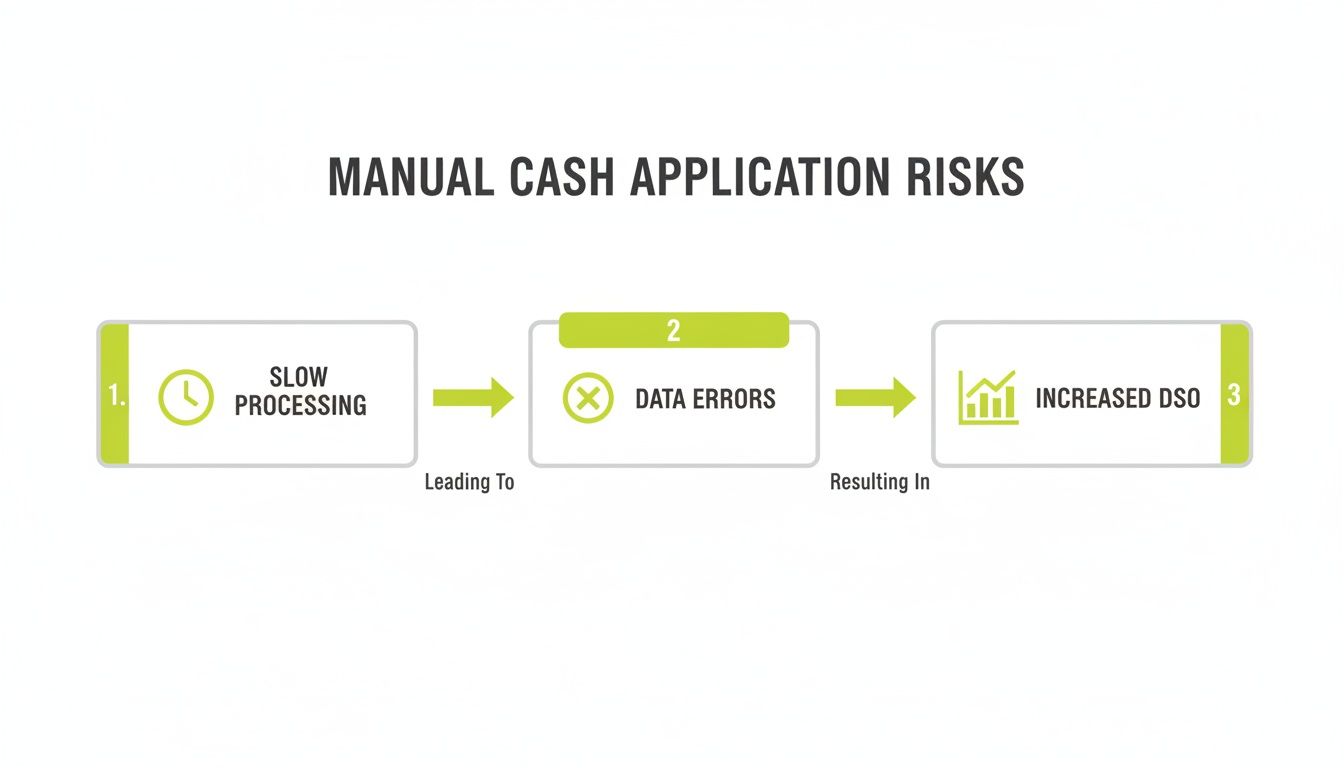
Each manual step introduces delay and the potential for error, increasing DSO and obscuring your true cash position.
The Inefficiency of Manual Matching
Once the remittance is located, the analyst must manually match the payment to one or more open invoices in the accounting system. This is highly susceptible to error, particularly in systems like QuickBooks that lack specialized AR automation tools.
Consider a single client payment of $50,000 intended to cover three project invoices and a retainer. The analyst must correctly identify each line item, account for short pays or deductions, and allocate every dollar accurately. A single misplaced decimal or transposed digit creates cascading reconciliation issues.
An experienced analyst can spend 15–20 minutes on a single complex payment. Multiplied across hundreds of transactions, this time becomes a significant operational cost.
The impact is not limited to time. A misapplied payment can trigger an incorrect overdue notice to a client who has paid on time, damaging the professional relationship your firm maintains.
The High Cost of Exceptions
Exceptions are the most expensive point of friction. When remittance information is missing, incomplete, or mismatched, the process stops. The payment is held in an unapplied cash account, distorting financial statements and tying up working capital.
Your team is then pulled into non-value-added work:
- Information Retrieval: Contacting clients to request correct remittance details.
- Discrepancy Investigation: Determining why a payment does not match an open invoice.
- Manual Adjustments: Creating credit memos or write-offs to close mismatched items.
This reactive work prevents the finance team from focusing on analysis that can actively improve cash flow.
The transition to AI AR automation eliminates these friction points. Platforms that offer QuickBooks AR automation can match the majority of payments instantly, allowing your team to manage only the complex exceptions requiring their expertise.
The KPIs Compromised by Manual Processes
Process friction is a direct liability to your firm's financial health. For finance leaders, the impact of a manual workflow is evident in the key performance indicators (KPIs) used to measure business performance.
Manual work introduces delays and errors at each step, from payment matching to posting cash. This accumulated drag is measurable and directly restricts working capital.
We will focus on three core metrics: Days Sales Outstanding (DSO), Unapplied Cash, and Invoice Match Rate. Examining how manual processes degrade these KPIs builds the business case for operational improvement.

Days Sales Outstanding (DSO)
DSO measures the average number of days required to collect payment after work is completed. For a professional services firm, it is a direct measure of cash conversion efficiency. A lower DSO indicates healthier cash flow.
Manual cash application inflates DSO by creating a lag between payment receipt and ledger posting. If a client pays on day 35, but it takes five days to locate remittance and post the payment, the DSO for that invoice becomes 40 days. The five-day delay is an internal process failure.
A firm with $10 million in annual revenue and a DSO of 60 days has approximately $1.64 million tied up in receivables. Reducing DSO by just five days frees up over $137,000 in working capital.
Unapplied Cash
Unapplied cash is money received but not yet matched to an invoice. It resides in a suspense account, distorting the accuracy of your financial statements.
A consistently high balance of unapplied cash is a clear indicator that the AR team cannot keep pace with incoming payments. This is a working capital issue: the money is yours but cannot be deployed until it is reconciled. For more on this, explore these proven ways to increase cash flow.
Invoice Match Rate
The invoice match rate (or auto-match rate) is the percentage of payments applied to invoices without human intervention. It serves as a direct measure of AR process efficiency.
Manual processes typically achieve match rates of 40–60%. This forces analysts to manually search for remittance data and resolve errors. Each payment requiring manual handling introduces risk and delay, perpetuating high DSO and unapplied cash balances.
Manual vs. Automated Performance Metrics
The operational difference between a manual process and an automated one is substantial. A direct comparison of key AR metrics demonstrates the impact.
Metric | Manual Process (Industry Average) | AI-Automated Process (Resolut) |
|---|---|---|
Invoice Match Rate | 40%–60% | 90%+ |
DSO Reduction | Baseline | 5-15 Days |
Unapplied Cash | 5%–10% of AR | <1% of AR |
Team Focus | Manual Data Entry & Research | Exception Management & Analysis |
Moving from manual systems is a strategic decision to regain control over the firm's financial operations. An AR software for professional services, particularly one delivering seamless QuickBooks AR automation, transforms cash application from a liability into an operational strength.
How Automation Restores Financial Control
Manual cash application is inherently reactive. The finance team chases information after payment has been received, creating a lag between cash receipt and cash application. This is a control problem.
Effective accounts receivable automation shifts the process from reactive to predictive. It is an upgrade to the engine that drives your firm's cash flow.

This shift transforms cash application from a manual task into a source of real-time financial intelligence.
The Core Technology
Modern AI AR automation relies on two key technologies that dismantle the manual workflow.
First, AI-powered matching engines use machine learning to analyze historical payment data. The system learns client payment patterns—identifying how lump sums are allocated or why short payments occur—and can predict invoice matches even with minimal remittance data.
This predictive capability is the critical upgrade. An analyst’s 20-minute investigation of a complex payment is reduced to a two-second confirmation of a high-confidence match proposed by the system.
Second, Natural Language Processing (NLP) extracts data from unstructured sources like PDF attachments, email bodies, and client payment portals. The system reads and interprets these documents, automatically pulling invoice numbers, payment amounts, and deduction codes.
Achieving a Touchless Match Rate
The combination of these technologies enables a significant increase in the touchless match rate. Modern AI engines now match over 90% of payments instantly, without human intervention. For further analysis, see Kapittx’s industry analysis.
This provides three distinct advantages:
- Real-Time Cash Position: With 90% of cash applied upon receipt, forecasting becomes precise, based on current data rather than a three-day-old reconciliation report.
- Strategic Team Focus: The finance team is freed from routine data entry. Their expertise is redirected to managing the small percentage of complex exceptions that require strategic intervention.
- Data Integrity: Automation eliminates the human error inherent in manual data entry. This maintains clean data in your ERP, providing a reliable foundation for all financial reporting. This is a core benefit of effective QuickBooks AR automation.
This level of automation provides the clarity and control required to manage the firm's finances strategically, enabling you to reduce DSO and improve cash flow through intelligent, automated precision.
A Practical Path to Implementing AR Automation
Implementing new financial technology can present perceived risks of operational disruption and data integrity issues.
However, adopting accounts receivable automation can be a controlled, phased process. It is not about radical replacement but about surgically targeting and resolving points of friction in the current workflow.
The goal is to enhance, not overhaul, your existing systems.
Scoping the Implementation
A successful implementation begins with a clear assessment of the current state. This involves mapping the AR process, identifying bottlenecks, and setting measurable objectives.
Key considerations include:
- Integration Points: How will the new system interface with your existing accounting software? For firms using QuickBooks, a seamless, two-way API integration is non-negotiable to prevent duplicate data entry and maintain a clean general ledger.
- Data Migration: Typically, 6–12 months of historical invoice and payment data is sufficient for the AI matching engine to establish a baseline for learning without creating an overly complex data transfer project.
- Workflow Configuration: The system must be configured to your firm’s specific rules for project-based billing, retainers, and unique client payment behaviors.
This initial scoping transforms the concept of "automation" into a concrete project plan. For a more detailed breakdown, see our guide to accounts receivable automation software.
Executing a Phased Rollout
A phased rollout minimizes risk and allows the team to adapt incrementally. It builds confidence and demonstrates value at each stage.
A standard phased rollout includes:
- System Integration and Data Sync: The initial step is establishing the connection between the AR software for professional services and your accounting platform, ensuring data flows accurately before any processes are changed.
- Pilot Program: Test the system with a representative subset of client accounts. This provides a controlled environment to fine-tune matching rules and gather team feedback without disrupting the entire AR function.
- Full Team Training and Go-Live: Once the pilot is validated, train the entire team, shifting their focus from data entry to exception management and analysis of the insights provided by the new system.
This structured approach protects daily operations and maintains control. The implementation becomes a managed project designed to improve cash flow, not a disruptive event.
The right solution should function as a natural extension of your team, understanding the nuances of your business and delivering results without introducing new complexities.
The New Standard for Financial Operations
Cash application is no longer a back-office function. It is a critical control point for any professional services firm focused on operational excellence and financial stability.
Automating this process is one of the most direct methods to improve cash flow. When payments are applied upon receipt, you achieve a real-time, accurate view of your cash position. The ambiguity of manual systems is eliminated, providing a solid foundation for strategic forecasting.
From Manual Drag to Strategic Advantage
The operational drag of manual work is a significant hidden cost. The hours spent on remittance retrieval, data entry correction, and reconciling unidentified payments represent a substantial drain on your finance team's capacity.
By implementing AI AR automation, you reclaim that capacity. You shift the team's focus from low-value clerical work to high-impact analysis of profitability and cash flow trends. This allows you to scale the finance function through efficiency, not increased headcount.
Adopting automation is a data-driven decision for any firm seeking complete control over its financial health. It addresses the root causes of high DSO and unapplied cash, moving your team from a reactive to a proactive operational posture.
The volume of modern finance makes this shift necessary. In 2023, the global payments industry processed approximately $1.8 quadrillion in transactions, according to McKinsey's 2024 analysis. In this environment, firms that apply cash with speed and accuracy command their cash flow.
This is the new standard: a financial operation as precise as the professional services you deliver.
Your Questions, Answered
As a finance leader, any new process is evaluated based on risk, ROI, and practicality. Here are direct answers to common questions from CFOs and Controllers considering cash application automation.
How does this integrate with QuickBooks?
Integration is achieved through a direct, two-way API. The AR software for professional services does not replace your accounting system; it enhances it.
The platform pulls open invoice data from QuickBooks and, upon matching a payment, pushes the reconciled data back. This automatically closes the invoice and updates your general ledger, eliminating manual data entry. Your accounting system remains the single source of truth.
What is a realistic invoice match rate?
A manual process typically yields a first-pass match rate of 50–60%. With a well-implemented AI AR automation system, you should expect to achieve over 90%.
The AI learns from your payment history and client remittance behavior, improving its accuracy over time. This allows your team to focus exclusively on the small percentage of exceptions that require human analysis.
Will automating AR feel robotic to our clients?
No. Automation enhances client relationships by eliminating the primary sources of friction and error.
Relationship damage occurs from human mistakes, such as misapplying a payment and issuing an incorrect collections notice. Automation ensures payments are applied correctly and instantly, leading to cleaner statements and fewer errors. This allows your team to engage in strategic conversations rather than resolving avoidable administrative issues.
How quickly will we see a reduction in DSO?
A measurable reduction in DSO should be visible within the first 60 to 90 days.
The immediate impact is the collapse of the cash application cycle time. Payments are applied the same day they are received, which directly reduces the DSO calculation. Over subsequent billing cycles, the system's automated reminders and improved payment options can accelerate client payments, further helping to improve cash flow.
--- Resolut automates AR for professional services—consistent, accurate, and human. Learn more at https://www.resolutai.com.