Account receivable aging method: A Guide to Financial Control
Learn the account receivable aging method to build accurate aging schedules, cut DSO, and accelerate cash flow with practical, professional tips.
The accounts receivable aging report is the financial control panel for a professional services firm. It's not a historical record; it's a forward-looking indicator of cash flow and client payment behavior.
For financial leaders, this report is the primary tool for mitigating the cash flow instability that plagues many firms. It transforms a simple list of unpaid invoices into a strategic instrument, offering a precise, real-time view of liquidity.
By categorizing outstanding invoices into time-based buckets, the aging report provides the data needed to forecast cash inflows with accuracy and identify liquidity risks before they escalate.
*Visual Idea 1: A clean, minimalist dashboard UI showing an AR aging report with color-coded buckets (green for current, yellow for 31-60, red for 61+ days). Key metrics like Total AR, DSO, and percentage of AR over 60 days are prominently displayed.*
Understanding Aging Buckets
The power of an AR aging report lies in its structured simplicity. It organizes the entire AR portfolio into clear, actionable categories based on the invoice issue date.
A standard structure includes:
- Current (0–30 days): Healthy invoices, within standard payment terms.
- 31–60 days: The first indicator of a potential delay requiring attention.
- 61–90 days: Invoices requiring immediate, targeted follow-up. Risk is escalating.
- 90+ days: High-risk accounts. The probability of collection diminishes daily.
This structure enables a shift from reactive collections to a proactive, data-driven strategy, focusing resources on the accounts that pose the greatest risk to the firm’s financial stability.
Benchmarking for Financial Health
A well-managed aging report provides critical performance benchmarks. Top-quartile professional services firms typically see 70-80% of their invoices paid within 30 days.
If more than 10-15% of your receivables extend beyond 60 days, it signals a process inefficiency that can inflate your Days Sales Outstanding (DSO) and constrict working capital. You can read more about these accounts receivable aging benchmarks on wise.com.
A consistently managed aging report is the foundation of operational excellence. It transforms raw data into actionable intelligence, enabling calm, confident control over your firm’s most critical asset—its cash.
Mastering this report provides the clarity to refine credit policies, manage client relationships, and bring predictability back to your finances.
How to Build an Accurate AR Aging Schedule
Constructing an AR aging schedule is a foundational finance function. It provides an objective picture of the firm's cash position and credit risk, converting raw invoice data into a financial roadmap.
The process begins with a clean data export of all outstanding invoices from your accounting system, such as QuickBooks. Essential data points include client name, invoice number, issue date, and total amount due. Data integrity at this stage is paramount.
Next, each invoice is categorized into aging buckets based on its age. This step provides the necessary structure to analyze the entire AR portfolio.
Defining Your Aging Buckets
The industry standard is 30-day increments. This method offers a progressive view of payment delinquency.
- 0–30 Days (Current): Healthy invoices, within normal payment terms.
- 31–60 Days: The first alert. Not a crisis, but requires monitoring.
- 61–90 Days: Seriously late accounts that demand immediate intervention.
- 91+ Days: High-risk invoices with a significantly lower probability of collection.
Once categorized, you sum the totals for each client to understand individual exposure and for each aging bucket to assess firm-wide risk. This dual perspective is essential for strategic credit management.
The core methodology dates back to the 1930s, designed to help businesses manage Depression-era defaults. You can read more about the history of AR aging on dnb.com. The principle remains unchanged: gather invoices, sort by age, and identify potential uncollectibles.
This chart illustrates the timeline.
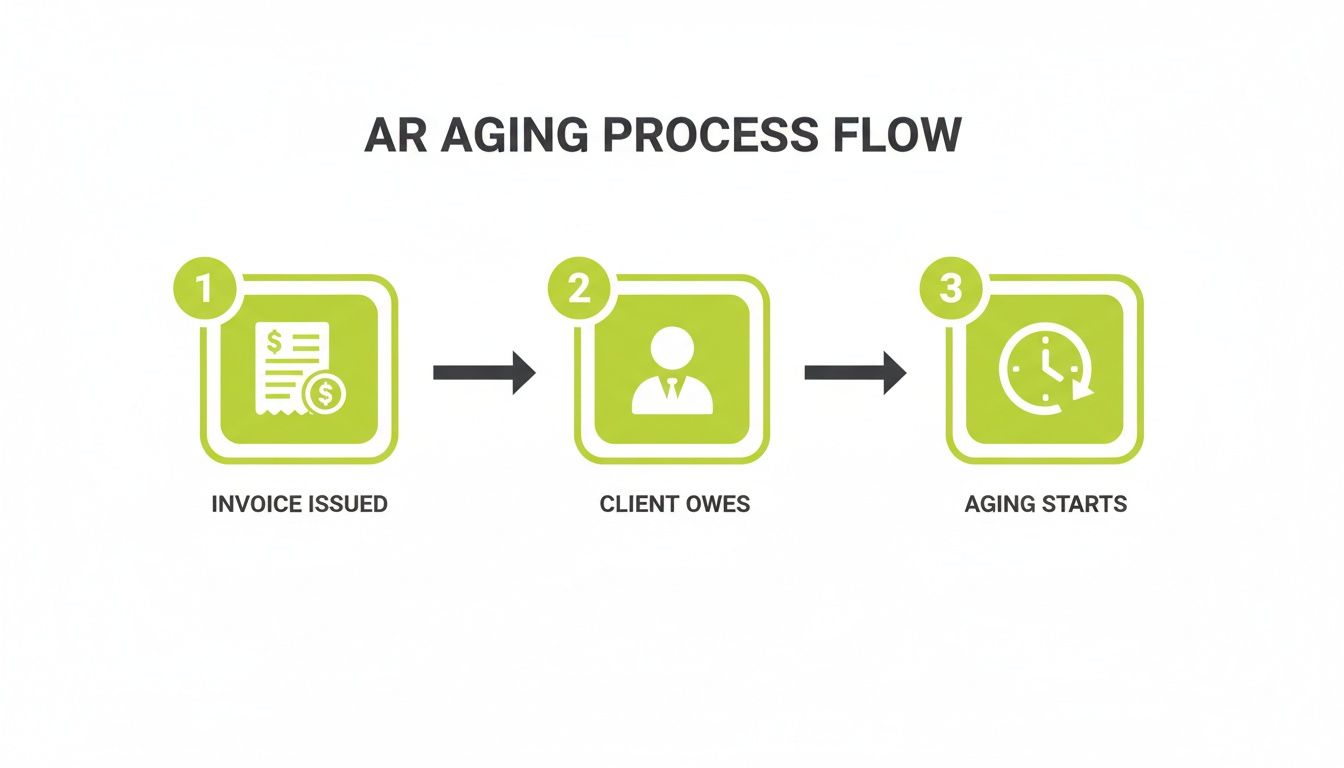
As shown, aging begins the moment an invoice is issued, not when it becomes past due. Every day an invoice is delayed is a day cash flow is deferred.
Let’s review a practical example.
Sample AR Aging Schedule for a Professional Services Firm
This table provides a snapshot for a services firm, offering an at-a-glance view of exposure and delinquency.
Client Name | Invoice # | Total Due | Current (0-30 Days) | 31-60 Days | 61-90 Days | 90+ Days |
|---|---|---|---|---|---|---|
Innovate Corp | INV-101 | $25,000 | $25,000 | |||
Innovate Corp | INV-095 | $15,000 | $15,000 | |||
Innovate Corp | Total | $40,000 | $25,000 | $15,000 | $0 | $0 |
Apex Solutions | INV-102 | $30,000 | $30,000 | |||
Apex Solutions | INV-088 | $10,000 | $10,000 | |||
Apex Solutions | Total | $40,000 | $30,000 | $0 | $10,000 | $0 |
Momentum Group | INV-075 | $20,000 | $20,000 | |||
Momentum Group | Total | $20,000 | $0 | $0 | $0 | $20,000 |
Grand Totals | $100,000 | $55,000 | $15,000 | $10,000 | $20,000 |
Immediately, it is clear that while Innovate Corp and Apex Solutions have identical total balances, their risk profiles differ significantly. The $20,000 from Momentum Group in the 90+ Days bucket requires immediate escalation.
From Totals to Percentages
The final step is converting dollar amounts into percentages of total AR. This transforms the report into a crucial risk barometer. A rising percentage in the 61–90 or 90+ day buckets is a clear warning of deteriorating financial health.
For example, a firm with $500,000 in total accounts receivable and $75,000 in the 90+ day bucket has 15% of its AR at high risk of write-off. This is a direct signal to escalate collections.
This process removes subjectivity, creating a reliable system for assessing your financial position.
Manual preparation is inefficient. This is where accounts receivable automation provides value. A robust system integrates with platforms like QuickBooks AR automation to generate these reports in real-time, without error. For any firm aiming to improve cash flow and reduce DSO, automation is an operational necessity.
Turning Aging Data Into Strategic Financial Decisions
An accounts receivable aging report is a diagnostic tool. It reveals where cash flow is heading and provides the data to change its trajectory.
For financial leaders, the report connects daily collections to high-level financial strategy. It is the primary instrument used to calculate—and systematically reduce DSO.
When a specific bucket swells—for example, the 31-60 day category increases by 10% quarter-over-quarter—it signals a breakdown in process. This allows you to intervene before working capital is impacted.

From Guesswork to Data-Backed Credit Policies
Aging trends provide the evidence needed to move from standardized "Net 30" terms to a risk-based credit approach.
If a client consistently resides in the 61-90 day bucket, the data justifies action. You can tighten their terms or require a partial payment upfront on future projects. This is not punitive; it is prudent financial management based on historical behavior.
This approach rewards reliable clients with flexibility while protecting the firm from those who use your balance sheet as an unauthorized credit line. It is a cornerstone of professional receivable management services.
Calculating Your Allowance for Doubtful Accounts
The account receivable aging method is most critical when calculating the allowance for doubtful accounts. This is not an estimate; it is a structured calculation that brings precision to the balance sheet.
You assign a historical non-payment percentage to each aging bucket. Current invoices may have a risk profile under 1%, while invoices in the 90+ day column carry a much higher probability of becoming a write-off.
For example, if your firm has $100,000 in the 90+ day bucket and historical data shows a 40% collection failure rate for invoices of that age, you have a defensible basis to provision $40,000 for that category.
This disciplined process is essential for accurate financial reporting under GAAP. It prevents asset overstatement and provides stakeholders with a realistic view of collectible cash.
From Reporting to True Risk Management
This is how an aging report evolves from a collections worksheet into a risk management tool. It quantifies risk across the entire client base with a high degree of confidence.
As invoices age, non-payment risk accelerates. Global data indicates invoices over 90 days past due often contribute 20-30% of total bad debt provisions. Research from Dun & Bradstreet found that in 15 U.S. industries, over 10% of all aging dollars are critically delinquent. You can review more data on how aging impacts bad debt on dnb.com.
This data demands a structured response. Your aging buckets are risk tiers, each requiring a distinct collections strategy.
- Current (0-30 Days): Focus on process integrity—accurate and timely invoicing. No collections activity.
- Overdue (31-60 Days): Initiate automated, professional reminders to resolve minor delays.
- Delinquent (61-90 Days): Escalate to direct communication from your finance team or a senior manager. The tone shifts from a reminder to a direct inquiry.
- High-Risk (90+ Days): Deploy assertive strategies. The primary goal is cash recovery, superseding discussions about future work.
A structured response creates consistency and control. For professional services, AR software can execute this playbook flawlessly. By integrating with systems like QuickBooks, AI AR automation manages these workflows with a consistency that manual processes cannot achieve.
Common Aging Method Pitfalls to Avoid
Even disciplined finance teams can fall into operational traps that compromise the integrity of their AR aging reports. These subtle process gaps introduce risk into forecasts and financial statements.
These are not novice errors but small inconsistencies that create blind spots, obscuring the firm’s true financial state. Correction requires operational discipline, not just new software.
*Visual Idea 2: Cinematic, slow-motion shot of a single domino falling, triggering a long, complex chain reaction. The metaphor is that one small error (misapplied cash, inconsistent aging) can compromise the entire financial picture.*
Inconsistent Aging Periods
Using inconsistent aging periods—switching between 30-day buckets and calendar months, for example—eliminates the ability to perform comparative analysis.
This masks underlying trends, making it impossible to detect a rising DSO or a client's gradual slide into delinquency. You are operating without reliable data.
The solution is a firm-wide policy on aging buckets. Standardize on 0-30, 31-60, and 61-90 days (or another consistent structure) for every report. This is the only way to ensure data comparability and meaningful analysis.
An aging report is a tool for comparison. Inconsistent buckets render it useless for tracking performance over time, forcing reliance on intuition rather than data.
Ignoring Small, Overdue Balances
Focusing collection efforts only on high-value invoices is a common but dangerous practice. Neglected small balances accumulate over time.
These small debts can aggregate into a material, uncollectible sum that clutters AR data. They inflate total receivables, creating an inaccurate representation of the firm's assets on the balance sheet.
- Create a Write-Off Protocol: Document a clear policy. For example, any balance under $250 that is over 120 days old is automatically written off quarterly.
- Assign Ownership: Make a single individual responsible for managing and clearing these small amounts monthly to ensure accountability.
A clear protocol maintains a clean aging report and focuses collections resources on recoverable revenue.
Failing to Reconcile with the General Ledger
This is the most critical operational control: the AR aging report must reconcile to the general ledger (GL) trial balance. The total on the aging schedule must tie out exactly to the accounts receivable control account in the GL.
Discrepancies arise from unrecorded payments, misapplied credit memos, or data entry errors. If uncorrected, these gaps can lead to material misstatements in financial reporting, creating compliance risk and eroding stakeholder trust.
This reconciliation is a non-negotiable step in the monthly close process. Platforms offering QuickBooks AR automation help prevent these disconnects by ensuring clean data synchronization, establishing a single source of truth.
Using Automation for Control and Consistency
Manual preparation of an AR aging report is an inefficient use of skilled finance professionals' time. It is slow, prone to error, and a fragile process for a growing firm.
The solution is not a better spreadsheet; it is accounts receivable automation. Modern AR platforms do not just accelerate a task—they fundamentally change the management of financial operations.
Beyond Speed: The Power of Transformation
The primary benefit of automation is not speed, but the accuracy and consistency it enforces.
Every invoice is categorized correctly. Every payment is applied automatically. Every follow-up is executed on schedule. It removes the risk of human error from the process and provides a clear, real-time view of the firm's cash position.
The measurable outcome is significant. A 2022 Gartner study found that B2B firms using the account receivable aging method with automation reduced their DSO by an average of 12 days. This unlocked an estimated $50 billion in working capital in the U.S. alone. Review more of these financial risk findings on dnb.com.
Automation does not just perform the old process faster. It creates a new, more intelligent process—one that is consistent, accurate, and scalable.
This allows the finance team to shift from data entry to data analysis, using clean, reliable information to guide strategic decisions.
From Static Reports to Dynamic Workflows
A key distinction: an Excel aging report is a static snapshot, outdated the moment it is created. An automated system is a dynamic tool that triggers intelligent actions based on real-time data.
An AI AR automation platform can automatically:
- Segment customers by payment behavior and risk profile to apply tailored collections strategies.
- Trigger customized collection workflows as an invoice ages, ensuring the right message is sent at the right time.
- Predict which invoices are at risk of delinquency, enabling proactive intervention.
Achieving this level of precision manually is not feasible at scale. Automation makes it manageable. You can dig deeper into this in our guide on accounts receivable automation software.
Integrating with Your Existing Systems
For most professional services firms, QuickBooks is the core accounting system. Modern AR software for professional services is designed for seamless integration. Effective QuickBooks AR automation creates a single, synchronized source of truth.
This direct connection ensures:
- No manual data entry. Information flows automatically, eliminating errors and saving hours of administrative work.
- Live aging reports. Data is always current, reflecting the latest payments and invoices without lag.
- A complete view of client financial health. The team has access to a client’s full payment history, enabling more informed communication.
This is how technology delivers financial control. It builds a system to reduce DSO and improve cash flow with a consistency that manual processes cannot provide.
Your Path to Proactive Cash Flow Management
An accounts receivable aging report is not a backward-looking document. For finance leaders, it is a predictive tool.
It converts raw invoice data into a clear forecast of the firm's financial health, identifying both risks and opportunities.
Mastering this report allows you to shift from reacting to late payments to preventing them. The aging report provides a framework to systematically reduce DSO, refine credit risk models, and improve cash flow. Each aging bucket becomes a trigger for a specific, pre-defined action.
This discipline separates firms that merely survive from those that achieve predictable, profitable growth. It establishes a rhythm of financial oversight that builds operational resilience.
Automation: The Final Step to Control
Manual execution of this process is a bottleneck. It is slow, prone to error, and consumes time that your team should be dedicating to high-value strategic analysis.
This is where accounts receivable automation provides the solution. It is the logical step to execute best practices with perfect consistency.
AI AR automation transforms your aging report from a static document into a dynamic control panel. The system doesn't just categorize invoices; it initiates intelligent workflows based on their age. A smart system can flag at-risk invoices early, triggering an appropriate, pre-scripted escalation.
Proactive management of this nature can reduce DSO by 20-30%, freeing up significant cash for growth. You can learn more about how AR aging impacts cash flow here.
This level of operational discipline ensures every invoice is managed according to a defined strategy, without failure. For firms serious about their financial control, technology is no longer an option; it is essential.
For more strategies, see our guide covering other ways to increase cash flow.
Common Questions
For financial leaders, the accounts receivable aging report is a fundamental control tool. Here are answers to common questions about its practical application.
How Often Should We Run an AR Aging Report?
For most professional services firms, weekly is the standard. Monthly is the absolute minimum.
A weekly review allows you to identify and address issues before they impact cash flow. You can see a key client slipping from 30 to 60 days past due early enough to intervene, rather than discovering the problem when cash reserves are low.
Monthly reporting is non-negotiable for closing the books, calculating the allowance for doubtful accounts, and ensuring the accuracy of financial statements.
What Is the Difference Between Aging by Invoice Date vs. Due Date?
Aging by invoice date starts the clock when the invoice is issued. Aging by due date starts the clock only after the agreed-upon payment terms (e.g., Net 30) have expired.
While both are valid, aging by due date provides more actionable information for collections. It directly answers the question: "Which clients are not adhering to our payment terms?" For managing credit risk and collections, the due date method offers superior clarity.
At What Point Should an Overdue Invoice Become a Serious Concern?
An invoice sliding into the "61-90 days" bucket is a major red flag and requires immediate escalation.
Data shows that the probability of collecting payment decreases dramatically after 90 days. For a client on Net 30 terms, an invoice in this bucket is already 31-60 days past its due date. At this point, automated reminders should be replaced with direct, senior-level communication.
An invoice over 60 days old is no longer a simple follow-up. It signals heightened credit risk and is the trigger to escalate from automated reminders to direct intervention.
How Does AR Automation Improve Aging Report Accuracy?
Manual AR processes are inherently prone to error. Accounts receivable automation eliminates the human errors common in spreadsheet-based and manual data entry workflows.
Platforms that integrate directly with accounting systems like QuickBooks pull real-time invoice and payment data automatically, ensuring data integrity.
Furthermore, an AI AR automation system is designed to correctly handle complex transactions—such as credit memos, partial payments, and unapplied cash—that often disrupt manual reporting. The result is a consistently accurate aging report, which is the foundation for a lower DSO and better financial control.
--- Resolut automates AR for professional services—consistent, accurate, and human.