A CFO’s Guide to Accounts Receivable Automation
Discover how accounts receivable automation solutions reduce DSO and improve cash flow. A practical guide for CFOs at professional services firms.
Manual accounts receivable isn't a process; it's a drag on working capital. For professional services firms, the administrative overhead, inconsistent follow-ups, and slow payment cycles of manual AR directly inhibit growth. Resources that should be allocated to strategic financial work are tied up in low-value administrative tasks.
The Real Cost of Manual Accounts Receivable
In professional services, the cost of manual AR extends far beyond the time spent sending reminder emails. It's a system burdened by hidden operational costs and financial leakage. Every invoice your team processes manually carries an administrative weight that erodes margins and constrains cash flow.
Inconsistent client communication is a primary driver of this cost. When your finance team relies on spreadsheets and calendar reminders, follow-ups are inevitably erratic. A high-value client may receive the same generic template as a small account, and critical invoices can be overlooked during peak periods. This directly extends payment times and inflates your Days Sales Outstanding (DSO).
This hands-on approach also creates a significant bottleneck in cash application. When a payment arrives, it must be manually deposited, entered into your accounting software like QuickBooks, and then reconciled. This process can take days, leaving cash flow reports out of sync with reality and undermining accurate financial forecasting.
Breaking Down the Administrative Drag
For a typical $10M firm with a 60-day DSO, $1.6M is tied up in receivables. The costs of managing this manually accumulate at several key failure points:
- Time-Consuming Follow-Up: A single invoice may require multiple emails and phone calls, each diverting your team from high-value financial analysis.
- Slow Dispute Resolution: When a client questions an invoice, the manual process of retrieving project hours and contracts can stall a payment for weeks or months.
- Inefficient Payment Processing: Manual cash application is prone to error, leading to reconciliation headaches and further delays in revenue recognition.
This is the workflow that drains profitability.
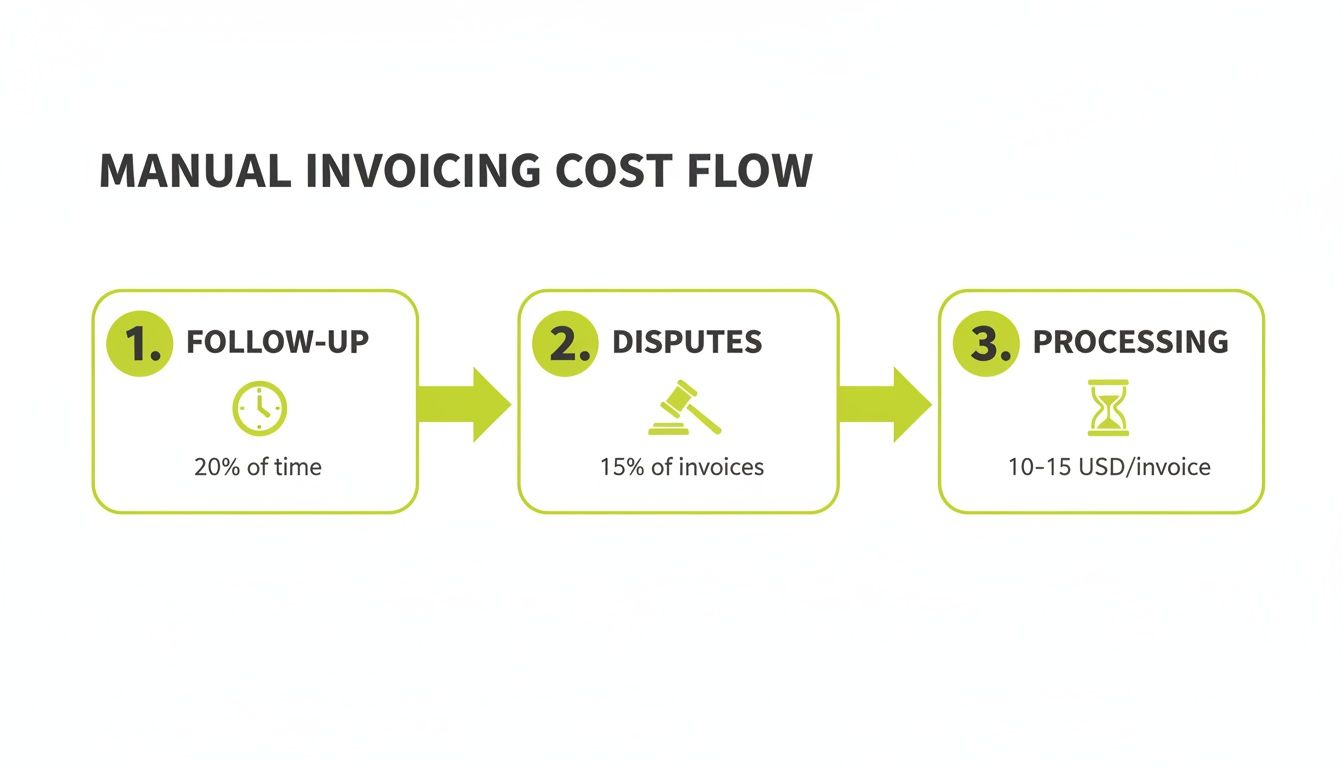
Each step carries a real cost that chips away at the profitability of your services. This constant drain on resources makes manual AR unsustainable for any firm aiming to scale with control and predictability.
The Strategic Move to Automation
Firms are rapidly adopting AI AR automation. This is not a trend; it's a strategic shift from chasing overdue payments to proactively managing cash flow. The market data reflects this, with projections showing the global accounts receivable automation market will reach $12.86 billion by 2033. You can find more details on this growth and what's driving it on mordorintelligence.com. This growth demonstrates a clear return on investment.
As a finance operator, you require control and predictability. Manual AR provides neither. It creates operational noise that masks underlying problems, making it impossible to forecast cash with confidence or scale operations effectively.
Moving away from manual processes is about reclaiming financial control. The right accounts receivable automation solution provides the structure and data to transform AR from a reactive, administrative chore into a strategic driver of your firm's financial health.
What Is Accounts Receivable Automation, Really?
The term “accounts receivable automation” often brings to mind basic dunning software that sends timed invoice reminders. While a useful function, this is only a minor component of a comprehensive solution. True accounts receivable automation solutions operate on a different level.
Think of a modern AR solution as a complete operating system for your collections process. It is a central command center that intelligently manages every invoice from issuance until the final payment is applied in your general ledger. This is not just about reminders; it’s about creating a single, reliable view of your firm’s working capital.

Core Components of an AR Operating System
A robust AR platform is built from several interconnected components, each designed to eliminate the manual bottlenecks that tie up your cash and your team's time. A key function is the ability to Automate Invoice Reminders Using Accounting Software, which frees collectors from manual follow-ups.
A top-tier system should include:
- Intelligent Outreach: The system uses AI AR automation to customize the message, timing, and channel (email, text, portal notification) based on a client's payment history and invoice value.
- Self-Service Payment Portals: A clean, branded online portal allows clients to view all outstanding invoices and pay instantly via their preferred method, such as ACH or credit card. This removes friction and accelerates payment.
- Automated Cash Application: The system automatically matches payments to invoices, including partial payments and bundled remittances. This is one of the fastest ways to improve cash flow visibility.
- AI-Driven Analytics and Risk Detection: The platform analyzes payment trends to flag at-risk accounts, enabling proactive intervention before a small issue escalates.
Differentiating Basic Tools from Strategic Platforms
It is crucial to understand the distinction. Basic tools, like features within standard accounting software, are limited. For example, QuickBooks AR automation can handle simple reminders but lacks advanced capabilities. A true strategic platform syncs with your accounting system and adds intelligence, customizable workflows, and deep analytics.
An AR platform is a force multiplier, not a replacement for your team. It automates repetitive, low-value work so your finance professionals can focus on exception management, client relationships, and high-level financial strategy.
The demand for these platforms is significant. The U.S. accounts receivable automation market is projected to grow from $1.62 billion in 2026 to $4.18 billion by 2033. This growth indicates that businesses recognize this technology as essential for a modern finance department.
The benefits of accounts receivable automation solutions are far-reaching. As a finance leader, your interest is in measurable outcomes. With AR automation, every feature is designed to impact a specific Key Performance Indicator (KPI), drawing a direct line from an automated action to a tangible result on your balance sheet.
The mission is to get cash in the door faster and more predictably. This requires transforming accounts receivable from a manual, time-consuming process into a streamlined, intelligent engine for cash flow.

Directly Reduce DSO with Intelligent Outreach
Your Days Sales Outstanding (DSO) measures the average time to collect payment after work is completed. A high DSO means cash is tied up in receivables. The most effective way to reduce DSO is through persistent and intelligent collections communication.
This is where AI-powered AR automation excels. Instead of sending generic emails, an intelligent system analyzes each client's payment behavior and invoice details to create a custom communication plan.
- For prompt-paying clients: A professional reminder is sent just before the due date with a link to a payment portal.
- For historically late-paying clients: The system initiates contact earlier, using a mix of channels, and automatically flags the account for team review if it becomes overdue.
This tailored approach ensures your outreach is always appropriate. Firms using this level of automation typically see their DSO drop by 20-40% within a few months by eliminating the manual delays and guesswork that inflate collection times.
Improve Cash Flow with Self-Service and Automated Application
For any professional services firm, predictable cash flow is critical. A lag between receiving and applying a payment distorts your cash position and makes forecasting unreliable. Modern AR software for professional services addresses this from two angles: payment collection and accounting.
First, a client payment portal simplifies the payment process. Instead of mailing a check, clients can view all outstanding invoices and pay with a few clicks via ACH or credit card. This self-service model nearly eliminates mail float and manual processing delays.
The most significant impact comes from automated cash application. When a payment arrives—even a complex one covering multiple invoices with deductions—the system instantly matches it to the correct open items in your ledger. This virtually eliminates tedious manual reconciliation.
Firms that automate cash application often reduce their reconciliation time by up to 90%. The payment is recognized in your system almost immediately, providing a true, up-to-the-minute view of your cash on hand and helping you improve cash flow. You can get a closer look at how straight-through processing makes this possible.
This is a fundamental shift from a reactive cost center to a proactive financial engine.
Manual AR vs. Automated AR: A Direct Comparison
Metric | Manual AR Process | Automated AR Solution |
|---|---|---|
Days Sales Outstanding (DSO) | High and unpredictable, inflated by manual follow-up delays. | Consistently lower, with a 20-40% reduction from automated, intelligent outreach. |
Cash Application Time | 2–5 days (or more) for manual matching and reconciliation. | Minutes or seconds, with up to 90% of payments applied automatically. |
Team Focus | 80% of time spent on administrative tasks like reminders and data entry. | 80% of time focused on strategic work like dispute resolution and financial analysis. |
Client Experience | Inconsistent communication and inconvenient payment options. | Professional, timely communication and easy self-service payment portals. |
Financial Visibility | Delayed and often inaccurate; cash position is a lagging indicator. | Real-time and accurate; you always know your true cash position. |
This table illustrates a complete operational transformation. By automating, you are fundamentally changing how your AR function contributes to the firm's financial strategy.
Enhance Team Efficiency and Strategic Focus
Your finance team consists of skilled experts, not administrative clerks. Yet, manual AR processes force them to spend an estimated 80% of their time on low-impact work like sending reminders and matching payments.
Accounts receivable automation reverses this dynamic. By delegating repetitive, high-volume tasks to the software, you free your team to focus on what matters:
- Managing High-Value Accounts: Providing the firm’s most important clients with the attention they require.
- Complex Dispute Resolution: Dedicating the time to investigate and resolve complex billing issues that require human intervention.
- Financial Analysis: Using data from the automation platform to identify payment trends, assess risk, and provide valuable insights to leadership.
This shift delivers a clear return on investment. You are redirecting their efforts from clerical duties to strategic financial management, maximizing the value of your personnel. The right platform, whether standalone or integrated with QuickBooks AR automation, transforms your AR group into a high-impact financial operations team.
Selecting the Right AR Automation Partner
Choosing an accounts receivable automation platform is more than comparing feature lists. You are selecting a partner. The right choice becomes a natural extension of your finance team, providing control and predictability over your collections process.
For professional services firms, this decision is critical. Your business model involves project-based billing, complex client relationships, and milestone payments—nuances that generic software cannot handle effectively. The focus must be on finding a partner who understands your operational reality.
Integration is Everything
Seamless integration is non-negotiable. Your accounts receivable automation solution must communicate flawlessly with your ERP or accounting system. A clunky, one-way data sync creates more manual work, defeating the purpose of automation.
Look for a provider with proven, two-way connectors for systems like QuickBooks and NetSuite. During a demo, ask to see the real-time sync in action. Verify that invoice updates, customer data, and payment statuses move between systems automatically. This creates a single source of truth, the foundation for reliable reporting and cash flow forecasting.
Look Past the Features to Real-World Capabilities
Feature lists are a starting point, but the real test is how the platform handles the complexities of A/R. Push past marketing slides and ask practical questions.
Visual Idea: A cinematic, slightly over-the-shoulder shot of a CFO in a modern office, looking at two screens. One shows a clean AR automation dashboard with key metrics (DSO, cash collected). The other shows a complex spreadsheet, representing the "before" state. The focus is on the clarity of the new dashboard.
Here are critical areas to investigate during your evaluation:
- Dispute and Exception Handling: How does the system manage a disputed charge? Ask for a walkthrough. Can you pause automated follow-ups, assign tasks to project managers, and view the entire resolution history within the platform?
- Cash Application Nuances: How does the software handle a partial payment? Or a single check covering multiple invoices with deductions? The quality of its AI AR automation in these scenarios reveals how much time your team will actually save.
- Scalability and Configuration: Your firm will grow. As you scale from $3M to $50M, your needs will change. Can the platform adapt? Can you configure different collection strategies for different client segments? What about adding new business entities or currencies?
The right partner will demonstrate how their software solves your specific, everyday problems. A platform that fails on your most common exceptions is not a solution.
Vetting Security and the People Behind the Platform
You are entrusting a partner with sensitive financial data. Confidence in their security protocols is paramount. Go beyond features and pricing to scrutinize their security standards. For example, understanding what SOC 2 compliance entails—a key certification for software providers—is a good measure of their commitment to protecting your data.
Equally important is the expertise of the team behind the tool. Does the vendor understand the professional services business model? A partner with direct industry experience will provide better support and build a more effective product. For a closer look at what separates a good platform from a great one, check out our guide on the ideal receivable management system.
Choosing a partner is about building confidence—in the technology, the vendor, and your ability to take control of your firm's financial future.
A Phased Roadmap to Implementing AR Automation
Migrating to an automated system can feel like a large undertaking, but it doesn't have to be a disruptive event. A phased approach minimizes risk, builds team comfort, and ensures the chosen accounts receivable automation solution aligns with your firm’s operations.
This is not a year-long technical project. Modern platforms are designed for rapid connection, especially with common accounting systems. The goal is to move from setup to measurable results quickly, proving value at each stage before a full rollout.
Phase 1: Data Integration and Initial Setup
The first step is connecting the new system to your financial source of truth—typically your ERP or accounting software. This foundational two-way sync ensures all invoice, client, and payment data flows seamlessly. Robust connectors, such as those for QuickBooks AR automation, simplify this process.
During this phase, we map out the initial collection workflows. These are the basic rules of engagement for your automation, such as when the first reminder is sent and what it contains. The objective is to build a solid starting point for your most common collection scenarios, not solve every problem at once.
A crucial step in Phase 1 is a data hygiene check. Automation quickly exposes messy data. This is the perfect opportunity to clean up incorrect billing contacts and inconsistent payment terms, which will yield benefits long-term.
Phase 2: The Pilot Program and Fine-Tuning
With the system connected and basic rules established, it's time for a pilot program. This is your safety net. Instead of enabling automation for your entire client base, you select a small, representative group of accounts to test the system.
This trial allows your team to operate the system in a "co-pilot" mode. The automation handles initial touchpoints, but your specialists can monitor everything and intervene as needed. This is the best way to build trust and gather invaluable, real-world feedback.
During the pilot, your team will be:
- Monitoring automated messages to ensure the tone and timing are appropriate.
- Testing the self-service payment portal with a few friendly clients.
- Tweaking workflow rules based on actual outcomes and exceptions.
This phase is about learning and adjusting. The insights gathered here provide the confidence to move forward, knowing the system is configured to improve cash flow without harming client relationships.
Phase 3: Full Rollout and Optimization
After a successful pilot, you are ready for the final phase: rolling out the AR software for professional services across all accounts. Since you have already tested and refined your workflows and messaging, this step feels more like an expansion than a new project.
Visual Idea: A simple, clean line chart showing DSO over a 6-month period. The line is high and erratic for the first 2 months ("Manual"), then shows a sharp, steady decline as it enters the "Automation" phase, eventually leveling out at a much lower point.
The work doesn't end at go-live. From here, the focus shifts to continuous optimization. Using the platform’s built-in analytics, your team can identify trends, such as which clients are habitually late or where payment disputes commonly occur. This data empowers you to fine-tune your collection strategies to further reduce DSO and improve profitability.
The Human Element: Your Team's New Role
Let's address the primary concern: "What does this mean for my team?" This question arises from a fear that automation is a synonym for replacement.
That fear is based on a misunderstanding of what effective AI AR automation is designed to do. The goal is not to replace skilled people but to stop them from wasting time on tasks a machine can do better. This allows them to focus on work that requires human expertise. Hours spent chasing routine invoices or matching payments is administration, not strategy.

When you automate that administrative noise, you elevate your AR function. Your team transitions from clerical staff to strategic financial operators. Their focus moves from data entry to data analysis, and their efforts have a direct, measurable impact on the firm's financial health.
Autopilot and Co-pilot: How It Works in Practice
The "Autopilot" and "Co-pilot" model is a useful way to think about this new dynamic. It's about applying the right mix of machine efficiency and human judgment—the core of the most effective accounts receivable automation solutions.
- Autopilot for the Everyday: The vast majority of collections work is predictable. For these straightforward, low-risk accounts, the system runs on Autopilot. It handles everything from sending timed reminders to processing portal payments, requiring no human intervention. This manages approximately 80% of the collections workload.
- Co-pilot for When It Counts: The remaining 20% consists of your sensitive, high-value, or disputed accounts. Here, the system acts as a Co-pilot. It flags the exception, packages all relevant data and communication history, and hands control to your specialist. They have everything they need to manage the situation with a personal touch.
This dual approach delivers significant efficiency gains without sacrificing critical client relationships.
Automation doesn't replace collectors; it transforms them into portfolio managers responsible for the financial health of their specific book of business, armed with better data and more time to act on it.
The New Focus of a Strategic AR Team
Once freed from the daily grind, your team can direct its energy toward high-impact work that was always important but rarely urgent enough to prioritize. This new role is more analytical, more relational, and far more critical to the firm’s bottom line.
Their focus now includes:
- Managing Key Client Relationships: When a long-standing or high-value client has an overdue payment, your team can intervene with the nuance required to resolve the issue while strengthening the partnership.
- Negotiating Complex Payment Plans: If a good client faces a temporary hardship, your team can proactively build a structured payment plan that secures your cash flow without damaging the relationship.
- Analyzing Payment and Risk Trends: The AR software for professional services is adept at spotting patterns. Your team can analyze these trends to uncover root causes, such as confusing invoice formats or recurring project-related disputes, and fix them permanently.
This isn't just about making the AR department more efficient. It’s about creating more engaging roles for your team and turning your finance function into a true strategic partner for the entire business.
Common Questions About AR Automation
Even when the numbers make sense, adopting new technology raises practical questions. As a finance leader in a professional services firm, you need straight answers that reflect your operational reality. Let's address the most common questions from CFOs and Controllers considering accounts receivable automation.
How Does AR Automation Integrate With QuickBooks?
This is often the first question. No one wants another data silo. Modern accounts receivable automation solutions are built to prevent this, using pre-built connectors that create a seamless, two-way sync with platforms like QuickBooks.
Think of it as a dedicated data highway. When an invoice is created in QuickBooks, it appears instantly in the AR platform. When a client pays through the portal, the payment is automatically recorded and reconciled back in QuickBooks. This eliminates manual data entry and establishes a single source of financial truth.
A solid integration keeps everyone on the same page. Your team isn't reconciling two different sets of books, which means your financial reports are always accurate and reliable.
Will Automating Collections Damage Client Relationships?
In a relationship-driven business, "automating" communication can sound impersonal. The fear is that you will bombard clients with robotic demands. A well-designed platform does the opposite.
What truly strains client relationships are inconsistent manual follow-ups—a forgotten reminder, a missed call, an awkward conversation. That is where friction lies.
Modern AI AR automation enables highly personalized outreach. You can set rules that treat key accounts with a high-touch, gentle approach while being more direct with chronically late payers. The system adjusts tone, timing, and channel based on the client, delivering professional persistence, not robotic pestering. Plus, a self-service payment portal improves their experience, making it easier for them to do business with you.
What Is the Typical ROI on AR Automation?
The return on investment materializes quickly in three key areas: reduced DSO, improved cash position, and reclaimed team productivity. While firm-specific, the financial impact is fast and measurable.
- DSO Reduction: Most firms see a 20-30% reduction in DSO within the first 60–90 days, which immediately frees up significant working capital.
- Improved Cash Flow: By accelerating payments and automating cash application, you shorten the cash conversion cycle, making cash flow more predictable.
- Team Productivity: Your finance team can reclaim up to 80% of the time previously spent on manual tasks, shifting their focus to strategic analysis and high-value client issues.
Can Automation Handle Complex Project-Based Billing?
Yes, but this requires careful evaluation. A generic AR tool will fail in a professional services environment. The AR software for professional services you choose must be flexible enough to handle your specific billing model.
This means the system must be able to:
- Manage custom payment schedules tied to project milestones.
- Group multiple invoices under a single project or statement of work.
- Handle retainers, deposits, and progress billing without manual workarounds.
The right platform adapts to your existing workflows, bringing efficiency and control to how you actually do business.
--- Resolut automates AR for professional services—consistent, accurate, and human.