A CFO's Guide to Mastering Accounts Receivable Processes
Transform your accounts receivable processes. This CFO-focused guide shows how to reduce DSO, boost cash flow, and leverage AR automation for greater control.
The accounts receivable process is the system a firm uses to convert billable work into cash. It's the operational bridge between value delivered and money in the bank.
For a financial operator, this isn't back-office administration. It is the engine of cash flow and a direct reflection of the firm's financial discipline.
Deconstructing the Accounts Receivable Process
A flawed AR process creates a drag on working capital. A single invoicing error, a missed follow-up, or a slow dispute resolution cycle delays cash collection and forces your team into reactive problem-solving.
This strains client relationships and erodes financial stability. Real control comes from defining each step, ensuring seamless handoffs, and measuring performance with precision.
Mapping the Core Stages of AR
The journey from a completed project to applied cash follows a clear path. Optimizing this workflow is fundamental to reducing Days Sales Outstanding (DSO) and improving cash flow.
Each stage is an opportunity for efficiency—or a potential bottleneck. The three primary stages are invoicing, collections, and cash application.
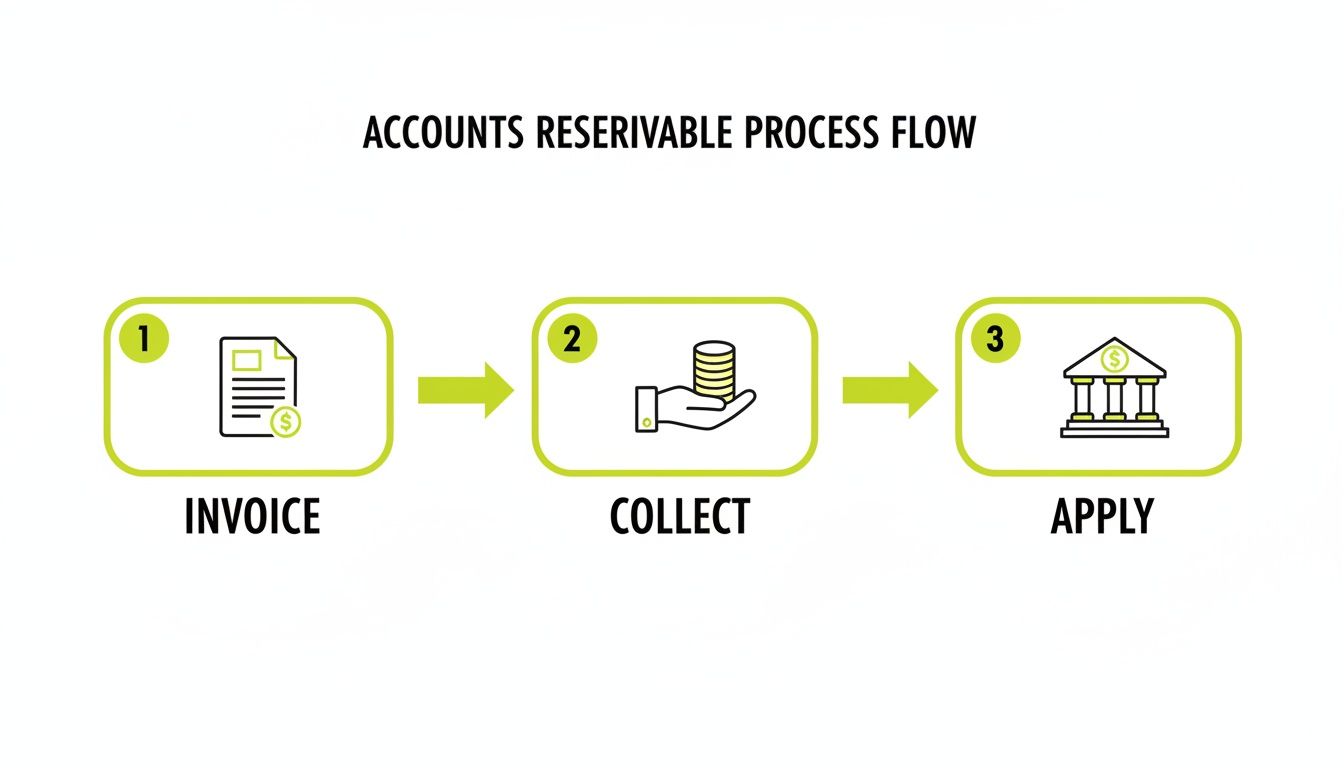
A delay at any point creates a ripple effect. It slows down the final step—getting cash properly recorded—and complicates financial reporting.
A Professional Services Firm Example
Consider a common scenario for a $10M consulting firm. A project manager signs off on a completed milestone, triggering the finance team to generate an invoice.
The invoice must be perfect: detailed services, correct rates, pre-approved expenses, and the correct PO number, sent to the right AP contact. This first step is where errors often originate, causing immediate payment delays.
Once sent, the collections clock starts. The process shifts to monitoring for payment, sending systematic reminders as the due date nears, and escalating if the invoice becomes overdue. This requires a balance of persistence and professionalism.
The core function of accounts receivable is to convert recognized revenue into cash as efficiently as possible. It is the operational link between the value your firm delivers and its financial reality.
Once payment is received, the final step is cash application—matching the payment to the correct open invoice in your accounting system, like QuickBooks. Mistakes here create inaccurate aging reports and require hours of reconciliation.
This lifecycle is one part of the larger order-to-cash process. Mastering these individual steps builds a resilient, predictable cash flow engine.
Why Manual Accounts Receivable Processes Break Down
For a small firm, manual AR is manageable. As you grow past $3M–$5M in revenue, it becomes a liability. The process itself, not the team, is the constraint.
Human-driven workflows are inherently inconsistent and prone to error. They do not scale without adding headcount to perform repetitive tasks.
This is not an administrative headache; it is a direct threat to your cash flow. Every manual step—invoice creation, follow-up, payment logging—is a point of potential failure. Spreadsheets and disconnected systems obscure these fractures until they surface as a critical cash problem.

Delayed Invoicing and Inconsistent Collections
The first point of failure is often the invoice itself. When an invoice sits in a draft folder for a week, you've added seven days to your DSO before the client even receives it.
Once sent, collections become arbitrary. Follow-ups depend on an individual’s memory or a calendar reminder. This inconsistency signals to clients that payment deadlines are flexible, quietly undermining your firm's financial position.
A manual AR process operates on tribal knowledge. When a key team member is on vacation or leaves the firm, the process halts, invoices stall, and cash collection suffers.
This dynamic places your team in a constant state of chasing earned revenue instead of proactively managing receivables. The impact on working capital is direct and measurable.
High Error Rates and Painful Dispute Resolution
Nothing stops an invoice faster than an error. Manual data entry is the primary cause of mistakes that halt the payment process. A typo in a PO number or a simple calculation error is all it takes for rejection.
Resolving these disputes manually is a significant time sink. It requires digging through emails and project files, getting approvals, and reissuing the invoice. Each dispute cycle adds days or weeks to DSO and creates unnecessary client friction.
These small, preventable mistakes have a cumulative financial impact. You can learn more in our analysis of the true cost of AR inefficiency in professional services.
The Measurable Impact of Manual Failures
These breakdowns have quantifiable consequences. In B2B commerce, 39% of U.S. invoices are paid late. Manual systems exacerbate this problem.
Ultimately, a manual system forces skilled finance professionals to spend their days on low-value, repetitive work. They are stuck chasing paper instead of focusing on financial analysis, forecasting, and client strategy.
The solution is to shift from manual effort to intelligent accounts receivable automation. By adopting AR software for professional services, particularly systems with native QuickBooks AR automation, firms can replace fragile manual steps with a reliable, scalable, and accurate workflow.
The Key Performance Indicators That Actually Matter
What you measure is what you manage.
Financial control requires focusing on a handful of metrics that provide an honest assessment of your firm’s cash health. These are not just reporting numbers; they are diagnostic tools.
They pinpoint where your AR process is working and where it’s breaking down. For any professional services firm, knowing these numbers is the difference between guessing about your cash position and owning it.

Days Sales Outstanding (DSO)
Days Sales Outstanding (DSO) measures the average number of days it takes to collect payment after delivering a service. It is a direct indicator of collection speed.
A high DSO means cash is trapped in receivables, acting as an interest-free loan to your clients. A low DSO indicates an efficient process that quickly converts services into cash, fueling working capital.
For a firm with $500,000 in receivables and $1.5M in revenue over a 90-day period, the DSO is 30 days. If that number creeps to 45, it’s a clear signal that cash flow is tightening. Reducing DSO by just five days can unlock significant working capital.
Average Days Delinquent (ADD)
While DSO provides a broad view, Average Days Delinquent (ADD) isolates the problem of late payments. This KPI measures, on average, how many days invoices are past their due date.
ADD separates collections performance from your payment terms. Your DSO could be 40 days, which may seem acceptable on Net 30 terms. But if your ADD is 10 days, it means clients are consistently paying late, indicating an ineffective follow-up process. A rising ADD is an early warning system.
Collection Effectiveness Index (CEI)
The Collection Effectiveness Index (CEI) measures the percentage of collectible receivables that were actually collected during a period.
A CEI near 100% indicates a highly effective collections process. A CEI of 80% is a red flag, suggesting that 20% of receivables are aging and at risk of becoming bad debt. It is a powerful measure of your finance team's performance.
Essential AR Metrics and Their Business Impact
Tracking these KPIs provides a data-driven view of your firm's financial pulse. They enable you to move from high-level summaries to actionable insights.
Metric (KPI) | Formula | What It Measures | Business Implication |
|---|---|---|---|
Days Sales Outstanding (DSO) | | The average time it takes to collect payment after a sale. | A high DSO signals cash flow is tied up; a low DSO means efficient cash conversion. |
Average Days Delinquent (ADD) | | The average number of days invoices are past due. | Isolates collections performance, showing if late payments are a systemic issue. |
Collection Effectiveness Index (CEI) | | The percentage of collectible receivables actually collected. | Directly measures the finance team's ability to recover funds, highlighting potential bad debt risk. |
Monitoring these metrics tells a story about your financial operations. For strategies to improve these numbers, see our guide on effective receivable management services.
When you replace manual tracking with a system of clear, connected metrics, you stop reacting to cash flow problems and start proactively managing your financial health.
Upgrading Your AR Workflow with Automation
Manual accounts receivable is a slow, constant drain on a growing firm. It creates operational risk, consumes valuable time, and limits cash flow.
The solution is not more aggressive collections; it is a system that executes the fundamentals perfectly, every time.
This is the function of modern accounts receivable automation. It acts as a force multiplier, delegating repetitive, high-volume work to an intelligent system. This frees your finance team to focus on strategic financial decisions and high-value client relationships.
An automated workflow ensures no invoice is forgotten, no reminder is missed, and no payment is lost. It establishes a level of operational discipline that is impossible to sustain manually.
From Manual Effort to Intelligent Execution
AR automation takes over routine but critical tasks. A well-designed system can manage the entire collections timeline, from invoice creation to cash application.
Core functions include:
- Systematic Invoice Delivery: Ensuring every invoice is sent on time via the client's preferred channel.
- Automated Payment Reminders: Sending professional follow-ups on a defined schedule.
- Targeted Collections Outreach: Escalating urgency and tailoring messaging for overdue accounts.
Data accuracy is paramount. Tools like an AI Invoice Scanner can eliminate manual entry and prevent the typos that cause payment delays. Precision at the start of the process prevents costly problems later.
The Power of AI in AR Automation
Standard automation follows a script. AI AR automation learns and adapts. It moves beyond a simple "if-then" logic to create dynamic outreach that responds to client payment history and behavior.
This intelligence allows the system to differentiate between a client who always pays on time but needs a single reminder, and a chronically late account requiring a more direct approach. The tone, timing, and communication channel are adjusted to optimize the outcome.
A well-designed AR automation platform feels responsive and professional, not robotic. It reinforces the reliability of your firm's operations.
This level of personalized communication at scale is not feasible manually. For instance, an AI system might note a specific client pays 5 days after receiving their second email reminder. It will then adjust its timing for that account to match this pattern, optimizing the collection cycle for that relationship. This is how you reduce DSO and accelerate cash flow.
Liberating Your Finance Team for High-Value Work
When your team is no longer buried in manual follow-ups, their strategic value emerges. Their focus shifts from chasing paper to driving financial strategy.
Before Automation:
- Manually sending hundreds of reminder emails.
- Chasing partners for invoice details.
- Spending hours reconciling payments in QuickBooks.
After Automation:
- Analyzing collections data to identify at-risk clients.
- Managing complex disputes that require human negotiation.
- Strengthening relationships with key clients to ensure long-term financial health.
This transition has a measurable impact. One professional services firm, after implementing QuickBooks AR automation, freed up 40 hours per month of their controller's time. Instead of chasing payments, she focused on strategic cash flow forecasting. The result was a 15% reduction in DSO within six months.
Effective AR software for professional services orchestrates this entire process, creating a single source of truth for your receivables. It builds a predictable system that helps you improve cash flow and provides the data needed to lead with confidence.
A Practical Blueprint for Implementing an Automated AR System
Integrating automation into your accounts receivable process is a shift in firm operations. A methodical plan is essential for success.
The goal is to establish control. This requires diagnosing the correct problems, setting clear targets, selecting the right tools, and guiding your team through the transition.

Stage 1: Audit Your Current Process
Before improving a system, you must understand its failures. Conduct an honest audit of your current AR process.
Map every step, from invoice creation to cash application. Identify bottlenecks and quantify the time your team spends on low-value tasks. This data becomes your baseline for measuring the ROI of the new system.
Stage 2: Set Clear, Measurable Objectives
With a clear diagnosis, set specific, quantifiable goals. Vague targets like “improve cash flow” are insufficient. Define measurable outcomes with a deadline.
Your objectives should be direct and impactful. For example:
- Reduce DSO by 15% in the first six months.
- Cut average days delinquent (ADD) from 12 to 5 days.
- Automate 80% of routine payment reminders, freeing up 25 hours of staff time monthly.
These milestones prove the project is delivering a return on investment.
The purpose of implementation is to re-engineer a core financial process to be faster, more accurate, and more predictable. Securing a few early, measurable wins is critical for building momentum.
Stage 3: Choose the Right AR Software
The market for accounts receivable automation is crowded. For a professional services firm, the right tool must understand project-based billing, protect client relationships, and integrate with your existing accounting software.
Seek AR software for professional services that offers personalized communication workflows and seamless QuickBooks AR automation. A system with AI AR automation can adapt its approach based on client payment histories, preserving high-touch relationships while maintaining financial discipline.
Stage 4: Manage a Phased Integration and Rollout
A "big bang" implementation is a high-risk gamble. A phased rollout is a more prudent approach, minimizing disruption and allowing you to build on small successes.
Start with a pilot group of clients or by automating a single part of the process, like initial reminders. This lets your team learn the system in a low-stakes environment. Ensure the QuickBooks integration is flawless before activating automated collections workflows. This methodical approach de-risks the project.
Stage 5: Train Your Team and Navigate the Change
Technology is only half the equation. Your team must understand not just how to use the new system, but why it is an improvement.
Frame the change around its benefits: less tedious work, more time for valuable analysis, and better tools. Provide hands-on training and celebrate early victories, such as the first noticeable reduction in DSO. Effective change management turns reluctant users into champions of the new process.
Measuring the ROI of a Modernized AR Process
Any system investment must be justified by its financial return. Modernizing your accounts receivable processes is a strategic decision with a clear, quantifiable ROI.
The business case for accounts receivable automation is built on hard numbers and unlocked operational potential. It transforms AR from a cost center into a driver of cash flow and efficiency.
Quantifying the Direct Financial Gains
The most immediate returns appear in your core cash flow metrics.
- Shrinking DSO: For a firm with $10M in annual revenue, cutting DSO from 45 to 35 days unlocks approximately $274,000 in cash. This is working capital that can be reinvested in the business.
- Lower Borrowing Costs: Improved cash flow reduces reliance on lines of credit. If that freed-up $274,000 helps you avoid borrowing at an 8% interest rate, you save nearly $22,000 annually.
- Reduced Bad Debt: Consistent, automated follow-ups decrease the likelihood of invoices aging into uncollectible debt, protecting earned revenue.
Unlocking the Indirect Value
Beyond financial metrics, AI AR automation delivers significant operational value. The ROI here is measured in efficiency and strategic capacity.
A modernized AR process provides the data and control needed for accurate forecasting. You move from reacting to cash shortages to proactively managing your financial position.
Automating routine collections gives your finance team their time back. Instead of spending 20-30 hours a month on manual follow-ups, they can focus on high-value analysis, strengthening client relationships, and financial planning.
This shift from administrative work to strategic oversight is where lasting value is created.
Your Questions About AR, Answered
When financial leaders evaluate modernizing accounts receivable, a few key questions consistently arise. They concern the practical impact on cash flow, operations, and client relationships.
How Can AR Automation Actually Improve Client Relationships?
This is a common concern. Done correctly, accounts receivable automation enhances client trust through consistency and professionalism.
Manual follow-ups are prone to human error—a missed reminder, an inconsistent tone, or an abrupt escalation. Automation removes this emotional, unpredictable element.
Providing clients a simple online portal to view and pay invoices creates transparency and reduces friction. This allows your team to reserve high-touch, personal support for strategic clients and complex issues, reinforcing your firm's reputation for reliability.
What’s the Real Timeline for Implementing AR Software?
Implementation is faster than many expect. Modern cloud-based AR software for professional services is designed for rapid deployment. For firms using standard systems like QuickBooks, basic integration can often be completed in a few days.
A full implementation, including workflow customization and team training, typically takes two to six weeks. A structured onboarding process led by the software provider is key to a smooth transition that doesn't disrupt daily operations.
Is AI Automation a Good Fit for High-Touch Client Relationships?
Yes. AI AR automation is ideal for high-touch environments because it enables personalization at scale. Instead of sending generic reminders, an AI-powered system analyzes a client's history to tailor the message.
A valued, long-term partner might receive a gentle, well-timed nudge, while a chronically late account receives a more direct follow-up. It applies the right pressure, in the right way. This allows you to maintain financial discipline and improve cash flow without damaging key client relationships.
--- Resolut automates AR for professional services—consistent, accurate, and human.