The Accounts Receivables Process: A CFO's Guide to Unlocking Cash Flow
Master the accounts receivables process to reduce DSO, optimize AR, and accelerate cash flow with practical, actionable steps.
The accounts receivable process is the system your firm uses to collect payment for services rendered. For a professional services firm, this is not an administrative task. It is the operational engine that governs cash flow, client relationships, and sustainable growth.
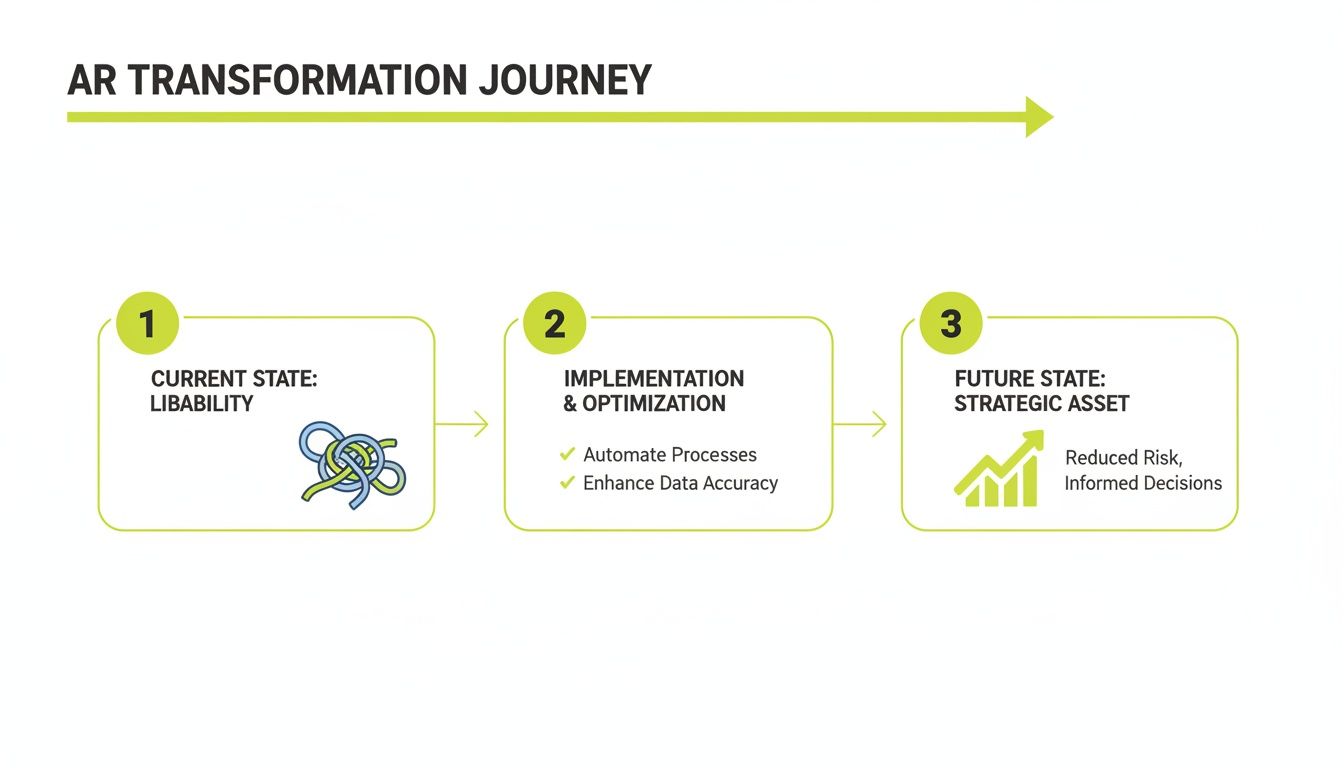
A fragmented, manual process is a liability. It creates cash traps, operational drag, and erodes client trust. A well-orchestrated AR system, however, unlocks working capital and provides the financial predictability required to scale.
Transforming AR from a Liability to a Strategic Asset
Many firms in the $3M–$50M revenue range treat AR as a disjointed series of manual tasks managed across spreadsheets and email chains. This approach creates significant blind spots. Without real-time data, cash forecasting is unreliable, and at-risk accounts are only identified when they become delinquent.
The operational drag is substantial, consuming finance team hours that should be allocated to strategic analysis. The objective is to shift from reactive collections to a proactive, controlled system that prevents payment delays before they occur.
Shifting from Reactive to Proactive Control
A proactive system is built on data and intelligent automation. Its function is not to chase late payments, but to architect a collections process that makes them rare.
This requires several key components:
- Data-Driven Credit Assessment: Set appropriate credit limits and terms from the outset based on client data, mitigating downstream risk.
- Automated, Personalized Outreach: Use accounts receivable automation to deliver the right message to the right contact at the right time, maintaining a professional, human tone.
- Frictionless Payment and Application: Provide clients with simple, secure payment options and use AR software for professional services to apply cash automatically. This is a direct lever to reduce DSO.
An optimized AR lifecycle, from credit assessment to cash application, converts an administrative burden into a source of competitive advantage for professional services firms.
To transform accounts receivable into a strategic asset, integrate it with your firm's approach to customer relationship management basics. Every invoice and reminder is a client touchpoint. Each one can either strengthen or weaken the relationship.
This guide provides a blueprint for CFOs, Controllers, and owners ready to re-engineer their accounts receivables process. We will dissect the AR lifecycle, identify common failure points, and outline a clear path toward optimization. The goal is not just faster payments, but a more resilient and predictable financial operation.
Breaking Down the AR Lifecycle: Where The System Fails
The accounts receivable process is a sequence of connected stages. A weakness in any single link can delay cash flow and strain client relationships. For professional services firms with complex billing tied to project milestones or logged hours, these failure points are particularly acute.
A manual, disconnected process is a direct liability. It introduces delays, creates low-value work for your finance team, and obscures the true state of your firm’s financial health. The first step toward control is understanding each stage of the collections journey.
The Seven Stages of the AR Process
Viewing AR as a complete lifecycle, not just "collections," is essential for pinpointing operational weaknesses. This framework is a core component of the broader order to cash cycle, a process that directly impacts revenue and working capital.
- Credit Policy & Client Onboarding: The process begins here, by setting clear payment terms. A common failure is inconsistent application of policy, such as offering ad-hoc terms that create collection challenges and increase risk.
- Invoicing & Billing Delivery: Accuracy and timing are critical. Manual data entry errors from timesheets, delays in sending invoices post-service, or delivering them to the wrong contact effectively resets the payment clock.
- Collections & Proactive Outreach: This stage is often the most painful. The primary failure is manual, inconsistent follow-up. Without a system, reminders are sporadic, unprofessional, and often fail to reach the payment approver.
- Payment Acceptance: Limiting payment options to checks or wire transfers creates unnecessary friction. Failing to offer a simple, secure online portal for ACH or credit card payments is a significant barrier to prompt payment and a failure to improve cash flow.
- Cash Application: Matching payments to the correct invoices is a major source of operational drag, particularly with partial payments or single remittances for multiple invoices. A breakdown here leads to inaccurate AR aging reports and wasted hours. Even basic QuickBooks AR automation tools can falter here.
- Dispute Resolution: When a client questions an invoice, the lack of a defined workflow for logging, escalating, and resolving the issue leaves cash in limbo and can damage client trust.
- Reporting & Analysis: The final failure is a lack of real-time data. Relying on static spreadsheets makes it impossible to accurately forecast cash, measure team performance, or identify at-risk accounts before they become critical.
The Financial Impact of Process Failures
These individual issues compound. In the U.S., 39% of B2B invoices are paid late, and 81% of businesses report that payment delays are increasing. A staggering 23% of these delays occur simply because clients forget to pay—a clear indicator that manual reminders are ineffective.
This operational drag forces 42% of U.S. firms to delay paying their own suppliers, propagating poor cash flow throughout the economy. You can review the data in this B2B payments study.
When you dissect the accounts receivables process, the problem becomes clear. It is rarely a people problem; it is a system problem, defined by manual handoffs and a lack of intelligent automation. Pinpointing these specific weaknesses is the first step toward building a reliable financial operation.
The Critical Metrics for Measuring AR Performance
You cannot manage what you do not measure. For a finance leader, this is the foundation of control and predictability over cash flow. Anecdotes from the collections team are not data. Hard metrics are required to understand the true performance of your accounts receivable.
While Days Sales Outstanding (DSO) is a standard metric, relying on it alone is insufficient for professional services firms. Project-based billing, retainers, and milestone payments can skew a simple DSO calculation, masking underlying issues in your collections cycle. A comprehensive dashboard provides a clearer view.
Beyond DSO: The Core AR Dashboard
To gain effective control over AR operations, track a set of key indicators that, together, provide a complete picture. These metrics move beyond payment speed to measure the effectiveness of your collections process and team.
Metric | Calculation Formula | What It Measures | Ideal Target |
|---|---|---|---|
Days Sales Outstanding (DSO) | | The average number of days to collect payment after an invoice is issued. | Varies by terms; lower is always better. |
Collection Effectiveness Index (CEI) | | The percentage of collectible receivables collected during a period. | As close to 100% as possible. |
Average Days Delinquent (ADD) | | The average number of days invoices are past due, isolating collections performance from payment terms. | Below 15-20 days. |
Dispute Rate | | The percentage of invoices that clients dispute. A high rate indicates billing or service issues. | Below 5%. |
Tracking these metrics replaces guesswork with knowledge. The data illuminates whether your primary problem lies in payment terms, billing accuracy, or collections follow-up.
Isolating the Problem with Granular Data
These metrics are diagnostic tools. A firm with a 60-day DSO may seem acceptable. But if its CEI is 75% and its ADD is 35 days, the data tells a different story. This firm is leaving a quarter of its collectible cash on the table each month, and overdue invoices are aging for over 30 days before payment.
This is a critical collections problem hidden within a passable DSO.
By tracking specific metrics, you move from "we need to improve cash flow" to precise operational directives like "we must reduce ADD by 10 days this quarter."
This is the level of detail required to drive results. It allows you to set measurable targets and build a clear business case for investing in superior tools, such as AI AR automation. To see how these numbers connect, learn to calculate your firm's accounts receivable turnover.
A data-driven accounts receivable function replaces ambiguity with clarity, empowering you to make decisions that directly increase working capital and financial stability.
How to Optimize Your AR Process with Strategic Automation
Once you have diagnosed the weaknesses in your accounts receivable process with data, the next step is to engineer a more resilient and proactive system. The objective is not aggressive collections; it is a workflow designed to prevent delays from occurring.
An optimized system does not treat every invoice identically. It uses data to apply a tailored approach at each stage, shifting from manual, reactive tasks to an automated, orchestrated process. This is the operational change that improves key metrics.

From Manual Effort to Intelligent Orchestration
True optimization is more than scheduling automated reminders. It involves embedding intelligence throughout the AR lifecycle, creating a system that adapts based on real-time data and client behavior. This is the operational advantage delivered by AI AR automation.
Here is how automation can be applied to specific AR stages:
- Credit Assessment: AI models can continuously analyze a client’s payment history and industry trends, allowing for dynamic adjustments to credit limits and proactive risk flagging.
- Invoice Delivery: Automation ensures invoices are generated and sent immediately upon project completion via the client’s preferred channel, eliminating initial lag time.
- Collections Outreach: This is where accounts receivable automation provides the most leverage. Systems can execute personalized outreach sequences based on invoice size, client history, and risk profile. A high-value client may receive a relationship-focused nudge, while a new account follows a firmer cadence.
Efficiencies in adjacent areas, such as streamlined client communication through specialized services for accounting and bookkeeping firms, can also support a smoother AR process.
Automating the Final Mile: Cash Application
One of the most tedious and error-prone stages of the AR process is cash application—matching incoming payments to open invoices. This is particularly complex for professional services firms managing project fees, retainers, and partial payments.
A manual cash application process is a direct bottleneck to accurate financial reporting. It introduces human error, delays cash recognition, and skews AR aging reports, destroying confidence in your data.
Modern AR software for professional services solves this. It automatically extracts remittance data from multiple sources (emails, bank statements, client portals) and uses AI to match payments to invoices with high accuracy, even with missing remittance advice. This is a critical feature, especially for firms seeking QuickBooks AR automation, as it provides capabilities beyond the native platform.
The result is a significant reduction in manual reconciliation. This frees your finance team for strategic analysis instead of data entry, leading directly to faster closing cycles and more reliable cash flow forecasting. To understand the full scope of these advantages, review the key benefits of AR automation in our detailed guide.
Strategic automation transforms the accounts receivables process from a manual cost center into a data-driven system that delivers control, predictability, and a direct path to a healthier balance sheet.
Your Roadmap to Implementing AR Automation
For a finance leader, the "how" is as critical as the "what." Implementing new technology can feel disruptive, but a phased approach ensures control, minimizes friction, and delivers predictable results. Adopting accounts receivable automation is not an event; it is a deliberate rollout designed to build a more resilient financial operation.
This roadmap breaks the process into manageable stages, demystifying implementation and addressing common concerns about business interruption and team adoption.
Stage 1: Assessment and Goal Setting
Before evaluating software, establish a clear, data-driven baseline of your current state. Define what success will look like in quantitative terms. Skipping this phase makes it impossible to prove ROI.
Audit your current accounts receivables process. Map every step from invoice creation to cash application, noting the time and personnel involved.
Next, establish your core metrics:
- Calculate your precise DSO and CEI over the last two quarters. This provides an honest benchmark.
- Identify primary failure points. Is it billing errors, inconsistent follow-up, or the manual work of cash application?
- Set specific, quantitative goals. For example, "Reduce DSO by 15% within six months," or "Decrease the dispute rate from 7% to 3%."
A successful implementation begins with a clear diagnosis. Vague goals like "improve cash flow" are insufficient. You need concrete targets tied to the metrics that drive your business.
Stage 2: Vendor Selection and System Integration
With clear goals, you can select the right technology partner. Generic AR software often fails professional services firms. Focus on platforms designed to handle project-based work, complex client relationships, and retainer billing.
Key features include customizable communication workflows, intelligent cash application logic, and seamless integration with your existing accounting system, such as an ERP or QuickBooks. An effective QuickBooks AR automation tool should sync data without requiring double entry, ensuring a single source of financial truth.
The integration itself is a critical step. A potential vendor must demonstrate a clear, low-impact plan for connecting their platform to your financial software. A complex integration process is a major red flag.
Stage 3: Team Training and a Phased Rollout
A tool is only as effective as the team using it. The final stage is about empowering your people and executing a controlled, intelligent rollout. A "big bang" launch invites chaos; a phased approach is superior.
Start with a pilot group of accounts or a single service line. This allows your team to learn the new system in a low-risk environment, build confidence, and provide feedback before a full implementation.
Training must be practical and role-specific. Demonstrate how the tool makes each person's job more effective—do not just provide a feature tour. Frame the adoption of AI AR automation as an elevation of their work from manual data entry to strategic financial oversight. When operators see the direct benefit, the system will be adopted, not just installed.
Calculating the ROI of a Modernized AR Process
Moving to an automated accounts receivables process is a financial decision with a clear, measurable return. You are not buying software; you are converting a manual cost center into an engine for predictable cash flow. The ROI is measured in unlocked capital, reduced operational drag, and improved financial relationships with clients.
The most immediate impact is a direct increase in working capital. Consider a professional services firm with $10 million in annual revenue and an average DSO of 60 days. A 15% reduction in DSO—just nine days—unlocks over $246,000 in cash that was previously trapped in receivables. This is capital that can be deployed for growth, debt reduction, or strategic investment.

Quantifying the Financial Gains
Beyond reducing DSO, the return on investment in AR automation appears in several key areas of the P&L. These are the hard numbers that build the business case.
- Lower Operational Costs: Manual AR is labor-intensive. Automation frees your team from hours spent on collections, payment matching, and dispute tracking, allowing them to focus on high-value analysis.
- Reduced Write-Offs: Proactive, consistent outreach dramatically reduces the number of invoices that become uncollectible bad debt. A smart system flags at-risk accounts early, enabling intervention before an issue becomes a loss.
- Fewer Billing Disputes: Automated invoice creation and delivery minimize the human errors that lead to client disputes. Accurate invoices are paid faster, reducing time spent on reconciliation.
According to recent data, 44% of U.S. B2B invoices are paid late and 3% are ultimately written off, directly impacting profitability. As 34% of businesses report that payment times are lengthening, the cycle worsens, leaving 42% struggling to pay their own suppliers. You can review more of this data on the current accounts receivable landscape on Quadient.com.
The Strategic Value Beyond the Numbers
While financial metrics are compelling, the qualitative benefits are equally important. An automated system creates a single source of truth for all receivables data, providing leadership with unprecedented visibility for strategic forecasting and planning.
An automated accounts receivables process creates consistency. Clients receive professional, predictable communication, which strengthens trust and transforms collections from a point of friction into a seamless part of the client experience.
A modern AR process is not an expense. It is a strategic lever for growth that delivers the financial control and predictability required for any professional services firm to scale sustainably.
Frequently Asked Questions About AR Automation
For any finance leader, overhauling the accounts receivable process raises practical questions. Here, we address common operational concerns for CFOs and Controllers at professional services firms.
How Can We Automate AR Without Alienating Clients?
This is a primary concern. The key is to view automation as a tool that enhances your team, not one that replaces it. A smart system allows you to build custom workflows, putting you in complete control of the tone and cadence of communication.
Instead of generic reminders, you can design communication sequences that match your firm's voice and the client relationship. High-value clients can receive a softer, more personal touch, while smaller accounts follow a standard but polite sequence. Good platforms pause automation when a client replies, flagging the interaction for a human team member. The goal is to automate tedious follow-ups so your team can focus on relationships.
What Is the First Step to Reducing Our DSO?
Before evaluating software, the most impactful first step is to gain clear visibility into your current process. You cannot fix what you do not measure.
Conduct a thorough audit. Calculate your current Days Sales Outstanding (DSO) and Collection Effectiveness Index (CEI) with precision. Map your entire AR journey, from invoice creation to cash application. Identify the bottlenecks: slow invoice delivery, billing inaccuracies, or inconsistent follow-up. This diagnostic work ensures you are solving the right problems.
A common mistake is investing in technology before diagnosing the process. Your automation strategy should be a direct response to your specific operational weaknesses, not a generic solution.
What Are Our Options for QuickBooks AR Automation?
Firms using QuickBooks have two primary paths. The first is to use the basic invoice reminder features built into QuickBooks. This is a starting point, but it often lacks the sophistication required for a growing services firm.
The superior route is a dedicated AR automation platform that integrates directly with QuickBooks. These tools sync all customer and invoice data while providing a more powerful engine. You can manage credit policies, design multi-step collection workflows, offer a client payment portal, and automate cash application. This approach provides enterprise-level AI AR automation without replacing your core accounting system.
Resolut automates AR for professional services—consistent, accurate, and human.