Invoice Automation Software to Cut DSO and Improve Cash Flow
Discover how invoice automation software can reduce DSO and improve cash flow. A guide for finance leaders on features, ROI, and implementation.
For a professional services firm, an invoice is the final step in delivering value.
But for many, manual accounts receivable turns that final step into a bottleneck. This process delays cash, creates client friction, and consumes your finance team’s energy on low-value tasks.
This guide moves beyond tactical tools. It’s about shifting your AR from a manual chore to an intelligent, automated system that gives you financial control.
From Chasing Invoices to Orchestrating Cash Flow
Manual AR is reactive. It runs on spreadsheets, calendar alerts, and a loop of "friendly follow-up" emails. This isn’t just inefficient; it stretches your cash conversion cycle and forces awkward conversations with clients.
Modern accounts receivable automation is not just an email tool. It orchestrates the entire process—from sending an accurate invoice to the right contact, to personalized payment reminders and clean cash application.
The objective isn't just to send an invoice. It is to ensure it gets received, understood, and paid with minimal human intervention.
The Shift from Niche Tool to Financial Control System
Invoice automation is now a core component of the modern finance stack. The market was valued at $2.87 billion in 2023 and is projected to reach $8.91 billion by 2031. This growth reflects a clear reality: automation is essential for financial control.
For a CFO or Controller, this shift is significant. It moves beyond saving a few hours. It provides a real-time view of cash flow, identifies risks before they escalate, and delivers a professional client experience.
The purpose of AR automation is to convert an administrative function into a data-driven, strategic asset. It turns earned revenue into cash in the bank—with maximum velocity and minimum friction.
This new class of AI AR automation allows finance leaders to focus on strategic work. The conversation shifts from, "Did they pay?" to "Which clients present a credit risk next quarter?" For more on this, see our guide on receivable management services.
When you automate predictable tasks, your team can manage the exceptions. This doesn't just reduce DSO—it strengthens the financial foundation of your firm.
Core Capabilities of Modern AR Automation Platforms
Effective invoice automation software manages the entire lifecycle of a receivable, providing control and clarity from issuance to settlement.
For a finance operator, the change is transformative. You move from the passive task of sending a bill to actively orchestrating the collection process. This requires a set of core capabilities working in concert.
Let's examine the pillars of a modern system.
Dynamic Billing for Complex Engagements
Professional services firms have complex billing structures: retainers, milestone payments, and variable project fees. Generic invoicing tools require manual workarounds, increasing the risk of errors that erode client trust.
Dynamic billing automatically generates accurate invoices based on contract or project rules.
- Example: A marketing agency has a client on a monthly retainer plus performance bonuses. Dynamic billing pulls both the retainer and performance data, creating a correct invoice every time. No manual calculation, no disputes.
This ensures every invoice is not just on time, but accurate.
Omnichannel Collections and Smart Outreach
The old method of collections relies on a generic email sequence that is easy for clients to ignore. Modern accounts receivable automation uses multiple channels for communication that feels responsive, not robotic.
An automated system should feel more consistent and personalized, not less human. It uses technology to deliver the right message through the right channel—email, SMS, or client portal—at the right time.
Omnichannel collections allow you to design follow-up sequences based on client behavior, invoice age, or risk profile. A high-value, long-term client might receive a gentle, personalized email. A new client with a small, overdue invoice might get an automated SMS reminder. This approach helps reduce DSO without damaging client relationships.
The shift from manual bottlenecks to an orchestrated system is a clear advance in operational control.
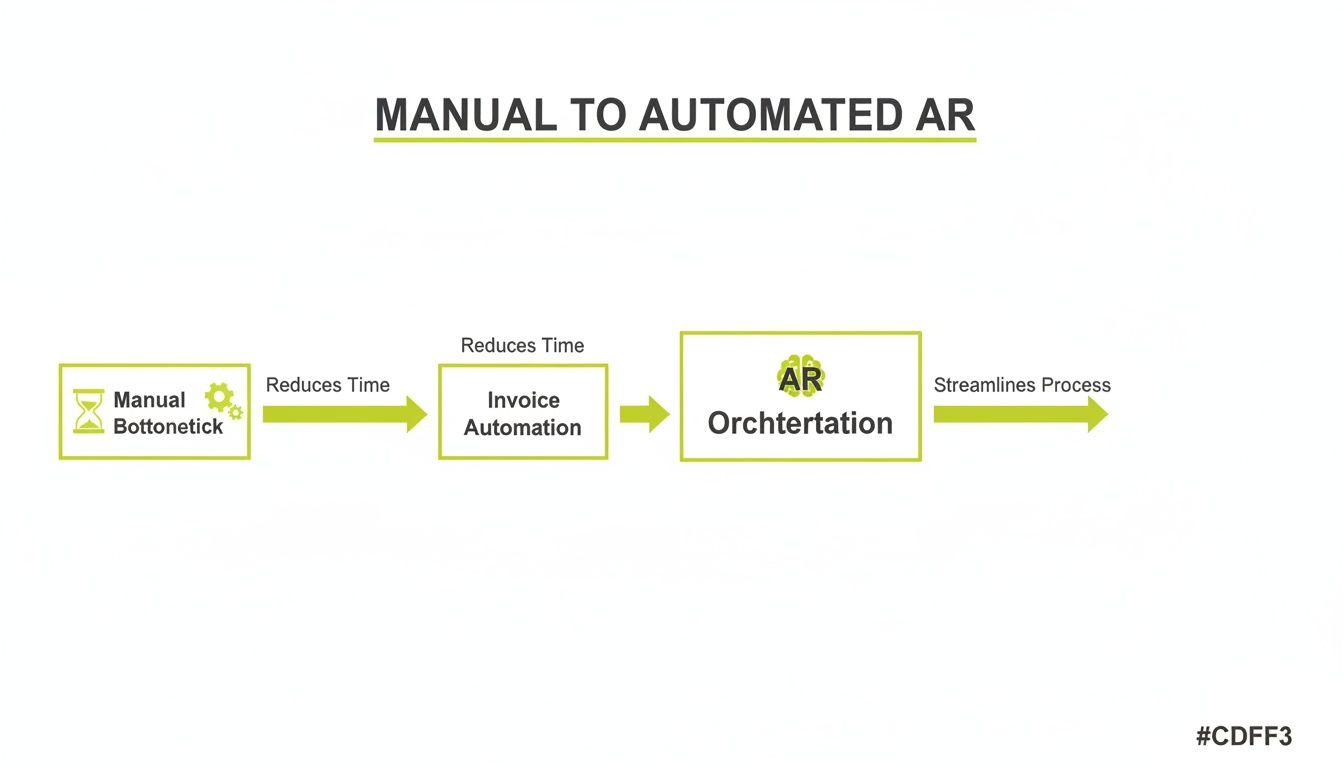
This is about moving from tactical work to strategic oversight that helps improve cash flow.
Automated Cash Application and Reconciliation
Matching incoming payments to open invoices is a time-consuming AR task. It becomes more complex when clients send a single payment for multiple bills. Manual cash application drains resources and is prone to error.
Automated cash application uses AI to instantly match payments from any source—ACH, wire, credit card—to the correct invoices. For firms using QuickBooks, this QuickBooks AR automation ensures your books are always accurate and current.
Intelligent Risk Scoring and Proactive Management
Waiting for an invoice to become 90 days past due is a reactive and costly strategy. The best AI AR automation platforms provide tools to identify at-risk accounts before they become write-offs.
Intelligent risk scoring analyzes payment histories and other data to assign a risk score to each client. This allows your team to focus on at-risk accounts, shifting AR from an administrative to a strategic function.
The market for AI-powered invoice processing is projected to grow from $2.8 billion to $47.1 billion by 2034. This signals that manual processes are no longer viable. Many of these capabilities are part of a broader trend seen in the best document automation software platforms.
The table below outlines the difference between a manual process and an orchestrated AR approach.
Manual AR vs. Automated AR Orchestration
Metric or Process | The Manual AR Approach | Automated AR Orchestration |
|---|---|---|
Days Sales Outstanding (DSO) | High and unpredictable; often 60+ days | Consistently lower; predictable cash cycles |
Team Focus | Chasing payments, data entry, manual follow-ups | Strategic analysis, client relationship management |
Client Experience | Inconsistent, often feels impersonal or nagging | Professional, consistent, and personalized |
Error Rate | High risk of billing errors and reconciliation issues | Minimal errors due to rule-based automation |
Cash Flow Visibility | Murky; requires manual report pulling | Clear and real-time, with predictive insights |
Cost to Collect | High, driven by manual labor and write-offs | Low, driven by efficiency and proactive risk management |
The shift impacts more than just the finance team’s daily tasks. It improves the financial health and predictability of the entire firm.
Calculating the Financial Impact of AR Automation
Any software investment must be justified by its financial return. The business case for invoice automation software is built on measurable outcomes that directly impact cash and operational costs.
The focus is on two primary benefits: unlocking cash by reducing Days Sales Outstanding (DSO) and cutting costs by eliminating manual work.
The Direct Impact of a Lower DSO
DSO is the clearest measure of how efficiently you convert revenue into cash. A high DSO means your earned revenue is sitting in clients' bank accounts, not yours.
The formula is:
DSO = (Accounts Receivable / Total Credit Sales) x Number of Days in Period
Consider a professional services firm with $10 million in annual revenue. If its DSO is 65 days, it has approximately $1,780,822 tied up in receivables.
Now, assume implementing AR software for professional services reduces DSO by a conservative 15 days, to 50.
- New Receivables Balance: ($10,000,000 / 365) x 50 days = $1,369,863
- Working Capital Unlocked: $1,780,822 - $1,369,863 = $410,959
This $410,959 is a permanent increase in the firm's liquidity. This cash can be used for growth, debt reduction, or to strengthen the balance sheet. The ability to consistently improve cash flow is the core driver for this investment.
Quantifying the Cost of Manual Effort
The other component of ROI is the reduction of soft costs—the hours your finance team spends on repetitive, low-value tasks.
Estimate the time spent on three key activities:
- Collections Follow-up: Manually chasing overdue invoices.
- Cash Application: Matching incoming payments to open invoices.
- Reporting and Analysis: Pulling AR aging reports and cash flow forecasts.
Assume a finance team member with a loaded cost of $50/hour spends 20 hours per week on these tasks.
- Weekly Cost: 20 hours x $50/hour = $1,000
- Annual Cost: $1,000/week x 52 weeks = $52,000
If AI AR automation eliminates 75% of this manual work, the firm saves $39,000 annually in direct labor costs. Your team can then focus on strategic credit risk management and optimizing payment terms.
The Financial Benefit of Client Experience
While harder to quantify, the client experience has a real financial impact. A manual collections process creates friction. Lost invoices and inconsistent reminders can damage the professional image your firm works to maintain.
An automated system provides a predictable, professional experience. Clients receive clear invoices, timely reminders, and simple online payment options. This frictionless process reinforces your firm's value and reduces client churn.
Your Implementation Roadmap for Invoice Automation
Implementing new financial software can be a methodical, controlled process. A phased approach ensures the switch to invoice automation software is a smooth transition, not a disruption to cash flow.
The goal is to map your proven business logic onto a more efficient platform. For a detailed perspective, this practical guide on how to automate invoice processing offers a step-by-step framework.
Scoping and System Integration
The first phase is foundational. The new system must integrate seamlessly with your existing financial core, typically your accounting software or ERP.
For firms on QuickBooks, a clean QuickBooks AR automation integration is critical. This means invoice data, client records, and payment statuses flow between both systems automatically, maintaining a single source of truth.
Key questions for this phase:
- Which specific data fields must sync?
- What is the required data sync frequency?
- Who on our team owns the accounting system integration?
Workflow Configuration and Logic Mapping
Once systems are connected, translate your collections strategy into automated sequences. This is where you codify your firm's approach to accounts receivable, setting rules for client communication and escalations.
You are essentially building decision trees. A high-value client with a strong payment history might receive a single, polite reminder. A new client with a small, overdue balance might trigger a more frequent series of automated emails.
Effective workflow configuration builds intelligent, tiered communication strategies that preserve client relationships while accelerating payment. The system should execute your best practices at scale.
This is also where you define when a human should intervene. The system should handle 90% of routine follow-ups, freeing your team to manage the complex 10% that require a direct conversation.
Pilot Program and Team Training
A small, controlled pilot program is key to a successful launch. It allows you to test new workflows on a select group of clients in a low-risk environment.
Select 10–20 clients with varied payment behaviors to test your automated sequences. During the pilot, your team can learn the platform and provide feedback.
After a successful pilot, you can proceed with team-wide training and a full launch. This phased approach mitigates risk and helps you start to improve cash flow from day one.
How to Select the Right AR Automation Partner
Choosing an AR automation partner is a long-term decision. The right partner unlocks cash flow and provides financial control. The wrong one creates integration issues and frustrates both your team and your clients.
The goal is to find a partner whose technology and philosophy align with the operational realities of a professional services firm. This means looking past marketing and into the core capabilities.
Integration and Technical Soundness
The first test for any invoice automation software is its ability to integrate with your existing tools. A one-way sync creates new manual reconciliation work.
Your questions should be direct:
- Is the sync bidirectional? A payment recorded in the AR system must instantly close the invoice in our accounting ledger, like QuickBooks Online or Desktop.
- How do you secure our data? We need to understand data encryption protocols and compliance certifications, such as SOC 2 Type II.
- Can the system scale with our firm? Do you offer API access? Will the platform handle a doubling of our invoice volume?
A true partner’s platform should feel like an extension of your accounting system. Clean data flow is the foundation for success.
Understanding of Professional Services Billing
Many AR platforms are built for e-commerce or SaaS, where invoicing is uniform. Professional services firms operate on retainers, milestone payments, and variable fees that require flexibility.
A potential partner must demonstrate they can handle this complexity.
- Can you manage our billing structures? Can the system bill based on project milestones or manage recurring retainers with overages?
- How are invoice disputes handled? Can we pause automated reminders on a specific invoice while our team resolves the issue with the client?
Generic platforms often fail here, merely shifting manual work from one system to another.
Customization, Support, and a Vision for the Future
You are investing in a long-term partnership. The vendor’s support model and product vision are as critical as its current features.
- How much control do we have? Can we customize the tone, timing, and channel of communications based on client type or invoice age?
- What does your onboarding process involve? What are your guaranteed response times for urgent support issues?
- What is your product roadmap for the next 12–18 months?
Selecting a vendor is a significant commitment. For a complete checklist, see our guide on how to choose AR automation software that works for professional services firms.
The right partner provides a clear path to financial control and predictability.
The Real-World Impact on Cash Flow and DSO
The true value of invoice automation is measured by its tangible impact on a firm's financial health and operational tempo.
These examples from professional services firms demonstrate the results of moving from manual AR to an intelligent, automated approach.
The Consulting Firm That Reduced DSO by 15 Days
A mid-sized management consultancy with $15M in annual revenue had a DSO of 72 days, a constant drag on cash flow. The finance team spent the first week of every month manually chasing overdue invoices.
They implemented AR software for professional services to automate their follow-up sequences.
- The Problem: The collections process was inconsistent and manual, with no clear escalation path.
- The Fix: They configured automated, multi-stage reminder workflows. Gentle emails for invoices 1-15 days overdue; a more direct email and account manager notification for 16-30 days past due; and a flag for a personal call on invoices over 30 days.
- The Outcome: Six months later, their DSO dropped from 72 to 57 days. This 15-day reduction unlocked over $616,000 in working capital and gave the finance team predictable control over cash flow.
The firm moved from reactive chasing to proactive financial management.
The Marketing Agency That Reclaimed 75% of Its Collections Time
At a $5M digital marketing agency, the controller was spending 25 hours per week on AR administration—reconciling payments, sending follow-ups, and updating their QuickBooks ledger.
They adopted an AI AR automation platform with a deep, bidirectional sync for QuickBooks AR automation.
The objective was to eliminate low-value, repetitive tasks so the controller could focus on strategic work that supported growth.
The platform's AI-driven cash application was the key. When clients paid, the system automatically matched payments to open invoices and marked them as paid in both the AR platform and QuickBooks.
- The Problem: Excessive manual labor was spent on collections, payment matching, and data entry.
- The Fix: They implemented a system combining automated outreach with intelligent cash application.
- The Outcome: Time spent on manual collections fell by 75%, from 25 hours a week to about 6. This allowed the controller to focus on financial modeling and client profitability analysis.
These results show that intelligent accounts receivable automation delivers measurable improvements to a firm's key financial metrics.
Common Questions About Invoice Automation
Here are direct answers to the questions we hear most often from professional services firms.
Will This Make Our Client Communications Feel Robotic?
No, not with the right platform. Modern accounts receivable automation is designed for high-touch personalization. It handles routine, predictable follow-ups, freeing your team for conversations that require a human touch. You control the tone, timing, and channel to match your firm's voice.
How Does Invoice Automation Work With QuickBooks?
Effective AR software for professional services offers a deep, bidirectional sync with QuickBooks. When an invoice is created in QuickBooks, it appears in the AR platform. When a payment is made, the invoice is marked as paid in both systems automatically. This QuickBooks AR automation eliminates double-entry and keeps your books clean.
What Is a Realistic Timeline to Lower DSO?
Most firms see a measurable improvement within the first 90 days. This initial drop comes from the system consistently following up on aged receivables that previously fell through the cracks.
A larger, sustainable reduction typically solidifies around the four-to-six-month mark. By then, your processes are refined and clients are accustomed to a predictable payment experience. This is how you consistently improve cash flow.
The system builds a reliable collections rhythm, which is the foundation of a financially healthy firm.
This methodical approach to AI AR automation ensures technology supports your firm’s operations.
--- Resolut automates AR for professional services—consistent, accurate, and human. Learn more at https://www.resolutai.com.