What Is an AR Ageing Report and Why It Matters for Your Firm
Learn what is ageing report and how to use it to improve cash flow, reduce DSO, and forecast your firm's financial health with practical steps.
An accounts receivable ageing report is a fundamental tool for financial control. It lists all unpaid client invoices, categorized by how long they have been outstanding.
The report provides immediate clarity on two critical questions: Who owes the firm money, and for how long? For any professional services firm, this document is the primary diagnostic for the health of its receivables and cash flow.
Your Ageing Report Is a Financial Diagnostic
For CFOs and Controllers in professional services, the AR ageing report is more than a list of debts. It is a real-time diagnostic, measuring the strength and predictability of the firm's incoming cash.
Each line item is a data point. It tells a story about a client's payment patterns, potential credit risks, and operational friction in your invoicing cycle.
A well-maintained ageing report provides the intelligence to act before small issues escalate. It enables more accurate cash forecasting, flags high-risk clients, and identifies bottlenecks in your billing and collections processes.
Without this clarity, firms are forced to react to cash flow problems instead of preventing them.
An ageing report transforms accounts receivable from a passive balance sheet item into an active performance indicator. Its value is not just in the data it presents, but in the strategic questions it forces you to ask about your clients and processes.
Before we go deeper, let's break down exactly what you're looking at when you pull up one of these reports. The table below outlines the key components and what they signal to a finance leader.
Key Components of an AR Ageing Report
Component | What It Tells You |
|---|---|
Customer Name | Identifies which client the outstanding invoices belong to. Essential for targeted follow-ups. |
Invoice Number | The unique identifier for each bill. Critical for referencing specific payments and disputes. |
Invoice Date | The date the invoice was issued. This is the starting point for calculating its age. |
Due Date | The date payment is expected. The difference between this and today's date determines if it's overdue. |
Invoice Amount | The total value of the invoice. Helps prioritize collections based on the largest outstanding sums. |
Ageing Buckets | Columns that group invoices by how long they are past due (e.g., 0-30, 31-60 days). |
Total Amount Due | The sum of all outstanding invoices for a specific client and across all clients. |
This structure provides an organized view, turning a simple list of numbers into a powerful diagnostic tool for your firm's financial health.
From Data Points to Strategic Insights
This report is the foundation for critical operational decisions. It can flag deeper issues long before they appear on the P&L statement.
For example, it can reveal:
- Ineffective Collection Processes: Is a significant portion of receivables in the 61-90 day bucket? This indicates a slow or ineffective follow-up process.
- Client Relationship Strain: When a key client consistently pays late, it may signal dissatisfaction with service delivery, requiring a conversation beyond the finance team.
- Billing Inaccuracies: A pattern of disputes tied to specific projects can point to problems with scope-of-work agreements or invoicing errors.
By using automation, you can ensure this report is always current and accurate. This gives you the ability to improve cash flow systematically rather than chasing individual invoices. Reading the signals in your ageing report is the first step toward controlling your firm's financial operations.
How to Read and Interpret Ageing Buckets
The power of an ageing report lies not in the total receivable balance, but in the distribution of that balance across the ageing buckets. These columns tell a story about your firm’s financial health in real time.
They show exactly who owes you what and, more importantly, for how long. Each bucket represents a different level of risk to your cash flow.
Visual Idea: A cinematic shot over the shoulder of a CFO in a modern, quiet office. They are looking at a tablet displaying a clean, color-coded AR ageing report. The focus is sharp on the "61-90 Days" column, which is highlighted in amber, indicating a point of concern.
Learning to read these buckets turns a simple report into a strategic tool. These are not just numbers; they are signals that inform credit policies, focus collection efforts, and flag at-risk client relationships.
The Story Each Bucket Tells
A standard ageing report breaks down receivables into a clear timeline. While tools like QuickBooks AR automation allow for customization, most firms use a familiar structure:
- Current (0-30 Days): These are invoices that are not yet due. A high balance here indicates healthy business activity and efficient billing.
- 1-30 Days Past Due: This is the first warning signal. An invoice here requires a prompt, professional follow-up. This is the most effective window for intervention.
- 31-60 Days Past Due: The invoice is now significantly late. A growing balance in this bucket may indicate a client issue or an internal process failure.
- 61-90 Days Past Due: Invoices here represent a material credit risk. The probability of collecting the full amount begins to decrease significantly at this stage.
- 90+ Days Past Due: This is the highest-risk category. These receivables have a high probability of becoming bad debt, requiring a write-off that directly impacts profitability.
Reviewing the distribution across these buckets gives you a clear picture of cash flow, credit risk, and client payment discipline.
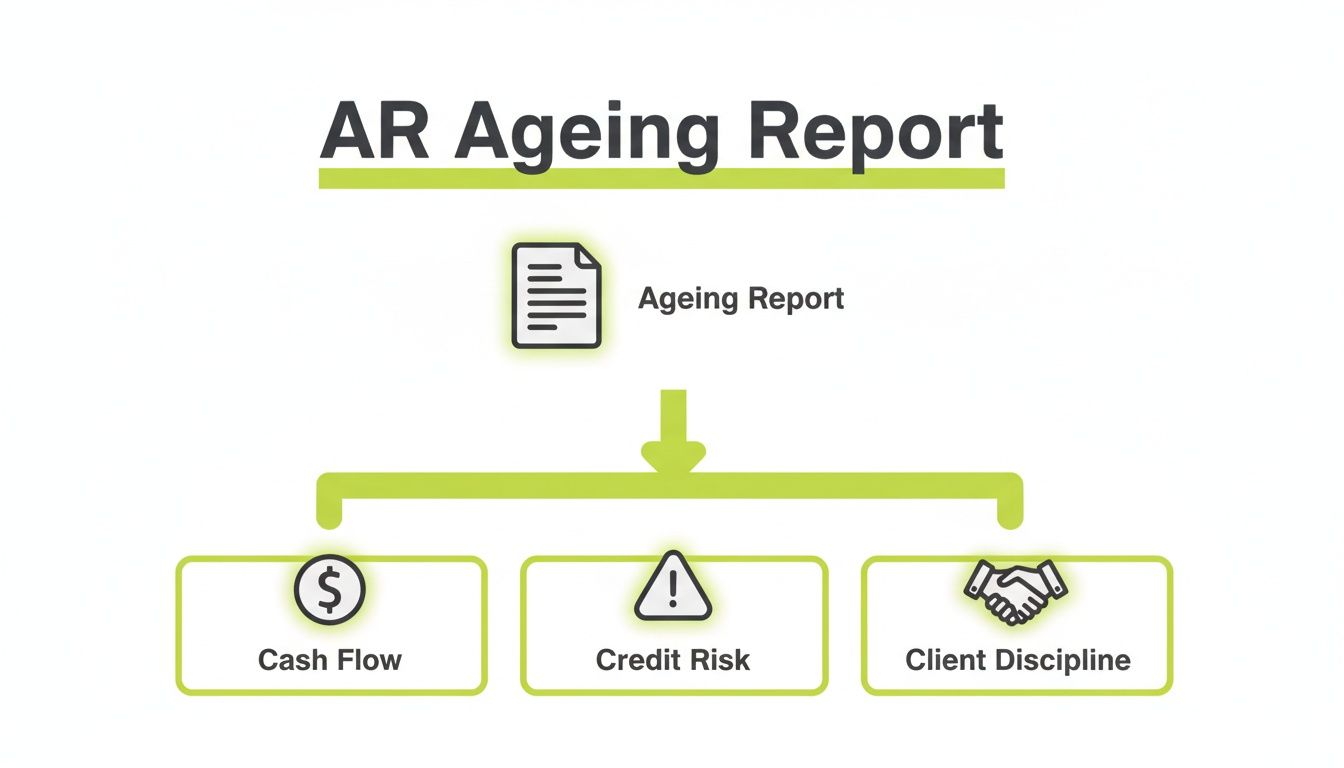
As you can see, one report feeds into multiple strategic areas. It turns a list of debts into a powerful diagnostic tool for the entire firm.
A Real-World Example
Imagine your firm has $12M in annual revenue. The Q2 ageing report shows $250,000 in the 61-90 day bucket from a single client.
This is not just a late payment; it’s a symptom. It could signal a dispute over deliverables or, more seriously, that the client is facing financial distress.
This requires an immediate, high-level conversation, not just another automated reminder. This is where accounts receivable automation provides value—by flagging such anomalies before they escalate.
This disciplined analysis is the foundation you need to improve cash flow and reduce DSO.
Key Performance Indicators Your Ageing Report Reveals
An ageing report is the source data for calculating vital financial KPIs. These metrics translate columns of numbers into a clear, actionable story about your firm's operational performance.
For a CFO or Controller, this isn't just data. It's the scoreboard for cash management.
Two of the most critical KPIs derived from this report are Days Sales Outstanding (DSO) and the Collection Effectiveness Index (CEI). Together, they provide a complete picture of how efficiently your firm converts billable work into cash.

Calculating Days Sales Outstanding
Days Sales Outstanding (DSO) measures the average number of days it takes to collect payment after an invoice has been sent.
A low DSO indicates that cash is flowing into the business quickly. A rising DSO is a direct warning that your collections cycle is slowing down.
The standard formula is:
DSO = (Total Accounts Receivable / Total Credit Sales) x Number of Days in Period
For example, a firm with $1.5M in accounts receivable and $4.5M in total credit sales over a 90-day quarter has a DSO of 30 days. This is a strong metric for most professional services firms. Tracking DSO monthly reveals performance trends.
A More Nuanced View with CEI
While DSO provides a high-level view, the Collection Effectiveness Index (CEI) offers a more precise measure of your team's performance. It answers one question: "Of the money that was available to be collected this period, what percentage did we actually collect?"
Here’s the formula:
- CEI = ((Beginning Receivables + Monthly Credit Sales) - Ending Total Receivables) / ((Beginning Receivables + Monthly Credit Sales) - Ending Current Receivables) x 100
A CEI of 100% is the goal, but a consistent score over 80% indicates a strong collections function. Unlike DSO, which can be skewed by sales volume fluctuations, CEI isolates collection performance. For a deeper dive, see how these KPIs fit into a broader strategy in these best practices for receivable management services.
Pairing DSO with CEI provides a comprehensive view of both the speed and effectiveness of your collections.
This is where modern AR software for professional services delivers value. It automates these calculations and displays them on a real-time dashboard, enabling data-driven decisions to reduce DSO and improve cash flow.
What Problems Your Ageing Report Is Trying to Tell You
Your ageing report is more than a list of outstanding invoices. It is a diagnostic tool that reveals underlying friction in your operations.
It is the patterns that matter. A single late payment is a task. A client who consistently appears in the 31-60 day bucket signals a deeper issue with the relationship, your processes, or service delivery.
Reading Between the Lines
A disciplined review of the ageing report connects the symptoms on the page to their root causes. Recurring themes are clues that point to operational weaknesses.
Here are common issues the report flags:
- Systemic Invoicing Errors: Are invoices for certain project types consistently disputed? This often points to vague SOWs or incorrect billing codes.
- Ineffective Collection Tactics: If a significant portion of your AR is aged 60+ days, your follow-up process is not working. The reminders may be too infrequent or lack the right tone.
- Unresolved Client Disputes: A large, static invoice in an older bucket often indicates client dissatisfaction with the work performed, requiring intervention from account management.
- A Sales-to-Finance Disconnect: Does a client consistently pay late due to a mismatch between sales terms and finance's billing? This gap creates friction and damages cash flow.
When the ageing report is viewed as a cross-departmental diagnostic tool, it evolves from a collections checklist to a catalyst for process improvement. It prompts conversations that prevent the same problems from recurring.
This analysis is increasingly important amid larger economic shifts. For example, demographic changes are impacting financial systems globally. In the EU, the old-age dependency ratio is projected to jump from 33.9% in 2024 to nearly 59.7% by 2100. You can explore more about these demographic shifts and their economic impact.
From Diagnosis to Action
The objective is to use these insights to drive measurable change. A pattern of late payments from a key client may require renegotiating terms to a 15-day cycle or setting up automated payments.
This is what AI AR automation is designed to address. It analyzes payment histories to flag at-risk accounts early and adjusts outreach based on client behavior. This frees up your team to solve root-cause problems, which is how you sustainably reduce DSO and improve cash flow.
From Manual Reports to Intelligent Automation
Pulling an ageing report from QuickBooks is a familiar, reactive process. The data is outdated the moment it's exported.
The time spent manipulating spreadsheets is time not spent on strategic action: determining who to call, what to say, and how to accelerate cash collection. For a $10M firm, even a small percentage of slow payments tied up in manual processes represents significant working capital.
The core problem is that manual reporting shows what happened yesterday, not what you should do today.

The Lift You Get From Automation
Implementing intelligent accounts receivable automation elevates your finance team from administrative work to strategic analysis. They can focus on managing high-risk accounts and improving processes rather than manual follow-ups.
The operational benefits are immediate:
- Real-Time Visibility: A live AR dashboard provides current data for faster, more informed decisions, replacing static spreadsheets.
- Proactive Workflows: Automation triggers collection activities based on predefined rules. A professional reminder is sent automatically when an invoice hits 31 days past due.
- Fewer Human Errors: Automation eliminates the manual data entry and reporting errors that compromise data integrity.
This shift transforms AR from a cost center into a strategic function. For a closer look at the tools involved, see this guide to accounts receivable automation software.
Beyond Automation to AI-Driven Orchestration
Modern AR software for professional services now incorporates AI AR automation. It does not just automate tasks; it orchestrates the entire collections process with intelligence.
An AI-driven system analyzes a client's payment history, communication patterns, and invoice size to determine the optimal action and timing. It personalizes outreach, deciding whether a soft email reminder is sufficient or if an account requires a direct phone call.
For example, the system may learn that one client consistently pays after the second reminder, while another responds only to SMS. This level of orchestration helps reduce DSO and improve cash flow without damaging client relationships. This is the operational control that manual processes can never provide.
The Future of AR Is an Automated Ageing Report
The accounts receivable ageing report is a cornerstone of financial management. Its familiar structure—current, 31-60, 90+ days—provides an essential snapshot of a firm’s cash position.
But its value is magnified when the report evolves from a static document into a live, automated system.
A manual report is a photograph: a moment frozen in time. An automated one is a real-time diagnostic feed, constantly scanning for issues before they impact cash flow. This is the logical next step for any finance team focused on performance.
From Static Data to Strategic Action
The goal is not just to identify late payers. It is to build a collections process so professional and efficient that fewer clients become seriously delinquent in the first place.
This is where accounts receivable automation changes the function. Instead of staff spending hours determining who to contact next, an intelligent system handles routine, persistent follow-up. This consistent outreach keeps your firm top-of-mind and professionalizes the payment experience.
The future of the ageing report is not the report itself, but the intelligent system built around it. It turns AR from a reactive, manual task into a proactive, strategic function that directly contributes to financial stability.
By engaging clients earlier and more consistently, firms can measurably reduce DSO and improve cash flow. This approach replaces last-minute collection calls with timely, professional reminders that strengthen, rather than strain, client relationships.
This ensures your most valuable asset—cash—is managed with precision and foresight.
A Few Lingering Questions
Here are the most common questions we hear from finance leaders aiming to improve their firm's cash flow.
How Often Should I Be Running an Ageing Report?
For most professional services firms, a weekly review is optimal. It is frequent enough to identify issues before they escalate, without creating excessive administrative work. Monthly reporting is insufficient; by the time an issue is visible, it is already old.
Of course, an effective accounts receivable automation platform makes this a non-issue. With a real-time dashboard, you stop "running reports" and start making decisions.
What’s a Good DSO for a Professional Services Firm?
A healthy Days Sales Outstanding (DSO) for a professional services firm typically falls between 30 and 45 days. A DSO under 30 indicates exceptionally efficient operations.
When DSO exceeds 60 days, it signals a potential issue in the invoicing process, client satisfaction, or collections follow-up that requires attention.
Visual Idea: A clean dashboard view showing a single large number for "Current DSO" (e.g., 38 days) with a small, green downward-trending arrow next to it, indicating positive momentum.
Can an Ageing Report Help Me Provision for Bad Debt?
Yes. It is the best tool for this purpose. The AR ageing report provides a data-driven method for estimating the allowance for doubtful accounts.
A common approach is to apply an increasing provision percentage to older ageing buckets. For example:
- 1% for invoices 31-60 days past due.
- 5% for invoices 61-90 days past due.
- 25% or more for anything over 90 days.
This method replaces guesswork with a systematic process, protecting the balance sheet from unexpected write-offs.
--- Resolut automates AR for professional services—consistent, accurate, and human. Learn more at https://www.resolutai.com.