
Optimize Collections with Automated Debt Collection Software
Discover automated debt collection software to reduce DSO, boost cash flow, and find AR automation for your professional services firm.
Manual receivables work looks harmless on a weekly dashboard. It rarely stays harmless for long.
A professional services firm can post solid revenue, keep utilization high, and still feel short on cash because billing, follow-up, dispute handling, and reconciliation are running through inboxes, spreadsheets, and memory. The issue isn’t just slow payment. It’s weak control.
That’s why automated debt collection software matters. Used well, it isn’t a blunt collections tool. It’s an operating layer for accounts receivable automation, payment follow-up, and escalation discipline. It gives finance leaders a way to reduce variability in cash collection without damaging client relationships.
The Unseen Drag on Your Firm's Cash Flow
Globally, enterprises waste an estimated $200B annually on administrative tasks related to managing unpaid invoices, according to IMARC Group’s debt collection software market analysis. For a CFO or controller, that figure matters because it reframes AR work as a cost center with direct impact on liquidity.

In professional services firms, the drag shows up in familiar ways. Partners review aging reports late. Project leads promise a client they’ll “sort it out” without looping in finance. An admin team sends reminders inconsistently because they’re also handling payroll, onboarding, and billing corrections.
The result is unstable collections behavior.
Why manual AR becomes expensive fast
Aging receivables create more than delayed cash. They create decision fog.
- Forecasting weakens: Cash-in assumptions become less reliable, which affects hiring, draws, bonuses, and vendor planning.
- Senior time gets pulled into collections: Partners and practice leaders end up chasing invoices instead of managing delivery or growth.
- Client treatment becomes inconsistent: One customer gets a soft nudge. Another gets silence. A third gets an overly sharp email because someone is frustrated.
Practical rule: If your AR process depends on who remembers to follow up, you don’t have a process. You have a habit.
The core issue is control
Most firms don’t need more aggressive collections. They need more consistent collections.
That means a defined cadence before due date, a standard sequence after due date, rules for when finance steps in, and a clear point where a matter moves from routine AR management into formal recovery. Without that structure, improve cash flow becomes a hope, not an operating outcome.
This is why AI AR automation has become relevant even for firms that once saw it as enterprise software. The value isn’t novelty. The value is control over follow-up, escalation, documentation, and cash application.
From AR Automation to Debt Collection An Operational Framework
Basic accounts receivable automation handles tasks. True automated debt collection software manages decisions.
That’s the practical line finance teams should use when evaluating tools. A reminder engine can send an email five days before due date. An orchestration platform decides what happens before the due date, after the due date, after a partial payment, after a promise to pay, after a dispute, and after internal escalation.
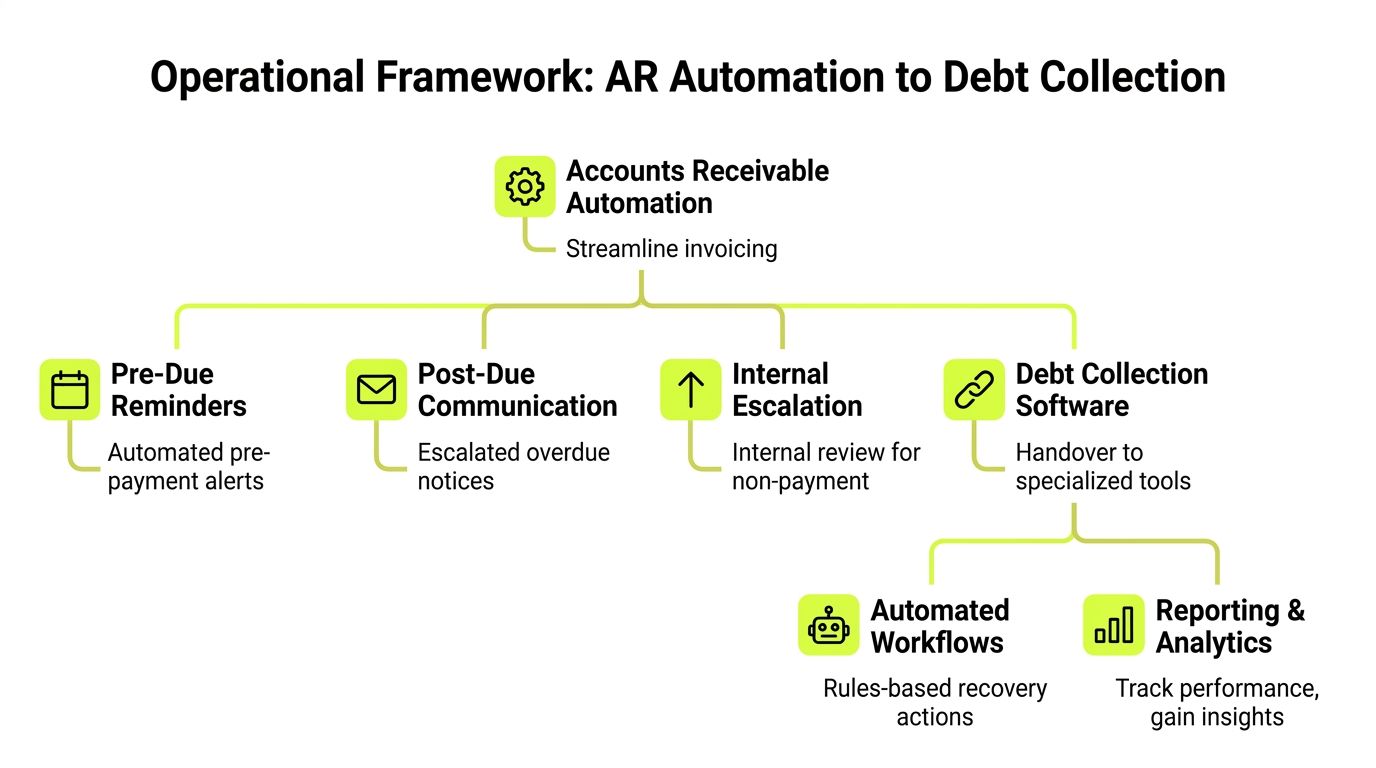
A useful mental model
Think of basic automation as a calendar alert.
Think of AR orchestration as air traffic control.
One reminds you to act. The other coordinates timing, priority, routing, exceptions, and safety rules across the whole system.
That distinction matters because the market is moving toward integrated platforms. The global debt collection software market is projected to reach USD 9.27 billion by 2030, growing at a 9.6% CAGR, driven by the shift away from standalone tools toward integrated platforms that automate communications, compliance, and analytics, according to Grand View Research.
What that framework looks like in practice
For a professional services firm, the operating framework usually has five layers.
- Invoice creation and timing Clean billing still comes first. If invoices go out late or with missing support, no workflow will save the collection cycle.
- Pre-due communication This is the polite, preventive layer. It reduces surprise and gives clients a chance to flag issues before the invoice ages.
- Post-due sequence At this stage, many firms fail. They either wait too long or escalate too early. A structured cadence fixes both.
- Internal coordination Finance, account leads, and firm leadership need shared visibility. If a client is strategically important, the system should support a controlled handoff rather than a disconnected email thread.
- Formal recovery path Not every overdue invoice belongs with an agency or legal process. But every firm needs a defined threshold for when standard AR ends and recovery begins.
A lightweight tool can help with the first two layers. If your team is still refining reminder cadence, a resource on automated invoice chasing can help frame the basics.
If you’re evaluating broader orchestration, this guide on https://www.resolutai.com/blog/accounts-receivable-automation-software is useful for mapping the gap between reminder automation and end-to-end AR control.
What works and what doesn’t
A lot of firms buy software to automate emails. That usually helps for a while.
It doesn’t solve the harder questions:
- Which invoices should get human attention first?
- When should a project lead be pulled in?
- What happens when a client pays partially?
- How do you document disputes and promises to pay?
- Which accounts are safe for autopilot, and which need review?
Good AR automation standardizes routine work. Good automated debt collection software also standardizes judgment boundaries.
That difference is what turns a tool into an operating system.
Key Features That Drive Financial Control and Efficiency
Feature lists usually hide the fundamental question. What changes in daily finance operations after the system goes live?
The best answer is simple. Your team stops treating every overdue invoice the same way.
Intelligent prioritization
Most manual teams work oldest-first. That feels disciplined, but it often isn’t the highest-return method.
AI-based prioritization changes the work queue by ranking accounts based on likely payment behavior and expected impact. According to HighRadius, AI-based prioritization can lead to a 20% reduction in past-due invoices and a 30% increase in collector productivity, while allowing teams to cover 4X more past-due accounts.
For an operator, the point isn’t the algorithm itself. The point is better allocation.
A firm with two hundred open invoices doesn’t need staff treating all two hundred as equal. It needs the system to surface:
- invoices likely to pay with a light reminder
- accounts needing immediate human outreach
- clients with dispute risk
- balances that should move toward controlled escalation
That’s where AI AR automation starts to earn its keep.
Omnichannel outreach with policy control
Email alone isn’t enough in many firms. But random use of calls, texts, and one-off partner outreach creates noise.
Strong automated debt collection software supports channel rules. Finance can define what gets sent, when it gets sent, who approves changes, and what happens if a client doesn’t engage. The value is consistency.
For professional services, tone matters as much as timing. The message should sound like a firm protecting commercial discipline, not a collections shop trying to pressure a customer.
If you want to reduce DSO, standardize the sequence first. Then personalize within that structure.
A practical workflow often includes:
- Pre-due reminders: Friendly notices tied to invoice date and expected payment method
- Post-due nudges: Short, factual reminders with invoice details and payment options
- Escalation messages: Clear statements that the account now needs finance review
- Relationship-sensitive routing: High-value or strategic accounts go to a named internal owner before harsher steps trigger
Teams that want a broader operational lens can review these business process automation benefits and apply the same discipline to AR workflows rather than treating collections as a disconnected back-office task.
Self-service payment paths
Clients often pay late for ordinary reasons. They can’t find the invoice. They need a copy of the engagement reference. They want a simpler payment path. They need to split internal approvals across departments.
A self-service portal removes friction.
For AR software for professional services, that matters because clients are usually not consumers making impulse payments. They are finance teams, office managers, general counsel, or business owners working through a process. The easier you make that process, the faster cash tends to move.
The portal should do a few things well:
Capability | Why it matters operationally |
|---|---|
Invoice visibility | Cuts the back-and-forth on “please resend” requests |
Simple payment options | Reduces delays caused by payment friction |
Clear account history | Helps resolve disputes before they age further |
Promise-to-pay capture | Gives finance a documented next step |
This is one of the quietest levers to improve cash flow. It reduces avoidable delay without increasing pressure.
Automated cash application and reconciliation
Many firms improve reminders and still lose time after the payment arrives.
The primary administrative burden often sits in cash application. Someone has to match remittances, identify short pays, update the ledger, and clear exceptions. If your firm uses QuickBooks, this becomes especially visible when multiple payments, credits, and old invoices overlap.
QuickBooks AR automation should be evaluated here, not just on email cadence.
A strong platform doesn’t stop at outreach. It pushes through to reconciliation so finance can see what’s been paid, what’s open, and what needs follow-up without rebuilding the picture manually.
Common signs this area needs work:
- unapplied cash sitting too long
- duplicate follow-ups after payment
- invoices marked overdue because records lag reality
- month-end cleanup that depends on one experienced employee
When cash application is automated well, the finance team gains something more valuable than saved clicks. It gains cleaner reporting and fewer client-facing mistakes.
Escalation with restraint
Late-stage collections in professional services require judgment. Some accounts need a firmer voice. Others need a calm commercial conversation because the relationship still matters.
That’s why managed escalation matters more than raw automation. The system should support thresholds, approvals, and message changes as risk increases. It should also document every touchpoint so leadership can defend the process if a client challenges it.
One platform option in this category is Resolut, which combines outreach, payment workflows, cash application, and human-in-the-loop controls for AR orchestration in service businesses. The important point isn’t the brand. It’s the operating model. Lower-risk accounts can run on autopilot, while sensitive accounts stay in co-pilot mode.
Reporting that changes behavior
Dashboards don’t matter unless they help finance act.
Useful reporting in automated debt collection software usually answers four questions:
- Where is cash stuck?
- Which accounts need human intervention today?
- What’s improving or worsening by client segment?
- Is the workflow reducing manual effort without creating client risk?
That last question gets missed. A report that only shows collections volume can hide bad process. The firm may be collecting, but through too much partner intervention, too many exceptions, or too much strain on client goodwill.
The right features don’t just automate work. They tighten control over how cash enters the business.
Implementing AR Automation A Phased Approach for Professional Services
The safest implementations don’t start with software. They start with policy.
If your team can’t describe the current collection path in a few clear stages, the tool will automate inconsistency. That’s why rollout should be phased, with decisions made in business terms rather than technical terms.

Phase one sets the rules
Start with scope.
Define which entities, service lines, and client segments are included first. Most firms should begin with one business unit or one invoice class rather than every receivable at once.
Then define the operating rules:
- Due-date policy: What counts as standard, overdue, and escalation-ready
- Ownership model: When finance owns the account and when relationship owners step in
- Exception handling: Who handles disputes, partial payments, and billing errors
- Tone standards: What language is acceptable by stage and by client type
This is also where autopilot versus co-pilot should be decided. Routine invoices with lower relationship sensitivity can usually run with more automation. Strategic accounts, large balances, and disputed matters usually need a human review step before escalation.
Phase two connects the data
Many projects wobble at this point. Fifty-two percent of companies face operational friction from incompatible systems, and without smooth API integrations, manual reconciliation persists, according to HighRadius’ analysis of debt collection tools.
For a professional services firm, the practical issue is familiar. Billing lives in one place. Client contacts sit in another. Notes on payment issues sit in email. Collections activity sits nowhere reliable.
That’s why integration work needs to focus on fields and ownership, not just sync status.
Integration area | What to verify before go-live |
|---|---|
Accounting system | Invoice status, credits, and payment timing sync correctly |
Client records | Primary contact and escalation contact are current |
Payment workflow | Links, references, and remittance handling are reliable |
Reporting layer | Aging, disputes, and collector notes are visible in one view |
If you’re mapping recovery stages alongside broader receivables control, https://www.resolutai.com/blog/debt-recovery-for-businesses is a useful reference point for drawing the line between internal AR and more formal debt recovery processes.
Phase three trains the people who use it
Training should be role-based.
Finance needs to know workflow logic, overrides, and exception queues. Partners need to know when they’ll be asked to intervene. Operations staff need to know how payments, disputes, and documentation flow through the system.
A short visual walkthrough can help teams align on the process before launch.
Phase four measures behavior before results
Most firms want to see cash impact immediately. Fair enough. But the earliest signal of success is process adherence.
Check whether the team is using the system consistently:
- are reminders going out on schedule
- are exceptions being tagged correctly
- are partners receiving fewer ad hoc requests
- are paid invoices leaving the queue promptly
- are disputed accounts routed cleanly
The first win in AR automation is consistency. The cash benefit follows that consistency.
A phased rollout gives you room to fix workflow gaps before they become client-facing problems.
Evaluating Vendors An Operator's Checklist
Vendor demos tend to overemphasize screens and underemphasize operating risk. A controller should push the discussion toward workflow control, integration depth, and reporting integrity.
The best question isn’t “What features do you have?” It’s “How will this behave inside our firm when invoices are late, disputed, partially paid, or tied to sensitive client relationships?”
The shortlist questions that matter
Use the platform review like due diligence, not procurement theater.
Evaluation Criteria | Key Questions to Ask | Weight |
|---|---|---|
Integration reliability | How does the system handle invoice updates, payment sync, credits, and exceptions with our accounting stack, especially if we rely on QuickBooks? | High |
Workflow flexibility | Can finance change reminder cadence, escalation steps, and approval paths without vendor dependency? | High |
Relationship controls | Can we separate low-risk autopilot accounts from strategic accounts needing human review? | High |
Cash application | How are incoming payments matched, and how are short pays or unapplied amounts handled? | High |
Reporting quality | Can we see aging, disputes, promises to pay, and user actions in one operational view? | High |
Compliance support | What audit trail exists for communication history, approvals, and escalation actions? | Medium |
Ease of adoption | How much training do collectors, admins, and partners need to use it properly? | Medium |
Total cost of ownership | What internal effort is required for implementation, maintenance, workflow changes, and support? | High |
External recovery path | If internal AR fails, how does the platform support agency, legal, or formal recovery workflows? | Medium |
What strong answers sound like
Good vendors answer in workflow terms.
They explain how invoice status changes move through the system. They show what a collector sees when a client disputes a bill. They explain whether a partner can be added to a controlled escalation without turning the process back into inbox management.
Weak vendors answer in abstractions. They talk about “integrated experiences” and “powerful AI” without showing exception handling.
Ask for the ugly scenarios
A solid evaluation includes edge cases:
- a client pays part of an invoice
- a client claims they never received the bill
- the billing contact left the company
- a strategic account goes overdue during a renewal discussion
- a payment arrives without usable remittance detail
If the workflow breaks under those conditions, the demo was cosmetic.
A helpful benchmark is to compare software questions against your broader recovery policy. This resource on https://www.resolutai.com/blog/ar-collection-agency can help frame when software should continue the internal process and when a different recovery route is warranted.
Buy for exceptions, not just for the happy path. Routine reminders are easy. Controlled escalation is where platforms earn their value.
Measuring ROI and Avoiding Common Pitfalls
ROI in AR automation is rarely just one metric. Finance leaders should measure both cash impact and control improvement.
The most useful scorecard combines primary outcomes with operational signals.
What to measure
Primary measures should sit close to cash:
- DSO trend: Is the firm collecting faster than before?
- Overdue exposure: Is the aging bucket shrinking in the segments you targeted?
- Cash forecast reliability: Are inflow expectations becoming more dependable?
Secondary measures show whether the engine is working:
- Team productivity: Are staff spending less time on repetitive follow-up?
- Exception volume: Are disputes and unapplied cash easier to identify and resolve?
- Partner interruption rate: Are fewer collection issues landing informally with senior staff?
A project can look successful, but it may still be operationally fragile. If collections improve only because one controller is manually correcting the system every day, the ROI isn’t durable.
What commonly goes wrong
The biggest implementation mistake is set-and-forget behavior.
Workflows need review. Client segments change. Billing patterns shift. A cadence that works for retainer clients may be wrong for project-based invoices or milestone billing.
Another common mistake is tone drift. The software sends messages exactly as configured. If the language is too passive, nothing moves. If it’s too sharp, the firm creates unnecessary relationship stress.
This is not theoretical. Retrievables notes that recovery rates can drop 15-25% in certain markets if tone isn’t adapted, highlighting the need for human-in-the-loop controls.
Guardrails that keep ROI real
The firms that get durable value usually put a few controls in place:
- Monthly workflow review: Check sequence timing, payment friction, and exception routing
- Segment-based messaging: Use different approaches for routine clients, strategic accounts, and disputed invoices
- Data hygiene discipline: Keep contacts, invoice references, and account ownership current
- Human review points: Require approval before stronger escalation on sensitive accounts
Automation should remove manual work, not managerial judgment.
If you want to reduce DSO without damaging trust, that’s the balance to protect. The software should make the process more consistent, more visible, and easier to manage. It shouldn’t turn your client relationships into a script.
Conclusion Real-World Application with Resolut
In professional services, the practical win isn’t “doing collections with AI.” It’s building a receivables process that is consistent enough to support growth and controlled enough to protect client relationships.
That’s where a platform like Resolut fits the operating model described above.
Example one
A consulting firm in the lower middle market often has solid revenue but inconsistent post-invoice follow-up. The billing team sends reminders. Engagement leads step in late. Finance spends too much time figuring out which overdue balances are collectible now.
In that situation, the useful application is risk-based prioritization plus a structured post-due sequence. The firm gets a cleaner work queue, better visibility into which accounts need human involvement, and fewer random escalations through partner inboxes.
Example two
A law firm usually cares about two things at once. Cash discipline and client discretion.
The practical fit there is a branded payment experience combined with QuickBooks AR automation and controlled messaging. Finance can keep reminders factual and timely, let clients pay with less friction, and reduce the administrative load that usually sits between payment receipt and ledger cleanup.
Example three
A fractional CFO or outsourced finance team needs multi-client visibility without running each client’s AR process from a separate spreadsheet. That setup benefits from standardized workflows, client-specific escalation rules, and one reporting layer that shows where cash is stuck across the portfolio.
That’s less about flashy automation and more about operational efficiency.
The right system gives finance a repeatable way to collect cash. The best one does it without making the firm sound less professional.
Automated debt collection software is worth the effort when it tightens process, improves reporting, and gives your team clear intervention points. For firms between $3M and $50M, that usually matters more than feature breadth.
Frequently Asked Questions
Is automated debt collection software too aggressive for professional services
Not if it’s configured correctly. In a healthy setup, the software supports structured AR management first. It sends consistent reminders, documents activity, and escalates only when rules are met. The goal is disciplined communication, not aggressive pressure.
What’s the difference between accounts receivable automation and debt collection software
Accounts receivable automation usually starts earlier in the cycle. It covers invoicing, reminders, payment links, and reconciliation. Debt collection software handles later-stage delinquency with stronger escalation logic, tighter controls, and more formal recovery workflows. Many firms need both in one operating model.
Can smaller firms use AI AR automation effectively
Yes, if they start with a narrow scope. A smaller firm doesn’t need every advanced workflow on day one. It needs reliable reminders, clear ownership, payment visibility, and a clean path for exceptions. Complexity should follow maturity, not the other way around.
Will automation hurt client relationships
It can, if the tone is wrong or escalation rules are careless. It usually helps when the system makes communication more timely, more consistent, and easier for clients to act on. Human review should stay in place for sensitive accounts and strategic relationships.
Does QuickBooks AR automation solve the whole problem
Usually not by itself. QuickBooks can be central to the accounting record, but firms still need workflow discipline around reminders, prioritization, escalation, and cash application. The accounting system is the ledger. The AR workflow still needs orchestration.
Resolut automates AR for professional services with a controlled approach to outreach, payment follow-up, reconciliation, and escalation. If your firm wants more predictable collections without losing the human touch, learn more at Resolut.