Automated Payment Reconciliation: A Guide for Professional Services Firms
Improve cash flow with automated payment reconciliation, streamline AR, reduce DSO, and boost accuracy with AI-powered tools.
Manual payment reconciliation is more than a back-office chore; it's an operational bottleneck. For a finance leader, it directly inflates Days Sales Outstanding (DSO), clouds financial reporting with human error, and constrains cash flow.
The process ties up your best people in low-value work, distorting your view of firm performance. The real cost isn't just staff hours; it's the unreliable cash forecasts, strained client relationships, and missed growth opportunities that result.
The True Cost of Manual Payment Reconciliation
For a professional services firm with $3M to $50M in revenue, the friction from manual AR processes is a significant financial drag. It's a systemic problem that erodes margins and complicates an already challenging B2B payment landscape.
This isn't a minor issue. It’s a direct hit to your firm's operational efficiency and financial health. A clear comparison of manual payments versus automated solutions highlights the friction inherent in traditional methods.
Inflated DSO and Stagnant Cash Flow
The most immediate symptom of manual reconciliation is a bloated DSO. When a client's payment sits in a bank account but isn't applied to their invoice, your AR ledger is inaccurate.
This kicks off a chain reaction. For a firm with $10M in annual revenue, every day added to your DSO locks up over $27,000 in working capital. This is cash you've earned but cannot use.
This directly impacts your firm's financial health:
- Delayed Revenue Recognition: Cash that isn't applied is revenue you can't recognize, skewing period-end reporting and misrepresenting performance.
- Unreliable Forecasting: Accurate cash flow forecasting is impossible without a real-time picture of your cash position. It turns a strategic exercise into guesswork.
- Wasted Collection Efforts: Your team chases clients who have already paid. It’s inefficient and damages the client relationship.
Every hour a Controller spends hunting for remittance advice is an hour they are not spending on strategic financial modeling, profitability analysis, or capital planning.
The Financial Drag of Human Error
Humans make mistakes. In manual reconciliation, these errors are inevitable and expensive. A single misplaced decimal or a payment applied to the wrong invoice can take hours of detective work to correct.
These errors spill over to your clients through inaccurate statements or uncredited payments. Such mistakes project disorganization and erode trust. A properly automated bank account reconciliation process, however, is built on accuracy.
The Bottom Line Impact
The impact of manual processes lands squarely on your bottom line. A higher DSO means less working capital is available to operate and invest. Time wasted on menial tasks drives up your G&A costs. Errors lead to revenue leakage, write-offs, and client churn.
To properly compare the two approaches, the impact on key metrics is clear.
Manual vs Automated Reconciliation Impact on Key Metrics
Metric | Manual Reconciliation | Automated Reconciliation |
|---|---|---|
Days Sales Outstanding (DSO) | Inflated due to 2-5+ day cash application delays. | Reduced significantly with real-time or same-day cash application. |
Cost Per Invoice | High; includes labor, error correction, and follow-up time. | 80-90% lower; processing is touchless for most payments. |
Error Rate | High; prone to typos, misapplication, and duplicate entries. | Near-zero; rules-based logic ensures consistent accuracy. |
Team Productivity | Low; team is focused on data entry and detective work. | High; team is freed up for analysis, credit control, and strategy. |
Cash Flow Visibility | Delayed and inaccurate; a reactive view of finances. | Real-time and precise; a proactive view for better decisions. |
Switching to an automated payment reconciliation system isn't about efficiency alone—it's about reclaiming capital and empowering your finance team to drive your firm's financial strategy.
Understanding Automated Payment Reconciliation
Automated payment reconciliation programmatically matches incoming payments to their corresponding invoices. It's a system that works 24/7 without error, acting as a central hub for your cash.
The system pulls payment data from all sources—ACH, wire, credit card, and lockbox files. It then uses rules-based logic to determine which payment belongs to which customer and invoice, transforming your what is cash application in accounting process.
Instead of your staff manually digging through bank statements and remittance emails, the system does the heavy lifting. The tedious, error-prone work of matching payments disappears.
A core principle is management by exception. An automated system handles the 95%+ of payments that are straightforward, leaving only genuine exceptions for your team to resolve, such as short payments or deductions. You stop managing every transaction and start focusing only on what requires human intellect.
This shift reduces operational gridlock, accelerates cash application, and minimizes errors that damage client relationships.
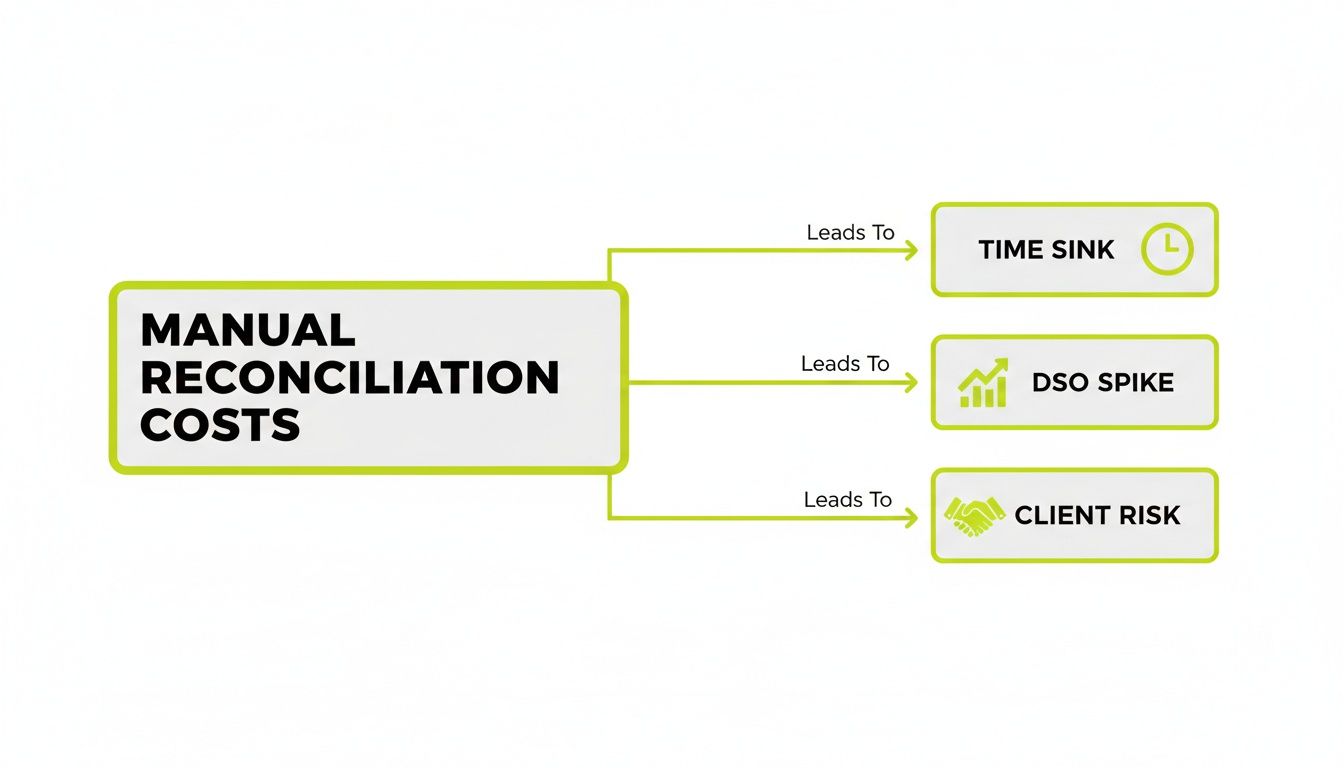
As the chart shows, time lost to manual tasks directly fuels a higher DSO and creates unnecessary client friction.
The Core Components of Automation
An effective automated payment reconciliation system is built on three pillars. These components work together to deliver fast, accurate cash application that integrates with your existing financial stack.
The three core functions are:
- Intelligent Matching Logic: The brain of the operation. It uses a hierarchy of rules—invoice number, dollar amount, customer name, payment patterns—to match payments with precision.
- Unified Payment Data Ingestion: The system must connect directly to all payment sources—bank accounts, payment portals—to create a single, clean pipeline of incoming cash data. No more downloading and uploading files.
- Seamless Ledger Integration: Once a payment is matched, the system must automatically post the transaction to your general ledger. This is critical for QuickBooks AR automation, ensuring your books are always accurate and up-to-date.
When these elements come together, they create a "touchless" workflow. Firms adopting these tools often see a 30-50% reduction in financial close times and a 20-25% acceleration of the invoice-to-cash cycle.
The goal is to create a single source of truth for your cash position. For a more detailed breakdown, our guide on what payment reconciliation is offers a solid foundation.
How AI Takes Your Reconciliation Process to the Next Level
Rules-based automation is a solid first step, but it hits a ceiling with the complex billing scenarios common in professional services. This is where AI AR automation adds genuine intelligence.
Think of it this way: rules-based automation stops where clean data ends. AI steps in to handle the exceptions that consume your team's day. It untangles partial payments, deciphers bundled remittances, and identifies payers even when remittance advice is missing.
This level of accounts receivable automation fundamentally changes your team's role. They transition from data entry to high-value problem-solving. The system doesn't just flag an issue; it learns from how your team resolves it.
Learning from Your Team to Get Smarter
At its heart, AI AR automation is machine learning. It acts like a new analyst who gets smarter with every correction your team makes. When a controller manually matches a complex payment, the AI observes and learns from that action.
It analyzes surrounding data—a project code in the memo line, a payment amount tied to a specific service package—to build a predictive model based on your firm’s unique payment history.
This learning loop drives match rates higher. While standard automation might peak at an 80-85% match rate, AI-driven systems can push that figure above 98%. For a firm processing thousands of transactions, that translates to hundreds of hours saved.
This means the number of exceptions requiring human intervention plummets over time. Your team stops playing detective and starts focusing on strategic financial work that helps reduce DSO.
Handling the Messy Reality of Payments
B2B payments are rarely neat. AI provides an operational edge by handling the complexity that simple automation cannot.
- Partial Payments: A client pays a portion of a large invoice. The AI correctly applies the amount paid and keeps the remaining balance open for collection, without manual intervention.
- Bundled Payments: A single ACH covers multiple invoices. AI algorithms read the attached remittance—even from unstructured PDFs or emails—to split and apply the funds correctly.
- Missing Remittance Data: A payment arrives with no invoice number. The AI uses other clues—payer name, payment history, bank origin—to deduce the correct invoice with high confidence.
This capability is a game-changer for any AR software for professional services, as it directly solves the problem of unapplied cash.
The Impact on Your Cash Flow and Reporting
The primary benefit of superior automated payment reconciliation is a direct improvement in cash flow visibility. When cash is applied the moment it arrives, your AR ledger becomes a live, reliable snapshot of your firm's financial health.
This eliminates the lag and guesswork of manual processes. As a CFO or Controller, you can trust the numbers. You can make confident decisions about working capital and investments because you know your exact cash position at any moment.
For firms on QuickBooks, adding an AI layer through a tool like Resolut ensures that your most complex transactions are reconciled and posted correctly, keeping your accounting system clean without manual workarounds.
Achieving Total Cash Application Control
Intelligent matching is one piece of the puzzle. The ultimate goal is total control over your entire cash application process, from the moment a client pays until the cash is posted in your books.
Think of it as an air traffic control system for your cash flow. It’s a central command center managing every payment, regardless of its source—client portal, ACH, wire, or credit card. It guides each payment to its destination without manual intervention.
When a system is truly orchestrated, a client’s payment triggers an instant, automated chain of events. This is the core of modern accounts receivable automation.
From Payment to Posting in Seconds
The test of control is how fast your financial records reflect reality. In an orchestrated setup, a payment made via a client portal is instantly applied to the correct invoice in your ERP or accounting software like QuickBooks.
This instant application has tangible benefits:
- Real-time Account Balances: The moment a client pays, their account is updated, eliminating discrepancies.
- No More Erroneous Collections: Collection activities for that invoice are automatically halted. You never chase a client who has already paid.
- Unified Information: Your finance, sales, and client service teams see the same up-to-the-minute data, preventing confusion.
An orchestrated workflow creates a state of calm control. You are no longer reacting to payment data that is hours or days old. Your systems operate in perfect sync with your cash flow.
Unifying a Fragmented Payments Landscape
Professional services firms accept payments through more channels than ever. Orchestration tames this complexity by unifying fragmented payment data into a single process.
This is enabled by richer data standards like ISO 20022, which allow payment messages to carry detailed remittance information. This shift is a massive catalyst for automated payment reconciliation and can improve cash flow management across the B2B payments landscape.
An orchestration platform acts as a universal translator for all payment types. It ensures a wire transfer with cryptic notes is processed just as accurately as a simple credit card payment. Understanding the fundamentals is key; our guide on what is cash application in accounting breaks it down.
By moving from simple AI AR automation to full orchestration, you build a more resilient, responsive, and predictable financial operation.
Your Practical Implementation Roadmap
Implementing an automated payment reconciliation system is a significant operational improvement, but it doesn't have to be disruptive. A methodical plan is the key to a smooth transition.
Think of it as pouring a foundation before putting up walls. Your data is the foundation, and your implementation plan is the blueprint.
Phase 1: Prepare Your Data
Automation is only as good as the data you feed it. "Garbage in, garbage out" is the absolute truth here. The first step is to get your data house in order.
Start with your customer master file. Merge duplicate records, fill in missing information, and ensure every client entry is complete and accurate. Standardize naming conventions. A week invested in data hygiene before implementation can save hundreds of hours in exception handling later.
A clean data set is the single most important factor for achieving high auto-match rates quickly—a critical step for successful accounts receivable automation.
Phase 2: Define and Integrate Your Systems
With clean data, the next step is connecting the system to your financial stack. This creates a single, reliable source of truth for your entire cash position.
Focus on two main integration points:
- Payment Sources: Establish direct connections to all payment channels—bank accounts for ACH and wires, merchant processors for credit cards, and lockbox services. This eliminates manual file downloads and uploads.
- Accounting Ledger: Your reconciliation tool needs a two-way connection with your general ledger. For most professional services firms, this means a deep integration for **QuickBooks AR automation** or your firm's primary accounting software.
This creates an uninterrupted flow of information, from payment receipt to posting, providing the technical backbone for real-time visibility.
Phase 3: Establish Rules and KPIs
With systems connected, teach the platform your business logic. Translate your current matching processes into rules, starting with basics like invoice number and amount, then adding complexity.
Simultaneously, define how you will measure success. Key Performance Indicators (KPIs) are essential for proving ROI and fine-tuning the process.
Key KPIs to Track:
- Auto-Match Rate: Percentage of payments reconciled without human touch. Aim for 85% within 60 days.
- Reduction in DSO: Track Days Sales Outstanding. A good implementation will improve cash flow and lower this number.
- Cash Application Time: The time from payment receipt to posting. The goal is to shrink this to near real-time.
- Exception Rate: Percentage of payments flagged for manual review. A falling rate shows the AI is learning.
Start with your highest-volume payment channel. An early win builds momentum for the rest of the project.
Phase 4: Train Your Team and Go Live
Prepare your team for their new role. Automation elevates them from data entry to strategic exception managers. Training should focus on the new workflow: investigating flagged payments and using dashboards for insights.
A phased rollout is best. Start with one payment type or a specific client group. This creates a controlled environment to learn the system and refine rules before a full launch. This operator-led approach ensures technology serves your team, not the other way around.
Measuring the ROI of Your Automation Investment
As a finance leader, any new investment requires a solid business case. For automated payment reconciliation, the argument is built on operational savings and tighter financial controls.
We're talking about tangible impacts on your P&L and balance sheet—direct cost reductions, accelerated cash flow, and reclaimed employee time.
Calculating Your Hard ROI
Let's model a professional services firm with $10M in annual revenue. Automation delivers measurable returns in four core areas.
- Cost-Per-Invoice Reduction: If your team spends 15 minutes manually processing each invoice at a blended hourly rate of $60, you're spending $15 per invoice. Automation can slash that to one minute for the occasional exception, dropping your cost to $1 per invoice—a 93% decrease.
- Reclaimed FTE Hours: A finance team spending 30 hours on manual reconciliation each week loses over 1,500 hours annually. This is time that skilled professionals could spend on strategic analysis instead of data entry.
- DSO Reduction: Applying cash in minutes instead of days directly impacts DSO. A conservative 3-5 day reduction is achievable. For a $10M firm, shaving 3 days off the cycle unlocks approximately $82,000 in working capital.
- Decreased Write-Offs: Unapplied cash often leads to unnecessary write-offs. Reducing these losses by just 0.5% on $10M in revenue saves the firm $50,000 a year.
This moves your finance team from chasing payments to overseeing a smooth, automated system, spotting at-risk invoices early and improving financial health.

The Qualitative Gains
The benefits extend beyond hard numbers. Qualitative improvements in financial controls reduce compliance risk and provide a clear audit trail.
Nothing damages a client relationship faster than an erroneous collections call. Accurate, automated payment application eliminates these mistakes, strengthening client trust. It projects an image of control and professionalism.
When building your case, look at proven results. One study found that AI automation cuts accounts receivable costs by 67%. Combining these hard savings with qualitative gains presents an undeniable argument for adopting modern AR software for professional services.
The Future of Your Finance Function
The conversation around automated payment reconciliation often focuses on efficiency and ROI. While essential, these metrics miss the larger strategic point: this is about fundamentally elevating the role of your finance team.
For too long, skilled finance professionals have been consumed by low-impact, repetitive work. Their days are spent chasing remittance advice and correcting data entry errors. This puts a hard ceiling on their ability to contribute strategically.
From Tactical Clerks to Strategic Operators
This is the real value of accounts receivable automation. You aren't replacing finance experts; you are liberating them.
When a system handles the 95%+ of routine transactions, your team’s focus shifts from tactical work to high-value analysis. Your Controller becomes a true financial operator, focused on work that improves cash flow and guides the firm forward.
The goal is to create a state of calm control—an environment where processes run like clockwork, data is reliable, and your team focuses on growth, strategy, and client success.
Building a Resilient, Intelligent Finance Core
With an automated AR process, your finance function becomes the intelligent core of the business. Your team gains the time to tackle big-picture challenges:
- Strategic Forecasting: Building reliable financial models using real-time, accurate cash data.
- Client Profitability Analysis: Identifying which clients and services drive the most profit to guide business development.
- Strengthening Client Relationships: Proactively managing credit and collections with real insight.
Visual Idea 1: A cinematic shot of a calm, focused finance professional analyzing a clean dashboard on a large screen, with complex data visualized simply. The background is a modern, well-lit office, conveying a sense of control and clarity.
This is how your finance department transforms from a reactive scorekeeper into a forward-looking strategic partner. It's the most effective way to reduce DSO and build a predictable financial future for your firm.
Visual Idea 2: A simple line chart showing two lines. One, labeled "Manual Process," is jagged and erratic, showing high team effort on low-value tasks. The second, "Automated Process," is a smooth, low line for low-value tasks, with a corresponding high, smooth line above it for "High-Value Strategic Work."
--- Resolut automates AR for professional services—consistent, accurate, and human. Learn more at https://www.resolutai.com.