
What Is AR Automation? A CFO's Guide to Cash Flow Control
What is AR automation? Learn how it works, its core components, and how to reduce DSO. A complete guide for CFOs at professional services firms.
Revenue looks fine on the P&L. Cash feels tight anyway.
That's a familiar pattern in professional services firms. You finish the work, send the invoice, assume payment will follow, then spend the next few weeks checking aging reports, nudging project leads, and trying to collect without irritating a good client. Meanwhile payroll, tax payments, partner draws, and vendor bills don't wait.
The issue usually isn't sales. It's control over the gap between booked revenue and money in the bank. That's where accounts receivable automation matters. If you're asking what is ar automation, the useful answer isn't “software that sends invoices.” It's a system that lets leadership manage the invoice-to-cash cycle with far less friction, less risk, and more predictability.
Beyond Invoices What Is AR Automation Really
A firm owner usually notices the problem long before they go shopping for software.
The pipeline is healthy. Utilization is strong. The team is billing real work. But cash still arrives unevenly because invoices go out late, reminders depend on whoever remembers, and payment status lives across inboxes, spreadsheets, QuickBooks notes, and client calls. One delayed milestone invoice can distort the month. A cluster of slow-paying clients can distort the quarter.
That's why the basic definition matters. Accounts receivable automation is the use of software and integrated workflows to streamline core receivables tasks such as invoicing, payment handling, collections, reconciliation, and reporting. In practice, it replaces repetitive manual work with digital workflows that connect invoicing to payment reconciliation and real-time dashboards, as outlined in Thomson Reuters' explanation of what AR automation includes.
It's not a collections tool alone
In a services business, AR isn't just an accounting process. It touches delivery, client communication, credit discipline, and forecasting.
A manual AR process usually breaks down in predictable ways:
- Invoices go out inconsistently: A partner approves one quickly, another sits for days.
- Collections feel personal: The firm hesitates to press clients because account managers don't want tension.
- Cash application lags: Payments arrive, but the team still spends time figuring out what got paid and what remains open.
- Leadership lacks a live view: The owner sees total AR, but not which balances are healthy, disputed, or drifting.
That's why good finance teams pair process discipline with systems. If your current workflow still depends on people remembering follow-ups, these effective accounts receivable practices are a useful baseline before automation hardens the process.
Practical rule: Don't automate chaos. Standardize invoice timing, contact ownership, and escalation paths first.
A stronger AR setup doesn't replace judgment. It gives judgment better timing and cleaner data. The shift is from “Who should chase this invoice today?” to “What should happen automatically, and what deserves human attention?” That distinction is the core strategic value, and it's why firms often start by reviewing the broader benefits of accounts receivable automation before evaluating platforms.
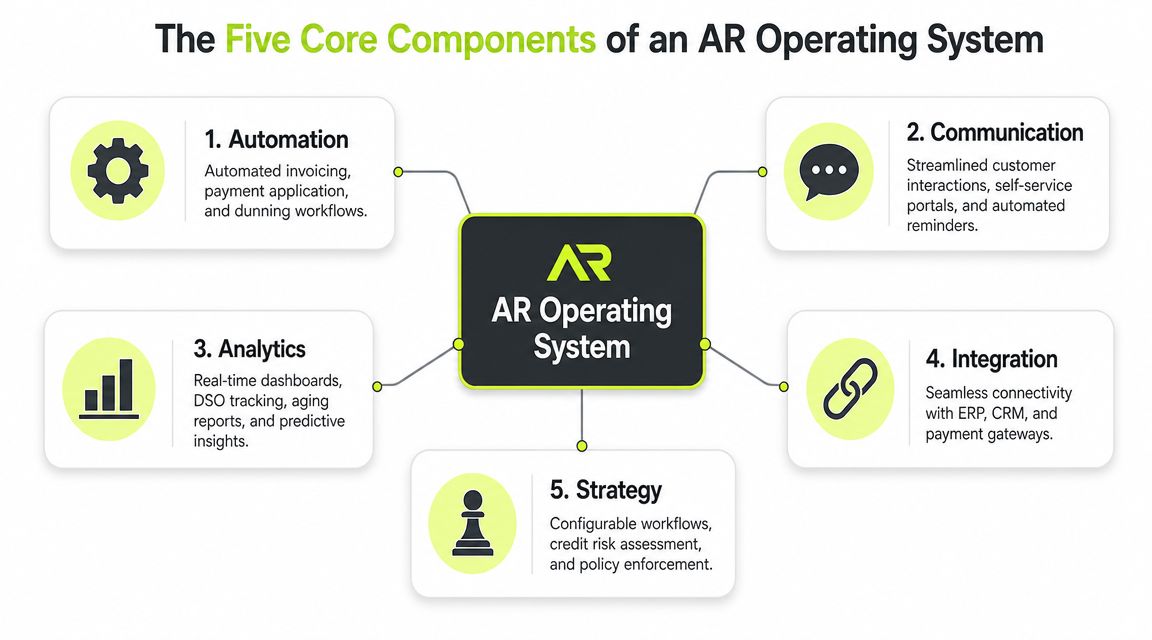
The Five Core Components of an AR Operating System
A modern AR stack should work like an operating system for cash flow. If one core layer is weak, the rest of the process drifts back into manual cleanup.
Credit and risk assessment
Most firms think about AR only after the invoice is sent. That's late.
Control starts before work begins or expands. Someone needs to decide whether a client should get standard terms, tighter terms, milestone billing, upfront deposits, or extra approval before more WIP turns into exposure. In a services firm, this isn't only about obvious bad debt. It's about avoiding preventable drift with clients who pay, but always slowly or only after multiple escalations.
A useful system stores those rules so the team doesn't reinvent them on every account.
Billing and invoicing
Many firms overestimate their maturity. They say billing is “handled,” but the actual process still depends on project managers, handwritten notes, emailed approvals, and end-of-month fire drills.
Billing automation means invoices are generated accurately, delivered on time, and tracked from issue through payment status. That includes recurring invoices, milestone invoices, and exceptions when supporting detail or client-specific formatting is required. For firms looking at QuickBooks AR automation, this layer matters because a decent tool has to work with the accounting system you already rely on instead of creating another reconciliation problem.
Collections orchestration
Collections isn't a single reminder email. It's a controlled sequence.
Different clients need different treatment. A repeat retainer client may need a light reminder and a clean payment link. A chronically slow client may need stricter cadence, faster escalation, and tighter internal visibility. Good AI AR automation doesn't just automate outreach. It organizes who gets contacted, when, through which channel, and when a human should step in.
The goal isn't more reminders. It's fewer overdue invoices that require awkward conversations.
Cash application
This is the least glamorous piece and one of the most important.
When payments come in, the system should capture them, match them to open invoices, and flag exceptions instead of forcing staff to hunt through remittance details. Thomson Reuters notes that automated reconciliation can match received payments to invoices automatically and update the AR ledger in real time in the underlying systems that support the process. That's what turns payment receipt into usable visibility, not just another banking event.
Reporting and analytics
Without reporting, automation becomes a black box.
Leadership needs a live view of aging, payment behavior, collection status, dispute patterns, and expected inflows. Not next week. Now. Reporting is what turns AR from clerical work into a finance control function.
A practical way to assess any platform is to ask whether it supports the full workflow or only one slice. If you're comparing options, a true receivable management system should connect policy, invoicing, outreach, cash application, and reporting in one operating rhythm.
Here's a simple operator's test:
Component | What works | What fails |
|---|---|---|
Credit and risk | Terms and billing structure are set before exposure grows | The team reacts only after invoices age |
Billing | Invoices go out on schedule with clear status tracking | Billing batches slip and no one notices quickly |
Collections | Follow-ups run by rule, with clear handoff points | Staff chase based on memory and urgency |
Cash application | Payments match quickly and exceptions surface fast | Cash arrives but sits unapplied |
Reporting | Leaders see aging and risks in real time | Month-end reporting hides current problems |
If a vendor can't show those five layers working together, it isn't an AR operating system. It's a partial tool.
The Quantifiable Impact on Your Firm's Financial Health
Finance leaders don't buy AR automation to save keystrokes. They buy it to gain cash control.
The business case is strongest when AR is measured as a working-capital function. Faster collections improve liquidity. Cleaner cash application improves trust in reporting. Better process control reduces the number of invoices that age because no one acted at the right time.
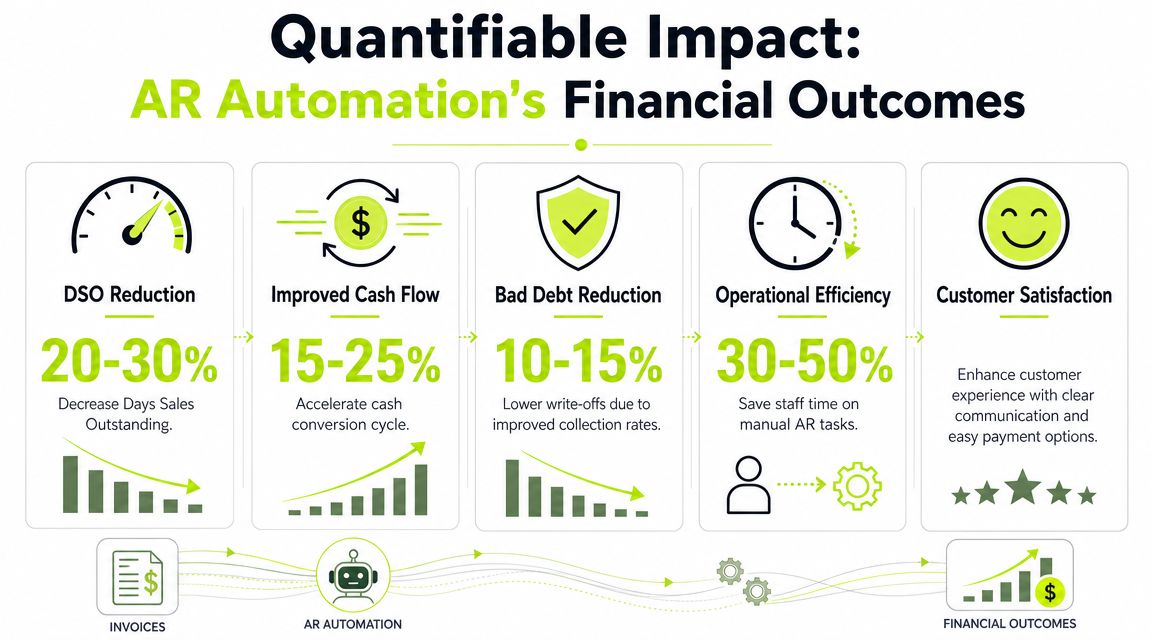
A useful benchmark set comes from a Vanson Bourne study cited by Resolve. 100% of respondents reported measurable gains from AR automation, organizations fully embracing it saw more than a 40% reduction in Days to Pay, 92% of companies accelerated cash flow, and invoice processing accuracy increased from 85 to 90% manually to 98 to 99% with automation, according to Resolve's AR benchmarking summary.
Early in an evaluation, it helps to visualize those outcomes in finance terms.
What those outcomes mean in practice
A lower Days to Pay figure changes more than collections reporting. It changes planning. When cash lands closer to expected timing, you can make staffing decisions, tax planning decisions, and capital allocation decisions with less guesswork.
Higher invoice accuracy matters too. In services firms, small billing errors create disproportionate delay because they trigger approval loops, revised invoices, and client-side confusion. When invoice handling becomes more accurate and payment application is more reliable, the finance team spends less time disputing the record and more time managing exceptions that require judgment.
The result is a stronger finance cadence:
- More predictable inflows: Forecasts rest on current receivables behavior instead of optimism.
- Less avoidable aging: Invoices don't slip merely because no one followed up.
- Cleaner closes: Fewer unapplied payments and fewer manual reconciliations.
- Better use of staff time: Controllers and AR staff focus on problem accounts, not repetitive status checks.
For readers looking at automation more broadly, this overview of process automation benefits in operations is useful context, especially if you're comparing AR to other back-office priorities.
A short explainer can help teams internalize the difference between activity and cash control:
The KPI that matters most to owners
Most owners ask first how to improve cash flow. That's the right instinct. But cash flow improves only when AR execution improves.
If your team bills accurately but collects inconsistently, the problem isn't revenue quality. It's process control.
That's also why leaders watch DSO and related timing metrics so closely. If you want a tighter finance lens on that, this guide to DSO in accounting is a good companion to an AR automation review.
AR Automation in Practice Use Cases for Professional Services
Professional services firms don't all struggle with AR in the same way. The billing model usually determines where control breaks down.
Architecture firm with milestone billing
An architecture practice may have clean contracts and healthy demand, yet still struggle with collections because billing depends on project milestones that are approved late or documented inconsistently.
The core issue isn't that clients refuse to pay. It's that the firm creates friction before the invoice even lands. Project managers confirm milestone completion by email. Finance waits for backup. Partners review wording. By the time the invoice goes out, the client's internal approval cycle has already moved on.
AR software for professional services helps by turning milestone billing into a governed workflow. Finance can trigger draft invoices from project data, route approvals to the right people, and send the invoice with supporting detail attached. Collections then follow a defined cadence instead of ad hoc outreach.
That keeps the relationship professional. The client sees a clear, timely invoice. The firm sees the status without chasing internal updates.
Marketing agency managing retainers
Retainer businesses often avoid disciplined collections because they don't want to sound transactional.
That creates a familiar pattern. The agency keeps delivering campaigns, the client pays eventually, and everyone tolerates the delay because the account feels important. Over time, “eventually” becomes normal. The owner starts funding client lateness from the firm's own cash.
A better setup uses automation for the predictable parts and humans for the sensitive parts. Recurring invoices go out on time. Reminder sequences are polite, branded, and consistent. Payment options are easy. If a key account drifts beyond the normal pattern, the account lead steps in with context.
That's the right co-pilot model. Automation handles routine discipline. Humans handle relationship nuance.
Consulting group buried in manual reconciliation
Consulting firms often don't fail on invoicing. They fail on what happens after payment.
A client pays multiple invoices in one transfer. Another shorts a payment and says the rest is pending approval. A third sends remittance information to the wrong contact. Cash is in the bank, but finance still can't close the loop quickly because the matching work is manual.
Here, QuickBooks AR automation or ERP-connected cash application becomes practical, not theoretical. The system captures payment events, matches what it can, and surfaces exceptions for review. Instead of the controller spending hours reconstructing the story, the team works a shorter exception queue.
Here's the pattern across these firms:
- Complex billing firms need structure before the invoice leaves.
- Relationship-driven firms need segmented collections rather than blanket reminders.
- High-volume payment environments need reconciliation control more than more outreach.
What doesn't work is applying the same automation style to every receivable. Small, standard invoices can run largely on autopilot. Disputed balances, credit exceptions, and strategically important accounts usually need a human in the loop.
That's why the question isn't whether to automate AR. It's where to automate fully and where to preserve judgment.
Implementation Roadmap and Vendor Selection
Most AR projects succeed or fail before the software is even turned on.
The firms that get value quickly usually start with process decisions. They define ownership, clean customer data, and decide what should happen automatically versus what requires approval. The firms that struggle usually try to automate a broken workflow and then blame the platform.
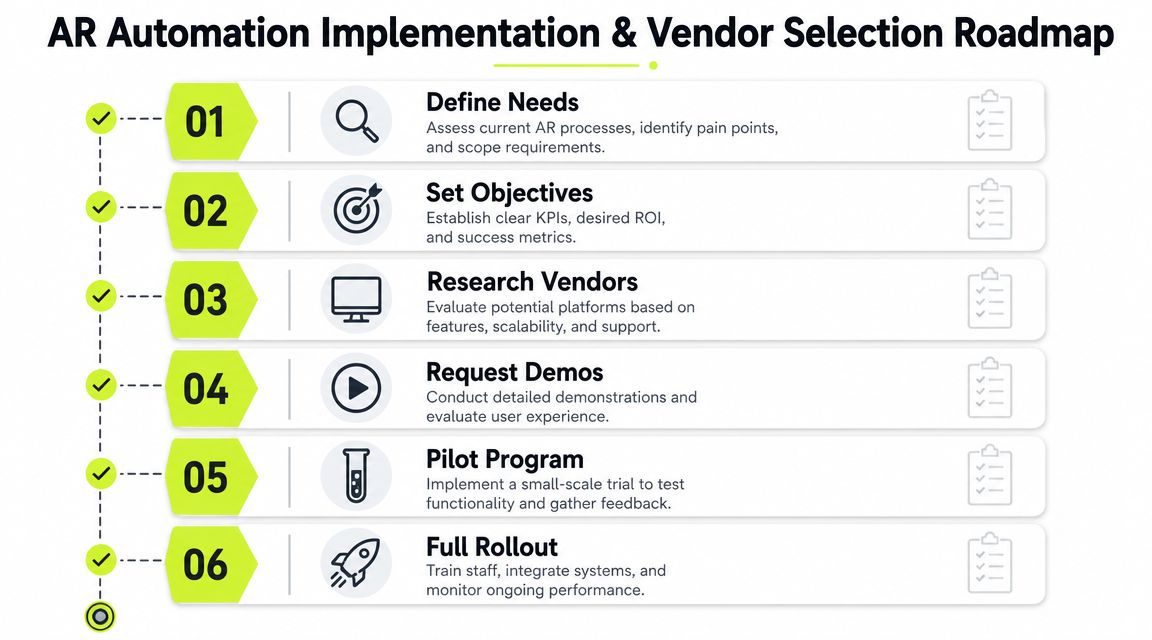
A practical rollout sequence
Start with an audit of your current invoice-to-cash process. Look at billing delays, aging by client type, unapplied cash, dispute reasons, and who owns each step. If responsibility is fuzzy now, automation will only make the confusion faster.
Then define the operating model:
- Set policy first: Decide billing timing, reminder cadence, escalation rules, and exception ownership.
- Clean master data: Fix billing contacts, terms, payment instructions, and customer naming issues.
- Segment receivables: Separate standard accounts from strategic accounts, disputed balances, and high-risk patterns.
- Integrate the source systems: Your accounting platform, ERP, CRM, and payment flow need to share the same truth.
- Pilot with one segment: Start where volume is meaningful but complexity is manageable.
- Review exceptions weekly: Tune templates, rules, and handoff points before broad rollout.
Operator's note: The first win should be consistency, not sophistication.
How to judge vendors like a finance operator
A polished demo doesn't tell you much. Look for control points.
The first is integration depth. If the platform can't work cleanly with your ledger and payment records, you'll create new reconciliation work while trying to solve old reconciliation work. For firms using QuickBooks, that matters immediately. For larger firms on ERP systems, it matters even more.
The second is workflow orchestration. The platform should be able to automate routine receivables while supporting exceptions without awkward workarounds. That's especially important because, as Upflow notes in its discussion of autopilot and co-pilot design in AR automation, one of the biggest gaps in the market is helping teams decide which receivables should be fully automated and which should remain human-led.
Questions worth asking in demos
Use direct questions. They expose weak systems fast.
- How does the platform handle exception accounts? Ask for disputes, short pays, and strategic clients.
- What can finance configure without engineering help? You want control over workflows and templates.
- How are reminders segmented? Client communication shouldn't feel generic.
- What does payment application look like when remittance is incomplete? That's real life.
- How visible are promises, disputes, and escalation status? If leadership can't see it, finance can't manage it.
One option in this category is Resolut, which combines credit assessment, billing, collections orchestration, payment workflows, and cash application with both autopilot and human-in-the-loop control. The important point isn't the brand. It's the architecture. You want one system that supports disciplined automation without stripping out judgment where judgment still matters.
The Shift from Collections to Cash Flow Control
Most firms think they need better collections.
Usually, they need a better operating system for cash flow. Collections is only one output of that system. The stronger result is control. You know what has been billed, what has been promised, what is at risk, and where a person needs to intervene before delay becomes a bigger problem.
Modern AR automation integrates ERP or accounting data, payment events, and predefined decision logic so the system can trigger reminders, capture payments, and flag exceptions. That architecture turns AR from a reactive clerical process into a controlled, data-driven operating system for the full invoice-to-cash cycle, as described in HighRadius' overview of modern AR automation architecture.
For a professional services firm, that shift is significant. It means less dependence on heroic follow-up by project leads. It means fewer awkward client conversations that happen too late. It means the controller and owner can look at receivables as a managed asset, not a monthly cleanup exercise.

The best implementations don't feel robotic. They feel reliable. Routine work moves without manual chasing. Exceptions surface early. Client communication stays clear. Leadership gets a truer picture of cash.
That's the answer to what is ar automation. It's not software that nags clients. It's a finance control layer that helps you reduce DSO, improve cash flow, and run receivables with the same discipline you already expect in payroll, reporting, and planning.
Resolut automates AR for professional services with a focus on consistent execution, accurate payment handling, and human-in-the-loop control where relationships or exceptions need judgment. If your firm is tired of chasing invoices manually, Resolut is built to make AR more controlled, more predictable, and more human.