Xero vs QuickBooks for Professional Services
A CFO's guide to Xero vs QuickBooks. Detailed comparison of AR automation, scalability, and reporting for professional services firms.
Your accounting system usually feels “good enough” until the firm hits a certain size. At that point, the friction stops being cosmetic.
A controller starts carrying month-end on spreadsheets. Project managers ask finance for invoice status instead of checking a dashboard. Collections happen in someone’s inbox. Cash forecasting turns into educated guesswork because posted payments, unapplied cash, and outstanding invoices live in different places.
That’s the key xero vs quickbooks decision for a professional services firm. It isn’t about brand preference. It’s about choosing the financial operating system that can support delivery complexity, tighter billing discipline, and accounts receivable automation as you scale from $3M to $50M.
Choosing Your Next Financial Operating System
If you’re leading finance at a growing consulting firm, agency, accounting practice, or legal-adjacent services business, you’ve probably seen this progression.
At first, the accounting platform handles the basics. Then headcount grows, client billing gets more nuanced, and the cracks show up in operations. A partner wants better visibility into collections. An AR specialist needs access without waiting for a license decision. Your firm starts serving international clients, and finance has to work around the system instead of through it.

That’s when software selection becomes a finance leadership issue. You’re not buying bookkeeping software. You’re choosing the system that will govern billing, collections, reconciliation, reporting, and team collaboration for the next stage of growth.
For firms evaluating staff capability alongside systems, this comparison of the best accounting software for your career is useful because it shows how the platforms are perceived from a practitioner’s side, not just a buyer’s side.
Early comparison table
Area | Xero | QuickBooks |
|---|---|---|
Best fit | Global, collaborative, customization-oriented firms | U.S.-centric firms prioritizing native payments and reporting depth |
User model | Unlimited users across all tiers | User access tied to plan tier |
Multi-currency | Available across all pricing tiers | Restricted to upper-tier plans |
Bank feeds | Real-time bank feed matching, some banks may need manual setup | Automated daily feeds, broader banking partner coverage |
Native AR strength | Flexible workflows through integrations and API | Strong built-in invoicing and payment collection |
Reporting posture | Solid, practical, app-friendly | Deeper native reporting and KPI visibility |
TCO for larger finance teams | Usually more favorable | Can rise faster as team access expands |
If finance has to build workarounds for invoicing, approvals, and cash application, the platform is no longer supporting growth. It’s taxing it.
My view is simple. QuickBooks is often the stronger native operator for U.S. collections and payment flow. Xero is often the better platform for collaboration, international billing, and long-term seat economics. The right answer depends on how your firm gets paid, where your clients are, and how much AR process you expect to automate.
Evaluating Core Accounting and Compliance
Core accounting comes first. If the ledger, bank feeds, and currency handling create friction, every downstream process gets slower. That includes month-end close, invoice posting, payment application, and client-level profitability review.
For professional services firms, this matters more than most buyers admit. You may not carry physical inventory, but you do carry complexity. Progress billing, retainers, pass-through expenses, deferred revenue, and cross-border contracts all put pressure on the accounting foundation.
Side-by-side on fundamentals
Capability | Xero | QuickBooks |
|---|---|---|
Multi-currency handling | Includes seamless multi-currency support across all pricing tiers | Restricts multi-currency to upper-tier plans |
Bank feed behavior | Real-time bank feed matching capabilities | Automated daily feeds and broader banking partner coverage |
Operational implication | Better fit for global client invoicing without plan fragmentation | Better fit for faster domestic reconciliation where bank connectivity is critical |
According to ERP Software Blog’s comparison of Xero vs QuickBooks, Xero includes integrated multi-currency support across all pricing tiers, with real-time bank feed matching capabilities, while QuickBooks restricts multi-currency functionality to upper-tier plans only. The same comparison notes that QuickBooks’ broader banking integration can accelerate reconciliation, while Xero’s universal multi-currency support is stronger for global client networks.
Where that shows up in real operations
If your firm serves mostly U.S. clients and receives a high volume of domestic ACH and card payments, QuickBooks has a practical edge. Faster bank-feed coverage and automated daily feeds matter because cash posting speed affects the accuracy of your collections queue and your weekly cash visibility.
If your firm bills clients across the UK, Australia, New Zealand, or broader APAC relationships, Xero removes a layer of operational drag. Finance doesn’t have to reserve critical currency functionality for a higher plan while the rest of the workflow sits elsewhere.
Practical rule: Choose the platform that minimizes exceptions in your most common billing pattern. Domestic firms need reconciliation speed. Cross-border firms need consistent currency handling.
Compliance and accounting discipline
Neither platform fixes sloppy accounting policy. Your team still needs a clean close process, invoice approval discipline, and a clear revenue recognition policy. If you want a useful refresher on that point, Resolut’s explainer on the revenue recognition principle is worth reading before you evaluate automation on top.
I’d also point finance teams to this guide to organized business finances because software choices work best when the underlying finance hygiene is already in place.
My recommendation on the accounting core
Pick QuickBooks when your main pain is reconciliation throughput inside a largely domestic business.
Pick Xero when your firm needs multi-entity collaboration, broader international invoicing flexibility, or a cleaner operating model for global clients.
That distinction sounds narrow. It isn’t. It affects who can work in the system, how quickly cash gets posted, and whether finance can scale without adding manual controls.
Accounts Receivable and Collections Capabilities
Many firms often make the wrong decision. They evaluate invoicing as a feature, not as a cash conversion workflow.
For a professional services firm, AR isn’t just “send invoice, receive payment.” It includes invoice formatting, billing cadence, approval timing, payment method availability, reminder logic, dispute handling, and cash application. If one step is clumsy, DSO rises and the partner group feels it before the finance team says it out loud.
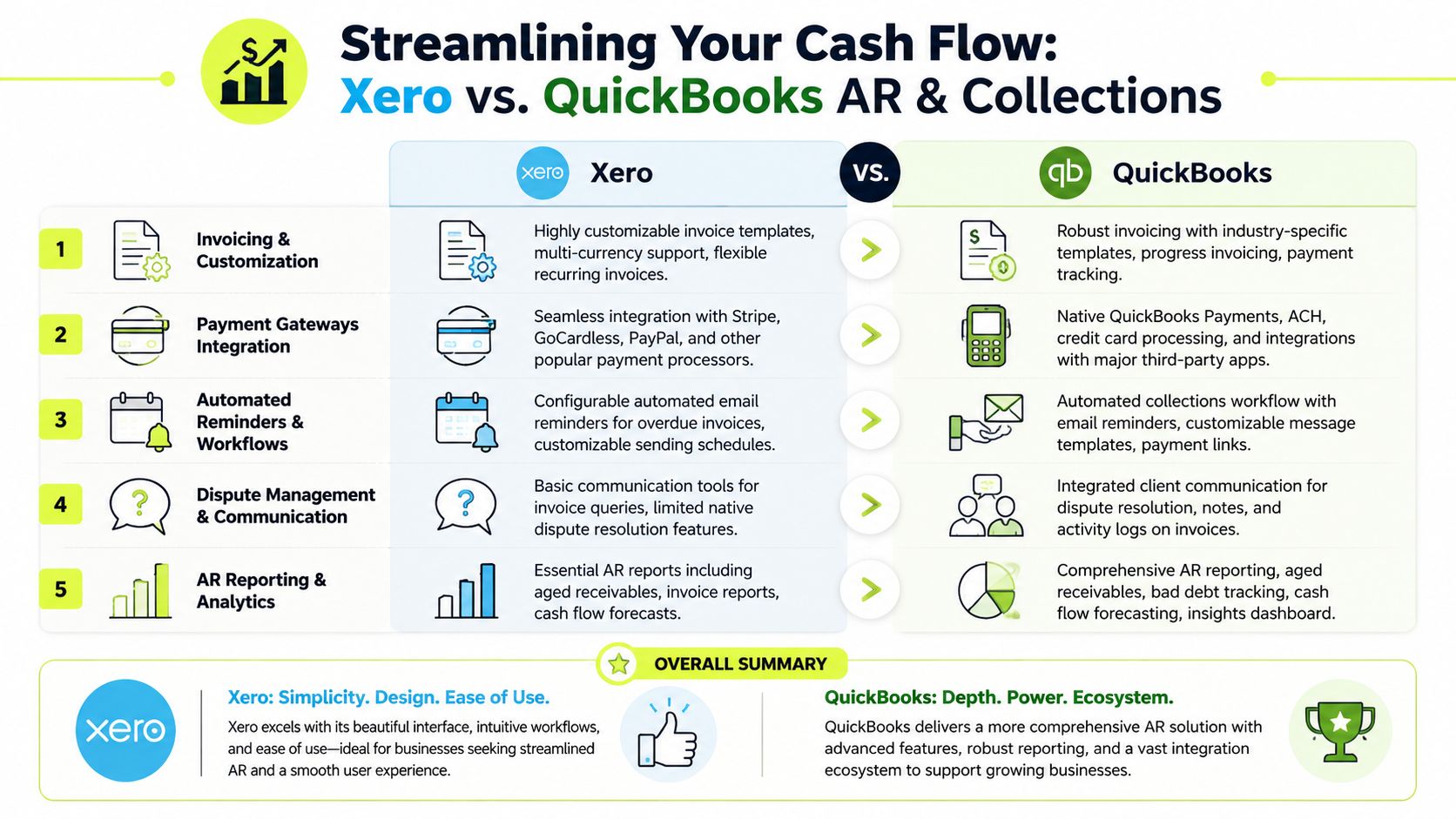
Here’s the high-level AR view.
QuickBooks has the stronger native cash collection motion
For firms that want to reduce DSO with as little system layering as possible, QuickBooks starts ahead. The reason is straightforward. It handles invoice-to-payment flow more natively.
As outlined in Fishbowl Inventory’s comparison of Xero and QuickBooks Online, QuickBooks Online demonstrates superior native invoicing and payment integration capabilities. The same source notes that QuickBooks Payments enables customers to remit payments directly through credit card, ACH, and Apple Pay, which creates a more frictionless collection experience.
That matters operationally. A client who can pay immediately from the invoice is easier to collect than a client who has to leave the invoice, find banking details, and process the payment separately.
Xero is better when billing logic is less standard
Xero’s strength isn’t native payment convenience. It’s flexibility.
The same Fishbowl comparison states that Xero offers over 1,000 integrations in its app marketplace and a developer-friendly API, making it the stronger choice for firms with non-standard billing workflows or multi-currency collections across IFRS-oriented jurisdictions. If your invoicing process varies by client type, geography, service line, or contract structure, that flexibility can matter more than having the most polished native payment rails.
Here’s the practical split:
- Choose QuickBooks for native collection speed. If clients are mostly domestic and you want payment links, integrated remittance, and fewer handoffs, QuickBooks is usually the cleaner AR software for professional services.
- Choose Xero for billing architecture flexibility. If your firm needs customized invoice workflows, unusual engagement structures, or broader international handling, Xero gives your stack more room to adapt.
- Don’t confuse invoice creation with AR automation. Both platforms can generate invoices. That doesn’t mean either one will run a disciplined collections process without operational design layered on top.
For firms tightening billing process, a practical starting point is a standardized professional services invoice template. Bad invoice structure creates avoidable disputes, and avoidable disputes turn into delayed cash.
AR controls CFOs should actually care about
When I assess xero vs quickbooks for accounts receivable automation readiness, I look at these questions first:
- Can clients pay from the invoice with minimal friction? QuickBooks is stronger here out of the box.
- Can finance support different billing models without duct-taping apps together? Xero usually gives more flexibility if the workflow is not standard.
- Can the collections owner see overdue accounts clearly and act fast? Both can support this, but QuickBooks tends to feel more operationally complete without extra tooling.
- Can the system support AI AR automation later? That depends less on invoice design and more on integration depth, API behavior, and how structured your receivables process is.
A short walkthrough helps if your team wants a visual comparison before making a call:
A firm doesn’t improve cash flow by sending invoices faster. It improves cash flow by making payment easier, follow-up more consistent, and exceptions visible sooner.
My opinion is direct here. If your primary objective is QuickBooks AR automation with minimal implementation complexity, QuickBooks is the better starting point. If your AR process is intertwined with international billing and custom workflow logic, Xero can be the better foundation.
Integration Ecosystem and AR Automation Readiness
A finance system doesn’t win because it has a long feature list. It wins when it connects cleanly to the rest of your operating stack.
Professional services firms usually run a mix of PSA tools, CRM, payroll, expense software, document workflows, payment systems, and reporting layers. AR automation sits in the middle of that environment. It needs clean invoice data, customer context, payment status, and timely ledger updates. If one connection is weak, collections still become manual.
App count matters less than workflow depth
QuickBooks offers a broad ecosystem and strong native functionality. Xero offers a larger app marketplace and a developer-friendly posture. Those are different advantages.
For firms building accounts receivable automation around a standardized U.S. billing motion, QuickBooks often gets you to “usable” faster because more of the payment experience is already inside the product. Your team has fewer immediate decisions to make.
For firms designing a more orchestrated model, Xero can be attractive because the ecosystem and API flexibility make it easier to shape around your operating model rather than the other way around.
What finance leaders should test before they decide
Don’t ask whether an app “integrates.” Ask what data moves, how often it syncs, and what happens when a payment doesn’t match cleanly.
Use this review checklist:
- Invoice event quality: Can downstream tools read invoice status, due date, customer entity, and payment activity in a structured way?
- Collections workflow fit: Can you trigger reminders, escalations, and outreach based on aging, risk, or client behavior without manual exports?
- Cash application support: When payments arrive, does the ledger update cleanly enough to keep the AR queue accurate?
- Human override: Can a controller or AR lead intervene without breaking the automation sequence?
If your team is exploring workflow design more broadly, it’s worth taking time to explore Recurrr's automation insights. The concepts are useful because finance automation succeeds on process logic, not just software selection.
My view on automation readiness
If you want a practical benchmark for what a purpose-built stack looks like, review this overview of accounts receivable automation software. It helps separate simple reminders from true orchestration.
For a professional services firm, AI AR automation only works when the accounting platform exposes the right signals. Payment status, customer-level behavior, invoice aging, and reconciliation state have to be visible and trustworthy. Otherwise, the “automation” is just scheduled email.
QuickBooks is usually easier if you need native payments and a shorter path to operational consistency.
Xero is usually better if your long-term edge comes from flexible architecture, broader integrations, and global billing variation.
Pricing Models and Scalability for Growing Firms
Software pricing becomes a finance problem once the team expands. At $3M in revenue, you might have one controller and outside support. By the time the firm is pushing higher, you may have a controller, staff accountant, AR specialist, collections coordinator, finance manager, and external advisor all needing access.
That’s where xero vs quickbooks gets very practical. The issue isn’t monthly list price. It’s total cost of ownership across the finance team.
Annual cost comparison for a five-user finance team
Platform | Plan | User Limit | Estimated Annual Cost |
|---|---|---|---|
Xero | Growing | Unlimited users | $564 |
QuickBooks Online | Plus | Tier-based user access | $1,080 |
According to Beancount’s 2026 comparison of Xero and QuickBooks, as of 2026, a five-person accounting team can expect to pay $564 annually for Xero’s Growing plan versus $1,080 for QuickBooks Online Plus, a difference of nearly $500 per year. The same source notes that Xero’s unlimited user policy across all tiers prevents costs from scaling with headcount in the same way.
That’s not a trivial detail for a professional services firm. Finance teams often scale in small increments. One AR hire here, one fractional resource there, another reviewer added for segregation of duties. If each new seat changes the software economics, cost control gets distorted.
The TCO issue most firms miss
The platform fee is only one layer of cost. The bigger issue is what the pricing model encourages operationally.
With unlimited access, Xero makes it easier to put the right people in the system. That supports cleaner handoffs between billing, collections, review, and approval. It also reduces the temptation to share logins or force work outside the system.
With tier-based access, QuickBooks can still be the better choice if its operational advantages save enough time in payments and reconciliation to justify the higher software cost. But finance should make that decision deliberately, not accidentally.
Paying less for the platform doesn’t help if your team spends the difference chasing unapplied cash and manually posting receipts.
My pricing recommendation
For growing firms with multiple finance contributors, Xero has the cleaner seat economics. If you already know your AR process requires several internal users and outside collaborators, Xero’s pricing model is a meaningful advantage.
Choose QuickBooks when the operational value of native payments, reporting depth, and domestic cash collection outweighs the user-cost premium.
Choose Xero when collaboration breadth and access scalability are part of the design, not an afterthought.
That’s how a CFO should evaluate cost. Not as a subscription line. As the ongoing price of running finance with control.
Reporting and Analytics for Financial Control
A good accounting platform doesn’t just close the books. It helps leadership see what’s drifting before cash gets tight.
For a professional services firm, the reporting question is usually this. Can the system help you move from historical reporting to active control? That means receivables aging by client, visibility into payment behavior, budget tracking, and a dashboard that lets leadership spot pressure without asking finance to build a manual pack every week.
QuickBooks is stronger natively for reporting depth
QuickBooks has the advantage if your team wants more capability without adding reporting tools immediately.
The verified data shows that QuickBooks provides over 50 customizable financial reports and includes features such as budget tracking, sales forecasting, and tax summaries, with the Advanced plan adding custom dashboards and KPI tracking. That’s a meaningful difference for controllers who want to monitor collections, budget variance, and operating performance in one place.
If your leadership team regularly asks for project profitability trends, forecast views, or more customized management reporting, QuickBooks is usually the more complete native environment.
Xero is cleaner when reporting lives in a broader stack
Xero can still work well for finance teams that prefer a lighter accounting core and are comfortable extending analytics through connected tools. Its strength is less about native reporting depth and more about how easily it fits into a broader system design.
That matters for firms that already use external dashboards, BI layers, or client-segment reporting models that don’t sit neatly inside the accounting platform.
A controller evaluating reporting should ask:
- Can I see aged receivables clearly enough to manage collections daily?
- Can I track performance against budget without rebuilding the report each month?
- Can department or service-line leaders consume the output without finance interpreting every line?
- Can I trust the dashboard enough to use it in decision-making, not just board prep?
Recommendation for finance control
If you want stronger native analytics, QuickBooks is the better choice.
If your firm already treats the accounting platform as one data source among several, Xero can still be effective, especially when flexibility and integrations matter more than built-in dashboard sophistication.
What matters most is not the number of reports. It’s whether your team can turn receivables, margin, and cash signals into action quickly enough to protect working capital.
An Actionable Recommendation Framework
Here’s the cleanest way to decide.
Choose QuickBooks if
Your firm is primarily U.S.-based. Your clients expect easy payment options. You want better native invoicing, integrated payment collection, and stronger built-in reporting without relying heavily on external tools.
QuickBooks is also the better call when your immediate objective is to improve cash flow through a more frictionless payment experience. For many domestic professional services firms, that’s the most direct path to tighter collections discipline.
Choose Xero if
Your client base is international, your billing structure is less standard, or your finance team needs broad collaboration without seat-count friction. Xero is the better fit when flexibility, multi-currency accessibility, and app-layer extensibility matter more than native payment depth.
It also makes sense when you’re designing for scale across a wider operating model. More users, more entities, more workflow variation.
The decision in one sentence
QuickBooks is the better operator for domestic AR execution. Xero is the better platform for collaborative and globally flexible finance operations.
If you’re a CFO or controller in the $3M to $50M range, don’t frame this as a software beauty contest. Frame it as an operating model decision. Your accounting platform should support clean billing, disciplined collections, reliable reconciliation, and room for automation. If it can’t do that, it will slow the business right when the business needs more control.
Resolut automates AR for professional services. If your firm wants collections that are consistent, accurate, and human, Resolut is built to help finance teams reduce manual follow-up, improve cash flow, and create a more controlled receivables process.