Automate Billing Process for CFOs: Boost Cash Flow
CFOs: Learn to automate billing process for professional services in 2026. Design workflows, integrate systems, and select AR software to boost cash flow.
Manual billing looks cheap until you measure what it does to cash. In 2025, Quadient reported that the average accounts payable team takes 9.2 days to process a single invoice and spends about USD 9.40 per invoice, while best-in-class organizations do it in 3.1 days at USD 2.78 (Quadient benchmark data). That gap should get every CFO's attention.
For professional services firms, the problem is rarely invoice creation alone. The primary challenge lies in the handoffs after the bill goes out. Follow-up is inconsistent. Disputes sit in email threads. Cash application lags. Partners think revenue is booked, but finance is still chasing payment.
If you want to automate billing process work in a way that improves cash flow, stop thinking about invoices as documents. Treat billing as an operating system for the full cash cycle. That means data integrity upstream, disciplined collections orchestration downstream, and tight measurement throughout.
A lot of firms also miss one simple control. Before investing in heavier automation, tighten your routine for automating month-end customer statements. Clear, consistent statements reduce confusion, surface disputes earlier, and give clients fewer excuses to delay payment.
Moving Beyond Manual Billing Bottlenecks
Professional services firms usually outgrow manual AR long before they admit it. At first, spreadsheets, emailed PDFs, and calendar reminders seem manageable. Then volume rises, billing models get more complex, and one controller ends up acting as the workflow engine.
That setup creates three problems at once. Finance loses time, partners lose visibility, and clients get an uneven payment experience. When collections depend on whoever remembered to send the follow-up, you don't have a process. You have a staffing risk.
Where the real bottleneck sits
Most firms think billing delay starts when invoices are created late. Sometimes that's true. More often, the slowdown starts earlier in fragmented source data and continues later in weak post-invoice discipline.
You see it in small symptoms:
- Time leakage: Staff re-key hours, rates, matter details, or project codes between systems.
- Error exposure: Clients challenge line items because data changed between engagement delivery and invoice generation.
- Collections drift: Reminder timing varies by client manager, not by policy.
- Cash posting lag: Payments arrive, but finance still spends time matching and reconciling them.
Billing doesn't fail because the PDF was generated manually. It fails because the workflow from approved work to applied cash is broken.
What good looks like
A strong AR automation design gives finance control without making the client experience feel mechanical. Bills go out on time. Reminder logic is consistent. Exceptions route to the right owner. Payments reconcile cleanly. The CFO sees where cash is stuck and why.
That's why accounts receivable automation matters more than simple invoicing software. One sends documents. The other manages cash movement.
Establishing Your Automation Goals and Baselines
Don't shop for software first. Measure first.
Most automation projects disappoint because leadership never defined success in operational terms. "Improve cash flow" is not a target. It's an intention. You need baseline metrics that tell you where friction lives today and whether the new process is fixing it.

Start with the KPI set that exposes friction
The most useful KPI set is operational, not cosmetic. Industry guidance recommends tracking invoice processing time, error rate, cost per invoice, straight-through processing rate, and payment-cycle time, and comparing each before and after automation. It also defines straight-through processing (STP) as the share of invoices handled without manual intervention, which makes it one of the clearest indicators of whether human bottlenecks still exist (invoice automation KPI guidance).
For a services firm, I'd translate that into a baseline dashboard with these fields:
Metric | What it tells you | What to inspect if it's weak |
|---|---|---|
DSO | How long cash stays tied up | Reminder timing, disputes, client-specific terms |
Invoice processing time | How fast work turns into billable output | Approval bottlenecks, source system delays |
Error rate | Whether billing data is trustworthy | Manual re-entry, pricing exceptions, missing backup |
Cost per invoice | Labor efficiency of the process | Touch count, rework, fragmented systems |
STP rate | How much of the process runs without manual handling | Exceptions, incomplete integrations, approval design |
Payment-cycle time | How quickly clients move from invoice receipt to payment | Portal friction, weak follow-up, unresolved disputes |
Baseline before you optimize
Pull a clean sample from recent billing cycles. Don't use a single week. Use enough history to capture normal variation across clients, service lines, and billing types.
Then classify every invoice by touch pattern:
- No-touch or near no-touch
- Needs finance review
- Needs partner approval
- Triggers client dispute
- Gets paid but needs manual cash application
That exercise usually reveals a simple truth. The issue isn't invoice volume. It's exception volume.
Practical rule: If you can't say where manual touches happen today, you can't build a credible AR automation business case.
Set targets that change behavior
Your targets should force operating discipline, not just justify software spend.
Examples of useful target categories include:
- Speed targets: Shorten invoice processing and payment-cycle time.
- Control targets: Raise STP and lower invoice error rates.
- Cash targets: Reduce DSO and tighten follow-up consistency.
- Labor targets: Cut avoidable data entry and manual cash posting work.
This is also where QuickBooks AR automation projects often go sideways. Firms assume syncing invoice data into QuickBooks solves AR. It doesn't. It solves bookkeeping handoff. AR performance depends on what happens before invoice creation and after invoice delivery.
Designing the End-to-End Billing Workflow
Most billing projects stop too early. They automate invoice generation, maybe add a portal, and call it transformation. That's not enough if late payment, disputes, and unapplied cash are still handled by inbox triage.
A better design starts with the full operating path from delivered work to collected cash. If you want a useful reference point for the broader flow, the order-to-cash process in finance operations is the right lens. Billing is one stage inside that larger system.
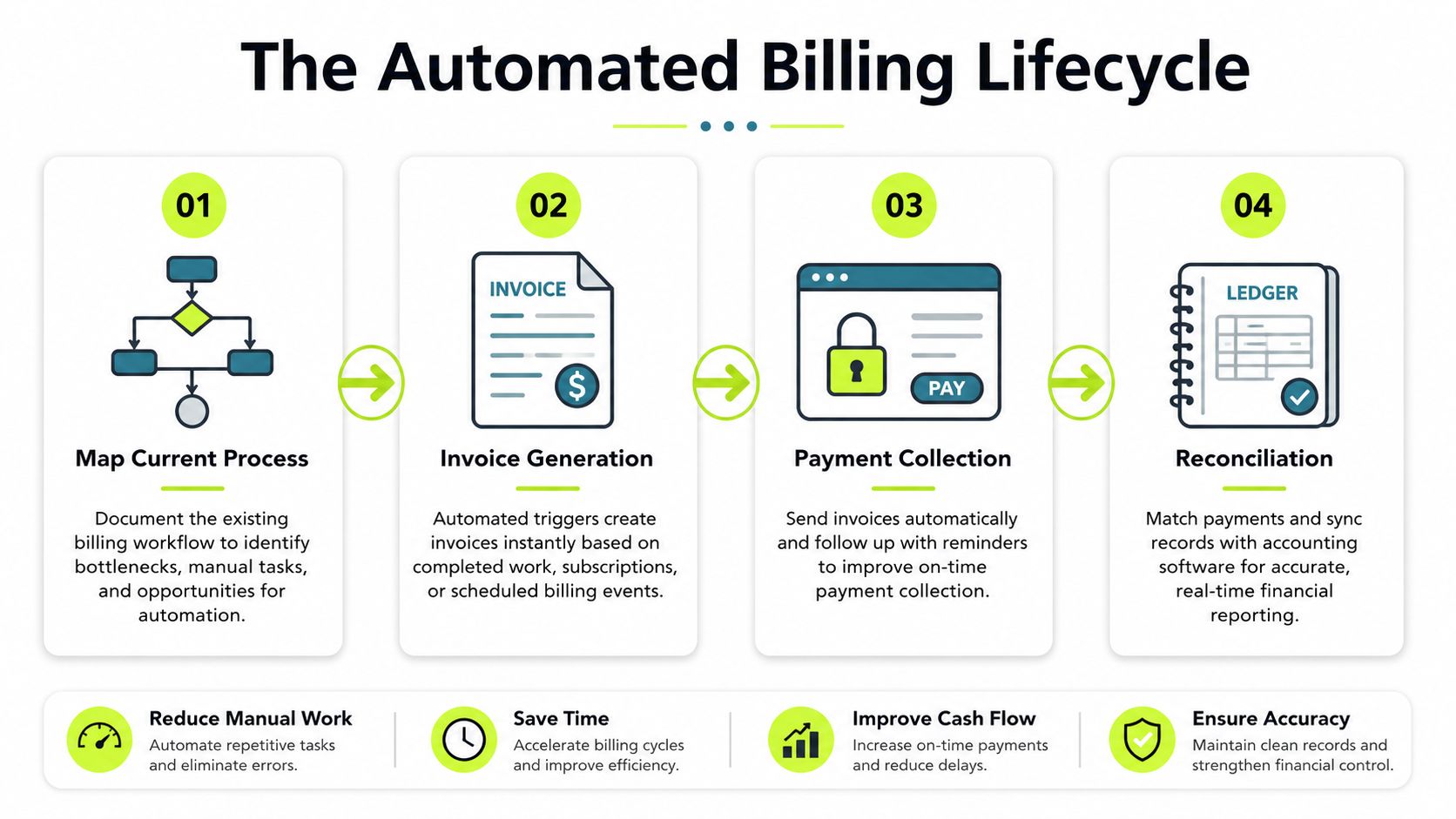
The workflow should cover five stages
I recommend mapping the future state in five parts, even if the software vendor markets it as one platform.
1. Source capture
The bill should pull from approved time, retainers, milestone triggers, or project events. If staff still copy data between systems, automation hasn't started.
2. Approval and release
Complex professional services invoices often need review. That's fine. The problem is unstructured review. Build approval rules around invoice value, discounting, nonstandard rates, or client-specific requirements.
3. Delivery and payment enablement
Invoice delivery should be immediate and consistent. Payment options should be easy, visible, and client-friendly. A portal matters, but only if clients can use it without friction.
A practical analogy comes from firms trying to streamline multi-channel retail workflows via API2Cart. Different channels, systems, and status changes need one coordinated data flow. AR has the same challenge. Different client contacts, communication channels, and payment states have to stay synchronized.
Here's a quick visual on how firms think about this flow in practice:
4. Collections orchestration
In this situation, most firms either reduce DSO or keep explaining it.
An underserved issue in billing automation content is everything that happens after the invoice is generated. Collections orchestration, dispute resolution, and cash application usually determine results, yet many guides ignore them. That gap matters because some data suggests 1 in 10 invoices go unpaid, which is why CFOs should care less about invoice creation alone and more about the full post-invoice workflow (analysis of post-invoice billing gaps).
Good orchestration doesn't mean sending more reminders. It means designing the right ones.
- Early reminders for clients who usually pay after a gentle nudge
- Escalation paths when a client contact ignores multiple notices
- Dispute routing to the project owner, not just finance
- Partial payment handling so the balance doesn't disappear into notes
- Promise-to-pay tracking so follow-up is tied to commitments
If your team says collections is "handled manually because clients are sensitive," that's usually a sign the process lacks structure, not that automation won't work.
5. Cash application and closeout
This stage gets ignored because it feels back-office. It isn't. If payment arrives and finance can't apply it cleanly, your AR aging stays noisy and your reporting gets weaker.
The workflow should account for remittance capture, matching rules, short pays, and unresolved balances. That's the difference between basic billing software and real AI AR automation. Intelligence should reduce exception handling, not just prettify the invoice.
Integrating Your Core Systems for Seamless Data Flow
If your CRM, practice management platform, payment system, and accounting ledger aren't connected, your automation layer will sit on top of bad plumbing. It may look modern, but the finance team will still clean up the same errors.
This is why I push firms to start with systems integration before they talk about templates, reminders, or portal branding. The order matters.
Integration comes before configuration
Practical implementation guidance is clear on this point. A strong billing rollout starts by selecting software with open APIs or pre-built integrations, then connecting practice management, CRM, and accounting systems so data flows automatically, and only then configuring billing rules. The reason is simple. Eliminating manual re-entry protects data integrity and prevents mismatches across engagement data, ledger records, and collections workflows (billing automation integration guidance).
For professional services firms, the minimum integration map usually includes:
- CRM: Client master data, terms, contacts, contract context
- Practice or project management: Time, milestones, deliverables, matter status
- Accounting system: Invoice posting, payment recording, GL impact
- Payment infrastructure: Client payment experience and settlement data
If you're evaluating portal design as part of this stack, focus on the payment experience too. A clean hosted payment gateway for B2B collections reduces friction and keeps finance from becoming the support desk for failed payment attempts.
Why QuickBooks AR automation often disappoints
QuickBooks is a solid accounting tool for many firms in this revenue band. But QuickBooks AR automation only works if upstream data arrives cleanly and downstream collection activity stays connected to invoice status.
What fails in practice?
Failure point | What happens | Result |
|---|---|---|
Disconnected CRM | Client terms or contacts are outdated | Invoices go to the wrong person or with the wrong rules |
Manual export from time system | Staff re-key hours or fees | Errors and disputes increase |
Standalone reminder tool | Collection emails aren't tied to payment status | Clients get awkward or mistimed follow-ups |
Loose payment reconciliation | Cash is received but not matched quickly | AR aging loses credibility |
Integration isn't an IT preference. It's a finance control.
Firms that skip this step usually blame the software later. The software wasn't the first problem. The fragmented operating model was.
Evaluating and Selecting Automation Technology
A polished demo proves almost nothing. Vendors can show clean invoice templates and attractive dashboards all day. Your job is to choose software that shortens the order-to-cash cycle, cuts manual touches after the invoice goes out, and gives finance tighter control over collections, cash application, and exceptions.
That standard eliminates a lot of tools quickly.
Most buying teams overvalue invoice creation and undervalue post-invoice execution. That is the mistake. Professional services firms usually lose time and cash after billing, when disputes stall, reminders go out late, partial payments sit unreconciled, and collectors work from incomplete data. Evaluate technology against that full cash cycle.
Evaluate for operating fit, not feature volume
Use a scorecard that reflects how your firm gets paid.
Criterion | What to Look For | Why It Matters |
|---|---|---|
Integration quality | Native connectors or dependable API support for CRM, QuickBooks, practice management, and payment tools | Weak integrations push work back into spreadsheets and email |
Workflow flexibility | Configurable rules for approvals, reminders, escalation paths, and exception handling | Services firms have client-specific billing rules that generic workflows miss |
Collections orchestration | Multi-step follow-up logic, dispute routing, promise-to-pay tracking, and role-based outreach | DSO improves when collection activity follows invoice status and client context |
Cash application capability | Matching support, remittance capture, short-pay handling, and exception queues | AR aging is only useful if receipts are posted accurately and quickly |
Client payment experience | Clear invoice access, practical payment methods, and an easy payment path | Friction delays payment and increases support work |
Reporting and KPI visibility | DSO, aging quality, touch counts, exception trends, collector activity, and dispute cycle time | Finance needs management data, not just transaction history |
Controls and auditability | Role-based approvals, workflow logs, and documented status history | Control failures create write-offs, client friction, and audit risk |
Intelligence layer | AI support for prioritization, segmentation, outreach timing, and exception triage | Useful intelligence reduces work and helps staff focus on high-value accounts |
What to ask in the demo
Run the demo on your ugliest real scenario, not the vendor's sample company.
Use cases like these expose whether the platform can handle collections work, not just produce invoices:
- A client disputes one line on a large invoice and pays only the undisputed amount.
- A partner misses the approval deadline and the invoice slips past the billing run.
- A payment arrives without clean remittance detail and finance has to match it fast.
- Reminder emails need to go to AP, while disputes need to route to the engagement lead.
- A retained-fee client follows a custom cadence that does not match standard terms.
If the vendor cannot show each step clearly, including status updates, ownership changes, and audit history, keep looking.
Evaluate AI by output, not branding
Every vendor now says "AI." That label is meaningless without a defined finance use case.
Good AI in AR helps your team prioritize accounts, sequence outreach, flag payment risk, and route exceptions to the right owner. For a simple outside reference on how firms frame broader AI technology applications, focus on the practical point. Intelligence should improve decision-making and execution.
In AR, that means fewer low-value touches, faster collector action, and cleaner queues.
You do not need software that writes clever reminder emails. You need software that tells your team which accounts need action today, which disputes are blocking cash, and which payments are likely to miss terms.
One practical fit test
As you narrow the field, compare each option against your workflow map and your post-invoice workload. Brand reputation matters less than process coverage.
That is why finance teams evaluating invoice automation software for finance teams should test where the product stops. Some tools handle invoice generation and delivery well, then leave reminders, payment orchestration, and reconciliation to separate systems. Resolut is one example of a platform built to cover billing, collections outreach, payment handling, and cash application in one AR workflow. That matters if your main bottleneck starts after the invoice is sent.
Buy the platform that removes the most labor from your actual cash cycle and gives finance better control over collections. That is the standard that improves DSO, reduces errors, and frees your team for higher-value work.
Your Roll-Out Plan and Post-Launch Monitoring
Finance teams lose more money in rollout mistakes than in software selection. A weak launch creates delayed invoices, broken approval paths, confused clients, and slower collections. A disciplined rollout protects cash while the process changes.

Go live in stages. Professional services firms have too many billing exceptions, stakeholder handoffs, and client-specific requirements for a full cutover to be a smart default.
Start with one controlled segment. Pick a service line, contract type, or client group with enough volume to expose real issues, but not so much complexity that every invoice becomes a one-off. The goal is to prove the full cash cycle works. Invoice creation, approvals, delivery, reminders, payment capture, dispute routing, and cash application.
I recommend this order:
- Pilot one contained workflow: Use a segment with repeatable billing patterns and a manageable number of exception types.
- Train by role: Billing staff, project leads, account owners, and collectors need task-specific training tied to the new workflow.
- Pressure-test exception handling: Run disputes, credits, short pays, partial payments, write-offs, and off-cycle approvals through the process before broader release.
- Set collections rules early: Define reminder timing, escalation points, and owner handoffs before invoices go out at scale.
- Expand only after stable results: Add segments once the first pilot shows clean invoice release, prompt follow-up, and accurate posting of cash.
That last point matters. Many firms automate invoice delivery, declare success, and then discover their collections process still depends on inbox follow-up and spreadsheet triage.
Monitor cash-cycle performance, not just system usage
Post-launch reviews should measure whether the new process is reducing labor and accelerating cash. If your team is spending the same amount of time chasing approvals, correcting invoices, answering payment questions, and clearing unapplied cash, the workflow is not fixed. It has only moved.
Review results weekly for the first two months. Shift to monthly once performance is steady.
Review area | Question to ask |
|---|---|
Invoice release | Are invoices going out on schedule without manual rescue work? |
Exception load | What still requires human intervention, and why? |
Collections performance | Which reminder steps are producing responses or payments? |
Dispute handling | Are disputes reaching the right owner quickly? |
Cash application | Are payments being matched cleanly and promptly? |
Client experience | Are clients confused by the new workflow, or finding it easier to pay? |
Add a few hard metrics to that review. Track invoice cycle time, first-pass accuracy, percentage of invoices sent on time, overdue balance by aging bucket, dispute resolution time, cash application turnaround, and DSO. Those measures show whether automation is improving throughput and cash conversion, not just reducing clicks.
A strong launch also reduces operator variance. Two collectors working the same client profile should produce similar follow-up timing, escalation behavior, and payment outcomes. If results still depend on individual heroics, your process is not standardized yet.
Mistakes that weaken results
I see three failures repeatedly in firms between $3M and $50M in revenue.
First, leadership treats implementation as a software setup project. It is a finance operating model project. The controller or CFO should own targets, exception policy, and cross-functional accountability.
Second, teams stop at invoice automation. That leaves the hardest part of AR untouched. Cash usually stalls after the invoice is sent, when reminders slip, disputes sit with no owner, and payments arrive without clean application.
Third, they stop tuning after launch. That is when the actual work starts. The first 60 to 90 days show which clients need different cadences, which approvers delay billing, and which exception types are still consuming team time.
If you're implementing AR software for professional services, expect to adjust workflows by client type. Enterprise customers, public sector clients, and founder-led SMBs pay differently and escalate differently. Your system should support that variation while keeping controls consistent.
Resolut automates AR for professional services with billing, collections orchestration, payment workflows, and cash application in one operating layer. If you want a calmer process that is consistent, accurate, and human, Resolut is worth a look.