Bank Reconciliation Format: A CFO's Guide to Control
Master the bank reconciliation format with our definitive guide for CFOs. Includes a template, example, and steps to improve cash flow and reduce DSO.
Month-end usually exposes the same uncomfortable gap. The P&L may be closed, receivables may look current, and the cash forecast may be circulating to leadership, but the actual bank balance still doesn’t fully explain what happened.
That gap is where finance teams lose control.
In professional services firms, it often shows up as a practical question rather than an accounting one. Did that client payment clear? Is cash lower because of timing, or because something was miscoded? Why does collections say an invoice is paid while the ledger still shows it open? When those questions linger, finance starts managing around uncertainty instead of through it.
The Foundation of Financial Control
A disciplined bank reconciliation format solves that problem at the source. It forces the team to prove the cash balance, item by item, instead of relying on assumptions from the general ledger or the online banking screen.
That matters more than many firms realize. Unreconciled timing differences can overstate DSO by 2 to 5 days and cause cash flow misforecasts of up to 10%, while manual reconciliation processes often inflate error rates by 15 to 20% according to Upflow’s bank reconciliation discussion. For a finance leader trying to keep DSO under control, those aren't abstract accounting issues. They affect staffing decisions, partner draws, debt planning, and vendor timing.
In smaller and mid-sized firms, the problem usually starts innocently. Someone exports the bank statement, someone else checks off a few transactions in Excel, and unmatched items get pushed into a suspense line or carried forward “until next month.” The close still gets done. The report still goes out. But confidence drops.
What weak reconciliation does to operating decisions
A poor process creates three predictable failures:
- Cash looks available when it isn’t. Deposits may be recorded internally but not yet cleared, or disbursements may still be outstanding.
- Collections performance gets distorted. If receipts aren’t matched cleanly, AR aging and DSO stop reflecting reality.
- Close quality declines over time. Old reconciling items roll forward, explanations get thinner, and reviewers stop trusting the file.
That’s why I treat bank reconciliation as part of cash governance, not clerical cleanup. It sits alongside billing discipline, collections follow-up, and treasury visibility.
A finance team can tolerate a lot of operational noise. It can’t tolerate uncertainty in cash.
For owners and finance managers who need a broader operating lens, small business cash flow management is a useful companion read because it connects day-to-day cash controls to wider planning decisions.
Where reconciliation meets AR automation
This is also where accounts receivable automation either works or stalls. If the reconciliation format is sloppy, payment application becomes unreliable. If payment application is unreliable, the firm can’t confidently reduce DSO, and any conversation about AI AR automation, AR software for professional services, or even QuickBooks AR automation becomes premature.
Good automation depends on clean control points. Bank reconciliation is one of the most important of them.
The Standard Bank Reconciliation Format Explained
The standard bank reconciliation format is simple on purpose. It starts with two balances that rarely match on the same date, then adjusts each side until both arrive at the same verified cash amount.
One side begins with the bank statement ending balance. The other starts with the book balance from the cash ledger. The purpose isn’t to force one record to “win.” The purpose is to explain every legitimate difference and arrive at one true cash figure that the team can support.
The two-column logic
This format works because the bank and the books capture activity on different timetables.
The bank statement includes what the bank has processed. The books include what the company has recorded. Between those two records, you’ll usually find timing items and unrecorded bank activity.
A practical layout looks like this:
Bank side | Book side |
|---|---|
Ending balance per bank statement | Ending balance per cash book |
Add deposits in transit | Add interest earned |
Less outstanding checks | Add or subtract missing payment items |
Adjusted bank balance | Less bank service fees |
Adjusted book balance |
A worked structure with numbers
A standard example from Ramp’s explanation of bank reconciliation shows the format clearly. Start with a bank statement ending balance of $25,000. Add deposits in transit of $1,500 and subtract outstanding checks of $300. The adjusted bank balance becomes $26,200.
On the book side, start with a cash book ending balance of $24,920. Add interest earned of $70, subtract bank service fees of $50, and add a missing customer payment of $1,260. That also produces $26,200.
That is the entire point of the document. Different starting balances. One supported ending balance.
Why the format still matters
Teams sometimes try to shortcut this into a transaction dump from the ERP or a list of unreconciled lines with no structure. That usually fails under review.
A proper format does three jobs at once:
- It explains the difference. The reviewer can see immediately whether the issue is timing or a missing book entry.
- It creates an audit trail. The file tells the story of the account instead of forcing someone to reconstruct it later.
- It surfaces control failures early. Missing receipts, duplicate postings, and unusual bank activity become visible while they’re still fixable.
Practical rule: If a reviewer can’t understand the reconciliation in a few minutes without asking the preparer for context, the format is too loose.
The structure also has a governance role. Ramp notes that bank reconciliations can detect fraud in up to 30% of cases in forensic accounting contexts within its cited discussion. That’s a strong reminder that this isn’t only about tidy month-end workpapers. It’s about protecting cash.
What works and what doesn’t
What works is consistency. Use the same layout every month, the same naming convention, and the same order of support.
What doesn’t work is reinventing the sheet account by account. Once every preparer uses a different format, review quality drops and reconciliation becomes personality-driven instead of process-driven.
Executing the Reconciliation Process Step by Step
A good bank reconciliation format only helps if the team follows a repeatable process. The strongest teams don’t “figure it out” each month. They run the same sequence every time, with clear ownership and a clear cutoff.
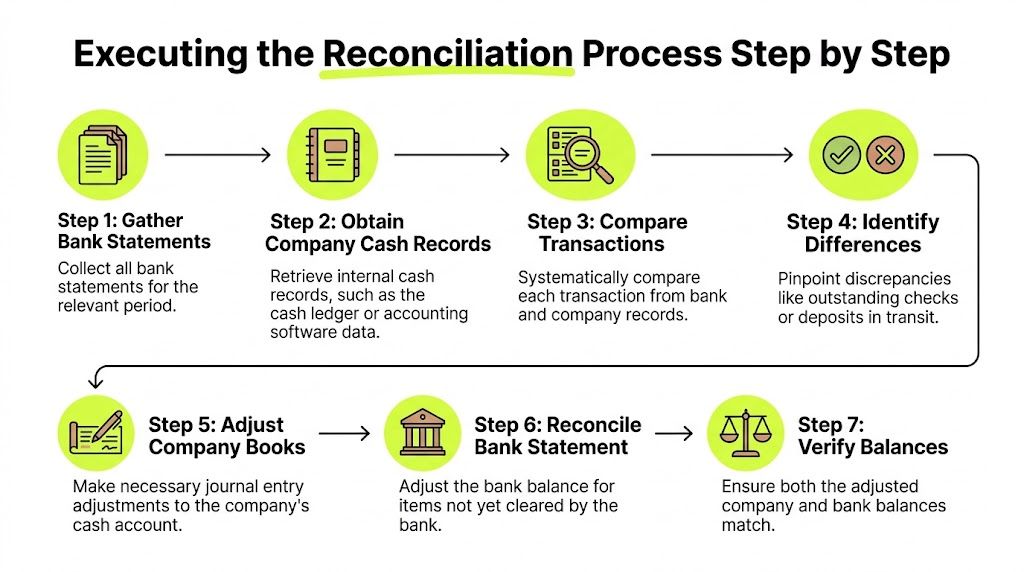
When I train a new finance manager, I want them to think in terms of evidence first and entries second. Don’t start by forcing the numbers to tie. Start by gathering complete records, then compare, then explain.
Start with a controlled data set
Before anyone matches a single line, lock down the period and the source documents.
The minimum package should include:
- The final bank statement for the period. Use the official statement, not a screenshot from online banking.
- The cash ledger detail. Pull the full activity for the same date range from the accounting system.
- Supporting transaction detail. Deposit records, cash receipt logs, and check or payment registers.
- Prior-period reconciliation. Open items should roll forward visibly, not by memory.
If your team needs a clean reference point for how the workflow fits into accounting operations, this walkthrough on reconciliation in accounting with example is a helpful companion.
Match what clears cleanly
Once the file is assembled, the first pass is mechanical. Tick and tie every transaction that appears in both places.
This is where discipline matters. Match on amount, date, and reference where available. Don’t assume a similar amount is the same transaction. In professional services, that’s how duplicate client payments and partial remittances get mishandled.
A practical sequence looks like this:
- Clear deposits first. Client receipts often drive downstream AR application questions, so resolve those early.
- Then clear disbursements. Checks, ACH payments, wires, and bank-initiated debits need separate attention.
- Flag exceptions immediately. Don’t leave unmatched lines for a vague “later” pass.
Separate timing from true book adjustments
Most reconciliation problems become easier once the team stops treating all differences as the same type of issue.
Some differences are timing only. A deposit may be in the ledger but not yet on the bank statement. A check may be issued but still outstanding. Those items affect the reconciliation statement, but they don’t always require a journal entry.
Other differences represent activity the bank recorded that the company hasn’t booked yet. Service charges, interest, and certain payment items belong in the ledger and need follow-up.
The fastest way to slow down month-end is to let timing items and book errors live in the same bucket.
Build the adjusted balances
After matching and classifying exceptions, prepare each side of the reconciliation in order.
On the bank side, begin with the ending balance from the statement. Add deposits in transit. Subtract outstanding checks or similar uncleared disbursements.
On the book side, begin with the cash balance from the ledger. Post or propose adjustments for items the bank recorded that the books missed. Then recalculate the adjusted book balance.
A reliable workflow usually follows this pattern:
- Bank adjustments: Items recorded in books but not yet reflected by the bank.
- Book adjustments: Items recorded by the bank but not yet entered in the ledger.
- Open-item review: Confirm whether outstanding items are reasonable and current.
- Final tie-out: Both adjusted balances must match exactly before sign-off.
Investigate differences with intent
If the adjusted balances still don’t tie, don’t start guessing.
Review date cutoffs first. Then look for duplicate entries, transposed amounts, and missing postings. In growing firms, I often see one of three root causes: cash posted to the wrong bank account, receipts booked without proper remittance detail, or bank activity imported late from the feed.
The point is not speed at any cost. The point is controlled speed. A reconciliation finished quickly but explained poorly creates more work in the next period.
Close the file properly
Once the balances match, complete the file as if an auditor or a new reviewer will open it without context.
That means:
- Document the preparer and reviewer.
- Date the reconciliation clearly.
- Attach support for each reconciling item.
- Show how prior outstanding items were resolved or carried forward.
A completed reconciliation should stand on its own. If the preparer goes on leave tomorrow, the file should still make sense.
Common Reconciling Items and Required Journal Entries
Most reconciliation issues fall into two categories. The first category is timing differences. The second is unrecorded items that require changes to the books.
That distinction matters because teams often overpost. They see an item on the reconciliation and assume every line needs a journal entry. It doesn’t. Posting entries for pure timing items creates new errors instead of removing old ones.
Timing differences
Timing differences are legitimate gaps between when the company records a transaction and when the bank processes it.
The common examples are deposits in transit and outstanding checks. These belong on the reconciliation statement because they explain the difference between bank and book balances. They generally do not require a journal entry if the company already recorded them correctly.
A deposit recorded in the cash receipts journal on the last day of the month may not hit the bank statement until the next period. The books are right. The bank is later.
An outstanding check works the same way in reverse. The company issued and recorded the payment, but the payee hasn’t cleared it yet.
Unrecorded items
Unrecorded items are different. These represent activity the bank has already processed, but the ledger hasn’t captured.
That’s where the reconciliation becomes a correction tool, not just a comparison.
Below is a practical reference table.
Reconciling Item | Description | Journal Entry (Debit) | Journal Entry (Credit) |
|---|---|---|---|
Deposit in transit | Receipt recorded in books but not yet processed by bank | No entry | No entry |
Outstanding check | Payment recorded in books but not yet cleared by bank | No entry | No entry |
Bank service fee | Fee charged by bank and not yet recorded in books | Bank service fee expense | Cash |
Interest earned | Interest credited by bank and not yet recorded in books | Cash | Interest income |
Missing customer payment | Customer payment reflected in bank activity but not yet recorded in books | Cash | Accounts receivable |
NSF check | Customer payment previously recorded, later rejected by bank | Accounts receivable | Cash |
What each entry is fixing
The mechanics are straightforward, but the control objective is what matters.
- Bank service fee: This reduces cash. If you leave it unposted, book cash stays overstated.
- Interest earned: This increases cash and income. If omitted, cash is understated.
- Missing customer payment: This is often the item that creates confusion between AR and treasury. Cash came in, but it hasn’t been applied against the customer account.
- NSF check: This reverses a payment that didn’t ultimately clear. The receivable is still outstanding and should return to AR.
If cash and receivables disagree, don’t patch the reconciliation. Fix the underlying customer posting.
What experienced teams watch closely
The accounting entry is only part of the job. The stronger habit is to ask what the item says about the process.
A bank fee may be routine. A missing customer payment may point to weak remittance handling. An NSF item may indicate a collections risk that the AR team needs to address quickly.
That’s why the best finance managers don’t prepare reconciliations as isolated month-end documents. They use them to feed information back into collections, billing, and cash application.
Common mistakes
Three mistakes show up often:
- Posting entries for deposits in transit or outstanding checks. That creates duplicate activity.
- Leaving bank-originated items unposted. The reconciliation ties temporarily, but the ledger stays wrong.
- Booking the cash side without fixing AR detail. The GL may reconcile while the customer subledger remains inaccurate.
The cleanest reconciliation file is the one that improves the next month’s close. That only happens when journal entries are limited to actual book corrections.
A Completed Bank Reconciliation Example
A practical example makes the format easier to trust. Consider a professional services firm at month-end with a bank account used for client receipts, payroll, and vendor disbursements.
Its controller pulls the statement and sees one number. The general ledger shows another. No one panics, because a mismatch at this stage is normal. The question is whether the difference is understandable and supportable.

The starting balances
Use the standard example values already established for the format.
The bank statement ending balance is $25,000. The cash book ending balance is $24,920. During review, the controller identifies three categories of differences:
- A deposit in transit of $1,500
- Outstanding checks of $300
- Book-side items consisting of interest earned of $70, bank service fees of $50, and a missing customer payment of $1,260
Filling out the statement
The bank side is completed first because it usually depends on cutoff timing, not new entries.
Bank reconciliation statement | Amount |
|---|---|
Ending balance per bank statement | $25,000 |
Add deposits in transit | $1,500 |
Less outstanding checks | ($300) |
Adjusted bank balance | $26,200 |
The book side follows:
Book reconciliation statement | Amount |
|---|---|
Ending balance per cash book | $24,920 |
Add interest earned | $70 |
Less bank service fees | ($50) |
Add missing customer payment | $1,260 |
Adjusted book balance | $26,200 |
The reconciliation is complete because both adjusted balances arrive at the same amount.
What the example is really showing
The numbers matter, but the lesson is operational.
The bank side explains timing. The book side corrects omissions. Once those are separated, the reconciliation stops feeling like detective work and starts functioning as a controlled routine.
That’s also why this topic is worth seeing demonstrated visually:
How a controller would review this file
A reviewer shouldn’t just verify arithmetic. The reviewer should ask:
- Is the deposit in transit supported by a receipt or deposit record?
- Are the outstanding checks still current and reasonable?
- Were the book-side items posted to the ledger after identification?
- Does the missing customer payment also clear the related AR balance?
If those questions are answered in the file, the reconciliation is doing its job.
If not, the statement may still tie, but it hasn’t yet created control.
Internal Controls and Best Practices for Integrity
A bank reconciliation format is only as reliable as the controls around it. You can have a clean template, perfect formulas, and a well-labeled folder structure, and still have a weak process if the wrong person prepares it, reviews it, and clears the exceptions.
That’s why I’m skeptical of any reconciliation process described as “efficient” before it’s described as controlled.
Segregation and review are not optional
The preparer and reviewer should not be the same person. The person posting cash should not have unchecked authority to clear reconciling items without review. In smaller firms, total separation may be hard, but independent review is still possible and necessary.
Post-Sarbanes-Oxley, modern accounting systems create immutable historical records for each reconciliation, including unique sequence numbers and user identifiers, and that documentation becomes increasingly important for audits under PCAOB AS 1215 effective December 15, 2026. The same discussion notes that manual errors or irregularities are found in 15 to 20% of monthly statements and that well-documented reconciliations serve as evidence in fraud investigations, as outlined in Numeric’s overview of bank reconciliation controls.
That should shape how you design the process. A reconciliation isn’t finished when it ties. It’s finished when preparation, review, evidence, and resolution are all documented.
What strong control looks like in practice
The control environment should include at least these habits:
- Independent preparation and approval: Someone prepares. Someone else reviews with enough context to challenge it.
- Clear sign-off: The file should show who completed the reconciliation and who approved it.
- Support attached to each open item: Statements, receipts, check detail, and other backup should live with the reconciliation.
- Aging of prior items: Old reconciling lines should never disappear into a roll-forward without explanation.
For teams refining their workflow, this guide to bank account reconciliation is useful because it connects the control side of reconciliation to day-to-day close management.
A reconciliation with no reviewer comments may mean the process is excellent. More often, it means the review was too light.
Timeliness matters as much as accuracy
Late reconciliations weaken every downstream report. If cash isn’t verified promptly, AR aging, working capital discussions, and leadership reporting all start from a shaky number.
A timely reconciliation catches issues while the evidence is still accessible. Bank-originated items are easier to trace. Staff still remember unusual transactions. Customer remittance information hasn’t gone cold.
That’s also why “we’ll clean it up next month” is one of the most expensive habits in accounting. Next month’s close already has enough work.
Excel can still work if the discipline is there
Not every firm needs a large ERP to run a sound reconciliation process. Excel can work well if the file design is controlled.
Useful practices include:
- Locked formulas and protected tabs: Prevent accidental edits to core calculations.
- Structured matching sheets: Separate matched, unmatched, and aged items.
- Lookup functions: Use tools such as VLOOKUP or equivalent functions to identify likely matches by amount, date, or reference.
- Version control: Save final files in a fixed close folder, not in email threads or personal desktops.
What doesn’t work is the unstructured spreadsheet that gets rewritten every month. That approach depends too much on one person’s memory and too little on process.
From Manual Formats to Automated Cash Application
Manual reconciliation formats still matter. They teach the logic of cash control, and every finance leader should understand them. But once transaction volume grows, manual matching starts creating friction across the entire order-to-cash cycle.
That friction shows up first in payment application. A receipt hits the bank. Someone has to identify the payer, locate the open invoice, apply the cash correctly, clear exceptions, and update the ledger. When that chain is manual, visibility slows down even if the team is working hard.
Where manual work breaks down
In many firms, the bottleneck isn’t the final bank rec itself. It’s the work before it.
Bank files arrive in different formats. Remittance advice is incomplete. Customer names don’t match legal entities. Payments cover multiple invoices or short-pay one invoice with no explanation. The finance team ends up reconciling cash after the fact instead of applying it in near real time.
That’s where practical tools can help even before full automation. If your bank still provides awkward exports, bank statement PDF to Excel converters can be useful for turning statement data into something your team can work with and validate.
What automation changes
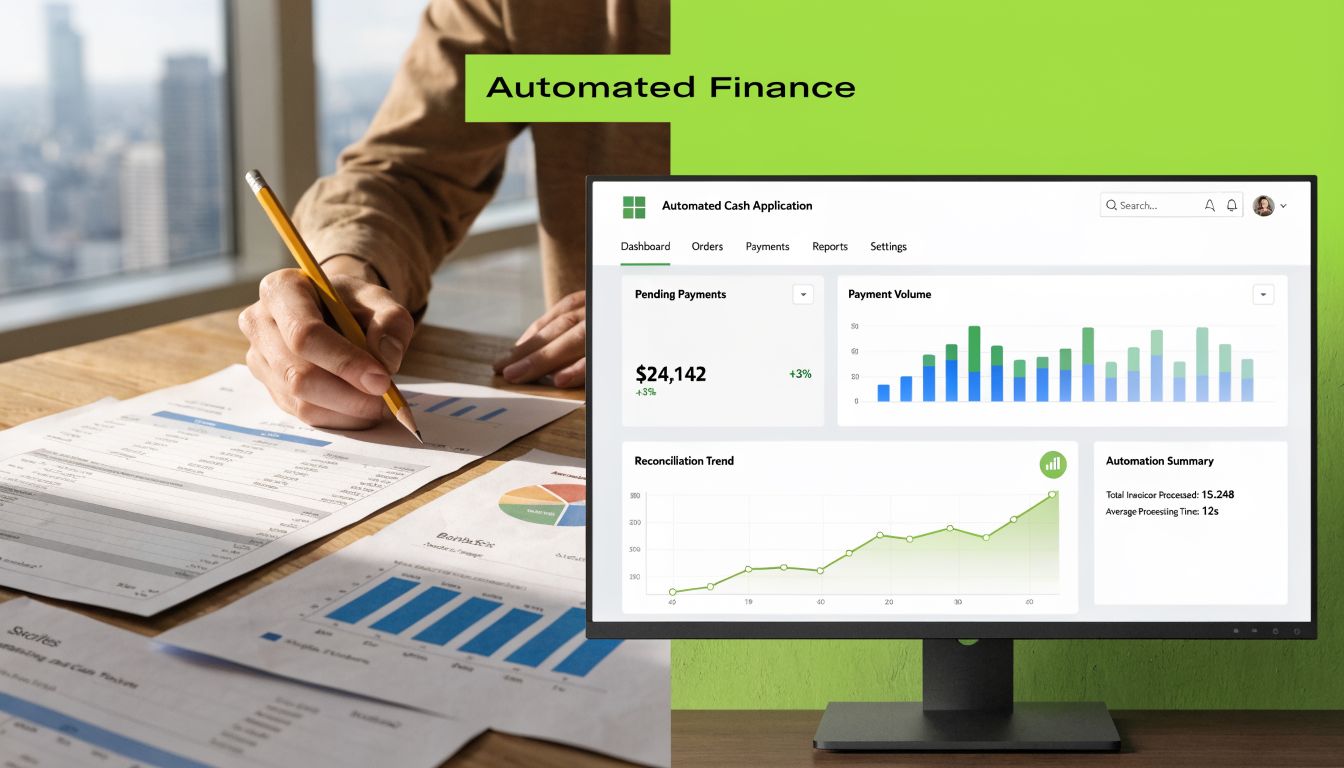
Automated reconciliation protocols can use AI-based matching to achieve 95 to 99% auto-match rates, reduce cash application delays from 5 to 10 days to under 24 hours, help teams monitor reconciliation velocity below 2 days, and support DSO reductions of 15 to 30%, according to Ledge’s discussion of automated bank reconciliation. The same source ties manual reconciliation errors to $200B in annual enterprise waste.
Those gains matter because they remove lag from finance reporting. Cash is recognized sooner. AR aging improves faster. Controllers spend more time reviewing exceptions and less time hunting basic matches.
What this means for professional services firms
For firms in the $3M to $50M range, the practical question isn’t whether automation sounds modern. It’s whether the current process is delaying visibility and forcing expensive manual effort.
If your team is still reconciling receipts by scanning emails, exporting CSVs, and cross-referencing invoice lists by hand, you don’t just have a bank rec issue. You have a cash application design problem.
That’s where accounts receivable automation, AI AR automation, and AR software for professional services become relevant. The right workflow should ingest payment data, match it intelligently, and leave the team with exceptions that require judgment.
A useful reference point is this overview of automated payment reconciliation, which connects bank data, matching logic, and posting workflows in a practical way.
What to look for in a modern workflow
The technology should support the control framework, not replace it.
Look for these capabilities:
- Reliable import of bank activity: The data has to enter cleanly and consistently.
- Rules-based and AI-assisted matching: Especially for partial payments, bundled remittances, and inconsistent payer names.
- Clear exception queues: Staff should review the unresolved few, not the obvious many.
- Audit-ready history: Every match, adjustment, and override should be visible after the fact.
For firms using QuickBooks AR automation or moving beyond it, this is usually the pivot point. Basic bookkeeping can record cash. A stronger AR automation stack helps apply cash accurately, support reconciliation, and improve forecasting.
One example in this category is Resolut, which automates AR workflows for professional services, including payment matching and cash application, in a way that supports consistency and review rather than replacing finance judgment.
Resolut automates AR for professional services with a practical focus on consistency, accuracy, and human oversight. If your current bank reconciliation format is doing the job mechanically but still leaving cash application slow, AR visibility unclear, or DSO harder to manage, it may be time to tighten the process around a system built for that workflow. Learn more at Resolut.