CFO's Guide: Cash Flow Management Software For Services
Cash flow management software - CFO's guide to cash flow management software. For professional services, reduce DSO & improve liquidity with AR automation and
A lot of professional services firms hit the same wall around the same revenue range.
The P&L looks healthy. Utilization is respectable. The sales pipeline is active. But the bank balance keeps creating stress that the income statement doesn't explain. Payroll dates feel too close. Partner draws get delayed. Hiring decisions stall because no one trusts when cash will arrive.
That’s usually the moment when finance leaders start looking at cash flow management software. The mistake is thinking the answer is only better forecasting. Forecasting matters, but for a services firm, forecast quality depends on one thing first: how reliably you convert billed work into collected cash.
The Revenue-Cash Disconnect in Professional Services
A $10M services firm can look successful on paper and still operate with constant cash tension.
That happens when revenue recognition and cash collection drift apart. The firm finishes work, sends invoices, records revenue, and assumes the cash is effectively “on the way.” In reality, invoices sit in approval queues, clients dispute line items, project managers avoid awkward follow-ups, and the controller spends too much time assembling a weekly view from partial data.

In professional services, the problem is sharper because the balance sheet doesn't have much physical cushion. You’re often selling expertise, time, and delivery capacity. When client payments slip, there isn’t inventory to liquidate or hard assets to lean on. There’s just slower cash in, while payroll and overhead keep moving on schedule.
The broader risk is real. 82% of small business failures are due to poor cash flow management, a problem that gets worse in service-based firms with long payment cycles and intangible assets, according to SNS Insider’s cash flow management market report.
The firms that feel “surprised” by cash problems usually weren't missing revenue. They were missing control over timing.
What this looks like in practice
A controller closes the month and sees strong billings. An owner sees signed statements of work and assumes the quarter is secure. Then three large clients pay later than expected, one invoice needs rework, and a planned hire gets pushed because cash confidence wasn't as strong as revenue confidence.
That’s not an accounting issue. It’s an operating model issue.
Where the pressure shows up first
- Payroll pressure: Labor is the main cost in most services firms, so collection delays hit payroll confidence quickly.
- Growth hesitation: Leaders pause hiring, software purchases, or marketing because cash timing feels uncertain.
- Relationship strain: Teams either chase clients inconsistently or avoid collections altogether, and neither approach works well.
A firm in this position doesn’t need more reports. It needs a system that turns receivables into a controllable process.
Why Spreadsheets and QuickBooks Are Not Enough
Spreadsheets and QuickBooks are useful. They just aren’t enough once a firm needs active cash control instead of historical bookkeeping.
QuickBooks tells you what was recorded. A spreadsheet lets someone model what might happen next. Neither tool, on its own, creates a dependable operating layer between invoices issued and cash received. That gap is where most services firms lose visibility.
The core failure is fragmented data
The biggest issue isn’t that finance teams lack effort. It’s that the data lives in too many places.
Invoice status sits in the accounting system. Client context sits with account managers. Promise-to-pay notes live in email or Slack. Forecast assumptions sit in a spreadsheet. Bank activity sits elsewhere. By the time someone combines it all, the picture is already stale.
That’s why 68% of CFOs cite siloed AR data as the top barrier to accurate cash forecasts, according to the Gartner finding summarized in Cube Software’s review of cash flow tools.
Manual workflows break under volume
At a small scale, finance can survive on manual exports and weekly spreadsheet updates. At a larger scale, those same habits create recurring failure points:
- Version confusion: The forecast file gets copied, edited, and emailed until no one is certain which version is current.
- Timing lag: Collections activity happens daily, but the forecast may only reflect changes once a week.
- Human inconsistency: Different team members classify risk differently, so expected receipts become judgment calls.
Practical rule: If your weekly cash meeting starts with “let me clean up the data first,” the system is already too manual.
QuickBooks AR automation isn't native enough for growing firms
QuickBooks is strong for accounting records. It isn’t built to run advanced collections orchestration across customer segments, payment behaviors, escalation paths, and cash application workflows.
That matters in a professional services firm with milestone billing, retainers, partial payments, disputes, and partner-sensitive client communications. You need more than reminders. You need accounts receivable automation that knows which customer to contact, when to contact them, and what happens after the payment lands.
A good finance stack also has to answer practical questions that basic tools struggle with:
Operational question | Spreadsheet or basic accounting tool | Modern platform |
|---|---|---|
What cash is likely to arrive this week? | Manual estimate | Live forecast tied to current data |
Which overdue invoices need action today? | Filter and review by hand | Workflow-driven prioritization |
Was a payment matched correctly? | Manual reconciliation | Automated matching and exception handling |
The issue isn't that spreadsheets are bad. The issue is that they keep finance reactive.
Core Capabilities of Modern Cash Flow Platforms
The cash flow management software market was valued at USD 477.78 million in 2026 and is projected to grow at a 10.2% CAGR, according to Global Market Statistics. That growth reflects a practical shift inside finance teams. They’re replacing fragmented manual work with systems that connect visibility, workflow, and execution.
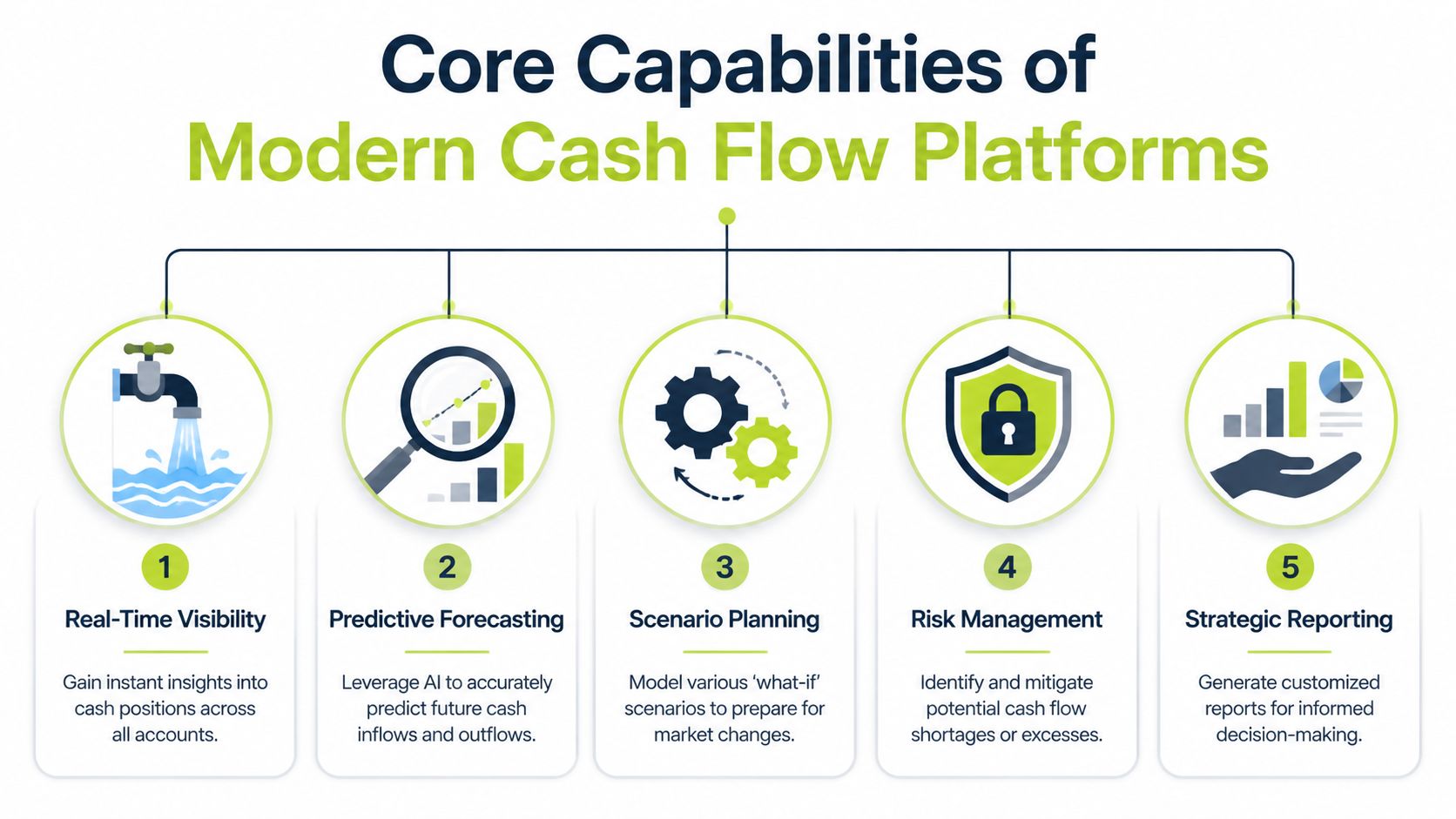
For a services firm, five capabilities matter most.
Real-time cash position and forecasting
A useful platform shows cash where it sits, not where last Friday’s spreadsheet said it might be. That means connected bank balances, current receivables, expected payables, and rolling views that adjust as client behavior changes.
For a services firm, the best forecast isn't a static annual model. It’s a working forecast tied to project billing schedules, retainers, expected collections, payroll timing, and tax obligations.
Accounts receivable automation
Many software evaluations become superficial at this point.
A platform should support invoice follow-up workflows, customer segmentation, payment reminders, escalation logic, and payment experience. For firms that bill on milestones or monthly retainers, AR software for professional services needs to reflect how clients buy and approve work.
Good AI AR automation also helps finance teams stop treating every overdue account the same way. Some customers need a simple reminder. Others need a tighter cadence, internal escalation, or different language because procurement is involved.
Accounts payable management
Controlling outflows matters, especially when inflows are uneven.
A strong platform helps finance decide what can be paid now, what should be timed to terms, and how planned disbursements affect near-term liquidity. That’s less about delaying every payment and more about managing sequencing with discipline.
Automated reconciliation and cash application
This capability is often undervalued until the firm sees how much time it saves.
When payments hit the bank, someone still has to identify the payer, match the amount, apply it to the right invoice, and resolve exceptions. Without automation, the forecast and the ledger drift apart. With automation, the finance team gets a cleaner picture faster.
A forecast is only as trustworthy as the speed and accuracy of the reconciliation underneath it.
Integrated analytics and reporting
Leaders don’t need more dashboards. They need decisions supported by clean signals.
The right system helps a CFO or controller answer questions such as:
- Collections trend: Are overdue balances improving or deteriorating by client cohort?
- Cash confidence: Which expected receipts are highly probable, and which are at risk?
- Operational load: Where is the AR team spending time on preventable follow-up?
The best platforms combine these functions into one operating rhythm. They don’t just report on cash. They help produce it.
Measuring the Strategic Impact on Business Performance
Most software pitches talk about efficiency. CFOs should care more about control.
If a platform improves visibility but doesn’t change cash behavior, it’s a reporting upgrade. If it helps finance predict cash more accurately, collect faster, and reduce manual handling, it changes operating performance.

Forecast quality improves first
Advanced platforms using AI-powered predictive analytics can achieve forecast accuracy up to 95%, compared with 20% to 30% error rates common in manual spreadsheet methods, according to this review of cash flow monitoring software features.
That gap matters operationally. Better forecast accuracy improves hiring timing, debt planning, partner distributions, and vendor negotiations. It also reduces the constant re-forecasting cycle that wears down finance teams.
For leaders building the internal case, it helps to frame automation as a finance operating model shift, not just a tooling change. Cyndra's automation guide is a useful outside read on how workflow automation changes decision speed and consistency across business functions.
Working capital gets less fragile
A services firm usually doesn’t need a dramatic turnaround. It needs fewer surprises.
When cash expectations are grounded in live collections data instead of static assumptions, leaders can make ordinary decisions with more confidence. They can approve hiring sooner, avoid unnecessary borrowing, and stop carrying excess caution because the numbers aren’t trusted.
Forecasting and receivables require joint discussion, not treatment as separate systems. If you want a clean primer on that relationship, Resolut’s article on cash flow forecasting fundamentals is a practical starting point.
ROI should be measured in finance capacity and timing confidence
The strongest returns often show up in places that don’t fit neatly into one line item.
- Finance time reclaimed: Less manual reconciliation, fewer spreadsheet updates, less status chasing.
- Faster decision cycles: Leaders act sooner because forecast confidence is stronger.
- Lower operational friction: Collections become a process, not a recurring internal debate.
A simple before-and-after scorecard helps:
Metric | Before software | After disciplined rollout |
|---|---|---|
Forecast process | Manual and batch-based | Live and updated from connected systems |
Collections effort | Reactive follow-up | Structured workflow by account risk |
Cash meetings | Debate over data quality | Discussion of actions and trade-offs |
A short explainer is worth watching before vendor demos start:
Why AR Automation Is Your Primary Cash Flow Lever
For a professional services firm, the highest-impact cash flow lever usually isn’t AP timing or another forecasting model. It’s receivables.
That’s because your inflows are concentrated in client payments. If those payments arrive late, every other part of the cash plan becomes defensive. You can build the cleanest forecast in the world and still be wrong if the AR process is inconsistent.
Forecasting tells you the problem. AR automation fixes it.
This is the distinction many teams miss.
Forecasting software can show that a shortfall is coming. Accounts receivable automation changes the odds that the shortfall happens at all. It improves the speed, consistency, and professionalism of collections before finance ends up in damage-control mode.
Modern AR automation reconciles 90% to 95% of payments instantly with AI-driven matching and can reduce DSO by 20 to 33 days, according to Tesorio’s guide to cash flow management software.
That matters more than most reporting upgrades.
What works in services firms
Professional services firms often have fragile collections habits. Partners don’t want to sound aggressive. Project managers assume accounting is handling it. Accounting assumes account leads will step in if a client is sensitive. The result is polite delay.
A better model uses workflow orchestration:
- Segment by account behavior: Retainer clients, enterprise procurement clients, and chronically late payers shouldn’t get the same sequence.
- Standardize outreach cadence: Reminder timing, language, and escalation shouldn't depend on who happens to remember.
- Make payment easy: A good portal reduces back-and-forth over method, remittance details, and confirmation.
QuickBooks AR automation typically needs augmentation. QuickBooks records the receivable. A dedicated AR platform manages the collection process around it.
What doesn't work
The following approaches look reasonable and fail in practice:
- Partner-only collections: Senior relationship owners often intervene too late and too selectively.
- Inbox-driven follow-up: If collection status lives in individual email threads, leadership has no clean control layer.
- One-size-fits-all reminders: Tone, frequency, and escalation need to reflect client type and payment history.
The goal isn't harder collections. It's more consistent collections with less internal friction.
Teams exploring broader workflow design beyond finance may find Doczen's enterprise automation guide useful. The same logic applies in AR. Good automation doesn't remove judgment. It reserves judgment for exceptions.
How to think about tools
A practical stack for a services firm often separates forecasting from receivables execution. Tools like Tesorio and CashAnalytics focus on cash visibility and forecasting. AR-focused systems handle outreach, risk signaling, payment collection, and cash application.
One example is accounts receivables automation, where the platform layer handles collections workflows, payment experience, and automated cash application instead of leaving those steps to spreadsheets and inboxes. That’s usually where firms see the fastest route to improve cash flow and reduce DSO without making the client experience feel blunt or chaotic.
An Evaluation Checklist for Finance Leaders
Most software selections go off course for one reason. The demo looks smoother than the actual operating reality.
A finance leader evaluating cash flow management software should focus less on visual polish and more on whether the system can support daily execution in a services environment. The questions below tend to separate useful platforms from attractive ones.

The non-negotiables
- Integration depth: Ask how the platform connects to QuickBooks, Xero, your ERP, bank feeds, and any PSA or billing tools. “Integration” can mean anything from a live sync to a scheduled file import.
- AR workflow control: Can finance define reminders, escalation paths, customer segmentation, dispute handling, and approval rules without vendor intervention?
- Cash application logic: How does the system handle partial payments, split remittances, and unmatched receipts?
The practical test
Don’t ask only what the platform can do. Ask what your team will stop doing manually if you buy it.
A useful vendor should be able to walk through a real sequence: invoice issued, reminder sent, payment received, exception flagged, cash applied, forecast updated. If that story breaks into manual handoffs, the software may create a reporting layer without fixing the process.
The shortlist questions
Evaluation area | What to ask |
|---|---|
Reporting | Can dashboards be customized for controllers, CFOs, and firm owners separately? |
Security | What permissions, audit trails, and approval controls are available? |
Services fit | Does the system handle milestone billing, retainers, and client-specific workflows well? |
Support | Who owns onboarding, and what does post-go-live support actually look like? |
Selection filter: Buy the platform that fits your process after discipline is applied, not the one that flatters your current mess.
If you’re comparing market options, this roundup of accounts receivable software categories and buyer considerations can help frame the shortlist more clearly.
Your Implementation Roadmap and Pitfalls to Avoid
A good software decision can still fail in rollout.
The reason is usually simple. Teams treat implementation as a technical project when it’s really an operating change. The software only works if billing discipline, ownership, escalation, and exception handling are defined before launch.
A rollout sequence that works
Start with process cleanup.
Map invoice issuance, approval timing, reminder ownership, dispute routing, payment matching, and reporting expectations. If those workflows are vague today, automation will only speed up the confusion.
Then configure integrations and rules carefully. Connect accounting, banking, and any billing systems. Define customer segments, message cadence, escalation triggers, and exception queues. Keep the first build practical. You can add complexity later.
Pilot before full rollout
Use a controlled client group first. Pick a sample that reflects reality: a few reliable payers, a few slow payers, and a few accounts with more complex approval chains.
That pilot should answer a small set of operational questions:
- Workflow fit: Are reminders landing at the right time and to the right contacts?
- Exception handling: Does the team know how to resolve disputes and unmatched cash quickly?
- Reporting trust: Do leaders believe the system outputs enough to use them in cash decisions?
Common pitfalls
The most common mistakes are operational, not technical.
- Automating bad habits: If invoices go out late now, software won’t fix that on its own.
- Unclear ownership: AR automation still needs named owners for disputes, escalations, and client communication standards.
- Too many custom rules too early: Overbuilding in month one usually creates complexity that the team won’t maintain.
- No success definition: If you haven’t agreed on what improvement should look like, the rollout will feel subjective.
A clean implementation starts with policy. The technology comes second.
Training matters too. Controllers, collectors, project leads, and partners need to understand what the system is doing and when humans should step in. The best rollouts preserve judgment for exceptions and let automation handle repetition.
A Strategic Shift to Proactive Finance
The core value of cash flow management software isn't prettier reporting. It’s moving finance from reactive interpretation to proactive control.
For a professional services firm, that shift usually starts in AR. Better forecasting helps. Better collections discipline changes outcomes. Pair the two, and finance becomes more reliable, less manual, and far more useful to leadership. For owners who want a broader operating perspective, essential cash flow tips for SMBs offer a practical companion read.
Resolut automates AR for professional services: consistent, accurate, and human.
If your firm has outgrown spreadsheet-based collections and basic accounting workflows, Resolut is built for that next step. It automates receivables work across outreach, cash application, and payment orchestration so finance teams can collect with more consistency and less manual effort.