
Collections Automation Software: Boost Cash Flow
Boost cash flow & reduce DSO with our 2026 collections automation software. Streamline processes, optimize AR, and accelerate payments efficiently.
Every controller knows the scene. You open the aging report, sort by oldest balance, and immediately recognize the same accounts. One client says the invoice is “in process.” Another needs a revised PDF. A third never got the original bill because it went to the wrong contact six months ago.
Then the actual work starts.
Someone on the team searches inboxes, exports a spreadsheet, updates notes manually, forwards statements, chases partial payments, and tries to remember which clients need a soft touch and which ones need escalation. That isn’t a collections strategy. It’s a cash flow risk with a polite tone.
Introduction The End of the Manual AR Chase
For professional services firms, AR usually breaks down in quiet ways. The billing goes out. Revenue is recognized. The pipeline looks healthy. But cash arrives unevenly because follow-up is inconsistent, ownership is fuzzy, and every collector or bookkeeper has their own method.
That’s why collections automation software matters. Not because it sends reminder emails faster, but because it puts discipline around the entire receivables process. It gives finance a system for visibility, cadence, prioritization, and follow-through.

The market direction is clear. The global credit and collections software market is projected to reach $9.98 billion by 2035, yet 70% of firms still report manual AR processes and only 4.13% of midmarket B2B companies use dedicated AR automation tools, according to Business Research Insights on the credit and collections software market. For a firm that wants tighter control over working capital, that gap is an opening.
Where manual follow-up starts to fail
Manual AR chase work usually fails in four places:
- Contact quality drifts: Billing contacts change, and nobody updates the system.
- Follow-up gets delayed: Team members prioritize urgent work over important work.
- Escalation is inconsistent: Similar accounts get very different treatment.
- Reporting trails reality: By the time leadership reviews aging, the team is already reacting late.
The problem isn't that finance teams don't care. It's that manual collections depend on memory, inbox discipline, and spare time.
If your firm is already dealing with overdue invoices, legal process may eventually matter. For a practical overview of how to collect unpaid invoices and get paid faster, that guide is useful because it frames collections as a sequence of actions rather than a last-minute threat.
A lot of firms also mistake a revenue problem for a process problem. If cash is always tighter than the P&L suggests, it helps to look at what causes recurring cash flow issues in growing businesses before you touch software. In many cases, AR is the leak.
The shift that matters
The change isn’t from people to software. It’s from reactive chasing to managed execution.
That’s the lens worth using for the rest of this discussion. Collections automation software is an operational control layer for receivables. When it’s configured well, it gives CFOs, controllers, and firm owners a steadier grip on cash.
What Collections Automation Actually Means for Your Firm
Most firms hear “automation” and think email sequences.
That’s too narrow. A good platform functions more like an AR operating system. It sits between your accounting records, your customer communication, your payment activity, and your reporting. Instead of asking the team to remember what to do next, it defines what should happen next and logs the result.
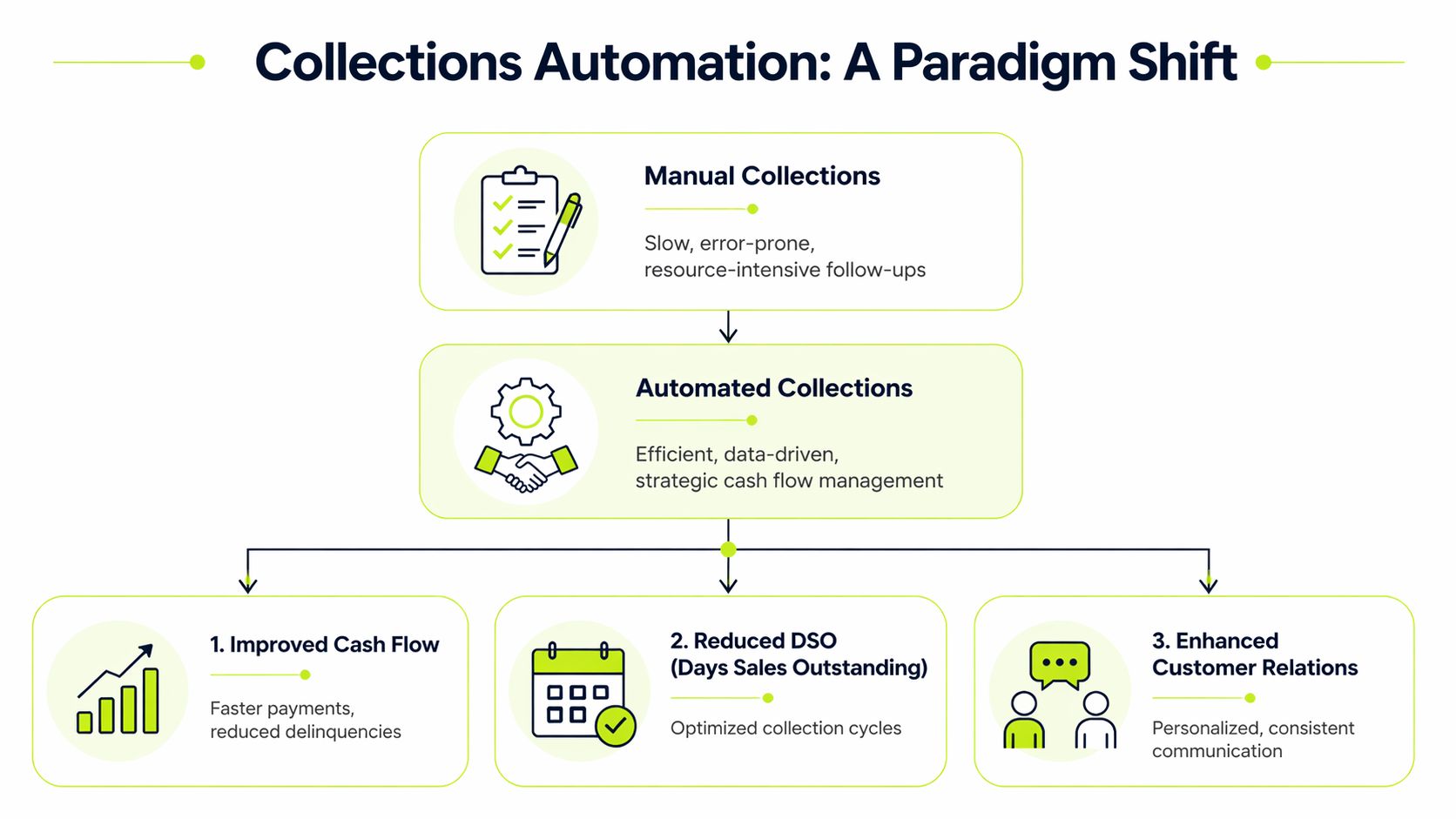
From personality-driven to system-driven
In many professional services firms, collections performance depends too much on individual style. One person is persistent. Another avoids difficult follow-up. A partner may intervene on one client but ignore another. That creates uneven cash results and weak internal control.
Collections automation software standardizes the process without flattening judgment. The routine work becomes consistent. The exceptions stay human.
A practical way to consider it:
Approach | What drives the outcome | What finance sees |
|---|---|---|
Manual AR | Individual follow-up habits, spreadsheets, inboxes | Fragmented activity and delayed insight |
Collections automation software | Rules, workflows, account history, payment behavior | Centralized activity and current visibility |
What the software is actually doing
At a basic level, the platform pulls invoice and customer data from the accounting system, then orchestrates the next actions around those records. For many firms, that starts with QuickBooks AR automation or a similar connection into the general ledger environment the team already trusts.
The useful shift is that actions happen from a single source of truth:
- Invoice status is current: The team isn’t chasing balances that were already settled.
- Outreach follows policy: Reminders go on schedule, not when someone remembers.
- Notes are shared: Anyone reviewing the account can see prior contact and next steps.
- Management gets visibility: Controllers can review collector activity and portfolio risk without asking for a manual status report.
Why this matters more in professional services
Professional services AR is not a commodity workflow. Clients may dispute time entries, wait on internal approval chains, ask for revised invoice support, or bundle multiple matters into one payment. A rigid tool can make that worse.
What works is software that supports both consistency and discretion.
Practical rule: Automate the cadence. Keep human control over exceptions, disputes, and strategic client relationships.
That’s why the “send reminders automatically” pitch misses the point. The key benefit is that the software creates structure around receivables while still allowing finance and relationship owners to step in where context matters.
The operating model that usually works
For firms in the $3M to $50M range, the strongest model usually has three layers:
- Baseline automation for standard accounts Routine reminders, statements, payment links, and task triggers run automatically.
- Segment-based treatment for important clients Larger or more sensitive accounts follow a different cadence, tone, and escalation path.
- Controller oversight through dashboards and policy Finance reviews aging, collector workload, dispute trends, and blocked invoices from one place.
As a result, accounts receivable automation becomes a management system rather than a convenience feature.
What it should feel like in practice
When collections automation software is working well, the team stops asking basic coordination questions.
They know which accounts need action today. They know which invoices are disputed versus ignored. They know whether a client opened the invoice, promised payment, or paid partially. And leadership can see whether the process is improving cash flow or just generating more activity.
That’s the true definition. Not fewer clicks. Better control.
Unpacking the Core Capabilities of an AR Platform
Not every AR platform deserves the same label. Some tools are reminder engines with a dashboard attached. Others change how the receivables process runs day to day.
For a finance operator, four capabilities matter most. If a platform is weak in any one of them, the rest of the workflow usually suffers.
Dynamic prioritization with AI AR automation
The first test is whether the system can decide what matters now.
Modern platforms don’t just sort invoices by due date. Advanced systems use Agentic AI to analyze payment history, risk signals, and customer behavior so the queue can shift in real time. That matters because the biggest balance isn’t always the most urgent balance, and the oldest invoice isn’t always the highest-risk account.
A useful platform should recognize signals like these:
- Behavior change: A client who normally pays on time suddenly goes quiet.
- Interaction signals: The customer viewed the invoice but didn’t act.
- Account complexity: Partial payment, dispute activity, or inconsistent remittance detail.
- Collector fit: The account needs someone experienced with high-touch follow-up.
The difference between static rules and dynamic prioritization is simple. Static rules say, “Send reminder at day 7.” Dynamic prioritization says, “This account moved up because the customer engaged, the amount is material, and the risk of delay just increased.”
Omnichannel outreach without losing tone
Most late payment problems aren’t solved by one more email template.
What usually works is a structured communication sequence across the channels your clients respond to, while keeping messaging professional and appropriate to the account. That can include email, logged calls, text-based outreach where suitable, and internal tasking for partner involvement.
The trade-off is important. More outreach is not automatically better outreach.
A professional services firm should be able to control:
Capability | Why it matters in practice |
|---|---|
Tone by segment | A strategic client should not get the same message as a chronic slow payer |
Timing rules | Invoices due on Friday may need a different cadence than month-end balances |
Escalation logic | Some accounts need partner involvement before finance pushes harder |
Response handling | Replies, disputes, and payment promises should change the next action |
Weak systems create noise. Such systems blast everyone on the same schedule, often irritating good clients and overlooking the actual collection risk.
A sound AR workflow doesn't confuse activity with progress. The goal is resolved invoices and reliable cash timing.
Payment experience that removes friction
A surprising amount of collections effort exists because paying is harder than it should be.
Clients delay payment for many reasons, but operational friction is common. The invoice is buried in an email chain. The payment link isn’t obvious. Backup documentation is missing. The AP contact needs a statement, not a reminder. Good software reduces those points of friction.
For AR software for professional services, this is especially important because invoices often involve narrative work descriptions, matter references, milestone billing, or approval steps outside AP. A clean portal and clear invoice access can shorten the path from “we’ll review it” to actual payment.
What to look for:
- Invoice visibility: Clients can see open invoices clearly.
- Self-service access: Statements and invoice copies are easy to retrieve.
- Dispute path: Clients can flag an issue without sending finance into an email hunt.
- Simple payment action: The next step is obvious and immediate.
This capability doesn’t replace follow-up. It makes follow-up more effective because the customer can act without extra back-and-forth.
Cash application that closes the loop
At this stage, many AR automation projects either become credible or fall apart.
If outreach improves but cash application stays messy, finance still spends hours reconciling bank activity, matching remittances, and clearing unapplied cash. That means the aging isn’t fully current, reporting lags, and the team loses confidence in the tool.
Advanced platforms use AI-driven cash application to reconcile complex payments with up to 99% accuracy, according to Billtrust’s overview of essential collections software features. That matters because cash application is not just an accounting cleanup task. It is what keeps the receivables picture reliable.
When cash application works well:
- Aging reflects reality quickly
- Collectors don’t chase already-paid balances
- Unapplied cash drops
- Month-end close gets cleaner
- Forecasting improves because payment signals are more current
How the pieces work together
These four capabilities should operate as one system, not as disconnected modules.
A client opens an invoice. The platform updates account context. The queue reprioritizes. The next reminder changes. The customer pays through the portal. The payment is applied automatically. The dashboard reflects the result. Finance doesn’t need three systems and two spreadsheets to understand what happened.
That’s the standard to use when evaluating AI AR automation. If the platform only automates one part of the cycle, the manual work and the visibility gaps move somewhere else.
Quantifying the ROI and Impact on Financial KPIs
Controllers don’t need a philosophical case for automation. They need to know whether the tool improves cash conversion, labor efficiency, and forecast confidence.
The cleanest place to start is DSO.

Companies using AR automation can reduce DSO by up to 22%, and top-tier platforms have helped clients lift CEI by 10 to 15 points annually, reaching 80% to 85% by the second or third year, along with an 80% productivity gain in the AR department, according to Billtrust’s analysis of automated collections software and CEI analytics.
That’s the kind of improvement finance teams can feel in the bank account, not just in a dashboard.
DSO reduction is working capital, not just a score
A lower DSO means cash arrives faster. For a professional services firm, that can change decisions around payroll timing, partner distributions, hiring, tax reserves, and reliance on a line of credit.
If you want a sharper definition of the metric itself, this guide to what DSO means and how finance teams use it is worth reviewing. The key point is simple. DSO is one of the clearest indicators of whether revenue is turning into cash with discipline.
Operator view: A DSO improvement is valuable because it increases room to operate. It gives finance more options and fewer surprises.
CEI often tells the better story
DSO is useful, but it can blur timing effects with actual collection performance. Collection Effectiveness Index, or CEI, is often more practical for managing the team because it focuses on how effectively overdue receivables are converted into cash.
For a controller, CEI is useful because it helps answer a specific question: are we collecting what is collectible, or are we just watching the aging grow?
When a platform improves CEI, that usually means the process is getting sharper in a real operational sense:
- overdue invoices are getting attention sooner
- collector effort is better directed
- disputes are surfaced earlier
- follow-up no longer depends on individual memory
Productivity gains matter more than headcount savings
Many finance leaders make the mistake of pitching automation as labor reduction. That’s usually the wrong framing for a professional services firm.
The better framing is redeployment. If the AR team spends less time on reminders, statement pulls, inbox searches, and payment matching, they can spend more time on exception handling, client communication, and cash forecasting. That’s where the 80% productivity gain noted in the Billtrust data becomes meaningful in practice.
A good tool should let the team do more of the work that requires judgment and less of the work that requires repetition.
Here’s a useful visual walkthrough of how better collections process design supports faster cash movement:
Forecasting gets steadier when AR gets disciplined
The most underrated return from collections automation software is better predictability.
When a platform logs contact attempts, payment promises, dispute status, and payment application accurately, finance can build a more believable short-term cash view. That won’t eliminate uncertainty, but it improves the quality of decisions around spend timing and reserves.
A team that still manages collections through disconnected inboxes and spreadsheets may know total AR. They usually don’t know the current condition of AR.
The business case that usually resonates
If you’re building an internal case for reduce DSO initiatives, keep it grounded in operating outcomes:
KPI | What improvement changes |
|---|---|
DSO | Faster cash conversion and more working capital flexibility |
CEI | Better collections discipline on overdue balances |
AR productivity | Less administrative burden and more focus on exceptions |
Forecast quality | Better near-term visibility into cash timing |
The strongest ROI cases don’t depend on abstract transformation language. They depend on better control of receivables.
How to Evaluate and Choose the Right Platform
Most demos make collections automation software look easy. The workflow is clean. The dashboard is polished. The reminders look smart. None of that tells you whether the system will fit a professional services firm with nuanced client relationships and a QuickBooks-centered process.
A better evaluation starts with one question. Will this platform give finance more control without creating new friction for clients or staff?
Start with segmentation, not features
One of the most important differentiators is how the platform handles customer segmentation. Many systems still treat every overdue invoice the same, which can damage valuable relationships. The better approach is software that supports different strategies based on customer lifetime value, payment history, and relationship context, as discussed in Fazeshift’s review of collections automation tools.
That’s not a cosmetic feature. It affects both recoveries and client retention.
For a services firm, segmentation should support distinctions like:
- Strategic client versus transactional client
- First-time late payer versus chronic slow payer
- Disputed invoice versus silent non-payment
- Large matter balance versus routine monthly invoice
If the platform can’t reflect those realities, the automation will feel blunt.
QuickBooks AR automation needs real depth
Many tools claim integration. Fewer handle the accounting workflow in a way controllers can rely on.
If your firm runs on QuickBooks, the integration needs to do more than import a customer list. It should sync invoice status accurately, reflect payments quickly, and preserve confidence in the ledger as the source of truth. Weak synchronization creates duplicate work and undermines adoption.
This is also the point where some firms compare broader AR tools with solutions designed for smaller finance teams. If you’re narrowing the list, this overview of collections software for small businesses can help frame what matters at your size and process maturity.
Use a checklist, not a vibe
A practical buying process is less about which platform sounds smartest and more about which one holds up under operational questions.
Criterion | Why It Matters | Key Question for Vendor |
|---|---|---|
Integration with accounting system | Bad sync breaks trust in the data | How do invoice status, payments, and credits sync with our ledger? |
Intelligent segmentation | Different clients need different treatment | Can we apply separate workflows by client value, history, and dispute status? |
Workflow control | Finance needs policy-level control | Who can edit cadence, escalation rules, and approval thresholds? |
Client payment experience | Payment friction slows collections | What does the customer see when they open an invoice or statement? |
Cash application | Manual reconciliation erodes ROI | How does the platform handle partial payments and unclear remittance detail? |
Analytics and reporting | Leaders need current visibility | Which KPIs can we monitor by collector, client, portfolio, and aging band? |
Human review options | Some accounts should not run on autopilot | Can we require approval before specific actions go out? |
Scalability | The process should hold as volume grows | What changes when invoice count or entity complexity increases? |
A few vendor questions reveal a lot
Some questions cut through polished demos quickly.
Ask how the platform handles a disputed invoice that shouldn’t keep receiving reminders. Ask what happens when a strategic client needs partner review before escalation. Ask whether collector notes, invoice activity, and payment signals stay in one timeline.
Also ask what implementation support looks like. Many projects fail because the vendor can configure software but can’t help the finance team shape a workable policy.
A useful demo isn't the one that shows the most features. It's the one that shows how the system handles your messy cases.
One-option-among-many view
In this category, firms often review tools like Billtrust, HighRadius, Tesorio, and solutions built specifically around accounts receivable automation for midmarket teams. Resolut is one option in that mix. It combines omnichannel collections workflows, payment portal functionality, cash application, and both autopilot and co-pilot operating modes. For a services firm, that matters if you want automation on routine accounts while keeping human review on sensitive ones.
The right choice still depends on fit. Finance should buy for control, not for feature volume.
Implementation and Avoiding Common Pitfalls
A collections automation project is not an IT install. It’s an operating change inside finance, with implications for client communication, internal accountability, and cash forecasting.
Teams that treat it like a plug-in usually end up disappointed. The software exposes weak data, inconsistent policies, and unclear ownership very quickly.

Clean data before you automate anything
Bad contact records, inconsistent payment terms, and unresolved credits will pollute the rollout fast. If the wrong person gets the reminder or the invoice balance is wrong, the automation doesn’t create efficiency. It scales confusion.
Before launch, review:
- Billing contacts: Confirm who receives and processes invoices.
- Terms and exceptions: Standardize what can be standardized.
- Open balance integrity: Clear old unapplied cash and obvious invoice errors.
- Client hierarchy: Identify which accounts need special handling.
This step is tedious. It’s also where credibility starts.
Use co-pilot mode first
One of the biggest risks in AI AR automation is the human-AI integration gap. Vendors often talk about human-in-the-loop design, but they rarely give enough practical guidance on how teams should train, verify, and override the system. Billtrust’s discussion of AI implementation in collections makes that point clearly in its review of the human-AI integration gap in automated software.
For most professional services firms, the right first move is co-pilot mode. Let the system recommend, draft, queue, and prioritize. Keep human review over sensitive outreach until the team trusts the logic and the data.
Build policy before templates
A common mistake is spending too much time perfecting reminder copy before deciding the actual collection policy.
Start with operating rules:
- Which accounts can run fully automated?
- Which segments require review before escalation?
- When does a dispute pause outreach?
- When does a partner, owner, or account lead get involved?
Only after those rules are clear should you finalize cadence and messaging.
The software should enforce policy. It shouldn't become the policy.
Expect a ramp, not a flip of a switch
You shouldn’t expect day-one perfection. The system needs feedback. The team needs repetition. Clients need to adjust to more consistent communication.
What usually works is a phased rollout:
Phase | Focus |
|---|---|
Early rollout | Standard accounts, simple cadences, reviewed messaging |
Stabilization | Tune segmentation, escalation rules, and exception handling |
Expansion | Add more automation, tighter reporting, and broader account coverage |
Team buy-in decides whether the tool sticks
If collectors, bookkeepers, or client service leads think the tool is there to police them, adoption will be shallow. If they understand that the platform removes repetitive work and clarifies ownership, they usually engage.
Show the team what improves for them. Fewer inbox searches. Fewer manual statements. Clearer priorities. Better records. Less ambiguity around who owns the next step.
Implementation succeeds when finance treats it as a control project with change management, not as a software project with training at the end.
Conclusion Taking Control of Your Firm's Financial Health
Manual collections create more than extra work. They create uncertainty around cash, uneven client treatment, weak audit trails, and delayed decision-making. For a professional services firm, that lack of control shows up everywhere. In forecasts, in partner conversations, in payroll planning, and in how much management trusts reported receivables.
Collections automation software changes that when it is deployed with discipline. It gives the firm a structured way to manage follow-up, prioritize risk, reduce friction in payment, and keep cash application current. The result is not just efficiency. It’s tighter financial control.
The strongest implementations share the same characteristics. They start with clean data. They respect segmentation. They keep humans involved where judgment matters. And they measure success through cash outcomes, not just software activity.
There’s also a governance angle that firms shouldn’t ignore. If your collection practices span multiple jurisdictions, a practical reference like Debt Collection Laws by State can help finance and legal teams think through where process boundaries and escalation rules may need extra care.
The firms that get the most from collections automation software don’t use it to send more reminders. They use it to run AR as a controlled operating function. That’s the difference between chasing payments and managing receivables.
Resolut automates AR for professional services with a practical mix of workflow orchestration, payment experience, and human review controls. If you want a more consistent, accurate, and human approach to getting paid, Resolut is worth a look.