CFO's Guide to Subscription Invoicing Software in 2026
Explore subscription invoicing software from a CFO's view. Automate AR, slash DSO, improve cash flow, and choose the best platform.
For professional services firms shifting to a subscription model, manual invoicing processes quickly become a liability. Methods that worked for project-based billing create costly errors, delay payments, and strain client relationships as you scale.
The Hidden Costs of Manual Subscription Billing
For a CFO or Controller, the cost of manual billing extends beyond team hours. It directly impacts key financial metrics like Days Sales Outstanding (DSO) and overall cash flow. Processes reliant on spreadsheets and basic accounting add-ons introduce friction into your revenue cycle.

When processing invoices by hand, you accumulate financial drains that don't appear as a P&L line item. These costs compound across finance operations, eroding profitability.
The Drag on Financial Health
This operational grind translates into measurable financial consequences. For a firm issuing hundreds of invoices monthly, a small error rate creates significant write-offs and wasted effort.
Consider these direct costs:
- Revenue Leakage: Unbilled services, incorrect proration, or missed renewals can account for 1–5% of total revenue. This loss is difficult to detect without automated checks.
- Inflated DSO: Manual invoice creation, approval delays, and slow follow-ups extend payment cycles. Each day added to your DSO holds working capital hostage.
- High Operational Overhead: If your finance team spends 20–30% of its time on invoice administration, they are not focused on strategic financial analysis or forecasting.
For a $10M firm, a 10-day reduction in DSO can free up over $270,000 in cash. Manual processes lack the efficiency to achieve this.
The Strategic Opportunity Cost
The largest cost is strategic. When your finance talent is consumed by administrative tasks, high-level financial planning suffers. They operate in a reactive mode, chasing payments instead of proactively guiding the firm's financial health.
Adopting subscription invoicing software is a strategic overhaul of your financial operations. It transforms the accounts receivable function from a manual cost center into an automated, strategic asset. This shift is essential to improve cash flow, reduce DSO, and build a foundation for scalable growth.
What Is Subscription Invoicing Software?
For finance leaders in a recurring revenue business, subscription invoicing software is the central system for managing revenue. It is the automated production line for cash flow, ensuring every invoice is accurate, on-time, and compliant without manual oversight.
This is not just about sending bills. It’s about transforming billing from a reactive, administrative task into a predictable, controlled financial operation. Before we go deeper, it helps to understand what is recurring billing and how it powers these systems.
The market for this technology reflects a major operational shift. Valued at USD 6.50 billion in 2024, it is projected to reach USD 16.96 billion by 2033. Professional services firms recognize the need for automated systems to manage complex pricing and prevent overdue invoices from inflating DSO.
The Automated Production Line for Revenue
At its core, this software replaces manual spreadsheets and disparate tools with a single, synchronized system. It is the difference between building a car from a box of parts and using a calibrated robotic assembly line. One process is prone to error; the other delivers a consistent result.
This is what provides the visibility and control needed to manage a subscription business with confidence.
* *
Key Capabilities for Financial Control
A true subscription invoicing platform does more than email a recurring PDF. It is the financial engine behind your client relationships, managing complexities that would overwhelm a manual process.
- Automated Recurring Schedules: The system manages all billing cycles—monthly, quarterly, annually—without human intervention. This is the foundation of accounts receivable automation, ensuring invoices are issued on schedule.
- Metered & Usage-Based Billing: This is critical for professional services firms. The software tracks and bills for variable usage, such as consulting hours or data consumption, closing revenue leakage gaps.
- Instant Proration Calculations: When a client changes their subscription, the system instantly calculates the prorated charge or credit. This prevents manual math errors that lead to disputes and write-offs.
These are not just features; they are financial controls that ensure every dollar earned is captured, billed, and tracked correctly. This provides the stable data foundation needed for more advanced AI AR automation, which further helps to improve cash flow.
For firms using QuickBooks, finding AR software for professional services with native QuickBooks AR automation is critical. This ensures all automated billing data flows directly into the general ledger, maintaining a single source of truth without manual reconciliation.
Core Capabilities for Financial Control and Automation
When evaluating subscription invoicing software, focus on tangible control over revenue and process automation. Every feature should tie back to a core outcome: improving cash flow, reducing risk, or streamlining finance operations.
These capabilities distinguish a resilient accounts receivable function from one that is constantly reacting to problems.
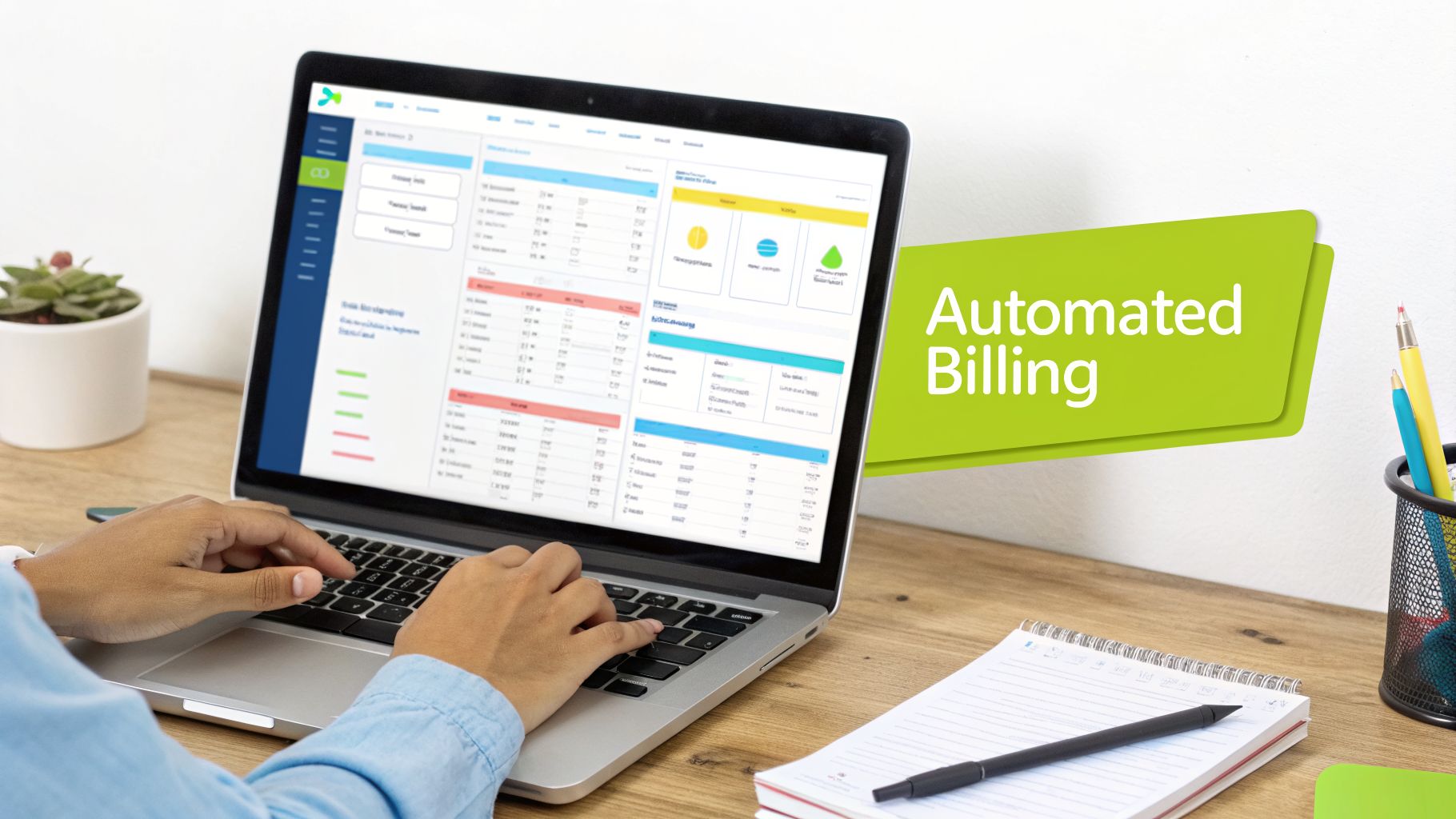
Let's break down the essential components that deliver automated financial control.
Recurring and Metered Billing
This software is designed to automate recurring and metered billing, which drives predictable revenue. For professional services, this often means hybrid models—a base subscription fee plus variable charges for consulting hours or project milestones.
This automation directly addresses revenue leakage. By systematically capturing every billable unit, the software ensures you invoice for all delivered services. It is a simple fix for the small, untracked losses that can quietly siphon 1–5% of annual revenue.
Proration Management
Clients upgrade, downgrade, or add users mid-cycle. Manually calculating prorated charges for these changes is a source of errors and customer disputes.
Effective subscription invoicing software performs this math for you, instantly and accurately. When a client makes a change, the system determines the exact amount owed. This maintains clean books and builds trust through transparent, correct invoices, a key part of any invoice automation software strategy.
For a firm with hundreds of subscriptions, manual proration is a massive operational risk. Automation converts a point of friction into a smooth, controlled process.
Dunning Management and Collections
Failed payments are a reality in any subscription business, but they do not have to become lost revenue. With 56% of small businesses reporting they are owed money from unpaid invoices, a systematic collections process is essential for healthy cash flow.
An automated dunning system activates the moment a payment fails. It executes a pre-defined playbook, which can include:
- Automatically retrying a credit card at optimal times.
- Sending personalized emails to clients about an expired card.
- Flagging high-value accounts for personal follow-up.
This systematic approach to collections is fundamental to reducing your DSO and minimizing involuntary churn. It is a core function of accounts receivable automation.
Tax Compliance Automation
For firms operating across multiple jurisdictions, sales tax and VAT compliance is a significant risk. Rules and rates change constantly, and errors can lead to audits and penalties.
Modern AR software for professional services integrates with tax engines that automatically apply correct, up-to-date tax rates for every invoice. This is a critical risk management tool that frees your finance team from needing to be global tax experts.
Manual vs. Automated Subscription Invoicing
Function | Manual Process (Spreadsheets + QuickBooks) | Automated Software Solution |
|---|---|---|
Invoice Creation | Manual data entry for each client, prone to copy-paste errors. | Auto-generates invoices based on subscription plans, usage data, and prorations. |
Billing Changes | Complex, error-prone manual calculations for upgrades, downgrades, and mid-cycle changes. | Instantly and accurately calculates prorated charges or credits automatically. |
Collections | Ad-hoc, manual follow-up emails and phone calls. Inconsistent and time-consuming. | Automated dunning workflows trigger emails and payment retries. Reduces DSO. |
Reporting | Time-consuming process of exporting data and manipulating spreadsheets to get metrics. | Real-time dashboards with key KPIs like MRR, churn, and cash flow forecasts. |
Tax Compliance | Manual research and application of tax rates, high risk of non-compliance. | Integrates with tax engines to automatically apply correct, jurisdiction-specific taxes. |
The table clarifies how automation transforms a high-risk manual process into a streamlined, controlled, and strategic function.
Seamless System Integrations
Your invoicing software must integrate with other core systems to create a single source of financial truth. A seamless, two-way sync is not negotiable.
This is especially crucial for QuickBooks AR automation. Invoices generated and payments collected in your AR platform must flow directly into your general ledger. This eliminates manual data entry, prevents reconciliation issues, and ensures your financial reports are built on real-time, accurate data. The goal is a connected ecosystem where your CRM, AR platform, and ERP are synchronized, powered by AI AR automation.
The Business Case for Slashing DSO and Improving Cash Flow
For a finance leader, technology is only as valuable as its impact on the balance sheet. Subscription invoicing software is a strategic tool for strengthening your firm’s financial foundation. The clearest returns are measured in two critical metrics: Days Sales Outstanding (DSO) and cash flow.
Every manual approval, late billing run, and error correction adds friction that extends your payment cycle. These delays inflate DSO and lock up working capital in receivables. Automation provides its most measurable return by eliminating this friction.
Driving Down DSO With Automation
The fastest way to lower DSO is to shorten the time between service delivery and cash receipt. A smart subscription invoicing software targets this gap. By automating invoice creation and delivery, it ensures accurate bills are sent on time.
The most transformative part is the improved client payment experience. Embedding payment links (ACH or credit card) directly into invoices removes friction. Instead of a multi-step manual process, clients can pay with a single click. This change alone can reduce DSO by up to 30%.
For a $10M firm with a 60-day DSO, a 15-day reduction frees up over $410,000 in cash. This is capital that can be deployed for growth instead of being locked in receivables.
This systematic removal of delays is the core of accounts receivable automation. You can learn more about how straight-through processing (STP) provides deeper insight into creating a touchless financial workflow.
Achieving Predictable Cash Flow
Unpredictable cash flow undermines effective planning and forces you to hold excess cash reserves. Accounts receivable automation addresses this by making your collections process consistent and repeatable.
The market growth for these tools confirms this trend. Valued at over USD 7.15 billion in 2024, the subscription management market is projected to reach nearly USD 18 billion by 2030. Cloud-based systems, which comprise over 75% of the market, are leading this growth by integrating with CRMs and payment gateways. AI-powered analysis within these platforms can also help cut customer churn by 15–20%.
This level of consistency enables precise forecasting. With reliable data on payment cycles and collection rates, you can allocate capital with confidence.
More Than Just Faster In-and-Out
Beyond DSO and cash flow, good AR software for professional services delivers other key benefits.
- Fewer Write-Offs: Automated billing and proration eliminate the manual errors that lead to invoice disputes and revenue write-offs.
- A Better Client Experience: A smooth, transparent billing process demonstrates professionalism and builds trust.
Ultimately, this allows your finance team to evolve. Instead of chasing late payments, they can focus on strategic analysis. This is why firms using tools like QuickBooks AR automation are able to scale more effectively.
How to Select the Right Software for Your Firm

Choosing the right subscription invoicing software is a high-stakes decision that impacts the entire firm. It is a long-term investment in control, stability, and a clear financial return. A finance leader must look past marketing claims and evaluate how these platforms perform under real-world conditions.
The right tool becomes the backbone of your financial operations, providing control over how to improve cash flow. The wrong one becomes an operational anchor. Here is a framework for making the right choice.
Scalability and Future Growth
Your billing system must keep pace with your firm's growth. The platform you choose must handle your client load not just next quarter, but for the next three to five years. Can it manage a 10x increase in invoice volume? Can it support new, more complex billing models?
A system that cannot scale is a future bottleneck. Imagine growing from 100 to 1,000 monthly subscriptions. A platform not built for that load will cause processing delays or system failures during a billing run, directly impacting client relationships and cash collection.
A truly scalable system should be invisible. It should perform as flawlessly with 5,000 invoices as it does with 50, providing a stable foundation for growth.
Integration Capabilities
No software operates in isolation. A critical factor is how well a new subscription invoicing software integrates with your existing tools, especially your accounting system. For most firms, this means a deep, two-way sync for QuickBooks AR automation is non-negotiable.
A simple one-way data dump is insufficient. You need a system where an invoice created in the AR platform automatically appears in QuickBooks, and a payment recorded in one is instantly reconciled in the other. This eliminates manual data entry and keeps your general ledger as the single source of truth. As we cover in our guide to the best accounts receivable software, this seamless integration is a top priority for experienced finance leaders.
Customization and Reporting
Professional services firms rarely use standard contracts. Your software must adapt to your unique client agreements and billing rules. Can you set up hybrid models—a base retainer plus usage-based fees—for a specific client? Can it handle non-standard payment dates without manual workarounds?
Equally important is the insight the system provides. A solid platform offers real-time, configurable dashboards with key AR software for professional services metrics at your fingertips:
- Days Sales Outstanding (DSO) trends.
- Detailed AR aging reports by client or service line.
- Cash flow forecasts based on payment schedules and collection history.
- Customer churn and payment failure analysis.
This visibility shifts your team from reactive data gathering to proactive financial strategy. It provides the control to identify and solve problems before they impact the balance sheet. Finally, ensure any platform you consider meets SOC 2 compliance standards to protect both your firm and your clients' financial data.
Moving Beyond Invoicing to Full AR Orchestration
Issuing an invoice is just the first step. The real work is collecting the cash. This is where the conversation shifts from simple invoicing to accounts receivable orchestration.
Your invoicing software is a single instrument. AR orchestration is the conductor for your entire financial process. It is an intelligent operating system for your cash flow, powered by AI AR automation that integrates billing, collections, and cash application.
From Static Invoicing to Dynamic Billing and Collections
A one-size-fits-all approach to collections is ineffective for professional services. Client relationships and payment behaviors vary. AI-driven automation allows you to move from a rigid process to a dynamic strategy.
Imagine a system that learns from client payment history. A client who always pays on time receives standard reminders. For an account that pays late, the system can automatically shorten payment windows or trigger the collections workflow sooner. This level of proactive management is impossible to execute manually.
Orchestration treats AR as an integrated system, not a list of separate tasks. It coordinates every touchpoint to achieve one goal: faster, more predictable cash flow.
This approach is about anticipating problems. Instead of waiting for an invoice to become 60 days past due, an orchestrated system identifies risk early. It analyzes payment patterns and communication interactions to flag accounts that require attention before they become a serious issue.
The Power of Omnichannel Outreach
A top-tier AR software for professional services uses an omnichannel communication approach to connect with clients where they are most likely to respond. This is not about sending mass messages; it is a coordinated sequence.
- An automated, friendly email can be sent five days before the due date.
- On the day an invoice is overdue, an SMS notification might be sent.
- For a high-value invoice from a client with a poor payment history, the system can create a task for a specialist to make a personal phone call.
Each action is part of a deliberate workflow designed to secure payment without damaging the client relationship.
* *
Autopilot vs. Co-pilot: True AR Automation
When leaders hear "AI AR automation," they may think of replacing their team. The reality is more nuanced. It is about applying the right level of automation to the right task, using "Autopilot" and "Co-pilot" modes.
- Autopilot Mode: The system handles routine, high-volume tasks. It sends standard invoices, follows up with on-time clients, and applies recognized payments. Autopilot can free up 80–90% of your team's time from administrative work.
- Co-pilot Mode: For complex situations requiring human judgment, the system acts as an advisor. It might flag a large, disputed invoice and suggest a collections path for a team member to review and approve. It provides data and recommendations, but leaves the final decision to your experts.
This blend of automation and human oversight ensures your team is focused on high-value work: managing key client relationships and solving complex financial problems. When linked with your accounting system through QuickBooks AR automation, every action is perfectly synchronized with your general ledger.
Orchestration elevates accounts receivable from a reactive cost center to a strategic part of your firm's financial engine. It provides the control needed to actively reduce DSO and improve cash flow.
Frequently Asked Questions
Here are straight answers to common questions from finance leaders evaluating new AR platforms.
How Does This Software Integrate With QuickBooks?
The best systems offer a deep, two-way sync with accounting software like QuickBooks. It acts as a dedicated, real-time bridge for financial data.
When you create an invoice in the AR platform, it instantly appears in QuickBooks. When a payment is recorded, it is automatically reconciled in both systems. This eliminates manual data entry, prevents errors, and ensures your general ledger is always up-to-date.
What Is The Implementation Process Like?
Setup is a guided process that typically takes a few weeks. A dedicated specialist works with your team to:
- Connect to your accounting system (like QuickBooks).
- Import client data and contract details.
- Configure billing rules, payment schedules, and collection workflows.
The goal is to have the system fully configured before going live, ensuring a smooth transition with no disruption to your cash flow.
This flowchart shows how all the pieces of the AR process come together.
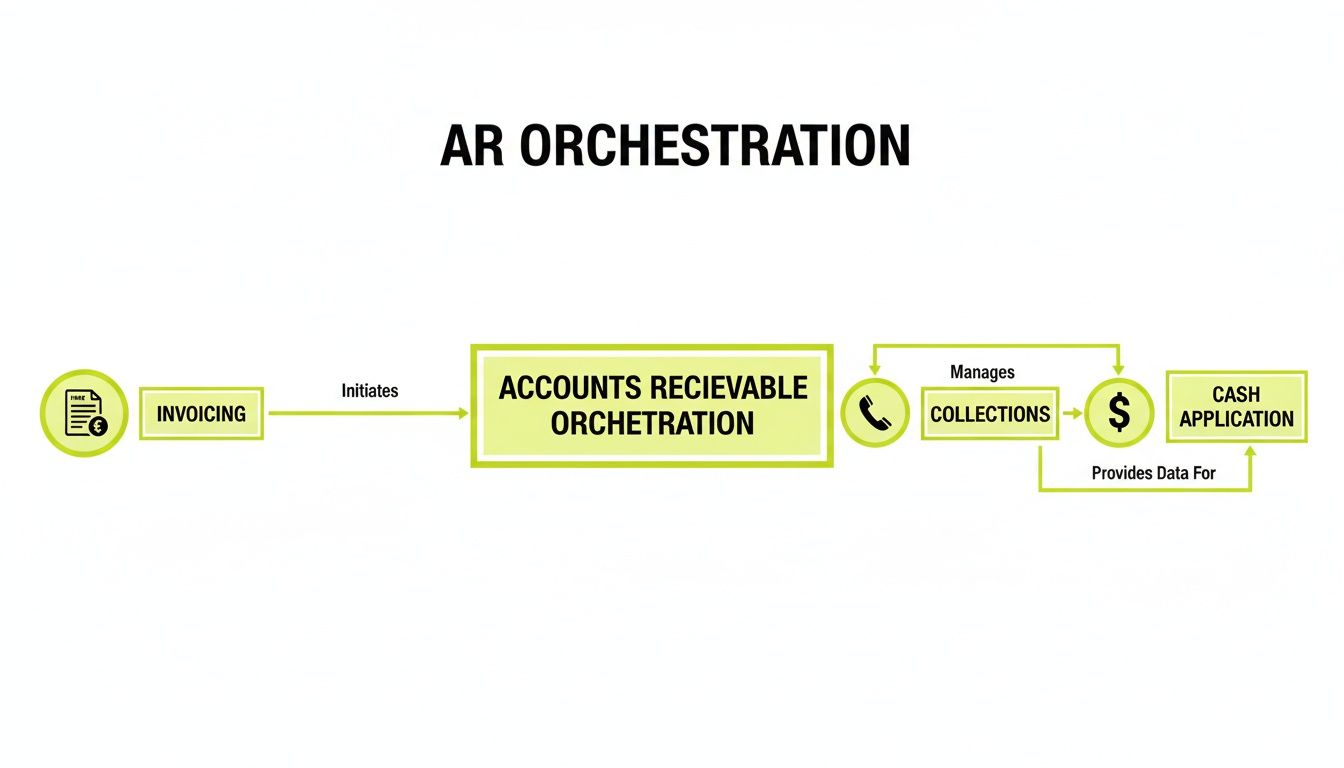
As you can see, a modern system unifies invoicing, collections, and cash application into one cohesive motion, which is essential to improve cash flow.
Can It Handle Complex Client Contracts?
Yes. That is a primary reason firms switch to a dedicated subscription invoicing software. Standard accounting software often struggles with the unique agreements common in professional services.
A powerful AR platform is built for complexity. It can manage hybrid models (a base retainer plus usage fees), custom payment schedules, and client-specific terms. You can set unique billing rules for each client, ensuring even your most complicated contracts are invoiced accurately and automatically.
--- Resolut automates AR for professional services—consistent, accurate, and human. Learn more at https://www.resolutai.com.