
Accounts Receivable Collections Software Guide for 2026
Accounts receivable collections software that cuts DSO and protects client relationships. A practical guide for CFOs, controllers, and firm owners.
Tuesday morning is when the aging report stops being abstract. The inbox is full, the partner wants an answer, and there are always a few invoices sitting just far enough past due to make the decision harder than it should be.
That's where accounts receivable collections software earns its keep. Not by sending more reminders, but by helping a controller decide which account gets attention first, which dispute is blocking cash, and which payment is likely to clear without another chase. For firms that live on billable hours and client trust, that's a working-capital decision, not a clerical one.
If you want a simple starting point for the aging side of the problem, the HireAccountants guide for founders is a useful refresher on how receivables age and why that aging matters in the first place.
The Tuesday Morning Collections Problem
The morning usually starts with the same scene. An aging report is open, three tabs deep in the browser, and the collector list has been patched together from memory, last week's notes, and a spreadsheet that's already out of date. Someone is asking whether to press the late-paying client with the largest balance, or the one whose relationship is already fragile.
That's the job. It isn't “send reminders.” It's move cash without making the customer harder to keep.
What gets lost in manual follow-up
Manual collections creates drag in places finance teams can feel immediately. Hours disappear into copied email threads, re-checking invoice status, and asking the same question three different ways because the status lives in different systems. The cash impact is slower, but the operational pain shows up right away.
Collections software exists to pull that work into one queue. It helps teams work accounts in the right order instead of working them in the order they happen to be noticed. That matters because the best next action on Monday morning isn't always the loudest overdue invoice, it's the one most likely to turn into cash now.
Practical rule: if your team is still choosing accounts by gut feel, you're probably spending time on the wrong invoices.
For a more traditional framing of aging and collections, the accounts receivable management guide from Jumpstart Partners is a helpful companion resource. The key difference is that modern software doesn't just record the problem, it tries to shape the outcome.
Why the pain feels different in professional services
Professional services firms don't usually fail because they can't invoice. They struggle because invoices are tied to ongoing relationships, scope questions, and work that's partially subjective. A late payment can be a simple timing issue, or it can mean someone is dissatisfied and hasn't said it directly yet.
That's why collections software matters here more than in a commodity billing environment. It gives finance a way to separate a routine delay from a real exception, then respond with the right level of pressure. Done well, that protects both cash flow and client retention.
What Accounts Receivable Collections Software Actually Does
Accounts receivable collections software sits in the post-invoice window. The invoice has already gone out, and the system now manages reminders, customer communication, escalation, and cash application until payment is matched back to the ledger. That's what separates it from invoicing tools and general accounting systems, which record transactions but don't run the collections workflow.
The modern version is built around a unified workspace. Invoice data, payment history, and customer-risk signals sync in from the ERP, then the system helps collectors work the right accounts first. High-risk balances, larger open items, and invoices closest to the due date get surfaced before the queue turns into a pile of aging noise. HighRadius describes that workflow model here.
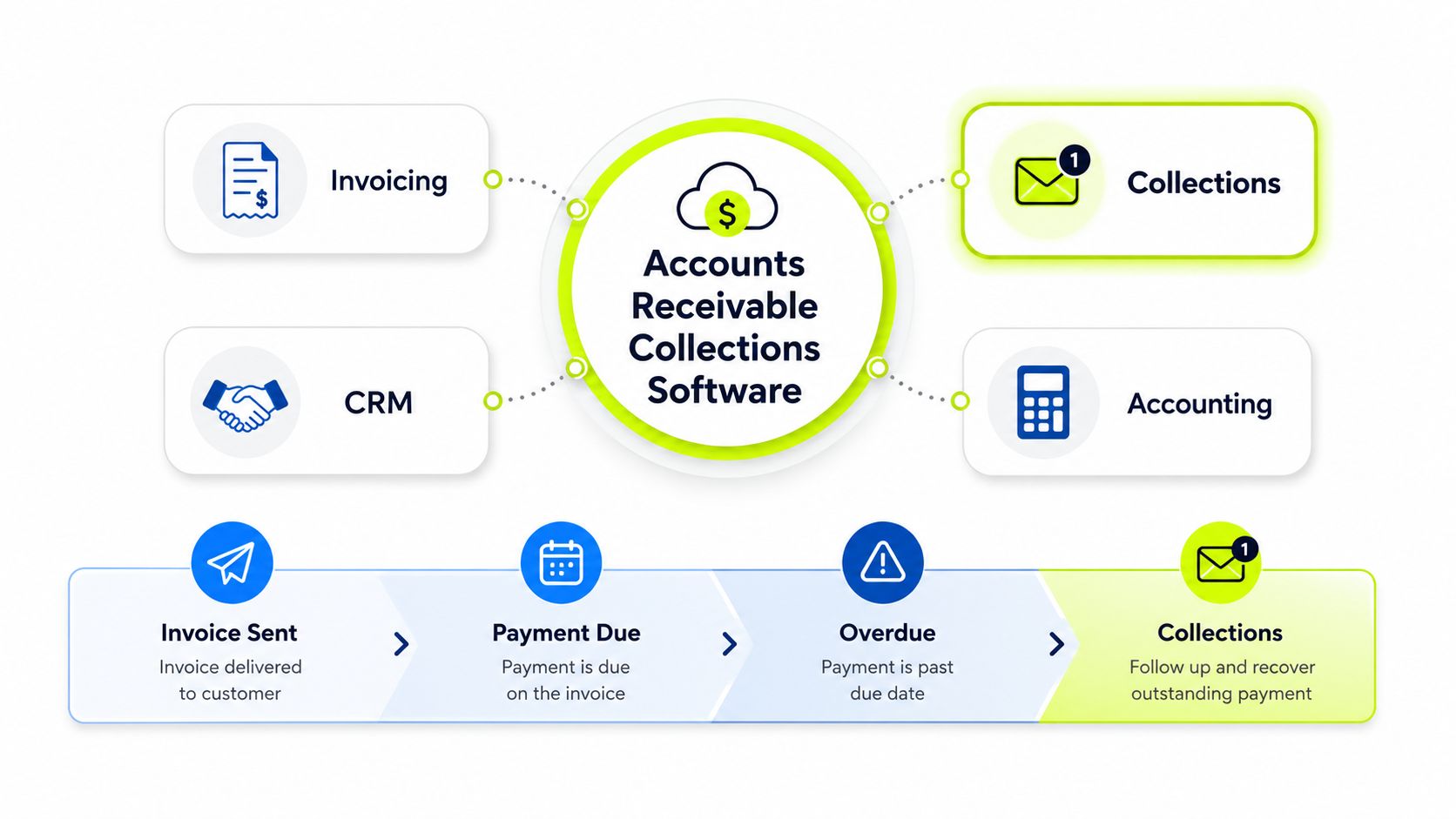
The four jobs it replaces
In practice, the software is doing four things at once. It helps prioritize accounts, automates outreach, manages disputes or payment plans, and applies cash to the right invoice when money lands. If any of those steps still live in separate tools, the team ends up stitching the workflow together manually.
The point isn't to eliminate judgment. It's to keep judgment focused on exceptions instead of routine admin. A good system tells a collector where to spend attention, then logs what happened so the next follow-up isn't built from scratch.
Where QuickBooks fits, and where it doesn't
QuickBooks is still fine for recording bills, payments, and ledger activity. It's not designed to run a collections queue across aging buckets, outreach channels, and exception handling. That's why QuickBooks AR automation usually means adding a layer on top of QuickBooks, not pretending QuickBooks itself is the collections engine.
A practical way to explain the category is this, collections software manages the post-invoice workflow, while accounting software keeps the books clean. Those are related jobs, but they're not the same job.
The AR management overview from Jumpstart Partners is useful if you need the broader operational context behind that split. For finance leaders, the distinction matters because implementation failures usually start when people buy a reminder tool and expect an end-to-end workflow.
The Real Cost of Slow Collections in Professional Services
The best way to judge collections software is to look at what slow cash does to the business. APQC data cited in 2026 AR research shows top performers collect in 30 days or less, median performers in 38 days or less, and bottom performers in 46 days or longer. The same source says 26% of receivables become uncollectible after 90 days past due, 70% after 180 days, and 90% after one year. Those figures explain why the software category is really about reduce DSO behavior, not just send reminders. Source data and benchmark context
For a professional services firm, the math is felt in working capital. A $10 million firm with slow-paying clients doesn't need a lecture on DSO, it needs more cash available to cover payroll, tax payments, and subcontractors without leaning on short-term financing. The longer the invoice sits, the more likely it is to drift into a risk bucket that becomes harder to recover from, even when the work was delivered cleanly.
What the hidden costs usually look like
The direct cost is obvious, but the hidden cost is usually bigger. Industry research says 39% of B2B invoices in the U.S. are paid late, 55% of B2B invoiced sales in the U.S. are overdue, with the UK at 58% and parts of Asia at 60%. The same research notes SMBs spend about 4 hours per week chasing late payments, while another source says many small-business owners spend about 5 hours per week on invoice follow-up. Late-payment benchmark data
That's real labor, and it's rarely cleanly tracked. In practice, it means a senior finance person or office manager spends part of the week doing work that software should be doing automatically. It also means follow-up quality drifts when the team is busy, which pushes invoices further into the danger zone.
Operational takeaway: if collections work isn't prioritized, it gets handled whenever someone has time. That's usually too late.
The market signal matches the operating reality. The global accounts receivable automation market was valued at USD 3.81 billion, which tells you the problem isn't niche, it's structural. Market size context
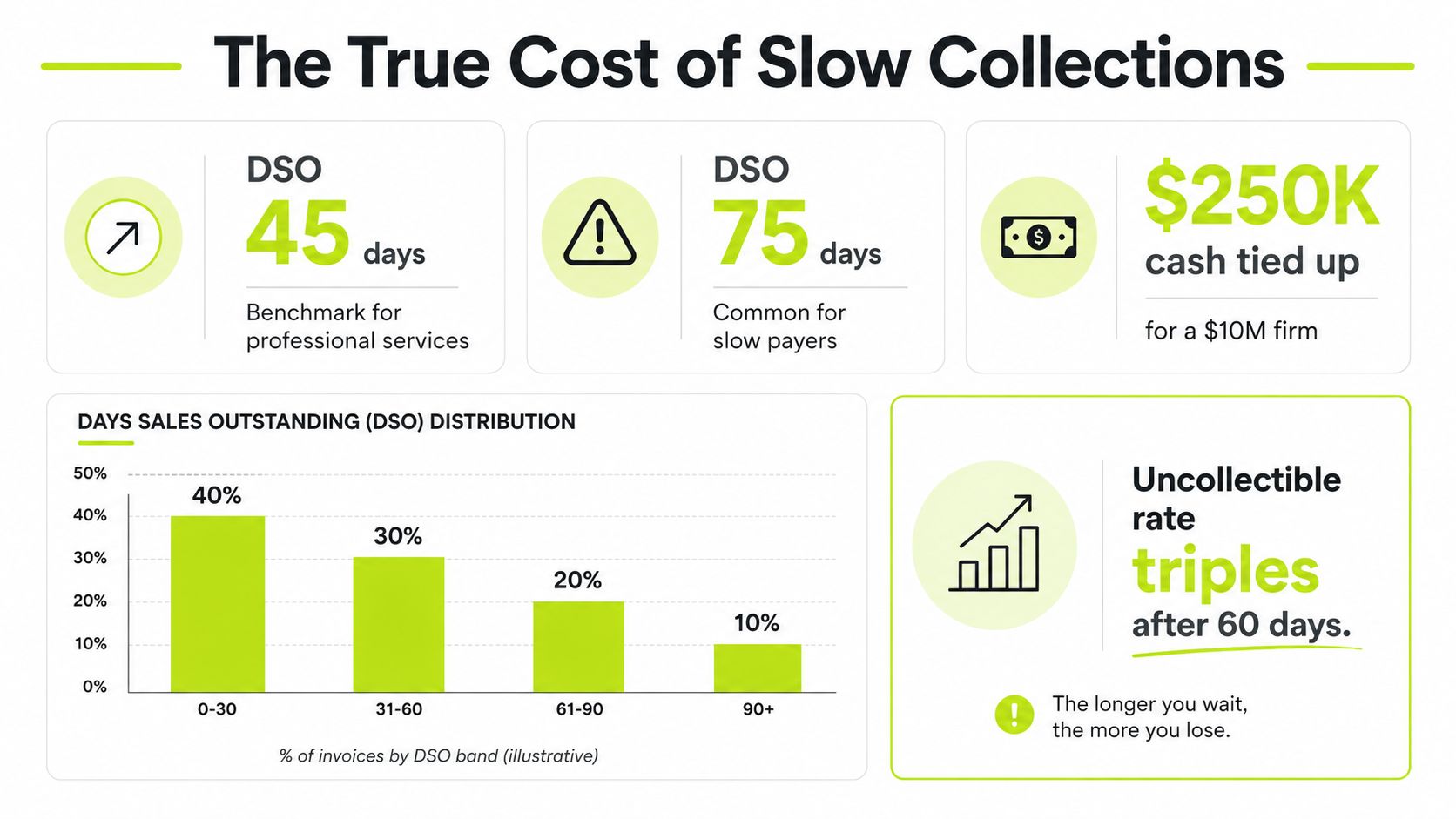
Why the 90-day line matters
The 90-day mark isn't just another aging bucket. It's where recoverability starts to change shape. Software that moves accounts out of that zone sooner is doing more than improving dashboards, it's protecting cash before the probability of collection drops sharply.
That's also why ROI conversations should be tied to working-capital mechanics, not generic efficiency claims. The value is in earlier prioritization, faster escalation, and cleaner handoff to cash application when payment arrives.
Core Features That Actually Move the Needle
The features worth paying for are the ones that change how cash moves through the queue. A reminder engine can nudge people. A real collections platform changes which accounts get worked, how disputes are resolved, and how fast a payment gets matched when it lands.
Modern systems typically automate the workflow by tracking outstanding invoices, sending follow-ups, and reducing manual effort, while also adding payment tracking and reporting. Versapay's collections overview describes that baseline well, but the better systems go further than basic dunning.
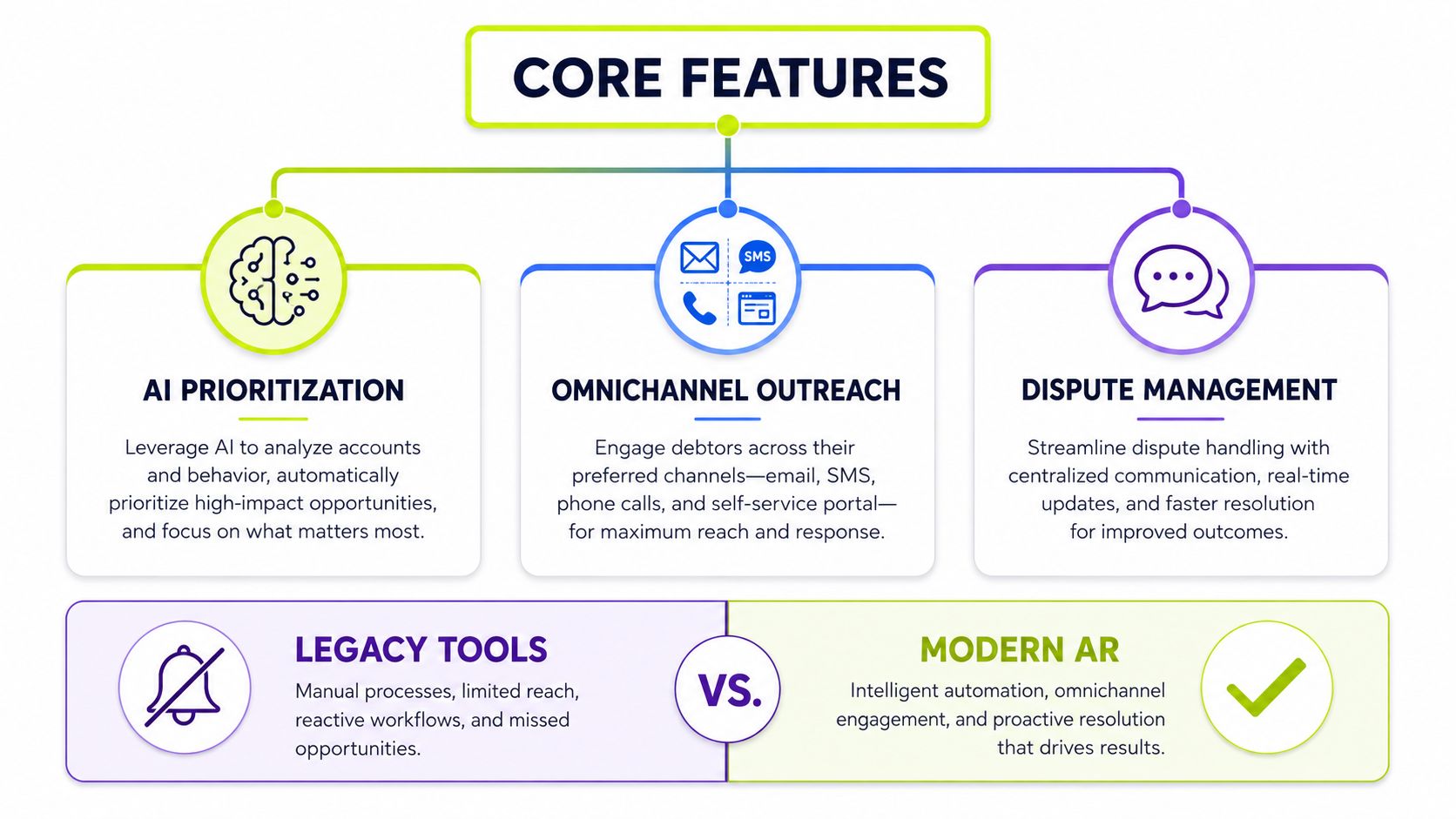
Prioritization is the first real win
The first lift usually comes from AI AR automation or rule-based prioritization. Instead of a flat aging list, collectors see a ranked queue built around risk, balance, and due date. That changes the rhythm of the day because the team stops guessing which account deserves a call.
The practical benefit is consistency. A late invoice with a strong payment history might sit lower than a large balance with signs of friction, and that's the kind of decision a human collector should not have to rebuild by hand every morning. AR software for professional services starts to feel different from a generic reminder tool.
Outreach, dispute handling, and cash application work together
Omnichannel outreach matters when the software can use email, SMS, phone, and portal activity without fragmenting the record. One reminder doesn't solve much on its own. A sequence that changes tone and channel based on customer behavior is more useful, especially when a response is waiting in the thread.
Dispute management is often underpriced in vendor demos. In services firms, a delay is frequently tied to a scope question, a missing approval, or a line item that needs review. If the system can centralize that conversation, the collector can pause the chase, route the issue, and avoid sending the wrong message to the client.
Cash application is the quiet feature that keeps accounting honest. When payment hits the bank, the software should help match it to the right invoice and push the result into the books without another manual search. That saves time, but more so, it closes the loop so open items don't stay open longer than they should.
What separates a serious platform from a shallow one
A shallow product fires reminders. A serious platform supports segmentation, escalation, payment portals, and the bookkeeping handoff at the end of the process. The difference shows up in the month-end close, not in the demo.
Practical rule: if the software can't help you resolve exceptions, it's only handling the easiest part of collections.
For teams comparing automation layers, Resolut's AR automation overview is a relevant read because it frames collections as part of a broader working-capital system, not a standalone reminder workflow. That framing matters when you're deciding whether to buy a lightweight tool or a deeper operating layer.
Integration, Security, and the QuickBooks Question
The cleanest feature set can still fail if the data sync is messy. I've seen software look excellent in the demo, then create work in week two because the invoice status in the collections tool didn't match the general ledger. That's why integration depth matters more than interface polish.
AR collections software is distinct because it focuses on the post-invoice process, where reminders, customer communication, escalation, and cash application continue until payment is matched correctly in the ledger. Articsledge's explanation of AR software captures that boundary clearly.
QuickBooks-native add-ons versus full-suite platforms
The decision isn't “QuickBooks or not.” It's whether you need a light layer that works inside a familiar accounting environment, or a fuller platform that handles more of the workflow itself. QuickBooks-native tools are usually faster to stand up and easier for small teams to adopt. Full suites usually automate more, but they ask for more change management.
Criterion | QuickBooks-Native Add-On | Full-Suite Platform |
|---|---|---|
Setup speed | Usually faster | Usually slower |
Workflow depth | Narrower | Broader |
Cash application | Often basic | Often stronger |
Dispute handling | Limited | More complete |
Reporting | Good enough for smaller teams | Better for operational control |
Change management | Lower | Higher |
The right choice depends on how much of the process you want software to own. If the team only needs nudges and a cleaner queue, QuickBooks AR automation can be enough. If the pain sits in prioritization, dispute resolution, and cash application, a fuller platform usually earns its keep.
What to inspect in demos
Security should be treated the same way as workflow depth. Ask who gets access to what, how permissions are handled, and how the system behaves when data changes in the ERP. Cloud-native platforms are easier to deploy and maintain, but they still need clear controls around roles, auditability, and data flow.
The most useful demo question is simple. Ask what happens from invoice issuance through matched payment, then watch whether the vendor can trace that path without hand-waving. If they can't show the full route, they're probably selling a reminder engine in AR clothing.
For teams comparing accounting stacks, this QuickBooks-versus-Xero guide from Resolut is handy because the integration choice often starts with the accounting system already in place. The collections layer should fit the ledger, not fight it.
Three Real Workflows From Professional Services Firms
A 15-person consultancy usually feels the pain first in the inbox. One person owns billing, another person owns collections, and both are spending too much time cross-checking status by hand. Once a collections platform is in place, the first change is usually not a dramatic DSO swing, it's that the team stops missing follow-ups because they were buried in other work.
The software creates a single queue, and that alone changes behavior. Instead of remembering who needs a nudge, the system keeps the overdue items visible and current. That matters when your client list is small enough that every relationship feels personal, but large enough that no one can keep it all in their head.
Fractional CFO practice
A fractional CFO practice has a different problem. It's often managing AR across multiple client entities, different approval patterns, and separate billing rhythms, all from one internal team. Collections software helps by segmenting activity cleanly, so each client's workflow stays in its own lane.
The value here is manual-hours reduction. When reminders, notes, and payment status live in one place, the team can move faster without losing context. A good system also helps avoid accidental over-communication, which matters when your brand is built on trust and discretion.
Mid-sized agency with retainers and project work
Agencies deal with retainers, milestone billing, and disputed line items that don't fit a simple aging report. That's where a shared communication history becomes more important than another dashboard. If the project manager can see the billing note and the collector can see the client complaint, the firm doesn't waste a day reconstructing the conversation.
A useful companion resource for firms building more internal workflows is job management software solutions from Osher Digital. Collections works better when it sits alongside the way the business delivers work, not apart from it.
The best operational improvement is often the quietest one, fewer duplicate emails, fewer surprise disputes, fewer calls where nobody has the same facts.
That's also where software compounds. It doesn't just send follow-ups. It gives finance, operations, and client-facing teams the same source of truth when cash is waiting on a human response.
A Vendor Selection and Implementation Checklist
The first filter is integration depth. If the platform can't sync cleanly with your ERP and CRM, the rest of the feature list won't matter for long. After that, look at security posture, AI behavior, and pricing model, because those are the items that determine whether the tool stays useful once the pilot ends.
The most practical KPI set is the one you can manage. Define DSO, CEI, ADD, and manual hours per week before you sign anything. If those metrics aren't baseline'd before rollout, you'll end up arguing about performance without a clean comparison point.
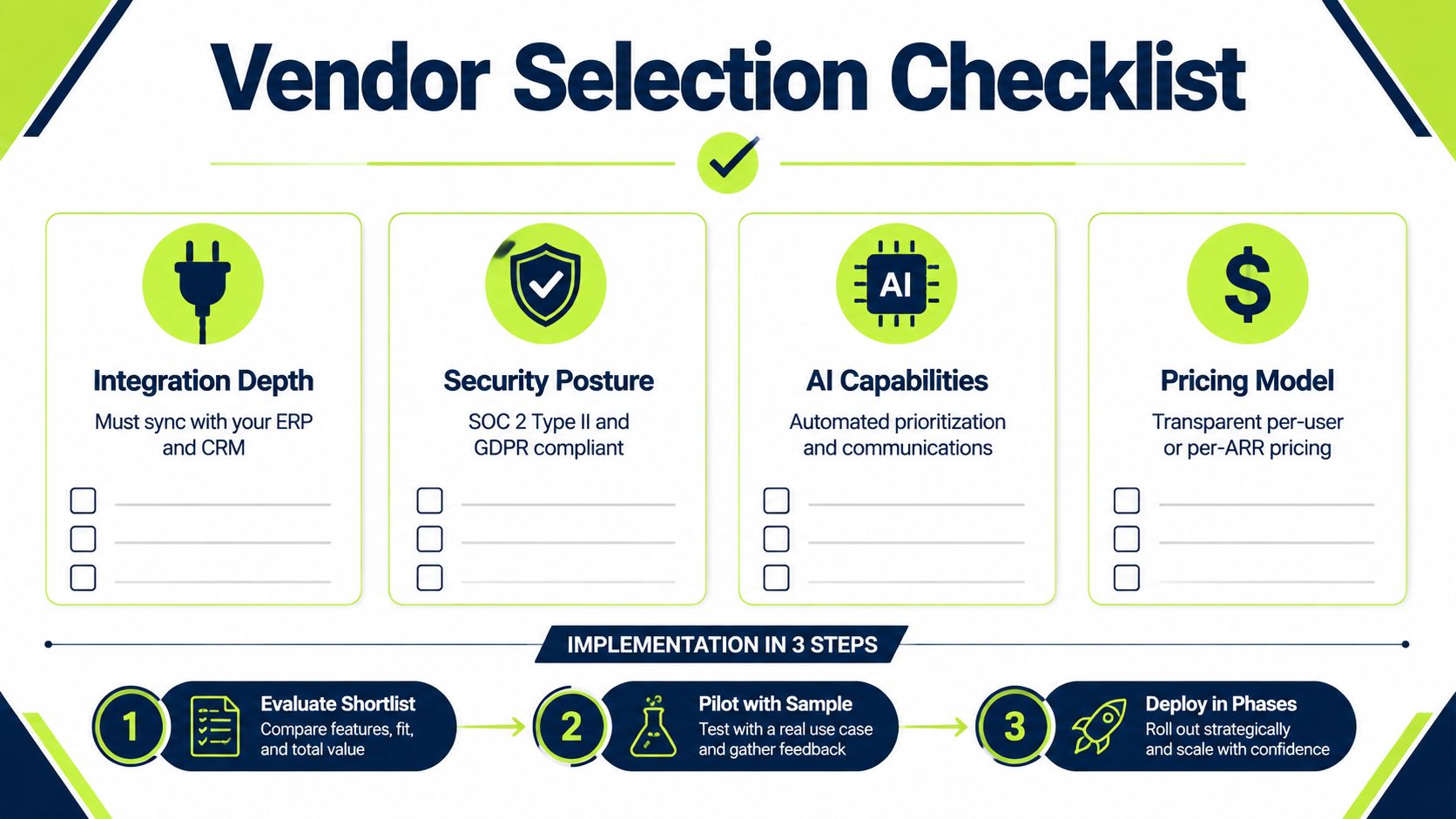
What to score during evaluation
- Integration depth, confirm the platform syncs invoice, payment, and customer data without manual exports.
- Security posture, ask about access controls, audit trails, and how customer data is protected.
- AI capability, test whether prioritization and outreach are adaptive or just rule-based scripts.
- Pricing clarity, make sure the model is transparent enough that growth won't create surprise costs.
The implementation sequence should stay simple. Start by evaluating a shortlist, then pilot on a sample set of accounts, then deploy in phases so the team can absorb the workflow changes without losing control. I've found that staged rollout matters more than vendor promises because real adoption changes when collectors see the queue working their way, not when a PowerPoint says it should.
How to sequence the rollout
- Evaluate the shortlist. Focus on integration, workflow depth, and whether the vendor can show the full post-invoice path.
- Pilot with sample accounts. Use real invoices, real disputes, and real payment behavior.
- Deploy in phases. Bring in the highest-friction accounts first, then expand once the team trusts the system.
For a useful parallel on implementation choices across billing and collections systems, Resolut's collection software guide is worth reading because it shows how workflow fit usually determines adoption, not feature count. That's the same lens I'd use before signing a contract.
What a Working AR System Actually Returns
A working system doesn't just fire faster reminders. It gets cash from aging buckets sooner, reduces the time your team spends on repetitive follow-up, and keeps customer communication consistent enough to preserve the relationship. That's the return CFOs and controllers should care about.
The trade-offs are real. Implementation takes effort, data hygiene matters, and the team has to trust the new queue before it replaces the old one. But once the process is stable, the work becomes calmer, cleaner, and easier to manage.
Resolut is a solid example of this category done in a way professional services firms can live with, because it keeps the workflow controlled, accurate, and human.
If you're comparing AR software for professional services, start with the part of the workflow that's causing the most friction today, not the longest feature list. Resolut is built to automate collections, prioritize risk, and keep outreach consistent across the invoices that matter most. If you want to see how that looks in practice, visit the site and judge it against your current aging report.