
Accounts Receivable Reporting for Professional Services
Master accounts receivable reporting with KPIs, dashboards, and automation strategies that reduce DSO and improve cash flow for professional services firms.
Monday morning starts with a familiar ritual. The Controller exports the standard 30-60-90 aging report, scans the totals, and sees a large invoice from a key client sitting in the overdue column. The report confirms that money is outstanding, but it doesn't explain whether the invoice is waiting on a project milestone, trapped in a billing dispute, missing a purchase-order reference, or being deprioritized by the client.
That distinction matters for a professional services firm. A static report can show yesterday's balance while leaving the finance team unable to answer a more urgent question: which receivables will become cash, when, and what must happen first?
Accounts receivable reporting needs to move beyond balance summaries. Firms that connect invoice data with project milestones, client behavior, dispute status, promised payments, and cash forecasts can replace reactive chasing with a clearer operating view of liquidity.
Why Most AR Reports Fail Professional Services Firms
Traditional aging reports weren't designed for the way professional services firms earn and collect revenue. A product company may invoice after a shipment and wait for a straightforward payment cycle. A consulting, legal, engineering, marketing, or technology firm may bill against time records, retainers, delivery milestones, change orders, acceptance criteria, or a client's internal approval process.
The aging report sees only the due date and balance. It doesn't know that a project sponsor approved the work but procurement rejected the invoice, or that the client has paid every previous invoice after a specific project review. It also won't tell the CFO whether a large receivable is commercially healthy or operationally stuck.
A balance is not a collection explanation
Many Controllers lose time here. They download the report, sort by balance, and distribute a list to account owners. The collections analyst then sends reminders to invoices that may not need a reminder, while blocked invoices remain untouched because nobody has connected AR with delivery and client information.
The problem becomes more serious when leadership uses the report as a cash forecast. Total receivables can look strong while the collectible portion is concentrated in a few clients, disputed invoices, or balances that have already drifted beyond agreed terms. Government-backed research in the UK estimated that approximately 1.54 million businesses were affected by late payment, representing about 28% of businesses surveyed, which shows why overdue exposure needs active monitoring rather than occasional review. (UK late invoice payment research)
The same source found that medium-sized businesses offering trade credit reported around 17% of outstanding invoices, by both volume and value, were late. For professional services finance teams, that reinforces the need to track aging, collections activity, and escalation status separately from the gross AR balance.
Practical rule: An aging report should tell you what to do next, not merely confirm what happened last month.
Dynamic reporting adds the missing context
Effective accounts receivable reporting combines several layers of information:
- Invoice facts: Amount, due date, billing status, credit notes, unapplied cash, and payment history.
- Delivery context: Project, milestone, acceptance status, timesheet approval, and change-order position.
- Client behavior: Typical payment timing, prior promises, recurring disputes, and account concentration.
- Action status: Last contact, next follow-up, owner, promised payment date, and escalation path.
- Cash relevance: Expected receipt timing and confidence level for the cash forecast.
This architecture changes the Controller's Monday meeting. Instead of asking why the balance is overdue, the team can identify the reason, assign an owner, estimate the likely receipt date, and decide whether the account needs a client conversation, billing correction, or executive escalation.
The Five KPIs That Matter for Cash Flow
A professional services firm does not need every available metric. It needs a focused set that explains collection speed, exposure, execution quality, billing friction, and forecast reliability. These measures move reporting beyond a static aging snapshot and show whether receivables are likely to become cash.
DSO remains the anchor. APQC treats DSO as a core accounts receivable KPI and segments benchmarks by industry. The Credit Research Foundation distributes performance data across six common KPIs on a quarterly cadence, about 45 days after quarter-end. (CRF NSDTR reporting) That recurring comparison gives finance teams more perspective than a single aging report.
KPI | Formula | Benchmark Range | What It Reveals |
|---|---|---|---|
Days Sales Outstanding | Accounts receivable ÷ credit sales × days in period | Industry and service mix dependent | Average collection speed and cash conversion |
Aging bucket distribution | Balance in each age bucket ÷ total AR | Watch concentration in older buckets | Where collection risk is accumulating |
Collection Effectiveness Index | Collected amount ÷ collectible amount × 100 | Use internal trend and peer context | Whether the team is converting available AR into cash |
Dispute rate | Disputed invoice value or count ÷ invoiced value or count | Establish a firm baseline | Whether billing and delivery issues are delaying payment |
Cash forecast accuracy | Actual receipts compared with forecast receipts | Track variance over time | Whether reported AR translates into dependable liquidity |
DSO needs context
APQC-derived benchmark summaries place top performers at 30 days or less, median performers at 38 days or less, and bottom performers at 46 days or longer. (APQC AR and invoicing benchmarks) A separate 2026 AR benchmark report described average DSO improving from 45 days to 39 days, a 6-day reduction. (2026 AR benchmark summary)
Those figures are reference points, not universal targets. A firm with milestone billing, public-sector clients, or complex acceptance processes may have a different collection pattern from a recurring advisory business. Use DSO to identify movement, then explain that movement through aging, contractual terms, disputes, and client mix.
Payment terms can distort the picture. Allianz Trade reported global payment terms at 56.5 days in 2025, unchanged at that level since 2022 and 3 days below the pre-pandemic norm. (Allianz Trade cash conversion cycle) A flat DSO can therefore conceal longer terms or weaker payment behavior. Pair it with overdue aging and analysis adjusted for agreed terms.
Finance leaders reviewing working-capital discipline can consult EndureGo Tax working capital tips. A more detailed accounts receivable KPI guide can help teams define formulas, ownership, and review cadence consistently.
The other four indicators complete the picture
Aging distribution exposes concentration risk that DSO averages away. Dispute rate provides an upstream warning when invoice challenges cluster around a service line, project manager, or billing rule.
CEI shows whether collectors are converting the receivables that were collectible during the period. Cash forecast accuracy tests the reporting chain from invoice status through expected receipt. If forecasts repeatedly assume that old invoices will convert while receipts arrive later, the problem may involve probability weighting, promise tracking, or missing project context, not only collection effort.
Track the five together. DSO tells you how fast, aging tells you where, CEI tells you how well, disputes tell you why, and forecast accuracy tells you whether management can trust the cash view.
Building AR Dashboards That Drive Action
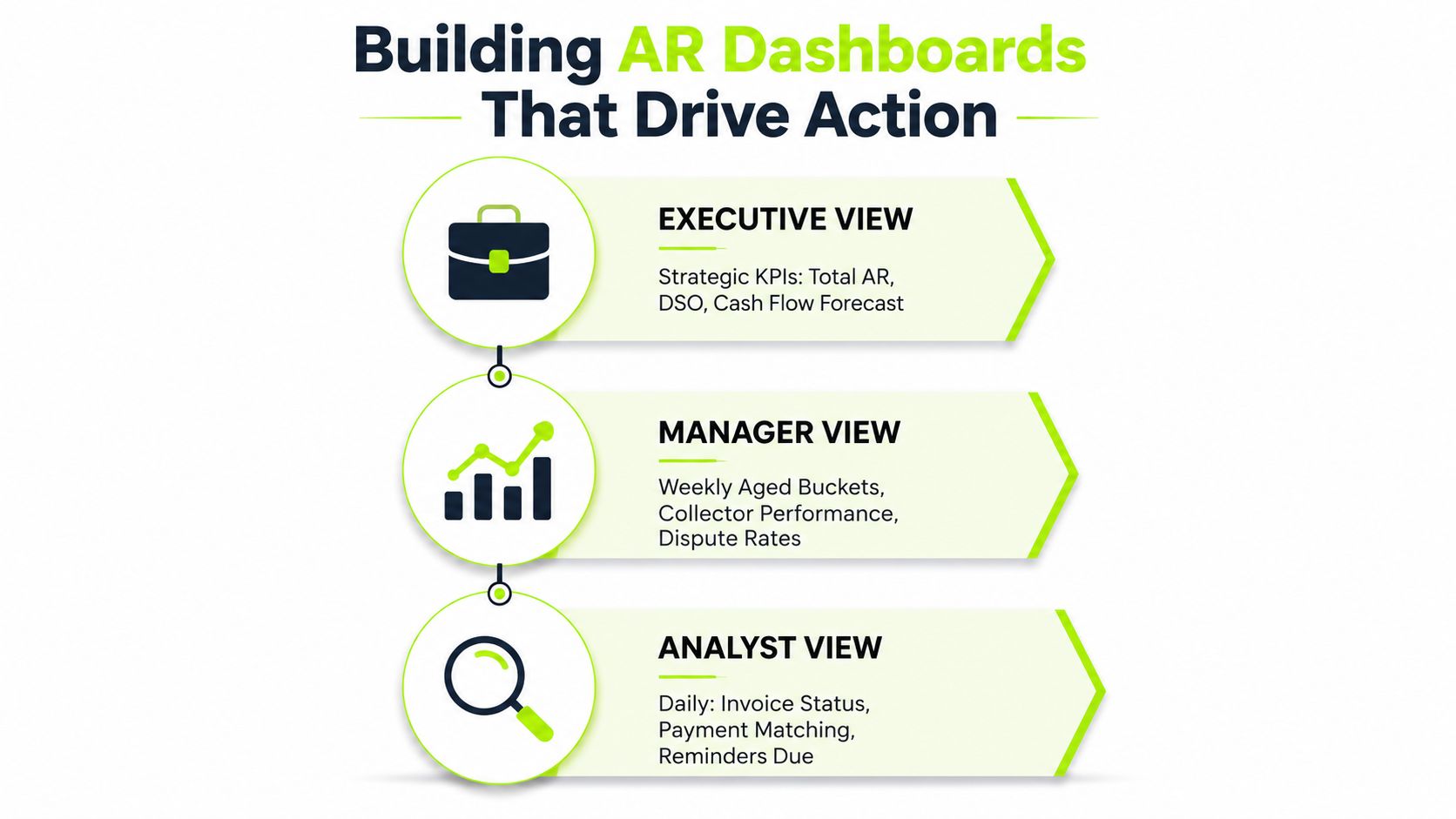
The right dashboard depends on who uses it and how often they make decisions. A collections analyst needs a work queue. A Controller needs trend and exception management. A CFO or managing partner needs a reliable connection between receivables and liquidity.
Start with the data model, not the chart design. Pull invoice and payment records from the ERP or accounting system, project status from the project-management platform, and relationship or account ownership from the CRM. Add dispute reason, promised payment date, next action, and confidence level as controlled fields rather than leaving them in email threads.
Give each role a decision-ready view
The analyst view should answer, “What should I work on today?” Include invoices approaching due dates, overdue balances, open disputes, unapplied payments, last-contact dates, and promised payment dates. Sort by action priority, not by invoice age.
The manager view should answer, “Where is the process drifting?” Review aging movement, DSO direction, collector workload, broken promises, recurring dispute reasons, and accounts that have crossed agreed terms. A weekly cadence gives the Controller enough time to intervene before exceptions become normal.
The executive view should answer, “What does this mean for cash and client risk?” Show total AR, DSO, expected receipts, confidence-weighted cash forecast, concentration, and the receivables requiring partner or executive involvement.
A dashboard earns its place when a user can name the decision it supports. If nobody knows what action follows a metric, remove the metric.
QuickBooks provides a useful baseline for operational aging. In the U.S. version, users can open Reports, choose Standard reports, and select Accounts receivable aging summary or detail under “Who owes you.” The report can be customized and saved for reuse. (QuickBooks AR aging report)
The summary view supports portfolio oversight. The detail view supports invoice-level follow-up, so the Controller can move from a total balance to named customers and unpaid invoices. Teams looking for a concise reference can find the aging report in the docs, while firms designing a broader dashboard can use this AR KPI dashboard framework.
Manual Reporting Versus Automated AR Intelligence
Manual accounts receivable reporting usually begins with several exports. Someone downloads an aging report from the accounting system, reconciles billing data, copies project notes from another system, updates formulas in Excel, checks email for payment promises, and sends a static PDF to stakeholders.
That workflow can work while the firm is small and the account structure is simple. It becomes fragile when multiple people edit the same file, when due dates differ by client, or when a report is already stale by the time leadership reviews it.
Dimension | Manual Reporting | Automated AR Intelligence |
|---|---|---|
Data aggregation | Exports and spreadsheet consolidation | Connected feeds from accounting, billing, project, and CRM systems |
Aging calculation | Formula maintenance and manual checks | Dynamic calculation based on due dates and report date |
Dispute tracking | Email threads and notes | Structured status, reason, owner, and next action |
Alerts | Dependent on someone remembering to review | Triggered by terms, age, risk, and broken promises |
Distribution | Static files sent to stakeholders | Role-based views with drill-down access |
Human judgment | Often consumed by data preparation | Focused on negotiation, escalation, and client context |
Automation removes assembly, not accountability
The strongest use of accounts receivable automation is not to eliminate finance judgment. It removes repetitive aggregation, calculation, threshold monitoring, and cadence enforcement so people can focus on decisions that require context.
AI AR automation can identify invoices that resemble prior problem accounts, prioritize outreach, summarize client history, and suggest next actions. A Controller still decides whether a strategic client needs a partner-led conversation, whether a disputed charge should be corrected, and whether commercial goodwill justifies a settlement.
The distinction matters for professional services. Automation should surface the account and explain the signal. It shouldn't send an impersonal escalation to a client whose invoice is awaiting an approved milestone.
Teams evaluating automation can review what AR automation involves. The underlying principle also applies outside professional services. A practical overview of how AI helps haulier billing illustrates the broader value of connecting billing workflows, exception handling, and follow-up rather than treating invoices as isolated documents.
Common Reporting Mistakes That Hide Cash Flow Problems
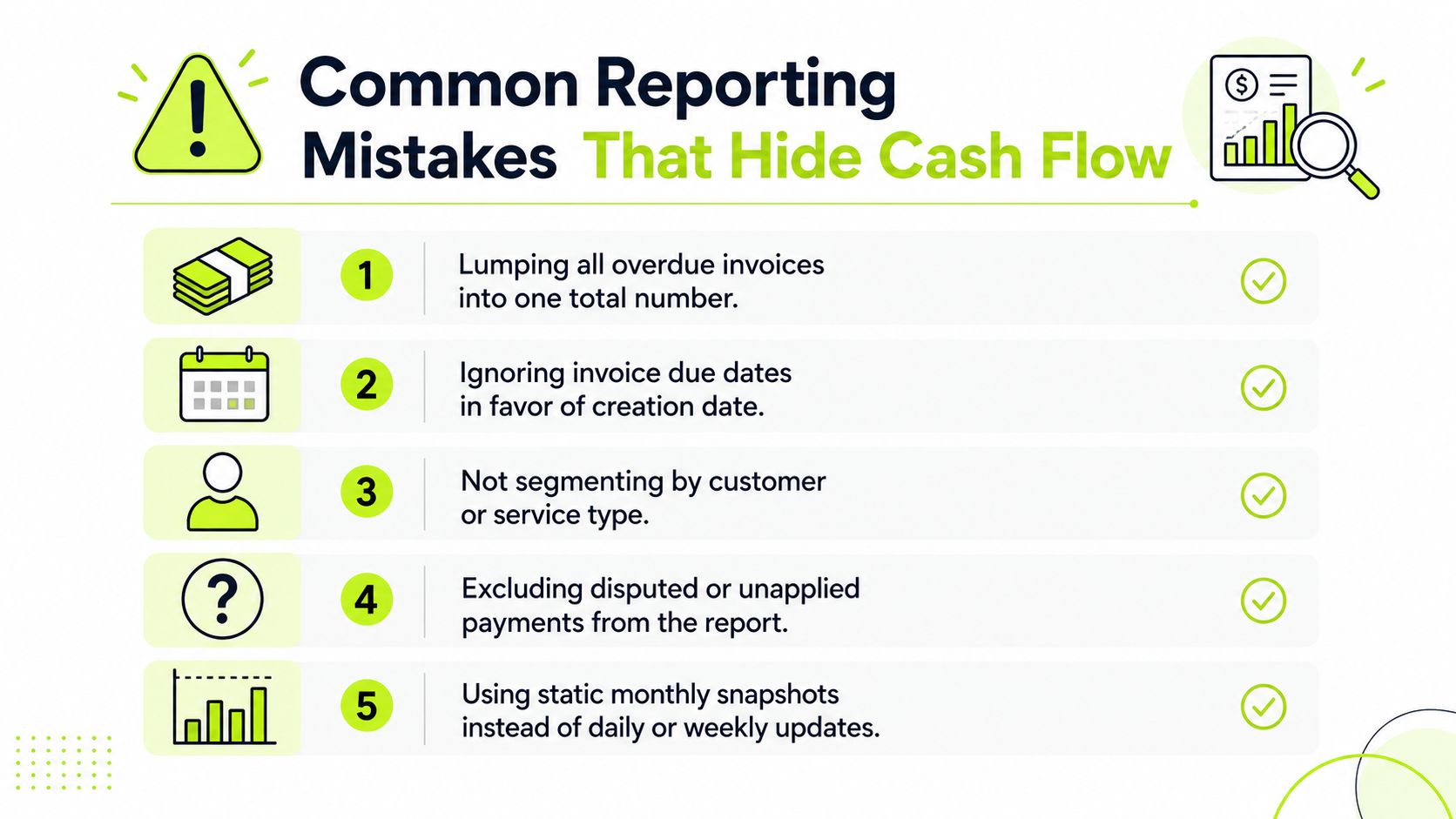
A report can be produced on schedule and still mislead leadership. The most dangerous errors aren't always missing data. They're classification choices that make a weak receivable look acceptable.
Five structural problems to audit
- Lumping older debt together: A single 90+ total hides the difference between a recently escalated invoice and one that has been unresolved through several billing cycles. Use current, 1-30, 31-60, 61-90, and 90+ buckets, then add a severe-delinquency view when needed. Standard aging reports commonly use these buckets and can be customized by reporting period and aging period. (QuickBooks aging report mechanics)
- Ignoring due dates: Aging from invoice creation rather than contractual due date can overstate or understate collection performance. QuickBooks treats “Current” as amounts not yet due and places balances into overdue ranges based on days after the due date. Transactions without a due date are treated as due upon receipt and become past due once a day has elapsed. (QuickBooks current and overdue logic)
- Hiding disputes inside total AR: A disputed invoice isn't equivalent to a clean invoice awaiting payment. Flag the disputed value, reason, owner, and expected resolution date separately so collectors don't receive credit for activity that can't convert until billing or delivery resolves the issue.
- Failing to segment exposure: Portfolio averages conceal client concentration and service-line patterns. Add customer, partner, project, service type, and account owner views. Dun & Bradstreet found that in Q1 2025, 17 of 209 U.S. industry segments had 10% or more of aging dollars 91+ days past due, demonstrating how sector-level tail risk can sit behind stable portfolio averages. (Dun & Bradstreet aging risk summary)
- Reporting gross balances without adjustments: Credits, retainage, unapplied cash, and approved write-offs can make gross AR look larger than the amount a collector can pursue. Reconcile these items and show collectible AR separately from accounting balance.
QuickBooks supports both summary and detail aging views, allowing Controllers to reconcile high-level exposure with invoice-level action lists. (QuickBooks aging detail and summary reports)
Turning AR Data Into Collections Strategy
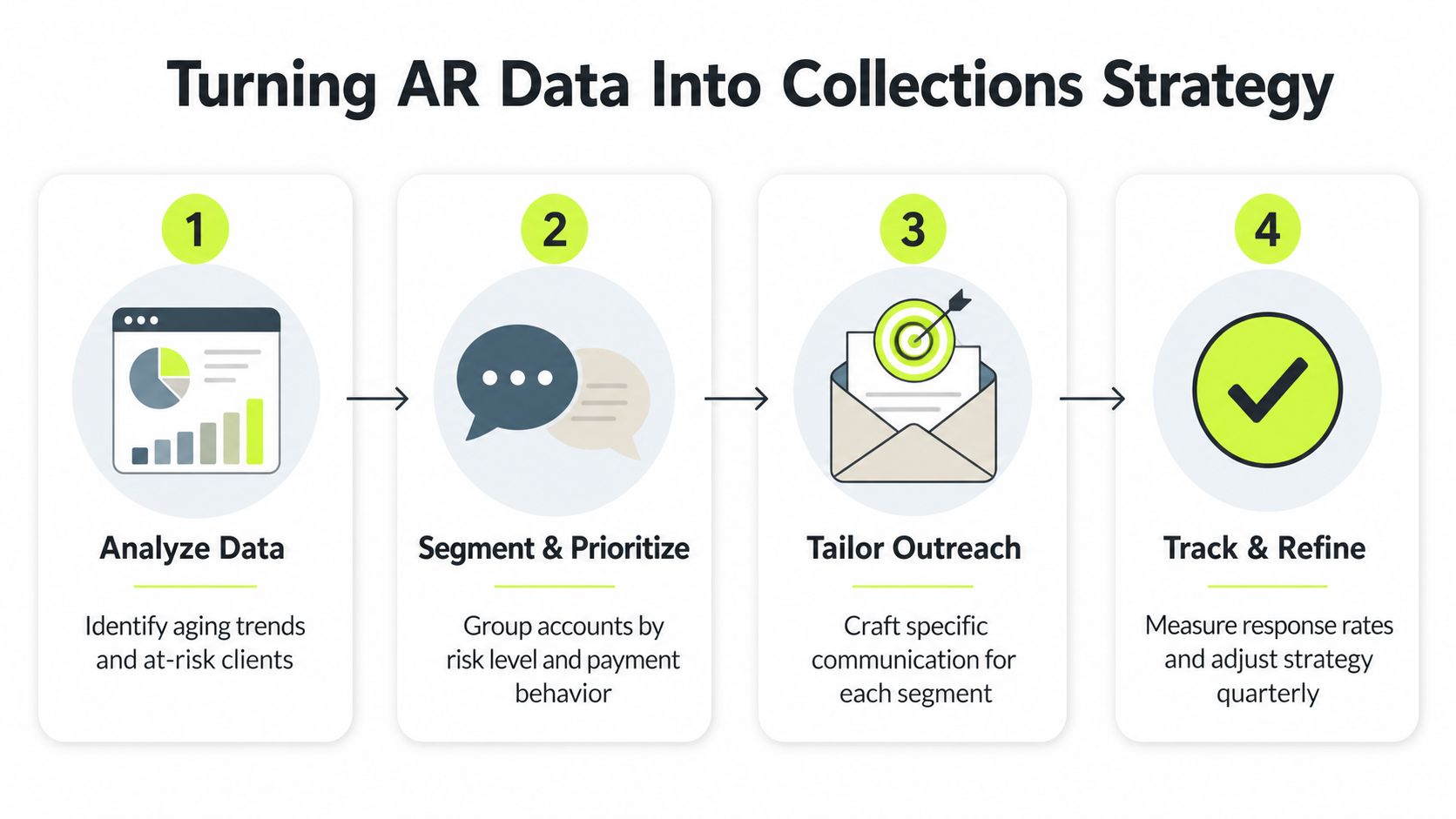
Reporting becomes valuable when it changes who gets contacted, what gets said, and when leadership gets involved. The first step is to translate aging and payment behavior into risk tiers. A current invoice from a historically reliable client doesn't need the same treatment as a smaller invoice from a client with repeated broken promises and open disputes.
Segment first, then choose the conversation
A practical risk model can combine age, amount, client importance, dispute status, payment history, and project position. Assign each account a clear next action:
- Low-risk accounts: Use scheduled reminders, clean invoice delivery, and confirmation of receipt.
- Watch accounts: Confirm approval status, contact the named payer, and record a specific promise date.
- High-risk accounts: Involve the account owner or partner, resolve commercial blockers, and define escalation conditions.
- Strategic exceptions: Separate relationship decisions from collection inactivity. An important client may deserve a bespoke conversation, not an indefinite extension.
Dispute-rate reporting can reveal upstream problems. If disputes cluster around unapproved time, unclear scope, or missing milestone evidence, collections is only treating the symptom. Finance should bring project leaders and billing owners into the review, then correct the process that keeps producing contested invoices.
AR reporting also improves cash forecasting when the forecast uses expected receipt dates rather than assuming every open invoice converts on its due date. Give each expected receipt a confidence level based on payment history, current communication, dispute status, and client commitment. The CFO can then distinguish a likely receipt from a hopeful assumption.
A mature operating rhythm has four parts. Analyze the data, segment and prioritize accounts, tailor outreach, then track responses and refine the rules. The collections strategy flow should lead to an owner and a next date, not merely a colored dashboard cell.
Your Path to Better Accounts Receivable Reporting
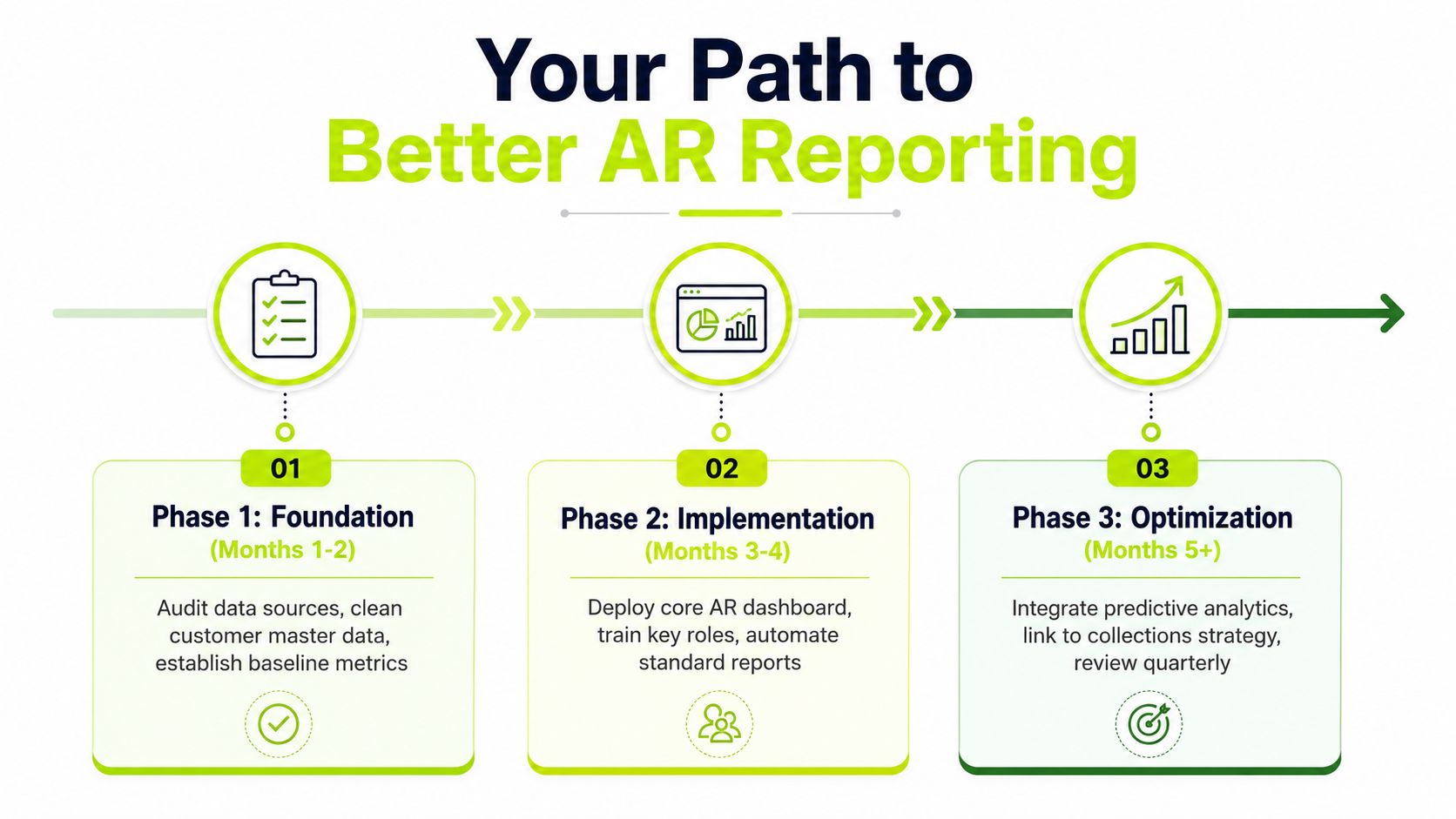
A firm doesn't need to replace its entire ERP to improve accounts receivable reporting. It needs to establish reliable definitions, connect the right operational data, and make follow-up part of the reporting process rather than an afterthought.
Start with a controlled foundation
Audit the source systems first. Reconcile customer master records, payment terms, invoice owners, project identifiers, dispute categories, and credit or retainage treatment. If the same client appears under multiple names, or if due dates are inconsistently maintained, no dashboard can produce dependable intelligence.
Then implement the five core KPIs with shared definitions. Decide how the firm calculates DSO, collectible AR, disputes, CEI, and forecast accuracy. Document the rules and assign ownership so the numbers don't change depending on who exports the report.
Add role-based action
Build the analyst work queue before the executive dashboard. If collectors can't see what needs attention, a polished summary won't improve cash conversion. Add automated reminders, dispute tracking, payment promises, and escalation triggers around the existing accounting workflow.
Controllers also need to change their own role. The job is no longer to spend the week preparing reports for review. It's to challenge the assumptions behind the cash forecast, identify process failure, and help account owners have better client conversations.
Move toward predictive cash management
Once the data is clean and the operating cadence is stable, layer in predictive analysis. Use client payment behavior, project progress, dispute patterns, term changes, and promise performance to estimate which receivables are likely to convert and which require intervention.
That progression supports AR software for professional services, QuickBooks AR automation, and broader accounts receivable automation without forcing a disruptive transformation. The technology matters, but disciplined definitions and consistent human follow-through matter just as much.
The objective isn't a more attractive aging report. It's a cash view that the finance team can act on with confidence.
Resolut automates AR for professional services by connecting receivables visibility, payment follow-up, dispute context, and cash application in one operating workflow. If your aging report doesn't explain what will happen to cash next, visit Resolut to explore a more consistent, accurate, and human approach.