What Is a Payment Portal and Why It Matters
What Is a Payment Portal. Learn what a payment portal is, how it works, and why it matters for AR teams and customers. Clear definition, key features
45% of consumers used a service-provider online payment portal in the past year, and 68% used a mobile device to pay a bill. A payment portal is the secure, branded web page where customers view balances and pay invoices online.
That definition matters because professional services firms don't have a checkout problem. They have a receivables problem. A client may receive a PDF, forward wire instructions to someone in procurement, request a revised invoice, and eventually pay without sending usable remittance information. The money arrives, but the accounting work doesn't end there.
For a CFO, Controller, or firm owner managing a $3M–$50M professional services business, the practical question isn't just what is a payment portal. It's whether the portal helps the firm reduce DSO, improve cash flow, and apply cash without adding another fragile system.
The Scene Most Finance Teams Know Too Well
A controller opens the aging report and starts with the oldest balances. One client needs the invoice resent. Another says the wire instructions went to the wrong person. A third paid several invoices together, but the remittance advice is buried in an email thread.
The team works from PDFs, spreadsheet notes, reminder templates, and a shared inbox. Someone copies balances into an email, someone else checks the bank, and a third person tries to determine whether a lump-sum payment belongs to one invoice or five. None of this work is strategically difficult. It's repetitive, distributed, and easy to get wrong.
A payment portal gives clients a secure, branded web page where they can log in, see outstanding invoices or balances, select a payment method, and submit payment online. The important AR detail is that the portal can capture payment and remittance information at the point of payment, rather than asking the client to send those details separately.
That makes it different from an ecommerce checkout. A retail checkout usually focuses on a product, a transaction, and immediate fulfillment. A professional services portal needs to understand customers, invoices, retainers, partial payments, credits, payment references, and accounting records.
Practical rule: A portal isn't successful because a client can enter card details. It's successful when the payment reaches the bank and the accounting team can identify, post, and audit it without reconstructing the transaction manually.
The distinction affects the metrics finance leaders review each month. If clients can find the correct invoice quickly, payment friction may fall. If the portal sends structured remittance data into the ERP, cash application may move faster. If the portal creates another login that clients ignore, the firm has bought software without changing payer behavior.
The operating lens is therefore straightforward: Does the portal shorten the path from issued invoice to reconciled cash? DSO and reconciliation friction are the two pressure points to keep in view.
How a Payment Portal Actually Works
Think of the process like paying a restaurant check. The check lists what was ordered, the amount due, and the person responsible for settling it. A payment portal adds the secure payment route and sends the result back to the business's ledger.
The five-step flow
- The invoice is issued. The ERP or accounting system creates the invoice and records the customer, invoice number, balance, due date, and any relevant remittance instructions.
- The balance reaches the portal. An integration synchronizes the invoice and customer record. The portal should display the same balance the finance team recognizes in the accounting system.
- The client receives a secure route. An email or reminder directs the payer to the branded portal. The link should take the client to the relevant account or invoice, not to a generic page that requires another search.
- The client reviews and pays. The payer checks line items, chooses ACH, card, bank transfer, or another supported method, then authorizes the transaction. Hosted fields or tokenization can keep raw card data away from the firm's application.
- The payment is processed and reconciled. The portal sends the transaction through the gateway and processor, confirms the outcome, and returns payment and remittance details to the accounting system. Cash application can then match the payment using an invoice number, customer ID, or payment reference.
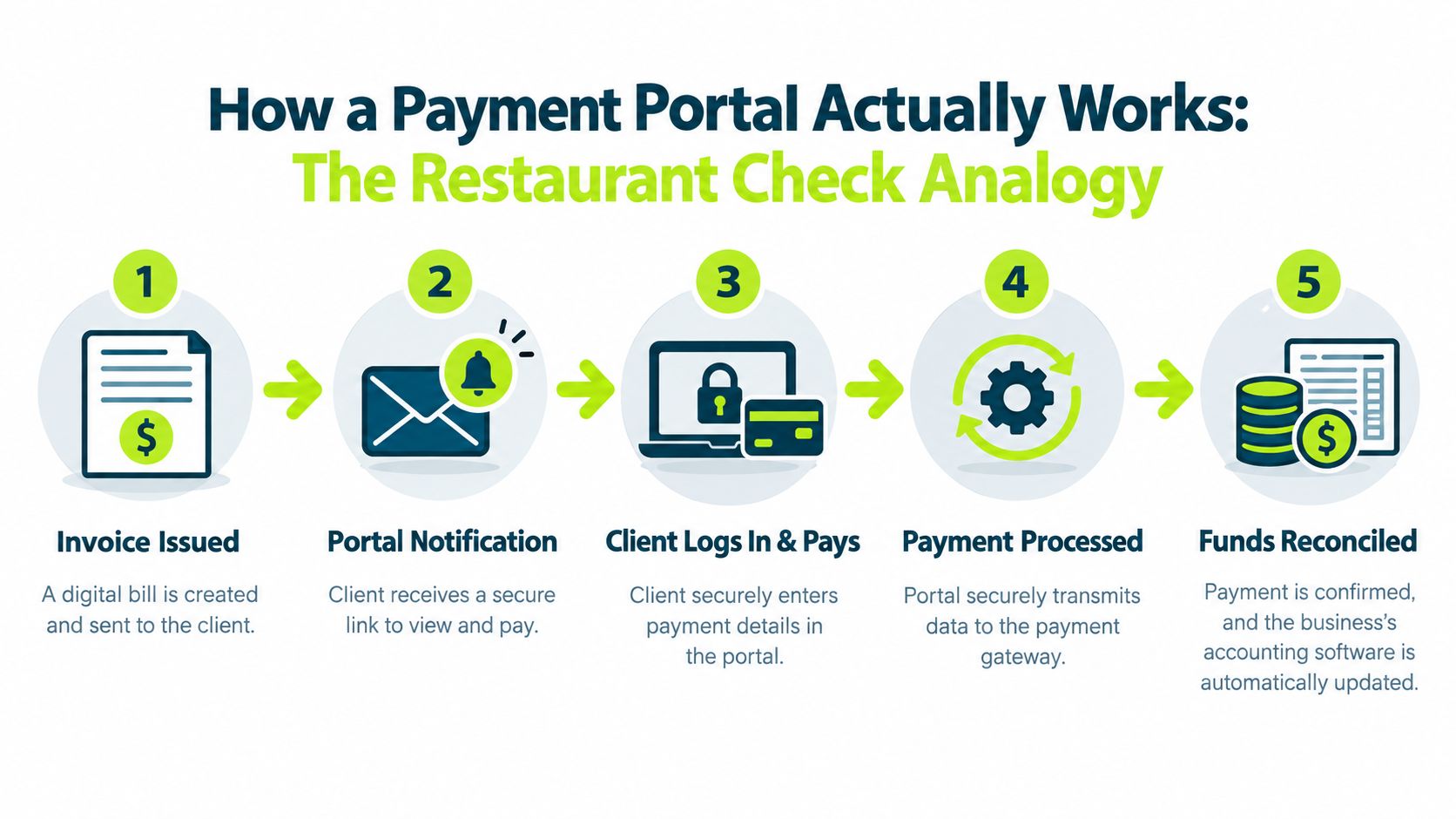
The analogy breaks down when the operational details are weak. A missing remittance email can leave a payment unidentified. Poor customer search can force a payer to contact AR. A portal that requires a new login for every payment can undermine the convenience it was supposed to create.
Finance teams should map this flow against their current process. Compare the invoice trigger, customer notification, payment authorization, settlement file, and cash-application rule. The useful question isn't whether the vendor can demonstrate the front end. It's whether the entire transaction can be followed from invoice creation to ERP posting. For a broader view of payment methods, see the B2B online payment methods guide.
The payment portal standards from Adyen also help clarify the basic architecture. A portal is the payer-facing interface, while the gateway handles secure transmission to the processor. That separation becomes important when finance evaluates security, contracts, and support ownership.
Core Components Every Portal Has to Get Right
A useful portal isn't a feature catalogue. It's a set of operating decisions that affect how clients pay and how the AR team records the result.
Payment methods follow customer economics
A professional services firm may support ACH, cards, bank transfers, eCheck, and digital wallets. The right mix depends on the customer segment, invoice size, payment urgency, and tolerance for transaction fees. ACH is often positioned as a cost-efficient option for larger invoices because it draws directly from the buyer's bank account, while cards may be more convenient for smaller or time-sensitive payments. Clarity Ventures outlines common B2B invoice payment methods.
Don't force every client into the same route. A procurement department may require ACH and remittance detail. An individual professional paying a smaller balance may prefer a card or wallet. The portal should make the preferred method obvious without hiding alternatives.
Security determines your exposure
The safest architecture keeps raw card data outside the firm's systems. Tokenization replaces the primary account number with a surrogate token, while hosted fields or redirect flows allow a vendor-controlled component to collect sensitive data. PCI Security Standards Council guidance includes requirements for Token Service Providers, reinforcing that tokenization is part of the payment-data trust boundary, not merely a design convenience. Review the PCI Security Standards.
Ask about hosted fields, token vault ownership, multifactor authentication, vendor access, incident response, and independent controls such as SOC 2. A vendor should explain precisely which systems remain in scope and which don't. A discussion of payment orchestration can also help your team separate routing decisions from portal presentation.
Reconciliation is the finance test
Invoice-level remittance capture matters more than a polished payment screen. The portal should return the invoice number, customer identifier, payment reference, amount applied, and status as structured data. It also needs rules for partial payments, credits, overpayments, write-offs, refunds, and failed transactions.
Component | What It Covers | Key Decisions for AR Teams |
|---|---|---|
Payment methods | ACH, cards, transfers, eCheck, and wallets | Which method fits each customer segment and invoice profile? |
Security | Tokenization, hosted fields, MFA, and access controls | Who owns sensitive data and PCI responsibilities? |
Reconciliation | Remittance, matching, exceptions, and ERP posting | Can the system handle partial payments and credits? |
Reporting | Activity logs, failures, refunds, and chargebacks | Can finance audit every payment and exception? |
Reporting closes the loop. Finance needs exportable activity logs, visibility into failed payments, refund status, and chargeback tracking. Before signing, ask the vendor to demonstrate an exception, not only a successful payment.
Payment Portal vs Gateway vs Processor
These three terms describe different layers of the payment transaction. Confusing them creates avoidable support and compliance problems.
A payment portal is the customer-facing experience. It shows invoices or balances and accepts the payer's selected method. It may be fully hosted by a vendor or embedded into the firm's website or client area.
A payment gateway is the encrypted bridge. It transports payment information from the portal to the processor and returns an authorization or decline response.
A payment processor, often working with an acquiring bank, communicates with card networks, moves the transaction through the financial system, and settles funds into the merchant's bank account.
Function | Payment Portal | Payment Gateway | Payment Processor |
|---|---|---|---|
Customer interaction | Displays invoices and collects payment choices | Not usually visible to the customer | Not usually visible to the customer |
Transaction role | Starts the payment request | Transmits and routes payment data | Authorizes, clears, moves, and settles funds |
AR relevance | Captures invoice and remittance context | Returns approval, decline, or error details | Provides settlement and transaction records |
Typical support issue | Missing invoice, login, or balance | Routing or authorization error | Settlement delay, refund, or network issue |
PCI concern | Depends on hosted fields, redirects, and tokenization | Handles secure transmission | Operates within processor and acquiring controls |
The boundary matters when a payment fails. A client may see the portal, but the failure could originate in the gateway or processor. Your team needs to know which provider investigates each error and which service-level agreement applies.
The same applies to chargebacks and refunds. The portal may expose the action, while the processor controls the underlying transaction workflow. The merchant statement may show the processor or acquiring entity rather than the portal brand. The contract governing the reconciliation feed may belong to yet another provider.
PCI scope deserves careful attention. If the portal uses hosted fields or tokenization, the firm can often keep raw card data away from its own systems. If the firm's application collects or relays raw card data, its obligations can expand. No vendor should answer this with a vague assurance. Ask for the data-flow diagram and responsibility matrix.
A focused payment gateway comparison can help your team prepare these questions before a vendor demonstration.
What a Portal Changes in Your AR Operations
A portal changes AR when payer actions connect directly to accounting outcomes. The balance, payment method, and remittance details should sit in one trusted path from invoice delivery to cash posting. If the payment button is buried, customer search is unclear, or reminders send clients elsewhere, the portal adds another obstacle instead of removing one.
DSO depends on the payment path
Clients act faster when the invoice, current balance, and payment action appear together. A portal replaces “please confirm the amount and send payment” with a direct route to the amount due. The design removes avoidable waiting between invoice review and payment.
Vendor-reported results remain directional. Stuut reports a 37% average DSO reduction for teams that contact 100% of accounts before due dates and match payments instantly, based on its own report rather than independent verification. Finance leaders should use the figure as a benchmark for testing workflow improvements, not as an expected outcome for every firm. Review the reported professional-services AR automation result.
Self-service moves work toward exceptions
Give clients access to invoices, balances, current or custom payment amounts, receipts, and remittance submission without an AR call. Portals cut repetitive balance inquiries when the payment link is embedded in every reminder email, not sent as a separate login.
Failed payments need operating rules of their own. Card updater capability, ACH retry logic, clear decline messages, and reminders keep temporary issues from becoming aged balances. Chargebacks require an audit trail linking the original invoice, dispute, evidence, and resolution. Finance teams designing escalation and monitoring rules can consult this guide to chargeback alerts.
Cash application determines whether the portal earns its place in the stack. A lump-sum bank deposit still creates manual work when the portal omits invoice-level references. Structured remittance gives the system the fields needed to match payments automatically and send only genuine exceptions to staff.
Measure the result through AR workload as well as payment volume. Staff should spend less time locating payments and answering balance questions, while focusing more on disputed scope, credit issues, unusual deductions, and accounts at risk. A portal supports that shift only when its payment path and remittance data are built around those operating targets.
Integration and UX Considerations Before You Buy
Take the vendor's demo script and replace the happy path with your own checklist. Start with the accounting system. NetSuite, Sage Intacct, Dynamics, and QuickBooks Online use different connector patterns, field structures, and posting rules. A connector that works for invoice creation may still fail to return remittance data or update payment status correctly.
Ask what happens to the data
Nightly synchronization may be acceptable for a low-volume operation, but it creates a stale balance problem when clients pay against recently issued invoices or when credits change the amount due. Ask whether invoice posting, payment status, customer updates, and cash application move in real time or through scheduled batches.
The portal should return structured fields, not PDF attachments that someone must open and interpret. At a minimum, test invoice number, customer ID, remittance reference, payment amount, payment date, transaction status, and partial-payment treatment.
Demo request: Ask the vendor to post one full payment, one partial payment, and one payment covering multiple invoices. Watch what reaches the ERP without allowing the salesperson to skip the exception screens.
Choose the right customer experience
Hosted payment fields generally reduce the firm's exposure to raw card data while keeping the payment experience inside a branded page. A full-page redirect can simplify implementation and scope, but it may introduce a trust break if the customer suddenly leaves the firm's domain. Neither option is universally right. Test the path with actual clients and review the security documentation before deciding.
Mobile rendering matters because 68% of consumers used a mobile device to pay a bill in the past year, according to the European Central Bank payment statistics publication. The portal should support saved payment methods, invoice-level links, and multi-invoice checkout so a client can pay several balances in one session. Global firms may also need language and currency support.
Rollout should be controlled. Pilot with one client segment, review adoption, DSO, call volume, failed payments, and unapplied cash for 60 days, then expand by segment. Accounts receivable process guidance from Resolut supports a narrow pilot, weekly exception review, and staged expansion rather than a single broad launch.
Why the Portal Is Now Table Stakes
A client who receives an invoice should not need to email accounts receivable for payment instructions, confirm bank details, and explain which invoices a single transfer covers. That friction shows up in slower collections, more follow-up, and unapplied cash.
Digital bill payment is now a normal customer expectation. A 2026 global consumer survey found that 45% of respondents had used a service provider's online portal in the past 12 months, while 28% had used a bank's online portal to make a payment. It also found that 68% had used a mobile device to pay a bill, as reported in the European Central Bank payment statistics publication.
The underlying payment market is mature. Payment gateways emerged in the mid-1990s, including Authorize.net, founded in 1994, and CyberSource, Ogone, and DataCash Group, founded in 1996. McKinsey reported in 2024 that roughly nine in ten consumers in the United States and Europe had made a digital payment during the prior year, with the United States at 92%. Forrester found in 2023 that 69% of U.S. online adults had used a digital payment method in the previous three months. InvoiceCloud's payment infrastructure overview summarizes these figures.
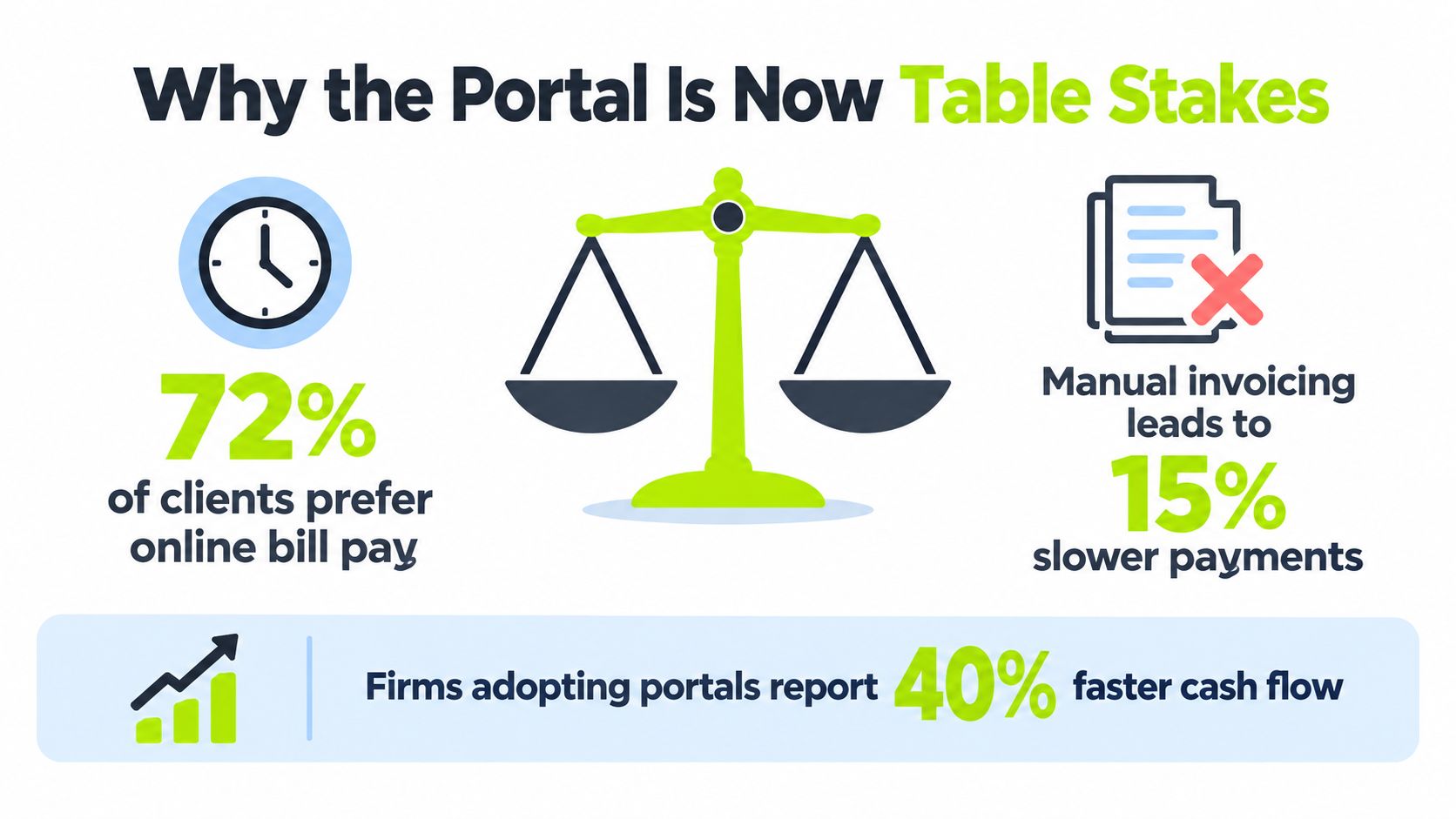
For professional services firms, the case is operational. A portal can give clients invoice-level payment options and capture remittance context at the point of payment. That can shorten DSO and help cash application, especially across recurring invoices, multiple entities, distributed billing teams, or high client volume. It will not correct inaccurate invoices, disputed work, poor communication, or weak credit controls.
Use the next planning cycle to test the workflow rather than judge the interface alone. Map invoice-to-cash handoffs, identify manual rekeying, review exception paths, and confirm that the portal supports the ERP without creating another isolated ledger.
If your team is mapping those handoffs, Resolut combines client payment options, automated follow-up, and cash application in one workflow. Visit Resolut to evaluate how its portal handles the DSO and unapplied-cash issues identified above.