AI for Accounts Receivable: CFO's 2026 Guide to AR Success
AI for accounts receivable transforms cash flow. CFOs, reduce DSO, explore key capabilities, & select AR software for professional services.
You're probably looking at the same pattern many professional services firms face. Revenue is booked. Clients are active. The team is busy. But cash still arrives on an unpredictable schedule, and the aging report keeps asking the same question every month: why are so many invoices still open?
That's where AI for accounts receivable gets useful. Not as a trend. As an operating discipline.
For CFOs, Controllers, and owners in the $3M to $50M range, the issue usually isn't invoice volume alone. It's the mix of inconsistent follow-up, manual reconciliation, uneven client communication, and limited visibility into which accounts need attention now versus later. Traditional accounts receivable automation helps. AI AR automation changes the timing, prioritization, and control layer.
The Real Cost of Inefficient Accounts Receivable
Late at night, the AR report looks deceptively simple. A few current invoices. A larger overdue bucket. A handful of clients who always say they'll pay next week. Then you zoom in and realize the same accounts have been aging for months, staff time is getting consumed by follow-up, and nobody has a reliable view of expected cash by date.

For a professional services firm, that isn't a back-office nuisance. It affects payroll planning, partner distributions, hiring decisions, and how confidently you can invest in growth. When collections are inconsistent, finance starts compensating elsewhere. You hold more cash than you should, delay decisions, or rely on short-term financing to bridge timing gaps.
The scale of the problem is often underestimated. Enterprises waste approximately $200 billion annually due to inefficient accounts receivable processes, and 1 in 10 invoices goes unpaid, which shows how directly AR inefficiency damages cash flow and revenue retention.
Where the cost actually shows up
The pain usually lands in four places:
- Working capital pressure: Cash is earned on paper but unavailable when you need it.
- Management distraction: Controllers and firm leaders spend time chasing exceptions instead of steering the business.
- Client experience risk: Inconsistent reminders create avoidable friction with good clients.
- Forecast quality: Collections become guesswork, so short-term cash planning gets weaker.
Practical rule: If your team can explain the aging report but can't explain the next thirty days of collections with confidence, AR is operating reactively.
Manual AR often hides its cost because the work is spread across people and systems. One person exports aging. Another sends reminders. Someone else checks bank activity. A partner steps in for a sensitive client. Nothing looks catastrophic in isolation. Together, it creates drag.
That's why improve cash flow isn't just a collections slogan. It's an operating outcome. The firms that tighten AR usually don't start by buying technology. They start by treating receivables as a controllable system.
What AI for Accounts Receivable Really Means
Most firms already use some form of accounts receivable automation. Scheduled invoices, reminder templates, recurring tasks, and basic workflow triggers all count. Useful, yes. But that's not the same thing as AI.
The cleanest way to think about it is this. Traditional automation is a paper map. It follows fixed routes. AI for accounts receivable is a GPS. It doesn't just know the route. It reroutes based on what's happening right now.
Automation follows rules. AI makes predictions.
Rule-based automation says: send reminder A on day 5, reminder B on day 12, escalate on day 20.
AI AR automation asks different questions. Which client usually pays after a document request? Which account slows down when approval changes? Which invoice is likely to slip even though it isn't overdue yet? Which message should go by email, and which one needs a call task?
That shift matters because finance teams don't need more activity. They need better sequencing.
A modern system uses payment history, invoice attributes, customer behavior, and communication signals to identify risk earlier. Some teams also look beyond commercial firms to adjacent finance environments where workflow precision matters. If you want a practical reference point on how AI is being applied in a mission-driven environment with tight controls, this overview of nonprofit AI accounting is worth scanning.
What changes in day-to-day AR
When AI is working properly, AR stops behaving like a reminder machine and starts acting like a prioritization engine.
That means:
- Collectors stop treating every account the same. Attention goes to invoices most likely to slip or dispute.
- Forecasting gets sharper. Expected cash is based less on hope and more on observed payment behavior.
- Follow-up becomes adaptive. Timing and tone change based on how the client responds.
- Exceptions surface faster. Missing remittance details, billing questions, and documentation requests don't sit buried in inboxes.
A good starting point is understanding the difference between simple task automation and workflow orchestration in practice. This breakdown of what AR automation is captures that distinction well.
Good AR systems don't just move faster. They help finance teams decide where human attention belongs.
That's the practical definition. Not software that sends more emails. Software that helps your team reduce DSO with fewer blind spots and less manual triage.
Key Capabilities of an AI-Driven AR System
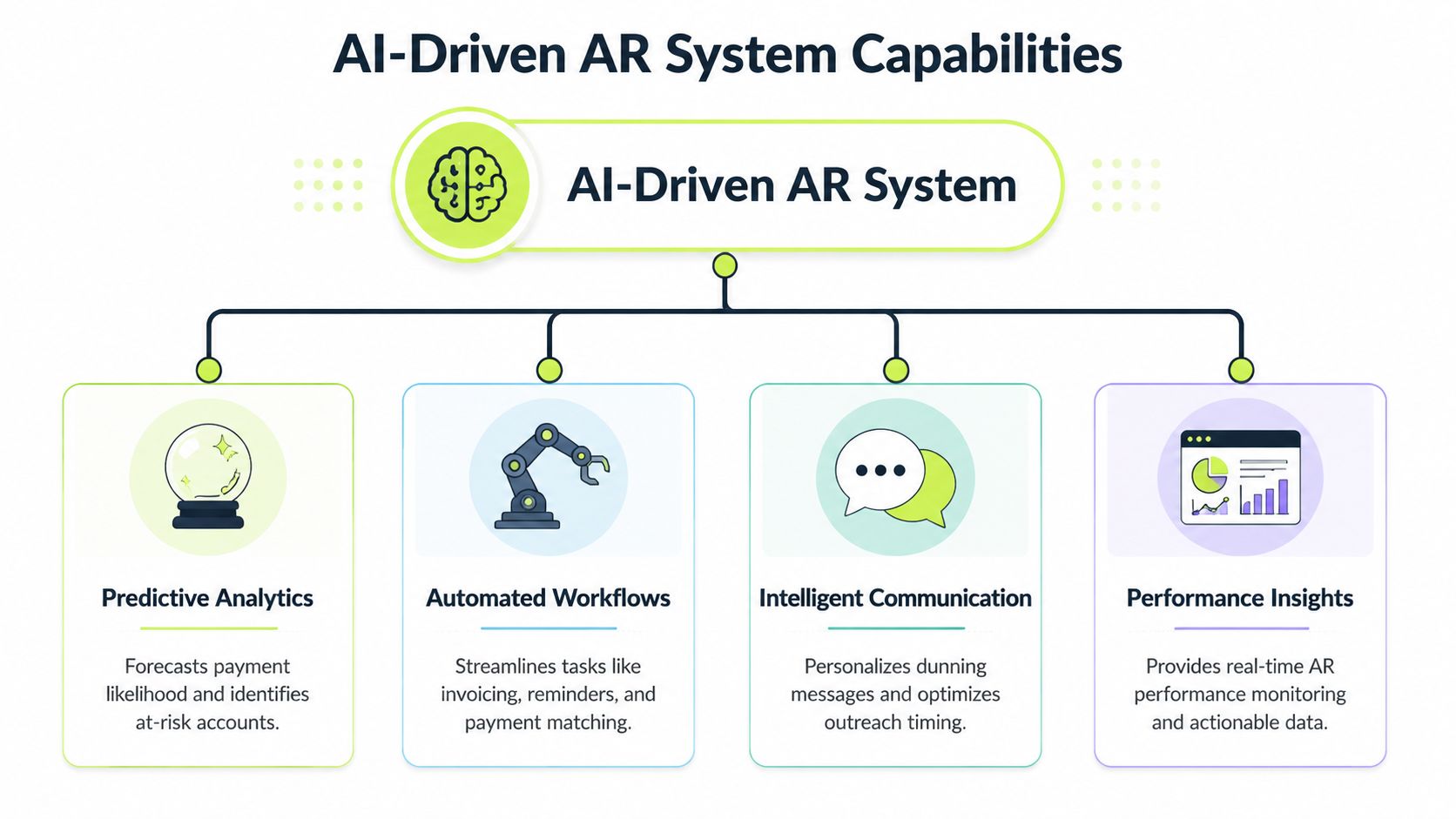
A good AI AR system changes who does what, when, and based on which signal. That is the standard I use when evaluating tools. If the product only sends reminders faster, it is automation. If it continuously reprioritizes work, routes exceptions, and improves cash application, it is operating infrastructure.
Intelligent orchestration
The first capability is workflow control across the full AR cycle.
The platform should coordinate invoice delivery, reminder timing, payment monitoring, exception routing, and escalation without asking staff to babysit every step. In practice, that means the system can hold outreach when a payment is in flight, escalate when a promise-to-pay slips, and send a collector only the accounts that need judgment.
That consistency matters more than it sounds. In manual AR, follow-up quality often depends on who is overloaded, who is out, or which inbox got checked last.
Predictive risk scoring
Static aging buckets tell you what is already late. Predictive scoring helps you act before an invoice becomes a problem.
Models can use payment history, dispute patterns, approval behavior, and account characteristics to rank collection risk and expected payment timing. If you want a practical view of how those models work, this guide to credit risk analysis using machine learning gives useful context.
The trade-off is straightforward. Scoring is valuable only if finance can inspect the logic well enough to trust the output. A model that labels an account high risk without showing the drivers creates more review work, not less.
Smart payments and automated reconciliation
Cash collection gets attention. Cash application usually gets less, even though it drives a large share of AR labor.
A capable system should match incoming payments to open invoices, handle short pays and partial remittances, and route true exceptions to staff with the right context attached. For firms using accounting systems like QuickBooks, QuickBooks AR automation should sync invoice status, payment activity, and exceptions cleanly enough that finance is not reconciling two versions of the ledger.
Here's the practical difference:
Capability | Manual AR | AI-driven AR |
|---|---|---|
Payment matching | Spreadsheet and inbox review | Automated matching with exception handling |
Follow-up priority | Aging bucket only | Risk-based prioritization |
Escalation | Staff judgment, often delayed | Workflow-based routing with human review |
Forecast input | Historical averages | Predicted payment behavior |
Dynamic outreach across channels
Communication is where weak AR tools show their limits. Scheduled templates are easy to deploy, but they miss context.
NetSuite notes that generative AI in accounts receivable enables personalized payment reminders and detailed responses to customer queries (NetSuite on AI in accounts receivable). That matters in professional services, where a payment delay may stem from missing backup, milestone confusion, or internal client approval steps rather than unwillingness to pay.
Tone matters too. A strategic client waiting on PO release should not receive the same sequence as an account with a long record of broken payment commitments.
What works and what doesn't
What works:
- Focused deployment: Start with invoice follow-up, payment matching, and exception handling, where manual effort is high and process variation is costly.
- Clear escalation rules: Define when the system acts, when it pauses, and when a collector, billing lead, or account owner steps in.
- Strong accounting integration: This matters for AR software for professional services that has milestone billing, split approvals, and client-specific documentation requirements.
What doesn't:
- Generic reminder blasts: More touches can increase noise, annoy good clients, and create more inbound work.
- Black-box scoring with no audit trail: Finance needs to see why an account was prioritized and whether the model is behaving sensibly.
- Loose ownership: If workflow exceptions do not have a clear owner, the backlog moves from the inbox to the software queue.
One example in the market is Resolut, which combines credit risk assessment, collections, omnichannel outreach, dynamic billing, and cash application in one system for AR operations.
Measuring What Matters KPIs for AI AR
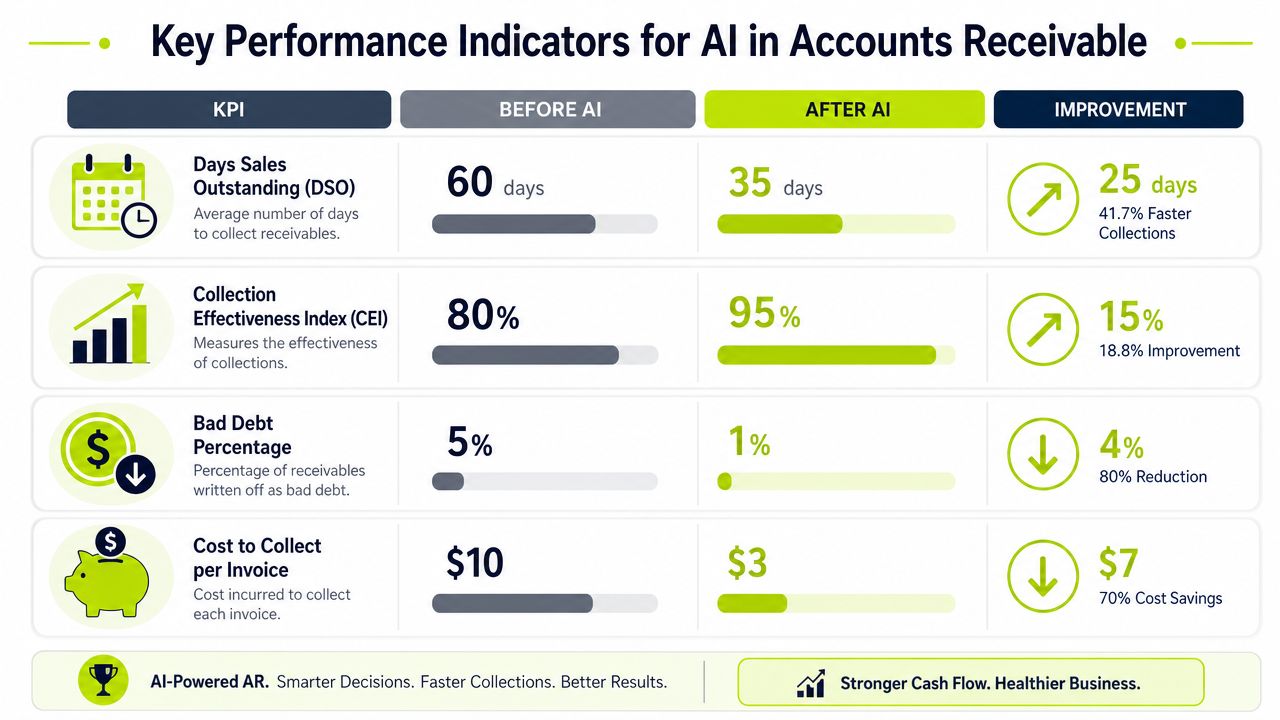
Organizations often start with one metric: reduce DSO. That makes sense. It's visible, board-friendly, and tied directly to cash. But DSO alone won't tell you whether your AR system is getting healthier or just moving numbers around.
Start with DSO, but don't stop there
Research by Wakefield and Billtrust found that 99% of companies implementing AI in accounts receivable reduced DSO, and 75% cut DSO by an average of 6 days or more (Wakefield and Billtrust findings summarized here).
For a professional services firm, a six-day reduction isn't abstract. It changes when cash lands, how much cushion you need, and how much management attention goes into weekly collection reviews.
Still, DSO is a lagging indicator. You need operating measures under it.
The KPI set that gives finance control
I'd track four categories:
- DSO: Your headline measure for collection speed.
- Collection Effectiveness Index: A clearer view of how much collectible receivables your team is converting.
- Average Days Delinquent: Useful for separating slow-paying behavior from invoice timing noise.
- Cost per invoice collected: The efficiency side of the equation, especially as volume rises.
If DSO improves but exception handling, dispute routing, or cost-to-collect gets worse, the system isn't really improving. It's shifting the burden.
A practical dashboard
The finance dashboard should answer these questions every week:
KPI | What it tells you | Why it matters |
|---|---|---|
DSO | How quickly invoices convert to cash | Core liquidity measure |
CEI | How effective collections are against collectible balances | Better than aging alone |
ADD | How far past due customers actually pay | Reveals true lateness |
Cost per invoice collected | Labor and process efficiency | Shows operating leverage |
For smaller teams, that's enough. You don't need a complicated scorecard. You need a dashboard that ties collections activity to cash outcomes and staffing efficiency.
Visual ideas worth using
If you're building internal buy-in, two visuals work well:
- A waterfall chart showing how open AR converts into expected cash by week.
- A cohort chart by client segment showing current, overdue, disputed, and promised-to-pay balances.
The goal is control, not reporting volume. A good KPI set tells you whether your AI AR automation is accelerating collections, protecting relationships, and lowering administrative effort at the same time.
An Operators Roadmap to Implementation
Most AR automation projects fail for one simple reason. Teams try to automate broken habits instead of redesigning the workflow first.
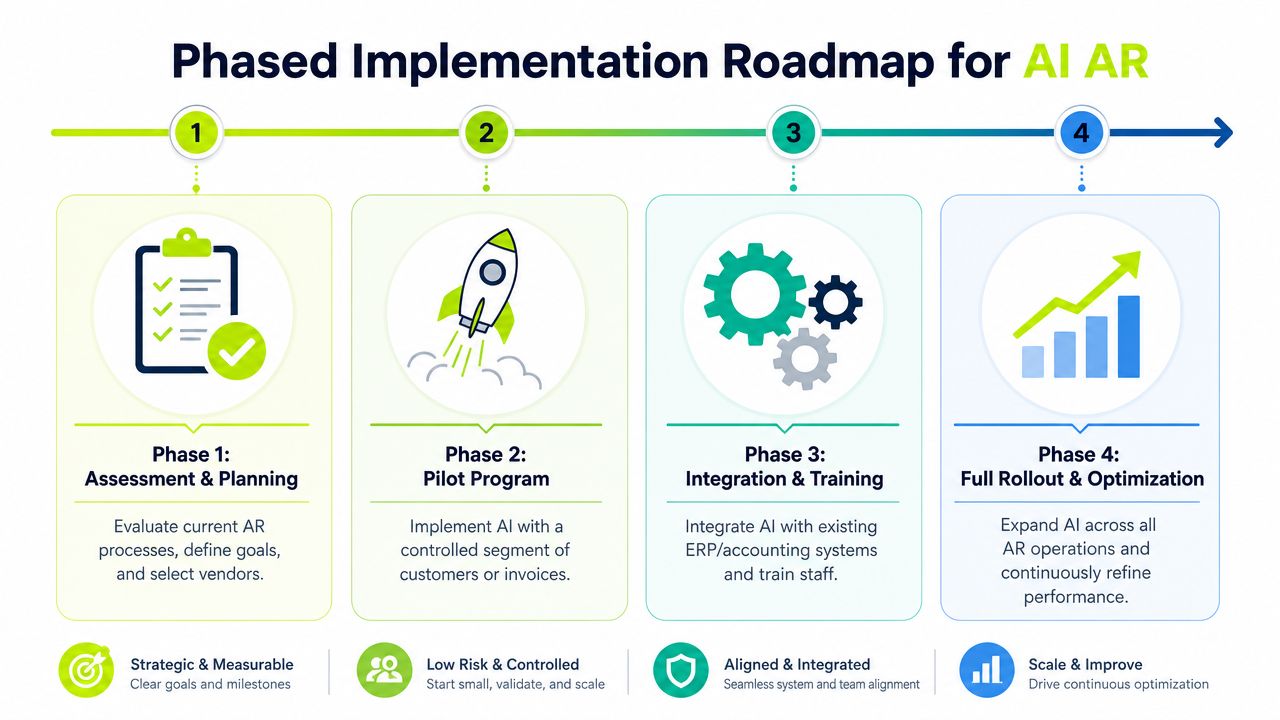
The better approach is phased. Calm. Controlled. That matters even more for firms running lean finance teams and serving relationship-driven clients.
Phase 1 assessment and planning
Start by cleaning the operating basics.
Review customer master data, invoice formats, payment terms, billing contacts, dispute codes, and current workflows. If approval contacts are outdated or remittance advice is inconsistent, AI won't fix that. It will just process noise faster.
Then set business outcomes. For most firms, the right targets are some mix of improve cash flow, lower manual effort, faster cash application, and better visibility into at-risk invoices.
Phase 2 pilot a narrow use case
Don't start with the whole ledger.
Pick a contained slice of AR. That might be one office, one client segment, recurring invoices, or a subset of accounts in QuickBooks. Here, QuickBooks AR automation can be a practical first step because it reduces system complexity and lets you test data flow, reminders, and reconciliation in a lower-risk setting.
A good pilot should answer three questions:
- Are reminders going out at the right time and with the right tone?
- Is cash application cleaner and faster?
- Are collectors spending less time on routine touches?
Phase 3 integrate and train
This is the point where many firms underinvest.
The system has to connect cleanly with your accounting stack, and the team has to know when to trust the workflow versus when to intervene. In advanced deployments, AI-driven AR can reduce DSO by up to 40%, reduce manual tasks by 70%, and reduce errors by 50% through automated cash application and intelligent collection prioritization. Those gains only show up when integration and workflow ownership are solid.
Use short role-based training:
- Collectors: How priority queues are built and when to override.
- Controllers: How to review exceptions, cash application, and reporting.
- Partners or client leads: When sensitive accounts require relationship-led escalation.
Phase 4 full rollout and optimization
After the pilot proves stable, expand by workflow and segment, not by enthusiasm.
Bring additional client groups onto the platform. Tighten escalation rules. Review message libraries. Audit dispute routing. Measure forecast accuracy against actual cash receipts. This is also where governance should become routine, not occasional.
Operator's note: AI works best in AR when finance owns the rules, sales respects the process, and exceptions don't bypass the system by habit.
What a realistic rollout looks like
Here's the practical sequence:
- First: Clean data and terms.
- Next: Pilot one use case.
- Then: Train staff and integrate fully.
- Finally: Expand with reporting and governance.
That approach avoids the classic mistake of treating AI AR automation like a software install instead of a finance operating model.
How to Select an AI AR Partner
Vendor selection gets messy fast because most platforms demo well. Dashboards look polished. Outreach flows look intelligent. Every roadmap includes prediction, automation, and insight. The essential question is whether the system will hold up inside your finance operation.
Ask how the AI actually decides
A CFO should press on decision logic early.
If the platform prioritizes accounts, ask what inputs drive that score. If it changes tone or timing, ask what behavior triggers the change. If the answer sounds vague, there's a good chance you're buying rules dressed up as AI.
Look for clarity on:
- Prediction inputs: Payment history, invoice age, communication activity, and account context.
- Escalation logic: What moves an account from reminder to collector review.
- Override controls: How your team can pause, revise, or redirect outreach.
Test the integration depth
A logo wall isn't integration.
For AR software for professional services, you need to know whether the platform syncs invoice status, notes, dispute flags, remittance details, and payment application in a usable way. If your firm runs on QuickBooks, ask specific questions about how QuickBooks AR automation works in practice. Can the team reconcile exceptions without switching systems repeatedly? Can invoice and customer changes flow back cleanly?
Evaluate the human-in-the-loop model
Routine AR can be automated. Complex disputes still need judgment.
That means the vendor should show how collectors step in, what context they receive, and how the system hands the account back once the issue is resolved. If the platform treats every exception as a support ticket with no workflow memory, your team will rebuild the process manually.
A short evaluation grid helps:
Question | Strong answer | Weak answer |
|---|---|---|
Is the AI predictive? | Clear explanation of inputs and outputs | “It learns over time” with no detail |
Does it fit our stack? | Specific workflow mapping to your systems | Generic integration claims |
Can staff intervene easily? | Human review, override, and approval controls | Fully automated with limited controls |
Does it support relationship-sensitive collections? | Segmented tone, routing, and account handling | Same workflow for every client |
Don't buy on feature count
Buy on operating fit.
The right partner will understand milestone billing, high-value invoices, partner-led relationships, and the fact that not every late payment should trigger the same response. In professional services, control matters as much as automation.
Governance and Avoiding Common AI Pitfalls
Month-end closes. Cash is tight. The AI system starts escalating accounts on its own, but your team cannot explain why one client received a second reminder while another was routed to collections review. That is not automation. It is a control failure.
The main governance risk in AI for accounts receivable is opacity. If finance cannot trace why the system changed message timing, tone, or escalation level, the company absorbs the downside. That usually shows up as compliance exposure, inconsistent treatment across customers, and avoidable strain on accounts the business still needs to retain.
The black-box problem is operational, not theoretical
An AR model does not need to be perfect. It does need to be explainable enough for finance, audit, and legal to review its decisions.
If an AI system moves from a courtesy reminder to a firmer escalation, the basis should be visible. Invoice age, prior broken promises to pay, dispute history, customer segment, and recent payment behavior are all reasonable inputs. Hidden logic is not.
This matters even more when automated outreach crosses into regulated communication channels. For a broader view, especially where consent and automated interactions intersect, this review of Voice AI governance shifts adds useful context.
Set approval rules before you automate
Teams get into trouble when they automate the entire collections process and try to add controls later. By then, the workflow is already live, customer habits are set, and exceptions are piling up.
Start with explicit policy decisions:
- Actions the system can take without review
- Accounts or balance thresholds that require manager approval
- Dispute types that must route to a human immediately
- The audit record kept for each recommendation, message, and override
Those rules should tie back to collections policy, not sit in a separate AI document nobody uses. If you are aligning escalation logic with compliance and outreach controls, this guide to AI for debt collection is a useful reference point.
Human review still matters. Strategic accounts, contract disputes, service complaints, and relationship-sensitive collections should not be left to model confidence scores alone.
A sound governance model gives finance three things: visibility into why the system acted, authority to override it, and a record of what happened afterward. Without those controls, AI speeds up inconsistency.
Resolut automates AR for professional services, combining workflow consistency with human oversight so finance teams can improve cash flow without losing control of client relationships. If you're evaluating a more disciplined approach to accounts receivable automation, Resolut is built to support consistency, accuracy, and human review.