
AR Automation Platform: A Practical Guide for CFOs
Learn how an AR automation platform cuts DSO, improves cash flow, and streamlines invoicing for professional services firms. Practical guide with KPIs and tips.
At 7:30 on Monday morning, the aging report is open on one monitor, Outlook is full of “reminder needed” threads, and a spreadsheet holds the collector call list. A controller at a professional services firm is already managing three separate problems: a 40-day invoice owed by a former client, a check that arrived without remittance information, and a project manager asking why a customer says they were billed twice.
That workload is common in firms billing monthly in arrears on net-30 terms. The payment clock doesn't start until the invoice is issued, and billing, collections, disputes, and cash application often sit in different systems. A practical explanation of DSO helps frame the issue, but the operating reality is more immediate: every unresolved exception takes attention away from client work, forecasting, and margin control.
This guide looks at the full invoice-to-cash loop, not a feature checklist. It covers what an AR automation platform does, which capabilities can reduce DSO, where QuickBooks Online automation is sufficient, how to implement without stalling, how to evaluate vendors, and which design mistakes drain ROI. The numbers come from published market and practitioner sources, not vendor brochures.
The Monday Morning Every Finance Leader Knows
The controller starts with the former client because the invoice has crossed from routine follow-up into a collection risk. A reminder was sent, but nobody recorded whether the client opened it. The account manager knows the relationship history, yet that context lives in email rather than the aging system.
The check is a different problem. The bank confirms receipt, but the payment reference doesn't identify the invoices covered. Someone must search the customer account, compare open items, and decide whether to apply the amount to one invoice, several invoices, or a partial balance.
Then the project manager appears with the duplicate-billing question. The invoice may be correct, but answering it requires checking the project record, credit notes, prior invoices, and customer communications. None of these tasks is difficult in isolation. Together, they turn a finance morning into manual case management.
Operator's rule: If collectors, accountants, and project managers each maintain a separate version of AR truth, the firm doesn't have an automation problem alone. It has a control problem.
Professional services firms commonly invoice after work has been delivered, with net-30 terms. Industry benchmarking places DSO for law, accounting, consulting, and agency businesses in the 35-to-55-day range, while DSO above 60 days is treated as a warning sign requiring review of billing or collections processes, according to professional services DSO benchmarks. A separate operating framework classifies below 30 days as excellent, 30 to 45 days as healthy, 45 to 60 days as requiring investigation, and above 60 days as a collections process problem in its DSO glossary.
The key question isn't whether the firm sends reminders. It's whether the process moves an invoice from approved billing to delivered invoice, active outreach, payment, accurate application, dispute resolution, and general-ledger close without creating another spreadsheet.
The rest of this guide treats AR as an operating system for cash. That means examining the work a platform removes, the exceptions it leaves for humans, and the evidence a CFO should request before approving a purchase.
What an AR Automation Platform Actually Does
An AR automation platform coordinates the invoice-to-cash loop. It should connect billing data, customer communication, payment collection, dispute handling, cash application, and accounting records so that each event updates the next step.
Consider a $24,500 milestone invoice generated from a project system. The platform should deliver it using the approved customer contact, include a payment link, and record delivery and engagement. If the balance remains open, it can send reminders on day 5, day 12, and day 28, subject to the account's terms, risk profile, and communication preferences.
Suppose the customer pays part of the invoice through ACH. The platform reads the bank transaction, email remittance, and ERP reference, then proposes a match. If the matching logic applies 90% automatically, the analyst reviews the remaining exception queue rather than rebuilding the entire reconciliation manually. The exact result depends on remittance quality, payment behavior, and integration design.
The loop matters more than the feature list
A useful platform handles each stage distinctly:
- Billing and delivery: It receives approved invoice data, validates required fields, and sends the invoice through the agreed channel.
- Customer outreach: It schedules reminders, records responses, and routes accounts that need human judgment.
- Payment intake: It provides convenient payment options and links the payment to the customer and invoice context.
- Exception management: It captures short pays, disputes, deductions, missing remittance, and duplicate-billing questions.
- Cash application: It matches bank activity to open receivables and sends approved postings back to the accounting system.
- Reporting: It connects activity to DSO, overdue exposure, unapplied cash, and collector workload.
A practical resource such as receivables content for financial professionals is useful because finance teams need to understand the underlying controls, not just the software interface.
Capability | AR Automation Platform | Standalone Invoice Sender | Generic Collections CRM |
|---|---|---|---|
Invoice delivery | Connected to billing and accounting records | Sends invoices and may track delivery | Usually depends on imported data |
Reminders | Rules-based or adaptive sequences tied to account status | Basic scheduled emails | Outreach workflows, often without payment context |
Cash application | Matches payments and manages exceptions | Usually outside scope | Often requires another system |
Disputes | Captures invoice context, ownership, and resolution status | Email or manual handling | Task tracking without full accounting workflow |
ERP or GL sync | Designed for two-way operational handoff | May export data | Varies widely |
Outcome reporting | DSO, aging, application, and workflow metrics | Delivery metrics | Activity metrics, not always cash metrics |
An invoice sender digitizes one step. A collections CRM may organize tasks. A genuine AR automation platform closes the loop between action and accounting outcome.
Core Capabilities That Move DSO and Cash Flow
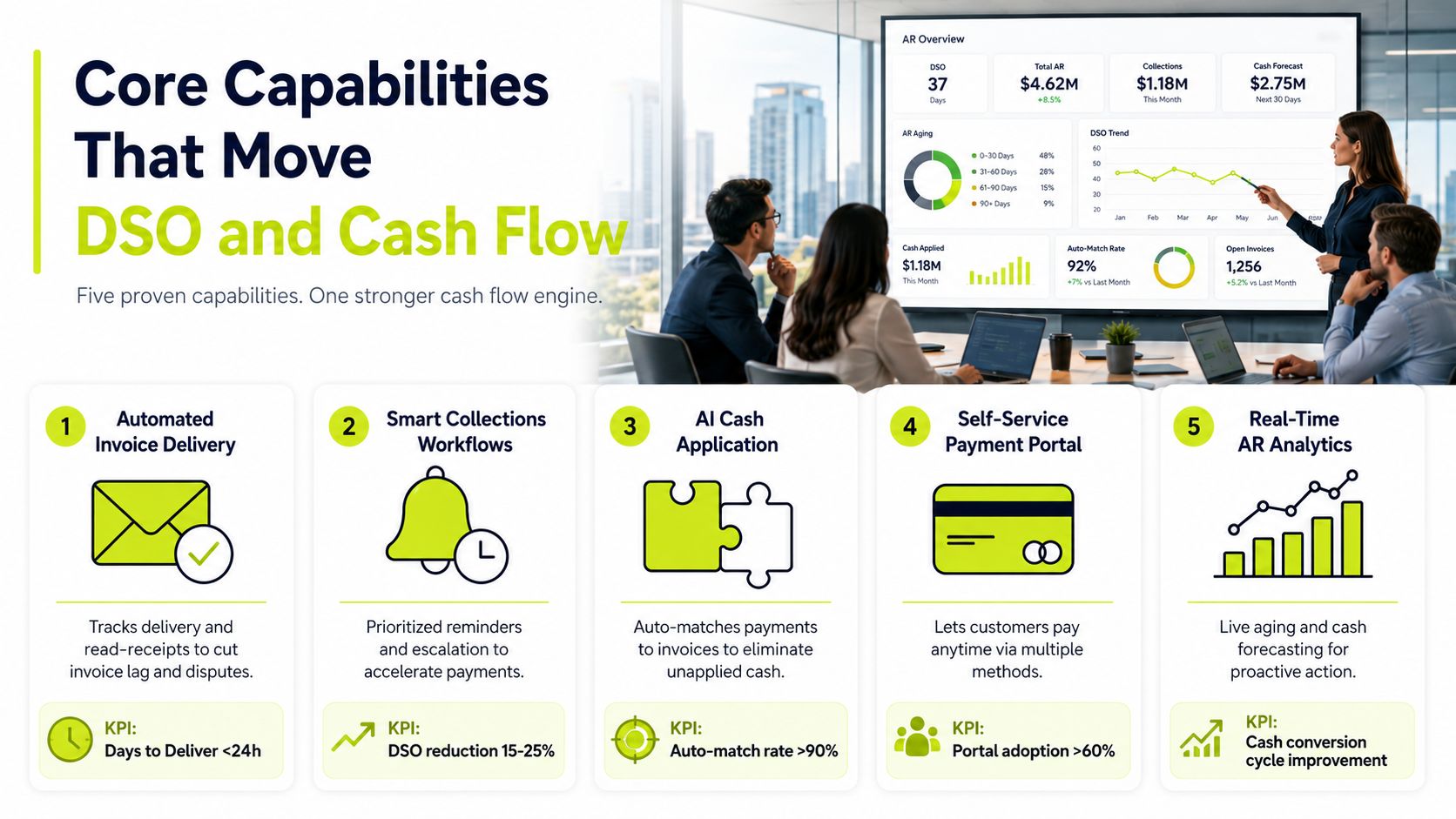
The strongest accounts receivable automation programs focus on measurable bottlenecks. For a professional services firm billing net 30, the relevant question isn't whether a dashboard looks modern. It's whether invoices reach clients promptly, collectors focus on the right accounts, payments get posted accurately, and disputes stop aging in silence.
Delivery and outreach
Automated delivery with read-receipt tracking removes uncertainty at the start of the process. The finance team can distinguish an invoice that wasn't delivered from one that was opened but remains unpaid. That distinction supports better follow-up and cleaner conversations with account owners.
Multi-channel dunning adds structure after delivery. Email, SMS, phone tasks, and escalation rules can follow a defined cadence rather than relying on individual memory. The workflow should slow down or change tone when a customer has an active dispute, and intensify when a healthy account ignores reminders.
Cash application is the control point
AI cash application matches bank lines to open invoices using remittance, customer identity, amount, and transaction history. Industry reporting places best-in-class touchless match rates at 85% to 92%, rules-based matching at 45% to 55%, and manual processing at 15% to 25%. The same source reports mature deployments reducing posting time from about 2.3 days to under 4 hours, with payment posting errors below 0.5%, in its 2026 AI cash application statistics.
Those figures should be treated as benchmarks to test, not promises to accept. Ask how the platform handles split payments, partial payments, missing remittance, and customer-level deductions. A high match rate that excludes difficult transactions won't improve the actual close process.
Disputes and prioritized work
Dispute management prevents a billing question from becoming an invisible aging balance. The system should connect the dispute to the invoice, project, owner, reason, promised resolution date, and next action. That gives the controller a view of both collectible debt and revenue at risk.
Prioritized worklists then direct collectors toward accounts where intervention matters. The list should show balance, age, payment behavior, dispute status, contact history, and recommended action. This is more useful than sorting an aging report by amount and calling from the top.
Independent finance research reports that organizations with high AR automation levels saw a 41% reduction in DSO, while even low automation produced a 29% improvement, as summarized in research on AR solutions for improving DSO. The implication is practical: breadth and quality matter. Automating delivery alone won't produce the same outcome as coordinating outreach, payment, application, and exceptions.
For a deeper look at the posting side of the process, see this guide to cash application automation.
QuickBooks AR Automation vs a Dedicated Platform
QuickBooks Online can handle more AR automation than many small firms use. It supports recurring invoices, automatic payment reminders, online payment links, and automatic matching of many payments to invoices. Setup guidance also describes reminder schedules with multiple touchpoints before and after the due date, as explained in this QuickBooks AR automation guide.
That native functionality works well when billing is predictable, customer records are clean, invoice volume is manageable, and the business operates as a single entity. It keeps the accounting system close to the process and avoids the implementation burden of another platform.
The limitations appear when the firm needs coordinated decisions rather than automatic events. Multi-entity dunning, customer-specific communication, dispute ownership, payment behavior analysis, self-service portals, and AI-assisted cash application usually require additional tooling and stronger integration.
Capability | QuickBooks Native | Dedicated AR Platform |
|---|---|---|
Invoicing rules | Recurring invoices and standard templates | Complex rules across entities, projects, and customer segments |
Reminders | Scheduled automatic reminders | Sequenced, multi-channel workflows with escalation and exceptions |
Cash application | Bank feed matching for many payments | AI matching, remittance interpretation, exception queues, and posting controls |
Reporting | Accounting and aging reports | DSO, delinquency, collector workload, dispute, and cash forecasting views |
Customer experience | Payment links and online payments | Configurable portal, payment options, communication history, and self-service context |
Operations | Best for simpler internal workflows | Designed for coordinated invoice-to-cash execution |
The point where native mechanics stop being enough
There isn't a universal invoice threshold, but many firms reassess QuickBooks-native workflows when monthly volume passes 500 invoices, when multi-entity or multi-currency requirements emerge, when DSO rises above 50 days, or when collectors need coordinated worklists rather than automatic emails. Those are decision signals, not laws.
Calculate the cost to process instead of comparing feature counts. Include collector time, unapplied-cash review, dispute follow-up, management reporting, delayed close work, and the opportunity cost of adding headcount. A dedicated platform is justified when it removes enough recurring work and improves enough cash visibility to outweigh subscription and implementation costs.
A useful comparison of the software category appears in this overview of accounts receivable automation software.
Implementing AR Automation Without Stalling
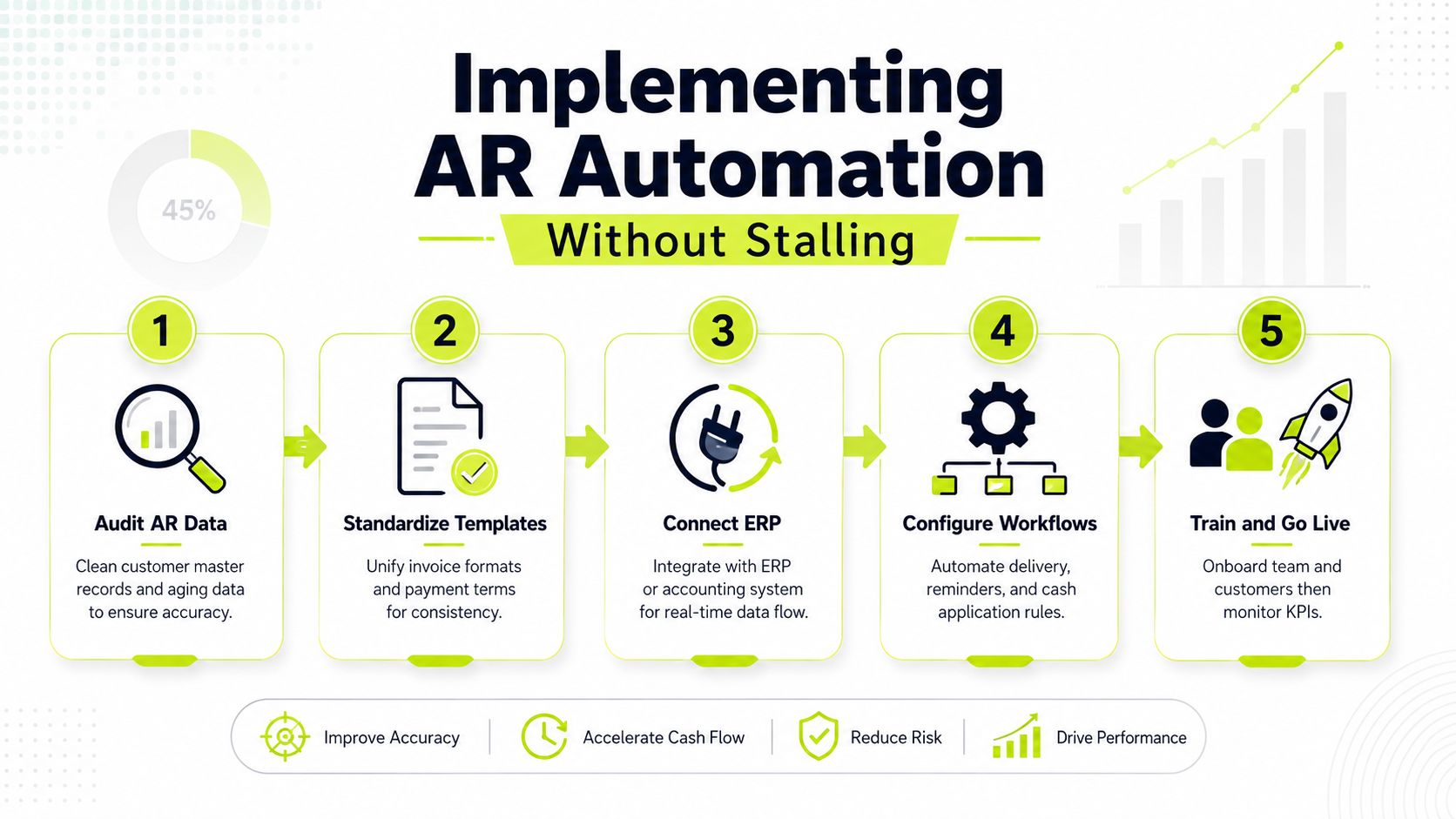
Implementation succeeds when the firm treats automation as a process redesign with accounting controls. Configuration alone won't correct duplicate customer records, inconsistent payment terms, or unclear ownership of disputes.
A practical sequence
- Audit the source data. Review customer master records, legal entities, contacts, invoice status, aging classifications, payment terms, and historical applications. Identify duplicates before they enter workflow rules.
- Standardize billing outputs. Align invoice templates, fields, payment instructions, project references, tax treatment, and terms. Customers should receive consistent information regardless of which team created the invoice.
- Connect the accounting environment. Map customers, invoices, credit notes, payments, accounts, and status changes between the accounting system and platform. Test both inbound and outbound data paths.
- Configure workflows and controls. Set reminder timing, approval requirements, dispute routes, payment thresholds, exception queues, and escalation rules. Keep the first version understandable.
- Pilot with one segment. Choose a customer group with representative invoice types and payment behavior. Train finance users, document exceptions, and expand only after the workflow performs reliably.
The first stall usually comes from incomplete customer data. A missing contact, incorrect entity, or obsolete email address can make a well-designed sequence look ineffective. The second comes from untested integration mappings, especially when invoice statuses or payment records don't return to the accounting system as expected.
Aggressive dunning creates a third risk. A firm may send reminders too frequently, contact the wrong person, or escalate a legitimate project dispute. During the pilot, use an approval path for unusual messages and give account owners a clear way to pause a workflow.
Practical rule: Start with a controlled pilot, not a perfect enterprise design. The team will learn more from real exceptions than from another round of configuration meetings.
A 60-day pilot provides enough time to observe invoice delivery, payment behavior, exceptions, month-end activity, and user adoption. Track baseline and pilot results weekly, define who approves workflow changes, and assign an escalation owner for unresolved integration or customer issues.
Implementation discipline matters more than the number of available settings. A simple workflow that finance trusts will outperform a complex one that collectors bypass.
Vendor Selection Criteria and KPIs to Track
A vendor demo can make every platform appear complete. The buyer's job is to test what happens when the invoice is disputed, the payment is partial, the remittance is missing, or the ERP rejects a posting.
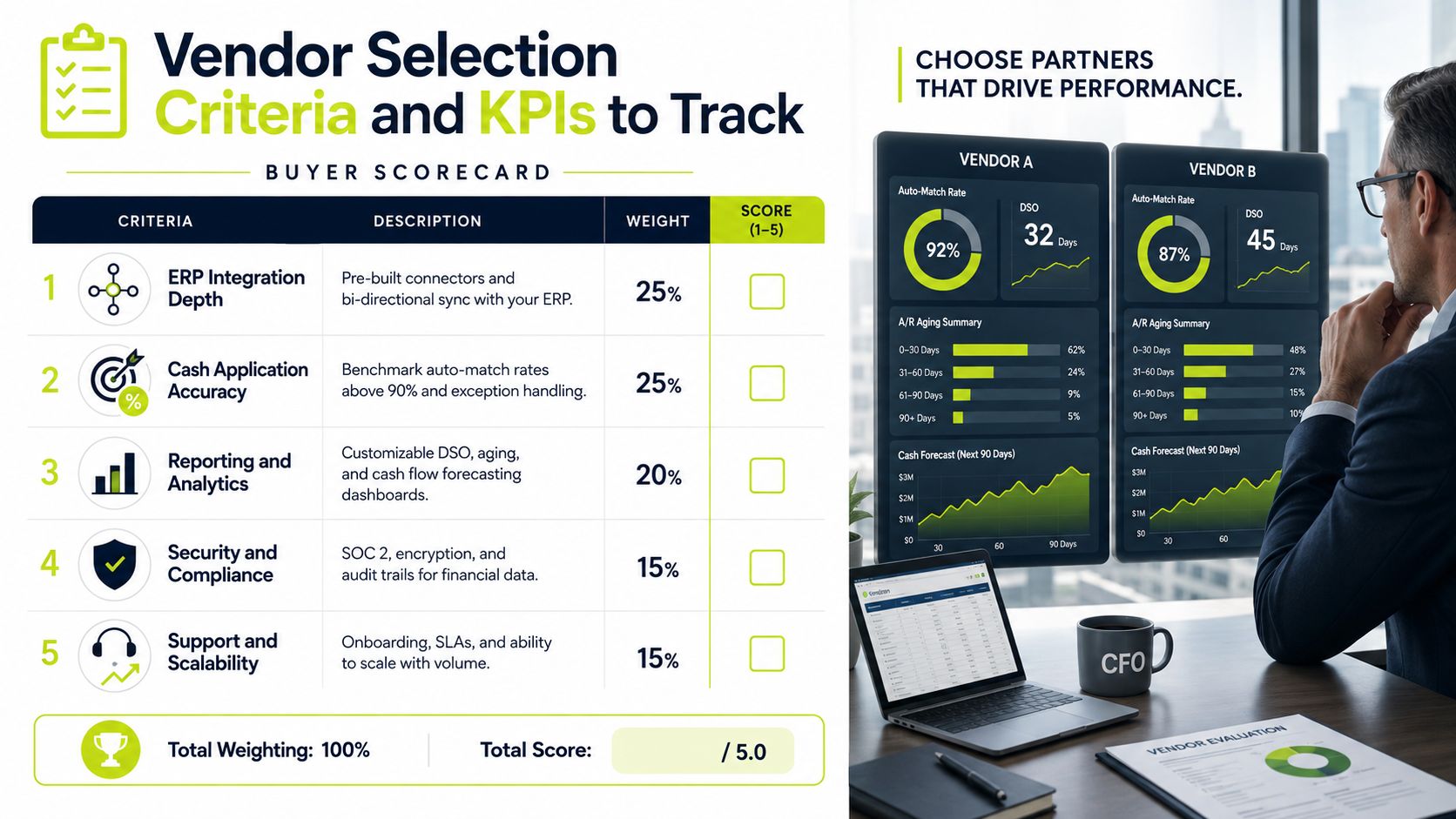
Build the scorecard around outcomes
Criterion | What to verify | KPI to track |
|---|---|---|
ERP integration depth | Bi-directional sync, status handling, error logs, and supported objects | DSO and posting latency |
Cash application accuracy | Match logic, remittance handling, exception review, and audit history | Touchless match rate |
Reporting maturity | Segmentation, drill-down, historical trends, and export controls | Days delinquent and overdue exposure |
Implementation support | Data migration, testing, training, ownership, and response model | Collections effectiveness index |
Total cost | Subscription, usage, integration, support, and internal administration | Cost per processed invoice |
Request a reference customer with comparable invoice complexity, not merely a recognizable logo. Ask the reference how the platform handles short pays, project disputes, unapplied cash, failed contact details, and month-end pressure.
Test claims with your own data
Ask vendors to document the population behind any cash application accuracy claim. Does the percentage include only clean ACH transactions, or does it include checks, split payments, missing remittance, and deductions? Request the exception workflow and see how an analyst resolves a proposed match without losing the audit trail.
A paid proof of concept using real, controlled AR data is often more informative than a polished demo. Include representative customers, historical invoices, payment records, disputes, and your actual accounting integration. Define success in advance using DSO, touchless match rate, days delinquent, collections effectiveness index, overdue exposure as a percentage of receivables, and user adoption.
Technical fit should be validated before commercial approval. A platform that sends excellent reminders but cannot reliably return approved cash applications to the ledger may move manual work to a different queue.
Common Pitfalls and Misconceptions
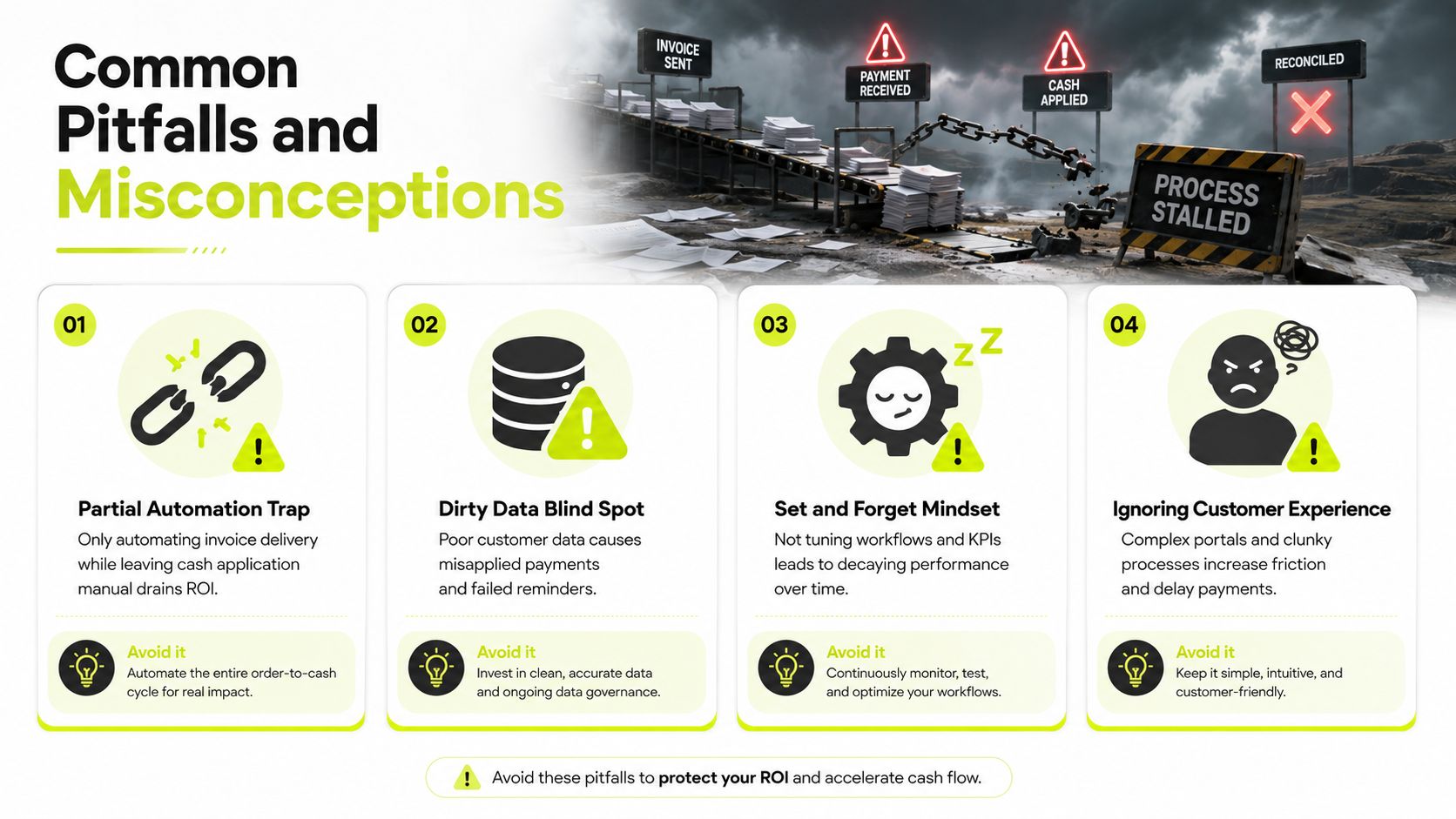
The first failure mode is partial automation. A firm turns on invoice delivery, but collectors continue using spreadsheets, analysts manually match payments, and disputed balances remain in email. The process looks modern at the front while the workload remains unchanged downstream.
The second is trusting cash application accuracy without examining the exception population. A platform that processes clean transactions well may still leave analysts with the difficult payments that consume the most time. Research on AI accounts receivable automation barriers highlights the importance of remittance quality, fragmented systems, incomplete data, and manual review before posting.
Four ways ROI disappears
- Partial automation: Automating delivery while leaving dunning and cash application manual shifts work rather than removing it. Avoid it: map the full loop before selecting the first workflow.
- Dirty data: Incorrect contacts, duplicate customers, and inconsistent entity records cause failed reminders and misapplied payments. Avoid it: make master-data ownership part of the operating model.
- Set-and-forget workflows: Reminder rules lose relevance as customers, services, and payment behavior change. Avoid it: review exceptions, response rates, delinquency, and applications on a scheduled basis.
- Poor customer experience: Complicated portals or excessive reminders can create friction and delay payment. Avoid it: test the customer journey with real account owners before scaling.
AR automation also isn't an IT project that finance hands over and forgets. Collectors must trust the prioritized worklist, account managers must own commercial context, and controllers must define posting and approval controls.
The technology doesn't replace collectors. It changes their work. Routine reminders, payment matching, and status checking should move into the workflow, while people spend more time on disputes, scope questions, high-value accounts, and relationship-sensitive conversations.
The Financial Case and What Comes Next
The financial case rests on three linked outcomes: lower DSO, a higher rate of touchless cash application, and fewer collector touches per invoice. When those measures improve together, the firm can release working capital while reducing the amount of repetitive work required to manage growth.
The market reflects sustained demand. An independent study estimates the global accounts receivable automation market at USD 3.84 billion in 2026, with a projection of USD 6.66 billion by 2031 and an implied 11.64% CAGR from 2026 to 2031. It identifies North America as the largest market and Asia-Pacific as the fastest-growing region in its AR automation market study.
Adoption, however, remains incomplete. A 2025 survey found that 80% of respondents considered AR automation important, high priority, or critical, while only 3% reported fully automated AR. The same survey found 67% evaluating AI for AR, 14% having deployed it, and 23% reporting mostly or fully automated payment processing, according to this accounts receivable landscape survey.
That gap is why a diagnostic should precede a purchase. Pull three months of invoice-level aging data, calculate DSO by client segment, and measure touchless posting and collector touches per $100,000 billed. Separate what software can address from what still requires leadership, including pricing disputes, scope creep, weak contracts, delayed approvals, and unclear project ownership.
For firms ready to move beyond QuickBooks-native workflows, Resolut is one option among AR automation platforms. Its stated product scope brings together credit risk assessment, collections outreach, dynamic billing, payment options, and cash application, with automation and human-in-the-loop operating modes. The practical question is whether your current AR model can absorb another quarter of growth without adding headcount.
Resolut automates AR for professional services through consistent invoice follow-up, workflow orchestration, payment collection, and cash application support. Review the platform at Resolut and compare its approach with your current DSO, exception queue, and collector workload.