Automated Collections Software for Faster Cash Flow
Learn how automated collections software reduces DSO, cuts AR costs, and improves cash flow for professional services firms. Features, ROI, and selection guide.
Monday morning, the aging report opens the same way it did last week. A few invoices sit in 31 to 60 days, one strategic client has gone quiet again, and the team has already sent the standard reminder emails with no real change in behavior. At that point, the problem usually isn't effort. It's structure.
That's where automated collections software earns its place in a professional services firm. For a controller, CFO, or owner, the key question isn't whether reminders can be sent automatically. It's whether the system helps you place human judgment where it matters, so the right accounts get the right treatment at the right time.
The market has already moved beyond the “nice-to-have” stage. The broader debt collection software category was estimated at USD 4.92 billion in 2023 and is projected to reach USD 9.27 billion by 2030, a 9.6% CAGR from 2024 to 2030, with North America holding 30.4% of the regional share in 2023 and the software segment accounting for 65.5% of the market that year (Grand View Research). For finance teams, that growth reflects a simple reality, AR work is getting more software-driven because manual follow-up doesn't scale cleanly.
The Monday Morning Aging Report Problem
The hardest part of collections in a mid-size services firm is that it rarely looks broken on one day. It looks manageable. Then the same five invoices keep showing up in the same bucket, and nobody can tell whether they need a call, a billing fix, a credit review, or a partner escalation.
In practice, the work gets split across inboxes, spreadsheets, and memory. One collector sends a firm note, another sends a softer version, and a partner hears a different story from the client than AR does. That inconsistency matters because professional services billing is relationship-sensitive. A reminder that works for a low-risk invoice can irritate a strategic account with a disputed scope item.

A better habit is to inspect the aging with more discipline than the team's inbox. If you need a refresher on the field layout, it helps to browse the aging report before you decide which balances are stale and which ones are just waiting on a response.
The structural issue is that calendar-driven follow-up treats all delinquency the same. A 31-day invoice, a disputed 60-day invoice, and a high-value client who always pays late are not the same operational problem. When the process doesn't separate them, collectors spend time on the wrong accounts and leaders assume the issue is collections effort instead of workflow design.
Practical rule: if every overdue invoice gets the same reminder cadence, the firm is probably automating volume, not judgment.
That distinction matters more than most software demos admit. The best AR teams aren't the ones that send the most messages. They're the ones that know which accounts deserve attention now, which ones need a pause, and which ones should never have been in the generic sequence in the first place.
What Automated Collections Software Does at a Practical Level
At a practical level, automated collections software acts as an integration hub, not a glorified dunning script. It pulls A/R data from ERP, CRM, billing, payment, dialer, and agency systems, then uses workflow automation and segmentation to decide what happens next (CGI). That matters because the software is only as useful as the quality of the data it can see in one place.
The main shift is from scattered context to a single operational view. Invoice status, payment history, dispute flags, and outreach activity sit together, so the collector is not hunting through inboxes to reconstruct the story. In a mid-size firm, that separates a quick call on a clean overdue balance from a manual review on an account that needs judgment.
The architecture behind the workflow
Vendors often describe modern collections stacks as cloud-native and microservice-based because that setup lets high-volume tasks scale independently. Invoice ingestion, reminder orchestration, reporting, and payment-status synchronization can expand without rewriting the whole platform. That is not a technical vanity point. It keeps collections from breaking when volume rises or when one process changes.
A useful way to frame the system is simple. Older setups asked, “Did the reminder go out?” Modern systems ask, “Did the right account get the right treatment based on age, risk, and behavior?” Those are different operating models, and they produce different results in the queue.
The strongest setups also separate decisioning into layers. Some actions are rule-based, like reminders tied to invoice age or payment history. Others are AI-driven, where scoring helps route high-risk or high-value accounts to a collector sooner, rather than later. Adoption is still uneven. A 2025 survey of 489 AR and credit management professionals found that 61% had already deployed some form of automated collections touchpoint, mainly email and SMS reminders, while only 29% had deployed AI-powered account scoring and another 11% were actively implementing it (Stealth Agents).
For a clean primer on the broader operating model, the overview at what is AR automation is useful because it frames collections as a workflow problem, not just a reminder problem. The same logic also applies when teams evaluate Wisely workflow automation, since the core question is where to place human judgment, not how many tasks to hand to software.
Core Capabilities That Change the Daily Workflow
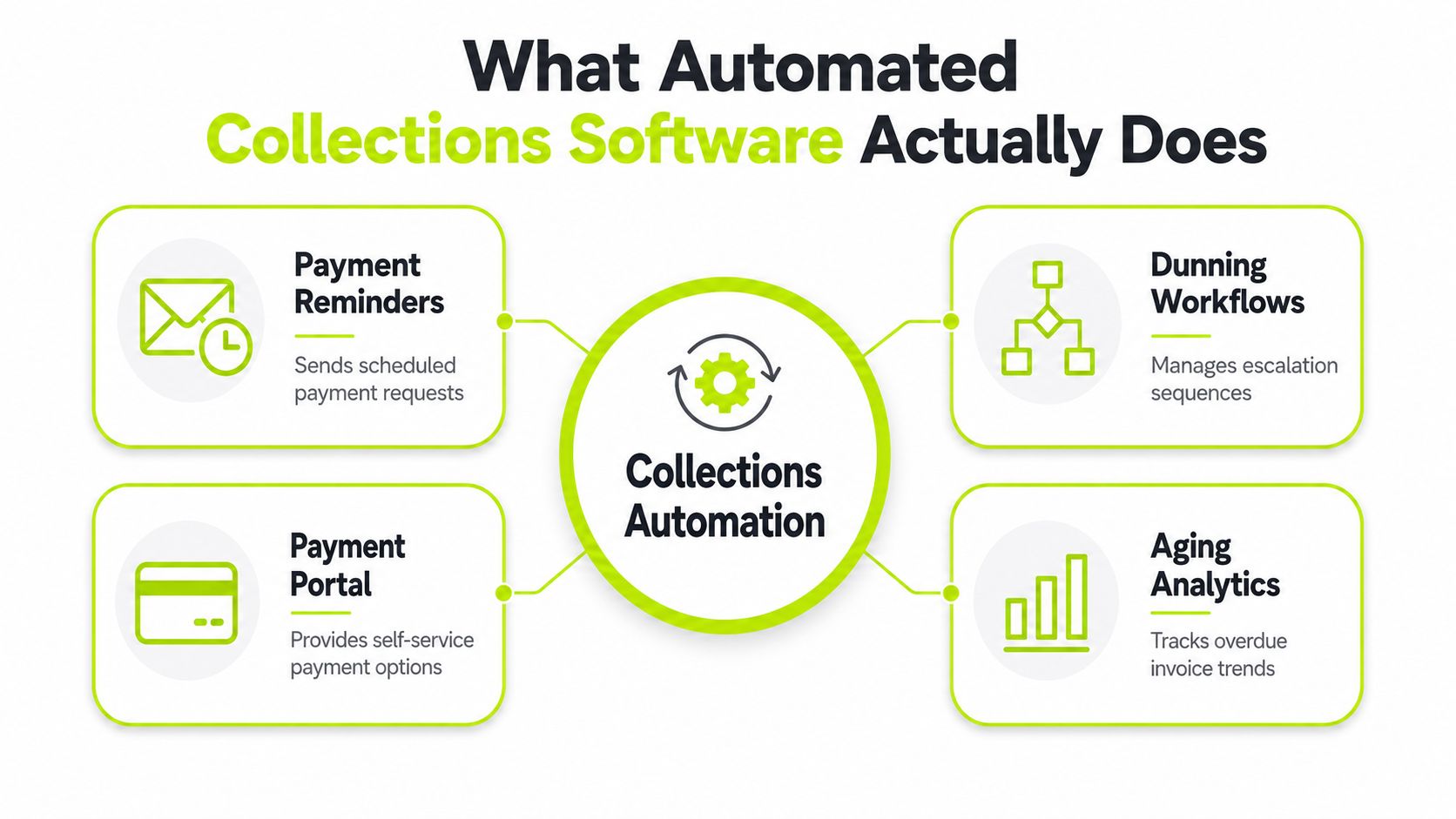
The day-to-day value shows up in how the software handles five recurring AR tasks. Each one maps to a moment a controller already knows well, the morning call list, the payment that needs matching, the invoice that is disputed, the account that looks fine until it doesn't.
The five functions that matter
- Multi-step dunning with segmentation. This is not a single reminder schedule. It's a way to route accounts by risk, behavior, and invoice age so low-risk balances get light-touch nudges while higher-risk ones escalate sooner. A controller uses this when deciding which 30 accounts deserve attention today, not tomorrow.
- Omnichannel outreach. Email, SMS, phone, portals, and even agency handoffs can sit in one workflow. That helps when one client opens emails but never replies, while another prefers a call after the first notice. The important part is not channel count. It's whether the channel matches the account.
- Self-service payment portals. Consumer-grade portals reduce friction by letting clients pay without going back and forth with AR. A clean portal with cards, ACH, and digital wallet options can matter most when the invoice is valid, the buyer just wants a quick path, and nobody wants a long thread over a simple payment.
- Automated cash application. When a payment lands, the system should reconcile it to the right invoices without manual sorting. That is where a lot of time disappears in real firms, especially when remittance details are messy or payments cover multiple invoices.
- Risk identification and escalation. The software should flag at-risk invoices early and trigger legal escalation when standard outreach has failed. That authority layer matters most when an account has gone beyond a routine reminder cycle and needs a stronger recovery posture.
For a workflow-focused view, Wisely's workflow automation material is a helpful companion because it shows how sequencing and routing affect operational load, not just message timing.
A collections platform should reduce choices for the easy accounts and preserve judgment for the messy ones.
That's why I care less about feature lists than about how the workflow behaves at 8:15 on a Tuesday. If the software helps you separate routine nudges from accounts that need a human, it's doing real work. If it just sends more messages, it's adding noise.
Where Automation Helps and Where It Does Not
The cleanest operating model is layered. Technical retries should hit failed payments first, before anyone spends time on manual follow-up. Then workflow automation can trigger outreach based on invoice age, amount, dispute status, or payment history. After that, self-service should let clients pay or resolve basic issues without waiting for a collector.
That sequence is important because not every overdue invoice is a collections problem. Some are payment failures. Some are billing disputes. Some sit in a strategic account where the right move is a partner conversation, not another SMS. A sixty-day overdue invoice on a client that drives meaningful margin should usually get higher-touch treatment, not a faster reminder cadence.
“More automation” can become a trap. A calendar-based sequence treats all aging the same, but the right treatment depends on why the balance is late. If the delay comes from a dispute, a credit issue, or a custom payment term, a generic nudge can make the situation worse.
The useful framework is simple. Put low-risk, repeatable accounts on autopilot. Keep mid-risk balances in co-pilot mode, where automation drafts the next step but a collector reviews it. Pull high-value or highly sensitive accounts out of the generic flow and let a human decide the tone, timing, and escalation path.
The broader automation conversation is moving in that direction. Teams are already seeing the limits of rigid workflows, which is why AI AR automation keeps coming up in practice discussions. A useful extension on that point is AI for debt collection, especially if you're trying to understand where scoring and prioritization add value without turning every account into an algorithmic sequence.
If the account is strategically important, the software should assist the collector, not replace the conversation.
That's the actual decision. Not how much you can automate, but where the firm should keep human judgment on the table. The right answer varies by portfolio, client type, and dispute profile, which is why layered workflows tend to outperform a one-size-fits-all reminder machine.
Selection and Implementation Checklist
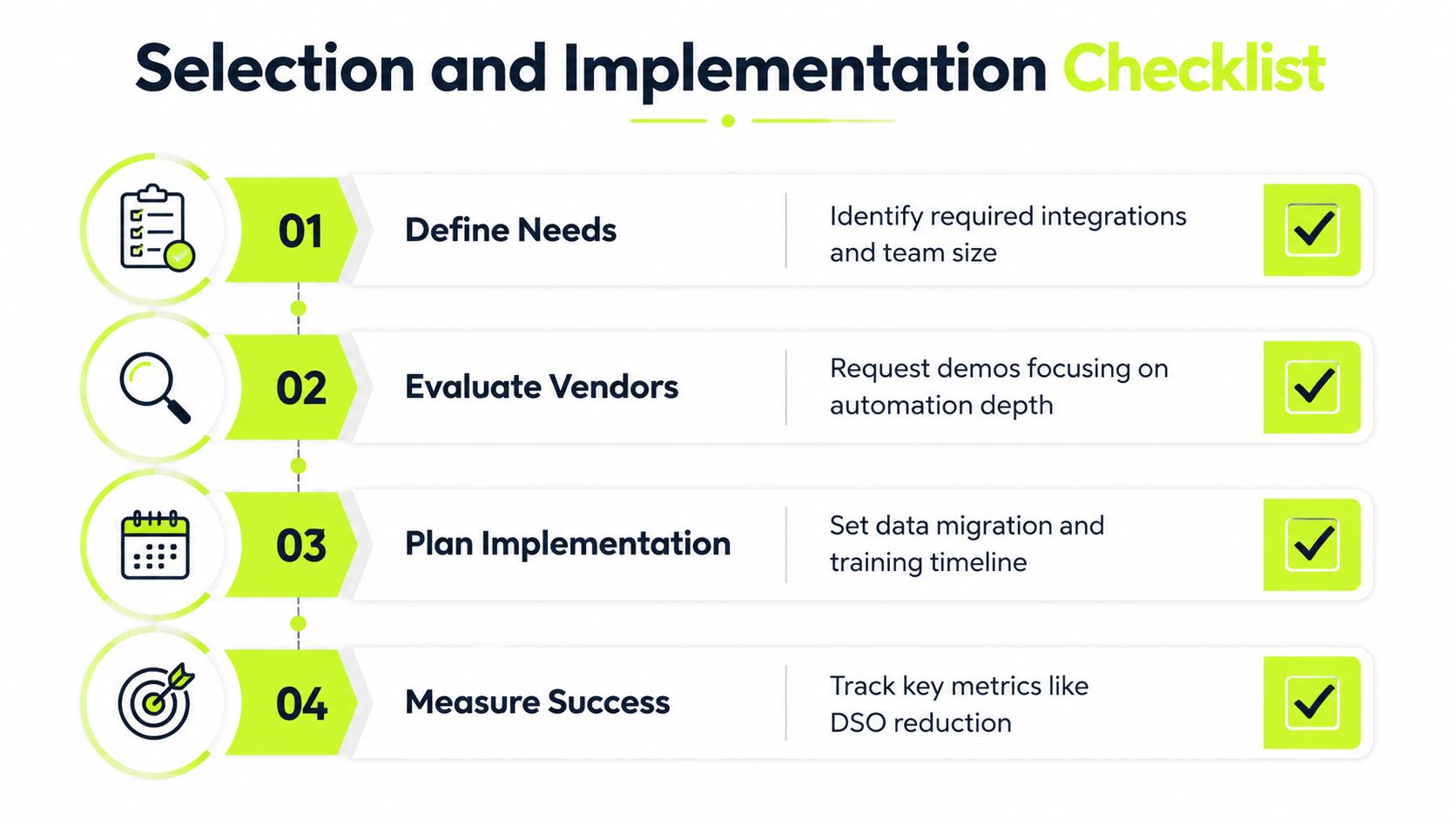
A demo should answer four questions fast. If it doesn't, the vendor is probably selling motion instead of control. The first is integration. Mid-size professional services firms usually live in QuickBooks, NetSuite, or Xero, and the software needs to connect cleanly to those systems, not sit beside them (Kolleno).
The second question is whether the sync is bidirectional. Payment data, invoice status, and collector activity need to flow back into the accounting system so the team isn't manually reconciling records after every payment. Without that loop, automation just creates a more organized version of the same bookkeeping pain.
The third question is reporting depth. A usable system should show aging, collector activity, and promise-to-pay tracking in a way a controller can trust. I'd also ask how the platform handles invoice-level notes, dispute pauses, and follow-up ownership, because those details determine whether the tool helps the team work or just helps management watch.
The fourth question is rollout design. Don't switch the entire portfolio at once. Start with one client segment or invoice type, run it for 60 to 90 days, and measure whether the workflow is improving cash handling and reducing manual follow-up. That phased approach protects relationships and gives the team time to spot bad automation before it spreads.
The industry guide on collections software for small business is useful here because the implementation logic is similar even if the portfolio is larger. The point is to prove the workflow on a manageable slice before you scale it.
Here's the short checklist I'd bring into the room:
- Integration depth: Does it connect to the systems we already use, or does it ask us to work around it?
- Data sync: Does payment and status data flow back automatically, or are we still reconciling by hand?
- Reporting: Can I see aging, follow-up history, and promise-to-pay activity without exporting to spreadsheets?
- Phased launch: Can we start with one segment and measure results before full rollout?
If the answers are vague, the platform is probably not ready for a finance team that needs control, not just activity.
Measuring ROI Beyond DSO
DSO matters, but it does not tell the full story. A firm can push DSO down with early-payment discounts, and the aging report may look better while margin still gives up ground. The primary question is where to place human judgment, because automation should reduce manual chasing without turning the team into a louder version of the same workflow.
A useful scorecard starts with cost-to-collect, then adds promise-to-pay conversion, dispute resolution time, working capital released, and collector capacity per account. As noted earlier, the broader market still shows a gap between basic automation and more selective AI-driven account scoring, which is why measurement matters more than feature counts. If automation only sends more reminders, you can raise activity without improving outcomes.
A simple ROI table for finance leaders
KPI | What It Measures | Why It Matters | Realistic Impact |
|---|---|---|---|
DSO | How long receivables stay outstanding | Shows whether cash is coming in faster | Useful, but incomplete on its own |
Cost-to-collect | Labor and process effort per dollar recovered | Reveals whether the team is spending less to collect the same cash | Should fall when manual chasing drops |
Promise-to-pay conversion | How often a committed payment is received | Shows whether follow-up is persuasive or just noisy | Helps separate real progress from activity |
Dispute resolution time | How long billing issues stay open | Shorter cycles reduce stuck balances and client friction | Strong indicator of process quality |
Working capital released | Cash freed by faster recovery | Makes the balance sheet benefit visible | Useful for CFO and partner discussions |
Collector capacity per account | How many accounts a collector can manage well | Shows whether automation expands span of control | Higher capacity can be good if quality stays intact |
The better lens is layered and risk-segmented. Low-risk accounts can sit in lighter reminder workflows, while disputed or relationship-sensitive balances need slower escalation and more human review. That is the practical trade-off most firms miss when they treat collections as a calendar problem instead of a judgment problem.
Mature deployments can still produce meaningful savings. Research summarized by Stealth Agents reports lower cost-to-collect, fewer labor hours per $1,000 collected, and a positive multi-year return after the system has been live long enough to settle into the workflow. I would treat those figures as directional, not guaranteed, because the result depends on how well the firm segments accounts, routes exceptions, and avoids over-automation. That said, the numbers are useful because they keep the discussion on labor efficiency and payback, not just aging.
The cleanest scorecard shows whether automation is saving time, improving recovery quality, and releasing working capital without making the team less selective. In practice, that means looking past DSO and asking whether the workflow is matching the right level of effort to the right account.
Compliance, Channel Governance, and the Over-Contact Trap
Once collections moves into email, SMS, phone, chat, portals, and agents, compliance becomes part of the operating model, not an afterthought. Teams need to understand jurisdictional rules around consent, call recording, message frequency, and audit trails, especially if outreach runs across multiple regions. The problem is not just legal exposure. It's the risk of appearing careless to a client who already feels pressured.
That's why channel governance matters. More channels can help recovery, but they also increase the chance of over-contacting a client when workflows fire in parallel. A reminder sequence that looks efficient on paper can feel aggressive if email, SMS, and a collector call all hit the same account too close together.
A practical counterweight is to keep simpler email-plus-portal workflows in play for relationship-sensitive professional services clients. In many firms, that approach is enough when the invoice is valid and the buyer just needs a clear path to pay. Aggressive multi-channel sequences can work elsewhere, but they're not automatically better for a consultancy, accounting practice, or fractional CFO firm.
For legal and receivables context, Lerner & Weiss commercial receivables services is a useful reference point because it underscores how much discipline is required once an account moves beyond routine follow-up. Governance should be visible in the software, too. The team needs to know what went out, when it went out, and why the workflow chose that path.
The main test is simple. If you can't explain the contact history account by account, the automation is too opaque for a finance team that needs control.
What Good Looks Like in a Professional Services Firm
A fifteen-person consultancy doesn't need industrial-grade complexity to see value. One firm I'd expect to benefit is the type that moves a few strategic clients into risk-based dunning, keeps email reminders measured, and routes disputed balances to a human quickly. The practical result is less back-and-forth on routine invoices and better focus on the accounts that need intervention.
An accounting practice often gets a different win. If the team automates cash application cleanly, a controller can spend less time reconciling payment status and more time on exceptions. That's the kind of change that can free up meaningful capacity without adding headcount pressure, especially when the accounting system stays synchronized instead of becoming a second source of truth.
A fractional CFO firm usually cares most about visibility. Better AR reporting can expose a client segment whose payment pattern is eroding margin, even when the top-line relationship still looks healthy. That kind of insight is more useful than a prettier aging report because it changes how the firm prices, terms, and escalates.
The right system makes slow payments visible early, then keeps the response proportional.
That's the standard I'd use for the category. Resolut fits that model as an AI-driven AR automation platform for professional services, with collections orchestration, risk-based prioritization, omnichannel outreach, and cash application built into one workflow. It's the kind of tool that belongs in a finance operation that wants consistency, accuracy, and a human layer where judgment still matters.
If you're evaluating automated collections software for a professional services firm, start with integration, workflow control, and reporting discipline, not just reminder automation. If you want a system that supports accounts receivable automation, AI AR automation, and better client-facing follow-up without losing oversight, visit Resolut and see how it handles collections with a steady, finance-first workflow.