Automated Invoice Processing for Small Business: 2026 Guide
Streamline your workflows with automated invoice processing for small business. Save time, reduce errors, and scale your operations with ease in 2026.
If you're running a professional services firm, you probably know the pattern. Client invoices go out later than they should because time entries need cleanup, approvals sit in inboxes, and cash gets tighter at month end than revenue on paper suggests. At the same time, vendor bills still need review, coding, and payment. Finance ends up managing both sides manually, which means delay going out and delay coming back in.
That's why automated invoice processing for small business matters more than most software categories. It isn't only an AP efficiency project. For firms between $3M and $50M, it's a control project, a timing project, and ultimately a cash project. True value comes when you tighten both flows: how quickly you process what you owe, and how consistently you collect what clients owe you.
Beyond Manual Entry The Real Cost of Inaction
The controller's version of this problem rarely looks dramatic. It looks ordinary.
A partner asks why cash is light even though billings were strong. AP is chasing approvals on vendor invoices. AR is waiting on a client contact who says they never saw the invoice, or saw it but needed backup, or approved it internally but hasn't paid yet. Nobody is doing anything wrong. The process is just too manual for the volume and too dependent on memory.

For AP alone, the economics are straightforward. Small businesses processing 50 to 200 invoices monthly can cut processing costs by 70-80%, from $12-25 per invoice to $3-8, by implementing automation. That level of improvement comes from reaching an 80-90% automation rate, where invoices move through digital workflows without manual intervention. At 100 invoices a month, that can mean $900-$2,200 in monthly savings, based on 2025 benchmarks summarized by Brex.
That's the direct cost.
The indirect cost is usually larger. Staff spend time rekeying data, hunting approvals, correcting exceptions that should have been caught earlier, and answering status questions that a system should answer on its own. If you want a broader operating view of why this matters, Stumptown AI's BPA insights are useful because they frame automation as process discipline, not just software replacement.
Why AP only thinking falls short
Many businesses begin by addressing incoming invoices because the workflow is straightforward. A bill arrives. Someone enters it. Someone approves it. Someone pays it.
But professional services firms usually feel the pain more acutely on the receivables side. A delayed outbound invoice, a missing follow-up, or weak collections cadence can stress cash faster than a clunky AP workflow. That's why finance leaders should understand the full billing cycle, not just intake and payment steps. If you need a quick refresher on the mechanics, this overview of how invoices work in practice is a helpful baseline.
Practical rule: If your team can't tell you where an invoice is, who owns the next action, and what triggered the delay, you don't have a staffing problem first. You have a workflow problem.
What inaction usually looks like
A manual environment creates a few predictable outcomes:
- Late visibility: Finance sees bottlenecks after aging worsens, not when risk first appears.
- Inconsistent controls: One manager approves by email, another in Slack, another from memory.
- Cash timing issues: The business pays vendors based on urgency while collecting from clients based on hope.
- Weak accountability: When every exception is handled manually, ownership gets blurred.
Automation doesn't eliminate judgment. It puts judgment where it belongs: on exceptions, approvals, disputes, and client relationships. The routine work should move without drama.
Conducting a Foundational Process Audit
Before evaluating platforms, map the process you run. Not the policy manual version. Not the system diagram. The live version.
In most firms, the truth appears quickly. Time and expense data enters one system, billing adjustments happen in another place, invoices are sent from accounting, approvals happen over email, and collections notes live in spreadsheets or inboxes. On the AP side, bills arrive through several channels, coding varies by preparer, and approvals depend on who's traveling.
Map the full invoice lifecycle
For professional services, I'd audit six points:
- Invoice creation How does work become a billable invoice? Identify where billing data starts, who reviews it, and what commonly delays release.
- Invoice delivery Confirm how clients receive invoices. Email, portal, PDF attachment, and accounting-system send flows each create different failure points.
- Collections follow-up Document who follows up, on what schedule, using which message, and how disputes get logged.
- Cash application Review how payments get matched back to open invoices and whether remittance detail arrives cleanly.
- Vendor invoice intake On the AP side, list every intake path, including email inboxes, scans, and forwarded bills.
- Approval and posting Trace the route from receipt through coding, approval, posting, and payment.
A useful companion for this exercise is a process-level view of the account receivable process, especially if your AR side has grown organically without a documented operating model.
Questions that surface the real bottlenecks
Don't start with software questions. Start with control questions.
- Where does work wait? Look for inboxes, spreadsheets, draft folders, and “pending review” queues.
- Where is data re-entered? Every rekey step introduces delay and error risk.
- Which exceptions recur? Missing PO references, billing disputes, approval bottlenecks, and unapplied cash often repeat in patterns.
- Who can override the process? Manual workarounds matter because they usually bypass controls.
- What depends on one person's memory? That's where breakdowns appear during vacations, turnover, or close week.
The strongest automation projects start with an uncomfortable but simple inventory: every handoff, every inbox, every approval, every exception.
Build a baseline before you buy anything
You don't need a complex consulting model. You do need a baseline.
Use your current records to calculate:
- Cost per invoice processed
- Average days from invoice receipt to approval
- Average days from service completion to client invoice sent
- Error and rework themes
- Volume by invoice type
- Top reasons for delayed client payment
- How often cash is applied manually
Then rank your top three bottlenecks. In most firms, they fall into one of these categories:
Bottleneck | What it usually means | Why it matters |
|---|---|---|
Approval drag | Too many approvers or unclear thresholds | Work sits idle and cycle time stretches |
Data fragmentation | Billing, AP, and accounting tools don't share clean data | Staff rekey information and errors multiply |
Collections inconsistency | Follow-up depends on individual effort | Cash timing becomes unpredictable |
Audit both cost and exposure
A finance operator should look past efficiency and ask where control is weak.
Manual invoice handling increases the chance of duplicate entry, misapplied payments, missed approval evidence, and poor audit support. On the AR side, it also weakens customer communication. Clients receive inconsistent follow-up, disputes aren't centralized, and account history gets harder to reconstruct.
That process audit gives you the business case. It also tells you where automation should start. For some firms, that's AP intake and approvals. For others, it's AR orchestration because delayed collections are the primary pressure point.
Designing Your Automated Invoice Workflow
A workable design has four stages. The important thing is not the diagram. It's the operating logic behind it.
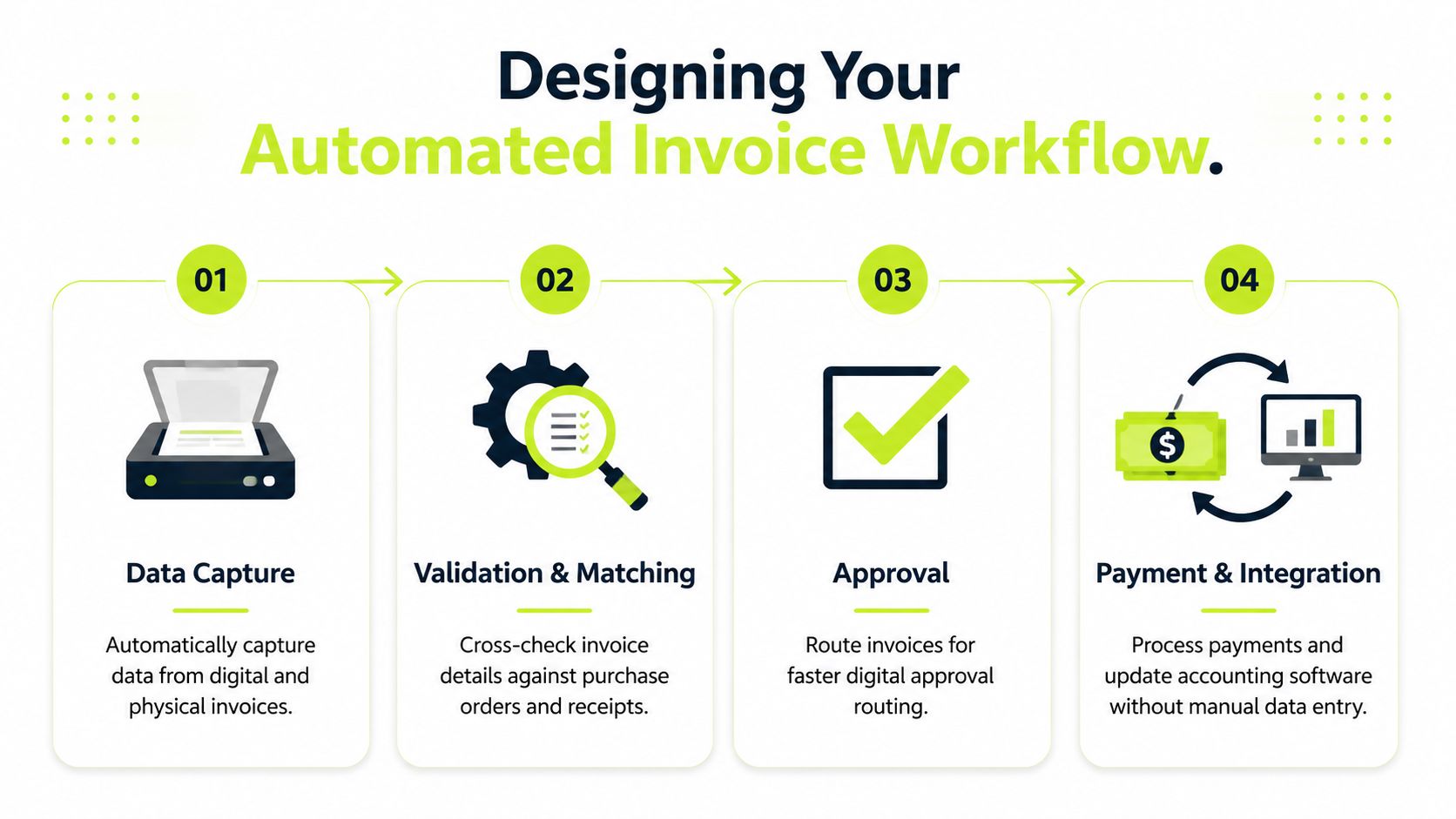
Best-in-class automated workflows reduce manual errors by 81% and cut invoice processing cycle times from an average of 12 days to 3. They typically use AI-powered OCR with up to 99% accuracy for data capture, automated matching, and dynamic approval routing that can achieve 49% touchless processing, while bringing processing cost from over $10 per invoice to as low as $1.42, according to benchmarks compiled by SuperAGI.
Data capture
For AP, this means invoices enter through a controlled channel. Email inboxes, scans, and uploads should feed one workflow. OCR extracts vendor name, invoice number, date, amount, and line details so staff aren't typing from PDFs.
For AR, the equivalent is upstream. Billing data should flow from your PSA, project system, or accounting platform into invoice generation without spreadsheet manipulation. If your team is still rebuilding invoice detail before every send, your AR process is slower than it looks.
If you want to compare approaches to efficient invoice capture for small businesses, focus on how well a system handles messy real-world inputs, not polished demo documents.
Validation and matching
Control improves here.
On the AP side, invoices should be checked against purchase orders, receipts, vendor records, and duplicate logic. Not every business uses formal PO matching for every bill, especially in services, but every business needs rules for what can post automatically and what must stop for review.
On the AR side, validation means billing accuracy before the client sees the invoice. Rates, service dates, tax treatment, supporting documentation, and client-specific billing rules should be checked before release. Bad invoices slow collections more than polite reminder emails ever fix.
A clean invoice accelerates payment. A disputed invoice starts a negotiation you didn't intend to have.
Approval routing
Automation works when approval rules reflect financial policy, not org chart politics.
For AP, route by amount, entity, department, vendor type, or spend category. The goal is to shorten cycle time while preserving segregation of duties.
In accounts receivable, “approval routing” frequently involves release control and escalation logic. Draft invoices above a threshold might require partner review. Overdue invoices can trigger staged outreach, internal alerts, or account review if the client has a dispute history. Such scenarios ensure accounts receivable automation becomes operational, not cosmetic.
A common failure is overbuilding the workflow. If every exception requires multiple handoffs, the software digitizes delay.
Payment and reconciliation
For AP, approved invoices should post cleanly to the accounting system and move into the payment process with a full audit trail. Reconciliation should show what was approved, paid, and archived without manual assembly.
Many firms still lose time in the AR process. Payment arrives, remittance is incomplete, and staff manually apply cash against open invoices. A better design links payment intake, matching, exception review, and ledger update so collections status remains accurate.
Workflow design principles that hold up
- Automate the standard path: Let routine invoices move quickly.
- Escalate exceptions early: Missing data and mismatches should surface immediately.
- Keep humans on judgment calls: Disputes, unusual approvals, and relationship-sensitive outreach still need finance review.
- Design for both AP and AR: One side controls spend. The other protects liquidity.
That's the bridge. Invoice automation isn't complete if it only helps you pay faster while clients still pay you late.
Selecting the Right Automation Platform
Software demos tend to overemphasize screen flow and underemphasize failure modes. Finance should reverse that.
A strong platform for automated invoice processing for small business needs to fit your accounting stack, your approval structure, and your control model. If you're in professional services, it also needs to work when many invoices are not PO-backed and many receivables require follow-up, exception handling, and cash application after the invoice is sent.
What good looks like
Leading cloud-based SaaS solutions use ML-driven data extraction and REST APIs with OAuth2 for integration. A reasonable benchmark is 30-50% touchless processing when AI confidence thresholds are set above 90%. Integration quality matters because 30% of SMBs report ERP mismatches that delay ROI by 3-6 months, which is why API-first architecture belongs on your shortlist, based on the benchmarks summarized by Resolve.
Use operator criteria, not vendor language
Ask questions in this order:
- Can it integrate cleanly with QuickBooks, your ERP, and any billing or PSA system you rely on?
- How does it handle exceptions, not just standard invoices?
- Can finance tune approval thresholds and confidence rules without custom development?
- What audit trail does it maintain for approvals, edits, and overrides?
- How does it support both AP workflow control and AR follow-up, cash application, or collections visibility?
If you're comparing categories, a review of invoice automation software options can help provide an overview before demos start.
Automation Platform Evaluation Criteria
Criterion | What to Look For | Red Flag |
|---|---|---|
Integration depth | Native or well-documented connection to QuickBooks, ERP, billing, and payment systems | CSV workarounds presented as “integration” |
Workflow control | Threshold-based routing, exception queues, and editable rules | Vendor must change every rule for you |
Data capture quality | Reliable OCR and structured extraction for common invoice formats | High correction effort after capture |
Exception handling | Clear queues for mismatches, duplicates, disputes, and unapplied cash | Exceptions disappear into email |
Security and access | Role-based permissions, approval history, and audit evidence | Broad user access with limited traceability |
AR capability | Support for collections workflows, outreach, and cash application where needed | AP-only tool forced into AR use case |
One platform or multiple tools
There isn't a universal answer.
A focused AP platform can work well if your main issue is vendor invoice handling. A separate AR layer may still be necessary if your actual cash constraint comes from delayed collections. For firms that want help with AI AR automation, one option in that category is Resolut, which is built around credit risk assessment, collections workflows, omnichannel outreach, and automated cash application for B2B receivables.
Selection rule: Buy for the failure points you already documented. Don't buy for the slickest demo path.
A platform should reduce operational fragility. If it adds another queue, another login, or another reconciliation step, it's not simplifying finance. It's relocating the burden.
Executing a Smooth Implementation and Adoption
The technical build matters. Adoption matters more.
Most automation rollouts fail, not publicly, but through internal workarounds. The system goes live, but the team keeps side spreadsheets, approval by email continues, and exceptions bypass the new workflow because “it's faster this way.” A few months later, leadership concludes the platform underperformed. Usually the issue wasn't the software. It was the absence of operating discipline.
Start with a pilot that proves control
A pilot should be small enough to manage and important enough to matter.
For AP, choose a defined vendor group or invoice type. For AR, choose a client segment with recurring billing patterns and visible collection friction. You want enough volume to see whether the workflow holds up under routine use, but not so much complexity that every edge case appears at once.
A good pilot answers four practical questions:
- Does data enter cleanly?
- Do approvals route to the right people without manual chasing?
- Are exceptions obvious and owned?
- Does the team trust the output enough to stop using side processes?
Change the message before you change the process
Finance staff hear “automation” and often translate it as “headcount pressure” or “loss of control.” That interpretation will slow adoption even if nobody says it aloud.
The better framing is accurate. Automation removes repetitive handling and gives the team better visibility, stronger audit support, and more time for exception review, collections strategy, and cash forecasting. In a healthy implementation, staff do less typing and more financial judgment.
Don't present automation as a replacement for the team. Present it as a replacement for avoidable manual work.
What works in rollout
The cleanest implementations usually share the same habits:
- Name a process owner: One finance leader should own the workflow, not just the software relationship.
- Define approval policy first: Thresholds, backup approvers, and exception paths should be agreed before buildout.
- Train by role: AP processors, approvers, controllers, and collections staff need different training.
- Cut off old paths: Shared inboxes and spreadsheet trackers should be retired deliberately, not left as fallback forever.
- Review exceptions daily at first: Early exception review teaches the team what the system is catching and where rules need adjustment.
What doesn't work
Some mistakes show up repeatedly.
One is trying to automate every edge case on day one. Another is allowing every department head to request custom routing logic. A third is treating AR as an afterthought because AP had the louder administrative pain. In professional services, delayed collections often have the bigger cash consequence, even when AP inefficiency looks more visible internally.
Practical adoption checklist
Focus area | Healthy sign | Trouble sign |
|---|---|---|
Team behavior | Staff use the workflow as the default path | People keep parallel trackers |
Approvals | Managers approve in-system | Email approvals remain common |
Exceptions | Issues are triaged quickly and visibly | Exceptions sit without ownership |
AR follow-up | Outreach cadence is consistent | Collections depend on who remembers to send the next email |
Good implementations create confidence. The team knows where invoices are, what's waiting, and what needs intervention. That clarity is what makes automation stick.
Measuring Success and Optimizing Cash Flow
Month-end looks cleaner after automation goes live. Invoices route faster. Approval queues are shorter. This test comes 30 to 60 days later, when the firm checks whether cash arrived sooner and with fewer surprises.

That distinction matters in professional services. AP automation improves control over spend, posting accuracy, and approval discipline. AR automation affects billing speed, collections follow-through, and the timing of cash receipts. Firms that optimize only one side usually still feel pressure on working capital. As noted in ProcureDesk's discussion of the AP versus AR automation gap, enterprises waste $200B annually on uncollected receivables.
Track the KPIs that affect liquidity
The best scorecard connects process performance to cash outcomes. For most professional services firms, I would review these every month, with weekly visibility on exceptions and collections activity:
- Time from work completed to invoice issued: Delays here push every downstream cash metric in the wrong direction.
- Approval aging by owner: This shows where payables controls are slowing processing and where authority or routing needs adjustment.
- Receivables aging movement: Watch whether balances are progressing toward collection or stalling in the same aging buckets.
- Promise-to-pay conversion: Commitments matter only if they turn into receipts on schedule.
- Cash application timing and accuracy: Unapplied cash hides the true receivables position and creates avoidable collection work.
- DSO trend: Use it to confirm whether faster billing and more consistent follow-up are reducing time to cash.
- Dispute and exception volume: Repeated billing errors usually point to upstream process problems, not collections weakness.
A team can hit AP efficiency targets and still miss its cash goals if invoices go out late, disputes sit unresolved, or receipts remain unapplied.
Watch the full cash cycle
The useful dashboard is not AP-only or AR-only. It should show the full path from completed work to collected cash, alongside the controls that govern outgoing payments.
That means combining billing timeliness, collection effectiveness, unapplied cash visibility, and payables approval bottlenecks in one operating view. Finance leaders need to see where cash is being delayed, whether the cause sits in billing, collections, client disputes, or internal approval rules. Without that view, teams often solve the visible administrative problem and miss the larger liquidity problem.
Here's a short walkthrough that can help teams think through process and performance in a more visual way.
Strong finance operations process invoices with control and convert completed work into collected cash on a predictable timetable.
Resolut automates AR for professional services with a practical focus on consistency, accuracy, and human oversight. If your team wants tighter collections, cleaner cash application, and a more disciplined way to improve cash flow without turning client communication into a blunt instrument, take a look at Resolut.