
The CFO's Guide to Automated Payment Collection
A guide for CFOs on implementing automated payment collection to reduce DSO, improve cash flow, and quantify ROI. Learn to map workflows and select vendors.
Month-end closes. You open the aging report, scan the familiar names, and already know what the next conversation will sound like.
One partner wants AR to push harder. Another wants to protect the client relationship. Your controller is trying to reconcile cash, your team is sending follow-ups from inboxes and spreadsheets, and too much working capital is still sitting inside invoices that should have been paid weeks ago.
This is the core context for automated payment collection in a professional services firm. It isn't a software trend. It's an operating decision about how your firm gets paid without turning collections into a relationship problem.
For firms in the $3M to $50M range, the issue usually isn't whether follow-up happens. It's whether follow-up happens consistently, with the right tone, at the right time, and without burning expensive finance time on repetitive work. Good accounts receivable automation gives you control over that system. Good implementation keeps it from feeling robotic.
Beyond the Follow-Up Email
A professional services firm rarely has a collections problem in the obvious sense. Most clients eventually pay. The issue is the gap between when work is completed and when cash arrives.
That gap creates a quiet tax on the business. It affects hiring decisions, owner distributions, debt planning, and how much room you have to absorb a slow quarter. It also creates avoidable friction inside the firm because AR becomes a judgment call instead of a process.
Where manual collections break down
Manual AR usually fails in small ways first.
An account manager sends a soft reminder because the client is important. A bookkeeper sends a firmer one because the invoice is late. A partner jumps in after the client complains. Nobody intended to create an inconsistent experience, but that's what happens when follow-up lives in inboxes instead of rules.
The result is familiar:
- Tone varies by employee and by day
- Escalation happens too late because nobody wants to damage the relationship
- High-value staff do low-value chasing instead of resolving exceptions
- Cash forecasting gets softer because collections timing depends on memory and effort
Practical rule: If your best clients get a custom experience only because your team remembers their preferences, you don't have a process. You have institutional memory.
The better model is structured, not aggressive. Your system should know when to send reminders, when to pause, when to route an issue to a person, and when to escalate based on account importance, invoice age, and prior behavior. That's the difference between automation and spam.
For firms that need a clean human escalation path, a documented set of collections escalation procedures matters as much as the software itself. The tool handles routine execution. Your team handles exceptions, relationship signals, and judgment calls.
What control actually feels like
When automated payment collection is set up well, month-end feels calmer.
Invoices go out on time. Reminders follow a schedule. Clients get a consistent payment path. Finance sees what's overdue without assembling it manually. Partners only get pulled in when the account needs intervention.
That doesn't remove human contact. It puts human contact where it has value.
Quantifying the True Cost of Manual AR
A partner asks why cash is tight when revenue is up, and the aged receivables report does not look catastrophic. The answer usually sits in the process between invoice delivery and payment, where small delays accumulate into a working-capital problem.
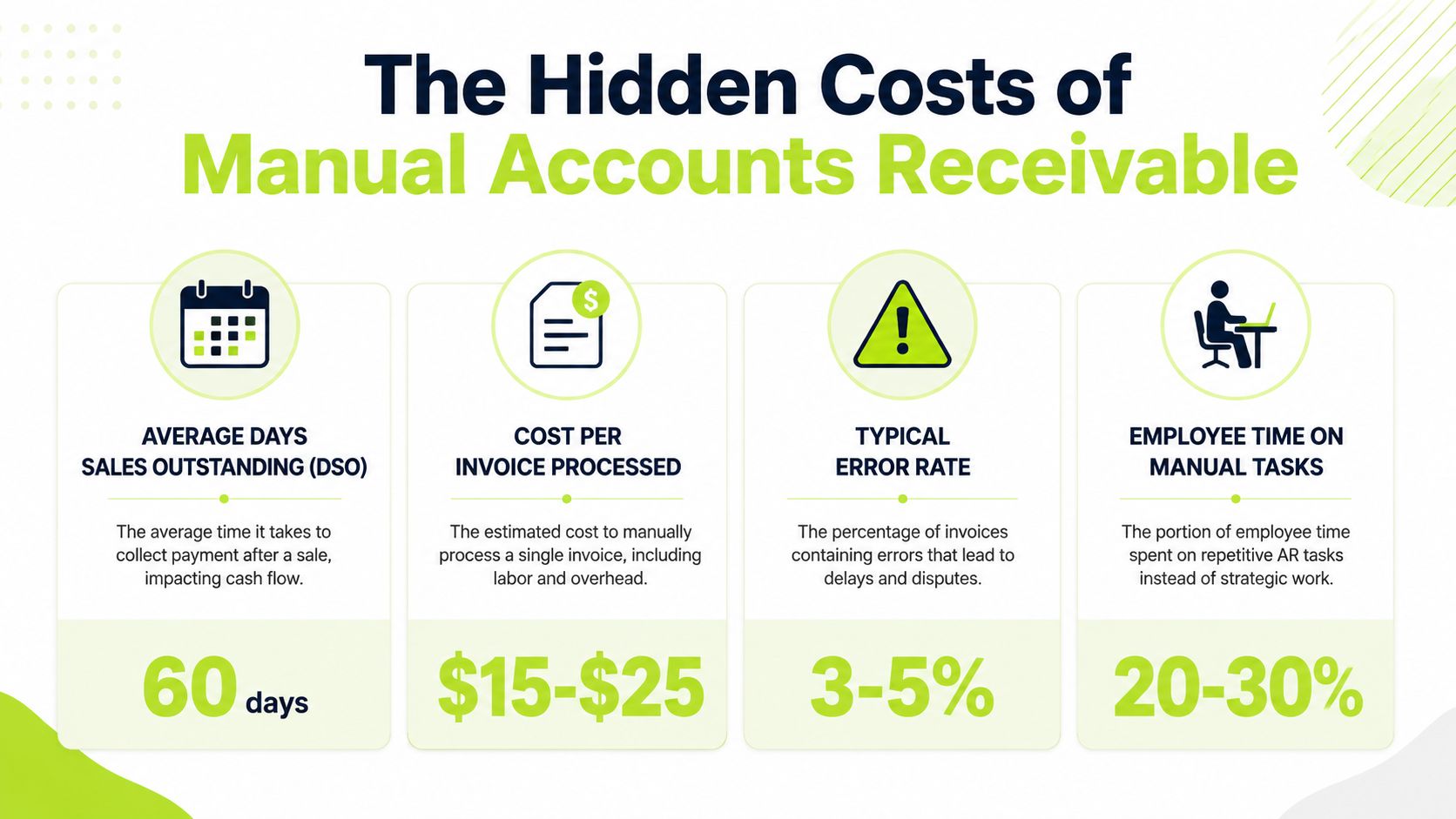
Manual AR costs more than the overdue balance suggests. It ties up cash, uses experienced finance time on routine follow-up, and delays intervention until a client issue has already turned into an aging issue.
Start with DSO and working capital
DSO is the clearest place to quantify the drag. For professional services firms, the useful question is not whether your DSO is higher than a product business. It probably is. The useful question is how many of those days come from billing approvals, invoice delivery gaps, unclear backup, missed follow-up, or payment friction that your team created.
The cash effect is straightforward. VAI's AR automation analysis shows that for a distributor with $50 million in annual credit sales, cutting DSO by five days frees up about $685,000 in working capital. The same analysis notes that electronic invoice delivery with embedded payment links can remove four to seven days from the in-transit portion of DSO.
The revenue model is different in a law firm, consultancy, or engineering practice, but the finance math is the same. A few days of delay across a large monthly billing run can mean slower payroll coverage, less room to absorb project overruns, and more pressure on the line of credit.
Labor cost shows up in the wrong places
The next cost is capacity. In a manual environment, senior AR staff and controllers spend time pulling reports, checking inboxes, resending invoices, and deciding who should follow up. Partners and account leads get pulled in late, often without a clean record of what the client has already received.
That is expensive work to do by hand.
Tesorio's research summary reported measurable gains among respondents using AR automation, including a 33-day average reduction in DSO, a 50% drop in 90-day aged accounts, and a 3x improvement in collections efficiency without increasing headcount. You should treat vendor-sponsored research with appropriate caution, but the operating point holds up in practice. Standardizing routine follow-up lets finance spend time on disputes, approvals, and at-risk client accounts instead of repetitive chasing.
That co-pilot model matters in professional services. Full automation can damage trust if it ignores project disputes, outside counsel guidelines, or client-specific billing requirements. Good automation handles the schedule, the documentation, and the reminders. Your team still owns judgment.
Write-offs usually start as ignored exceptions
Bad debt rarely appears out of nowhere in a services firm. It often starts with an invoice sent to the wrong contact, backup the client says it never received, a time-entry dispute nobody resolved, or a client who pays only after a specific internal approval path is triggered.
Resolve's AR automation statistics cite typical reductions in bad debt write-offs after AR automation, driven by earlier visibility and faster intervention. The number matters less than the mechanism. Teams act sooner when the system shows which account is aging, what communication has already gone out, and where the blockage sits.
This is also where reconciliation discipline matters. If cash comes in but sits unapplied, your collections team can easily chase a client who already paid. Firms that connect collections with automated payment reconciliation workflows reduce that risk and protect the client relationship at the same time.
A related principle shows up outside professional services as well. The partner reference on billing efficiency with automation is from a different billing environment, but the lesson translates well. Standardize high-volume routine work so people can focus on exceptions that require judgment.
A simple finance lens
Use this table when building the case internally:
Cost area | Manual AR effect | What improves with automation |
|---|---|---|
Working capital | Cash stays in receivables longer because billing and follow-up depend on manual steps | Faster invoice delivery, scheduled reminders, and easier payment options shorten delay |
Finance labor | Skilled staff spend time on resend requests, status checks, and routine chasing | Staff shift toward disputes, client outreach, and forecast analysis |
Bad debt | Accounts age while issues sit unresolved or unnoticed | Earlier flags and cleaner communication support faster intervention |
Forecast confidence | Expected cash receipts depend on individual effort and memory | Collection timing becomes more consistent and easier to model |
Manual AR does not only slow cash collection. It weakens confidence in when cash will arrive, which makes staffing, partner draws, and short-term planning harder.
If you are evaluating AR software for a professional services firm, build the case around cash conversion, labor reallocation, and exception handling. Feature depth matters, but trust is harder to recover than a missed workflow requirement. The right system should help your team collect faster without turning client communication into a blind sequence.
Mapping the Modern Automated AR Workflow
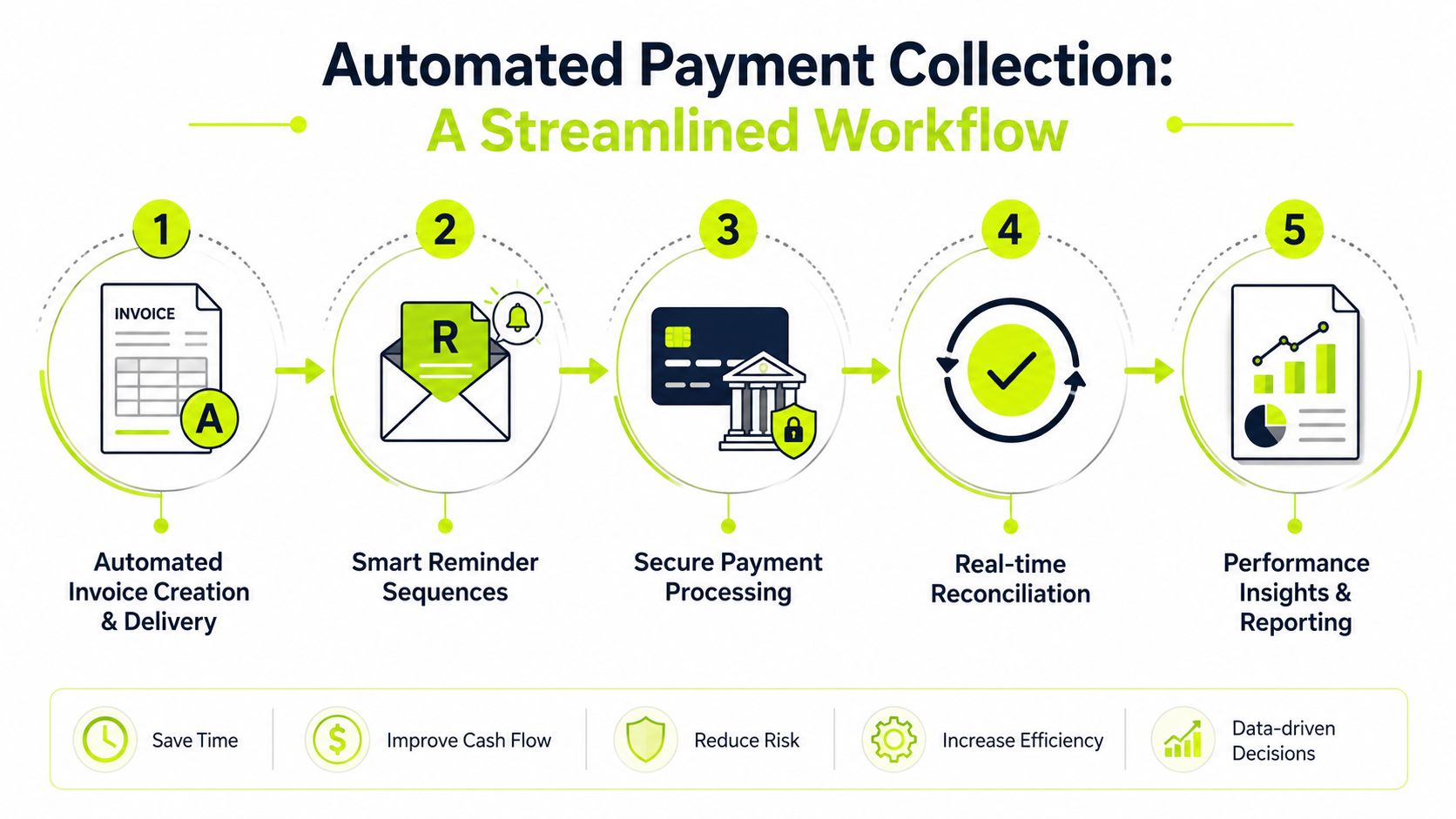
A useful automated payment collection workflow is simple on the surface and strict underneath. The client sees a clear invoice, a few professional reminders, an easy payment path, and accurate receipts. Your team sees orchestration.
The workflow below is what mature accounts receivable automation looks like in practice.
Step one to invoice delivery
It starts with invoice creation and delivery. The operational goal is boring on purpose. Every invoice should go out on time, in the correct format, with supporting detail, and with a payment path that doesn't force the client to hunt.
That matters more than many firms admit. If the invoice sits in a partner's draft folder, gets sent without backup, or requires the client to call AP for instructions, you've created delay before collections even begin.
A practical benchmark from adjacent finance operations is the emphasis on billing efficiency with automation. The context is different, but the operating principle holds. Standardize routine execution so your team can spend time on exceptions.
Step two to smart outreach
The next stage is reminder orchestration.
According to Kolleno's guide to automated collections, automated systems use predictive analytics and AI to assess repayment likelihood, prioritize higher-risk accounts, reduce manual AR workload by up to 75%, and use rule-based multi-channel reminders plus self-service portals to cut DSO by 20 to 30 days.
For a professional services firm, the practical application is segmentation:
- Low-risk, smaller invoices can move through an automated reminder sequence
- High-value invoices should trigger softer language and earlier internal review
- Accounts with dispute history should route toward a person sooner
- Strategic clients often need a co-pilot approach, not autopilot
The best AI AR automation doesn't decide everything. It surfaces where human judgment matters.
Step three to payment and reconciliation
Once the client is ready to pay, the system should make that easy. Self-service portals that support cards, ACH, and digital payment methods reduce friction and remove the “we were waiting on instructions” excuse.
Then cash application needs to happen without creating a second manual mess. Real-time sync with the accounting system matters here. For those considering QuickBooks AR automation, this integration often determines project success or failure. Payment collection alone isn't enough. You need the payment applied correctly, matched to the right invoice, and visible quickly.
For teams tightening the close process, automated payment reconciliation workflows are usually where the administrative payoff becomes obvious.
A short visual walkthrough helps make the workflow concrete:
Step four to reporting and intervention
The last stage is performance visibility.
A healthy system reports who paid, who didn't, which reminders converted, where disputes cluster, and which accounts need human intervention. That closes the loop. You stop managing AR from anecdotes and start managing it from operating signals.
The Implementation Roadmap for Professional Services
Most automation projects go sideways for one reason. The firm treats implementation as software setup instead of process design.
In a professional services environment, the system has to reflect engagement structures, partner preferences, client sensitivity, and your accounting reality. That's why a phased rollout works better than a hard switch.
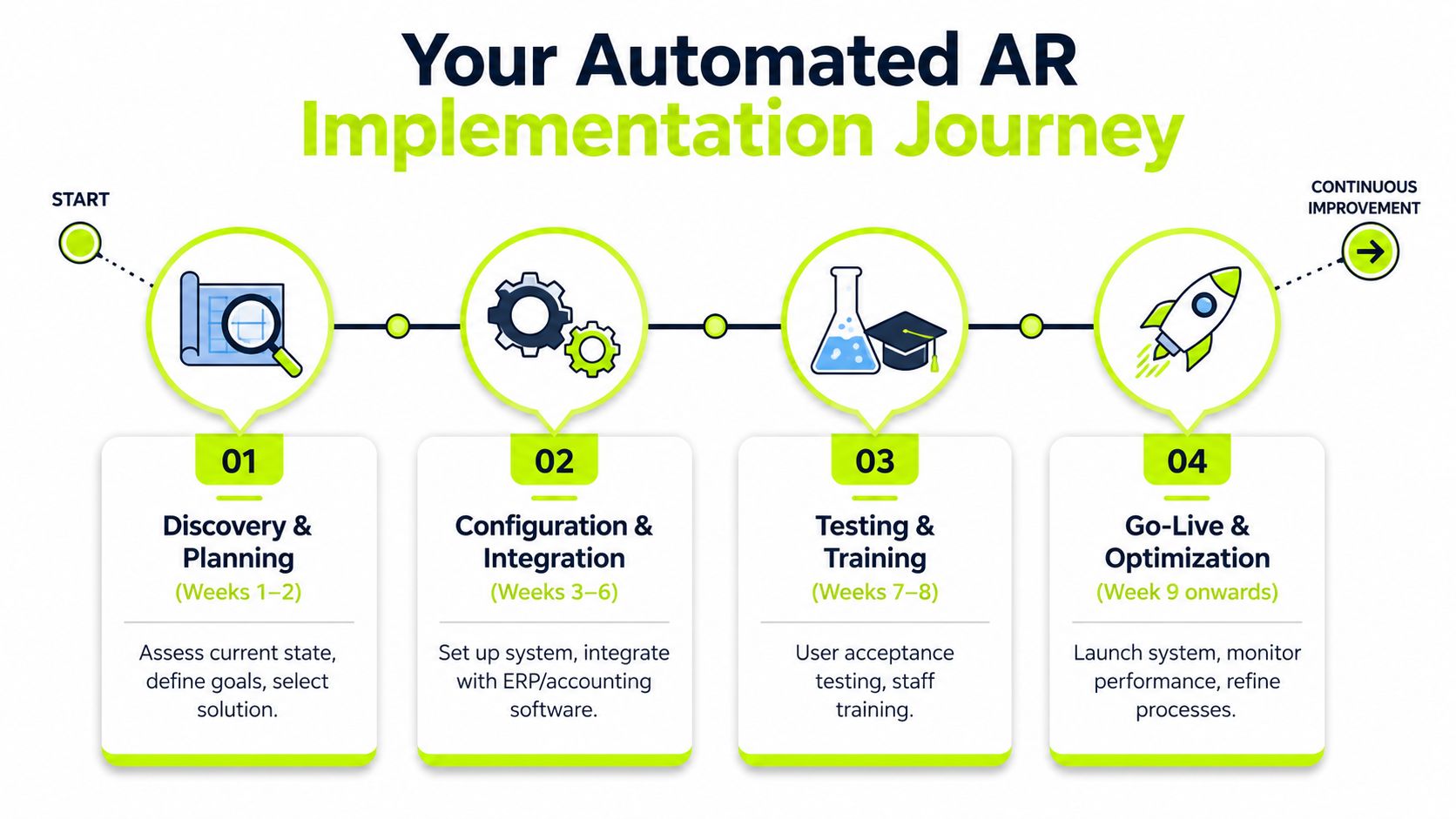
Discovery and planning
Start with workflow mapping, not vendor demos.
Document how invoices are generated, who approves them, how reminders go out today, where disputes land, and which clients require different handling. You're looking for policy decisions hiding inside ad hoc behavior.
Use a short checklist:
- Client segmentation rules based on invoice size, strategic importance, and payment history
- Systems including ERP, PSA, billing tools, and whether you need native QuickBooks integration
- Communication ownership across finance, account management, and partners
- Exception categories such as disputes, missing backup, billing errors, and promised payment plans
If a firm is using QuickBooks, this is also where QuickBooks AR automation needs a reality check. Native sync matters, but so does what happens when invoices change after issue, partial payments arrive, or a client disputes one line item.
Configuration and integration
The second phase is where firms often over-automate.
Don't start by trying to automate every client and every edge case. Configure the base rules first. Invoice delivery timing, reminder cadence, payment links, portal access, role permissions, and accounting sync should be stable before you get clever.
A practical first-pass configuration usually includes:
- Invoice triggers tied to approval and release.
- Reminder sequences for standard accounts with tone controls by aging stage.
- Escalation routes for strategic or high-value clients.
- Payment methods that align with how your clients already prefer to pay.
- Cash application rules mapped to your chart of accounts and invoice structure.
Keep the first release narrow enough that your team can explain every rule without opening a systems manual.
Testing and go-live
Testing should include finance, client-facing staff, and at least a few real account scenarios.
Run through partial payment, overpayment, disputed invoice, late fee policy if applicable, client reply handling, and partner override requests. A system that works in the happy path but collapses in the exception path will lose trust fast.
Pilot with a controlled client segment first. For many firms, that means recurring-billing clients or lower-complexity engagements. Once the messaging, payment experience, and reconciliation are stable, expand.
If you're evaluating platforms, this is also where one option like Resolut may fit if you need AI-driven collections, omnichannel outreach, autopilot and co-pilot modes, and automated cash application in a single operating workflow. What matters most is whether the rules and controls fit your firm's billing reality, not whether the demo looks polished.
Measuring Success with the Right KPIs
A firm can automate reminders, add online payment options, and still end up with the same quarter-end scramble. The difference usually shows up in the metrics. If the dashboard only reports DSO, finance sees the outcome but misses the operational reason behind it.
The KPI set that matters
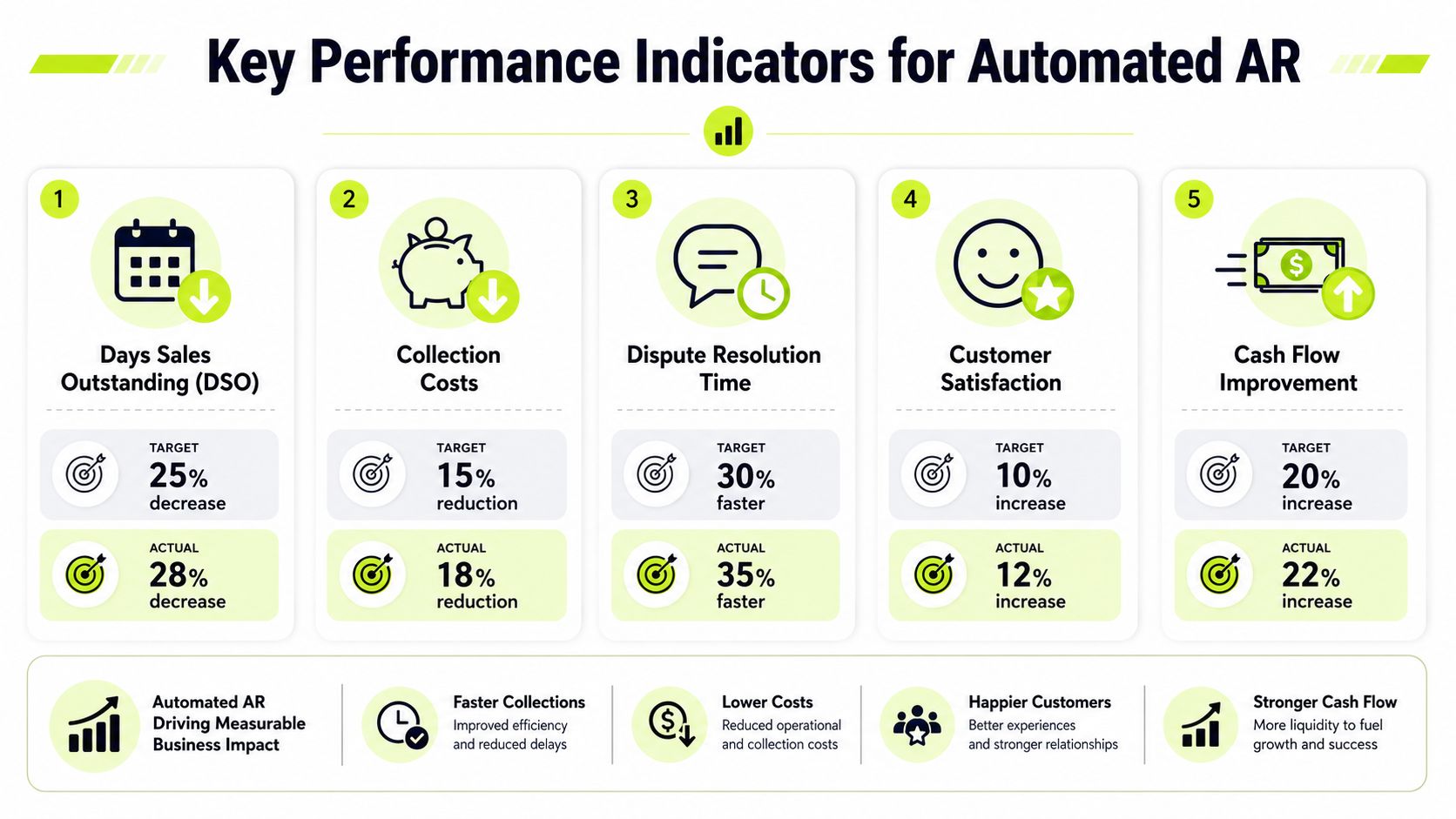
DSO still belongs on the dashboard. It just needs context. Professional services firms often carry longer collection cycles than product businesses because billing is tied to milestones, approvals, budget owners, and occasional scope disputes. A high DSO does not automatically mean the collection process is weak. It does mean the firm should know which part of the cycle is driving the delay.
That is why I prefer a scorecard that separates payment behavior, billing quality, and collection execution.
KPI | What to watch | Why it matters |
|---|---|---|
DSO | Trend by client segment and office or practice line | Shows whether cash conversion is improving |
Average days delinquent | How late invoices are after terms, not just overall DSO | Reveals behavior hidden inside blended averages |
Electronic payment share | Portion of invoices paid through digital methods | Indicates whether clients are using the easier path |
Dispute cycle time | Time from dispute open to dispute resolved | Shows whether delays are billing quality or collection quality |
Bad debt trend | Aging migration and write-off movement | Tracks whether risk is being addressed earlier |
One more cut is often worth adding. Track partner-held accounts separately from finance-managed accounts. In many firms, that split shows whether delays come from client resistance or from inconsistent follow-up once a relationship owner gets involved.
Read the metrics together
No AR KPI should stand alone.
A falling DSO with rising dispute cycle time usually means invoices are going out faster, but not cleaner. A higher electronic payment share with no change in average days delinquent usually points to a follow-up problem, not a payment-method problem. If bad debt drops while escalations and client complaints rise, the process may be collecting cash at the expense of the relationship.
That trade-off matters more in professional services than in high-volume transactional businesses. Many clients are not refusing to pay. They are waiting on internal approval, questioning time entries, or looking for a project lead to confirm deliverables. An automated AR program should help the team spot those cases sooner and route them to a person before the account ages unnecessarily.
The right dashboard measures cash speed and client friction at the same time.
This is also where the co-pilot model proves its value. Success is not "how many reminders went out." Success is whether the system handled routine follow-up consistently while giving finance and client leaders a clear point to step in on sensitive accounts.
A useful review cadence is monthly at the team level and quarterly by segment. Look for changes by practice line, billing partner, client size, and invoice type. Those cuts usually reveal where automation is working as intended and where the firm still has a process issue upstream.
Navigating Risk Compliance and Change Management
The technical side of automated payment collection is straightforward compared with the human side.
Most CFOs don't worry that the software can send reminders. They worry that it will send the wrong reminder, at the wrong moment, to the wrong client, and create a problem the finance team then has to repair.
Security and compliance aren't optional
Payment systems need a strong baseline. Security controls such as encryption, tokenization, and PCI DSS compliance are foundational in automated payment systems, and Stripe notes that API-connected systems can update accounting records within seconds, reduce reconciliation time from hours to minutes, process 10,000+ daily transactions with 99.9% reliability, and reduce fraud losses by 60% through AI-powered analytics in secure environments, as outlined in Stripe's overview of automated payment systems.
The specific transaction volume may be more than a mid-market services firm needs, but the principle applies. The controls matter because trust in the payment experience matters.
The co-pilot model protects relationships
Many firms incorrectly approach their operating model. They assume the choice is manual collections or full autopilot.
It isn't.
One under-discussed issue in B2B collections is client trust. According to DoctorConnect's analysis of automation and relationship friction, 1 in 10 unpaid B2B invoices stem from relationship friction, and 68% of finance leaders now want hybrid autopilot and co-pilot modes rather than pure automation.
That fits professional services exactly. Your clients aren't one-time buyers. They're ongoing relationships, often with multiple stakeholders and live projects attached.
Use a co-pilot model like this:
- Automate routine accounts where invoice amounts are modest and payment history is stable
- Route strategic clients to human review before tone shifts from reminder to escalation
- Pause automation during open disputes so the system doesn't keep chasing an invoice under review
- Escalate by value and context rather than by aging alone
- Give partners visibility, not veto power over every step so process stays intact
Automation should protect your client relationship from inconsistency. It shouldn't remove judgment from sensitive moments.
Change management inside the firm
Your AR team also needs a role redesign.
When routine follow-up becomes automated, staff should own exception handling, queue review, dispute coordination, and outreach strategy for accounts that need a person. That's a better use of finance talent than sending the third reminder manually.
Partners need guardrails too. If they can bypass the process casually, the system won't hold. Give them visibility into account status, a clear way to flag relationship risk, and a limited set of override paths.
That's how reduce DSO efforts survive first contact with real clients.
Selecting the Right Automation Partner
Choosing an automation partner is less about feature breadth and more about operating fit.
For a professional services firm, the wrong platform usually fails in one of three places. It doesn't integrate cleanly with accounting, it can't handle client-specific communication rules, or it pushes too much automation where a human should stay involved.
The non-negotiables
Use this list when evaluating vendors:
- Accounting integration that matches your stack. If you need QuickBooks AR automation, ask how invoices, credits, partial payments, and applied cash sync in real workflows, not just in a demo.
- Flexible rules for segmentation. You need different logic for a recurring retainer client, a litigation matter, and a large project invoice.
- A client-facing payment experience that removes friction. PYMNTS data cited by Versapay shows 76% of vendors believe buyers are more likely to pay on time with electronic payment methods, and adding options such as ACH and virtual credit cards can reduce past-due invoices by 30% or more, as summarized in Versapay's DSO reduction analysis.
- Human-in-the-loop controls. Ask how the system pauses, reroutes, or escalates when a partner flags sensitivity.
- Clear reporting for finance leadership. You need visibility into queue health, payment channel adoption, disputes, and collector effort.
- Implementation support that understands services firms. Billing complexity in professional services isn't the same as product invoicing.
Questions worth asking in the demo
A short decision table helps separate polished tools from operationally useful ones:
Ask this | Listen for this |
|---|---|
How do you handle exceptions? | Specific workflows, not “manual review” as a catch-all |
How does the portal support client payment preferences? | Concrete support for multiple payment paths |
What happens when a disputed invoice is still in a reminder sequence? | Pause and reroute logic |
How do you support partner visibility? | Role-based access and controlled overrides |
What does implementation require from our team? | Clear data, testing, and rollout ownership |
If you want a deeper framework for evaluating accounts receivable automation software, focus on process fit first, then reporting, then user experience. In that order.
The right partner won't promise to remove every collection issue. They'll help you standardize the routine work, tighten cash conversion, and keep the sensitive moments human.
Resolut automates AR for professional services with a co-pilot approach that fits how firms manage client relationships. If you want accounts receivable automation that's consistent, accurate, and human, take a look at Resolut.