Boost Cash Flow: Automated Payment Processing for CFOs
CFOs: Master automated payment processing. Reduce DSO, boost cash flow, and gain operational control with AR software integration for professional services.
You can usually spot a manual receivables process before anyone describes it. The aging report is open. The controller has a side spreadsheet of promised payment dates. Someone in operations is asking whether a client really paid. Senior finance staff are spending part of their week doing work that should have been system work.
For a professional services firm, that drag shows up in two places at once. Cash comes in later than it should, and the finance team loses time that should be going into forecasting, pricing discipline, staffing decisions, and client risk management. That's why automated payment processing matters. Not as a shiny feature, but as a control system for cash.
The True Cost of Manual Accounts Receivable
Month-end usually exposes the problem.
A partner thinks collections are “mostly under control” because invoices went out on time. Then finance reviews the aging. Several balances are current but fragile. A few larger invoices are sitting in “followed up” status with no real next action. Cash receipts are hard to predict because reminders, client replies, and payment posting all depend on individual people remembering what happened last.
The obvious cost is late payment. The less visible cost is operational drag.
Where manual AR eats margin
In a manual setup, the process breaks in small ways:
- Invoices leave the accounting system but not the workflow. Someone still has to send reminders, answer payment questions, and track exceptions.
- Cash application depends on memory. A payment arrives with incomplete remittance, and a finance employee has to figure out what it belongs to.
- Collections quality varies by employee. One person is firm and timely. Another waits too long because they don't want to strain the client relationship.
- Leadership gets stale information. The AR report may be accurate at the ledger level, but it often misses real collection status.
That means the CFO or controller isn't managing receivables through a process. They're managing it through vigilance.
Manual AR doesn't only delay cash. It turns financial control into a person-dependent habit.
For firms that bill by project, retainer, or milestone, this gets worse as complexity rises. A client disputes one line item, and the entire invoice stalls. A partial payment comes in, and no one closes the loop. A promised payment date sits in someone's inbox instead of in a shared workflow.
Why this becomes a leadership problem
At smaller firms, owners often absorb this friction personally. At larger firms, it spreads across billing coordinators, account managers, and accounting staff. Either way, it weakens forecasting and makes collections harder to scale.
That same pattern shows up in adjacent recurring-billing environments. Teams dealing with subscription operations or scaling internet provider services run into the same issue. Once billing volume and exception handling increase, manual follow-up stops being “manageable” and starts becoming a control failure.
A finance leader should look at AR not as an admin queue, but as a system that determines how confidently the business can hire, invest, and operate. If payment collection depends on heroic effort, the process is already too expensive.
Defining Automated Payment Processing for Finance Leaders
A “Pay Now” button on an invoice is useful. It isn't automated payment processing.
Automated payment processing is the orchestration of the full receivables workflow. It covers client communication, payment capture, transaction routing, settlement, and the accounting update that closes the loop. The infrastructure behind this has become central to modern finance operations. The global payment processing market was valued at $61.1 billion in 2023 and is projected to expand at 6.5% CAGR, reflecting the shift from manual handling to automated electronic settlement and reconciliation, according to Airwallex's payment processing industry statistics.
What finance should mean by automation
For a CFO or controller, the practical definition is simpler. An automated system should do four things consistently:
- Prompt the client at the right time
- Make payment easy through a secure channel
- Route and record the payment without manual re-entry
- Return clear status back to the ledger and AR team
If any of those steps still rely on inboxes, spreadsheets, or memory, the workflow is only partially automated.
What a complete workflow looks like
A solid receivables setup usually includes:
- Accounts receivable automation for outreach. Reminder schedules, overdue notices, and internal escalation rules run based on invoice status.
- A client payment experience that reduces friction. The client can review invoices and pay without emailing finance for instructions.
- Processor and bank connectivity. Card, ACH, and other payment methods move through secure rails rather than ad hoc manual handling.
- Automated cash application. The system matches completed payments back to the open invoice and updates accounting records.
That last point matters more than many firms expect. Finance teams often buy payment acceptance first, then discover that their primary bottleneck was reconciliation all along.
Why the distinction matters
When firms evaluate AR software for professional services, they often compare surface features. Branded reminders. Portal design. Payment options. Those matter, but they don't create control on their own.
Operator's test: If your team still has to ask, “Did that client pay, and where should we post it?” you don't have end-to-end automation yet.
The right frame is order-to-cash control. Not invoice decoration. Not a prettier checkout page. Real automation reduces handoffs, improves data integrity, and gives leadership one reliable view of what's due, what's at risk, and what cleared.
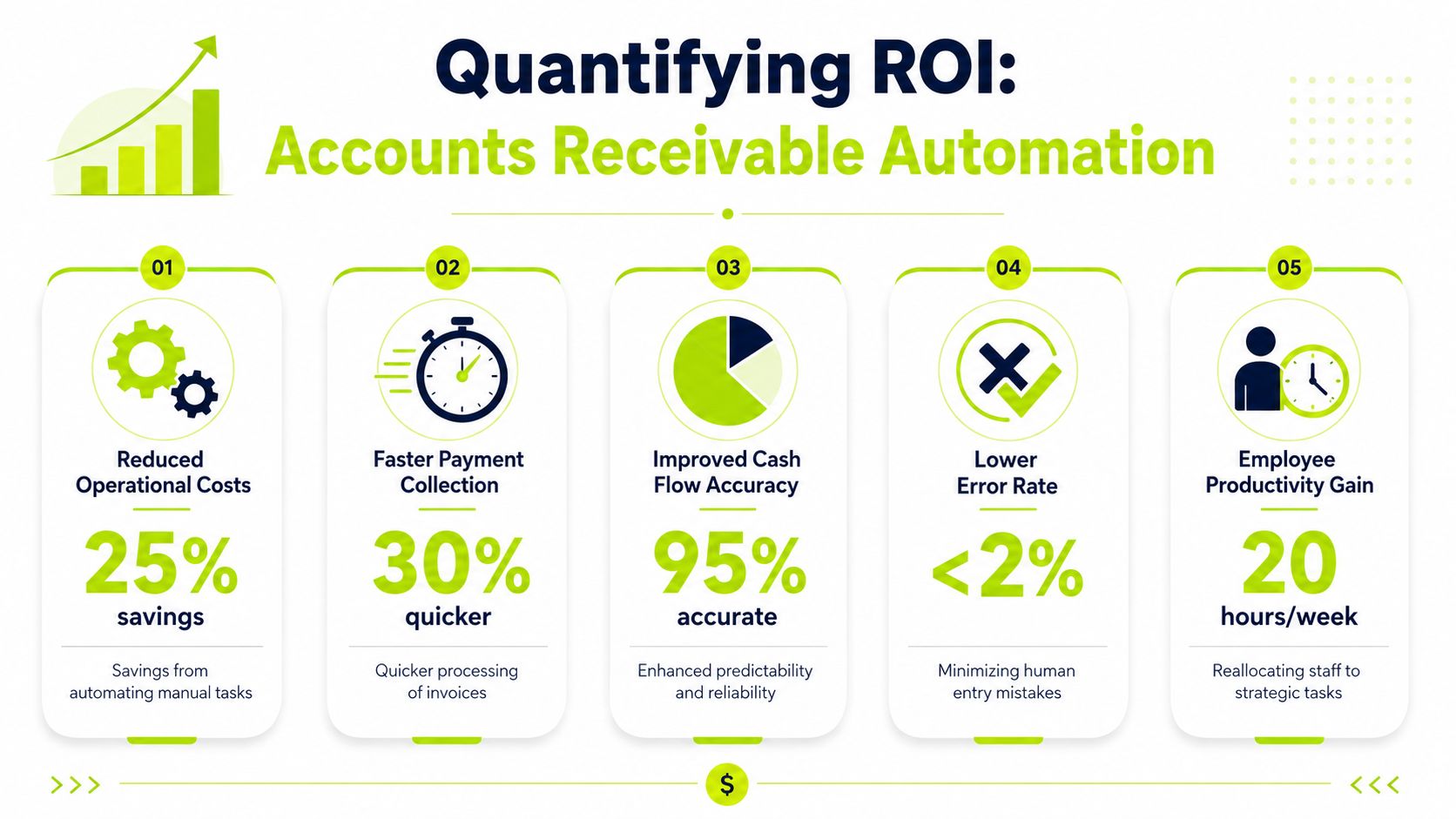
Quantifying the ROI of Accounts Receivable Automation
The ROI case for automation usually starts with labor savings. That's too narrow.
The stronger case is that automation improves cash timing, reduces failure-related leakage, and gives finance a more dependable picture of receivables. Those are operating outcomes, not just software benefits.
The scale problem in modern payments
Digital payment volume keeps rising. Digital payment transactions are expected to exceed 1.1 trillion by 2025, and payment failures average 5% to 10% worldwide, costing businesses about $20.3 billion annually, according to PayCompass payment processing industry statistics.
For a professional services firm, the lesson isn't that you need “more tech.” It's that even a modest exception rate creates real finance work once invoice volume rises. More electronic payments means more opportunities for retries, short pays, missing remittance data, card failures, and unapplied cash unless the workflow is automated.
A CFO-grade ROI lens
Use three lenses when building the business case.
ROI area | What to measure | Why it matters |
|---|---|---|
Cash timing | DSO trend, on-time payment rate, aging concentration | Faster collection improves liquidity and reduces planning uncertainty |
Team capacity | Manual follow-up load, payment posting effort, exception handling time | Staff can shift from chasing cash to resolving root causes |
Forecast reliability | Accuracy of expected receipts, unapplied cash visibility, dispute status clarity | Better visibility improves near-term cash planning |
A firm doesn't need a giant transaction count to justify this. It needs enough recurring manual effort and enough uncertainty around collections to make that effort expensive.
Where AI AR automation adds value
AI AR automation is most useful when it improves decision quality inside the workflow. That can mean adjusting reminder timing, identifying invoices likely to slip, or routing exceptions to the right person faster. It shouldn't be treated as a black box. Finance should still define the rules, approval thresholds, and escalation points.
That's also why many firms pair software evaluation with outside analytical support. If leadership wants a cleaner baseline for labor cost, working-capital drag, and receivables risk, a dedicated review by experienced Financial Analysts can help sharpen the implementation case.
For teams focused on the ledger side of ROI, the payoff often becomes clearest in reconciliation. If payments come in faster but still take too long to post correctly, the process remains only half-fixed. That's why automated matching and posting deserve as much attention as client reminders. A deeper look at automated payment reconciliation usually surfaces more value than firms expect.
Finance should approve automation for the same reason it approves any operational investment: better control over cash, labor, and forecast accuracy.
The Core Components of an Automated Payment System
Most payment systems feel complex because vendors describe them by feature list. The better way to evaluate them is as a control chain.
An automated payment environment has distinct layers. Each one has a job. If one layer is weak, the finance team ends up compensating manually.
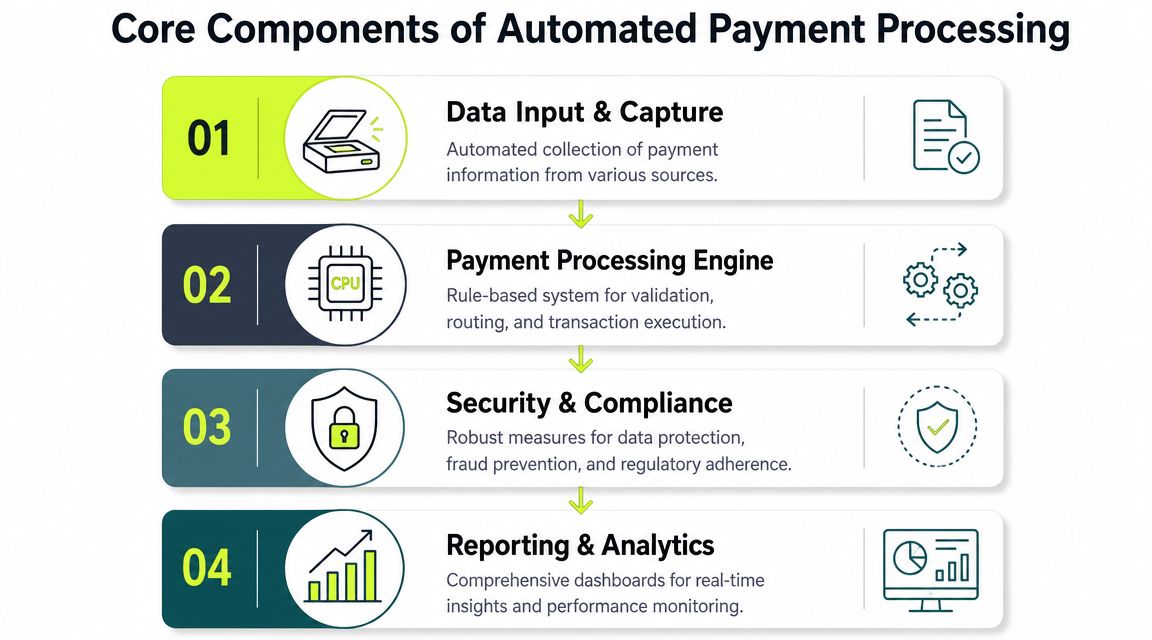
The four layers that matter
According to Stripe's explanation of automated payment systems, automated payment processing is a multi-stage control chain in which a gateway encrypts and forwards data, the processor validates funds, banking networks carry the transaction, and settlement and reconciliation update the ledger. Each stage can be instrumented for reliability and auditability.
In practice, finance leaders should think about four components.
AR automation platform
This is the orchestration layer. It decides when reminders go out, what clients see in the portal, which invoices need escalation, and how exceptions are routed internally.
In a professional services context, this layer also handles tone. A client with a long history and a disputed invoice shouldn't receive the same sequence as a client who forgot to pay.
Payment gateway
The gateway is the secure handoff point. It captures payment data and transmits it safely to the next stage. Finance may not manage this component day to day, but it matters because weak gateway design creates friction, failed attempts, and avoidable support tickets.
If your team is comparing providers, this overview of payment gateways for business is a useful starting point for understanding how gateway choices affect operations.
Payment processor and rails
This layer connects the payment request to the funding source and banking rails. It determines whether a payment clears, declines, or needs additional handling.
The key finance question isn't “Which processor is famous?” It's whether your workflow gets clear decline reasons, dependable status updates, and support for the payment methods your clients use.
Accounting integration and cash application
Here, many implementations succeed or fail.
- If integration is shallow, payments arrive but staff still has to post them manually.
- If integration is deep, invoice status, settlement, and ledger updates move together.
- If exception handling is weak, unapplied cash starts building even though payment volume is healthy.
What to ask in software review
A short evaluation list usually tells you more than a long demo.
- How does the system handle partial payments
- What happens when remittance data is missing
- Can QuickBooks AR automation post cleanly without manual cleanup
- Which exceptions still require a person
- Where is the audit trail stored and who can see it
One practical option in this category is Resolut, which combines AR workflow orchestration, payment acceptance, and automated cash application in one system. That matters for firms trying to reduce handoffs between outreach, payment, and reconciliation rather than solving each step separately.
A Practical Roadmap for Implementing AR Automation
The cleanest implementations are phased. Finance teams get in trouble when they try to automate every edge case at once.
A better approach is to sequence the work so clients experience less friction first, then internal collection discipline improves, and finally the accounting close gets easier. That keeps adoption manageable and exposes process issues before they spread.
Stage one with client payment friction
Start where clients feel the process.
A self-service payment portal usually delivers immediate value because it removes avoidable back-and-forth. Clients can review what's outstanding, choose a payment method, and act without waiting for someone in finance to resend links or instructions. That doesn't solve everything, but it reduces collection lag caused by pure convenience issues.
At this stage, keep the design standard. Don't over-customize messaging, forms, or payment paths until you've seen how clients use the system.
Stage two with structured collections
Next, automate outreach and follow-up logic.
Accounts receivable automation begins to change behavior inside the business. Reminder cadence stops depending on individual employees. Escalation rules become visible. Account managers know when they're expected to step in and when finance should handle the matter directly.
A simple rollout structure works well:
- Current invoices. Friendly reminders before and near due date.
- Early overdue invoices. Clear notice, easy payment path, visible reply channel.
- High-risk or strategic accounts. Human review before stronger collection language goes out.
The best automated collections workflows still leave room for judgment on strategic accounts.
Stage three with accounting integration
The biggest operational gains usually arrive here. In enterprise payment automation, the strongest benefits come from deep ERP or accounting integration that lets approved invoices flow into payment runs and completed payments match back to the general ledger without manual intervention, accelerating the close-to-cash cycle, as described by Rillion's payment automation guidance.
For firms using QuickBooks, this is the point where QuickBooks AR automation either proves itself or disappoints. If invoice status, payment confirmation, and cash application don't sync reliably, staff will create workarounds and the old process will creep back in.
What to watch during rollout
A phased implementation should include a short weekly review across finance and operations.
Focus area | Question to ask |
|---|---|
Adoption | Are clients actually using the portal and payment options provided? |
Exceptions | Which payment failures or posting issues are repeating? |
Collections discipline | Are reminders and escalations going out on schedule? |
Accounting impact | Is reconciliation becoming easier, or just moving the work downstream? |
The goal isn't instant perfection. It's steady removal of manual handoffs while preserving accuracy and client trust.
Navigating Common Risks in Payment Automation
Automation helps most when it's designed for the unhappy path.
A lot of payment content focuses on speed. Faster invoicing. Faster clicks. Faster settlement. Those are useful outcomes, but they don't answer the questions finance leaders grapple with. What happens when the payment fails? What controls stop fraud or compliance mistakes? What keeps automated outreach from sounding cold or careless with a good client?

Failed payments need a recovery system
This is the biggest blind spot in many implementations.
A 2025 study found that 90% of subscription businesses experienced involuntary churn from failed payments, and 42% said it affected over 10% of their revenue, according to Chargeflow's discussion of automated payment processing. Professional services firms aren't subscriptions in the same way, but the operational lesson carries over. Automation doesn't eliminate failure. It makes failure handling more important.
When a payment declines, the system should determine the next step automatically:
- Retry when retry makes sense
- Notify the client with a clear action path
- Flag finance when the issue suggests account risk
- Pause escalation when a dispute, not a payment problem, is the primary blocker
If the workflow marks the payment “failed” and waits for a human to notice, that isn't resilient automation.
Compliance and fraud control can't be bolted on
Finance leaders should be skeptical of any setup that promises frictionless payment acceptance without discussing controls. Faster movement of money also means faster propagation of mistakes.
The right design keeps controls close to the transaction. User permissions, audit trails, approved payment methods, exception queues, and documented escalation paths all matter. Cost visibility matters too. Payment method decisions affect economics as well as convenience, which is why finance should understand the trade-offs in ACH payment processing fees before defaulting to a single collection method.
Chargebacks are another weak point. If your client mix or payment behavior exposes you to disputes, the workflow should feed that signal back into account review. Teams facing recurring dispute issues may benefit from more structured guidance on managing high chargeback rates, especially when service delivery evidence and billing language need tightening.
Control principle: Automated payment processing should accelerate approved activity, not bypass review.
Client experience still matters
Poor automation often sounds efficient internally and abrasive externally.
Clients don't mind systems. They mind systems that ignore context. A reminder sequence that keeps sending “urgent” messages after a partial payment, a dispute note, or a payment promise will damage trust. In professional services, that matters because collections and account management often overlap.
Use segmentation. Adjust tone by account type, invoice age, and relationship history. Keep a human override for strategic clients and disputed balances. Good AI AR automation can help with timing and workflow branching, but finance should still define the communication standard.
This short overview is worth watching because it illustrates the importance of designing payment automation with operational controls, not just convenience in mind.
The firms that get this right don't choose between speed and control. They build both into the system from the start.
Your Next Step Toward Financial Control
Manual AR lingers because each individual step looks tolerable. Send the invoice. Follow up later. Check the bank. Post the payment. Resolve exceptions as they come in. But taken together, those steps create uncertainty around the one thing a finance leader can't afford to treat casually, cash timing.
Automated payment processing fixes that when it's implemented as an operating system, not a narrow payment feature. Its value is consistent execution. Clients get a smoother way to pay. Finance gets cleaner visibility. Leadership gets a more reliable view of collections, risk, and short-term liquidity.
For CFOs, controllers, and firm owners, the practical question isn't whether automation is broadly useful. It is. The better question is whether your current process still depends on manual effort in places that should already be system-driven. If it does, that's where to start.
A resilient setup should support accounts receivable automation, AI AR automation where it adds discipline, better cash application, and accounting integration that reduces manual cleanup. For many firms, that's the path to reduce DSO, improve cash flow, and make AR software for professional services behave like infrastructure rather than another dashboard.
Resolut automates AR for professional services with workflow orchestration, payment acceptance, and cash application designed to be consistent, accurate, and human. If your team is trying to reduce DSO without adding client friction, Resolut is worth a closer look.