B2B Payment Automation: A CFO’s Guide to Faster Cash Flow
Discover how B2B payment automation reduces DSO, protects client relationships, and improves cash flow for professional services firms.
The aging report is open, the largest overdue balance belongs to a client your partners value, and the next reminder needs to be firm without sounding careless. A controller has already checked the invoice. The client has probably seen it. Yet someone still has to decide who gets contacted, when, through which channel, and what happens when a payment arrives without useful remittance detail.
That tension defines B2B payment automation for professional services firms. The objective isn't to replace judgment with software. It's to apply judgment consistently, protect client trust, and give finance leaders better control over cash. For firms between $3M and $50M, that distinction matters because every collection conversation can affect both working capital and the next engagement.
What B2B Payment Automation Actually Means for Your Firm
A professional services CFO usually sees the problem first in the aging report. One client is only slightly late, another has a disputed time entry, and a third has paid but the cash hasn't been matched to the right invoice. The team knows the accounts, but the process depends on memory, spreadsheets, inbox searches, and whoever happens to be available that afternoon.
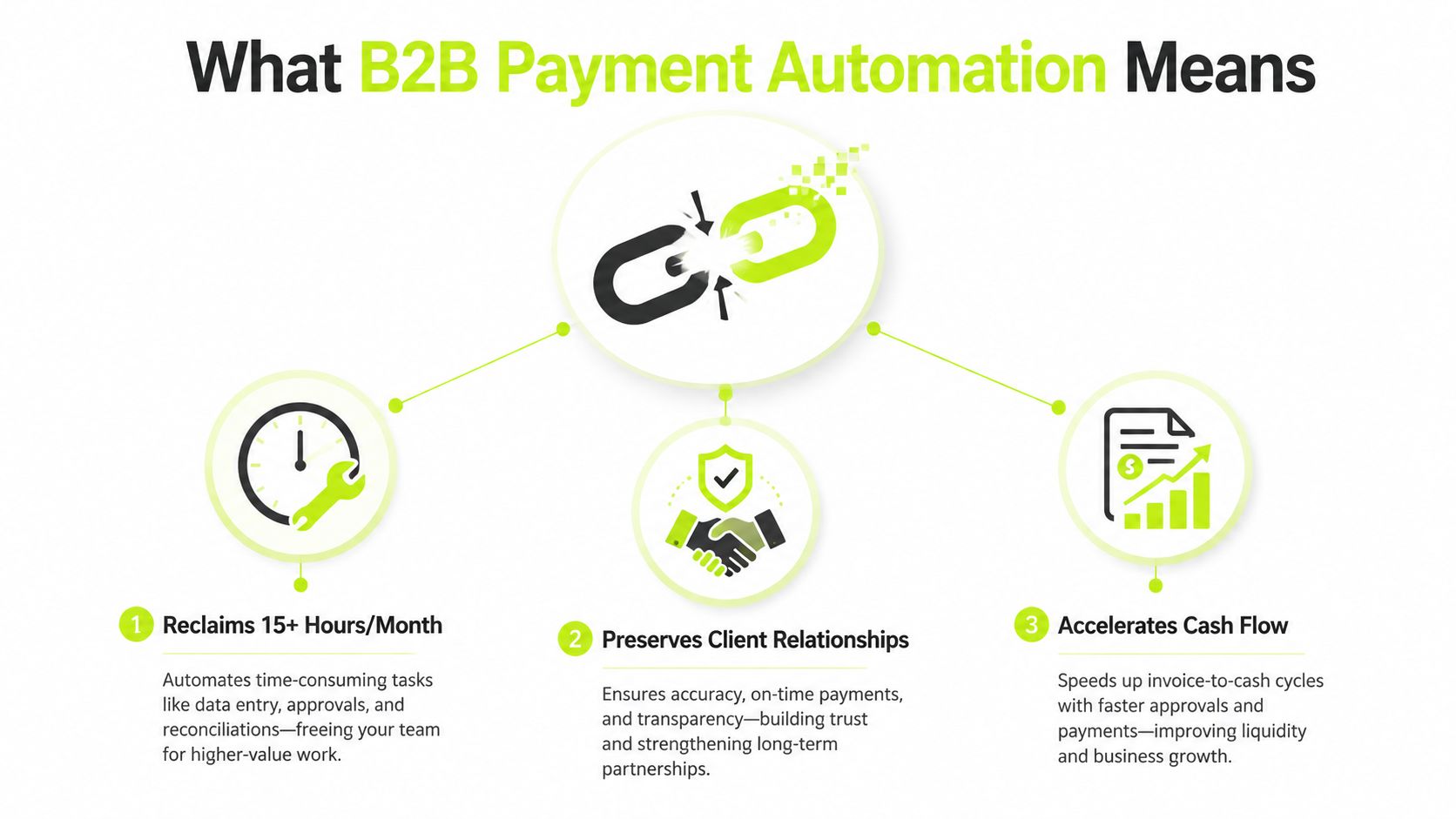
B2B payment automation connects those decisions into one operating workflow. It can coordinate invoice creation and delivery, approval status, payment reminders, payment processing, dispute routing, and cash application. The important word is connected. An electronic invoice by itself is digitization. A payment link by itself is a collection channel. Neither creates end-to-end control if the finance team still re-enters data or reconciles every payment manually.
The workflow behind the label
A practical accounts receivable automation workflow begins with clean billing data. The system generates or imports an invoice, sends it through the agreed delivery channel, tracks status, and records relevant client or matter details. If the due date passes, the collections workflow uses rules based on invoice status, client history, dispute indicators, and relationship sensitivity.
AI AR automation adds a decision layer. Instead of sending every customer the same reminder on the same schedule, it can help tailor timing, channel, and wording. A long-standing client with a clean history may receive a courteous portal reminder. An account with repeated broken promises may require earlier escalation and closer human review.
Practical rule: Automate the sequence, not the relationship. Let the system handle consistency while people retain control over exceptions, disputes, and sensitive accounts.
This is also why a finance leader should separate invoice digitization, payment acceptance, and payment orchestration during vendor evaluation. If your firm accepts cards or bank transfers but still relies on separate spreadsheets for aging, outreach, and reconciliation, the core bottleneck remains.
For firms with international clients, payment rails add another layer of judgment. Before selecting a provider, it helps to compare cross-border payment providers by supported methods, settlement behavior, currency handling, and the operational visibility they provide.
The gap usually appears in handoffs. Billing prepares the invoice, a partner approves an adjustment, collections sends a reminder, the client pays, and accounting searches for the matching remittance. Automation closes those gaps by keeping the invoice, communication, payment, and ledger event in the same process.
The Financial Case for Automating Accounts Receivable
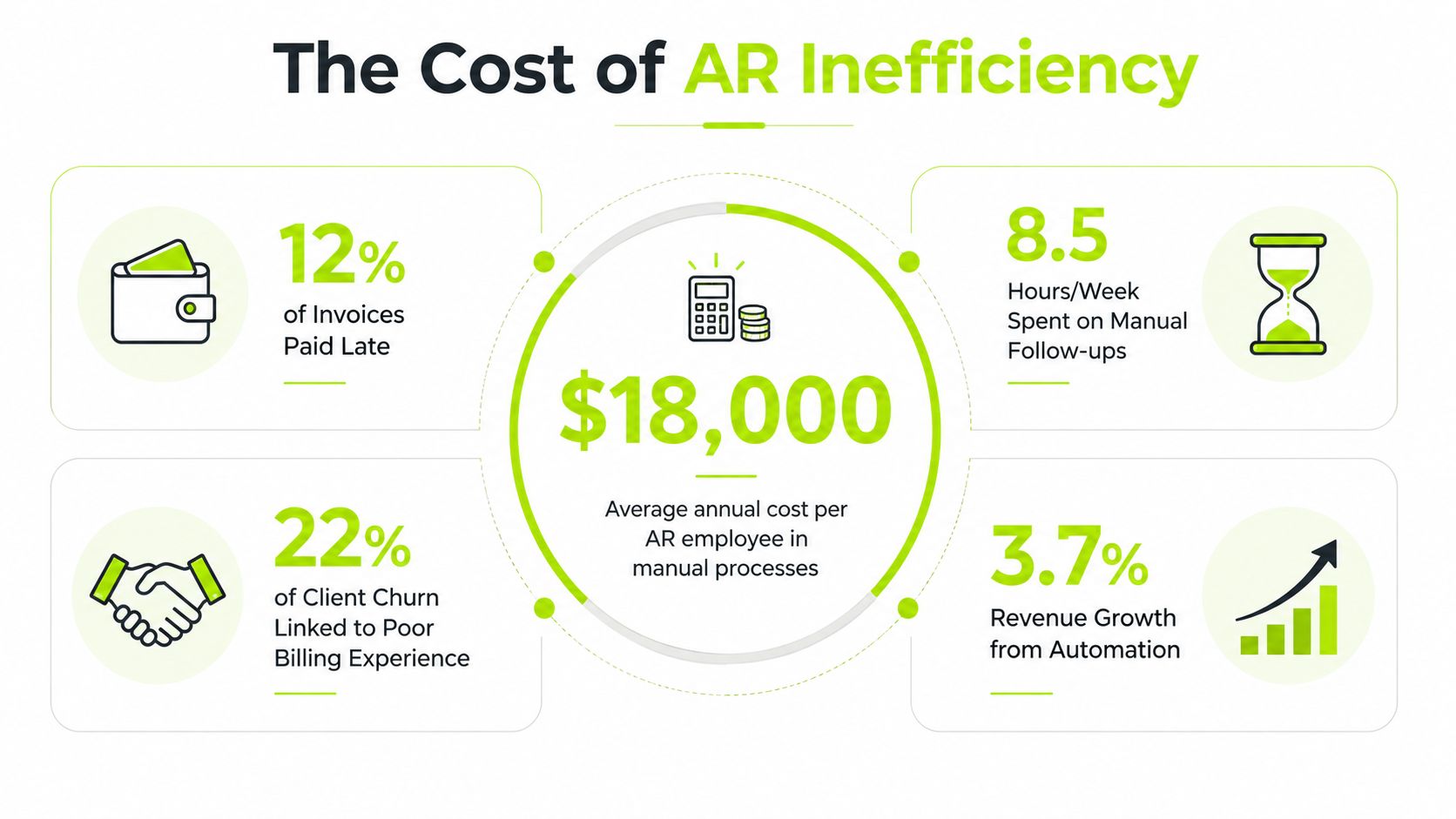
AR inefficiency consumes more than staff time. It delays working capital, forces leaders to make decisions with incomplete cash visibility, and increases the chance that a valid invoice becomes a relationship problem. Professional services firms feel this sharply because billing often includes retainers, milestones, time entries, expenses, and client-specific approval requirements.
The most useful benchmark is not a generic claim about productivity. It's the connection between DSO, cash application, and the speed of invoice-to-cash operations. End-to-end order-to-cash automation has been associated with an average DSO reduction of 8 to 12 days, while machine-learning cash matching has reached 85% to 92% touchless rates in the cited research. Both figures come from the accounts receivable automation benchmark.
Translating DSO into cash
Consider a consultancy billing $10M annually. Annual billings divided by 365 days produce an approximate daily billing rate of $27,397, before considering seasonality or billing concentration. An 8 to 12 day DSO improvement therefore represents roughly $219,178 to $328,767 in billing value moving through the collection cycle sooner, using the cited DSO benchmark and a simple operating estimate.
That isn't automatically profit, and it isn't a promise that every firm will achieve the same result. It is a way to frame the opportunity. A 40-person consultancy may recover partner and finance capacity currently spent on follow-up. A regional accounting practice may gain cleaner visibility into recurring client balances. A boutique law firm may reduce the time between approved work and collected fees without making every client interaction feel like a demand letter.
The second lever is reconciliation. When payments match automatically, the team doesn't have to spend the same amount of effort identifying which client paid, which invoice was covered, or whether an unapplied balance needs investigation. The result is a more reliable cash position and less month-end cleanup.
Use a simple internal estimate:
- Start with annual billings: Use your actual billed revenue, not a target.
- Calculate daily billings: Divide annual billings by 365.
- Model the range: Multiply daily billings by 8 and by 12, using the cited benchmark as a scenario range.
- Separate cash from cost: Estimate staff time, financing needs, and write-off exposure independently. Don't treat all recovered billing value as savings.
The financial case becomes credible when the model distinguishes earlier cash, reduced manual work, and lower risk. Those are related outcomes, but they aren't interchangeable.
The visual below can help finance teams explain the operating problem to partners and department leaders.
Core Components of a B2B Payment Automation Platform
A useful way to assess an AR platform is to treat it like an operating system, not a drawer full of disconnected apps. A billing tool can issue an invoice. A gateway can accept a payment. A CRM can store a contact. The firm still needs a system that decides what happens next and records the result.
Start with billing and delivery
The first layer is dynamic billing and invoice delivery. It should support the actual commercial structure of professional services, including recurring work, milestones, retainers, expenses, approval dependencies, and client-specific delivery preferences. It should also expose invoice status clearly, so collections doesn't chase an invoice that hasn't cleared an internal approval step.
Delivery should connect to a payment experience. A client who opens an invoice should be able to review the balance and choose an approved payment method without searching through an old email thread. The point isn't to force every client into one rail. It's to remove avoidable friction while preserving the firm's controls.
Add coordinated collections
The second layer is omnichannel collections outreach. Email may be appropriate for a routine reminder, while a portal notification or phone task may work better for a high-value account. The workflow should record each contact, suppress unnecessary messages, and allow a partner or account owner to intervene when context matters.
A platform that sends reminders without understanding invoice status can create embarrassment. A platform that never sends anything without manual approval recreates the old queue. The practical choice is usually a controlled co-pilot mode first, followed by autopilot for well-understood account segments.
For payment method decisions and customer-facing options, finance leaders can review B2B online payment methods alongside their existing billing and client-service requirements.
Finish with risk and reconciliation
The third layer is AI risk identification and cash application. Risk scoring should help the team focus on accounts that need attention before they become severely overdue. It shouldn't become an opaque ranking that overrides a partner's knowledge of a client or a legitimate dispute.
Cash application closes the loop. Incoming funds should match against invoice number, customer identity, payment history, remittance patterns, and other available signals. Exceptions should route to a visible queue with an owner and reason, rather than disappear into an accounting inbox.
A customer-facing payment experience also matters. Firms should evaluate whether a platform supports cards, bank transfers, digital wallets, payment links, and the controls needed for larger business transactions. For teams reviewing the checkout layer separately, the Samba checkout system is one example of the kind of payment experience that should be assessed for usability and integration fit.
The right stack creates a chain from invoice to payment to ledger. If each component uses a separate customer record or exports data through files, the firm may gain isolated efficiencies while adding new reconciliation work.
Evaluating AR Software for Professional Services
The right AR software for professional services should pass a relationship test as well as a finance test. A platform that reduces manual touches but sends an inappropriate message to a strategic client isn't operationally successful. Conversely, a system that preserves perfect human discretion but leaves every routine reminder to staff won't reduce DSO.
Start with the accounting system. QuickBooks AR automation must synchronize customer records, invoice status, credit memos, payments, and adjustments without creating duplicate records. The same principle applies to NetSuite, Sage, and other ERPs. Ask the vendor to demonstrate an actual exception, not just a clean invoice moving from one screen to another.
Use a practical vendor scorecard
Autopilot and co-pilot modes deserve close attention. Autopilot can handle predictable accounts under defined rules. Co-pilot mode gives a collector or controller the ability to review suggested messages, pause a sequence, or approve escalation. Professional services firms generally need both.
Tone controls should include more than a choice between “friendly” and “firm.” Look for editable templates, client segmentation, partner visibility, dispute suppression, and approval rules for sensitive communications. Legal escalation should be explicit, with clear conditions and an audit trail, rather than an alarming message that appears without context.
Reporting should let a controller answer operational questions quickly:
- Which invoices are overdue because of a dispute?
- Which accounts received no contact after the due date?
- Which promises to pay remain open?
- Which payments are unapplied?
- Which workflows produce the most human exceptions?
Use the following comparison during a vendor demo.
Feature | Priority | Why It Matters |
|---|---|---|
ERP or accounting integration | Must-have | Keeps invoices, payments, credits, and customer data aligned |
Configurable collection sequences | Must-have | Applies consistent follow-up without treating every client identically |
Co-pilot and autopilot controls | Must-have | Balances efficiency with human review |
Tone and escalation governance | Must-have | Protects client relationships and limits inappropriate outreach |
Automated cash application | Must-have | Reduces unapplied cash and reconciliation effort |
Flexible payment portal | Must-have | Gives clients a clear path to payment |
Predictive risk indicators | Valuable | Helps prioritize attention before balances become harder to recover |
Advanced forecasting views | Nice-to-have | Supports planning once core data and workflows are reliable |
A vendor's feature list matters less than its behavior under imperfect conditions. Test partial payments, credits, disputed invoices, duplicate remittances, changed client contacts, and a payment received without an invoice reference. For a broader market comparison, review this guide to the best accounts receivable software, then apply your own integration and relationship criteria.
Why Most Automation Implementations Stall at Partial
Buying software doesn't create straight-through processing. The gap is visible in the historical record. One benchmark found that only 5% of AP teams had a fully automated invoice and payment process, while 56% used electronic payments and 52% received invoices electronically, as summarized by Skynova's invoicing statistics. Electronic inputs can coexist with manual approvals, exception work, and re-entry.
The more recent picture is similar. A 2025 global survey reported that 73% of AP teams weren't fully automated, 27% had no automation, and 66% still manually entered invoice data into ERP systems in the cited accounts payable automation trends report.
Three failure points
Incomplete integration is the first. If the AR system doesn't receive authoritative invoice, credit, and payment status from the ERP, staff create side files to fill the gap. The mitigation is to define the system of record for every field before configuration and test two-way status updates with real exceptions.
Exception workflows are the second. Teams often automate the happy path and leave disputed invoices, short pays, unapplied cash, and missing purchase orders outside the workflow. Those exceptions become the daily workload. Build queues by reason, assign ownership, and set a documented resolution path for each category.
Process mismatch is the third. If the software's sequence doesn't reflect how partners approve messages or how clients request backup, staff revert to email and spreadsheets. Start with the firm's actual operating rules, then simplify only where the change improves control.
Adoption improves when the team can see why a message was selected, pause it safely, and correct the underlying data without opening a support ticket. Partial automation isn't a moral failure. It's a signal that the workflow design stopped before the difficult handoffs were addressed.
Implementation Roadmap for Mid-Market Finance Teams
A mid-market firm shouldn't attempt to automate every AR decision on the first day. The reliable path is phased, with clean data and integration work completed before advanced rules are activated.
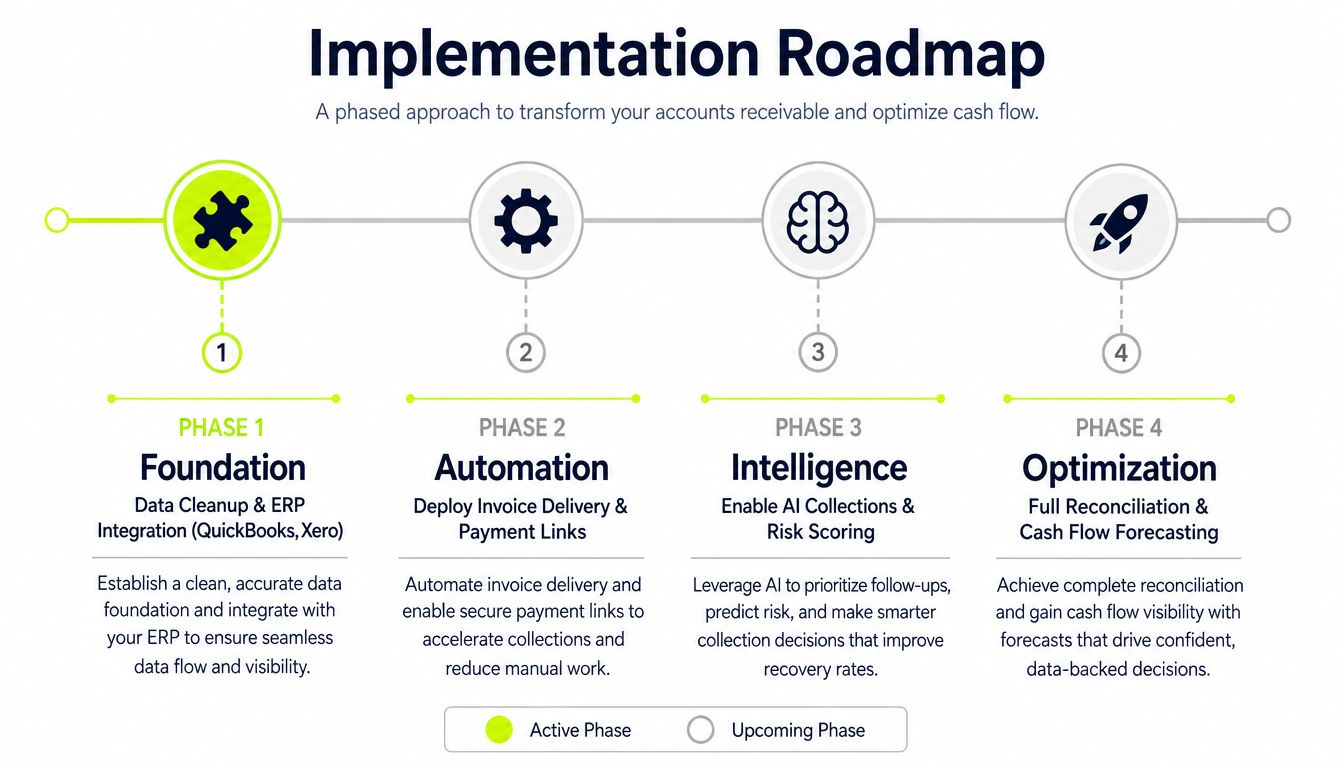
Phase one builds the foundation
Begin with customer, contact, invoice, credit, payment, and terms data. Remove duplicate customers, standardize contact roles, identify inactive records, and document how disputes are represented. Integration work should cover QuickBooks, NetSuite, or Sage according to the firm's environment, with clear ownership for failed syncs.
The full deployment can reasonably take 8 to 12 weeks when the scope is controlled and stakeholders are available. That range is an implementation planning assumption, not a universal benchmark. Data quality, ERP complexity, approval requirements, and payment configuration can extend it.
Phase two activates the routine workflow
Configure invoice delivery, payment links, portal access, reminders, promise-to-pay tracking, and cash application rules. Start with a limited group of clients or invoice types. Review messages with finance, client service, and partner representatives before enabling automated outreach.
Test the awkward cases early. A partial payment, a credit memo, a changed billing contact, or a disputed expense should create a clear next action. If the test only covers a fully paid invoice, the implementation team hasn't tested the process that consumes the most staff attention.
Phase three introduces intelligence
Risk scoring and AI-driven collections should come after the basic workflow produces dependable data. Otherwise, the model learns from inconsistent statuses and incomplete contact histories. Use human review for high-value clients, active disputes, unusual payment behavior, and any account where a relationship owner has raised a concern.
Legal escalation belongs here as a governed path, not an automatic threat. Define the triggers, approval authority, message style, and handoff to counsel. A controlled escalation can increase discipline while preserving credibility.
Phase four optimizes cash visibility
Once invoice status, outreach, payment, and reconciliation events are dependable, add forecasting views and management dashboards. Finance leaders can then distinguish a genuine collection risk from a data problem.
Change management determines whether the system sticks. Assign an executive sponsor, name a process owner, train collectors on exceptions, publish escalation rules, and review adoption in weekly operating meetings. The guide to automating accounts receivable provides additional implementation context, but your own process map should govern the deployment.
Measuring Success and Sustaining AR Performance
A successful AR program gives the CFO fewer surprises, the controller cleaner records, and the client a more consistent experience. Measure all three outcomes. A lower balance alone doesn't prove that the process improved if the team is writing off disputed invoices or damaging important relationships.
The first dashboard should stay focused. Track DSO trends, aging by client segment, average days to first contact, collection effectiveness, unapplied cash, promise-to-pay performance, and client satisfaction signals. Add touchless cash application as a process measure, using the 85% to 92% benchmark from the earlier cited research as a reference point rather than a target that fits every ledger.
Read metrics together
DSO tells you how quickly the firm converts billing into cash, but it doesn't explain why performance changed. Pair it with first-contact timing and dispute status. If DSO worsens while first contact remains prompt, the issue may be client liquidity, approval friction, or terms rather than collector inactivity.
Cash application deserves its own view. A high volume of unapplied cash can make aging reports unreliable and cause collectors to contact clients who have already paid. Monitor match rates, exception reasons, resolution ownership, and the age of unresolved items.
Client satisfaction should be practical, not ornamental. Review complaints about duplicate reminders, unclear invoices, missing backup, or inappropriate escalation. A professional services firm protects trust by making payment conversations predictable and respectful.
Operating principle: A collection workflow is performing well when it makes the next action obvious to the finance team and reasonable to the client.
Rules need maintenance. New service lines change invoice formats. A merger changes customer records. A major client changes its portal or approval process. Review segments, templates, suppression rules, and escalation thresholds as the business evolves.
The economic context also matters. Automation can't eliminate delayed payment behavior when customers face liquidity pressure or operate under local payment norms. The EU Payment Observatory reported average European B2B payment periods above 60 days, specifically 60.3 days, while late payments represented 37% of the global payment cycle and businesses waited an average of 51 days to get paid in 2025, according to its late-payment analysis. Your workflow should therefore segment risk, preserve judgment, and adapt outreach instead of assuming faster software automatically creates faster cash.
Resolut automates AR for professional services by connecting invoice follow-up, client-friendly outreach, payment collection, risk signals, and cash application in one controlled workflow. Visit Resolut to assess how consistent, accurate, and human AR automation could support your firm's cash flow and client relationships.