Bills and Invoices: A Finance Operator's Guide
See how bills and invoices differ for professional services, then create, send, and manage them to reduce DSO and improve cash flow.
Two cash flows run through every professional services firm, and they share a ledger, a mailbox and a vocabulary. Money a client owes you arrives on someone else's schedule. Money you owe a subcontractor, a landlord or a software vendor leaves on a date that was set for you.
Bills and invoices get used interchangeably in that daily traffic, and the habit is expensive. It blurs the aging report, it puts vendor paperwork in front of the partner who should be chasing a client, and it hides which number belongs in the cash forecast.
What follows is the split I use with controllers: a comparison table that separates the two documents, a seven-step path for issuing and collecting an invoice, and a diagnostic that names why a specific balance is late before anyone's tone hardens.
When One Pile of Paper Hides Two Cash Flows
It's Monday morning and the close is three days behind. The aging report is open on one screen, the bank feed on the other, and a partner has just forwarded their third soft nudge to the same client.
A client owes $86,000 across three invoices for an advisory phase the team finished in March. On the same desk, a subcontracted researcher's bill for $14,200 sits unapproved because nobody matched it back to the statement of work. Both arrived as PDFs. Both got called bills and invoices in the same conversation. Only one of them should bring cash in.
That collapse of language costs money. The Federal Reserve's 2024 Report on Payments found roughly four in five small firms had run into payment-related challenges, and professional services firms were more likely than most industries to accept checks and to name slow-paying customers as a problem.
Look at what that produces inside one firm's week. Payroll clears against a line of credit while $86,000 sits at day 61. The forecast counts unbilled March work as though it were already cash. And the $14,200 going out is invisible until the vendor emails a second time, because it lives in an inbox rather than in payables.
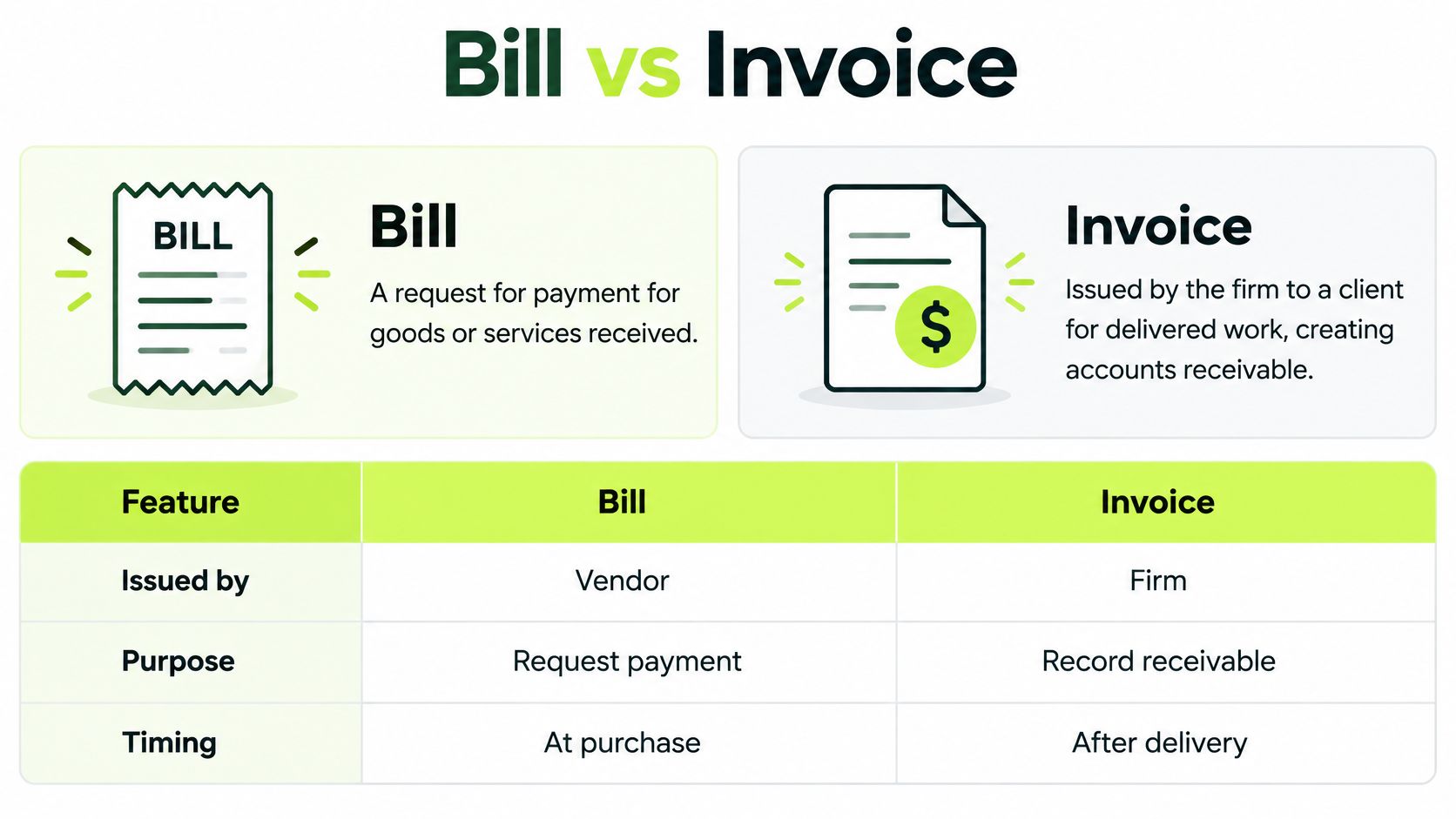
The rule this guide works from: an invoice is your firm's claim on a client. A bill is someone else's claim on your firm. One number should come in. The other should go out.
Two consequences follow from that single distinction:
- Direction sets the owner. Receivables belong to the billing lead and the partner. Payables belong to whoever controls project margin.
- Direction sets the measure. An invoice is judged by days to cash. A bill is judged by whether it was coded before the due date.
Same paper, opposite jobs. Treating them as one pile is how a healthy firm ends up borrowing to fund work it already delivered.
How a Bill Differs from an Invoice
The distinction holds up best as a table, because most errors happen at the row where two documents look alike.
Document | Issued by | Ledger | Cash direction | Creates a new balance |
|---|---|---|---|---|
Invoice | Your firm to the client | Accounts receivable | In | Yes, a client amount due |
Bill | Vendor to your firm | Accounts payable | Out | Yes, an amount you owe |
Credit note | Either party | Reduces AR or AP | Adjustment | No, it reduces an open item |
Statement | Your firm | Summary of open invoices | None by itself | No |
Pro forma or estimate | Your firm before the charge | Not yet revenue | None until converted | No |
One engagement, two documents, one gap
Take a three-month implementation priced at $120,000. The firm invoices the client in three milestones of $40,000. It also records an $18,000 bill from the specialist who built the integration layer.
Both numbers are real. Neither is interchangeable. The $40,000 sits in receivables and pulls cash toward the firm on Net 30. The $18,000 sits in payables and pulls cash away, possibly on Net 15, which means the specialist gets paid two weeks before the client pays you. That timing gap, not the folder of PDFs, is working capital.
Documents that get mistaken for both
A credit note reduces an open balance. It is not a new charge, and coding it as revenue inflates the month.
A statement lists what is still open. It carries no due date of its own and does not restart a clock.
A pro forma or estimate is a proposal with figures attached. It becomes AR only when the work is delivered and the client owes you.
Retainers and progress billings are invoices when a client owes the firm, even though the cash may be applied later against delivered work. Keep them in receivables, not in a holding account someone reconciles at year end.
The close-the-books test, quotable as written: if cash should arrive, code it to accounts receivable. If cash should leave, code it to accounts payable. If neither, it isn't a balance yet.
Hand that line to a billing coordinator on day one. It resolves most misclassification at firms in the $3 million to $50 million range, where one person usually wears both the billing and the payables hat.
Managing Incoming Bills in Accounts Payable
A bill is a vendor's claim on the firm, so it follows the exact reverse path of an invoice. The steps below are the ones I'd put in a written procedure, each with the reason it exists.
- Capture the bill on receipt, not on payment. Record vendor name, reference number, amount and due date the day it arrives, so nothing lives only in someone's inbox. A bill you can't see can't be forecast.
- Match it to the engagement and to the approver who accepted the work. A subcontractor bill should trace to a statement of work and to a named person. Without the match, you're paying for effort nobody has confirmed.
- Code it the day it lands. Coding assigns the cost to a project and a cost center, which is the only way margin is visible before the cash leaves. A bill coded three weeks late is a margin surprise.
- Route approval by amount, with one owner per engagement. One approver, one threshold, one date stamped on every stall. Multi-person approval chains are where payables age.
- Schedule payment against the due date, not the day someone remembers. Paying early drains cash the forecast still counts as available. Paying late damages a vendor you'll need next quarter.
- Record the payment the same day it clears. That keeps the AP balance and the bank balance in agreement and stops a duplicate payment to a persistent vendor.
Here's where the direction matters most in practice. A $6,400 translation bill and a $2,100 software renewal sit in the same tray as a client's overdue balance. Coded as payables, they're cash out on known dates. Coded into the wrong book by a distracted administrator, they inflate the forecast and hide a real outflow.
If your team is still building this process, the accounts payable guide for startups from Allied Tax Advisors covers the definitions and the control points in plain terms. Pair it with a matching routine, the kind described in this walkthrough of automated invoice matching, so a three-way check happens before approval rather than after payment.
The controller's check is simple. Every open bill has an owner, a due date, and a matched engagement.
How to Issue an Invoice Clients Can Pay
A milestone can be approved and the work complete, yet cash still waits on a clean invoice. Treat the invoice as the handoff between delivery and payment: code it correctly, start the cash clock clearly, and track what prevents it from becoming payable.
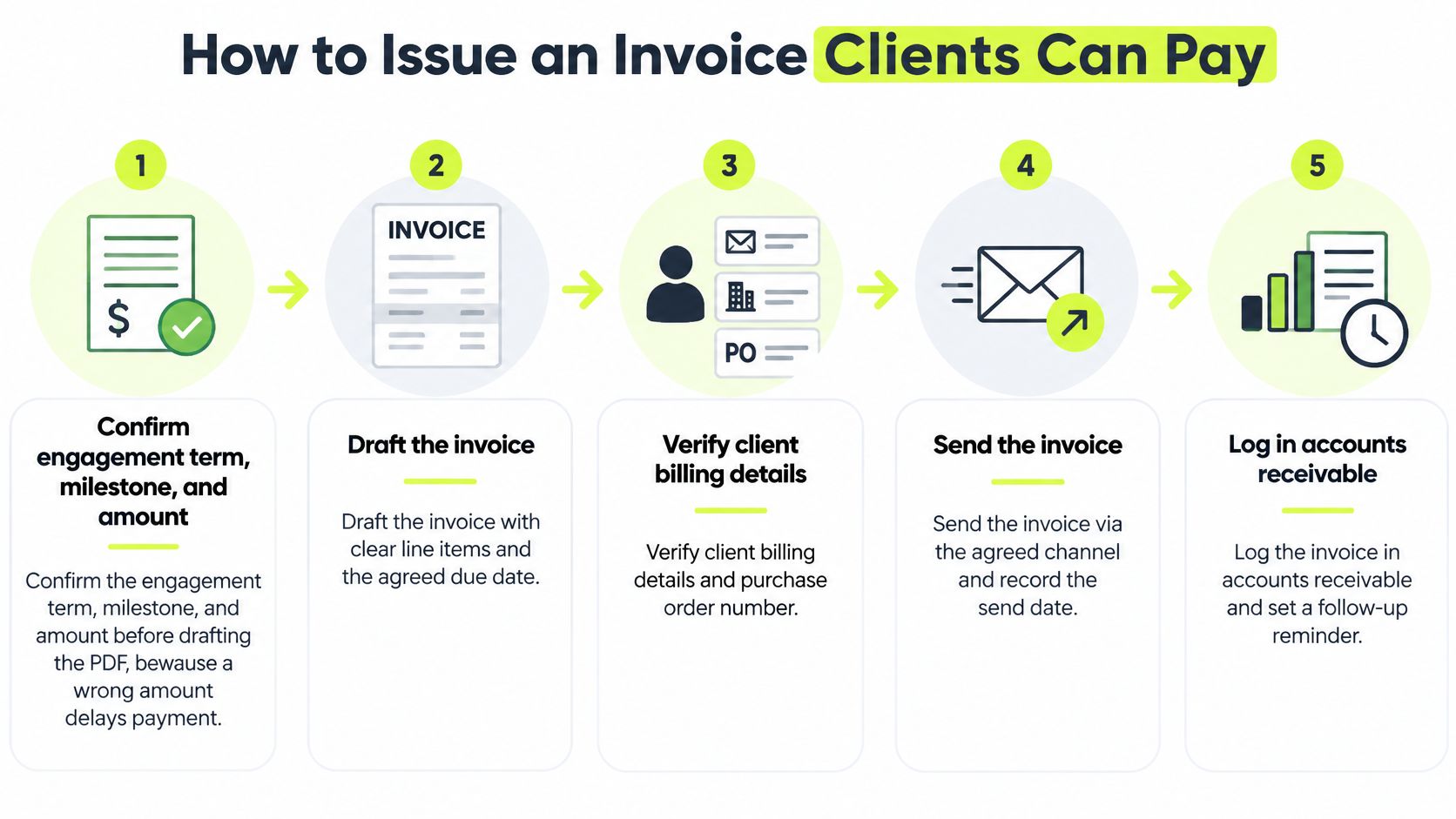
- Confirm the engagement term, milestone, and amount before drafting. Match the charge to the approved work and the client's billing requirements. A mismatch can send the invoice back for correction and delay approval.
- Include the fields the client needs to process payment. Use the legal names, engagement reference, service period, line-item detail, tax treatment, due date, and payment instructions. Net 30 means the amount is due within thirty calendar days of the invoice date.
- Check each field before sending. Incorrect invoice information delays about 15.1% of invoices processed in Europe, according to the European Commission's e-invoicing thematic report. The report also cites evidence that e-invoices settle 5 to 7 days earlier than paper invoices, while noting that changing the format alone does not change a client's intention to pay late.
- Issue the invoice when the milestone is accepted. Send it to the correct billing address and include payment instructions on the document. If the client has to ask how to pay, processing stalls while they wait for the answer.
- Record the receivable in the AR ledger the same day. The ledger entry should match the invoice. This gives the person managing collections a reliable amount, date, and open balance to work from.
- Set reminders against the due date. A neutral message three days before the deadline and a brief follow-up the day after make the payment schedule clear without turning routine administration into pressure.
- Keep a dispute tied to the disputed line. Correct the error, resend the updated open item, and continue tracking any undisputed balance. Holding the full invoice can delay payment on work the client has already accepted.
For a first invoice, a free tutoring invoice generator can help show how the fields are arranged. Resolut also offers a free invoice generator that runs in your browser. In either case, check the details before sending: users are responsible for the accuracy and lawfulness of invoices they create, including tax.
Track first-pass acceptance rate, exception rate, and days from issuance to payable status. Together, these measures help distinguish document errors from delays in the client's approval or payment process.
A Services Firm Week from Work to Cash
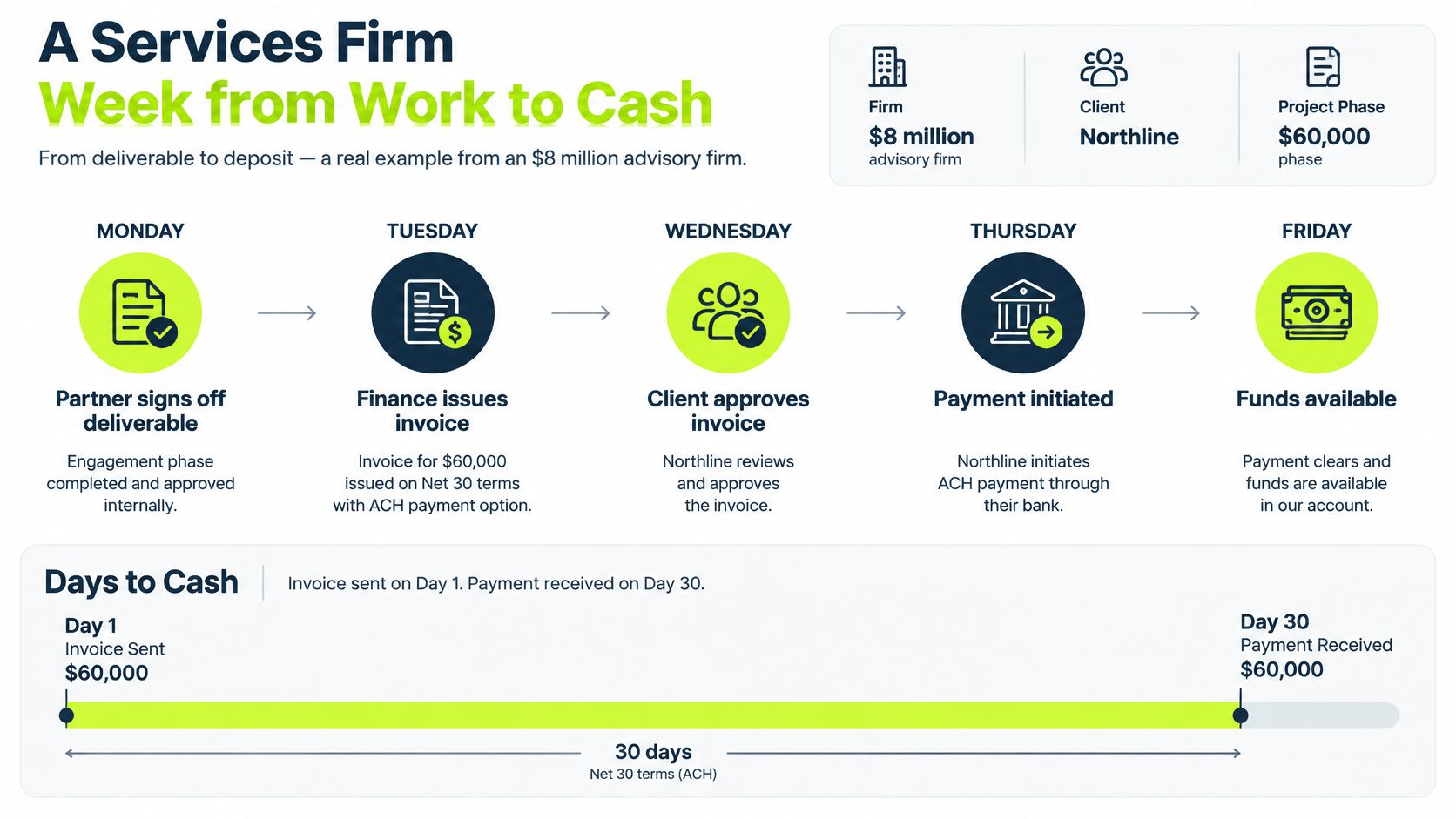
An $8 million advisory firm completes a $60,000 phase for Northline. The work is finished, but cash still has to move through two systems: the firm's receivables ledger and the client's approval process.
Monday. The partner signs off the deliverable.
Tuesday. Finance issues the invoice on Net 30, with ACH and card instructions. If billing waits for the next Monday run, seven days pass before the client even receives it.
Wednesday to Friday. Northline's AP clerk flags the invoice because it lacks a purchase-order reference. The engagement letter does not list that requirement. One email fixes the field, but the invoice has already lost time in the client's queue.
Nine days later, it clears the exception queue. The delay came from a missing field, not necessarily from Northline's willingness to pay.
The 2025 Professional Services Maturity Benchmark defines days sales outstanding (DSO) as the average number of days required to collect revenue after a bill is issued. Its distribution of surveyed organizations is:
DSO band | Share of organizations |
|---|---|
Under 30 days | 46.3% |
30 to 50 days | 27.4% |
50 to 70 days | 27.3% |
The benchmark notes that DSO can reflect invoice accuracy, collection effectiveness, client satisfaction, operational controls and client creditworthiness. One blended figure cannot show which factor is holding cash.
Code the transaction correctly first: a supplier bill is money owed by your firm; a client invoice is money owed to your firm. Then compare the cash clocks. Split receivables by client, service line, invoice age, dispute status and payment route. If cash is delayed before an invoice reaches the client's payable queue, examine issuance and coding. If clean invoices consistently take longer to collect, investigate the client's payment process and the agreed terms.
Northline's nine-day delay belongs on the receivables timeline, but its cause sits in the handoff between billing and accounts payable.
Why the Invoice Is Late
A $12,000 invoice can sit unpaid for very different reasons. A missing purchase order needs a correction; a stalled approval needs routing; a customer short on cash may need a dated payment plan. Treating each case as a collections problem risks damaging the relationship without fixing the cause.
Use the aging bucket to identify the delay, then check the account before choosing a response. Common causes include invoice errors, slow internal approvals, paperwork gaps, temporary cash constraints, and worsening credit risk.
What you see | Likely cause | Do this | Do not do this |
|---|---|---|---|
Rejected fields, missing PO, tax query | Invoice or paperwork defect | Correct and resend the open item | Escalate tone on a document the client cannot post |
Approved work, stuck with one approver | Buyer-side workflow | Send a complete packet to the approver and date the stall | Treat the whole balance as a refusal to pay |
Good history, one slow cycle, asks for time | Temporary liquidity | Offer ACH, card, or a short dated plan | Imply the relationship is at risk |
Repeated lateness, partial pays, new disputes | Credit exposure | Tighten terms and pause new unbilled work | Add more of the same reminder |
Repeated late payments and partial settlements call for a different response from a one-off delay. Review exposure early, before more work goes out unpaid. At a $20 million firm, even a small share of receivables written off can make that review financially significant.
The log line that replaces the script
Before outreach, record four things:
- Cause. Defect, approval stall, cash timing, or credit.
- Evidence. What on the account supports that assessment.
- Next action. Resend, route to the approver, offer a plan, or freeze new work.
- Outreach status. On, paused, or escalated.
A bad invoice can turn a healthy client into a frustrated one. Check the document and the account history before sending another reminder.
What Format and Payment Rails Change
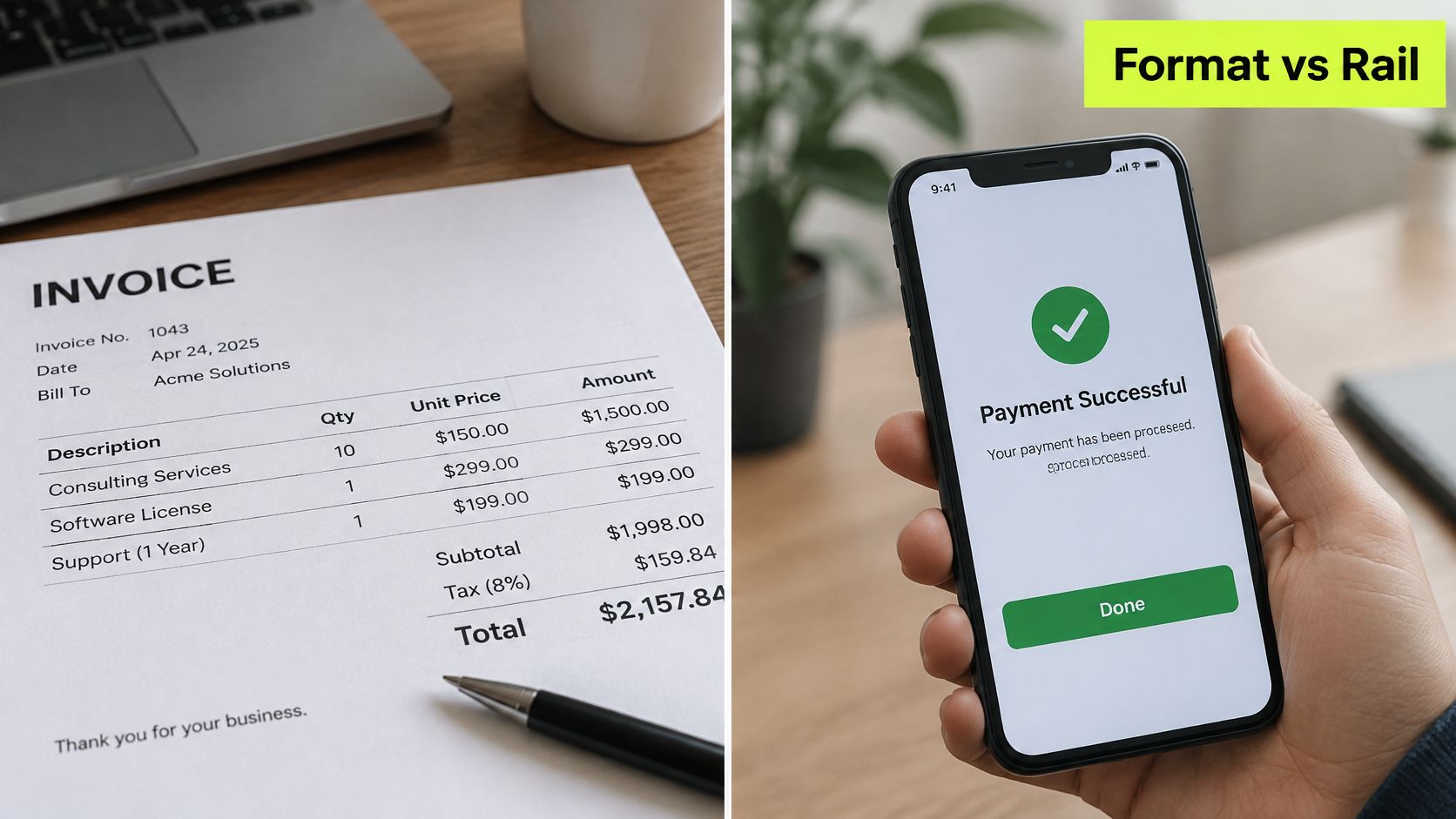
Two clocks get merged in most AR discussions. Format changes the cost and error rate of handling a document. The rail changes when initiated money becomes usable cash.
The cost side is well documented. Evidence summarized in the European Commission's e-invoicing thematic report shows total invoicing costs falling 54.5% for issuers and 71.8% for receivers in one Hasselt University study, and 59% and 64% respectively in an analysis of a 5,000-employee company. The same report cites a European e-invoicing forum estimate of paper-invoice processing near EUR 17 per invoice for buyers, with 40% to 60% reductions after electronic deployment.
The mechanism is not the file extension. A PDF emailed to a person still gets rekeyed. Structured data posting into the ledger doesn't.
The rail side is where CFOs get surprised. A mailed check can pass through invoice delivery, client processing, mailing, receipt, internal handling, deposit and bank clearance, while ACH generally settles in one to three days, as the Federal Reserve's small business payments survey sets out.
So put ACH and card instructions on the invoice at issuance, then measure from send date to cleared funds, not to the day a client says they paid. A promise is not a deposit.
Track straight-through rate and exception rate beside DSO, or you'll credit a format project for a behavior change it never caused. If you're reworking the payment instructions themselves, this breakdown of B2B online payment methods covers which rails clear when.
Standardize the Receivable and Keep the Tone
Here's the decision to make before the next billing cycle. Bills stay in accounts payable. Invoices stay in accounts receivable. Each invoice goes out the day the milestone is accepted, and no overdue note leaves without a due date, a payment instruction and a cause code attached.
That's the control. Everything else is cadence.
Automation belongs where the work is repetitive and the relationship is easy to bruise: the same reminder, on time, in wording a partner would still use in the room. Resolut runs that loop for professional services firms, and setup takes three steps. Connect QuickBooks or drop PDFs, pick a workflow and adjust the cadence, then the chasing happens without a person remembering it. When QuickBooks Online is connected, invoice payment status syncs live, so the aging report and the ledger stop disagreeing.
Start narrow. Pick one service line, classify every open item with the comparison table above, and run the next thirty days of invoices on a single cadence. At day thirty, count three things: invoices accepted first pass, open items past terms, and DSO by segment against the 30-day band. If the exception rate is above a few percent, fix the document before you touch the tone.
The aim isn't a perfect collections script. It's fewer outstanding invoices and a client who still wants the next engagement.
Resolut automates accounts receivable for professional services firms, from follow-ups and late-payment scoring to cash forecasting, so bills and invoices stop sharing a pile and start moving in the direction they were meant to. Connect QuickBooks or upload your open invoices, choose a cadence, and let the routine work run while your team handles the exceptions that need judgement. Visit Resolut to see how it fits your billing cycle.