The Cash Application Process: From Receipt to Reconciliation
A practical guide to the cash application process for finance leaders. Learn the workflow, KPIs, common challenges, and how automation reduces DSO.
Tuesday morning always tells the truth in accounts receivable. The inbox is full, the bank feed has moved, five payments came in through five different channels, and only two had clean remittance. Someone on the team is already building a spreadsheet to sort short pays from real deductions, while a controller is trying to answer the only question that matters before the forecast meeting, how much cash is available right now.
That's where the cash application process stops being a back-office task and starts acting like a control. When receipts aren't applied cleanly, the ledger is inaccurate, collections work from stale balances, and month-end reconciliation turns into a search party. For CFOs, Controllers, and owners of professional services firms, the core issue isn't whether the team is busy. It's whether the process gives you usable cash visibility before the day gets away from you.
Where Cash Application Breaks Down First
The first failure usually doesn't show up on an aging report. It shows up in the AR inbox, where a payment arrives by ACH, another through a portal, a third through a wire, and a fourth with a remittance file buried in someone's email thread. By noon, the team has partial matches, unanswered deduction questions, and at least one unapplied cash item that nobody wants to own.
The pattern is familiar
That pattern isn't about poor effort. It's about a process built for a simpler world, when a cleaner share of payments moved through fewer rails and remittance came in one place, in one format. Today, the operational problem is fragmentation. Payment and remittance arrive separately, invoice identifiers are missing or inconsistent, and the matching queue grows before anyone has time to normalize the data.
Practical rule: if the team is still “finding” remittance by hand, the process is already behind the transaction.
Three symptoms usually appear before the books feel broken. First, queues of unapplied cash build up. Second, analysts keep spreadsheets full of partial matches that no one trusts completely. Third, finance can't answer a simple management question without checking three systems and two inboxes.
That's why a process lens matters more than a tools list. If the core issue is remittance fragmentation, a faster matching screen won't fix it. If the issue is controls, then the workflow has to prove not just that cash was matched, but that it was posted correctly, reconciled, and defensible in the audit trail.
What this means for a service firm
Professional services firms feel this quickly because billing is often milestone-based, project-based, or relationship-heavy. A client pays several invoices at once, deducts a disputed amount, or sends a note that only makes sense to the person who happened to manage the account last quarter. That's not unusual. It's normal operating noise.
The danger is treating that noise as a minor admin issue. Once cash application starts lagging, collections begins calling on balances that are already paid, and leadership starts making decisions from a stale cash picture. The process can still look busy while it stops being reliable.
What the Cash Application Process Does
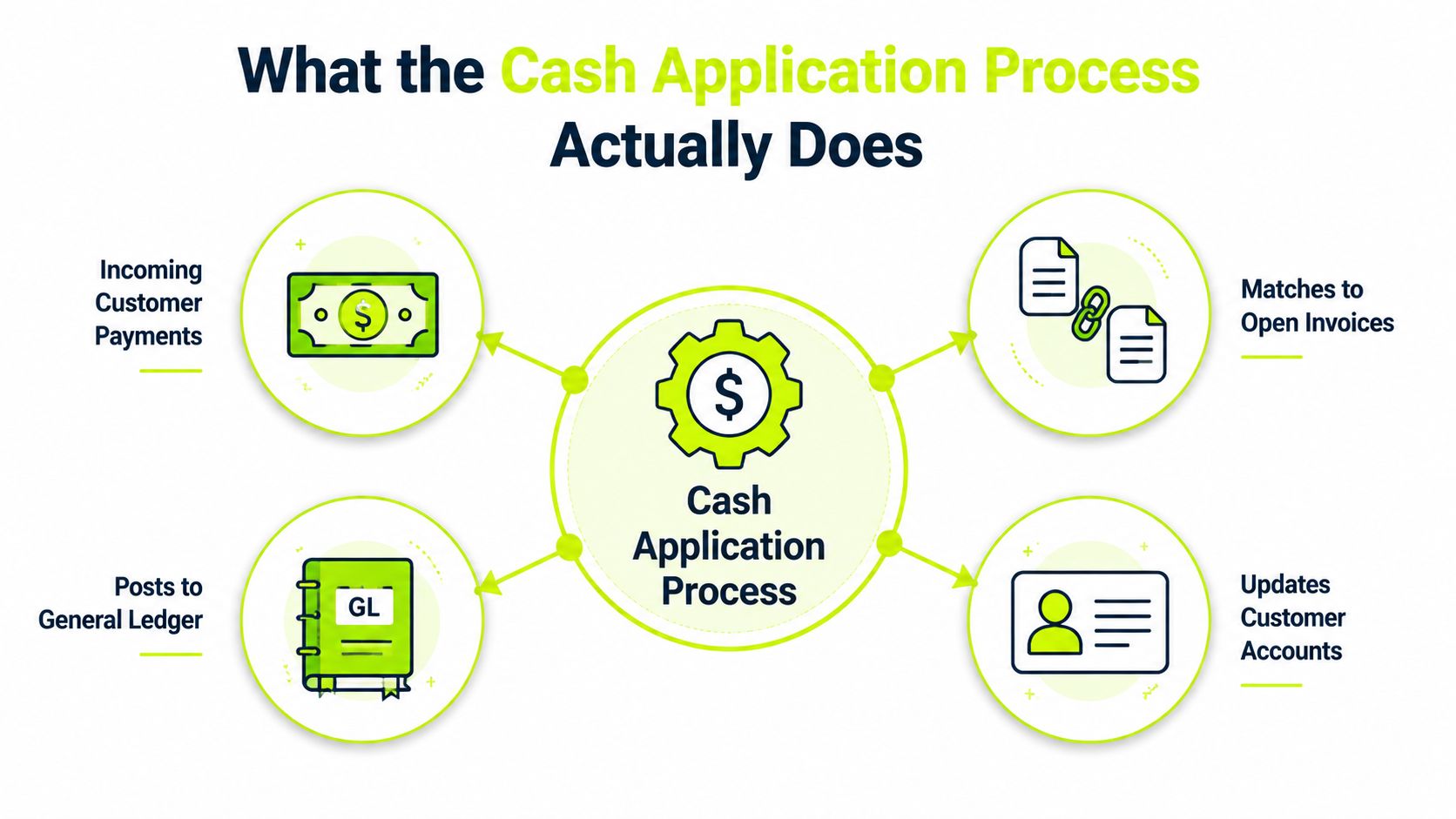
The cash application process takes incoming customer payments, matches them to open invoices, and posts the result to the general ledger. In practice, it is the point where money stops sitting in transit and becomes accounting reality the controller can rely on at close. That is why industry guidance focuses on straight-through processing rate and average time to apply cash, because those measures show how much work is automated and how quickly receipts reach the books. See the KPI framing in Billtrust's cash application KPI guide.
It's a control point, not clerical work
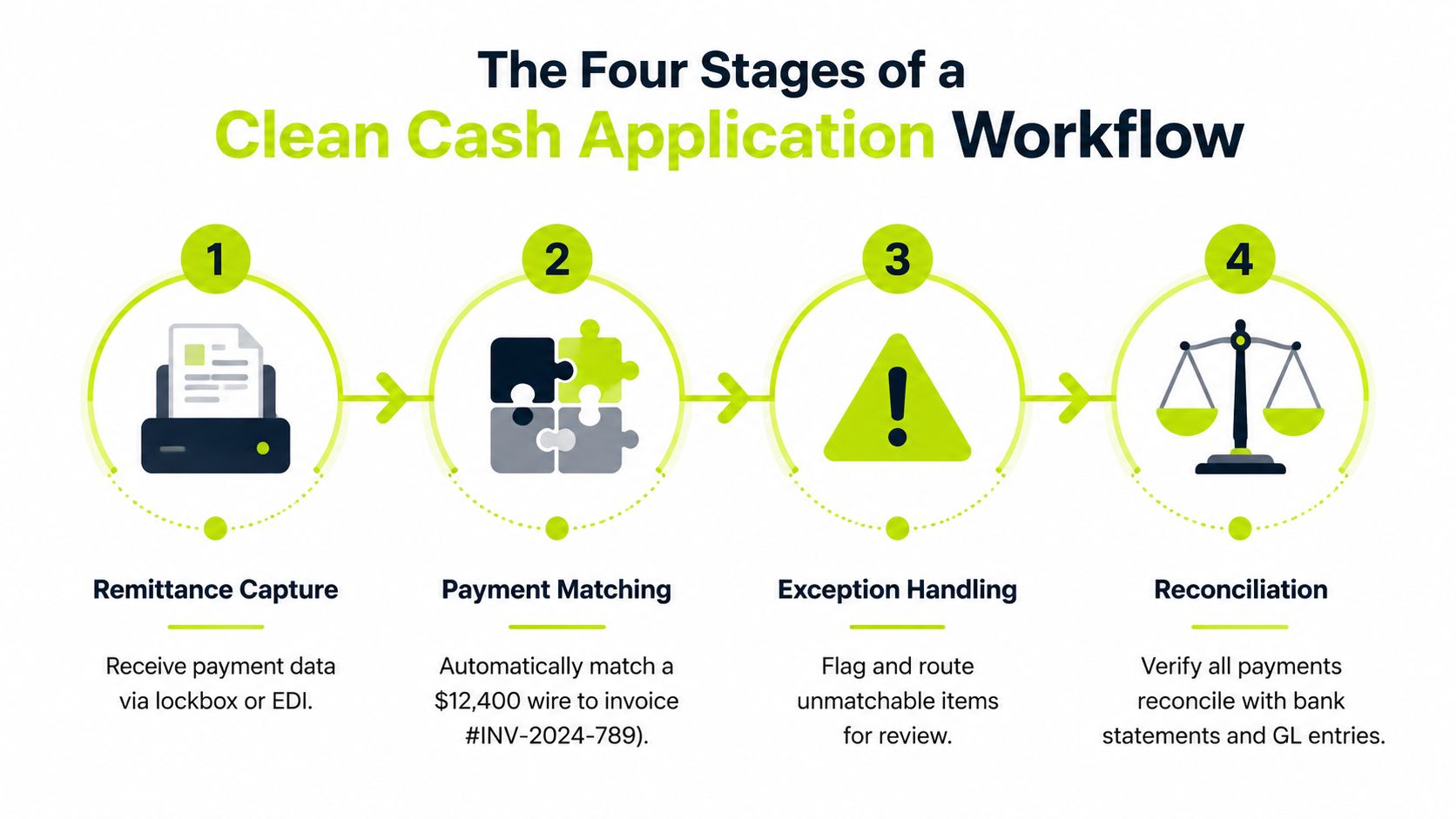
The work usually includes remittance capture, payment matching, exception handling, GL posting, and reconciliation. Each step carries a different control risk. Capture determines whether the team has enough data to work with. Matching determines whether the payment lands on the right open item. Posting determines whether the ledger is accurate. Reconciliation determines whether the books and bank still agree.
That is why this process sits at the center of accounts receivable automation. Faster application shortens the time between receipt and usable working capital, but speed only matters if the posting is defensible. A clean cash app desk does not just reduce labor, it keeps the cash forecast honest and the close easier to trust.
What's in scope and what isn't
Cash application is not invoicing, credit policy, or collections follow-up, although it affects all three. It starts after the customer pays and ends when the cash is posted, the exceptions are routed, and the balance is reconciled cleanly.
A practical boundary helps here. If the team is handling payment data, invoice-level matching, deduction review, or posting into the ERP, that belongs here. If the team is deciding whether to extend terms, issue the invoice, or escalate a delinquent account, that is a different control.
The fastest way to muddy the close is to let cash application behave like a catch-all bucket. Clear scope keeps the workflow measurable, and measurable workflows are easier to fix.
For firms that run QuickBooks AR automation setups, the logic is the same even if the system is lighter. The core question is whether the software can receive structured remittance, apply cash cleanly, and leave a trace the controller can trust at month end. For teams comparing process design with system controls, automated payment reconciliation guidance is a useful reference point.
The Four Stages of a Clean Cash Application Workflow
A clean workflow starts with the messy reality of how payments arrive. A customer may send one wire for several invoices, remittance may come in a separate email, and the payment note may be clearer than the bank detail, or not clear at all. That is normal, and it is why the process has to be controlled like a revenue-assurance step, not treated as a simple matching task.
1. Remittance capture
Remittance capture is the intake step. The source can be a check stub, an email attachment, a portal download, a bank feed, or a lockbox file. The core job is to normalize the payment details so the ERP has structured data to work with.
The control issue here is completeness. If invoice numbers, purchase order references, or account identifiers are not captured cleanly, the process falls back into manual research. That is where delays begin, and it is where unapplied cash starts to sit.
2. Payment matching
Matching is where the payment is tied to one invoice, or several invoices, based on amount, date, customer ID, account details, and invoice references. In a small desk, this can work by judgment. At volume, it has to work by logic and consistent rules.
A useful example is a $12,400 wire tied to several open invoices in one pass. If the remittance is structured, the system can match quickly. If the remittance is partial or inconsistent, the item moves into review. For a closer look at the reconciliation side of that flow, automated payment reconciliation is worth reading alongside the cash app process.
3. Exception handling
The hard work hides here. Short pays, overpayments, missing remittance, and deduction disputes all land here. These are the items that consume analyst hours because they require judgment, customer context, or additional research.
Many teams automate the front of the process and leave exceptions undocumented. That creates a fast lane for easy items and a bottleneck for everything else. A better model is to let automation handle routine matches, then route the edge cases to a controlled analyst queue with clear ownership and reason codes.
4. Reconciliation
Reconciliation closes the loop. The applied cash has to agree with the bank, the subledger, and the general ledger. If it does not, the payment may be matched in name only, but the accounting is still not clean.
Short rule: if a payment cannot reconcile, it has not really been applied.
A single workflow can be built around this sequence, but the bottleneck moves from firm to firm. Some desks lose time at capture, others at matching, and others at reconciliation. Automate the stage leaking the most hours rather than the one that looks most modern.
The KPIs That Tell You Cash Application Is Healthy
Most firms watch collections closely, but cash application often gets less discipline. That creates blind spots. Leadership may know cash came in, yet still miss how long it sat unapplied or how much work the team absorbed to post it. A useful companion to this scorecard is the broader AR view in Resolut's accounts receivable KPI guide.
Measure control, not activity
A healthy cash application desk is measured by straight-through processing rate, average time to apply cash, unapplied cash balance, unapplied items aging, and exception rate. Straight-through processing shows how much cash posts without intervention. Average time to apply cash shows how long receipts wait before they are usable in the books. Unapplied cash balance shows how much money is sitting on the sidelines. Unapplied items aging shows which receipts are starting to create clean-up work. Exception rate shows how much of the queue still needs human review.
The point is control. The most important question is whether the numbers help you reduce DSO and defend working capital. If cash sits unapplied, the forecast is stale and collections may chase accounts that are already paid. If exceptions pile up, analysts spend more time on research than on control.
Build a weekly scorecard
A simple weekly scorecard works well in a spreadsheet. Track daily receipts, how many were auto-applied, how many moved to exception review, and how long each bucket stayed open. Add the dollar value of unapplied cash so the team sees both volume and exposure.
That view tells you where the process is breaking. If applied cash lags incoming receipts, the issue may be remittance capture, posting discipline, or a queue that is too long to clear on time. If exceptions keep rising, the rules may not fit the customer base, or the team may be missing enough remittance detail to post cleanly.
What leaders should watch first
- Average time to apply cash: long dwell time usually means remittance capture or posting is slowing the process.
- Unapplied cash balance: if this keeps rising, the team has a control issue, not just a workload issue.
- Exception rate: if too many items need manual review, the matching rules are not tuned to the customer base.
- Straight-through processing rate: this is the clearest signal of whether automation is doing real work or just adding another screen.
Healthy cash application does not mean zero exceptions. It means the exceptions are visible, routed, and closed without distorting the close. It also means the scorecard is used as an operating tool, not a report that sits untouched until month end.
For teams that want a tighter link between cash application and the rest of receivables control, the weekly view should sit alongside an AR dashboard and the posting rules behind it, with RecurX automatic payments entry kept in mind where recurring receipts flow through the same controls.
Manual Versus Automated Cash Application
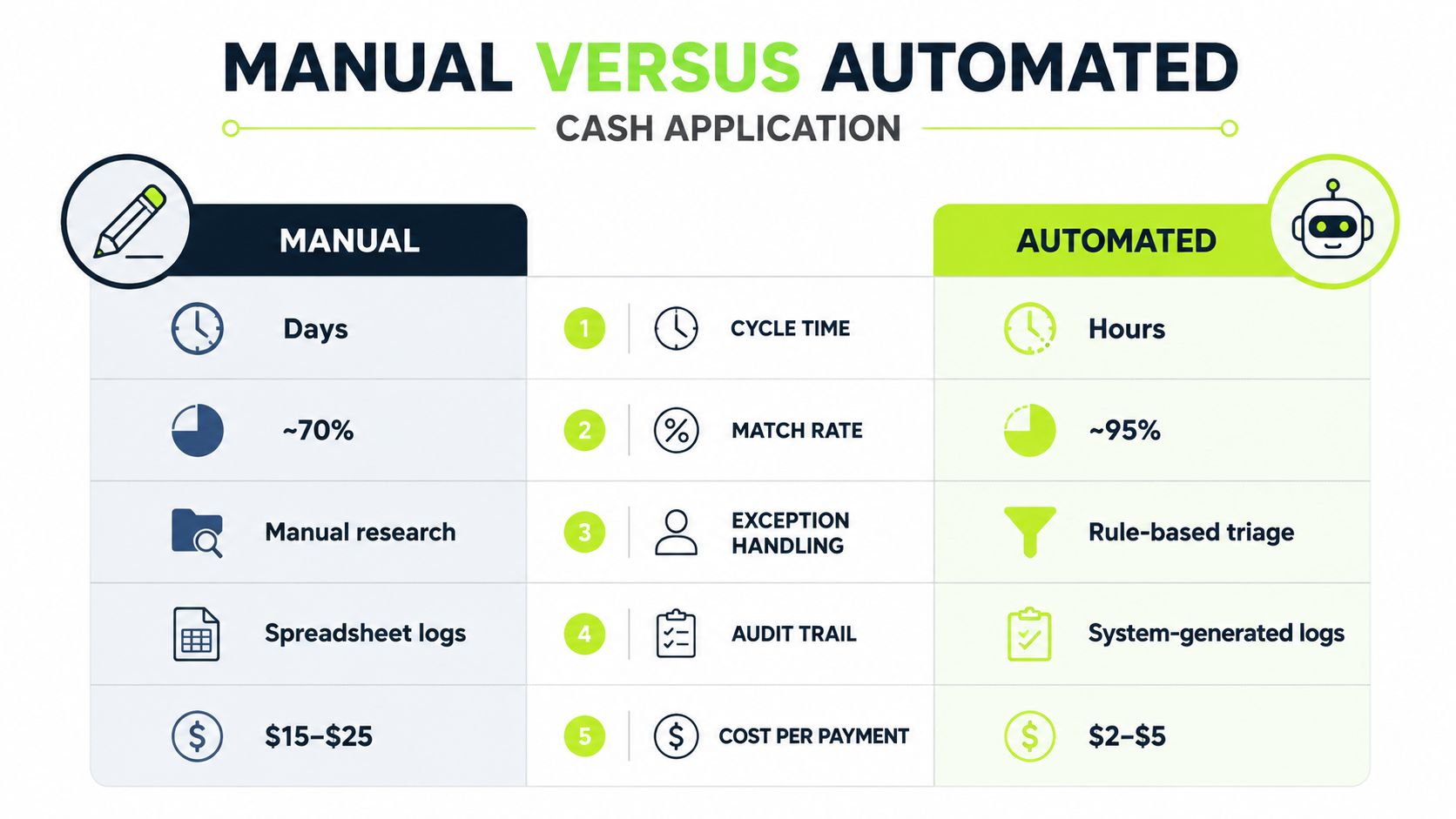
A cash application desk is not choosing between speed and care. It is choosing how much judgment to keep in the process, and where that judgment belongs. Manual work still matters when the receipt is messy, the remittance is incomplete, or the deduction needs a human who knows the customer history. It should not be the default for clean, repeatable items that can be controlled with rules.
What manual still does better
Manual processing handles exceptions that software should not guess at. A seasoned analyst can read a customer-specific shorthand, spot a deduction pattern that does not fit the template, and decide whether the item belongs in cash application, collections, or dispute resolution. That kind of judgment protects revenue when the input is incomplete.
Manual work also has a role during process change. If exception codes are still being defined, or the customer base is changing faster than the rules can be tuned, a human queue gives the team room to keep posting while the controls settle. That is a temporary operating choice, not a long-term model.
Manual work is the right backup, not the right default.
Where automation belongs first
Automation belongs where the process is repetitive, rule-driven, and high volume enough that human review adds cost without adding much control. That usually means clean remittance, standard payment references, and matching logic that can be trusted to post without a second look. It also means the team can see every exception instead of burying them in a general work queue.
A good starting point is to automate the items that create the most avoidable touches, then build from there. The goal is not to replace every analyst judgment. The goal is to keep analysts on the receipts that need a decision.
For teams planning that shift, Resolut's cash application automation guide is a useful reference for how to structure the change without turning the desk into a black box.
How a hybrid model should work
Hybrid cash application is the practical middle ground. Rules-based automation clears the standard payments, while analysts handle short pays, misapplied cash, and cases where the remittance does not line up with the invoice. That split preserves control and keeps the close from becoming a daily fire drill.
The model only works if the handoff is clear. Automated posting should route exceptions with enough context for someone to resolve them quickly, and manual review should feed patterns back into the rules. If the team keeps solving the same issue by hand, the process is telling you the rule set is incomplete.
For payment flows that already sit inside recurring schedules, RecurX automatic payments entry helps explain where routine posting ends and exception handling begins.
The decision framework
The question is not whether automation is better than manual work. It is whether a specific task needs human judgment to protect cash and revenue. If the answer is yes, keep it manual until the rule can be made reliable. If the answer is no, automate it and measure the exceptions instead of the touches.
That is the control view of cash application. It treats the process as revenue assurance, not clerical matching. The team should automate the steps that reduce leakage, tighten posting discipline, and surface exceptions early, while keeping manual review for the cases that still need a person at the desk.
Is Your Finance Operation Ready for Cash Application Automation
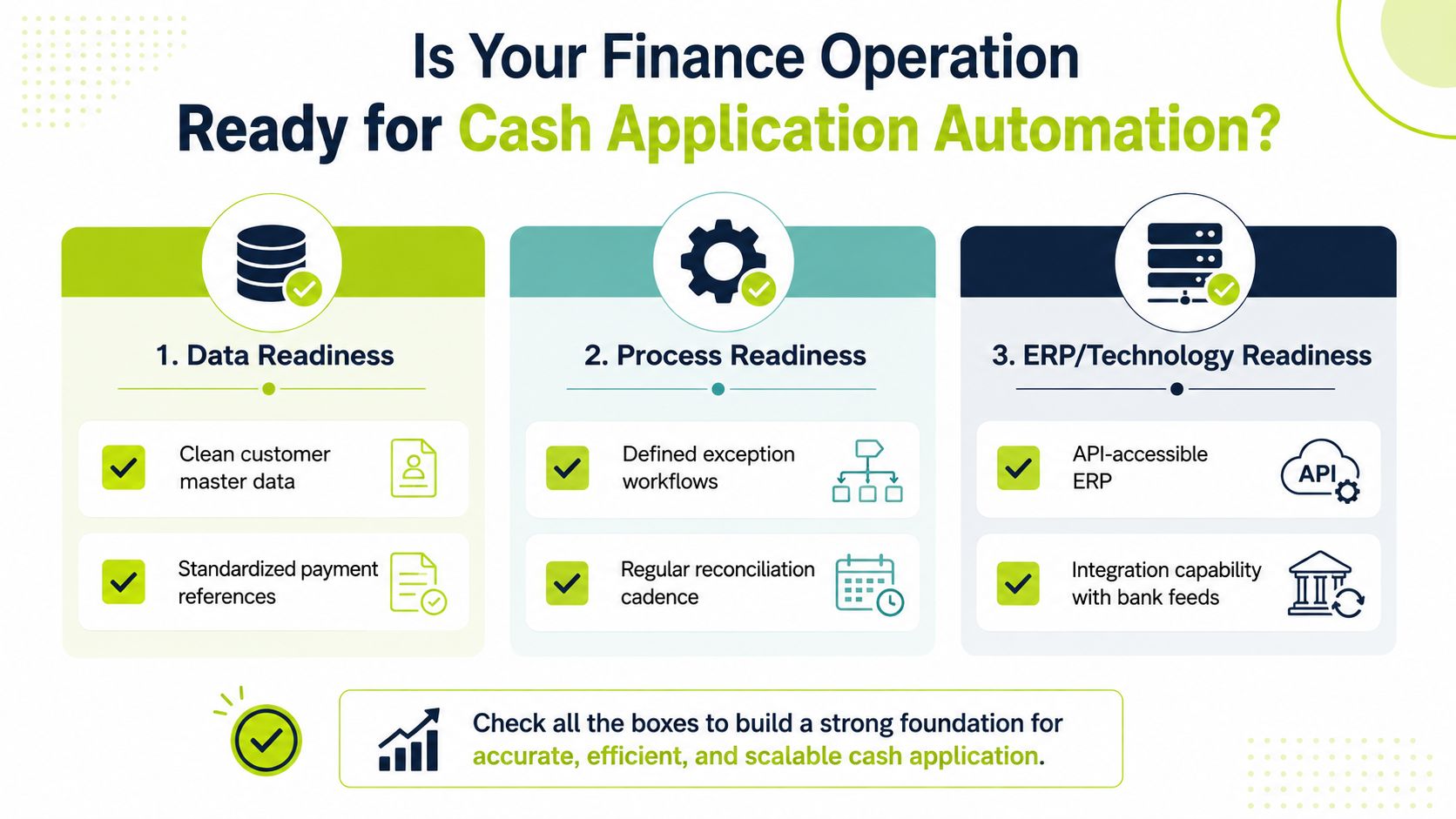
Automation works when the inputs are clean enough for the machine to trust. If the customer master is messy, remittance is scattered, and the ERP can't accept clean posting logic, the tool won't save the process. It may just expose the weaknesses faster.
Data readiness comes first
The data side needs invoice-level identifiers in customer payment instructions, structured remittance capture, and customer master data that doesn't create false mismatches. If the payment arrives with no usable reference, the system has less to work with and more to escalate. That's not a software failure. It's a data design issue.
Practical rule: standardize the reference you ask customers to send, or you'll keep paying analysts to reconstruct it later.
Process readiness matters just as much
The team needs documented exception categories, clear ownership between AR and collections, and a reconciliation cadence that people follow. If no one knows who closes a short pay or who reviews an unapplied item after three days, automation just accelerates confusion.
The best implementations also accept that rules need tuning. Matching logic should be reviewed, not worshipped. If the team never revisits thresholds, the system will drift out of alignment with the way customers really pay.
ERP readiness is where many projects stall
QuickBooks-heavy firms need the same discipline as larger NetSuite or SAP environments. The key question is whether the ERP can accept auto-posted entries cleanly and whether the bank feed can integrate without manual rekeying. If the system can't receive structured data, the cash app desk will keep exporting and importing its way back to the spreadsheet.
For the next 30 to 60 days, the strongest move is to close the gaps that block clean automation. Standardize payment references, define exception ownership, and confirm the ERP can accept structured posting. That's usually enough to tell whether a pilot will improve the process or digitize the mess.
Cash Application as a Finance Control
A payment that matches to the wrong invoice can still make the desk look busy while the books drift out of line. Cash application is a controls and revenue-assurance problem that touches the general ledger, bank reconciliation, the audit trail, and sometimes revenue recognition validation. That broader view appears in newer guidance from JPMorgan's cash application process guide, and it changes what finance should ask the process to prove.
A matched payment can still be wrong
A matched payment can create a false sense of collection progress when it lands on the wrong invoice. The customer looks current, the DSO view looks cleaner than it really is, and the collections team may move on to the wrong account. The books are active, but the signal is wrong.
A posted entry without a clear audit trail creates a different problem. If someone cannot explain how the cash was applied, the close gets slower and the year-end review gets harder. The audit question matters as much as the posting question.
The downstream effect is where the control lives
An unapplied cash item that ages is no longer just an AR issue. It becomes a collections issue because someone has to decide whether the customer owes money, whether the remittance is missing, or whether the payment was misapplied. Once aging starts to stretch, the problem has already moved beyond the original desk.
GL posting belongs inside the process rather than as a cleanup task at the end. If posting is treated like a separate chore, the process can look finished before the accounting is right. That is a bad trade in any month and a worse one at quarter end.
The best cash application process does not just move faster. It produces accounting that can survive a question from the controller, the CFO, or the auditor.
This control lens is especially useful for professional services firms. The margins are often tight enough that a few days of stale cash visibility can distort resource planning, vendor timing, or partner draws. The process does not need to be perfect. It needs to be trustworthy.
The ROI of Automating the Cash Application Process
A clean ROI case starts with the control gap, not the software. If payment posting is slow or inconsistent, finance spends time clearing exceptions, collections works from stale balances, and leadership makes decisions on an AR picture that is already out of date. Automation earns its keep when it reduces that delay, tightens the audit trail, and makes unapplied cash less likely to pile up.
The business case should be built from your own workflow, not from a generic promise of efficiency. Measure how long payments sit before they are applied, how often staff need to research remittance detail, how much time gets spent on exception handling, and how often the close has to absorb late cash cleanup. Those are the costs that automation can change.
A controller-grade ROI model usually separates three buckets. First is labor, which includes the time analysts spend reading remittances, matching short pays, and clearing unapplied items. Second is control risk, which shows up when cash is posted to the wrong customer, the wrong invoice, or the wrong period. Third is working capital, which improves when cash is visible sooner and the AR book reflects reality faster.
That framework is more useful than a simple headcount reduction story. In a small finance team, even a modest drop in manual review can free up enough time to protect the close, answer customer disputes faster, and stop rework from spilling into other priorities. In a larger operation, the value often comes from consistency, because a standard process creates fewer exceptions for collections, credit, and the general ledger to clean up later.
A good payback analysis also distinguishes routine payments from the messy ones. Straightforward items are where automation should do most of the work. Exceptions still need human review, but they should land in a queue with context, not in a stack of emails and spreadsheets. That split matters, because the fastest return usually comes from removing repetitive review, not from trying to force every payment through the same rule set.
For a practical business case, look at the cost of inaction. Unapplied cash that lingers makes the AR ledger harder to trust, slows down reconciliation, and forces the team to spend time on questions that should have been answered at the point of posting. If the current process already depends on manual triage, the ROI is not just labor saved. It is the reduction in cleanup work that follows a weak control process.
Billtrust's KPI guide is useful here because it ties cash application performance to measures finance can manage. Pair those KPIs with your own exception rates, write off patterns, and close-cycle pain points, then build the case around fewer errors, faster posting, and better cash visibility. That is the kind of ROI a CFO can defend.
Resolut fits that approach by automating the repetitive parts of AR for professional services while keeping finance in control of exceptions and review. If your team is still spending too much time on manual matching or late cleanup, a scoped pilot is a better test than a broad promise. It shows whether the process gets tighter, the audit trail gets clearer, and the month end gets easier to close.
If you want a cleaner close to month end, fewer unapplied items, and a cash app workflow your controller can trust, visit Resolut to see how it handles AR for professional services. It is built to automate the parts of the process that should not require manual rescue, while keeping finance in control of the exceptions.