E Invoice Software: A CFO's Guide to Cash Flow
Explore e invoice software from a finance operator's view. Reduce DSO, improve cash flow, & select AR automation for your firm.
Your team closes the month. WIP is up, billings went out, and cash still feels late.
Not because clients refuse to pay. More often, the invoice was sent as a PDF, landed in the wrong inbox, missed a required PO field, got rekeyed badly on the client side, or sat untouched because nobody followed up consistently. Then your AR team burns time on status emails instead of collecting cash.
That's why I treat e invoice software as a finance control system, not a document tool.
For a professional services firm, the value isn't “going paperless.” The value is tighter billing operations, fewer preventable disputes, better accounts receivable automation, and more predictable cash. If you want to reduce DSO, improve cash flow, and stop relying on heroic collections work, this belongs on the CFO agenda.
Why E-Invoicing Is Now a CFO-Level Priority
Most firms in the $3M to $50M range don't have an invoicing problem. They have an execution problem.
Invoices go out late because time entries aren't clean. PDFs get generated, but the client wants data in a specific format. Follow-up depends on whoever remembers. Cash application lags because remittance detail is messy. That's not a billing issue. That's weak AR control.
E invoice software fixes the handoff between billing, client receipt, and collection. That handoff is where cash slows down.
The broader market confirms this isn't a niche workflow anymore. The global e-invoicing market was valued at USD 7.97 billion in 2024 and is projected to reach USD 30.78 billion by 2033, growing at a 16.2% CAGR, according to Market Data Forecast's e-invoicing market analysis. The same source says e-invoicing now manages more than ten crore business transactions yearly.
That matters because finance teams don't need another point solution. They need infrastructure that reduces preventable friction across order-to-cash.
What this changes for a services firm
If you bill retainers, progress invoices, recurring fees, or project milestones, small process errors delay cash fast. One wrong matter code. One missing approver. One invoice sent to AP as a PDF when the client expects structured data. One collector who follows up differently from everyone else.
E-invoicing creates discipline in the flow:
- Cleaner invoice creation: Billing data gets standardized before the invoice leaves your system.
- Faster client acceptance: Invoices arrive in a format the client can process.
- Better downstream collections: Your AR team spends less time proving an invoice was received.
- Stronger auditability: You can see status, exceptions, and handoff failures earlier.
Practical rule: If your team still treats invoicing as “send PDF and hope AP processes it,” your AR process is underbuilt.
A lot of firms still think e-invoicing is only relevant for large enterprises or cross-border compliance. That's too narrow. For professional services, it's part of cash discipline. It sits next to collections cadence, client payment experience, and cash application.
If you need a basic grounding first, this short explainer on what e-invoicing means in practice is a useful starting point.
Beyond the PDF What E-Invoice Software Actually Does
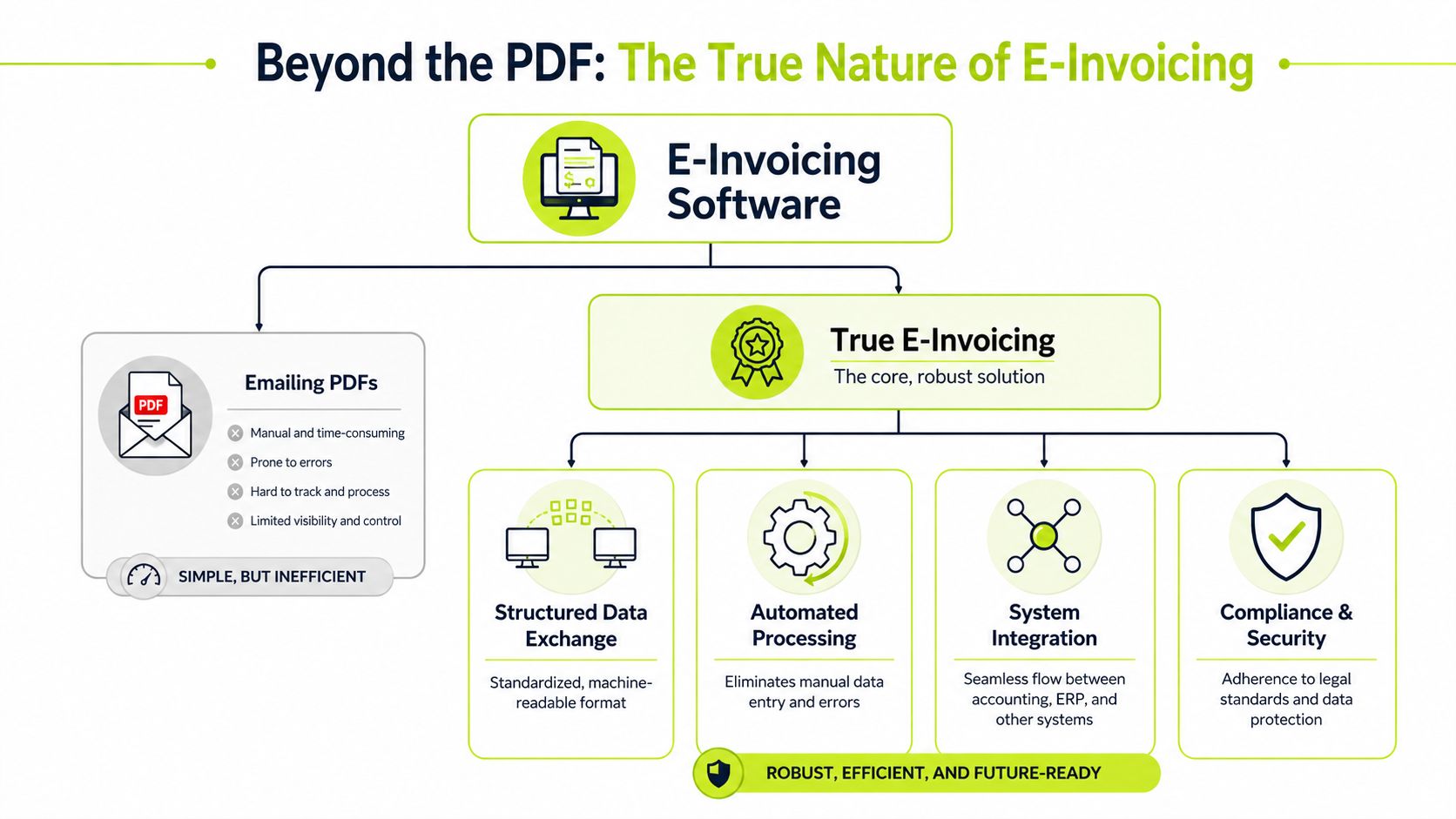
A PDF invoice is a picture of the bill.
A true e-invoice is the data itself.
That distinction matters more than most finance teams realize. If you email a PDF, the buyer's AP team or software often has to read it, extract fields, validate it, and enter it into their process. Even when OCR helps, you're still working around a document. With real e invoicing, the invoice is sent as structured, machine-readable data.
The formats that matter
OpenText explains that e-invoice software relies on standards such as XML, EDI, UBL, Peppol BIS, Factur-X, and XRechnung, so invoice fields can be validated and processed automatically by ERP and AP systems. It also notes that structured fields like supplier identity, buyer details, line items, taxes, and payment terms can be checked before posting, which reduces manual rekeying and exception handling in AP workflows. See OpenText's overview of how structured e-invoicing works.
For a CFO, the practical takeaway is simple. Structured data travels better than documents.
Why PDF is the wrong mental model
Think of it this way:
Format | What it really is | Operational consequence |
|---|---|---|
PDF invoice | A visual representation of billing data | Someone or some tool still has to interpret it |
True e-invoice | A standardized data file | Systems can validate, route, and process it automatically |
That's why firms trying to get paid faster with invoicing software should look beyond branded templates and reminder emails. The key question is whether the invoice can move as usable data, not just look professional in a client inbox.
What machine-readable means for AR
For your AR team, machine-readable means fewer avoidable delays:
- Supplier and buyer fields are explicit. That cuts down on rejected invoices caused by bad entity data.
- Line items and tax fields can be validated. Errors get caught before the buyer disputes them.
- Status becomes more visible. You have a cleaner trail of submission, receipt, and processing.
- Manual entry drops. Your team isn't spending time fixing data that shouldn't have broken in the first place.
A polished PDF can still be operationally weak. Finance should care more about acceptance and processability than design.
If your current process is “generate in QuickBooks, email from Outlook, log follow-ups in a spreadsheet,” you don't have e-invoicing. You have digital paperwork.
Core Software Features That Directly Impact Cash Flow
Most software demos bury the core issue. They talk about templates, portals, and dashboards. Those matter, but they don't move cash unless they improve the mechanics of AR.
The right e invoice software should shorten the path from approved billing to applied cash. If it doesn't do that, it's cosmetic.
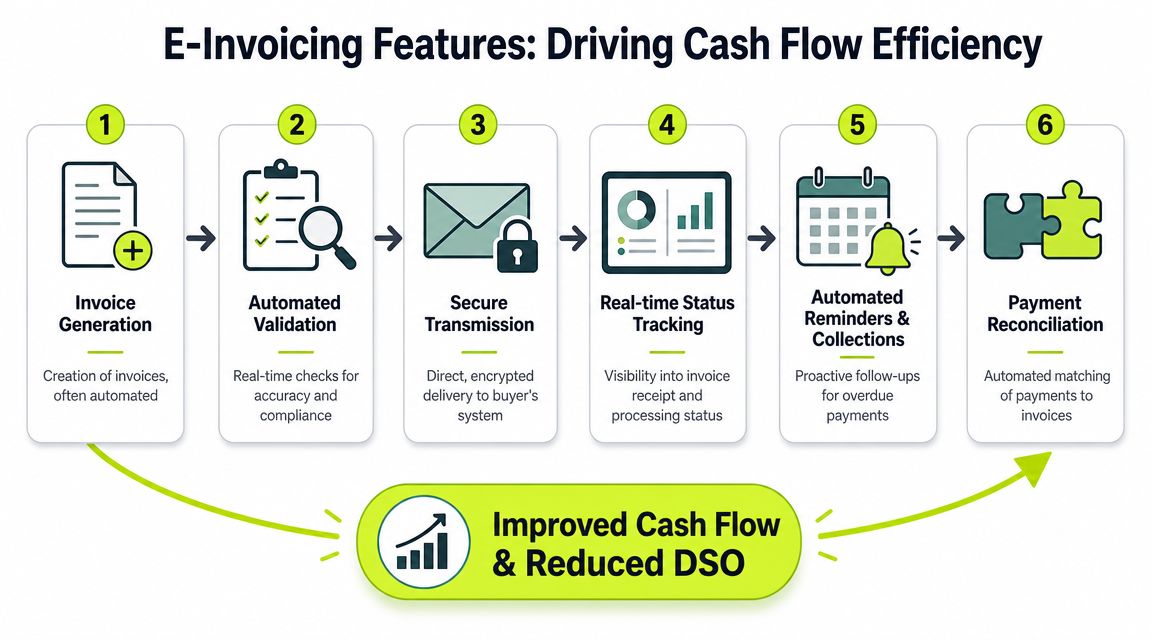
Start with integration, not appearance
If the platform doesn't connect cleanly to your accounting stack, you'll create more reconciliation work than you remove. For many firms, that means QuickBooks AR automation, a PSA system, or both.
Before: billing exports live in CSV files, invoices are reworked manually, and collections notes sit outside the ledger.
After: invoice status, payment activity, and customer communications stay tied to the same record.
That's the foundation for real accounts receivable automation.
The features that actually matter
Here's the short list I'd push on in a buying process.
- ERP and accounting integration Your invoice data should sync without manual re-entry. If the platform can't keep customer records, invoice status, and payment data aligned, your Controller inherits cleanup work.
- Workflow automation for reminders and escalations Many firms finally reduce DSO due to this functionality. Not because the software is magical, but because every invoice gets a consistent follow-up path. No more collector-by-collector improvisation.
- Client-facing payment options The easier it is for the client to pay, the fewer delays your team has to chase. Good systems reduce friction between invoice receipt and settlement.
- Automated cash application A payment isn't useful until it's matched and posted correctly. This is one of the biggest capacity wins for lean finance teams.
- Exception handling and status tracking You need to know whether an invoice was delivered, accepted, disputed, or stalled. Otherwise your collectors operate blind.
Where AI AR automation helps
AI AR automation is useful when it makes collections more consistent, not when it adds novelty.
A practical use case is prioritization. Which invoices need a reminder now, which accounts are drifting into risk, which clients respond better to a softer tone, and which require escalation. Another is orchestration. One workflow coordinates email, tasking, payment prompts, and handoff to a human collector.
That's very different from dumping a chatbot into receivables and calling it innovation.
Operator view: Automation should remove variance from collections. The goal is reliable execution, not clever software.
A simple before and after lens
Area | Before | After |
|---|---|---|
Invoice delivery | PDF emailed manually | Structured or automated delivery tied to workflow |
Follow-up | Inconsistent reminders | Scheduled collections sequences |
Payment collection | Client has to ask how to pay | Payment options are embedded in the process |
Reconciliation | Team matches cash manually | Cash application is automated or assisted |
Visibility | AR aging tells you what is late | Status data tells you why it is late |
A lot of firms looking for AR software for professional services really need one system that connects billing, reminders, and payment handling without sacrificing client tone. That's where tools differ.
Some teams use invoice generation inside QuickBooks and layer on collections tools. Others want a broader operating system. For example, Resolut handles invoice upload, automated invoice-triggered follow-up, payment workflows, and cash application in one AR environment. That matters if you want tighter control from invoice creation through collection, not just another reminder tool.
This walkthrough gives a decent visual overview of where e-invoicing fits inside finance operations:
Nice-to-have versus necessary
Nice-to-have is branded invoice design.
Necessary is a system that helps your team invoice accurately, follow up automatically, accept payment cleanly, and reconcile without heroics.
If you're evaluating software through a cash flow lens, keep asking one question: Does this reduce manual AR effort while improving collection control? If the answer is vague, move on.
Navigating Compliance and Interoperability Mandates
Compliance matters, but most vendors frame it too narrowly.
The core issue isn't whether a platform can produce an e-invoice. The issue is whether the invoice can move through the right network, in the right format, to the right recipient, without creating another silo your team has to maintain.
Treat networks like universal adapters
In practical terms, standards and networks act like adapters between systems. Your software may not match the buyer's stack, but the network and format rules make exchange possible.
That's why interoperability matters more than a glossy product demo. If your clients use different AP systems, procurement workflows, or network requirements, your AR process only scales if your invoicing layer can connect cleanly across that variation.
A useful adjacent read on engineering for regulated environments is this piece on navigating compliance in software development. The same principle applies here. Build around durable rules and interoperability, not one-off exceptions.
The U.S. is still messy
Many articles get lazy by implying e-invoicing is standardized already. It isn't.
Storecove notes that the U.S. market uses a four-corner model similar to Peppol, but it remains fragmented, with more than 250 service providers and 15+ invoice formats. Their overview of U.S. e-invoicing adoption and interoperability makes the core point clearly: buyers should ask whether software connects into an interoperable network, not just whether it can send invoices.
For CFOs, that changes vendor selection.
You're not just buying invoice output. You're buying connectivity and future flexibility.
Questions worth asking vendors
- Which networks do you connect to? Don't settle for “we support e-invoicing” as an answer.
- How do you handle format variation? Especially if enterprise clients impose different requirements.
- What happens when a client changes AP workflow? Your team shouldn't need a mini-implementation every time.
- Can you support straight-through processing? If not, you'll keep absorbing manual exceptions. This primer on straight-through processing in finance operations is worth sharing with your team.
If a vendor's version of compliance depends on custom work for every major client, you're buying future admin.
That matters even more for professional services firms. You may not be invoicing across dozens of countries, but you are dealing with varied client requirements, procurement systems, and approval paths. Interoperability is what keeps those differences from overwhelming a lean finance team.
A Vendor Evaluation Checklist for Professional Services
Most software evaluations go off track because the demo is built for generic invoicing. Professional services firms need a tighter filter.
Your billing model is different. You may invoice retainers, milestones, recurring fees, pass-through expenses, or blended project work. You also need client communication to stay firm but professional. That means your shortlist should be built around AR execution, not just invoice generation.
Use this checklist, not the vendor's slide deck
Criterion | What to Look For | Why It Matters |
|---|---|---|
Accounting integration | Clean sync with QuickBooks and your general ledger workflow | Prevents duplicate entry and reconciliation delays |
Billing flexibility | Support for recurring invoices, milestone billing, retainers, and adjustments | Services firms rarely use one simple invoice pattern |
Structured invoice capability | Ability to send machine-readable invoices where needed | Improves client-side processing and reduces preventable disputes |
Collections automation | Configurable reminder sequences, escalation paths, and tasking | Creates consistent follow-up and supports efforts to reduce DSO |
Payment experience | Branded portal, clear payment links, low-friction client experience | Helps improve cash flow without making clients work harder |
Cash application | Automated or assisted matching of incoming payments | Frees finance capacity and closes the loop faster |
Status visibility | Receipt, dispute, and payment tracking tied to invoice records | Gives Controllers better operational control |
Client communication controls | Tone options, approval workflows, and human override | Protects relationships with key accounts |
Exception management | Easy handling of short pays, disputes, and missing approvals | Keeps edge cases from clogging the whole AR process |
Implementation burden | Fast deployment, low maintenance, minimal custom mapping | Small teams can't support a heavy admin layer |
What I would reject quickly
I'd pass on any tool that:
- Lives outside your accounting process and forces manual exports.
- Makes collections robotic with no room for human review on sensitive accounts.
- Looks strong on invoicing but weak on payment reconciliation.
- Requires ongoing vendor services for normal workflow changes.
Those are warning signs that the product may automate one step while making the rest of AR harder.
What matters most for a lean finance team
For a professional services firm, the best platform usually isn't the one with the longest feature list. It's the one that fits your operating reality:
- Your team is small. The system must reduce touch time.
- Your clients vary. The workflow must handle different billing and payment expectations.
- Your brand matters. Collections can't sound like a debt buyer.
- Your accounting stack is already set. Good software should fit into it, not force a redesign.
If your team is comparing broader tools, this guide to invoice automation software for finance teams is a useful companion to the checklist above.
The wrong AR tool gives you more dashboards. The right one gives your team fewer manual decisions.
A Phased Implementation and Pitfalls to Avoid
Don't roll this out all at once.
That's the fastest way to create confusion in billing, frustrate clients, and dump cleanup work back on finance. A phased implementation is the right move because invoicing touches data quality, client communication, payment workflows, and accounting controls at the same time.
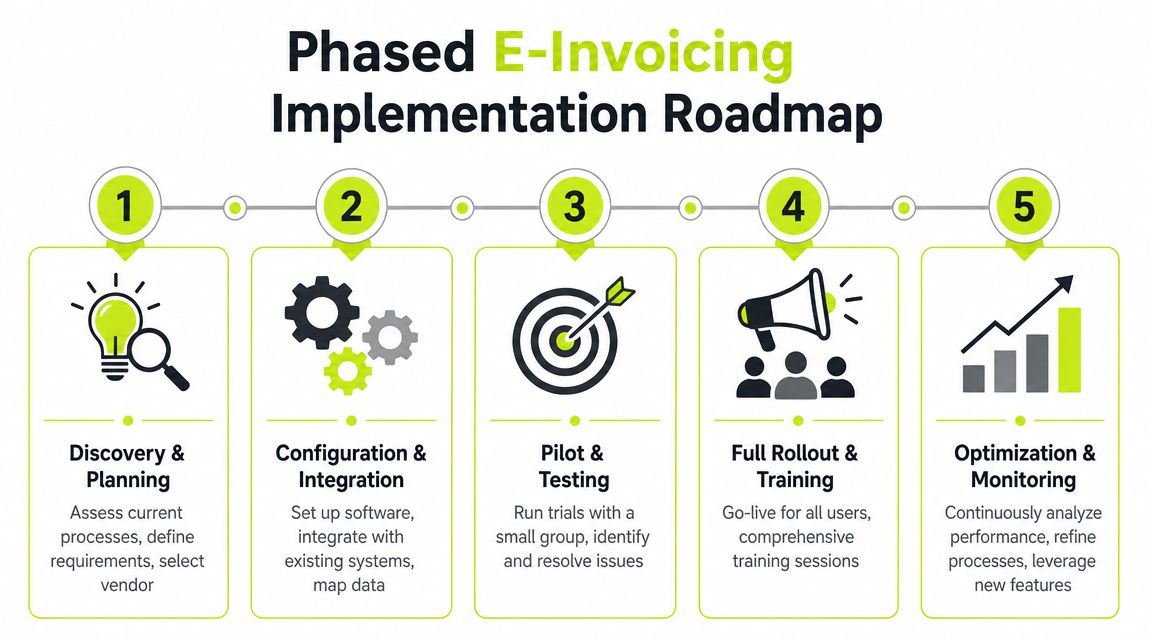
Roll out in controlled phases
Start with a narrow slice of invoices and a handful of cooperative clients. That gives your team room to fix data mapping, approval routing, and reminder timing before volume goes up.
A practical sequence looks like this:
- Clean the source data Fix customer records, billing contacts, payment terms, and invoice fields first.
- Integrate one core system Usually that's QuickBooks or your accounting platform. Don't connect five tools on day one.
- Pilot with stable clients Pick accounts with predictable billing and responsive contacts.
- Train finance and account managers Collections tone, dispute routing, and exception handling should be agreed before rollout.
- Expand by client segment Move from simple recurring invoices to more complex project billing after the process is stable.
The biggest mistake to avoid
Thomson Reuters describes a common failure as the “point-to-point trap”. That's when firms create custom e-invoicing connections for each country or major client, adding technical debt and slowing rollout instead of simplifying it. Their article on how fragmented e-invoicing stalls growth is especially relevant if your client base is diverse.
Even if you're not multinational, the lesson holds. If every major client needs a custom billing path, your team doesn't have a scalable AR operation.
Keep AP and AR aligned
One reason implementations fail is that finance leaders treat e-invoicing as an AR-only decision. It isn't. Your AP process teaches you what good automation looks like on the other side: structured intake, validation, approval logic, and exception control.
If you want a parallel view from payables, this guide to AP software for finance leaders is useful because it highlights many of the same operating principles from the buyer side.
Build the process once in a way your team can support. Don't let every large client negotiate a new workflow.
What success looks like
Success isn't “the software is live.”
Success is simpler:
- invoices leave the system cleanly
- clients receive them in a usable format
- reminders fire on schedule
- disputes surface early
- payments get applied without manual scramble
That's when e invoice software starts acting like finance infrastructure instead of an IT project.
Answering Your Team's Top Questions
Is emailing a PDF the same as e-invoicing
No. A PDF is a document. A true e-invoice is structured data that systems can validate and process automatically. If your client still has to read, extract, or re-enter the information, you haven't solved the core AR friction.
Will clients push back on a new invoice process
Some will, especially if they're used to informal billing habits. Keep the rollout selective at first, explain the operational benefit, and give key accounts a human contact. Most resistance drops when invoices are clearer, easier to approve, and easier to pay.
Can this work with QuickBooks
Yes, if you choose software that treats QuickBooks as the accounting core and extends it with workflow, collections, and payment controls. That's where QuickBooks AR automation becomes useful. Don't force QuickBooks to do work it wasn't designed to do on its own.
Do we need full AI AR automation
No. You need practical automation. Start with invoice-triggered reminders, status visibility, and cash application. Add AI where it improves prioritization, messaging, or escalation logic. If the tool can't improve daily collections execution, the AI label doesn't matter.
What should we optimize first if cash is already tight
Fix invoice quality and follow-up consistency first. Late cash often starts with bad billing inputs and uneven collections cadence. Once those are under control, layer in payment experience and automated reconciliation.
Resolut automates AR for professional services with consistent workflows, accurate follow-up, and a human touch where it counts. If you want tighter billing control without making client relationships feel mechanical, it's built for that operating reality.