Human in the Loop Automation: A CFO’s Guide to AR Control
Learn how human in the loop automation transforms AR. A guide for CFOs on benefits, risks, KPIs, and implementation to improve cash flow and reduce DSO.
An overdue account gets the same automated reminder as every other account. The language is too blunt, and a client who pays on time every quarter starts to feel like they've been treated like a delinquent. In professional services, that mistake does more than slow collection. It can strain the relationship that drives the next engagement.
That is why human in the loop automation matters in AR. It keeps automation usable in real finance work by putting routine activity on the system and judgment on the finance team. The broader market reflects that shift. The global human review and AI oversight services market is projected to reach $14.8 billion by 2028, up from $4.2 billion in 2023, and McKinsey's 2025 survey found 67% of organizations with mature AI deployments have formalized HITL review for their highest-risk outputs, according to Stealth Agents' market summary.
For firms using accounts receivables automation, the primary issue is control. Cash collection needs discipline, but it also needs room for exceptions, dispute handling, and relationship management. A system that can sort the routine from the risky gives finance teams a cleaner operating model.
The workflow should be judged on how it protects cash flow and prevents avoidable errors. Resolut's AI for debt collection shows the same principle in practice, where automation handles repeatable steps and people handle the cases that need context, approval, or override.
A transport management system follows a similar logic. It does not replace judgment in logistics. It routes exceptions with more discipline, which is why Haulier.AI's TMS overview is a useful parallel for finance leaders who care about process control.
Automation Without Losing Control
A collections sequence can be efficient and still damage control. One wrong reminder to a strategic customer, a disputed invoice, or an account tied to renewal risk creates extra cleanup for finance and more friction in the collection process. Controllers see that cost immediately, because the team spends time fixing the workflow instead of managing cash.
Human in the loop automation keeps the routine work in software and the judgment calls with people. That is the practical fit for accounts receivable automation, because most invoices need standard follow-up while a smaller set needs context, nuance, and a person who can read the relationship before anything goes out. The control point matters more than the promise of speed. A system that sorts routine accounts from exceptions gives finance a cleaner operating model, which is the same reason this AR automation guide is useful for teams trying to tighten the process.
The practical definition that matters in finance
HITL is a workflow, not a vague review step. The system acts first, checks confidence and risk, and then routes only the cases that need review, approval, correction, or override, as described in Balto's overview of human in the loop automation. That structure matters because finance teams need throughput on routine items and accountability on edge cases.
For CFOs and Controllers, the test is straightforward. If a platform cannot show where the human enters the process, what the human can change, and what happens after the decision, control is weak. It is just software with a cleaner interface.
Practical rule: if the system cannot explain why a task was routed to a reviewer, the reviewer ends up serving as the audit trail instead of the decision maker.
The same control logic shows up in other operational systems. If you want a plain-language comparison of how workflow automation becomes operational rather than theoretical, Haulier.AI's TMS overview is a useful reference point for how finance teams organize the work.
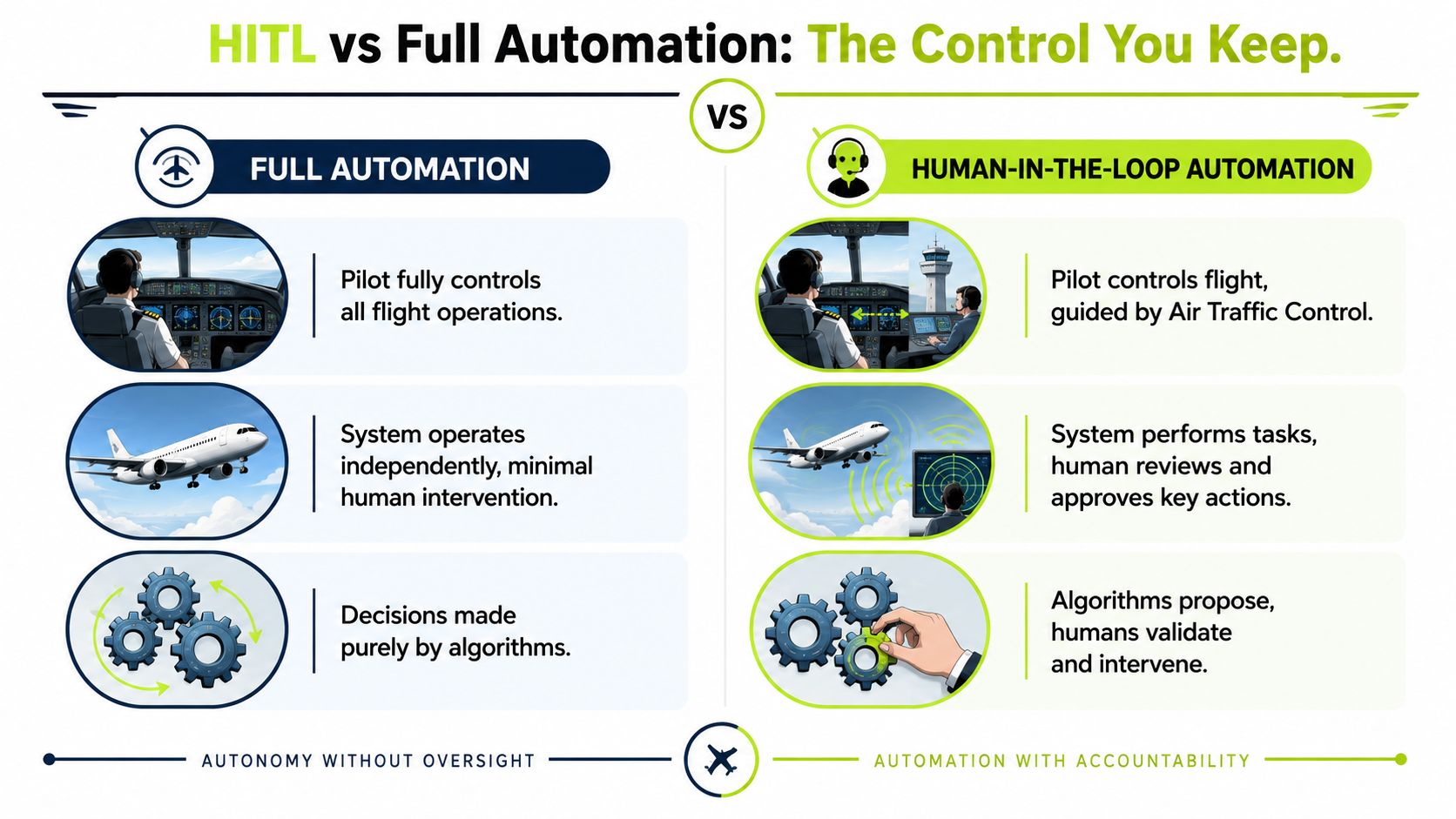
HITL vs Full Automation The Control You Keep
AR teams usually choose between two operating models. Full automation runs straight through the workflow on preset rules. Human in the loop automation keeps a person in the path for exceptions, approvals, and overrides that affect cash flow and customer relationships.
What changes, and what stays in your hands
Full automation depends on preset logic and keeps moving until it hits a rule it cannot handle. That can be fine for repetitive work, but AR rarely stays that simple. A disputed line item, a VIP client, or a legal escalation needs judgment, not just throughput.
HITL keeps the machine doing the repetitive part. It drafts the reminder, scores the account, flags the exception, and organizes the case. The finance team still controls the decisions that affect collections timing, customer treatment, and auditability.
The practical goal is to make routine work disappear from the queue while keeping exceptions visible and deliberate.
That distinction matters when teams compare AI AR automation or QuickBooks AR automation add-ons. A tool can be fast and still miss the point where control matters most. If the workflow hides why an account escalated, or if the reviewer cannot override the machine cleanly, the system merely shifts work without really protecting cash flow.
For a direct look at how exception handling fits collections work, this guide on AI for debt collection is a useful companion to the control model. For teams comparing systems that must keep both fiat and crypto payments in view, Find the top business crypto wallet helps frame the operational trade-offs.
Evaluating the Benefits and Risks of HITL
The main benefit finance leaders want is straightforward, improve cash flow without adding headcount. In AR, that usually means more consistent follow-up, fewer invoices left untouched, and a cleaner path to reduce DSO. It also means better client treatment, because the system can keep routine reminders moving while a person handles the sensitive accounts that need judgment.
That balance matters in professional services. A partner-led firm cannot afford collections that sound like a call center script. The point of HITL is to keep the tone aligned with the relationship, especially when the invoice is large, the project had scope changes, or the client already pushed back once.
Where review helps, and where it can hurt
The hidden risk is that human review can become ceremonial. A reviewer sees too many cases, moves too quickly, and starts approving whatever the system suggests. That is not oversight, it is noise with a sign-off attached.
The caution is not theoretical. A 2024 study published in PLOS ONE found that while inserting humans into automated decision-making increased user uptake, it instead decreased average decision accuracy when monitors made adjustments. Finance teams need to respect that trade-off. A human loop only improves the process if the human has real authority, clear rules, and enough context to change the outcome correctly.
For teams designing risk controls, the right framing is close to the guidance in managing AI risks for SaaS products. The common thread is the same. Review helps when it is specific, meaningful, and traceable. If your reviewers are too detached from the decision, they will rubber-stamp. If they are overloaded, they will slow the queue and still miss edge cases.
The financial upside is real, but so is the operational discipline required to get it. HITL is not a safety blanket. It is a control system, and control systems have to be designed, staffed, and audited like any other finance process.
Practical HITL Use Cases in Accounts Receivable
The easiest way to understand AR software for professional services is to follow the work, not the marketing copy. In a live finance team, the machine should do the repetitive parts, and the human should step in where judgment affects cash, client trust, or legal exposure.
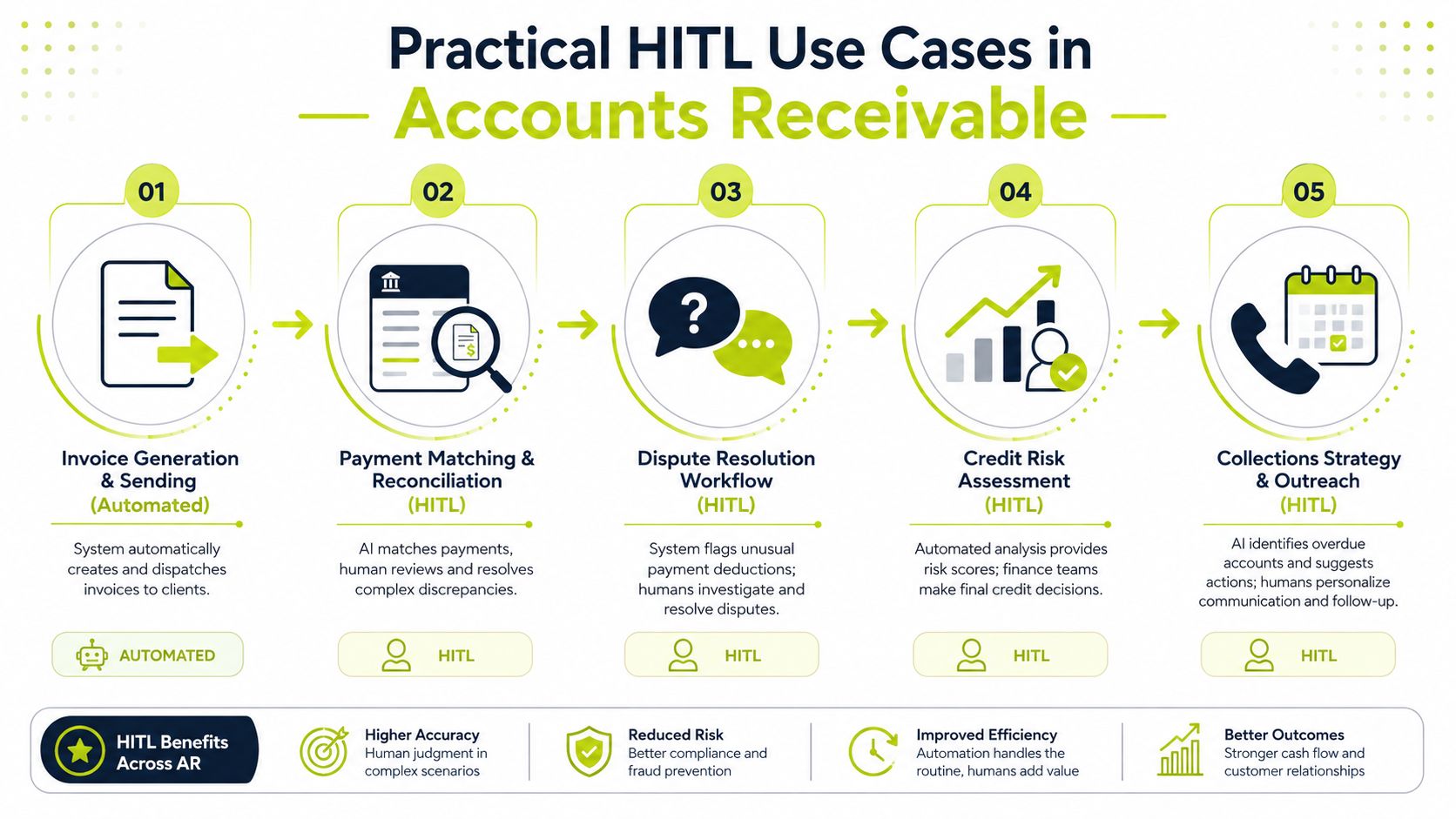
Credit risk and new customer onboarding
A new client comes in with thin payment history and a large first engagement. The system can score the profile, compare it to your policy, and suggest a credit limit. The finance leader still approves the final limit, because the model doesn't know the strategic value of the account, the sales commitment behind it, or the reputational cost of being wrong.
Collections outreach on sensitive accounts
Routine reminder sequences are where automation earns its keep. The platform drafts the message, schedules the send, and routes the low-risk cases automatically. A team member reviews high-value or sensitive accounts, then personalizes the note so it sounds like your firm, not a bot.
Dispute handling with full context
Most collection delays aren't about unwillingness to pay, they're about unresolved disagreement. Good automation gathers the invoice, email thread, contract, and any prior notes into one file. The human then resolves the nuance, because the issue may be about scope, timing, or an internal approval process on the client side.
Legal escalation with final authority
When an account meets the predefined criteria for legal action, the system can flag it and prepare the file. The controller still makes the final decision to proceed. That's the right split, because legal escalation is not a mechanical choice. It affects recovery, reputation, and the way future clients perceive your firm.
For teams evaluating tooling around payments and treasury, even categories outside AR can help sharpen the vendor lens. A roundup like Find the top business crypto wallet isn't about collections itself, but it shows how much judgment still matters when a financial workflow touches multiple rails and exceptions.
Operational note: if a workflow can't separate standard follow-up from strategic-account review, it's not really automation. It's a queue with a shorter name.
Implementation Patterns for Finance Teams
The cleanest implementations usually separate co-pilot and autopilot behavior. In co-pilot mode, the human works alongside the system, reviewing drafts, confirming next actions, and shaping the tone before anything goes out. In autopilot mode, the system runs the standard path and only interrupts when the case crosses a threshold.
That threshold logic is where teams win or lose control. A strong setup routes based on invoice value, negative sentiment in a reply, a dispute flag, or the account's stage in the dunning cycle. A weak setup just sends everything to a reviewer and calls it governance.
What the workflow should expose
The system needs to surface the reason for escalation, not just the fact that something was escalated. That can be a confidence score, a rule violation, or a blocker signal. The point is to make the decision path visible so the reviewer knows whether to approve, correct, or stop the flow.
Good routing preserves speed on routine work and slows down only the cases that deserve human judgment.
That's also why interface design matters so much in QuickBooks AR automation and other finance stacks. If the reviewer has to hunt for context, they'll move too slowly. If they see too much, they'll ignore what matters. The best tools make the exception obvious and the next step unambiguous.
The screenshot below gives a practical reference for how this can look in a finance dashboard.
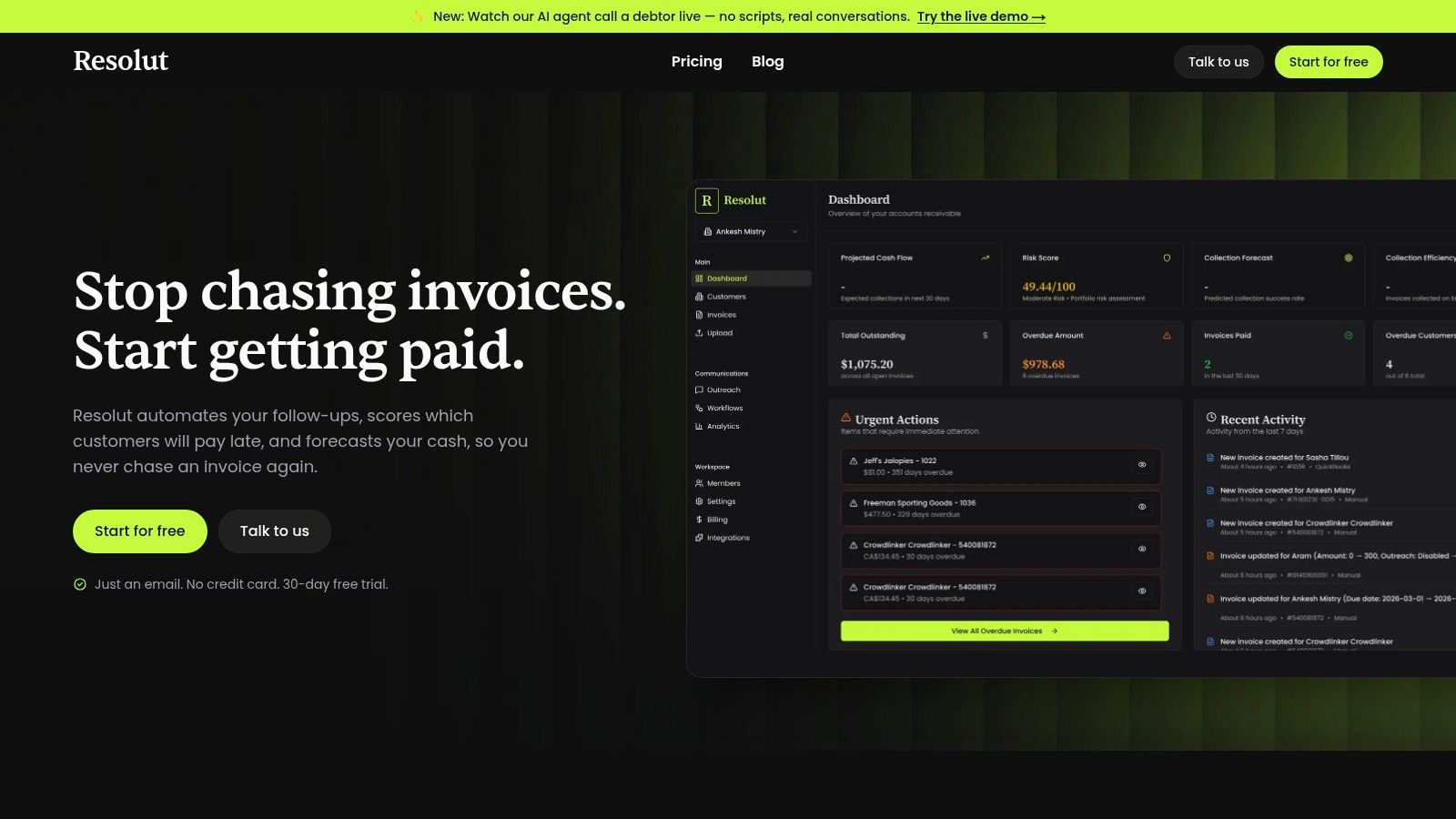
The implementation pattern that holds up best is simple. Let the machine handle the standard invoice, the standard reminder, and the standard routing. Keep a human in the loop for exceptions, escalations, and the handful of accounts where a bad decision would cost far more than the time saved.
Measuring Success with KPIs That Matter
CFOs don't buy workflows, they buy outcomes. If AI AR automation doesn't move the dashboard, it's just overhead with a better user interface. The most important measures are still the ones finance already trusts, DSO, cash flow velocity, and recovery performance.

The metrics that show whether the loop is working
DSO tells you whether the process is getting cash in faster. Cash flow velocity tells you whether money is moving through the business with less friction. Recovery rates tell you whether the team is collecting what it should after disputes, reminders, and escalations.
Then there's the operational side. Touch reduction is one of the most useful internal measures because it shows how many invoices were collected with zero or minimal human intervention. That matters because a strong HITL setup should reduce unnecessary touches on routine cases while preserving the right amount of review on exceptions.
The best finance dashboards separate volume from judgment. A high-volume week is not success if the team spent it cleaning up avoidable mistakes. A low-touch process isn't success either if it let risky invoices slip through without review.
The right way to think about the KPI stack is simple. Standard metrics tell you whether cash is moving. HITL-specific measures tell you whether the control design is doing its job without creating new bottlenecks.
If you want a tighter operating benchmark for what to watch, this AR KPI guide is a practical companion. Use it to separate meaningful improvement from cosmetic automation.
Choosing Your Partner and Your Path Forward
The right vendor won't just promise automation. It will show you where the human enters the workflow, what gets logged, and how exceptions are handled without losing control. That's the standard Stanford HAI points to when it says effective HITL needs meaningful human interaction, not just another review step, and that interface design should preserve human agency and granularity of control, according to Stanford HAI.
What to look for before you sign
- Configurable workflows. You should be able to set review thresholds by account type, invoice value, and risk level.
- Clear audit trails. Every override, approval, and escalation should be logged.
- Simple reviewer experience. If the interface is clumsy, your team will start rubber-stamping.
- Policy fit. The tool has to match how your firm handles sensitive accounts in practice, not how a demo script says it should work.
The best first step is operational, not technical. Pull a small sample of overdue accounts and identify the one place where manual work creates the most delay or the most risk. That gives you a real design target, not a vague automation wish list.
If you want a platform built around that control model, Resolut automates AR for professional services with review points built into the workflow. It supports a practical mix of automation and human judgment so finance teams can keep cash work moving without giving up oversight.
If you're ready to bring more control to collections, disputes, and escalation, visit Resolut and see how a human-in-the-loop AR workflow can fit your finance process without sacrificing accuracy or accountability.