AR Automation Implementation Timeline That Actually Works
Build an AR automation implementation timeline with phases, owners, KPIs, and a 16-week rollout plan that reduces DSO without disrupting client relationships.
The aging report lands in front of the controller every Monday. The same invoices are overdue, the same account managers need reminders, and the AR team repeats the follow-up dance from last quarter. The firm may have added better billing discipline, yet cash still depends on spreadsheets, inbox searches, and individual memory.
That's usually the point when leaders start searching for an accounts receivable automation implementation timeline. Vendors may describe a clean four-to-six-week launch. A narrow pilot can sometimes go live quickly, but a professional services firm has to coordinate invoice evidence, client relationships, dispute ownership, payment channels, and reporting before the rollout produces reliable value.
The relevant question isn't only, “When will the software be live?” It's, “When will the firm collect consistently across ordinary invoices, partial payments, credit notes, disputes, entities, and exceptions?” That distinction separates a pilot launch from full operational adoption.
A useful rollout behaves like an early warning system. Finance leaders who want a broader framework for identifying operational exposure can also review early warning systems for business crises. For AR, the warning signs are practical: unresolved disputes, missing purchase-order evidence, inconsistent customer records, and promises to pay that nobody owns.
Why Most AR Implementation Timelines Slip Before They Start
A vendor-led timeline often starts with configuration. A finance-led timeline starts with decisions.
The difference matters. A demonstration can show automated reminders, payment portals, cash application, and workflow rules using clean sample data. Your firm's receivables contain renamed clients, partner-approved exceptions, retainers, milestone invoices, write-offs, partial payments, and sales teams that don't agree on who should contact a customer.
That's why a glossy four-to-six-week promise rarely survives contact with full AR. The short window may describe a focused rollout, not the work required to establish operating rules across the entire ledger. Independent AR implementation guidance distinguishes between a narrow go-live in 4–6 weeks and full invoice-to-cash coverage, which can take 12–20+ weeks, because disputes and forecasting require coordination across teams and systems (EverWorker's AR implementation guidance).
The calendar isn't the control system
A date on a project plan doesn't answer who approves a dispute code, who owns a service-level agreement, or what evidence is sufficient to release a blocked invoice. Without those decisions, configuration hardens ambiguity into software.
ERP benchmarks show the broader pattern. Published research summarized in industry reporting puts the actual average ERP go-live at 7–9 months, even when vendors quote 4–6 months, and only 23% of projects finish on their original timeline (Bizowie's ERP implementation benchmark). AR automation may be narrower than an ERP replacement, but the lesson carries over. Integration depth, data quality, governance, and user adoption determine delivery more than the demo calendar.
Define the value gap before approval
The CFO should approve two dates, not one:
- Pilot go-live: A controlled workflow is operating on a representative share of invoice volume.
- Full value: The team handles the long tail of invoices and exceptions with stable controls, measurable KPIs, and no dependence on the old spreadsheet process.
A timeline without named owners is a wish list. A timeline with owners, checkpoint questions, and evidence standards becomes a governance artifact. That's the standard a controller can take to a Monday staff meeting and use to decide whether the rollout is moving, stalled, or accumulating risk.
The 16-Week AR Implementation Timeline at a Glance
A pilot can be technically live while the finance team is still carrying the old spreadsheet process. That gap is why an AR rollout needs two operating milestones: pilot go-live, when a controlled workflow handles a representative share of invoices, and full value, when exceptions, controls, and ownership work without implementation-team support.
A practical staged rollout may take 8–12 weeks, with the broader sequence continuing through full rollout and optimization. For a professional services firm, a 16-week implementation timeline gives the team enough structure to separate preparation, pilot, expansion, and stabilization. The schedule is a management tool, not a promise that every phase will take the same effort.
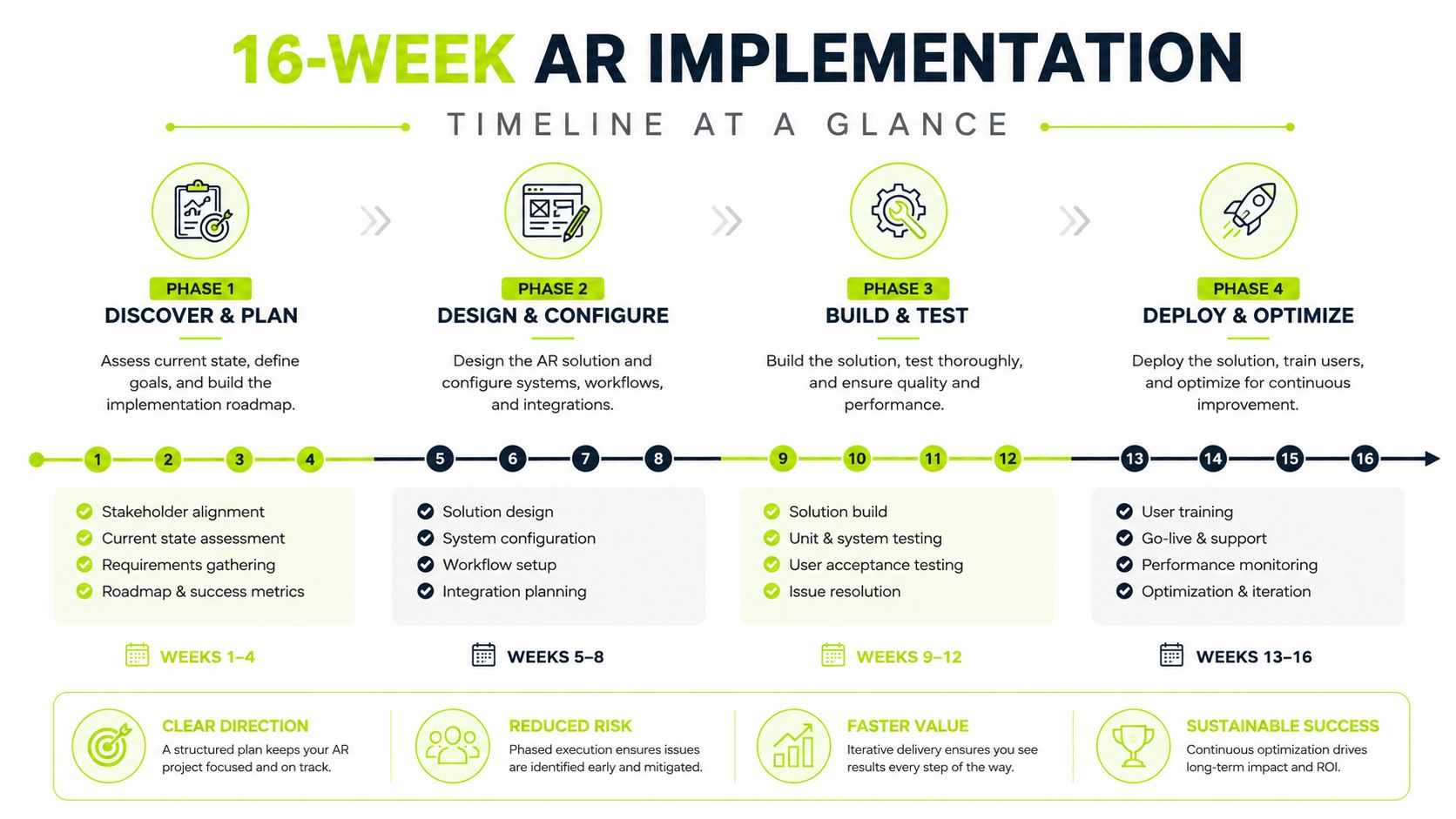
During weeks 1–2, the Controller leads discovery. The team documents invoice sources, customer segments, entities, payment terms, dispute reasons, approval paths, current touchpoints, and reporting definitions. The deliverable is a list of failure points, decision rights, and evidence requirements, including who can restart an invoice that has stopped moving.
Weeks 3–4 cover selection and planning. Finance, IT, AR, and the CFO agree on the target workflow, integration boundaries, pilot population, data ownership, escalation rules, and go-live criteria. QuickBooks, Sage, and mid-market ERP environments follow the same phase logic, but connector testing, mapping, and reconciliation requirements differ.
Practical rule: Don't call a requirement “out of scope” until someone has documented who will perform that work manually after launch.
Weeks 5–6 focus on setup and integration. The team connects the accounting platform, bank feeds, payment portal, CRM handoffs, and relevant email or messaging workflows. It validates opening balances, customer master data, invoice line items, and dispute evidence. Where internal capacity is limited, firms may assess implementation accountant services.
The pilot runs through weeks 7–10, covering 30–40% of invoice volume. The sample should include difficult work, not only clean invoices from cooperative clients. Test partial payments, credit notes, missing purchase orders, disputed time, and account-manager involvement before calling the workflow ready.
Weeks 11–14 move the approved workflow into full rollout. Add each customer group or entity only after the preceding cohort meets the agreed controls. The final weeks 15–16 cover stabilization, exception review, reporting lock-down, and transfer of ownership to business-as-usual operators.
The timeline leaves room for system differences while forcing decisions about readiness, evidence, and accountability. That distinction keeps a pilot launch from being mistaken for delivered value.
Owners, Checkpoints, and KPIs for Each Phase
Most implementation plans list activities. Stronger plans assign accountability for decisions.
The Controller should own readiness because finance owns the integrity of the ledger and reporting. IT should own integration reliability and access controls. The AR manager should own outreach cadence, exception handling, and analyst adoption. The CFO should own go or no-go decisions, especially when a launch could affect client relationships or reported cash expectations.
A KPI should answer whether the workflow is improving the business, not merely whether a configuration task is complete. Useful measures include DSO, invoices paid on terms, touchpoint-to-payment time, automated matching, dispute aging, and the percentage of exceptions resolved within SLA. A broader reference for selecting and managing receivables measures is Resolut's guide to accounts receivable KPIs.
Phase | Owner | Checkpoint Question | KPI |
|---|---|---|---|
Discovery | Controller | Are the current process, data definitions, and failure points documented? | Baseline DSO and touchpoint-to-payment time |
Selection and planning | CFO | Does the proposed workflow fit the firm's risk tolerance and client model? | Approved scope, owners, and go-live criteria |
Setup and integration | IT | Do the accounting, bank, payment, and CRM connections reconcile correctly? | Connector test results and reconciled opening balances |
Pilot | AR manager | Is the pilot representative of difficult invoice work? | Automated matching, dispute SLA performance, and DSO movement |
Full rollout | Controller and AR manager | Can the team operate without the legacy process for the active cohort? | Invoices paid on terms and exception backlog |
Stabilization | CFO and Controller | Is value stable enough to govern as normal operations? | Reporting accuracy, adoption, and sustained cash-flow indicators |
Checkpoints should force decisions
A checkpoint isn't a status meeting. It should produce a decision, an owner, and a documented action.
At the end of discovery, the Controller should be able to explain which data fields control collection. Before the pilot, IT should demonstrate that transactions reconcile. Before full rollout, the AR manager should show that the team can resolve exceptions without escalating every case to the CFO.
If the answer is “not yet,” the timeline should move. Pressing ahead because the target date is approaching turns an implementation issue into an operating issue.
Use baseline measures honestly
Baseline data must come from the current process and use stable definitions. If one team counts a customer promise as a resolved dispute while another requires cash receipt, the KPI will flatter the rollout without improving control.
The CFO's role is to protect the measurement from optimism. A successful implementation may initially expose more exceptions because the system makes hidden work visible. That's useful information, provided the team treats it as a correction to the process rather than a failure of reporting.
Integrations, Data Migration, and QuickBooks Setup
Integration is the workstream that determines whether the implementation timeline holds.
A connector can move records between systems and still leave finance with an unusable process. The accounting platform, bank feeds, payment portal, CRM, and customer communication workflow need a shared definition of invoice status, payment status, dispute status, and ownership.
For a QuickBooks environment, QuickBooks AR automation should be assessed as an end-to-end operating flow. The team needs to know where invoices originate, how edits are approved, how payments are imported, how unapplied cash is handled, and how account managers see client context. A comparison of Xero versus QuickBooks can help frame the accounting-platform decision, but the timeline still depends on the firm's actual data and approval rules.
Establish one evidence standard
Automation can only act reliably when the underlying evidence is consistent. Before go-live, agree on the minimum record required for each collection decision:
- Invoice detail: Line items, service dates, project or matter references, payment terms, and approved adjustments.
- Commercial evidence: Purchase orders, statements of work, rate approvals, and milestone acceptance.
- Dispute evidence: A controlled taxonomy for billing error, service concern, missing documentation, pricing issue, and timing disagreement.
- Customer identity: One customer master record across accounting, CRM, payment, and communication systems.
- Payment evidence: Bank references, remittance details, credit notes, and allocation rules.
The goal isn't perfect historical data. The goal is a known operating position. By week six, the team should know which 10% of invoices will be the messy ones, as specified in the rollout requirements, and should have a manual handling rule for them.
Reconcile before you automate
Run a controlled reconciliation between the accounting ledger, bank activity, open invoices, credits, and payment portal records. Investigate differences before enabling automated outreach or cash application. Otherwise, the system may send a reminder for an invoice that has already been paid, or apply cash to the wrong customer.
IT owns technical testing, but the Controller signs off on financial correctness. That division prevents a technically successful integration from becoming a month-end problem.
Running the Pilot Without Fooling Yourself
A pilot should expose the work your full rollout will have to handle, not showcase the cleanest customer records.
If the sample contains only simple invoices and cooperative clients, almost any AR system can appear effective. It will not reveal how the process handles partial payments, credit notes, disputed time, missing purchase orders, or a partner who wants to approve every message. Select 30–40% of invoice volume deliberately, choosing a boundary that exercises those risks. The population might be one entity, customer segment, service line, or invoice class. The right boundary is the one that reflects the operating problems the full rollout must absorb.
Write exit criteria before the pilot begins
The CFO, Controller, and AR manager should approve the criteria before the first automated action. They own different questions, so assign ownership explicitly:
- Matching quality: The agreed share of pilot invoices matches automatically, and exceptions have a documented category.
- SLA performance: Disputes reach the correct owner and are resolved within the firm's documented service level.
- Cash performance: DSO and payment-on-terms results are compared with the baseline using the same definitions.
- Human review: Analysts can explain why the workflow acted, paused, or escalated.
- Client experience: Account managers confirm that tone, timing, and escalation fit relationship expectations.
Use the firm's own baselines and thresholds. Invoice mix, payment terms, and client concentration determine what a credible result looks like. A pilot is not ready for expansion because the software is active. It is ready when the operating evidence supports the decision.
Treat stalled evidence as a stop signal
Bad customer data or unclear dispute ownership is a useful pilot finding. Pause, assign an owner, and correct the process before expanding. Vendor readiness or a date on the project plan is not evidence that the business is ready.
A small, difficult pilot is more valuable than a large, polished pilot that never tests the exceptions.
Early improvement can still mislead. A focused rollout may take 4–8 weeks, while complex or legacy deployments can extend to 6–18 months. Measurable ROI may not appear until months 4–6, even when implementation begins earlier, according to Growfin's AR automation guide. Treat pilot success as proof that owners, controls, exception handling, and customer communication work together. Pilot go-live is only the checkpoint. Full value comes after the team can run that model without constant vendor intervention.
Training, Legal Escalation, and Go-Live Verification
The technical build can be complete while the operating model remains unready.
Training should follow the work. Controllers need to understand controls, reporting, and approval points first. AR analysts then learn queues, exceptions, evidence requirements, and customer communication. Sales and account managers need a clear explanation of who contacts clients, how outreach tone changes, and when they're expected to intervene.
Legal escalation needs the same precision. Define the point at which automated dunning stops and a lawyer-led communication begins. The approval threshold may depend on dispute status, customer importance, contractual language, or the amount of unresolved exposure. The CFO or Controller should approve the rule, while the AR manager owns the handoff process.
A documented escalation procedure prevents analysts from improvising under pressure. It also protects client relationships by keeping escalation consistent rather than personal.
Verify the workflow beside the old one
Use a deliberate two-week verification window around go-live. Keep side-by-side reconciliation in place, sample exceptions, compare system actions with ledger activity, and ask account managers whether customers are receiving accurate messages.
The Controller should review:
- Cash application: Payments are allocated to the correct customer and invoice.
- Outreach: Messages use the right terms, contacts, tone, and escalation path.
- Exceptions: Every pause has a reason and an owner.
- Reporting: Aging, DSO, disputes, and payment status agree with the accounting records.
- Client experience: Relationship owners can identify and correct an inappropriate communication quickly.
Cash forecasting should reflect the new workflow and its remaining uncertainty. Finance leaders looking for a broader framework can use guidance on strategic cash flow with AmbitionCFO while deciding how automation outputs feed the forecast.
A launch that protects client relationships protects cash flow. Verification is the quality-control layer that keeps twelve weeks of work from becoming a three-month detour.
Your 30-60-90 Day Plan After Go-Live
Go-live is the transfer of responsibility, not the end of the implementation timeline.
During days 1–30, the Controller confirms automation rates, reconciliation accuracy, dispute SLAs, and exception ownership. The AR manager reviews every meaningful failure pattern and adjusts workflows without changing definitions casually.
During days 31–60, expand to the next customer cohort or entity. Keep the same checkpoint criteria, and document where the new group differs from the pilot. During days 61–90, retire legacy spreadsheets, lock reporting definitions, and make the operating cadence part of the monthly close and cash review.
Questions finance leaders ask
How long until DSO moves? Use the pilot as an early indicator, but judge durable value across the long tail. The U.S. B2B baseline reported for 2026 is 34 days of average DSO, with 29% of invoices paid past due and an average delay of 8 days beyond terms (BillVanta's U.S. invoice payment benchmark). UK professional services firms can also compare their results with a reported sector average of 16% late payments (UK government late-payment research).
What if the pilot stalls? Return to the checkpoint owner. Fix evidence, integration, or SLA ownership before expanding.
How should ROI be measured? Compare cash outcomes, staff touchpoints, dispute aging, and payment timing with the original baseline. Don't count a dashboard as value unless the team uses it to make a better collection decision.
Resolut automates AR for professional services by bringing outreach, workflow orchestration, payment coordination, and cash application into a controlled operating process. If your firm is planning an AR implementation timeline and needs consistent, accurate, human communication, visit Resolut to see how the platform fits your rollout.