Phone Call Automation for AR: A CFO's Guide to Control
Learn how phone call automation can improve cash flow and reduce DSO for professional services. A guide for CFOs on AR automation, compliance, and ROI.
On many finance teams, the awkwardest AR task still lands with the most expensive people.
A controller reviews the aging, sees a cluster of overdue invoices from otherwise good clients, and starts nudging project leads to call. One partner makes the call right away. Another waits a week. One sounds polished. Another sounds irritated. Notes live in inboxes, not in the system. Nobody is sure which accounts were reached, which promised to pay, and which need a firmer response.
That isn't just a collections problem. It's a control problem.
For professional services firms, accounts receivable automation matters because cash collection sits right at the intersection of working capital, client relationships, and internal discipline. If your process depends on memory, personality, and spare time, you don't really have a process. You have a series of improvised interventions.
The Hidden Cost of Manual AR Calls
The direct cost of manual calls is easy to see. Someone spends time dialing, leaving voicemails, chasing callbacks, and documenting what happened.
The harder cost sits underneath. Senior staff get pulled off billable work or forecasting work. Collections tone changes from client to client. Promises to pay get lost between email threads, CRM notes, and accounting records. By the time leadership sees a pattern, the receivable is older and the conversation is more delicate.
Inconsistency is the real leak
Manual AR calls usually break in familiar ways:
- Timing drifts: A polite reminder goes out late because the team was closing the month.
- Tone varies: One caller sounds accommodating. Another sounds like legal escalation is around the corner.
- Follow-up stalls: A client says, “Send me the invoice again,” and nobody confirms whether that happened.
- Escalation is subjective: Large balances can sit untouched because no one wants to push a strategic account.
In a professional services firm, those gaps hit cash flow twice. First, you collect later. Second, you teach clients that your payment process is negotiable.
Manual collections rarely fail because people don't care. They fail because good people apply effort inconsistently.
There's also a broader market signal here. Gartner projections cited in 2026 industry reporting say 10% of all agent interactions will be fully automated by 2026, up from 1.6% previously, while 88% of contact centers already report using some form of AI according to 2026 call center statistics summarized by Ringly. For a CFO, the point isn't to copy a contact center. It's to recognize that repeatable voice workflows are no longer experimental.
Why this matters in professional services
Professional services firms have a specific AR problem. You can't treat every overdue invoice like a commodity collections file.
A law firm, agency, consultancy, or outsourced accounting practice often has layered relationships with the client. The person who approves invoices may not be the day-to-day contact. A payment delay may reflect a missing PO, an internal approval backlog, or a quiet dispute no one has surfaced yet.
That makes manual calling feel safer. In practice, it often creates more risk.
A controlled phone workflow does something manual effort rarely does well. It separates routine follow-up from relationship management. The routine work gets handled consistently. The sensitive work gets surfaced early and handed to the right human.
That is where AI AR automation starts to earn its keep. Not by replacing judgment, but by reserving judgment for the calls that need it.
How Phone Call Automation Actually Works
Most finance leaders don't need the engineering details. They need to know whether the system behaves like a black box or a control framework.
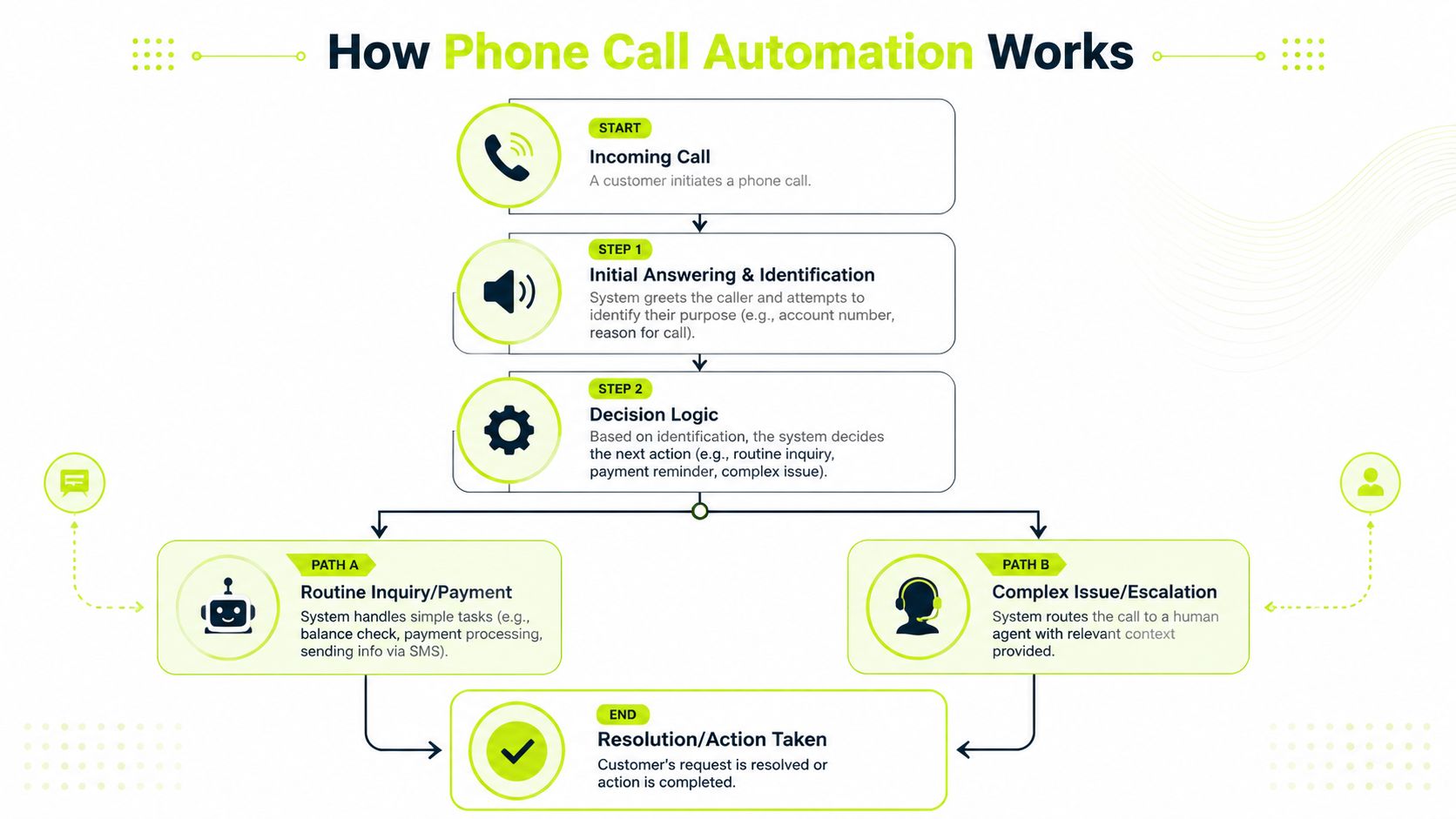
The simplest way to think about phone call automation is this. The system listens for an event, then takes the next approved action. If a client answers, it can play a message, gather input, or route the call. If the client asks for a person, it can transfer with context. If there's no answer, it can retry later under pre-set rules.
Microsoft describes this as an action-event model that listens to real-time call events and then executes control-plane actions such as answer, transfer, play audio, and start recording in its overview of Azure Communication Services call automation.
The parts that matter to finance
A working setup usually has a few functional components.
Component | What it does in AR | Why finance should care |
|---|---|---|
Call handling logic | Answers, routes, transfers, records outcomes | Keeps outreach consistent and auditable |
Dialer controls | Places calls based on account lists and retry rules | Reduces manual effort and missed follow-up |
Script engine | Delivers approved language for reminders and prompts | Protects tone and brand |
Escalation rules | Sends complex cases to a human | Prevents bad automation decisions |
Analytics layer | Tracks outcomes and exceptions | Supports process improvement |
A lot of vendors dress this up as conversational AI. For AR, that framing can be misleading. You don't need a charismatic robot. You need a reliable operating model.
What good design looks like
In practice, the strongest systems handle a short set of predictable scenarios very well.
- Reminder calls: “Your invoice is past due. Would you like a payment link by text or email?”
- Status confirmation: “Press or say the best option. Payment submitted, need invoice copy, billing question, speak with specialist.”
- Warm transfer: If the client indicates a dispute or asks for an exception, the system routes to a person and passes along the reason.
That matters more than novelty. In AR software for professional services, clean branching beats flashy conversation every time.
Practical rule: Automate the first minute of the call and the last administrative step. Keep the middle open for human judgment when needed.
If you're evaluating architecture or routing choices, this guide on how to optimize AI agent customer service is useful because it gets into a practical issue many teams overlook. Caller context has to move with the interaction, or the handoff feels broken.
Where it fits with the rest of AR automation
Phone isn't a standalone tool. It's one channel in a broader collections workflow.
In most firms, email still carries the invoice, backup, and written trail. SMS can speed simple reminders. Calls do their best work when the account needs confirmation, urgency, or a live path to resolution. That's why accounts receivable automation works better as orchestration than as a single feature.
For a deeper look at where voice belongs inside collections operations, this piece on AI for debt collection is worth reading. The useful question isn't whether AI can place calls. It's whether the call is embedded in a disciplined recovery process.
Balancing Gains and Risks in AR Collections
The promise of phone call automation in collections is straightforward. Faster outreach. Better consistency. Less dependence on who remembered to call.
The risk is just as straightforward. If you automate the wrong conversation, you can make a good client feel like a delinquent account.
That trade-off matters more in professional services than in many other sectors. Your invoices often follow project-based work, change orders, budget approvals, or partner review. A late payment may reflect friction, not refusal. If the workflow pushes too hard, too early, you can create a relationship problem where there was only an administrative one.

Where automation works well
Some AR call types are low-risk and highly repeatable.
- Invoice receipt confirmation: Did the client get the invoice and support documents?
- Simple reminder outreach: Is payment scheduled, and does the client need a payment link or copy?
- Routing tasks: Identify whether the issue is AP processing, missing information, or timing.
- Post-voicemail follow-up: Re-attempt contact or trigger another channel when no answer comes through.
These are the pieces that help reduce DSO and improve cash flow. They also free your team to spend time on exceptions instead of routine chasing.
Where automation should stop
The trouble starts when firms try to automate emotionally loaded or commercially sensitive discussions.
UiPath notes that many buyers ask for “fully automated calls” without clear guidance on escalation thresholds, human handoff design, or which call types are too risky for end-to-end automation. The market is moving from “replace agents” to “orchestrate humans plus AI” in its discussion of contact center automation.
For AR, that principle is practical. Some conversations need a person from the start:
Use automation first | Move to human quickly |
|---|---|
Invoice reminder | Fee dispute |
Payment link request | Service complaint |
AP routing | Request for extended terms |
Duplicate copy of invoice | Strategic account with aging concentration |
If the client needs reassurance, negotiation, or judgment, the system should route, not persist.
A better decision rule for CFOs
Don't ask, “Can this be automated?”
Ask three narrower questions:
- Is the issue routine or interpretive? Routine tasks are good candidates. Interpretive ones usually aren't.
- What is the client relationship worth? A small overdue balance on a high-value account may deserve immediate human ownership.
- What happens if the system gets it wrong? If the downside is mild annoyance, automation is fine. If the downside is reputational damage, tighten the handoff threshold.
AI AR automation shifts from a cost-cutting exercise to a control tool. The win isn't maximum automation. The win is sending the standard cases through a consistent path and surfacing exceptions early, before they become write-offs or partner escalations.
Navigating Compliance and Privacy Guardrails
Finance teams often treat compliance as the reason not to modernize. In AR calling, that's the wrong frame.
Compliance is the operating boundary that keeps your outreach credible. If your phone process ignores consent, timing, recording disclosure, or data handling, it doesn't matter how efficient it is. It creates legal and reputational exposure that no CFO wants on the balance sheet.
What the guardrails mean in plain English
For a professional services firm, a few principles matter more than feature lists.
- Consent has to be intentional: If you're using automated outreach, your team needs a clear basis for contacting that business client through that channel.
- Call timing matters: Outreach should respect local business hours and client expectations.
- Recording rules vary: If calls are recorded, disclosure and process discipline have to be explicit.
- Data should stay controlled: Call notes, transcripts, and outcomes need the same governance you expect from other finance records.
That sounds restrictive. It isn't. It forces discipline into a process that often lacks it.
Why compliance improves collections quality
Nextiva notes that automated calling can coordinate with other channels and be scheduled by time zone or peak hours, but its success depends on tight compliance, personalization, and real-time analytics to avoid backlash from over-automation in its guide to automated phone calling.
That's exactly right for B2B collections.
An AR call that lands at the wrong time, reaches the wrong contact, or uses generic language doesn't just underperform. It signals that your firm doesn't know the account. In professional services, that weakens trust quickly.
Good compliance practice often overlaps with good client experience. The same rules that reduce risk also reduce avoidable friction.
Operational controls worth insisting on
If you're reviewing tools for accounts receivable automation or QuickBooks AR automation, ask for controls, not promises.
- Time-zone aware scheduling: Calls should follow local working hours.
- Role-based contact logic: The system should distinguish between project contact, approver, and AP contact.
- Clear recording policies: Your team should know when disclosure is required and how that is handled.
- Audit trail: You need a record of what was attempted, what happened, and what triggered the next step.
- Easy suppression and exception handling: If a client is in dispute or under partner review, the account should come out of automation immediately.
A compliant process doesn't slow collections down. It prevents careless activity that makes collections harder later.
Integrating Automation into Your AR Workflow
A call by itself rarely resolves a receivable. Payment happens because the client receives the right prompt, through the right channel, with the right context, at the right moment.
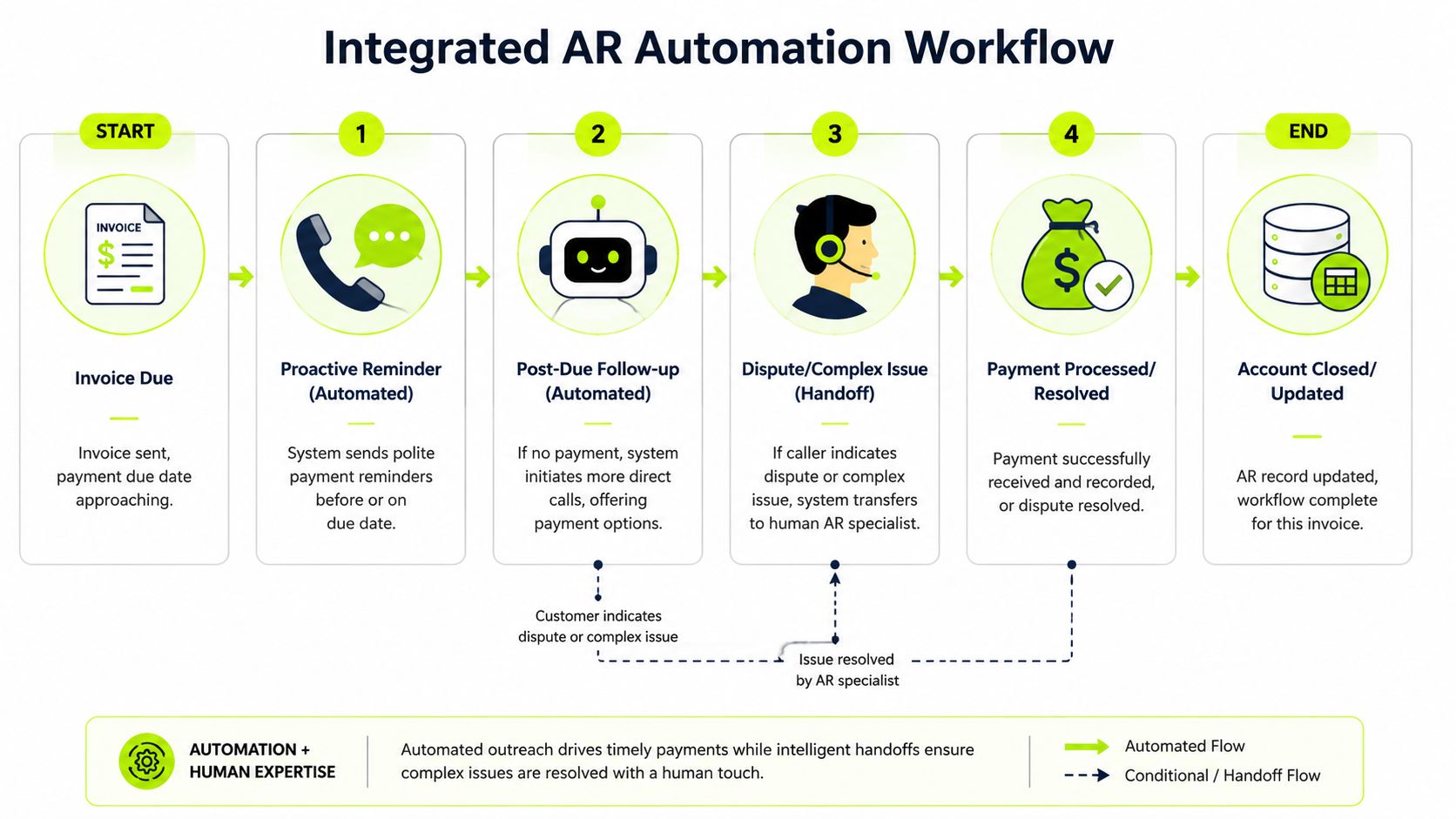
That is why phone call automation works best inside a coordinated AR workflow. Email carries the invoice and support. SMS can shorten the path to action. Calls add immediacy and help uncover friction. Human follow-up handles disputes, exceptions, and account strategy.
A practical sequence that fits professional services
A solid workflow usually looks less aggressive than firms expect.
Before due date Send a clean reminder by email with invoice, backup, and payment options. The point here isn't pressure. It's error reduction.
At due date or just after Trigger a light-touch follow-up. This may be email first, or a short call if the account historically responds better to voice.
If no action follows Use an automated call to confirm receipt, offer to resend documents, or provide a payment path.
If there is friction Route to a human AR specialist, controller, or account owner based on account value and issue type.
Many overdue invoices aren't refusal events. They're workflow failures. The right sequence corrects the workflow without escalating the relationship.
Why dialer settings affect finance outcomes
A lot of finance teams ignore the mechanics behind call delivery. They shouldn't.
Vendor documentation summarized by Lindy notes that automated phone-call systems are often tuned through dialer type, retry rules, and call-time windows, including predictive, power, progressive, and preview approaches, because those settings directly affect answer rates and agent utilization in automated phone call software guidance.
You don't need to become a call-center operator to use that insight. You just need to understand the implications:
- Retry rules shape persistence: Too little follow-up and invoices drift. Too much and you annoy clients.
- Call windows shape professionalism: A reminder that reaches AP during working hours feels operational. One that lands poorly feels careless.
- Dialer logic shapes workload: If a human team is receiving escalations, the pacing has to match their capacity.
The handoff is where most systems fail
The weak point in many collections setups isn't the automated reminder. It's what happens after the client responds.
If a client says the invoice is wrong, asks for a revised copy, or wants to discuss terms, the system has to move that information into the AR workflow cleanly. Otherwise the client repeats themselves and your team starts from zero.
That's where straight-through processing becomes relevant to collections operations, not just payments. Clean data movement reduces lag between client response and internal action. This overview of straight-through processing in finance operations is useful because it frames the broader operational principle well.
What this looks like in a real finance cadence
Think in terms of orchestration, not channels.
Trigger | Best first action | Next action if unresolved |
|---|---|---|
Invoice sent | Email with documentation | None unless non-delivery or exception |
Due date approaching | Reminder email or SMS | Short automated call for confirmation |
Past due with no response | Automated call | Human follow-up |
Dispute or exception raised | Human owner | Managed resolution path |
AR software for professional services earns trust through its nuanced approach. It doesn't hammer every account with the same treatment. It applies controlled pressure, then routes nuance to humans.
Measuring Performance and Calculating ROI
If you're evaluating phone call automation, avoid vanity metrics first.
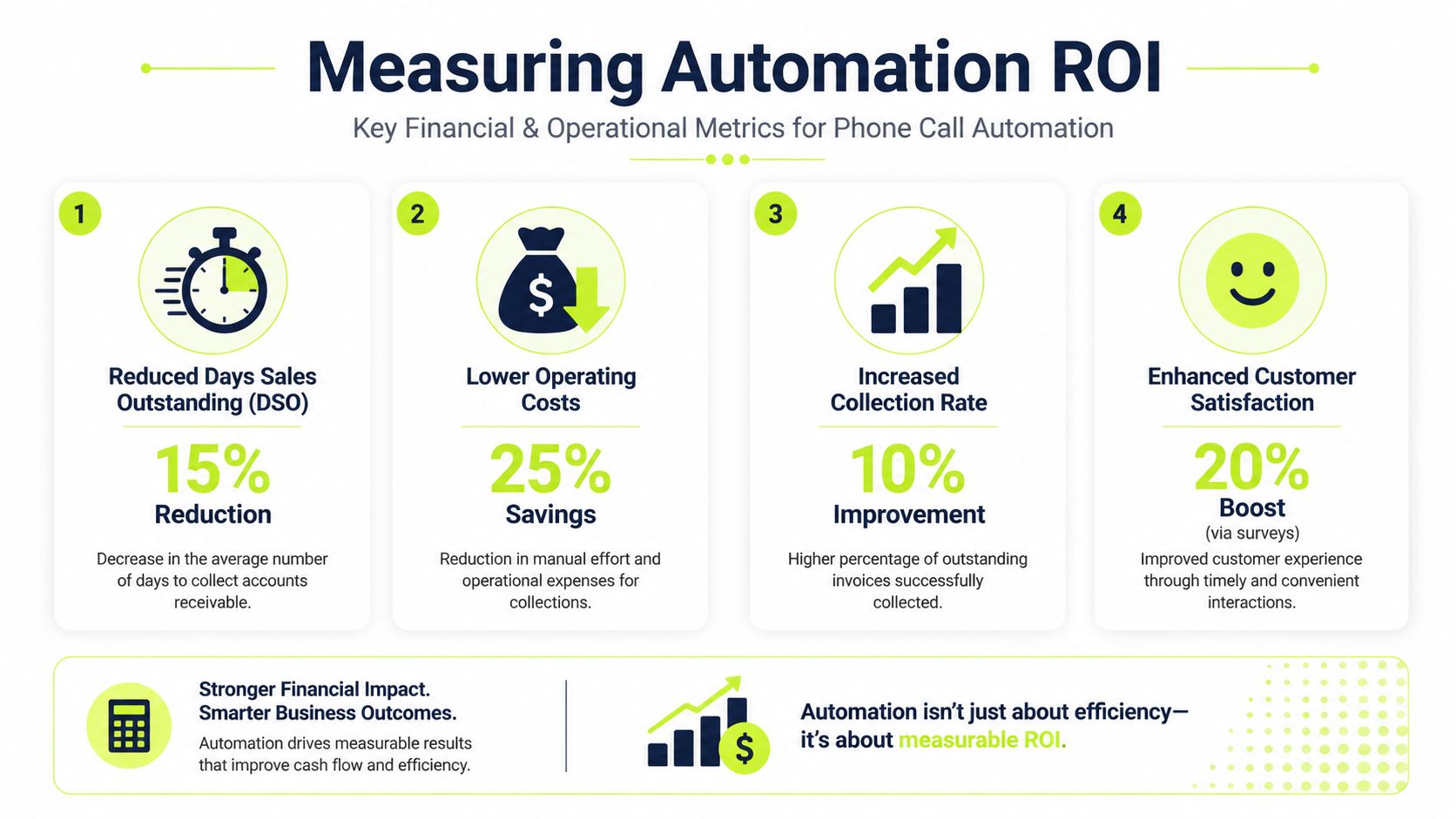
A finance leader doesn't need to know that the system made a lot of calls. You need to know whether it improved cash timing, reduced manual effort, and made collections more controlled.
The KPIs that matter
Track a short set of measures that connect directly to cash flow and risk reduction.
- DSO movement: Is the average collection cycle tightening after rollout?
- Promise-to-pay capture: Are more commitments being recorded systematically?
- Right-party contact rate: Are you reaching people who can move payment?
- Escalation mix: What share of accounts can stay in automation, and which ones need human intervention?
- Cost per collection touch: Is the team spending less manual time per overdue account?
- Dispute identification speed: Are issues surfacing earlier, while they can still be solved cleanly?
A KPI set like this works well whether you're using standalone tools or broader accounts receivable automation tied into your ERP or QuickBooks AR automation stack.
A back-of-the-napkin ROI model
You don't need a complex model to make the case internally.
Start with three buckets:
- Labor recovered Estimate time your team currently spends on outbound follow-up, note capture, resending invoices, and callback handling.
- Cash acceleration Estimate the value of collecting sooner, not just collecting eventually. Even modest reductions in delay improve liquidity and reduce reliance on reactive cash management.
- Risk reduction Estimate the value of fewer dropped follow-ups, better documentation, and earlier dispute surfacing.
Then compare that against software cost, implementation effort, and internal ownership time.
Operator view: If the system saves time but creates more exceptions, the ROI is weaker than it looks. Measure net operating relief, not just activity shifted to software.
How to review results after launch
At the first review, don't ask whether every number improved at once.
Ask whether the process got more reliable.
- Are reminders going out on time?
- Are outcomes being captured in one place?
- Are clients being routed correctly?
- Is the team spending more time resolving exceptions and less time hunting status?
If those answers are yes, your base is stronger. The financial gains usually follow process quality.
For teams that want a tighter framework for one of the core metrics, this explanation of the collection effectiveness index is a useful companion to DSO. It helps separate true collections performance from simple aging movement.
Your Implementation Roadmap
Start small. The firms that get value from phone call automation don't begin with every client, every script, and every scenario live at once.
Step one
Pick a narrow pilot group. Use a defined slice of receivables, such as standard invoices past due without active disputes. Keep strategic accounts and known exceptions out of the first rollout.
Step two
Write scripts like finance policy, not marketing copy. The language should be calm, specific, and aligned with your firm's tone. Build explicit handoff rules for disputes, payment-plan requests, and relationship-sensitive accounts.
Step three
Decide who owns the exceptions. Automation only works when a human can pick up the cases that need judgment. In most firms, that's some mix of AR, controller, and account lead.
Step four
Review weekly at the start. Listen to outcomes, not just dashboards. Tighten timing, retry rules, and escalation thresholds until the process feels controlled.
The right framing for your team is simple. This is a co-pilot for collections discipline, not a replacement for client stewardship.
Resolut helps professional services firms automate AR with the balance most finance leaders want: consistent outreach, accurate workflows, and human judgment where it counts. If you're looking to reduce DSO, improve cash flow, and bring more control to collections without damaging client relationships, Resolut is built for that.