
What Is Accounts Receivable Automation and Why It Matters
Learn what is accounts receivable automation, how it reduces DSO, improves cash flow, and transforms collections for professional services firms.
If you run finance at a $3M to $50M professional services firm, you already know the pattern. Month-end closes, the aging report looks worse than last week, and someone on your team is still copying invoice numbers into reminders, checking payment portals, then matching deposits line by line in QuickBooks.
That isn't a people problem. It's an operating model problem.
Accounts receivable automation is the layer that fixes that operating model. It connects invoicing, reminders, collections, cash application, and reporting so your team can spend less time chasing routine follow-ups and more time on disputes, credit calls, and client relationships. The point is not to remove humans from receivables. The point is to stop asking humans to do work software handles more consistently.
In practice, the need is obvious because many firms still live with slow collections. A 2026 industry summary reported that roughly 70% of companies have a DSO above 46 days, and the average cash conversion cycle across more than 2,700 U.S. public companies is near 89 days (accounts receivable statistics). That's a lot of cash sitting in invoices instead of working in the business.
For professional services, the drag shows up in small ways first. Hiring feels conservative. Forecasts stay padded. Client follow-up becomes uneven because one person writes warm reminders and another writes stern ones. Cash application gets pushed to the end of the day, then to tomorrow, then to week-end cleanup.
A useful way to think about the category is that AR automation sits between your accounting system and your clients. It handles the repetitive choreography, invoice delivery, reminder cadence, payment matching, and status visibility, while your team keeps judgment where judgment matters.
For a broader view of how receivables friction hits services firms specifically, see the true cost of AR inefficiency in professional services.
The Hidden Problem AR Automation Solves
Month-end usually exposes the issue all at once. The aging report is long, the oldest balances are the ones nobody wants to touch, and your controller is asking why a client who usually pays eventually still hasn't paid. Meanwhile, someone on the team is sending the third polite email to a 45-day invoice while trying not to sound annoyed.
That follow-up burns time, but the deeper cost is inconsistency. A client who gets one careful reminder, then one generic nudge, then a rushed escalation experiences the finance team as fragmented, even when the invoice itself is fine. Tone drift in collections is hard to see from the inside, but clients feel it fast.
The other leak is operational. Payments arrive through ACH, wire, check, portals, or lockbox files, and then somebody has to figure out which invoice each payment belongs to. That cash application work is where a lot of the unglamorous labor hides, especially when remittance data is incomplete or arrives in a format nobody expected. For firms trying to compare receivables effort with other finance automation priorities, the operating lesson is similar to the one covered in professional crypto treasury tips, control the cash process, don't let cash process control you.
AR automation changes that daily work. It sits between your accounting system and your clients, handling invoice delivery, reminder cadence, payment matching, and status visibility while your team keeps judgment where it matters. In practice, that means less time spent copying data between systems and more time spent on disputes, credit calls, and client relationships.
A useful outside read on how receivables friction hits services firms specifically is the true cost of AR inefficiency in professional services.
The goal is to free humans from routine tasks so they can focus on work that requires judgment. That matters most in $3M to $50M professional services firms, where invoicing volume is steady, relationships are personal, and small delays show up quickly in forecast quality, hiring caution, and week-end cleanup.
Core Components of Accounts Receivable Automation
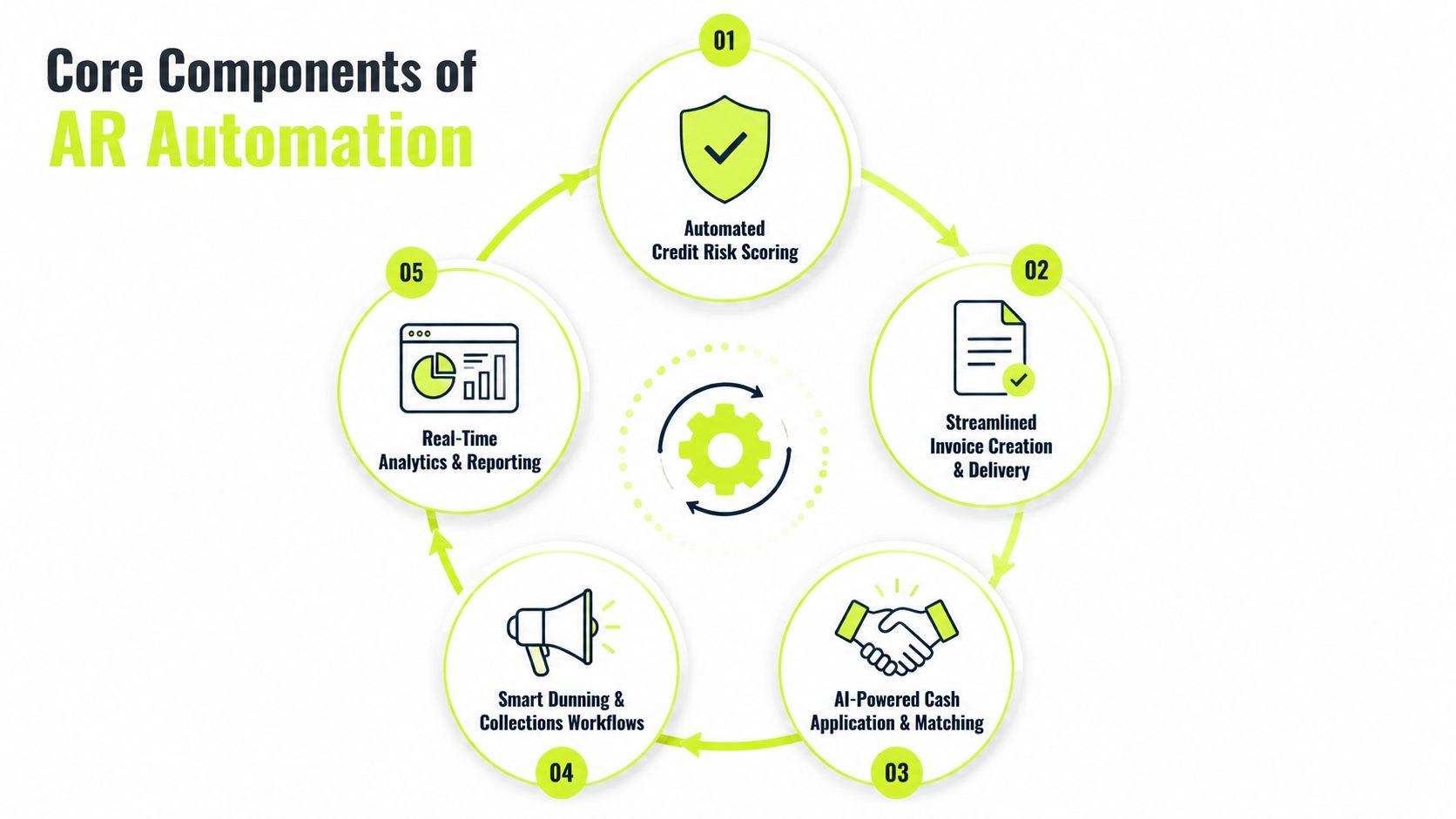
A complete AR software for professional services setup usually has five parts. Some vendors package them together. Others sell them as separate modules. The function is the same, the system should reduce manual touchpoints without turning collections into a blunt instrument.
1. Credit risk management
Before a project starts, the system can flag accounts that already show payment strain. In practice, that means looking at history, client segmentation, and whatever internal rules you've set for who gets terms, who gets a deposit, and who gets reviewed before work begins.
In a 50-person consulting firm, the before state is familiar. Sales wants the engagement signed, delivery wants to start, and finance only sees risk after the invoice goes out. After automation, the credit review happens earlier, so the firm can shape terms before the job is underway.
2. Billing and invoice delivery
This is the part many picture first. The platform generates invoices, sends them through the right channel, and syncs the output back to your accounting system. For firms using QuickBooks AR automation, the sync matters as much as the invoice itself because duplicate entries and stale invoice status create a mess downstream.
For a growing advisory firm, the difference is simple. Before automation, someone builds invoices manually, saves PDFs, emails them one by one, and then updates the ledger later. After automation, invoice creation and delivery happen as one workflow, with fewer versioning mistakes.
3. Cash application
This is the hidden grind. Payments hit the bank, remittance notes arrive separately, and someone has to reconcile the pieces. AI-assisted matching has become meaningful here because the target is not just speed, it's touchless processing at scale. Best-in-class AI-assisted matching is reported at 85% to 92% touchless rates, versus about 45% to 55% for rules-based matching and 15% to 25% for manual processing (AI cash application automation statistics 2026).
That gap matters in a consulting firm because partial payments and multiple-invoice remittances are common. If the system can match the clean items quickly, your team only sees the exceptions.
4. Collections orchestration
Collections orchestration is different from simple reminder sending. The workflow engine decides who gets contacted, when they get contacted, and what tone or channel makes sense based on aging and account behavior. It's less about “send reminder” and more about “send the next right action.”
Keep the human in the loop where context matters, and let the system handle the sequence where repetition is the problem.
5. Omnichannel outreach
Clients don't all respond the same way. Some read email. Some respond faster to SMS. Some expect portal notices. Good AR automation coordinates those channels so the messaging feels consistent instead of noisy.
For teams using systems that support connected workflows, the mechanics can include invoices, monthly statements, dunning reminders by email and SMS, and payment sync back to QuickBooks automatically, which is the difference between a reminder tool and a real receivables workflow (QuickBooks AR automation example).
For a related view of how structured workflows reduce document friction, streamline business document processes is a useful comparison point. The pattern is the same, fewer handoffs, fewer mistakes, better visibility.
Measurable Business Benefits and ROI
CFOs do not need another promise. They need a clear view of what changes, what stays the same, and how long it takes to show up in the numbers.
The strongest benefit is usually cash conversion. Independent industry benchmarks report automated AR teams around 40 days DSO versus about 47 days without automation, and top performers collect in roughly 30 days versus 46 days for the bottom quartile (AR collections automation ROI 2026). For a services firm, that means cash arrives sooner and less capital sits in open invoices.
What changes first
Labor efficiency usually improves next. Manual invoice processing has been benchmarked at about $15.97 per invoice versus $3.24 when automated, a 79% reduction (financial automation statistics). That does not mean finance headcount disappears. It means the team can handle more volume without adding people right away.
Cash application also gets cleaner. When touchless matching rises, back-office time falls, and fewer items sit unresolved in limbo. Month-end close becomes easier because there are fewer open questions to clear at the last minute.
A realistic ROI view also has to include the ramp. The first 60 days often look quieter than the pitch deck promised. Teams are learning the workflow, exception rules are getting tuned, and the system is building pattern awareness. That is normal, especially when you are dealing with partial payments, stale customer data, and sync gaps between the AR platform and QuickBooks.
Practical rule: If a vendor promises instant transformation, ask what happens to exceptions, stale customer data, and partial payments. That is where real implementations live.
Manual vs. Automated AR Performance Comparison | Manual AR Process | Automated AR Process | Improvement |
|---|---|---|---|
Invoice handling | Hand-built, routed by email, checked later | Generated and delivered in workflow | Less rekeying and fewer misses |
Collections follow-up | Inconsistent, depends on who owns the account | Sequenced and rule-based | More consistent outreach |
Cash application | Manual matching and exception chasing | AI-assisted matching and posting | Faster reconciliation |
DSO | Higher and less predictable | Lower and more stable | Working capital improves |
Team capacity | More time spent on repetitive tasks | More time on exceptions and reviews | Higher throughput without immediate hires |
For a clean way to frame the business case, use how to calculate ROI before you compare vendors or map a rollout plan.
Key Metrics to Track Before and After Automation
The fastest way to get lost in AR automation is to watch only DSO. It matters, but it doesn't tell you whether collections got more disciplined or whether the team worked harder for the same result.
Start with a small scorecard. Track the metrics that show both outcome and behavior. If the numbers improve, you'll know whether the workflow is changing how receivables move through the business.
AR Automation Metrics Scorecard | Definition | Typical Manual Benchmark | Post-Automation Target |
|---|---|---|---|
DSO | Average time from invoice to payment | Higher, often inconsistent | Lower and steadier |
CEI | How much collectible receivables were actually collected in the period | Varies by team discipline | Rising over time |
ADD | How many days invoices remain past due on average | Builds quietly in weak processes | Declines as follow-up tightens |
Cost per invoice collected | Internal effort to close each invoice | Higher because of manual work | Lower through automation |
Automated touch rate | Share of reminders and actions handled by workflow | Low in manual teams | Higher as sequencing matures |
Dispute cycle time | Time from issue raised to resolution | Often dragged out by email loops | Shorter with clearer routing |
The numbers above are most useful when you compare pre and post periods in the same firm. A consulting business with long client approval chains will look different from an engineering firm with recurring milestone billing. The goal isn't a universal benchmark, it's a tighter internal baseline.
There's also a reporting discipline issue. Teams often say collections feel better before the reporting proves it. That's where dashboards matter, because the system should make operational change visible, not just presumed.
For a useful parallel on live operational measurement, real time analytics for ecommerce shows how fast-moving teams use current data to adjust behavior. AR doesn't need ecommerce-style velocity, but it does need timely visibility.
Implementation Paths and Common Pitfalls
Not every firm should start with a full platform overhaul. In professional services, the best path depends on how much pain you can remove without disrupting the rest of the finance stack.
Three practical rollout paths
Quick win. Automate dunning emails and payment reminders first. This is the easiest place to start because it's visible, low risk, and usually doesn't require a full process redesign.
Phased rollout. Add cash application and collections orchestration after the reminder layer works. This is usually the right move for firms that want better control without taking on too much change at once.
Full-stack transformation. Replace the legacy workflow end to end. This makes sense when the current process is too fragmented to patch and the firm is ready to standardize how receivables operate.
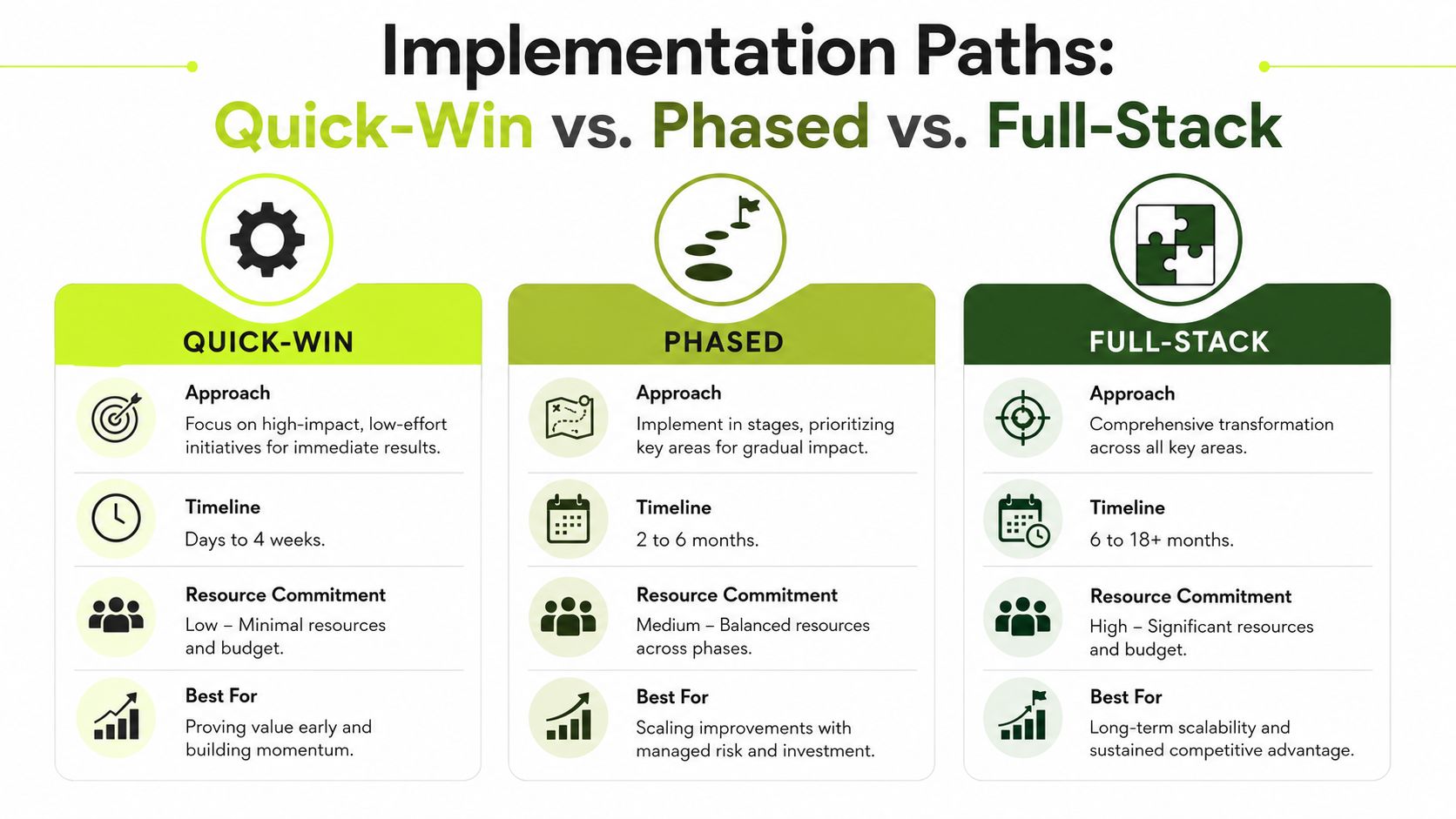
The trade-off is simple. Quick wins get attention fast. Phased rollouts reduce risk. Full-stack projects create the cleanest long-term operating model, but they ask for more coordination.
Integration timing matters too. A realistic timeline should include discovery, configuration, testing, training, and a controlled launch. A practical planning view is laid out in implementation timeline, and that sequencing matters more than any sales demo.
The common failure points
The first one is data hygiene. If client names are duplicated, contacts are stale, and invoice records don't line up across systems, automation will send the right message to the wrong place or the wrong message to the right place. That's not a software flaw. It's a data maintenance issue.
The second is tone drift. Templated collections emails can get robotic very quickly, especially in professional services where clients expect a relationship, not a billing robot. The fix is to segment by account type, keep message language tight, and review the escalation sequence before launch.
The third is sync gaps. If your practice management tool, accounting platform, and AR system don't agree on invoice status, the team will end up reconciling the automation instead of using it. That is where small integration weaknesses turn into daily frustration.
Vendor Evaluation Checklist for Professional Services
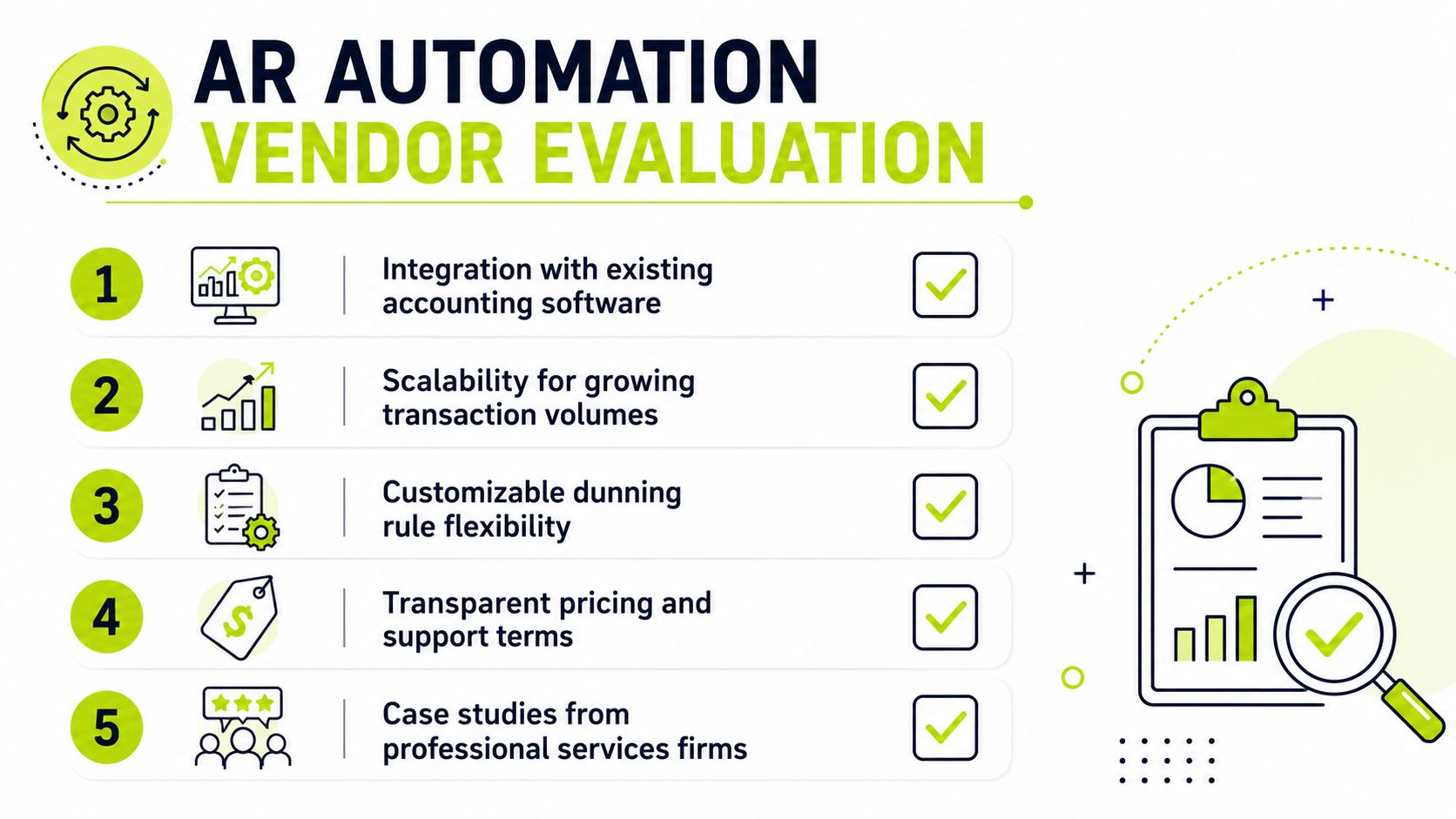
The right vendor should fit your accounting stack and your client model, not the other way around. A 30-person firm and a 300-person firm can both need AR automation, but they do not need the same contract shape, onboarding burden, or configuration depth.
What to test before you commit
- Integration depth: Ask whether the platform syncs cleanly with QuickBooks, Xero, or NetSuite, including project-based billing and multi-entity needs.
- Collections logic: Check whether outreach changes by client behavior, aging, or segment, or whether everyone gets the same sequence.
- Cash application accuracy: Push on partial payments, remittance parsing, and exception handling, not just basic invoice matching.
- Implementation support: Find out who configures the workflows, who trains your team, and what happens after go-live.
- Pricing and contract terms: Make sure the commercial model fits a services firm that wants control, not a long enterprise lock-in.
What good looks like in the demo
A useful demo shows real invoice data, not a polished sandbox. It shows how the system handles a partial payment, how it escalates an overdue account, and how a controller sees status without opening five tabs. It also shows whether the platform can work with the way your team already operates.
One option in this space is Resolut, which combines credit risk assessment, collections orchestration, omnichannel outreach, billing, and cash application in one AR workflow. It's worth evaluating alongside other vendors if you want a single system rather than a stack of point tools.
The fastest way to score vendors is to have the controller, the AR lead, and the ops owner grade the same three scenarios. If the answers don't line up, the platform probably won't survive real usage.
Real-World Use Cases and Next Steps
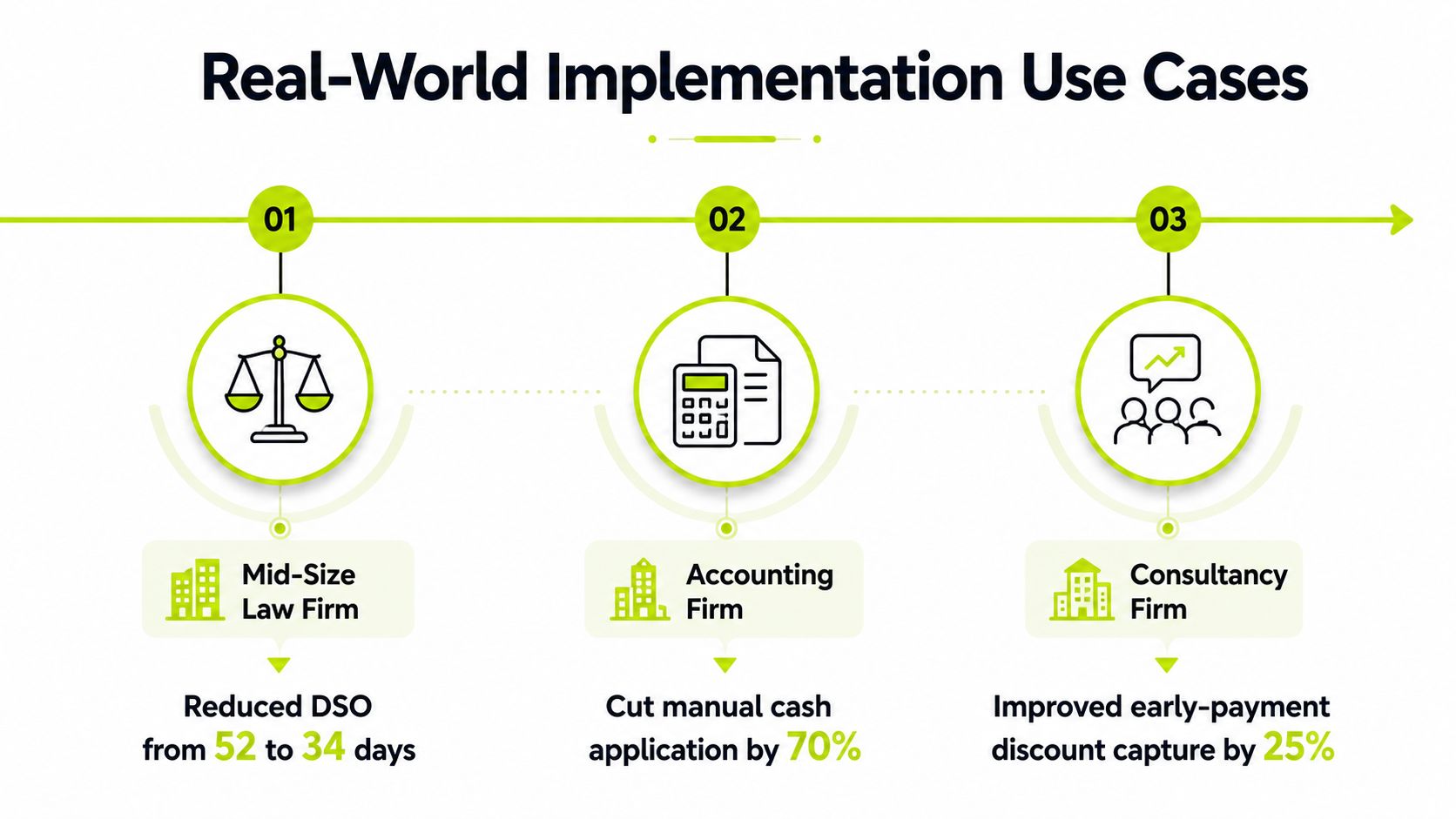
A mid-size consulting firm doesn't usually need a dramatic overhaul to see the value. It needs fewer late invoices, cleaner posting, and a follow-up sequence that doesn't depend on one person remembering everything. In that kind of setting, automating dunning and cash application can make the process feel less fragile, and the collections team can spend more time on exceptions instead of chasing every invoice manually.
A marketing agency has a different problem. The issue is often tone. One client needs a gentle reminder, another needs firmer language, and a third needs portal-based visibility because multiple people touch the same account. Omnichannel outreach solves that by making communication consistent without making it generic.
An engineering firm often lives with sync gaps between billing and the ledger. That creates confusion over whether an invoice was sent, viewed, paid, or partially cleared. Clean QuickBooks sync closes that gap and gives finance a current picture instead of a weekend reconciliation exercise.
If you're deciding what to do next, start with the friction, not the software. Audit where invoices stall, where reminders lose tone, where payments sit unmatched, and where reporting forces manual cleanup. Then choose one win, usually reminders or cash application, and prove the process before you expand it.
Resolut helps professional services firms automate receivables with structured workflows for reminders, collections, billing, and cash application, while keeping the process human where it needs judgment. If you want to reduce DSO without losing control of client communication, visit Resolut and review how it fits your current AR stack.