Automated Collection Calls: Rules, Limits and Results
Automated collection calls explained for finance leaders: the FDCPA and TCPA rules, when calls beat email, cadence settings and a setup checklist.
An invoice you sent three weeks ago is still open. The client is a long one, the work is finished, and your controller is weighing whether a phone call collects the balance or irritates the partner who owns the relationship.
That choice defines the true purpose of automated collection calls. Run as the default touch, they burn goodwill and invite complaints. Run as a governed workflow, with consent records and account-by-account selection, they help a professional-services firm reduce DSO and improve cash flow without turning every overdue invoice into a confrontation.
Many growing firms run collections with a controller, a bookkeeper and QuickBooks rather than a dedicated process. Accounts receivable automation only pays off when the call is the exception, chosen account by account, with rules a person can defend later. Resolut follows that order, reserving its AI voice calling agent for the Orchestration tier while lower tiers stay on email and SMS.
What Automated Collection Calls Are and How They Work
It's Monday. Invoice 4418 has passed its due date and entered the workflow. Nobody has picked up a phone yet.
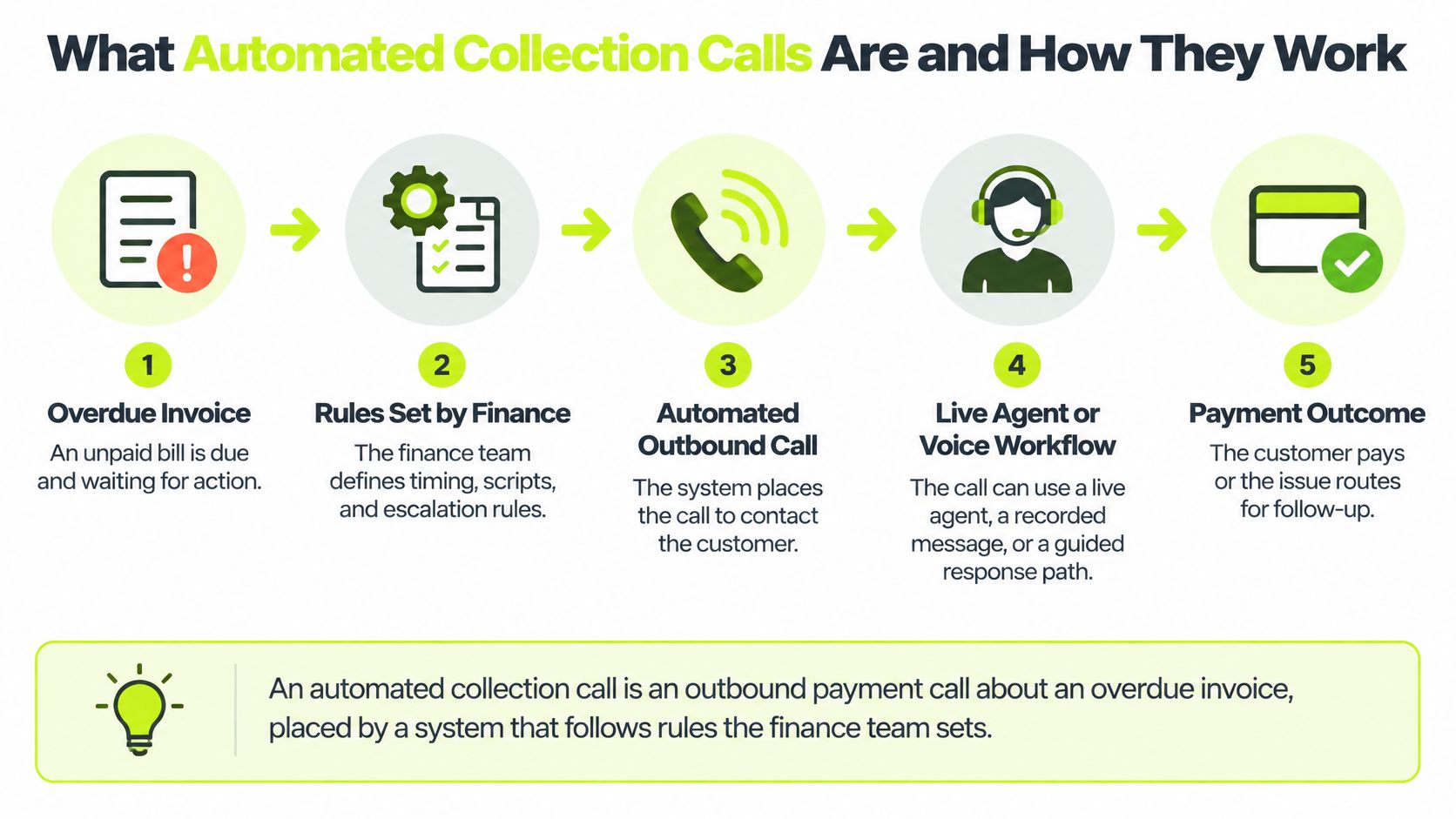
An automated collection call is an outbound payment call about an overdue invoice, placed by a system that follows rules the finance team sets. The voice can be a live agent, a prerecorded message, or an AI voice. Those rules apply whether or not the firm thinks of itself as a collector.
Treat the system as a dispatcher with a rulebook, not a telemarketer working a dial list.
The path of one invoice
The sequence is short, and every step writes to the account record.
- Check the file first. The system reads that account's call history, consent, and time zone before it dials.
- Place the call in a permitted window. If the rules allow it, the dialer calls. If they don't, the invoice waits.
- Land on one of four outcomes. A person answers, voicemail is left, nobody answers, or the number is invalid.
- Write the next action. The outcome updates the record and sets what happens next, including a payment link or another channel.
- Hand off anything that isn't routine. Disputes, hardship, and broken commitments go to a person the same day.
Volume is the reason control matters. Americans received more than 58 billion robocalls in 2019, and FTC complaints rose from about 756,000 in 2009 to 3.7 million in 2019, according to figures cited in an amicus brief filed with the Supreme Court. A finance team that dials without a ledger will look like part of that noise.
Before you turn a dialer on, verify three things: how often a debtor is called, whether consent exists for that number, and how a non-routine call reaches a human. Teams comparing how a voice agent is built can review an Expressify AI voice assistant as a reference for the speaking layer. The rules that decide whether the call is allowed still belong to finance.
Automation decides when a call is allowed, and people decide what happens when the call is not routine.
The Legal Limits Every Automated Call Must Respect
These limits belong in the dialer, not in a reminder taped to a monitor. A staff note gets skipped when two people work the same account. A hard block doesn't.
Rule | Requirement | Applies to |
|---|---|---|
Call frequency | No more than 7 calls about one debt in 7 consecutive days | Automated and live calls |
After a conversation | No calls for 7 days after a completed phone conversation about the debt | Automated and live calls |
Calling hours | No calls before 8 a.m. or after 9 p.m. | Debtor's local time |
Inconvenient times or places | No calls at times or places the consumer has designated as inconvenient | Every call |
AI or prerecorded voice | Prior express consent, documented before the call | Voice calls |
Caller identity | Caller states who it is and the purpose of the call | Every call |
Opt-out | Consumer can prohibit phone contact, and the system must honor it on every channel | All channels |
The table covers U.S. federal rules only. Rebuild it for each state, country, and debt type before you launch.
Why the block has to be mechanical
The Consumer Financial Protection Bureau states that a collector is presumed to violate federal frequency limits when it calls about a particular debt more than seven times within seven consecutive days, or calls within seven days after a completed telephone conversation about that debt. Hours follow the same logic: no calls before 8 a.m. or after 9 p.m. local time, and none at a time or place the person has marked inconvenient.
Before every attempt, the system should calculate a blocked-until date from the last conversation and the rolling call count, then refuse the call until that date has passed. Lowering priority isn't enough. Parallel agents and retries will still exceed the limit.
Say a debtor speaks with someone on Tuesday about one invoice. No further call about that debt can go out before the following Tuesday, even if the account is flagged high priority. The ledger, not the collector's judgment, holds the date.
An AI or prerecorded voice adds a separate consent duty. The FCC has confirmed that AI-generated human voices fall under the Telephone Consumer Protection Act's rules for artificial or prerecorded voices, so prior express consent has to be on file before that call. The caller also has to identify itself. If you want a practical view of how call centers encode those checks, read how operators manage TCPA compliance in call centers. Pair that with your own regulatory requirements review, because consent and calling hours differ by channel and jurisdiction.
Practical rule: Ask any vendor to show the specific rule that blocked a specific call last month, and the record where that block is stored. If they can't, the control isn't real.
When a Call Beats Email, SMS or a Payment Link
Automated calls aren't automatically the best channel. More voice can lower engagement when the client would rather read a short note and pay.
In a 2025 survey of U.S. and U.K. adults summarized by Encore Capital, phone calls were preferred by 39% of U.S. respondents, while email led in the U.K. at 45%. Only a small minority preferred an automated chatbot, across age and income. Treat those numbers as a warning against defaulting to voice: preference varies by market, and the channel that feels strongest to a collector can be the one the debtor ignores.
The test for every call is whether it raises promise-to-pay completion and payment conversion per attempt. Attempt counts don't tell you that. Track right-party contact, promise-to-pay completion, payment conversion, complaint rate, opt-outs, and client retention. Review the segment rules each quarter against those measures. A multi-channel outreach plan should start from preference and balance, not from the channel that's easiest to automate.
First channel by account situation
Account situation | First channel | When a call adds value | Why |
|---|---|---|---|
Routine invoice, low balance | Email with payment link, then SMS if opted in | Usually not at all | A call costs more than a small balance justifies |
Mid-size overdue, two emails unanswered | Live or automated call | After the second unanswered email | Voice reaches people that email misses |
Long-standing client, relationship-sensitive | Email from the relationship partner | Human-led call before any automated sequence | Tone matters more than speed here |
Broken promise to pay | Call plus payment link | Within one business day of the missed date | Fast follow-up keeps the commitment alive |
Disputed invoice | Pause automated outreach | Human call to resolve the dispute | Automated contact on a disputed invoice creates risk |
Hardship reported | Stop automated contact | Human-only conversation about a payment plan | Protects the relationship and limits compliance exposure |
Use the table as a starting point, then adjust by segment. A chronic late payer who answers SMS quickly may never need a call. An account that opens nothing gets one sooner.
Say the book holds 40 overdue invoices under $500 and five above $5,000. Don't call the small ones. Send email with a payment link. Reserve the call for the five larger invoices that stayed silent after two emails. Then measure the lift: compare promise-to-pay and conversion on the called accounts against a similar set that got email only. That comparison, run on your own aging each quarter, is the only reliable way to know whether voice pays for itself or automates work a link would have finished.
A Cadence That Escalates Without Overreaching
Set the ladder once. Then stop letting each collector invent timing.
Synovus places typical DSO for professional-services firms at 40–55 days and recommends automated reminders before the due date, then structured escalation at 7, 30, 60, and 90 days past due. Pre-due outreach prevents delinquency you could have avoided. Urgency rises at those aging points, not whenever someone happens to open the account.
A firm with $1 million in average monthly credit sales releases roughly $33,333 of cash for each one-day reduction in DSO. That is the case for a written cadence inside AR software for professional services, not a vague push to follow up faster.
Days past due | Action | Channel | Owner |
|---|---|---|---|
3 days before due | Friendly reminder with payment link | Automated | |
Due date | Invoice reminder and portal link | Automated | |
7 days past due | Follow-up on the unpaid balance | Email, plus SMS if opted in | Automated |
30 days past due | Call about the balance and payment plan options | Automated or live call | Collections team reviews |
60 days past due | Escalated call and statement review | Live call | Controller or finance lead |
90 days past due | Dispute check and escalation decision | Live call and written notice | Controller with legal review |
What runs alone and what needs a person
The first three rows run alone. Reminders follow a cadence you set once, and most workspaces send their first automated reminder within 10 minutes of setup. Those notes go from your own domain, signed by your team, in the template you wrote. Only the sending is automatic. Keep that early layer inside automated invoice reminders so the call isn't doing work email should have done.
The last three rows need a named person. At 60 and 90 days the open questions are judgment calls: is the balance disputed, is a payment plan in play, is the account ready for a written notice. An automated sequence that keeps dialing through those questions overreaches, and every unnecessary call spends client goodwill you will want later.
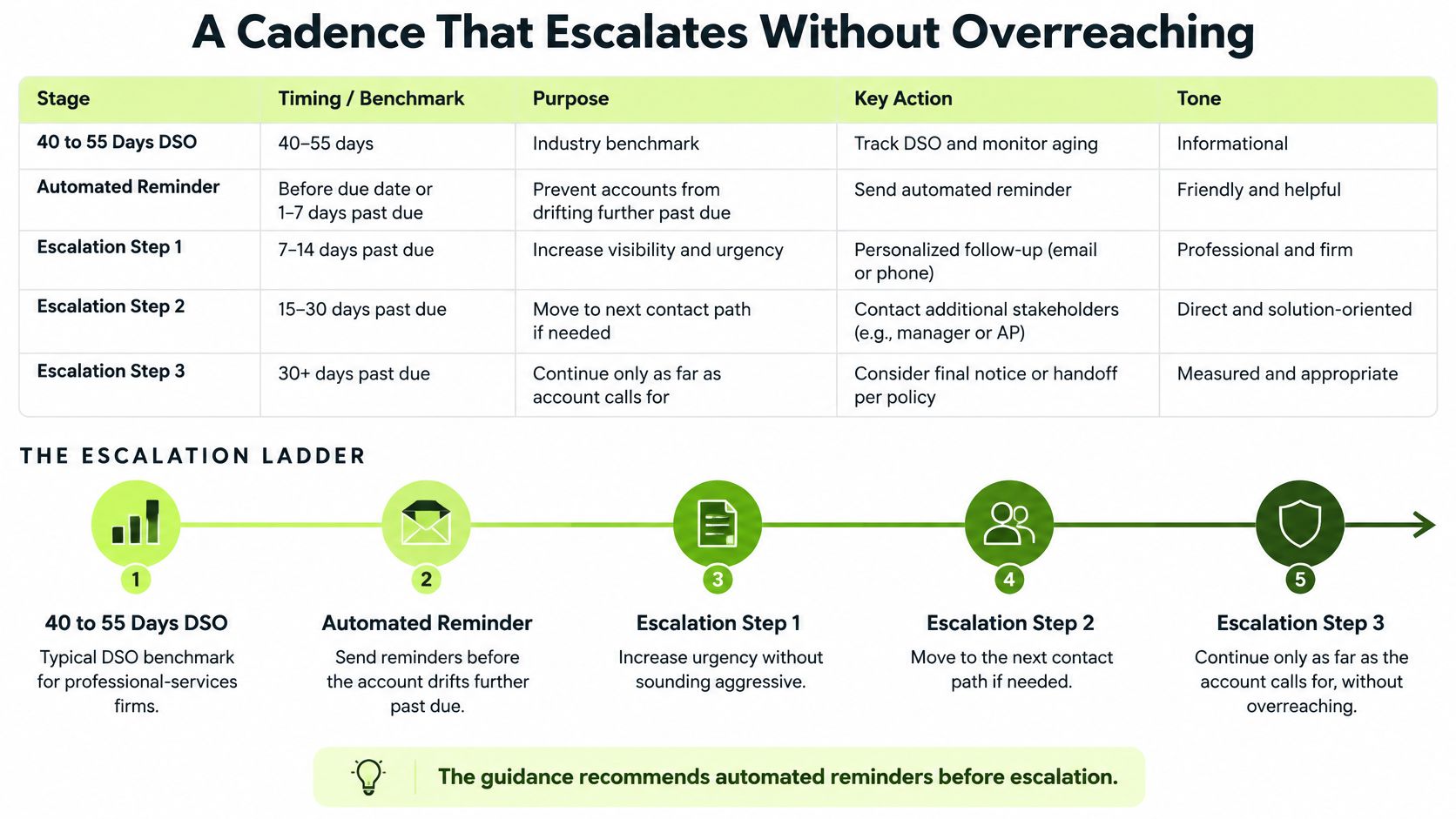
Voice enters the ladder once, at the 30-day mark, and only for accounts still silent after the email bands. AR automation across the whole workflow, reminders, risk scoring, and payment reconciliation working together, can shorten DSO before a phone call is ever placed. Treat dialing as the escalation layer on top of that work, not the engine of it.
Match the ladder to this month's aging report. Count how many invoices sit in each band, and how many of those were paid after a call versus after an email. If the 7-day band clears most balances, keep voice at 30 days and leave it there.
How to Set Up Consent, Suppression and Audit Trails
Build the controls before the first live call. Each step exists so a paid, disputed, or opted-out invoice can't be dialed by accident.
- One record per phone number. Store the consent source and the date on that record, because a later dispute will ask where the number came from.
- Separate voice consent from text consent. We send SMS only to people who have expressly opted in by providing their mobile number and checking the consent box, so keep that evidence with the number rather than assuming a voice okay covers a text.
- Load the suppression list before anything dials. Include do-not-call requests, disputed invoices, hardship flags, and paid invoices. Paid status should come from the accounting system. When an uploaded PDF carries a paid stamp, we detect it and turn off outreach for that invoice. Any invoice can also be marked paid in one click.
- Count attempts on the account, not on the campaign. Track calls about each debt in the recent window and the days since the last completed conversation, using the hard block you already defined, so retries can't stack.
- Set windows from the debtor's local time. The firm's office clock will place early calls into the wrong morning for a client two time zones away.
- Make every opt-out hit the same record. A person can withdraw SMS consent by replying STOP to any message, and an opt-out spoken on a call has to reach that same record before the next channel fires.
- Keep an immutable call log. Store attempt time, outcome, consent basis, and any block reason so a later question has an answer that wasn't edited after the fact.
- Test 50 invoices before go-live. Include paid, disputed, and opted-out accounts, and confirm every blocked call appears in the log with its reason.
The QuickBooks trap
If the firm runs QuickBooks, sync invoices and payments daily. A stale export is the easiest way to call a client who already paid, and that call costs more in trust than the balance was worth. QuickBooks AR automation fails at the sync, not at the script, when yesterday's open list is treated as today's truth.
Call Scripts for Four Common Outcomes
Say the balance is $12,400, 30 days past due, owed by a client the firm has served for six years. The lines below are illustrative. Read them as something that client might hear, not as a generic collections pitch.

Opening
- Name the caller and the firm. "This is Dana Chen at Northline Advisory."
- State the purpose in one line. "I'm calling about an open invoice, not about new work."
- Confirm the person, the number, and the amount. "Is this Alex Rivera, and is invoice 4418 for $12,400 the one you have?"
This opening avoids talking about the debt before you know who answered.
Promise to pay
- Ask for a date and an amount. "What date works, and will that cover the full $12,400?"
- Send the payment link while you're still on the line. Don't make them hunt for last month's email.
- Repeat the commitment back. "So that's $12,400 on Thursday the 18th. I'll note that on the invoice."
A vague "we'll look at it" isn't a promise. Don't log it as one.
Dispute
- Stop discussing the amount. "I'll take this off the payment path."
- Name the handoff. "A person on our finance team will review invoice 4418."
- Log it and route it within one business day. The client shouldn't have to retell the story.
Automated contact after a dispute is how a six-year relationship turns into a complaint.
Hardship or opt-out
- Acknowledge the request without arguing. "I hear you, and I'll record that."
- Confirm the stop. "No further calls will be placed on this number."
- Explain the human path. "If a payment plan would help, our team can set that up with you directly."
None of these scripts threaten action the firm won't take, and none mention credit reporting unless the firm reports. Read each script aloud. Cut any sentence that would sound like a threat if that client were listening.
Confirm the Setup Before You Launch Automated Calls
Don't launch because the script sounds fine. Launch when the checklist is clean.
- Legal limits are confirmed for every state, country, and debt type in the book.
- Consent evidence exists for each number that will receive a voice call.
- The suppression list has been tested on paid, disputed, and opted-out invoices.
- The controller has approved the cadence, and the owner of each handoff is named.
- A baseline is written down: DSO for the last 90 days, the share of invoices paid within 14 days of the due date, and the complaint count.
Compare those same measures over the same months after launch. Wait at least one full billing cycle before you judge the result. A single good week isn't a new process.
Setup is three steps: connect QuickBooks or drop in PDFs, pick a workflow and adjust the cadence, then we do the chasing. Our AI agent makes real phone calls to debtors, and you can watch a live demo of it before you put a client on the line. In a survey of finance professionals reported by Chaser, 71% of automation users received payment within two weeks of the due date, compared with 47% of organizations relying on manual methods. Track that same share against your baseline, not against someone else's book.
If any line on the checklist is open, wait. A governed call is worth more than a fast one.
Resolut automates AR for professional services, consistent, accurate, and human.
Resolut runs accounts receivable automation for professional services firms, including an AI agent that places real collection calls only inside the cadence and consent rules you set. If you want overdue invoices handled with the same care you'd give a long-standing client, visit Resolut and watch how the workflow treats a call as the exception, not the default.