Automated Collections Services: A Finance Leader's Guide
Learn how automated collections services reduce DSO and improve cash flow. Explore features, vendor criteria, compliance, and ROI
You're looking at an aging report that seems to demand the same decision every week. Send another polite reminder, ask an account manager to intervene, or accept that a client who values your expertise still hasn't paid on time. Meanwhile, cash flow forecasts become less reliable, partners ask why receivables remain high, and your team spends valuable hours reconciling payments instead of managing the business.
For professional services firms with $3M to $50M in revenue, collections rarely fail because someone forgot how to write an email. They fail because billing data, client context, payment options, follow-up timing, and cash application sit in separate workflows. Automated collections services bring those activities into one operating process, helping finance teams protect relationships while applying consistent cash discipline.
Why Automated Collections Services Matter Now
A consulting firm can have three late invoices that require three different actions. One may be held up because the client's accounts payable team omitted a purchase-order reference. Another may reflect cash pressure. A third may involve a genuine dispute over scope. Sending the same reminder to all three creates friction and gives finance little control.
A basic reminder tool sends a message when an invoice reaches a date. A properly designed automated collections service reads invoice aging, payment behavior, client segment, dispute status, and prior outreach, then determines the next action. It can pause routine dunning when a documented dispute exists, prompt a relationship owner to intervene on a strategic account, and continue a standard sequence for an otherwise healthy payer.
That makes the system an operational control layer, not merely an email sender. It connects collection policy with client context and gives finance a defined process for exceptions.
What the service controls
A complete workflow typically combines:
- Risk scoring: Identifies invoices and accounts that need attention before aging becomes severe.
- Sequenced outreach: Sends reminders according to invoice age, payment behavior, and customer preferences.
- Omnichannel communication: Coordinates email, SMS, and phone activity instead of allowing disconnected follow-ups.
- Dynamic escalation: Raises urgency when a customer ignores messages, breaks a promise to pay, or enters a higher-risk segment.
- Payment enablement: Gives the customer a direct route to pay by card or bank transfer, where appropriate.
- Cash application: Matches incoming payments to invoices and reduces manual reconciliation.
The distinction matters in professional services because every invoice is attached to a relationship. Clients may be buying legal advice, implementation work, design, accounting, or specialist expertise. A poorly timed message can make the firm appear disorganized, while an aggressive message can undermine the account manager's work.
Practical rule: Automate the process, not the judgment. Routine follow-ups belong in the system. Sensitive disputes, strategic accounts, and unusual payment arrangements need clear human ownership.
Executive interest has moved faster than implementation. A 2025 industry survey found that 80% of respondents rated AR automation as important, high priority, or critical, while only 14% had deployed AR automation at all and just 3% had fully automated accounts receivable (Experian's survey of automated debt collection). The gap reflects practical constraints: budget approval, competing IT work, manual exceptions, and payment steps that still create friction for clients.
That is why finance leaders are evaluating accounts receivable automation now, while many professional services firms remain only partly automated. The technology can manage repeatable work, but adoption still depends on fitting it into billing, client ownership, dispute handling, and cash application.
The Measurable Impact on DSO and Cash Flow
Days Sales Outstanding, or DSO, measures the average number of days a business takes to collect after a credit sale. The standard calculation divides accounts receivable by total credit sales, then multiplies the result by the number of days in the period. In professional services, DSO represents the AR-days component of total lockup, alongside work-in-progress days, as explained in this guide to reducing DSO with AR automation.
The benchmark gap is concrete. Average DSO across domestic trade receivables was reported at 36.8 days in Q3 2024, while the top 25% of companies in a Hackett Group benchmark collected in 25.1 days (DSO and average collection period guidance). The roughly 11.7-day difference represents working capital that remains tied up when collection processes lack the discipline and visibility of top performers.
For a services firm, the effect extends beyond the aging report. Faster conversion can reduce pressure on credit facilities, make payroll and vendor planning more predictable, and reduce the hours controllers spend investigating old balances. The cash result depends on billing volume, client mix, and invoice size. Finance teams should therefore model the effect using their own credit sales instead of relying on a generic promise.
Adoption remains behind executive intent
Evidence connects AR automation with faster cash conversion. Independent guidance reports that 62% of surveyed businesses saw DSO improve after automating accounts receivable, alongside automated reminders based on invoice aging and payment behavior, plus dashboards for DSO, Collection Effectiveness Index, average payment delays, and collection performance (AR automation and collections workflows). A separate 2023 study cited in finance software coverage found that 85% of CFOs at companies automating more than half of their AR processes reported a decrease in DSO (automated cash application guidance).
The operational lesson matters more than either headline. Reminder emails cannot deliver the full benefit if clients still face a difficult payment experience or staff must manually match every receipt to an invoice.
Payment processing remains a frequent bottleneck. Earlier survey findings reported that only 23% of organizations had mostly or fully automated payment processing. A firm can therefore improve outreach while clients still search for old invoices, request payment instructions, or wait for manual reconciliation.
Budget approval and IT backlogs often explain this partial adoption. The business case should connect each workflow change to a finance metric. A structured approach to calculating automation ROI should include reduced manual effort, faster payment conversion, lower dispute handling time, and improved visibility, not just the number of reminders sent.
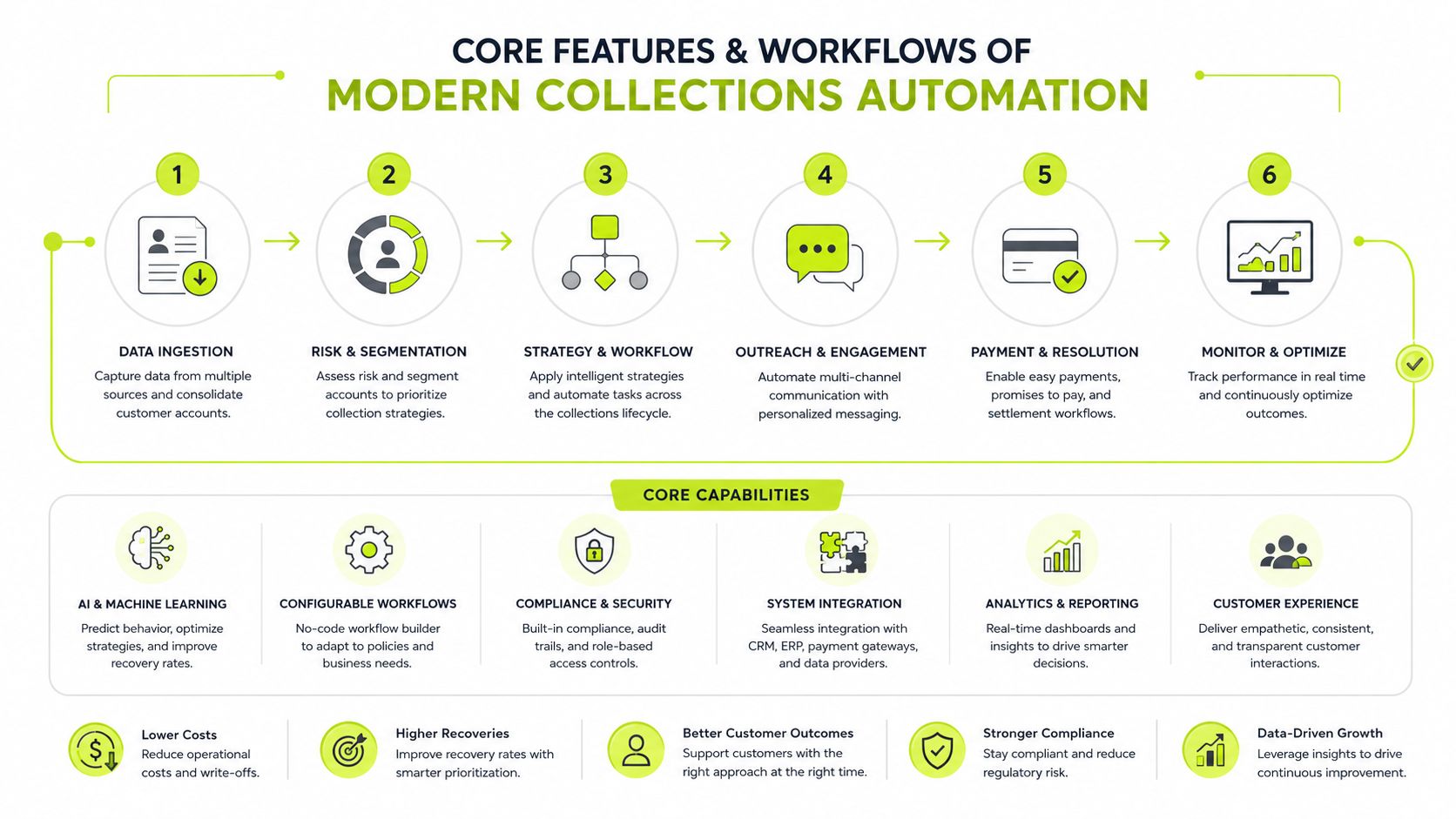
Core Features and Workflows of Modern Collections Automation
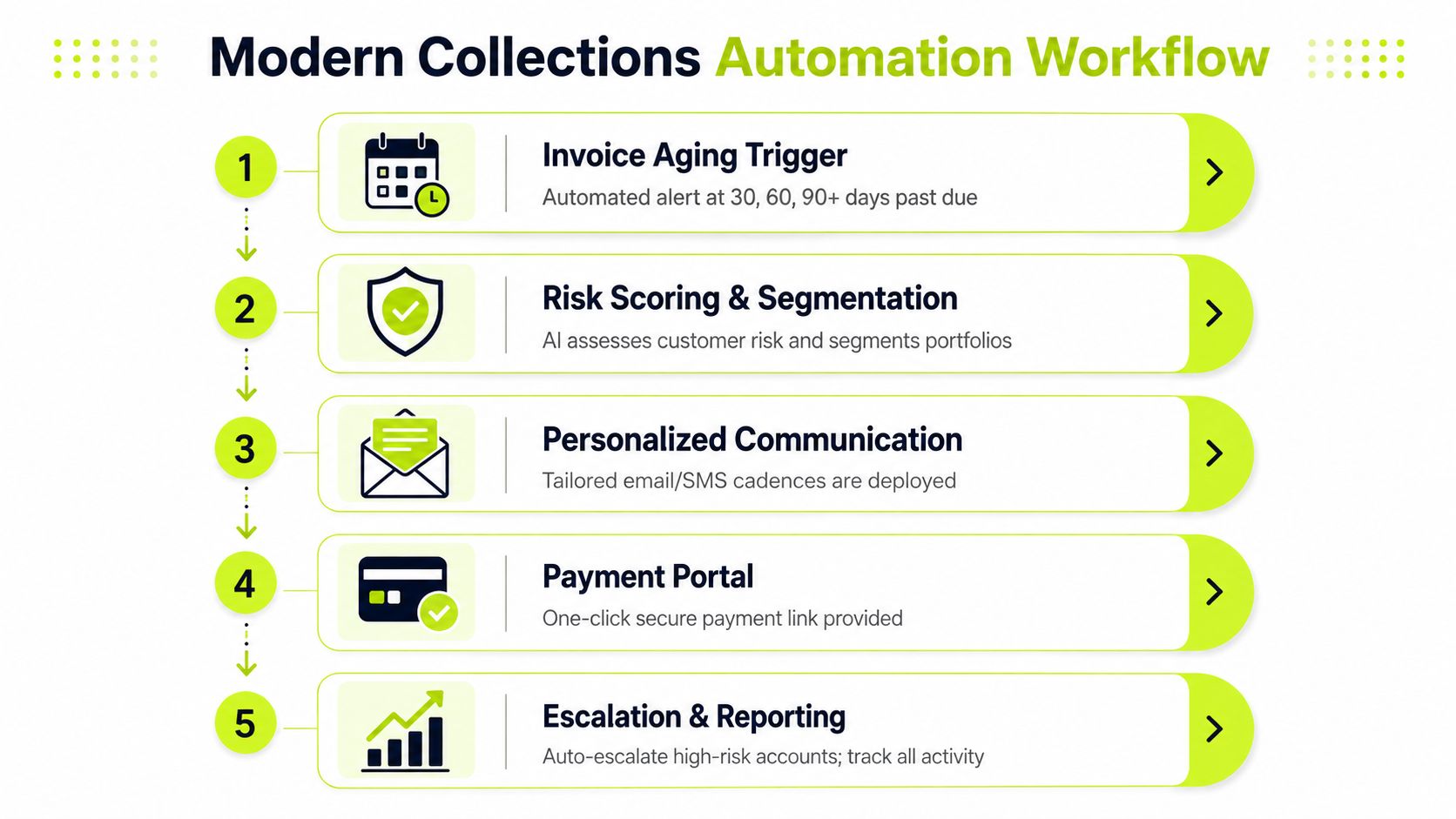
A strong AI AR automation workflow moves an invoice through a sequence of controlled decisions. The technology matters, but the design matters more. Each stage should have a clear trigger, an owner, an exception path, and a measurable result.
Start with aging and risk
The first trigger is invoice status. The system should know when an invoice is approaching its due date, reaches the due date, or moves into a defined overdue bucket. It should also identify risk before a balance becomes seriously delinquent by considering payment history, broken promises, disputes, credit information, and account importance.
A risk score shouldn't automatically decide that every late payer deserves a hard escalation. It should help the finance team distinguish between a reliable customer with an administrative delay and a customer whose behavior indicates a growing collection risk.
Build a cadence, not a single reminder
A practical reminder sequence can begin 3 to 7 days before the due date, continue on the due date, then follow up at 7 days past due, 14 days past due, and 30 days past due, according to payment-reminder guidance from Garfield Law. The content should change as the invoice ages.
Early messages can confirm invoice details and provide an easy payment route. Later messages can request a firm payment date, identify the consequences of continued nonpayment, or route the account to a human owner. The system should stop or modify the sequence when a payment is promised, a dispute is opened, or a client contact responds with relevant information.
Match channels to the relationship
Email is useful for documentation and invoice detail. SMS can work for short payment prompts when the customer has consented to that channel. Phone outreach is more appropriate for high-value accounts, complex balances, or situations where written exchanges have failed.
Channel selection should reflect customer preference, service sensitivity, geography, and compliance requirements. A consumer-style sequence applied to a board-level client can feel careless, while a phone call for every small administrative delay creates unnecessary cost.
Remove friction at payment and reconciliation
A payment portal should let the customer review the invoice and choose an available method, such as a card or bank transfer. Digital wallets can be useful in some markets, but availability remains limited. One 2025 survey found that only 17% of organizations currently offered digital wallets (2026 AR trends coverage from Corcentric).
The workflow isn't complete when the customer clicks Pay. Automated cash application should match the payment to the correct invoice, account, and remittance information, then update the ledger and reporting system. Without that step, finance staff still spend hours resolving unapplied cash and the DSO report remains less trustworthy than it should be.
Finally, intelligent escalation should route high-risk accounts to the right person. That can include a controller, account leader, partner, internal collections specialist, or legal adviser. A firm should never let an AI system issue legal-sounding language without governance, approved templates, and an explicit decision rule.
How to Evaluate an Automated Collections Vendor
Professional services firms should evaluate an AR platform against the workflow they operate, not the feature list in a product demonstration. The first question is whether the vendor can connect billing, client context, payment acceptance, and reconciliation without creating another isolated system.
QuickBooks AR automation deserves particular scrutiny for smaller and mid-sized firms. A vendor should explain how invoices, credits, customer records, payment status, disputes, and applied cash move between QuickBooks and the collections platform. Ask to see the exception process, not just the successful sync. A system that handles clean invoices but requires manual repair for credits or partial payments will create a second reconciliation burden.
Autopilot and co-pilot need different jobs
Routine accounts can run in autopilot when the rules are clear and the client relationship is low risk. Co-pilot mode is more suitable when a partner owns the relationship, an invoice is disputed, a payment plan is under negotiation, or the balance could affect future work.
The vendor should let finance define those boundaries. Look for approval controls, activity history, role-based access, configurable templates, and a record of every message, response, promise, and escalation.
Evaluation Criteria | What to Look For | Common Pitfalls |
|---|---|---|
Accounting integration | Reliable two-way data exchange with QuickBooks or the firm's accounting system | A one-way export that leaves payment status and exceptions for manual work |
Workflow control | Rules by client segment, invoice age, dispute status, and payment behavior | A fixed cadence that treats every customer the same |
Communication channels | Coordinated email, SMS, and phone workflows with consent and audit history | Reminder emails marketed as full omnichannel collections |
Payment experience | Secure portal with practical payment methods and invoice context | Messages that demand payment but provide no direct route to complete it |
Cash application | Automated matching, exception queues, and reconciliation visibility | A separate payment tool that leaves unapplied cash untouched |
Human oversight | Autopilot and co-pilot modes, approvals, pause controls, and escalation ownership | Full automation with no review path for strategic or disputed accounts |
Security and compliance | Clear data controls, access permissions, retention practices, and compliance documentation | Broad security language without evidence of operational controls |
Implementation support | Data mapping, testing, training, and a documented rollout plan | A quick launch that moves process problems into production |
Request a demonstration using your own professional services scenarios. Show the vendor a retainer invoice, a disputed project invoice, a partial payment, a client with a broken promise, and an account requiring partner involvement. If the platform can't explain what happens at each branch, it probably solves only the visible reminder problem.
Why Most Firms Are Still Stuck in Partial Automation
Executive approval does not create operational readiness. The survey cited earlier found that 49% of organizations were considering AR automation and 39% were implementing it, while only 3% had fully automated AR. That gap reflects the situation inside many professional services firms. Leaders approve the direction, but ownership, systems, and daily procedures remain fragmented.
The obstacles are usually practical:
- Budget constraints: Finance leaders must compare automation with hiring, billing improvements, system upgrades, and other competing priorities.
- IT backlog: Accounting integrations often wait behind client-facing projects, security work, and core system maintenance.
- Fragmented data: Invoice status may sit in the accounting system, relationship context in a CRM, disputes in email, and payment promises in a spreadsheet.
- Payment friction: A client may receive a reminder yet lack a convenient payment option or a clear remittance process.
Partial automation persists because firms often start with the most visible task, sending reminders, rather than the entire transaction. A message can reach the client while the invoice remains difficult to identify, a mismatch remains unresolved, or remittance details still require manual handling.
Why reminder-only projects stall
Automated outreach does not improve collections if the recipient cannot complete the next step. The client needs enough invoice context to recognize the balance, a way to resolve discrepancies, a suitable payment method, and instructions for submitting remittance information. Without those elements, the communication layer operates, but payment remains unfinished.
Payment processing maturity shows why this matters. Only 23% of organizations reported mostly or fully automated payment processing, according to Corcentric's coverage of AR trends. A reminder-only rollout can therefore optimize the easiest part of collections while acceptance, exception handling, and reconciliation remain manual.

A practical rollout begins with the highest-friction path. Map an invoice from approval through payment, then identify where work stops. Some firms should begin with invoice data quality and payment links. Others need cash application first because unapplied receipts distort reporting. Outreach automation can expand once those foundations are stable.
Balancing Compliance and Client Relationships
Collections automation should make client communication more consistent, not less human. Manual follow-up often creates emotional drift. One team member writes an overly casual note, another sends a message that sounds accusatory, and a third escalates an account without knowing that the client has already raised a valid billing issue.
A controlled workflow gives the firm a common standard. Early reminders can be courteous and specific, with invoice references, due dates, contact information, and a clear payment route. As risk increases, the language can become firmer without becoming threatening. Human review should remain mandatory for disputes, vulnerable situations, negotiated payment plans, and high-value relationships.
Escalation needs evidence
Predictive risk identification helps the team act before an invoice enters a severe aging category. The useful question isn't whether a balance is late. It's whether the account's behavior indicates a need for a relationship conversation, a billing correction, a payment-plan discussion, or formal escalation.
A system should document why an account moved into a new treatment path. That record supports internal accountability and helps the firm explain its actions if a client challenges the process.
Compliance depends on jurisdiction, customer type, communication channel, and the firm's industry. Finance leaders should review fair debt practices, data privacy obligations, consent requirements for electronic communication, record retention, and any professional or sector-specific rules that apply to their work. This overview of regulatory requirements can help teams organize the questions they need to take to counsel and compliance advisers.
Automation protects the relationship when it gives people better timing, better context, and a clear reason to intervene.
The strongest model is neither “send everything automatically” nor “keep every step manual.” It is a governed division of labor. Software handles repeatable timing, segmentation, documentation, and payment routing. Finance and client teams handle judgment, empathy, negotiation, and exceptions.
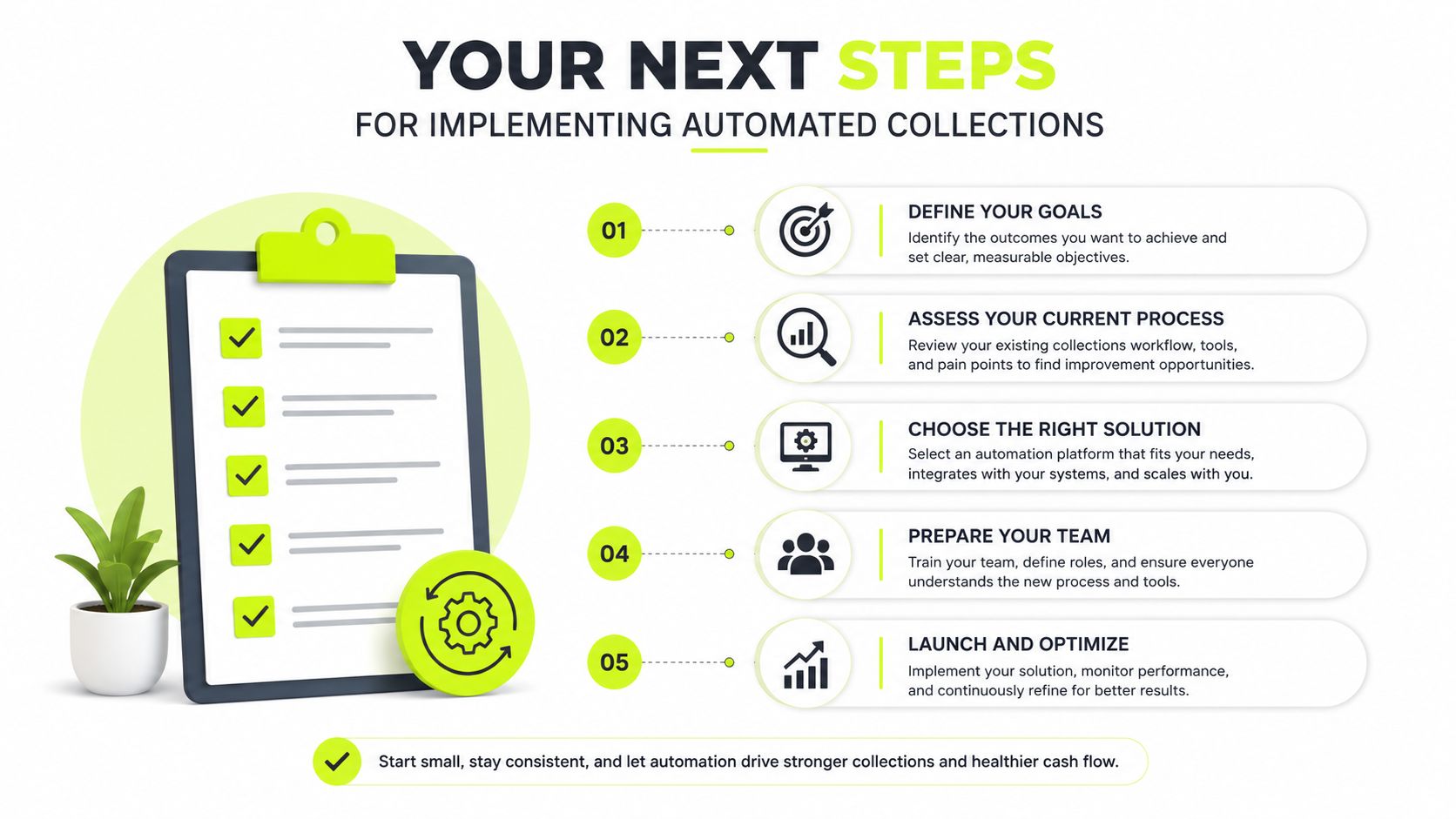
Your Next Steps for Implementing Automated Collections
Start with an audit, not a vendor contract. Document how invoices are approved, sent, followed up, disputed, paid, and applied. Mark every manual handoff and quantify the operational cost in hours, delays, rework, and reporting uncertainty.
Then evaluate vendors against your actual environment:
- Audit: Segment receivables by age, client type, dispute status, payment method, and relationship owner. Identify whether outreach, payment acceptance, or cash application creates the greatest constraint.
- Evaluate: Shortlist platforms that integrate with your accounting system, support professional services workflows, provide autopilot and co-pilot controls, and demonstrate exception handling. Ask for a workflow demonstration using your own invoice scenarios.
- Implement: Start with the most costly friction point. Test data mappings, templates, permissions, payment routing, escalation rules, and cash application before expanding the program. Use implementation timeline guidance to set realistic ownership and sequencing.
Track DSO, Collection Effectiveness Index, average days to payment, dispute rates by segment, unapplied cash, and manual touches per invoice from the first production cycle. Those measures will show whether automation is improving cash conversion or merely increasing message volume.
Resolut automates AR for professional services, combining risk identification, sequenced omnichannel outreach, payment workflows, and cash application with human oversight for sensitive accounts. Review how Resolut can help your finance team build a consistent, accurate, and human collections process.