Automated Invoice Software: A Buyer's Guide for 2026
Automated invoice software explained for finance teams: what it does, which features matter for AR and cash flow, and how to choose the right fit.
The invoice left your firm on time. It was accurate, approved and sent to the right client, and then it sat. The client's accounts payable team could not process it because a purchase order number was missing, nobody at your firm knew, and the first reminder did not go out until three weeks after the due date.
That's the gap most automated invoice software promises to close, and it's also where buying decisions go wrong. Sending a clean PDF faster doesn't get you paid faster if the delay happens after delivery.
What Automated Invoice Software Covers and Where It Stops
Say it's month-end at a $10 million professional services firm. Your controller has an aging report open, a folder of sent invoices on the desk, and a sticky note that reads PO missing. The work was delivered, the invoice was right, and cash still isn't moving.

In plain terms, automated invoice software creates, sends, tracks and reconciles customer invoices with minimal manual steps. For receivables teams, the better tools go further into reminders, payment collection and cash posting.
Think of a manual invoice as a letter someone must remember to mail, chase and then check against the bank statement. Automation sends that letter on schedule, records whether the client replied, and logs the payment without anyone retyping the details.
The three layers buyers confuse
- Invoice generation: Templates, recurring billing and PDF delivery. This gets the document out the door on the scheduled date.
- Invoice processing: Capturing data from incoming bills you receive from suppliers. That's mostly an accounts payable problem.
- Receivables automation: Collections follow-up, payment portals and cash application. accounts receivable automation affects when money arrives.
Vendors use one label for all three, so a demo can look complete while covering only the first layer. A tool that only produces PDFs won't shorten payment time, because it stops before the client has acted.
Judge the software by what happens after the invoice is sent, not by how quickly it produces the document.
If you're a CFO, controller, or firm owner at a professional services firm doing $3M to $50M in revenue, your bottleneck is rarely typing speed. It's usually visibility. You can't see which invoices are stuck, who owns the next step, or whether a reminder went out.
Visual to keep in mind: a controller's desk at month-end, an open aging report beside an unopened invoice folder, and that sticky note reading PO missing. That's the before picture you're buying your way out of.
I would start by naming which layer addresses your actual bottleneck, in writing, before you look at any feature list. That single decision rules out half the tools you'll be shown.
Core Features Mapped to the Order-to-Cash Cycle
Cash moves through a firm in a predictable order, and each stage fails in a predictable way. The table below maps features to that order, so you can test a demo against the stage where your own process breaks.
Stage | Feature | What It Automates | What Changes for Finance |
|---|---|---|---|
Billing | Recurring and milestone invoicing | Invoice creation and dispatch on schedule | Invoices leave on the due date, not when someone remembers |
Routing | Approval and dispute routing | Sends exceptions to a named owner | Disputes stop sitting unread in shared inboxes |
Payments | Hosted payment portal | Accepts cards, bank transfers and digital wallets | Fewer payment friction points for the client |
Collections | Segment-based reminders | Timed follow-ups by customer segment and risk | Reminder tone and cadence stay consistent |
Cash application | Automatic payment matching | Posts payments to open invoices | Ledger matches bank deposits without rekeying |
Reporting | Aging and cash forecast | Overdue balances and projected receipts | DSO by customer segment visible every week |
Billing and routing
Recurring and milestone invoicing means an invoice goes out on the contract date, not when a partner approves a batch or someone returns from leave. For professional services, where billing often waits on time entry and internal review, that scheduling discipline is worth more than a prettier template. Firms using project-based tools sometimes pair this with studio invoicing with freispace to keep project billing and the invoice itself in step.
Routing is where most delays hide. When an invoice lacks a purchase order number or a client disputes one line item, the system should send that exception to a named owner with a date attached. A shared inbox has no owner, so the invoice ages while everyone assumes someone else is handling it.
Payments and collections
A hosted payment portal that accepts cards, bank transfers and digital wallets removes a barrier that has nothing to do with willingness to pay. Busy clients pay the invoice that takes two clicks before the one that requires a bank login and a remittance email. Ask what each method costs you, because convenience has a fee attached.
Collections outreach should be timed before and after the due date, and set by customer segment. A longstanding client who pays on day 32 every month doesn't need the same message as a first-time client with no payment history. AI AR automation earns its keep here when it adjusts timing and tone by risk, rather than sending identical reminders to everyone on the same day.
Resolut automates follow-ups, scores which customers will pay late, and forecasts cash, which is the combination that turns a reminder tool into something a controller can plan around. Scoring matters because your team's time is finite. They should spend it on the invoices most likely to slip, not on the ones that would have paid anyway.
Cash application and reporting
Cash application closes the loop. When a payment arrives, it should post against the correct open invoice as the bank feed or ledger sync matches it. If your staff still key payments manually, you've automated the chase and kept the cleanup.
When QuickBooks Online is connected, invoice payment status syncs live, which determines whether your aging report is current this morning or only after someone uploads a file. That one detail decides whether follow-up stops the moment a client pays. Sending a reminder for an invoice paid yesterday is the fastest way to lose credibility with a good client.
Reporting then becomes usable. You want aging buckets, overdue balances and DSO by segment, refreshed weekly, not a month-end snapshot that arrives too late to act on. AR software for professional services is only useful if a partner can see which clients are drifting before the quarter closes.
Two checks will tell you more than an hour of demo. First, does the feature write back to the ledger, or does it live in a separate system your team has to reconcile? Second, who approves an exception, and where does that approval get recorded? If a vendor can't answer both clearly, the feature isn't finished.
Where Late Payments Come From After the Invoice Is Sent
A sent invoice can still stall for weeks. A missing purchase order reference, an unidentified approver or a delayed follow-up may leave a valid balance sitting in the client's queue.
The Atradius 2025 U.S. Payment Practices Barometer reports that nearly 50% of B2B sales are made on credit, with average payment terms of 45 days from invoicing, and that overdue invoices affect 43% of credit-based B2B sales. For a firm with half its revenue on credit, late payment is a working-capital issue, not just an administrative nuisance.
Buyer-side friction
Administrative friction inside the client's process is one common cause. Missing purchase order numbers, incorrect contacts, approvals stalled by an absence and unclear payment instructions can all prevent an invoice from moving. The client may be willing to pay, but the invoice has not reached the person or process that can release payment.
Automated reminders can restate the reference, amount and payment instructions so the client's team has the information needed to act. A sequence should also give the recipient a clear way to raise an issue, rather than sending the same demand repeatedly. The guide to automated invoice reminders explains how to structure follow-ups around that goal.
Buyer liquidity
Temporary liquidity pressure produces a different pattern: broken promise dates, partial payments or requests to defer payment until the following month. A sterner email does not resolve a cash shortfall.
Use payment behaviour to decide when to follow up and when to involve a person. Record a specific promise date, then escalate if the date passes without payment. The trade-off is straightforward: earlier, more frequent outreach can bring a risk to attention sooner, but poorly timed pressure can strain a customer relationship.
Your own inconsistency
Follow-up can also fail inside your firm. A busy employee may send a reminder late, while different staff members use different tones. That inconsistency makes it harder for clients to know what to expect.
A defined cadence makes routine follow-up consistent. Staff can focus on exceptions that need judgement, such as a disputed invoice or a missed promise date.
Practical rule: Send the first reminder before the due date, and move to a named person as soon as a promise date is missed.
To see which cause dominates, chart your aging buckets: current, 1 to 30, 31 to 60, 61 to 90 and over 90 days. Split each bucket by likely cause: buyer friction, buyer liquidity or internal follow-up drift. The pattern helps distinguish a process problem from a customer payment problem.
Start with one question from your aging report: which of these three causes accounts for most of the balance more than 30 days past due?
What Automation Returns in Cash and DSO
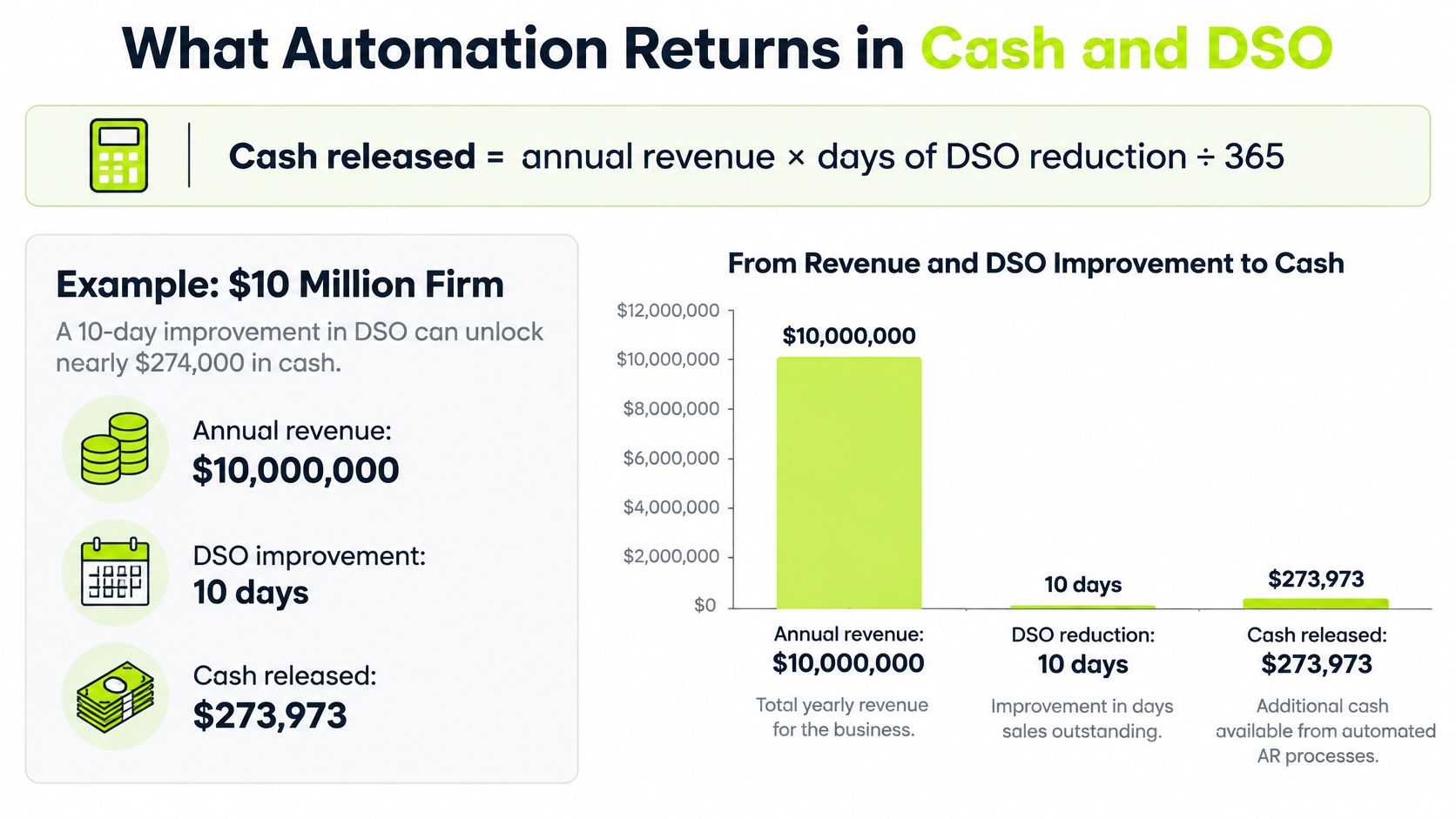
The return calculation is simple, and you should run it before you listen to a savings claim. Cash released equals annual revenue multiplied by the days of DSO reduction, divided by 365.
Take a $10 million firm that reduces DSO by 10 days. That's $10,000,000 multiplied by 10, divided by 365, which comes to roughly $273,973 that would otherwise stay tied up in receivables. That cash isn't new revenue. It's money you've already earned, arriving sooner.
The chart below sets that worked example out step by step.
Annual revenue | 5-day reduction | 10-day reduction | 15-day reduction |
|---|---|---|---|
$5M | $68,493 | $136,986 | $205,479 |
$10M | $136,986 | $273,973 | $410,959 |
$25M | $342,466 | $684,932 | $1,027,397 |
Measuring the baseline properly
These numbers only mean something against an honest baseline. Take the trailing three months, calculate DSO by customer segment, and weight it by invoice value. A simple average hides the handful of large overdue invoices that control your cash position.
Segmentation matters for a second reason. If one client group pays in 20 days and another in 70, your blended DSO tells you nothing about where to act. The firms that reduce DSO fastest usually find the problem concentrated in a few segments, then fix the follow-up for those.
The short walkthrough below shows how the calculation holds together when you change the revenue figure.
What the table leaves out
- Staff hours: Time your team spends writing individual follow-up emails and hunting for payment status.
- Write-offs avoided: Balances recovered because a slipping client was contacted early rather than at 90 days.
- Borrowing costs: Interest on the credit line you draw while waiting for money you've already earned.
- Partner time: Senior people pulled into collection calls that a consistent process would have prevented.
Those are real, but they're harder to verify, and vendors will inflate them. Report the cash number first because you can prove it from the ledger. The same discipline applies at smaller scale, which is why cash flow planning for remote freelancers makes a useful read on separating earned revenue from cash in hand.
A 5 to 10 day reduction in the first year is a reasonable target when overdue balances are concentrated in a few segments. Where the aging is spread evenly across many clients, expect a smaller and slower result. Anyone promising a large drop without asking about your segment mix hasn't looked at your numbers.
Set your own baseline against the table before a demo. If a vendor's projected saving is larger than the cash your arithmetic supports, ask them to show their working.
Visual to build: a grouped bar chart with the three revenue levels on the horizontal axis and three bars per level for the 5, 10 and 15-day reductions, labelled in dollars. It's the chart that gets a managing partner's attention.
Measure Your DSO Before You Choose a Tool
Do this before you evaluate anything. Pull the last 90 days of your aging report and calculate DSO by customer segment, weighted by invoice value.
If you'd like the method set out step by step, our explainer on how to calculate days sales outstanding walks through the formula and the weighting. Use one method and stick to it, because changing the method halfway through a pilot makes the results unreadable.
Pick the pilot segment
Find the share of your balance that's more than 30 days past due, then identify the segment carrying the largest overdue amount. That segment becomes your pilot. Choosing the worst segment isn't pessimism. It's where you'll see a result soonest, and where a failure tells you something useful.
Write down two numbers for that segment today. Its DSO, and its share of balance over 30 days past due. Add a third if you can get it, the average time from first reminder to a promise to pay or actual payment.
Run a 90-day measurement
- Day 30: Record DSO and overdue share for the pilot segment only.
- Day 60: Record again, and count manual follow-ups your team sent that week.
- Day 90: Compare against the baseline, and check whether reminder-to-payment time shortened.
A good result looks like this, as an illustration. A pilot segment sitting at 38 percent overdue falls to 24 percent by day 90, even though total firm DSO barely moves because other segments were untouched. That tells you the process works and should be widened.
A flat firm-wide DSO with a clearly improving pilot segment is a success, not a disappointment.
If the pilot number doesn't move, look at the cause before blaming the software. Buyer friction and buyer liquidity respond to different actions, and no tool fixes both with the same message. Check whether reminders were sent on schedule, whether disputes had owners, and whether promise dates were recorded.
Fix the baseline and the pilot segment in writing before any demo. Then every vendor gets measured against the same numbers, and nobody can move the goalposts later.
Buyer Criteria for QuickBooks AR Automation
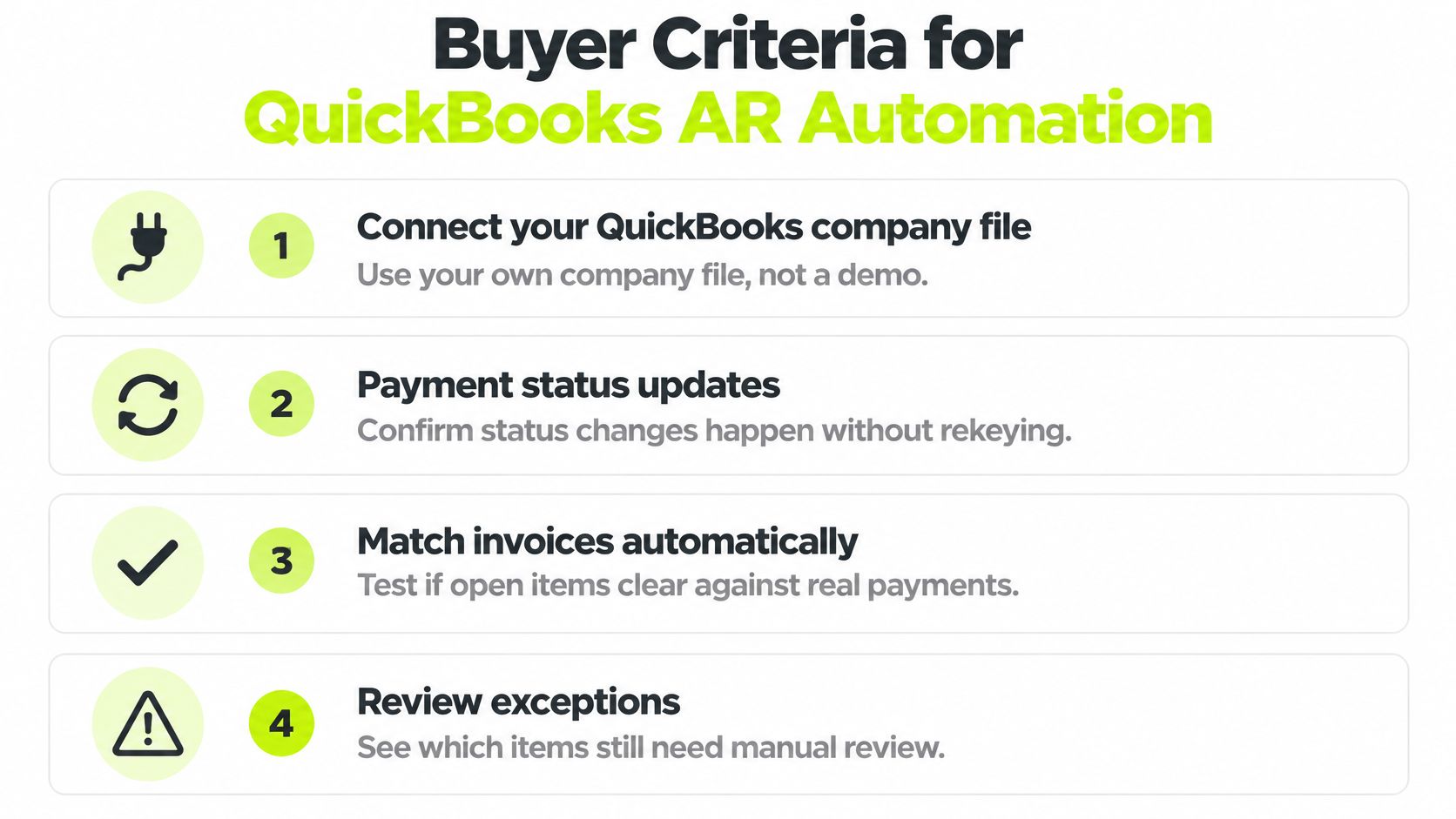
Treat each criterion as a test to run on your own data, not a line in a brochure. A demo database is clean in ways your ledger isn't, and the problems that matter only appear with real client names and real balances.
Connection and settlement timing
Connect a copy of your own QuickBooks company file and confirm that payment status updates without rekeying. Then test the awkward case. An invoice paid by check or outside the portal needs to be marked paid in one step, without creating a duplicate entry in the ledger.
Settlement timing is the test most demos skip. A tool may mark an invoice paid the moment the client pays, while the cash reaches your bank later. QuickBooks states in its QuickBooks Payments deposit guidance that standard transactions processed before 3:00 p.m. Pacific Time are deposited within two business days, and that first payments and initial deposits can take up to five business days while the merchant account is established. Ask which date the cash forecast uses, because forecasting on the payment date overstates your available cash.
Disputes, cadence and matching
Test dispute handling directly. Can a dispute be logged against a specific invoice, assigned to a named owner, and pause reminders on that invoice while it's open? If reminders keep firing during a genuine dispute, you'll damage a client relationship for no benefit.
Check that reminder cadence is set by segment and risk, not one schedule for the whole ledger. Confirm which payment methods the portal accepts and what each one costs you. Then send a partial payment through the test file and watch how it matches against open invoices, because partial payments are where automatic matching usually breaks.
Reporting should cut by segment, and access should be role-based so partners see their clients without seeing everyone's. Get written answers on data encryption and how long invoice data is retained.
On responsibility, be clear eyed. Users are responsible for the accuracy and lawfulness of the invoices they create and send, including tax, so ask how the tool helps you check an invoice before it goes out rather than assuming it validates tax for you.
Reading the pricing
Look for revenue caps, invoice limits and per-user fees, since those turn early success into a bigger bill. Our plans include no revenue caps, unlimited invoices, unlimited seats, and unlimited workspaces, and annual billing saves 20% compared with monthly billing, so the comparison to make is total cost at your expected invoice volume, not the entry price. If you want a sense of how other trades structure these charges, this breakdown of contractor invoicing features and pricing shows the common fee patterns to watch for.
Score each criterion against your own workflow and keep the sheet. QuickBooks AR automation that's strong on reminders but weak on settlement timing will leave your cash forecast wrong every week.
Document Accuracy, Confidence Scoring and Validation
A clean digital PDF and a scanned, handwritten or multi-page invoice pose different extraction problems. Accuracy typically drops as documents become less standardized, so one overall score can hide the cases most likely to create cleanup work. Ask vendors to report results by document type and field, rather than relying on a single headline figure.
Clean master data helps validation checks confirm that extracted fields match the right customer records. For example, correct billing information gives the system a reference for checking invoice details.
Why one accuracy figure misleads
A system may read a clean electronic invoice well and struggle with a scan or a document that spans several pages. Ask how the vendor handles each type, including multilingual and handwritten invoices. If it provides only one aggregate score, you cannot tell how the difficult cases perform.
The validation layer that catches the rest
- Totals reconcile: Line items plus tax should equal the amount due.
- Tax matches jurisdiction: Check that the rate fits the client's location and the service supplied.
- Currencies normalize: Amounts should use a consistent reporting currency, with the exchange rate recorded.
- Duplicates are caught: The same invoice number and amount should not enter the workflow twice.
- Identifiers match master data: Supplier and client IDs should tie to existing records.
A misread digit in a bank account number can carry into payment, reconciliation and reporting unless a field-level check catches it.
Confidence scoring assigns a score to each extracted field. Route fields below your threshold to a person for review instead of posting them automatically. That queue keeps uncertain data out of the ledger while allowing reliable fields to move through the workflow.
Set thresholds by field importance. An amount, tax code or bank detail warrants a stricter threshold than a delivery-note reference.
How to Roll Out Automated Invoicing Without Losing Control
Our setup has three steps: connect QuickBooks or drop PDFs, pick a workflow and adjust the cadence, then Resolut does the chasing. The mechanics are quick. Keeping control while you do it takes a little more care.
- Set the baseline. Use your 90-day segment figures so results can be compared like for like. Common slip: comparing against a single month-end snapshot, which makes normal timing swings look like progress.
- Connect and reconcile. Link QuickBooks or upload PDFs, then confirm invoice numbers, customer IDs and tax settings match the ledger. Common slip: skipping this check. Mismatches here create most of the cleanup you'll do later.
- Start with one segment and one workflow. Send a reminder before the due date, then follow up at 7 and 14 days overdue. Common slip: launching every segment at once, so you can't tell what worked.
- Apply validation thresholds. Send low-confidence fields to a person rather than posting them. The guidance in the Springer invoice recognition benchmark is that low-confidence fields should enter a human-in-the-loop queue instead of being posted automatically, because a small extraction error can propagate into payment and reporting failures. Common slip: trusting the clean-PDF accuracy rate on scanned documents.
- Run two parallel cycles. Compare automated status against your manual aging report for two billing cycles. Common slip: retiring the manual report too early, before you've seen the exceptions it would have caught.
- Expand when exceptions stabilise. Widen to other segments only once the exception rate is steady week to week. Common slip: expanding on a good fortnight, then discovering the edge cases at scale.
One detail protects client goodwill throughout. Keep a manual one-click paid mark for payments received outside the system. We detect paid stamps on uploaded PDFs and turn off outreach for that invoice automatically, and users can also mark any invoice paid manually in one click. Common slip: sending a reminder on an invoice already settled by check, which is the mistake clients remember.
Roll out this way and automation stays under your control. You keep a human on the exceptions, a clear baseline underneath the results, and a process that runs the same way every week. Resolut automates AR for professional services, consistent, accurate and human.
If your invoices go out on time but cash still arrives late, we'd like to help you close that gap. Resolut automates follow-ups, payment collection and cash application for professional services firms, so you can improve cash flow without adding headcount or chasing clients yourself. Connect QuickBooks, set your cadence and measure the DSO change over your first 90 days.