Automation in Accounting: Maximize Efficiency, Boost Cash
Discover automation in accounting for professional services. Use AI, RPA, and AR software to cut DSO, boost cash flow, and enhance efficiency.
On Monday morning, the aging report looks familiar. A handful of invoices are drifting past terms. A project manager says the client “always pays late but eventually.” Someone in finance is drafting follow-up emails by hand because the tone matters, and nobody wants to damage the relationship.
By Thursday, the problem isn't collections effort. It's control. Billing went out in batches instead of on completion. Cash application is behind. Leadership is asking for a cleaner cash forecast than the underlying process can support.
That's where automation in accounting earns its keep. Not as a tech initiative. As a way to tighten the link between work delivered, invoices issued, cash received, and decisions made.
Beyond Spreadsheets and Manual Follow-Ups
In a professional services firm, receivables friction usually hides in plain sight. The team sends invoices. The controller reviews aging. Collectors or account managers follow up. Payments arrive, often without clean remittance detail, and someone sorts it out later. Nothing looks broken enough to trigger urgency, but cash stays slower than it should.
That pattern shows up most clearly in firms between growth stages. Revenue is meaningful. Client relationships matter. Process discipline hasn't fully caught up. The result is a finance team doing careful work inside a weak system.

Over 70% of accounting firms have adopted artificial intelligence to automate core tasks. This isn't a future trend; it's the current standard for firms aiming to shift from repetitive data entry to high-value strategic analysis (reference). For a CFO or Controller, that matters less as a headline than as a signal. The operating model has changed.
What the manual process actually costs
Manual AR rarely fails in dramatic ways. It leaks value through small delays and inconsistent execution.
- Invoice timing slips: Work is complete, but billing waits on internal review or missing detail.
- Follow-up varies by person: One collector is firm, another delays, a partner overrides the sequence for a favored client.
- Cash visibility trails reality: Finance closes the gap after the fact instead of managing it in motion.
Practical rule: If your collections cadence depends on who remembered to send the email, you don't have a collections process. You have a series of personal habits.
A good starting point is to map the process end to end. This guide to accounting automation is useful because it frames automation as workflow redesign, not just software deployment. For AR leaders specifically, this deeper look at how to automate accounts receivable is the more practical lens.
Automation in accounting works when it removes avoidable delay, standardizes execution, and gives finance a cleaner read on cash before month-end forces the issue.
The Technology Stack Unpacked
Most finance teams don't need more jargon. They need to know which part of the stack does what, and where it affects cash collection, reconciliations, and reporting.
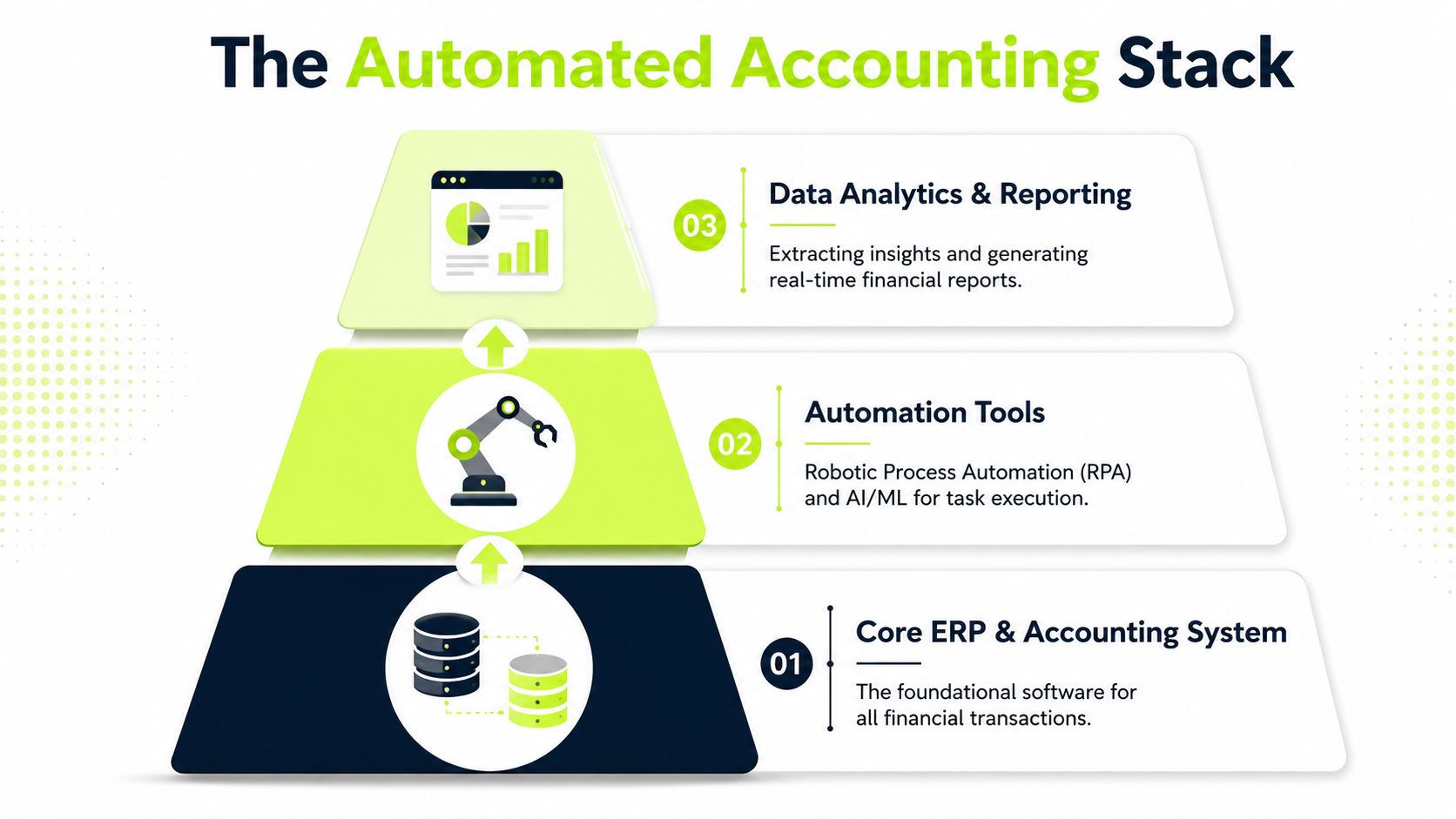
The easiest way to think about the stack is this. One layer does the work. One layer reads the inputs. One layer learns from patterns. One layer routes decisions.
RPA and OCR handle the repetitive burden
Robotic Process Automation (RPA) is the digital operator. It performs structured, repeatable tasks such as moving data between systems, triggering reminders, or pushing approved information into downstream workflows.
Optical Character Recognition (OCR) is the document reader. It captures text and fields from invoices, remittances, purchase orders, and related files that would otherwise require someone to key in or verify manually.
Together, they replace a lot of the friction finance teams accept as “just admin.”
AI and machine learning turn process into judgment support
Automation in accounting transitions from task reduction to operational control. Modern automation uses agentic AI, ML, RPA, and OCR to replace manual tasks. For example, intelligent document processing can extract data from invoices and post it directly to business systems, eliminating manual roles in AP and AR (IBM overview of accounting automation).
That same logic applies in receivables. Systems can identify likely payment risk, support automated cash application, and route exceptions based on live context instead of static rules.
A useful architecture test is API connectivity. If the platform can't reliably exchange data with your ERP, bank, CRM, and billing tools, the automation layer won't hold. This primer on what API connectivity means in finance operations is worth reviewing before you evaluate vendors.
To compare categories and capabilities side by side, this resource on compare accounting automation tools 2026 is a practical shortlist builder.
Here's a quick operating view:
Layer | What it does | Finance example |
|---|---|---|
Core system | Stores transactions and books activity | ERP or accounting platform |
Automation layer | Executes repeatable steps | Invoice reminders, payment matching |
Intelligence layer | Scores, predicts, flags | Risk-based collections prioritization |
Orchestration layer | Routes work and exceptions | Escalate disputed invoices to the right owner |
A short walkthrough helps make the distinction concrete:
Automation without orchestration just makes isolated tasks faster. Orchestration makes the finance process more reliable.
High-Impact Use Cases for Professional Services
Professional services firms don't need every finance workflow automated at once. They need the few workflows that tighten billing discipline, accelerate collections, and improve trust in cash reporting.
Accounts receivable automation
This is usually the first place to act because the pain is obvious. In a manual environment, invoice delivery is inconsistent, reminders depend on calendar discipline, and escalation happens too late or with the wrong tone. Good accounts receivable automation fixes sequence and timing first.
For a consulting firm, that can mean invoices go out as soon as approved milestones are complete, reminders follow a defined cadence, and high-risk accounts get reviewed earlier. The gain isn't just labor savings. It's better control over when cash should arrive.
Dynamic billing and invoicing
Professional services firms often lose time before collections even begin. Invoices stall because time entries need cleanup, write-offs are unresolved, or backup documentation sits in someone's inbox.
Automation helps enforce billing readiness. It can collect required support, route approvals, and trigger invoice release faster. For firms using AR software for professional services, that usually creates a cleaner handoff from operations to finance.
Clients rarely pay early on a messy invoice. They pay later on one.
Automated cash application
Cash application is one of the least visible causes of poor receivables control. A payment hits the bank, but the invoice stays open because remittance data is incomplete or arrives in an email attachment someone hasn't reviewed yet.
Modern systems can match incoming payments to open invoices, including unstructured remittance information, with much less manual handling. That gives controllers a more accurate receivables position during the month, not just after cleanup. For firms exploring that workflow, this look at cash application automation gets into the operational details.
Reconciliations and live cash visibility
Manual reconciliation tends to preserve a month-end mindset. Finance learns where cash stands after the fact. Automation changes that by connecting bank data and accounting records more continuously, which gives the team a more current view of what cleared, what's pending, and where exceptions sit.
That matters because forecasting quality depends on current data, not just a well-built model.
A practical summary:
- Best first use case: Collections workflow where reminders, escalation, and ownership are inconsistent.
- Best second use case: Cash application where receipts are arriving but staying unresolved.
- Best third use case: Billing orchestration where invoice timing depends on too many manual handoffs.
For firms running QuickBooks, this often starts as QuickBooks AR automation rather than a full finance transformation. That's usually the right move. Start where the cash impact is direct.
Measuring the True Financial Impact
Most automation projects get sold on time savings. CFOs should care more about cash timing.
If the process change doesn't help finance collect earlier, apply cash faster, or forecast with more confidence, it may still be useful. It just isn't yet a strong cash-flow investment.
Start with DSO, not hours saved
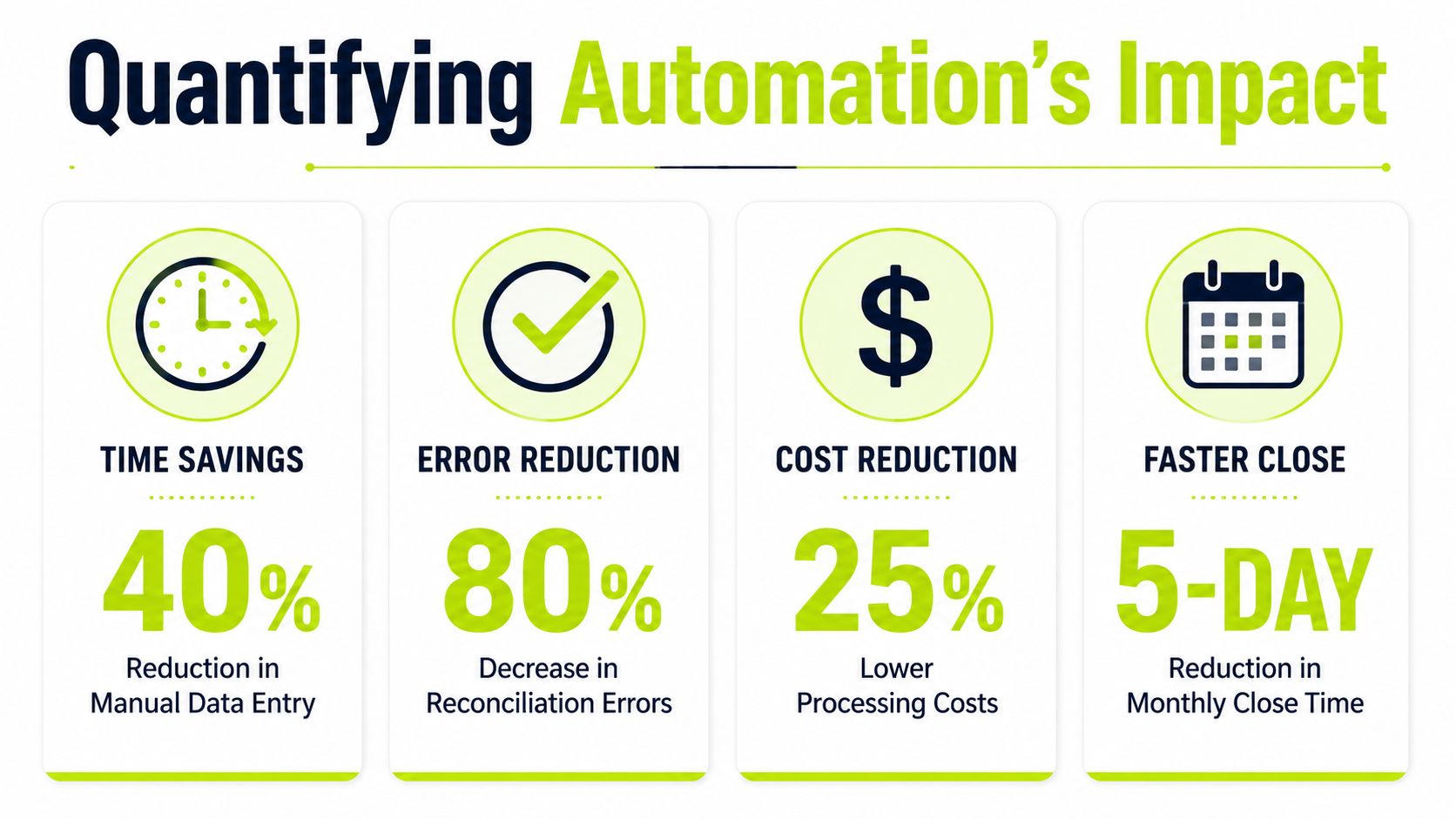
For professional services firms, the most direct metric is collections speed. AR automation software for professional services directly reduces Days Sales Outstanding by 40% or more by eliminating bottlenecks in invoice delivery, tracking, and collections workflows (Versapay reference for professional services AR automation).
That's the number finance leaders should pressure-test first. Not because every firm will achieve the same result, but because it ties the automation decision to the balance sheet and to working capital discipline.
A simple ROI view looks like this:
Area | What to measure | Why it matters |
|---|---|---|
DSO | Days from invoice to cash | Direct cash-flow impact |
Billing lag | Time from work completion to invoice issue | Prevents avoidable delay before collections start |
Cash application delay | Time from payment receipt to invoice match | Improves reporting accuracy and collection focus |
Forecast confidence | Variance between expected and actual receipts | Strengthens operating decisions |
Build the business case around avoided delay
Consider a services firm where project work is billed accurately, but reminders go out inconsistently and unapplied cash muddies the aging report. The issue isn't effort. It's that finance can't act on a clean picture quickly enough.
That's where AI AR automation starts to earn attention. It doesn't just automate emails. It supports earlier intervention, better prioritization, and cleaner visibility into what is collectible now versus what requires dispute resolution or partner involvement.
Operator view: A faster close is useful. Faster cash is more valuable.
QuickBooks AR automation can still be meaningful
Some teams assume impact only comes after an ERP replacement. That's usually wrong. If your firm runs QuickBooks and the receivables workflow is still handled through spreadsheets, inboxes, and ad hoc reminders, QuickBooks AR automation can improve control without changing the whole finance architecture.
The right question isn't “How many tasks can we automate?” It's “Which delays are keeping cash out of the business longer than necessary?”
That framing keeps the evaluation honest. It also keeps the project from drifting into software theater.
A Phased Roadmap for Implementation
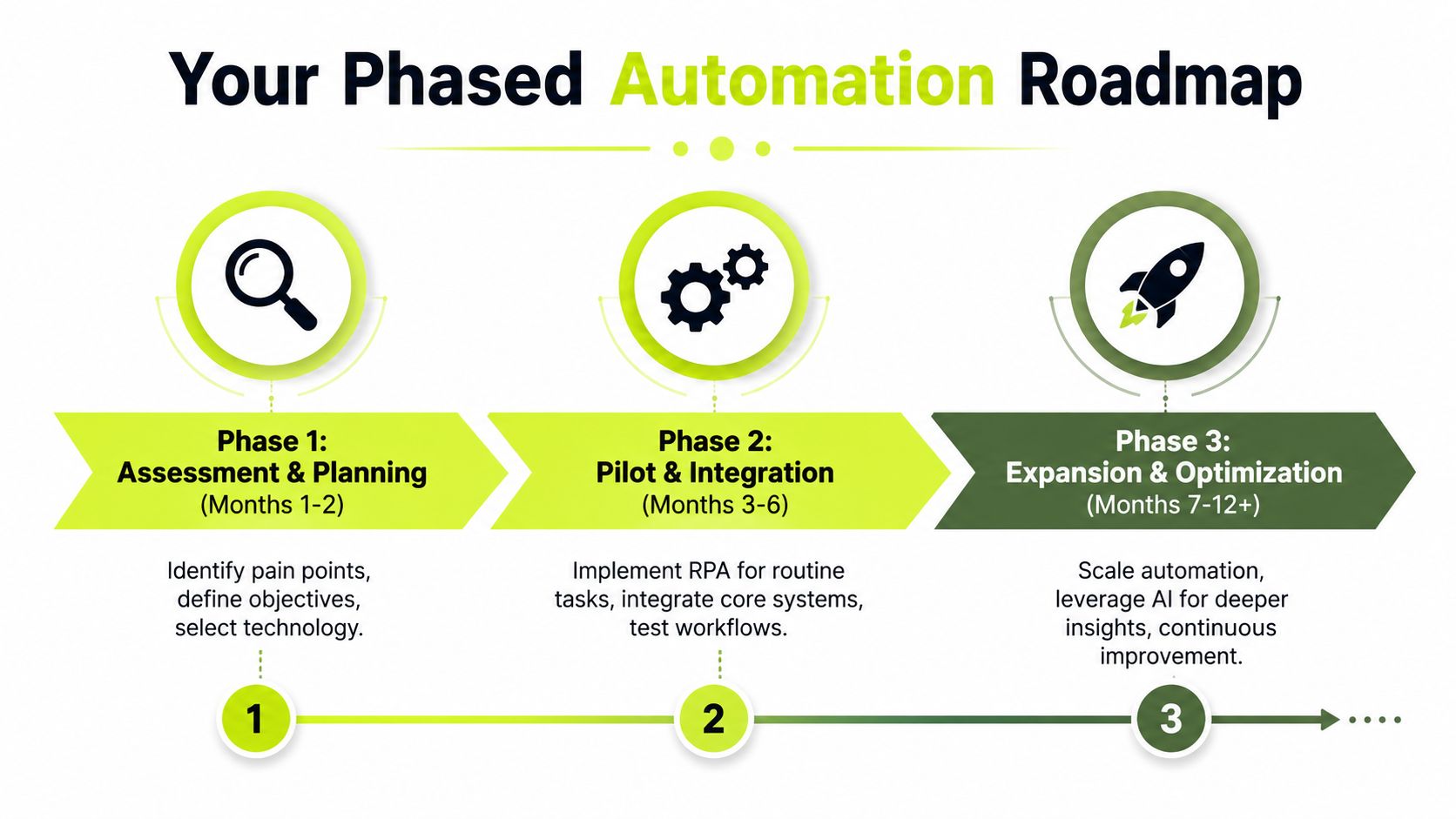
Finance teams get into trouble when they try to automate everything at once. The better path is narrower and more disciplined. Pick one workflow with clear cash impact, prove the operating model, then expand.
Phase one assesses process failure, not just software gaps
Begin with the current state. Review billing lag, follow-up cadence, exception handling, unapplied cash, and dispute ownership. Don't ask where the team is busy. Ask where cash slows down.
That usually surfaces a short list of issues:
- Broken handoffs: Billing waits on approvals, documentation, or partner review.
- Weak sequencing: Reminder timing changes by collector or account owner.
- Poor exception visibility: Disputes and short pays sit in general inboxes too long.
Phase two pilots one receivables motion
The first pilot should be specific. Examples include reminder automation for current and overdue invoices, automated cash application, or routing disputes to the right owner.
This is where vendor evaluation matters. The platform should connect to your accounting stack, support approval logic, and let finance control escalation rules. For teams researching implementation approaches more broadly, this piece on implementing finance automation is a useful planning reference.
There are also outcome signals worth paying attention to. In AR automation implementations, 93% of finance professionals confirm their software delivered the expected ROI, with 100% reporting measurable gains like faster payments and accelerated cash flows (Billtrust ROI findings).
Phase three expands with tighter governance
Once the pilot proves stable, scale into adjacent workflows. That might mean adding intelligent prioritization, billing orchestration, or deeper reporting around collector performance and cash forecasting.
One option in this category is Resolut, which combines collections, dynamic billing, cash application, and human-in-the-loop orchestration for professional services receivables. The practical question isn't brand preference. It's whether the platform supports the controls your team needs.
Use this checklist before expanding:
- KPI clarity: Track DSO, billing lag, and unapplied cash before and after rollout.
- Workflow ownership: Name who manages automation logic, exceptions, and rule updates.
- User adoption: Confirm collectors, controllers, and account leaders know when to trust automation and when to intervene.
A phased rollout does something important politically, too. It turns automation from an abstract promise into visible operational evidence.
Navigating Common Pitfalls and Risks
Most automation failures aren't technology failures. They're operating model failures.
The set-it-and-forget-it mistake
Collections is the clearest example. A critical pitfall is ignoring the human-in-the-loop friction. While enterprises waste $200B annually on administrative burdens, pure automation can backfire in collections. The key is balancing autopilot efficiency with co-pilot modes that adapt tone and timing to protect client relationships (Texas CPA discussion of automation and AI in accounting)).
That matters in professional services because the person receiving the reminder may also be approving the next statement of work.
Mitigation is simple in concept and harder in execution. Automate the sequence. Keep human review for disputed invoices, strategic accounts, and late-stage escalation.
A good collections system knows when to send the reminder and when to pause it.
Integration that looks fine in a demo
Bad integration creates duplicate work. Teams still export files, manually correct records, and reconcile exceptions outside the system. The software appears live, but the finance team is carrying the same burden in a different place.
Watch for these warning signs:
- Data arrives late: Bank, ERP, or invoice data syncs on a schedule that doesn't support daily decisions.
- Exceptions pile up outside the platform: Staff work from inboxes and spreadsheets instead of the workflow itself.
- Audit trail is weak: You can't easily see who changed what and why.
Change management gets treated as training
Training matters, but it isn't the whole job. People resist automation when ownership gets blurry. Partners worry about client tone. Collectors worry the system will override judgment. Controllers worry they'll lose visibility.
The fix is to define boundaries early. Which actions run automatically. Which actions require approval. Which accounts stay in co-pilot mode. Once those rules are explicit, adoption gets easier because the team understands the control model.
The aim isn't less human involvement everywhere. It's better human involvement where judgment changes the outcome.
Conclusion The Path to Calm Control
A lot of finance teams still frame automation in accounting as an efficiency project. That's too narrow. For CFOs, Controllers, and firm owners, the better frame is control over billing discipline, collections execution, and cash visibility.
The strongest use cases aren't abstract. They show up in fewer invoice delays, cleaner application of receipts, sharper collections timing, and a more believable forecast. That's why the most useful metrics are tied to DSO and cash flow, not activity volume.
There's also a broader management point. Automation does not remove the need for judgment. It removes the need for judgment on routine steps that should already be standardized. That's what gives finance leaders room to focus on exceptions, client nuance, and working capital decisions that require experience.
The firms that get the most value don't start with a grand transformation. They start with one weak process, usually in receivables, and tighten it until cash moves more predictably.
That's the path to calmer finance operations. Less chasing. Less guessing. More control.
Resolut automates AR for professional services, bringing collections, billing, cash application, and human-in-the-loop workflows into one operating model. If your goal is to reduce DSO and improve cash flow without sacrificing client relationships, Resolut is built for consistent, accurate, and human execution.