The B2B Portal for Invoicing: What It Is and Why It Matters
Discover how a B2B portal transforms invoicing and payments. Learn core features, use cases, implementation tips, and cash flow benefits for your firm.
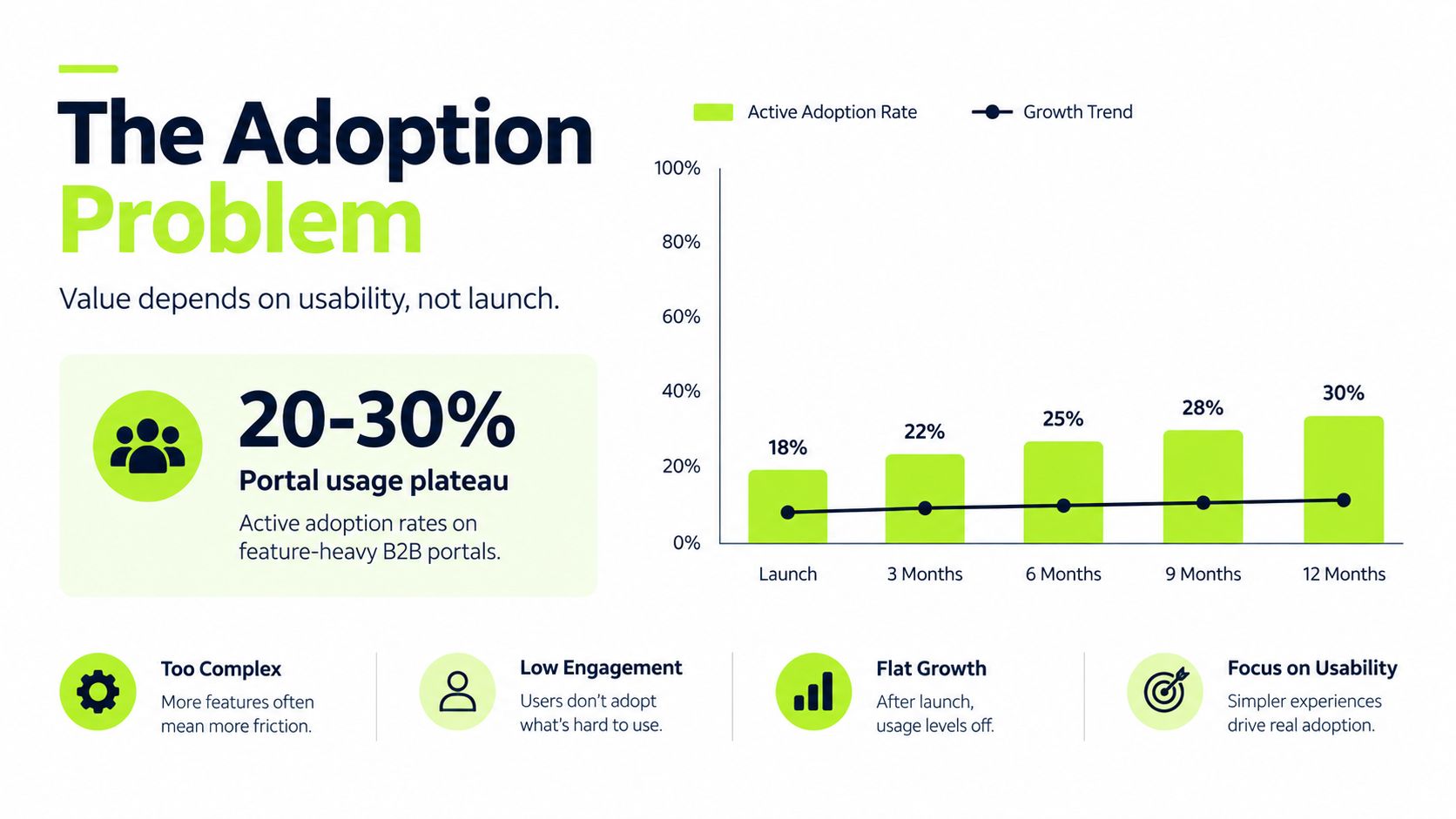
Active adoption on feature-heavy B2B portals often plateaus at 20% to 30%. Launch day is only the beginning, not the finish line, for getting paid faster.
A firm can have a polished client portal, automated invoice delivery, and online payment buttons, yet still wait on overdue balances. The gap usually isn't the existence of the portal. It's whether clients can use it to answer account questions, resolve disputes, choose a payment method, and complete payment without involving another person.
For CFOs, Controllers, and owners of professional services firms, that distinction matters. A B2B portal shouldn't be treated as a digital brochure for invoices. It should operate as part of the accounts receivable process, connecting billing, client communication, payment execution, and cash application.
The Tension Between Getting Paid and Keeping Clients
A partner at a consulting firm notices that a long-standing client has an invoice sitting beyond its agreed terms. The finance team wants to follow up. The account lead hesitates because the client is in the middle of a sensitive engagement. Nobody wants a routine collection email to sound like a threat.
That tension is familiar in professional services. Accounts receivable looks procedural on paper, send the invoice, follow up, record the payment, but every interaction sits inside a commercial relationship. A poorly timed reminder can make a client feel managed as a balance rather than supported as a customer.
A well-designed B2B portal for invoicing changes the tone. Instead of asking a client to search through email or call the account team, the firm gives them a secure place to review open invoices, see payment status, download documents, ask questions, and pay.

The portal as a relationship tool
The strongest portals don't make finance less human. They remove the repetitive interactions that make finance feel adversarial.
A client doesn't need to email, “Can you resend the invoice?” The document is available. They don't need to ask whether a payment was received. The account view can show the current status. They don't need to explain a billing concern across several messages. The portal can route the question to the right person with the relevant invoice attached.
Practical rule: Make the easiest client action the action that helps your finance team.
That means designing around the client's account-control needs, not only the firm's internal workflow. Invoices, credit notes, complaints, claims, payment schedules, and supporting documents should sit close together. The client should be able to understand what is owed and what happens next without negotiating the interface.
This approach also protects the client relationship. Collections becomes a structured service experience rather than a series of increasingly uncomfortable nudges. The firm still maintains clear payment discipline, but the client receives context, access, and choice at every stage.
What a B2B Portal Actually Does for Invoicing and Payments
A B2B portal gives finance and clients one controlled account interface for the invoice and payment cycle. A client can review current and historic invoices, check payment status, download receipts, submit a payment, and raise a question or dispute without opening another email chain.
That function goes beyond sending a PDF. A PDF communicates a charge. A portal organizes the account around it, showing the balance, payment history, related documents, approved contacts, and outstanding actions in one place. The difference matters because portal availability alone does not improve collections. The account view must help the client understand what is owed and complete the next required action.
The operational gain is a shared record. Finance sees the same invoice status as the client, while the client can retrieve documents without involving an account manager. The AR team can spend less time answering routine status questions and more time resolving exceptions that require judgment.
Electronic B2B marketplaces existed before the web. Travicom launched in 1976 and connected multiple airlines and travel agents through an automated network. The modern marketplace model accelerated in the 1990s through platforms such as Ariba and CommerceOne. Europe had 10 B2B marketplaces in 2010 and more than 300 later in the decade, according to this history of the B2B marketplace revolution. For finance teams, the point is practical: portal-based business transactions have developed into an established operating channel, not merely a technical experiment.
From invoice delivery to account control
The traditional PDF-and-spreadsheet process creates several handoffs:
- Invoice creation: Someone generates the invoice and sends it by email.
- Client clarification: The client replies with questions, often without the original document.
- Payment execution: The client selects a method through a separate process.
- Cash application: A finance employee matches the payment to an open invoice.
- Status reporting: Someone updates the ledger and answers follow-up requests.
A portal can place these steps within a traceable workflow. It can show which information is available, what action remains, and where a question belongs. The accounting system and payment processor still govern posting and settlement, so the portal does not remove the need for sound back-office controls.
Teams designing a wider billing operation can consult this guide to auto invoicing for startups for the relationship between recurring invoice creation, delivery, and collection. For the client-facing layer, this explanation of what a payment portal is clarifies how payment access fits into the account experience.
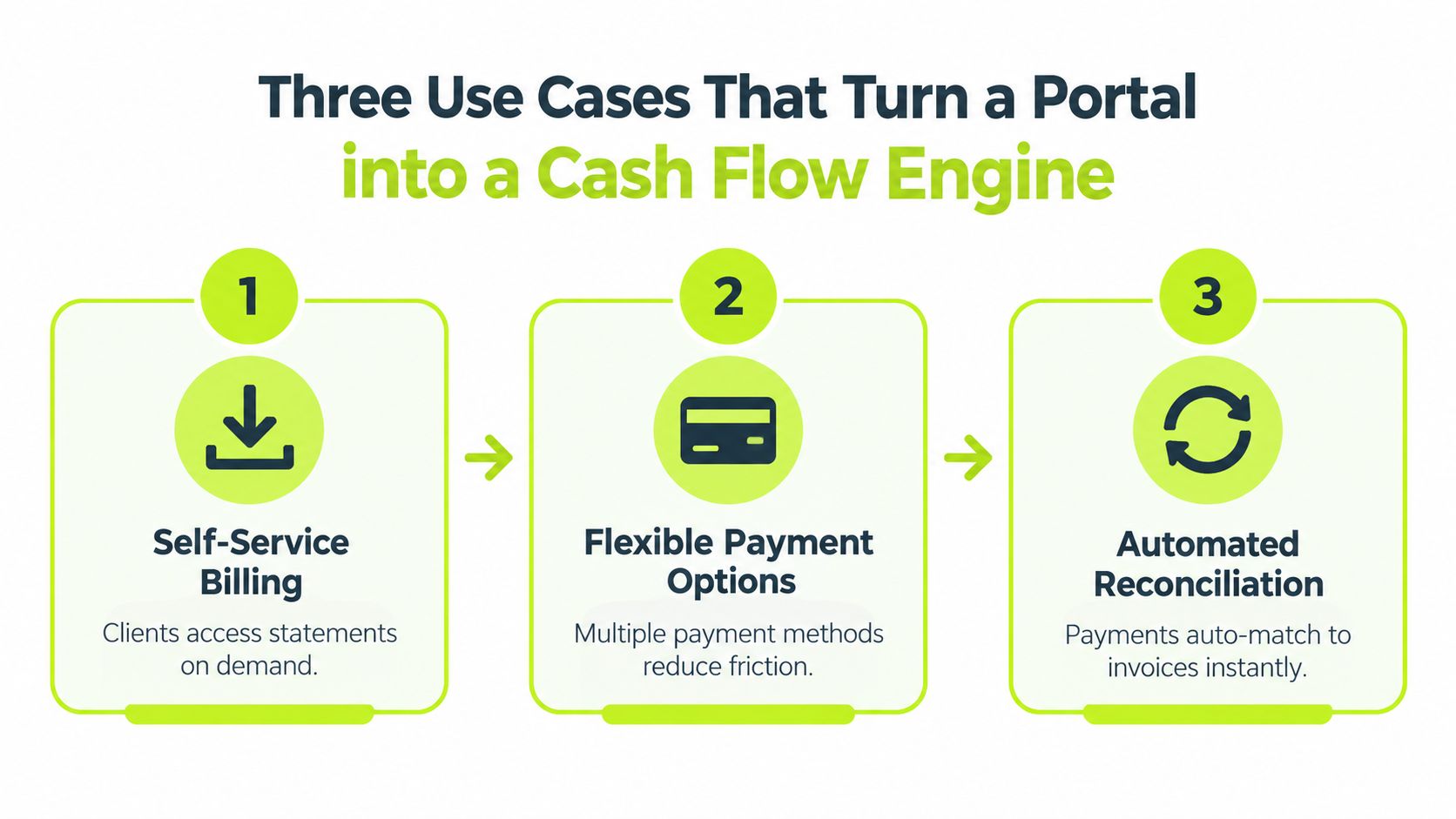
Three Use Cases That Turn a Portal into a Cash Flow Engine
A portal only improves cash flow when it changes a daily behavior. Three use cases usually matter most: giving clients self-service access, reducing payment friction, and recording cash without avoidable manual work.
Self-service billing
Clients shouldn't have to wait for finance to resend an invoice or statement. The portal should expose the documents that clients need to approve and pay, including the invoice, supporting time detail, payment terms, credit notes, and account history where appropriate.
Self-service also helps internal teams. An account manager can direct a client to the same account view instead of becoming the document retrieval layer. Finance can see whether the client accessed the information and can reserve personal outreach for an unresolved issue rather than a missing attachment.
Flexible payment options
A payment button has limited value if it leads to a process the client can't use. Firms should offer payment methods that fit the client's approval and treasury policies, while presenting the terms, remittance information, and confirmation clearly.
The goal isn't to push every client into the same method. It's to remove unnecessary delay between approval and execution. A portal can present the available choices in context and capture the payment reference needed for accurate posting.
Automated reconciliation
Payment execution is only half the process. The finance team still needs to know which invoice was settled, whether the amount is complete, and whether a credit or short payment needs review.
Automated reconciliation matches incoming funds to open receivables using the available invoice, customer, amount, and reference data. Exceptions should go to a queue with enough context for a person to resolve them quickly. Automation works best when it handles predictable matches and leaves judgment-heavy cases visible.
For small and mid-sized professional services firms, QuickBooks supports important AR mechanics. It can create accounts receivable when an invoice is issued, send invoices automatically, track payments, generate reports, add an online payment button, and reduce the AR balance when a payment is recorded through its Receive Payment flow, as described in QuickBooks' accounts receivable documentation.
A practical workflow looks like this:
- The firm issues an invoice from its accounting system.
- The client receives a portal notification and opens the account view.
- The client reviews the invoice and supporting detail.
- The client submits payment or raises a structured question.
- The system records the payment and routes any exception to finance.
The portal becomes a cash flow engine when those steps work together, not when each feature exists separately.
The Adoption Problem and What Usability Research Reveals
Building a portal is easier than changing client behavior. Clients already know how to search email, call an account manager, or ask a partner for help. A new interface has to be faster and clearer than those habits, otherwise launch activity fades.
Active adoption on feature-heavy B2B portals often plateaus at 20% to 30%, according to research on B2B customer portals. That figure isn't a reason to remove useful capabilities. It is a warning that adding features without improving routing, onboarding, and task completion can leave the main value unused.
Every click carries a cost
Usability research reported a correlation of r = -0.737, with p < 0.05, between System Usability Scale scores and the number of clicks required to complete portal tasks. The same study reported an aggregate SUS score of 69.25, described as good while still leaving room for improvement in complex enterprise workflows, as shown in the self-service portal usability study.
The implication for AR is practical. A client who must search through several menus to find an invoice is more likely to email finance. A client who can't tell whether a payment posted is more likely to ask an account manager. A client who must leave the portal to dispute a charge may abandon self-service entirely.
Design for the common task
A finance-led portal should prioritize the actions clients perform most often:
- Find an invoice: Search by invoice number, project, date, or balance.
- Understand the balance: Show open, paid, disputed, and scheduled items distinctly.
- Pay immediately: Keep the payment action visible from the invoice and account view.
- Resolve an issue: Let the client submit a question with the relevant document attached.
- Retrieve proof: Make receipts and payment confirmations easy to download.
Adoption measurement should follow the same logic. Login volume alone doesn't show whether the portal reduces manual AR work. Track completed payments, self-service document retrieval, dispute routing, payment-status questions, and the share of exceptions that still arrive through email.
Why Having a Portal Isn't the Same as Solving AR Problems
A client opens the portal to check an overdue invoice, finds the balance, and still emails finance to ask what happens next. The portal is available, but the collections process remains manual. That gap matters to CFOs. Ordering, pricing, and shipment tracking may attract attention, while invoices, credit notes, complaints, claims, payment schedules, and disputes determine whether receivables are collected on time.
Industry coverage treats self-service and ERP or API integration as baseline expectations for modern portals, rather than differentiators, in its discussion of B2B portal trends. Procurement context is covered in the earlier B2B marketplace analysis, but procurement access does not prove that a portal supports effective collections. The finance test is narrower: can the client understand the receivable, resolve an exception, and complete payment without creating another task for the AR team?
The adoption gap is visible in collections activity. A 2026 AR automation summary reports that customer portals were used for collections notifications only 11% of the time, while 23% of organizations reported mostly or fully automated payment processing, as documented in this finance executive survey. Portal availability therefore says little about cash flow unless the system connects customer action with internal follow-up and ledger updates.
Availability is not orchestration
A portal can display an overdue invoice without assigning the next collection action. It can show a dispute without routing the issue to the project owner. It can accept a payment without applying the cash to the correct receivable. Each gap sends work back to inboxes, spreadsheets, and account managers.
Finance leaders should test the full transaction:
- Does the portal identify the correct payer and authorized users?
- Can the client distinguish an overdue invoice from one under dispute?
- Does a promise to pay create a visible follow-up task?
- Can the system route a billing question to the right internal owner?
- Does payment update the ledger and close the correct receivable?
Security belongs in the operating design. Multi-factor authentication, role-based access control, encryption in transit and at rest, audit logging, and recurring penetration tests provide a sensible baseline for invoices, contracts, and account information.
A portal without these controls is a cleaner display for the old process. It may improve presentation while leaving collection work unchanged. The relevant measure is not portal availability, but the number of receivables that move from review to resolution and payment without manual intervention.
From QuickBooks Automation to AI-Driven Orchestration
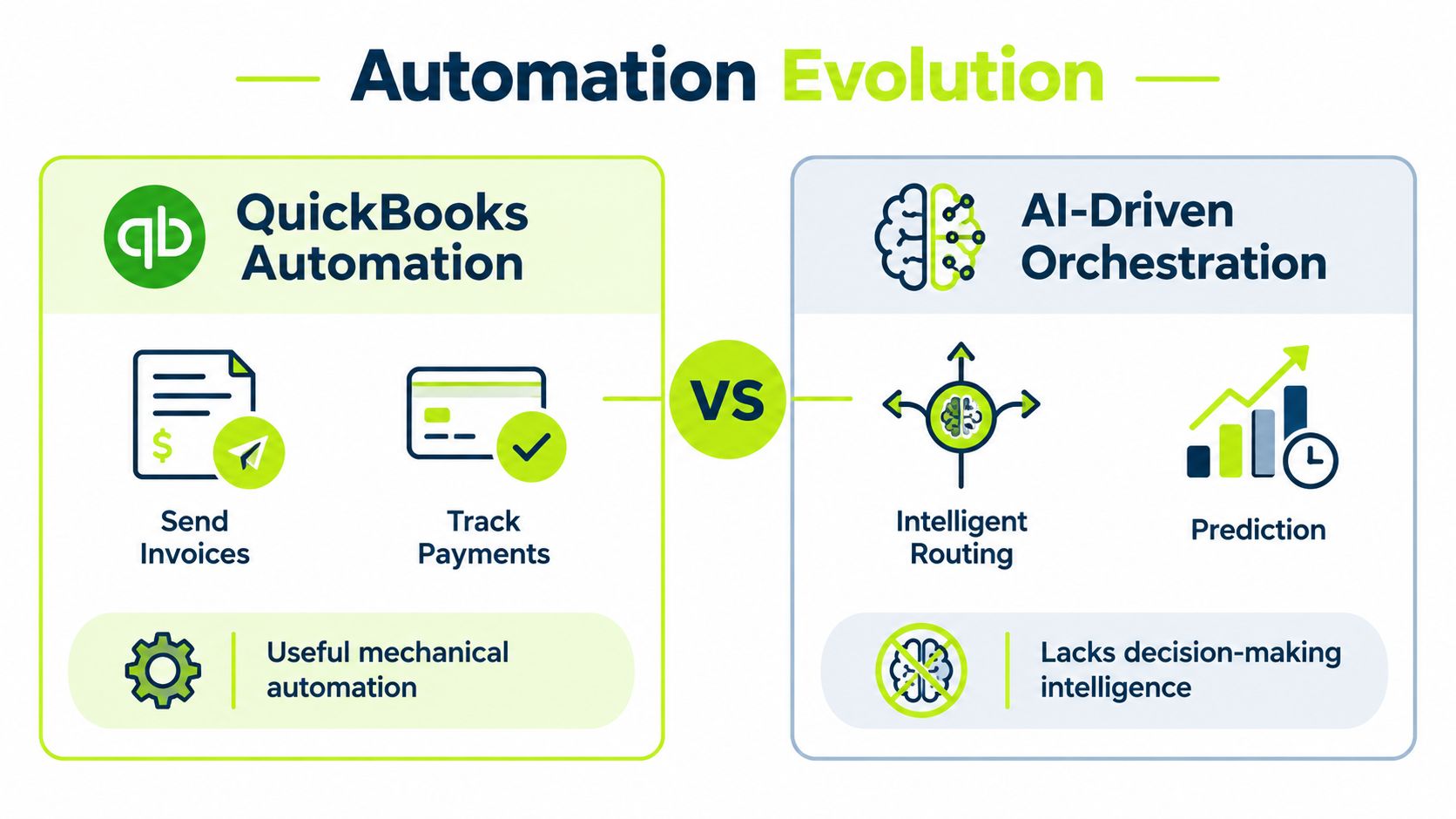
Rule-based automation is useful. It sends an invoice, triggers a reminder, records a payment, and produces a report. Those mechanics can remove repetitive work and create a dependable foundation for AR software for professional services.
The limitation appears when the workflow needs judgment. A rule may send the same reminder to every client. It may treat a strategic account and a chronically late payer alike. It may not understand that a late invoice is attached to an unresolved project issue or that a client has promised payment but needs a different follow-up path.
Mechanical automation has a clear role
QuickBooks and similar accounting tools are effective when the requirement is predictable execution. They can generate invoices, deliver them, track responses, and update balances. That makes them useful for firms that need to replace manual billing steps without redesigning the entire collections operation.
The next layer is AI AR automation. An intelligent system can assess invoice risk, personalize outreach, route work by account context, and adapt timing across email, SMS, phone, and other channels. It can also support different operating modes, from human approval for sensitive communications to autopilot for routine, low-risk actions.
The distinction isn't automation versus no automation. It's fixed rules versus adaptive orchestration.
The operating model matters
A professional services firm should decide which work belongs in each layer:
Work type | Suitable operating approach |
|---|---|
Invoice creation and standard delivery | Accounting-system automation |
Payment links and account access | Client-facing portal |
Routine reminders | Rules and approved communication sequences |
Risk identification and prioritization | Adaptive analysis |
Disputes and sensitive accounts | Human review with structured routing |
Cash matching | Automated application with exception handling |
A platform that supports intelligent payment routing can help finance teams direct payments and exceptions according to account context instead of relying on one fixed path.
The best design still preserves control. Finance leaders need audit trails, approval thresholds, role-based access, and clear ownership when an automated recommendation is wrong. Intelligence should reduce decision fatigue, not make the process opaque.
The Hard Numbers on How AR Automation Moves DSO
A CFO reviewing a B2B portal should ask a specific question: does it shorten the path from invoice delivery to collected cash? Portal availability alone does not prove that collections are working. The useful measures are Days Sales Outstanding, staff workload, and cash released from outstanding balances.
A finance-leader study cited in Billtrust's review of AR solutions for improving DSO found that organizations with high levels of AR automation achieved an average 41% reduction in DSO. Organizations with low automation still achieved a 29% improvement. The same source reports that 75% of AR teams using AI saw DSO fall by 6 days or more, while 14% reduced it by 11 days or more.
These figures describe reported outcomes, not a guarantee for every professional services firm. They show that workflow coverage matters. Automation has more financial impact when it connects invoice delivery, follow-up, payment execution, dispute handling, and cash application, rather than addressing one isolated task.
A real deployment shows the mechanics
Independent research from Nucleus described an office-supplies provider that reduced DSO by about 27%, from 80 days to 58 days, while freeing credit staff for higher-value analytical work. The deployment included online payment capabilities and efficient cash application, as reported in the Nucleus benefit case study.
The operating logic applies to professional services. Online payment access lets the client complete the transaction through the portal. Cash application lets finance close the loop. Staff can then spend less time locating payments and more time reviewing disputed work, assessing credit exposure, and supporting account decisions.
A separate accounts receivable statistics summary reports average DSO of 40 days for automated AR users, compared with 47 days for manual processes. It also says 62% of firms reported that automation improved DSO.
For tactics that shorten the collection cycle, see this guide on how to reduce DSO. The financial case should be tested against a focused set of operating measures:
- DSO: Has the collection cycle shortened?
- Aging quality: Are overdue balances easier to prioritize?
- Exception volume: Do fewer payments and disputes require manual research?
- Staff capacity: Is the team spending more time on analysis than status chasing?
- Client effort: Can clients resolve and pay routine invoices without assistance?
A portal creates measurable value when these indicators improve together, not merely when clients can view an invoice.
Where Professional Services Firms Should Go Next
A B2B portal is infrastructure, not a collections strategy. It gives clients access to information and payment tools, but the firm still needs a deliberate operating model for onboarding, routing, reminders, disputes, reconciliation, and escalation.
Adoption is the first constraint. If clients can't find the right invoice or complete payment quickly, they'll return to email. If finance can't see disputes, promises, and exceptions in one workflow, the firm will keep running AR through spreadsheets around the portal.
The practical sequence is clear:
- Map the current invoice-to-cash process.
- Identify where clients ask for information the portal should provide.
- Remove unnecessary steps from invoice lookup and payment.
- Connect payment activity to reconciliation and follow-up.
- Measure DSO, exception volume, and client self-service behavior.
- Add intelligent routing only after the underlying data and controls are reliable.
The right outcome isn't a portal with more features. It's a finance operation where routine payments happen with less intervention, sensitive conversations receive the right human attention, and leaders can see which balances need action.
If your portal is only a billing display, you're leaving operational value unused. If it connects account visibility, client communication, payment, and cash application, it becomes part of how the firm manages cash flow and protects client relationships.
Resolut automates AR for professional services with consistent invoice follow-up, payment workflows, cash application, and human oversight where judgment matters. Visit Resolut to see how an intelligent AR operating model can help your firm reduce DSO and improve cash flow without making client communication feel transactional.