Credit Collection Software for Professional Services
Compare credit collection software for $3M-$50M firms. See features, pricing models, integrations, and ROI criteria finance leaders actually use.
The accounts receivable automation gap is still unusually wide. In one AR automation survey, 88% of respondents said their collections process was fully manual, mostly manual, or only partially automated, while just 1% reported fully automated collections. The same survey found that only 31% used automated reminder workflows. Read the AR automation survey findings
That matters more to a professional services firm than a software feature checklist suggests. If billing depends on retainers, milestones, project approvals, or recurring usage, cash is often delayed by a poorly timed message or an unresolved question, not by a lack of collector effort.
Buying priority | Adequate tool | Operational credit collection software |
|---|---|---|
Outreach | Sends scheduled reminders | Adjusts timing, tone, channel, and escalation by account context |
Invoice visibility | Shows aging buckets | Connects aging, project, dispute, owner, and prior contact history |
Cash application | Imports payment data | Matches partial payments, deductions, and remittance details automatically |
Dispute handling | Adds notes to an account | Assigns ownership, tracks resolution, and keeps disputes visible in aging |
Finance reporting | Produces standard dashboards | Quantifies DSO, cure rate, promise-to-pay performance, and exceptions |
Integration | Exports and imports files | Keeps the GL, billing system, bank activity, and collections queue synchronized |
Why Credit Collection Software Matters for Mid-Market Firms
The strongest argument for credit collection software is not that it reduces repetitive work. It's that it gives finance a practical way to reduce DSO without damaging client relationships.
The market already reflects that need. The global debt collection software market is projected to grow from USD 5.23 billion in 2025 to USD 7.54 billion by 2031, with a 6.24% CAGR from 2026 to 2031. North America represented 34.51% of the market in 2025, which indicates that enterprise adoption is established even as the category expands globally. See the debt collection software market outlook
For firms between $3M and $50M in revenue, the operational problem usually appears before the organization has a dedicated collections department. A controller, billing manager, project lead, or account executive owns part of the process. Each person has context, but no single system consistently turns that context into the next action.
A monthly statement run and a reactive chase email can't solve that problem. The highest-value intervention often occurs shortly after an invoice is issued, while the client still remembers the work, the approval path is open, and the payment issue hasn't become an aged account.
Practical rule: Buy software to improve the first few touches after invoicing, not just to intensify collection activity after an account becomes seriously overdue.
Start with a clean baseline. Pull invoice-level aging, DSO, payment application exceptions, unresolved disputes, and promise-to-pay outcomes. Then identify where the current workflow loses time, context, or accountability.
A useful primer on the operating model is this guide to what AR automation means for finance teams. The point isn't to automate every human interaction. The point is to reserve human attention for accounts where judgment can change the outcome.
The rest of the buying decision should follow that principle. A platform deserves consideration only if it can connect invoice data to appropriate outreach, payment execution, dispute ownership, and measurable cash outcomes.
The Five Capabilities That Actually Move DSO
Most vendor comparisons overvalue communication channels. Email, SMS, and phone support are table stakes. The better question is whether the platform connects outreach to the finance events that determine whether an invoice gets paid.
Capability | What It Must Do | What Inadequate Looks Like |
|---|---|---|
Workflow automation | Trigger actions from invoice milestones, aging, client segment, and dispute status | Calendar-based reminders sent without account context |
Multi-channel outreach | Coordinate email, SMS, and documented phone activity by timing and engagement history | The same message repeated across every account |
Cash application | Match remittance, partial payments, deductions, and credits to open invoices | Finance staff manually reconcile routine receipts |
Disputes and deductions | Log the issue, assign an owner, track resolution, and preserve visibility in aging | Open disputes disappear into notes or email threads |
Reporting and analytics | Track aging, cure rate, promise-to-pay, automation rate, and collector effectiveness | A dashboard shows totals but not the action behind them |
Workflow must follow invoice reality
A professional services workflow should react to events, not only dates. Invoice delivery, client approval, a missed promise-to-pay, a partial payment, and a new dispute each require different actions.
The sequence also needs branching. A strategic account with a known approval delay should receive a different message from a chronically late payer. A disputed milestone invoice shouldn't receive an aggressive overdue notice while the engagement owner is still validating the work.
Outreach needs context
Tone and timing influence whether the client responds. A good platform should know the invoice, engagement, contact history, payment terms, client segment, and current dispute status before it drafts or sends a message.
Cash application is where many otherwise polished tools fall short. Partial payments, retainer credits, deductions, and vague remittance references create exceptions. If those exceptions remain in a queue for manual review, the firm may automate reminders while leaving the underlying ledger unreliable.
Dispute management must also be operational. It should capture the reason, assign responsibility, set a next action, and link the resolution back to the invoice. Aging reports that treat disputed balances like ordinary delinquency give management the wrong picture.
For a broader view of how finance teams can evaluate exposure before collection activity begins, see these credit risk assessment tools. Risk assessment and collections should share account context, even when different teams own them.
Reporting is the final test. Enterprise buyer guidance highlights recovery rate, cure rate, roll rate, time to resolution, cost per cure, agent productivity, automation rate, uptime, and response times as relevant operating metrics. Review the enterprise collections metrics buyers should track
A tool that handles only workflow and outreach offers useful features. A platform that wires all five capabilities together becomes an operating layer for AR.
Pricing Models and What They Really Cost
The cheapest subscription is rarely the lowest-cost option. Finance leaders should evaluate pricing against invoice volume, data quality, integration effort, exception handling, and the internal time required to keep the process accurate.
Pricing Model | Common In | Scales With | Hidden Cost Driver |
|---|---|---|---|
Per-user monthly subscription | SMB-oriented tools | Number of users | Adding access for sales, billing, and engagement owners |
Per-customer or per-invoice tier | Mid-market AR platforms | Accounts or invoice volume | Duplicate customers, orphan invoices, and poor master data |
Percentage of collected revenue | Contingency providers and some AI platforms | Cash recovered | The fee can rise as collection performance improves |
Platform fee plus implementation | ERP-adjacent enterprise tools | Modules, integrations, and deployment scope | Internal time spent on migration, APIs, testing, and reconciliation |
Per-user pricing appears predictable, but it can discourage broader adoption. If only one controller has access, the system may lack the client and engagement context needed to resolve payment blockers.
Per-customer or per-invoice models align more closely with operating scale. They also expose data hygiene problems. Duplicate legal entities, inactive accounts, and invoices without a valid customer record can inflate the commercial relationship and complicate reporting.
Percentage-based pricing is attractive when the vendor genuinely shares outcome risk. Read the contract carefully. A percentage of recovered revenue can become expensive after the workflow improves, especially if the vendor's fee applies to payments the firm would have collected through normal operations.
Platform fees with implementation charges often look less appealing on the first quote. They can still be rational when the vendor takes responsibility for API work, migration, controls, and testing. The comparison should include the internal hours required to build and maintain those pieces yourself.
The hidden cost across every model is integration maintenance. QuickBooks, NetSuite, Sage Intacct, and Microsoft Dynamics handle customers, invoices, credits, payments, and status fields differently. A system that imports data successfully during implementation can still create recurring reconciliation work if field mappings, permissions, and exception rules aren't maintained.
Ask vendors to price the operating model, not just the license. Include implementation, support, data cleanup, new entities, reporting changes, payment rails, and the cost of human review for unmatched transactions.
Matching Platforms to Your Stack and Team
The general rule is simple: choose by the GL of record first, then by invoice volume, and only then by feature count.
A QuickBooks-first firm doesn't need the same deployment model as a multi-entity company running an enterprise ERP. The wrong architecture creates latency in the collections queue, duplicate data entry, and uncertainty over which system contains the authoritative balance.
Capability | QuickBooks-Native | Mid-Market AR Suite | ERP-Adjacent Enterprise |
|---|---|---|---|
Workflow automation | Strong for standard invoice and reminder sequences | Strong for segmented, multi-step workflows | Strongest for complex rules and entities |
Multi-channel outreach | Usually accessible and fast to deploy | Broad, with deeper orchestration | Broad, but may require configuration |
Cash application | Suitable for straightforward payment matching | Better for exceptions, credits, and remittance logic | Best for complex payment structures and controls |
Dispute tracking | Often adequate for basic ownership | Stronger collaboration and escalation | Strong, with extensive audit and role controls |
Reporting | Fast, practical dashboards | More detailed operational and finance analytics | Deepest enterprise reporting and governance |
For a $3M to $10M firm using QuickBooks Online, a QuickBooks-native add-on usually offers the best balance. The finance team can improve reminder timing, payment access, and visibility without introducing a second enterprise operating model.
For a $15M to $30M firm running Sage Intacct or NetSuite, a mid-market AR suite is generally more appropriate. The firm likely needs stronger cash application, engagement-level dispute workflows, approval controls, and reporting that can survive a larger client portfolio.
ERP-adjacent platforms make sense when entities, payment structures, security requirements, and custom dunning logic dominate the decision. They also demand more implementation discipline. A lean AR team may gain capability but lose speed if every workflow change requires technical support.
Middleware such as Zapier can connect systems quickly, but it adds another point where fields can fail, events can arrive late, or records can duplicate. Native connectors usually reduce that integration tax, though they still need testing against credits, changes, voids, and partial payments.
The useful companion resource for planning that technical layer is this guide to ERP system integration. For finance teams also standardizing customer communication, credit approval email examples for businesses can help establish a consistent tone before collections messaging begins.
Three Professional Services Scenarios
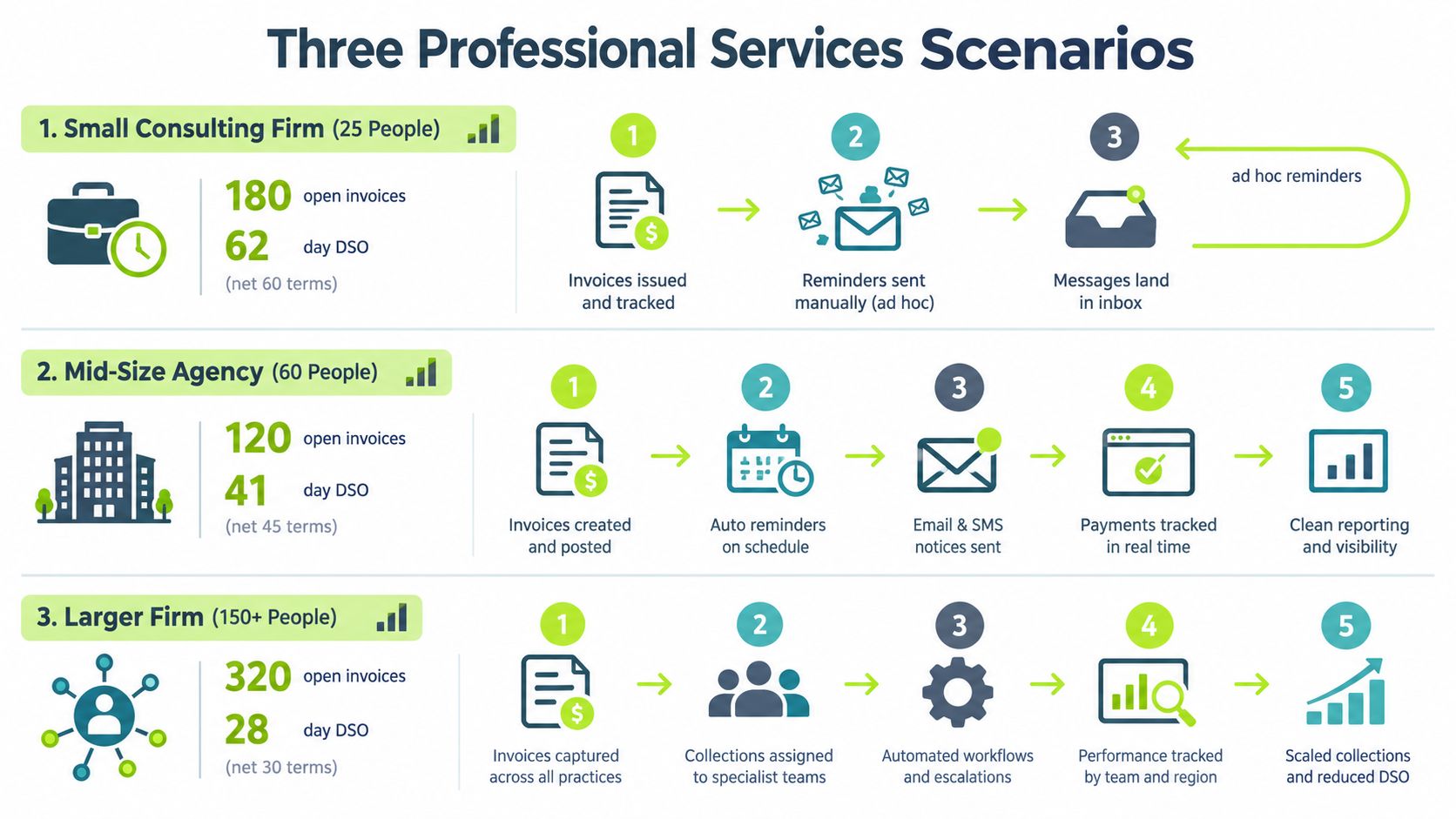
The same reminder tool behaves very differently across professional services models. The bottleneck is rarely call volume. It's usually the loss of timing, tone, or engagement context between the GL and the person contacting the client.
Consulting firm with a fragmented follow-up process
Consider a 25-person consulting firm with 180 open invoices and a 62-day DSO against net-60 receivables. The team uses ad hoc email reminders, so every follow-up depends on someone remembering the account and reconstructing the prior conversation.
The required workflow is straightforward but disciplined. Send a polite confirmation after invoice delivery, identify approval friction before the due date, escalate only when the client misses a commitment, and route exceptions to the engagement owner.
A generic tool usually falls short because it sees an overdue invoice, not the project context. Fit-for-purpose software should pull the invoice and client record from the accounting system, preserve touch history, vary the message by account status, and show which invoices need human intervention.
Architecture and engineering with retainage
A 60-person architecture and engineering firm may bill by milestone, carry retainage, and receive partial draws. The issue isn't whether the client pays late. It's whether the system can distinguish an expected retainage balance from an unexplained short payment.
Here, dispute resolution needs a structured queue. The firm should record whether the issue concerns scope, approval, documentation, retainage, or an incorrect amount. The system should assign the case to the correct project or engagement owner while keeping the remaining collectible balance visible.
A basic reminder engine tends to treat every short payment as delinquency. That creates the wrong client experience and can prompt unnecessary escalation. The better platform links payment allocation, contract terms, project milestones, and dispute status before selecting the next communication.
IT services with usage-based billing
A 150-person IT services firm may issue usage-based invoices in the middle of the month. Payment intent varies by client, and the invoice may require validation by procurement, IT, and accounts payable before it reaches the payment queue.
The workflow needs earlier segmentation. High-value clients with predictable approval cycles may need a confirmation and documentation prompt. Accounts with usage anomalies need a review path. Clients that have acknowledged the balance but missed a promise-to-pay need a different escalation from those that haven't opened the invoice.
Generic tools typically send the same reminder to all three groups. Fit-for-purpose credit collection software should combine billing data, prior payment behavior, client contacts, and workflow history so the next action is relevant.
The common thread is operational context. Collections improves when the system knows why an invoice is unpaid and who can remove the obstacle.
The Demo Scorecard Finance Leaders Should Use
A polished demo tells you what a vendor wants to show. A controlled test tells you whether the product can run your AR operation.
Bring three difficult examples to the meeting: a disputed invoice, a partial payment with unclear remittance, and a client that has ignored several messages. Ask the vendor to use your scenarios, not a prepared sample account.
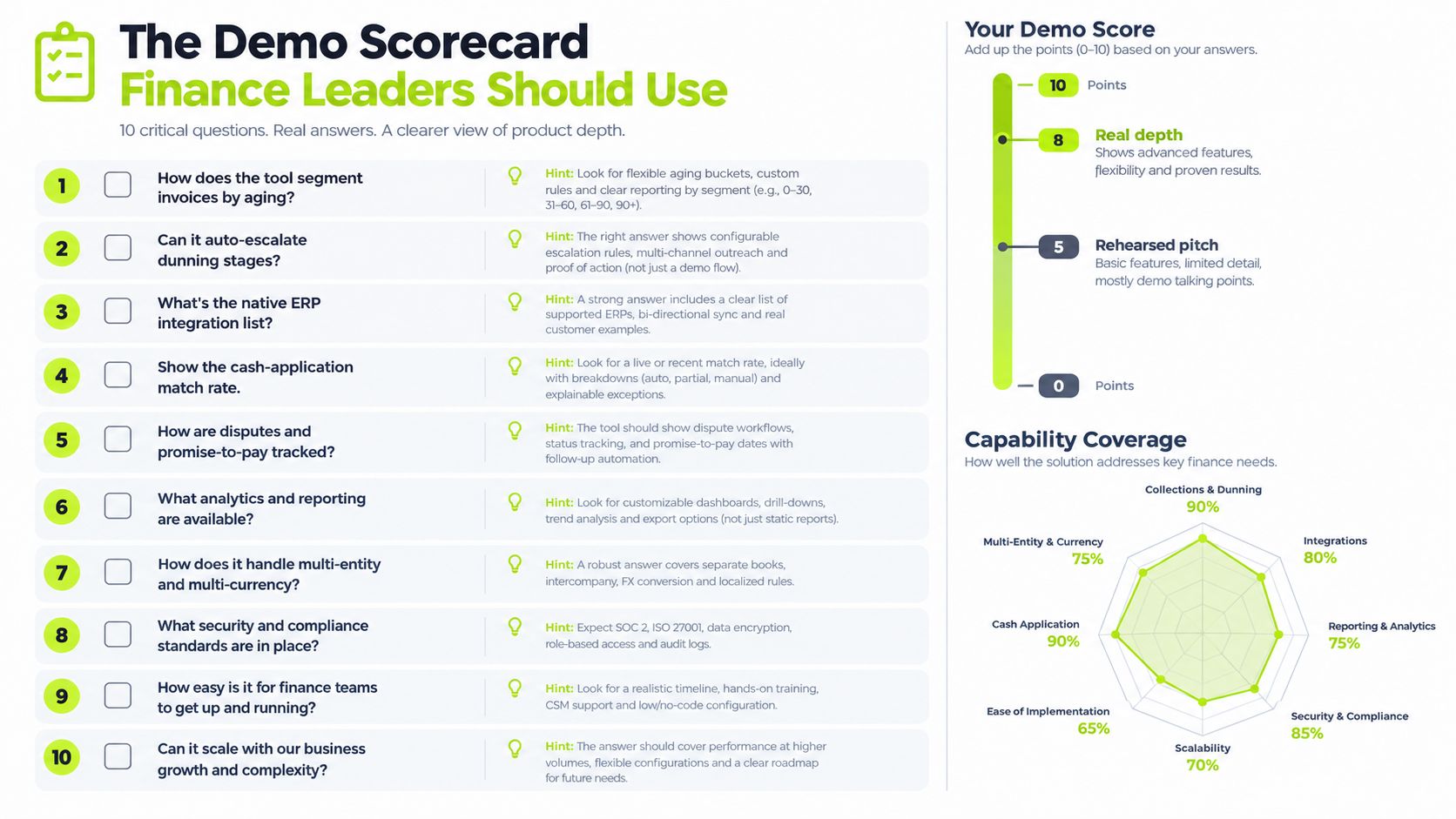
- How does the tool segment invoices by aging, client type, and dispute status in one view? Real depth means you can change the segment and immediately see the resulting queue. A rehearsed pitch shows a static dashboard.
- Can it generate a context-aware dunning email? The message should reference the specific invoice, project, balance, and prior touchpoint without requiring manual rewriting.
- Can it auto-escalate dunning stages? Look for rules based on response, promise-to-pay status, dispute status, and aging. A fixed sequence is not intelligent orchestration.
- What happens when a client pays partially or short-pays with a reference note? The vendor should show the payment entering an exception or matching workflow, not disappear into a manual spreadsheet.
- Show the cash-application match rate and exception process. Don't accept “AI-powered” as an answer. Ask to see how the system handles unmatched remittances, credits, deductions, and split payments.
- Does dispute resolution create a ticketed workflow tied to the engagement owner? Notes on a customer record aren't enough. You need ownership, status, due dates, and a clear connection to the invoice.
- How does the platform handle retainage, milestone billing, and usage-based invoices? Ask the vendor to demonstrate the exact billing pattern that creates friction in your firm.
- What does the audit trail show? Finance leaders should see the user, action, timestamp, message, approval, and data change. This matters for teams operating with SOX-adjacent controls.
- Which integrations are native, and which are API-only? Ask who owns data migration, testing, field mapping, permissions, and ongoing maintenance. “We integrate with your ERP” is not a deployment plan.
- How is pricing tied to invoice volume, users, and modules? Have the vendor model growth, additional entities, broader access, payment processing, and support. Walk away if the commercial model is impossible to forecast.
Walk-away signal: If the vendor can't show a partial payment, a live dispute, and a failed promise-to-pay in one workflow, you're looking at a presentation layer, not an AR operating system.
The final question should be direct: what measurable DSO target will the vendor support during a pilot, and what data will both sides use to evaluate it?
How to Make the Call This Quarter
Use one decision rule: choose the platform that fits your invoice volume, accounting stack, and team size, then demonstrates a credible path to lower DSO within a 90-day horizon.
For firms processing under 500 invoices a month with QuickBooks Online, a lighter automation layer is usually the sensible starting point. Prioritize native synchronization, flexible outreach, payment access, and low administrative overhead.
Firms handling 500 to 2,000 invoices with NetSuite or Sage Intacct need deeper ERP-native workflows. Cash application, dispute ownership, approval controls, and invoice-level reporting should carry more weight than a long list of communication templates.
Above 2,000 invoices with multi-entity AR, enterprise platforms become more defensible. Custom dunning logic, role-based controls, entity-level reporting, and integration governance can justify the added deployment work.
Every shortlist should pass three gates:
- Live ledger integration: The vendor demonstrates synchronization with the actual GL, including credits, voids, partial payments, and status changes.
- Adaptive outreach: The system changes tone and timing based on payment behavior, client context, response, and dispute status.
- Economics tied to outcomes: Pricing scales in a way that remains rational as recovered dollars and invoice volume change, rather than forcing unnecessary seats.
Don't accept a vendor's generic implementation timeline as evidence. Use your own difficult accounts and ask for a working session. The strongest signal is a written commitment to a measurable DSO target, with the baseline, control group, reporting method, and pilot period defined in advance.
A Clear Next Step for Your AR Operation
Treat the purchase as a controlled operating change, not a software installation.
During days 0 to 30, pull a 90-day aging snapshot. Tag the accounts your current process misses, including disputed invoices, partial payments, silent approvals, and promises that weren't kept. Invite two shortlisted vendors to demonstrate workflows against those real patterns.
During days 31 to 60, run a paid pilot on 20% of the ledger, measured against a control cohort. Track DSO and cash-application accuracy as the primary variables. Also record response time, dispute resolution ownership, unmatched payments, and the number of accounts that still require manual intervention.
During days 61 to 90, expand only if the evidence supports it. Renegotiate pricing against proven operating results, or exit cleanly if the platform creates reconciliation work, weakens client communication, or fails to move the relevant queue.
Resolut is one credible option for QuickBooks-first and mid-market professional services firms because its product model combines AI-native collections workflows, multi-channel outreach, automatic cash application, and QuickBooks and ERP integrations. The relevant test remains the same as with any vendor: whether it can create a tighter DSO, fewer avoidable write-offs, and an AR team that spends time on accounts that need a human.
Resolut automates AR for professional services with consistent workflows, accurate cash application, and human-aware outreach across the collection process. Review how it can fit your stack and invite the team at Resolut to discuss a focused pilot.