Bank Reconciliation Automation to Close Faster & Protect
Bank reconciliation automation - Automate bank reconciliation to close books faster and protect cash flow. Streamline your month-end close in 2026
The Controller's month-end usually doesn't fail in one dramatic moment. It slips through a series of small disruptions: a bank feed stops syncing, a processor sends a different file format, a PDF needs to be rekeyed, and a spreadsheet carries yesterday's matching logic into today's close.
At a $3M–$50M professional services firm, those breaks quickly become a control problem. The team may know cash is moving, but they can't explain every movement cleanly, apply every client payment to the right invoice, or give leadership a dependable view of collections.
That's why bank reconciliation automation deserves a broader definition. It isn't only software that matches two lists. It's an operating layer for bank data, cash application, exception management, and accounts receivable automation. When those pieces work together, finance leaders can reduce repetitive work, protect the audit trail, and improve cash flow without turning client communication into a robotic process.
Introduction Why Manual Reconciliation Breaks at Scale
At 4:45 p.m. on the last business day of the month, a Controller opens another CSV. The firm's bank feed is missing several transactions, a payment processor has grouped deposits differently than the general ledger, and a client's wire includes no useful remittance detail. The accounting team starts searching email, billing records, and prior spreadsheets to identify what belongs where.
The problem isn't that the team lacks discipline. Manual reconciliation depends on too many fragile handoffs. Bank portals, payment rails, billing tools, customer records, and the general ledger often describe the same transaction in different ways. When one source changes its date format or omits a reference, the analyst has to compensate manually.
That workload grows as firms add entities, accounts, cards, ACH payments, wires, and processor settlements. Every new source introduces another version of the truth. The result is a close process that may eventually reach the right answer, but only after significant investigation and with too much dependence on individual knowledge.
A calmer close looks different. Bank data arrives consistently, internal records are normalized before matching, routine transactions clear through defined rules, and unresolved items appear in an owned queue. The Controller can see not only what remains unmatched, but why it remains unmatched and who is responsible for resolution.
For a practical overview of the underlying process, bank reconciliation fundamentals provide a useful starting point. The more important operating insight is that reconciliation sits upstream of cash reporting, forecasting, and collections decisions.
A payment that remains unapplied isn't merely an accounting exception. It can also leave an invoice appearing overdue, distort client follow-up, and delay working-capital decisions. A reconciliation program should therefore connect with cash application, accounts receivable automation, and the firm's approach to reducing DSO.
This guide treats automation as a control system. Speed matters, but the core outcome is dependable data that lets the finance team close, explain, and act with confidence.
What Bank Reconciliation Automation Really Is
Bank reconciliation is the process of comparing two records of the same cash activity. One record comes from the bank. The other comes from the general ledger, subledger, billing system, or payment platform.
Think of it as checking two guest lists for the same event. If the name, date, and ticket value line up, the match is straightforward. If the name is abbreviated, the date is slightly different, or several tickets were bought together, someone needs a controlled way to investigate.
Bank reconciliation automation applies that logic systematically.
Exact matches come first
A well-designed workflow begins with deterministic rules. The system checks stable fields such as:
- Reference identifiers: Invoice numbers, payment IDs, customer references, or processor IDs.
- Amounts: Exact payment values, with approved treatment for fees or immaterial differences.
- Dates: Posting dates and permitted timing windows.
- Transaction types: ACH, wire, card settlement, transfer, fee, or interest activity.
Exact matches should clear without human intervention when the supporting data is reliable. This protects reviewers from spending time on routine items and creates a consistent standard for what qualifies as an automatic match.
AI-assisted matching can then help with less direct relationships. It may identify patterns in descriptions, recurring payer behavior, or grouped deposits, but it should operate within Controller-defined guardrails. AI can suggest a match. It shouldn't override financial controls.
Exceptions need a taxonomy
Unmatched items shouldn't land in one large queue labeled “investigate.” Oracle's reconciliation workflow distinguishes ambiguous, date, and amount exceptions, and stops evaluating additional exception types after one is found for a statement line. Oracle's reconciliation exception documentation illustrates why this structure matters.
A transaction with a date issue needs a different owner and resolution path from one with an amount discrepancy. Categorizing the first cause prevents duplicate handling logic and lets the team measure breakage by root cause instead of only counting unmatched items.
Practical rule: Match the routine automatically, classify the uncertainty precisely, and reserve human review for judgment rather than data entry.
The same principles apply whether a team is building an internal workflow or evaluating master bank reconciliation Australia resources for process design. The architecture should remain understandable to a non-technical finance partner: ingest the data, normalize it, match what's clear, queue what isn't, and preserve evidence for every decision.
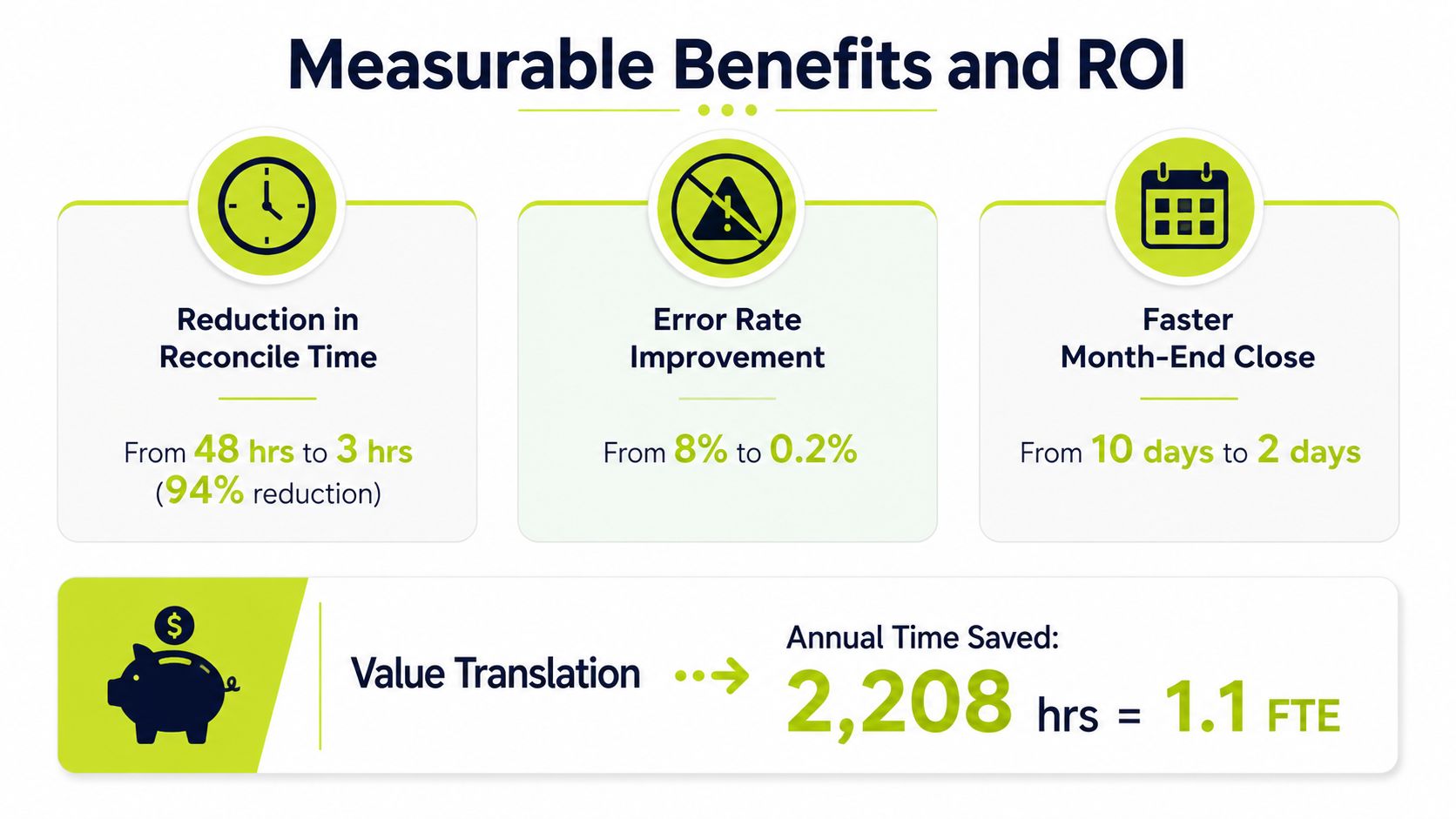
Measurable Benefits and ROI for Finance Teams
A business case for automation should start with the work the team performs today, not with a vendor's feature list. CFOs and Controllers can model three practical levers: time reclaimed, exceptions avoided, and close days removed.
One benchmark reports that AI-assisted bank reconciliation reduces reconciliation time by about 70% on average. In that benchmark, reconciling 500 transactions falls from roughly 3.5 hours to about 1 hour. The same source reports error rates below 0.5% for AI-assisted workflows, compared with 1% to 8% for manual processes. The bank reconciliation automation benchmark provides the underlying figures.
Those results don't mean every firm will achieve the same outcome. Data quality, transaction complexity, feed reliability, and exception design determine how much work clears automatically. They do show why the calculation should focus on hours spent per account and per close, rather than a general promise of “efficiency.”
Close performance is a separate value driver
The same benchmark reports that organizations using AI-powered reconciliation tools close their books 57% faster on average, with month-end close shrinking from 8.2 days to 3.5 days. That change has operational value beyond accounting labor.
A shorter close gives the CFO earlier visibility into cash, collections, margin, and upcoming obligations. It also reduces the period during which leadership makes decisions using incomplete or unverified information.
Industry summaries report that automated reconciliation can reduce reconciliation time by about 70% and cut close times by up to 70%. Other summaries cite 85% faster reconciliations and a 95% decrease in errors versus manual methods. These figures come from industry reconciliation statistics, and should be treated as directional benchmarks rather than a guarantee for a particular firm.
Translate saved time into capacity
For professional services firms, the most useful question is often, “What will the team do with the time?” An ROI analysis for SMBs with $10M–$50M in revenue describes 15–20 manual reconciliation hours per month compared with 2–3 automated hours, implying an 85%–90% reduction in time spent. The SMB reconciliation ROI analysis provides that comparison.
The value may appear as more timely billing follow-up, better project-margin analysis, cleaner cash forecasting, or fewer late-night close tasks. Finance leaders should document the baseline, identify which roles perform the work, and assign a realistic value to the recovered capacity.
The software category itself has become substantial. Market estimates value global bank account reconciliation automation at $4.2 billion in 2025, with a projection of $9.8 billion by 2034 and a 10.3% CAGR. Another estimate values the automated reconciliation platform market at $4.12 billion in 2025 and projects $11.84 billion by 2034, with a 12.4% CAGR. These are independent market estimates from bank reconciliation automation market research, and they signal growing institutional adoption rather than a guaranteed return for an individual firm.
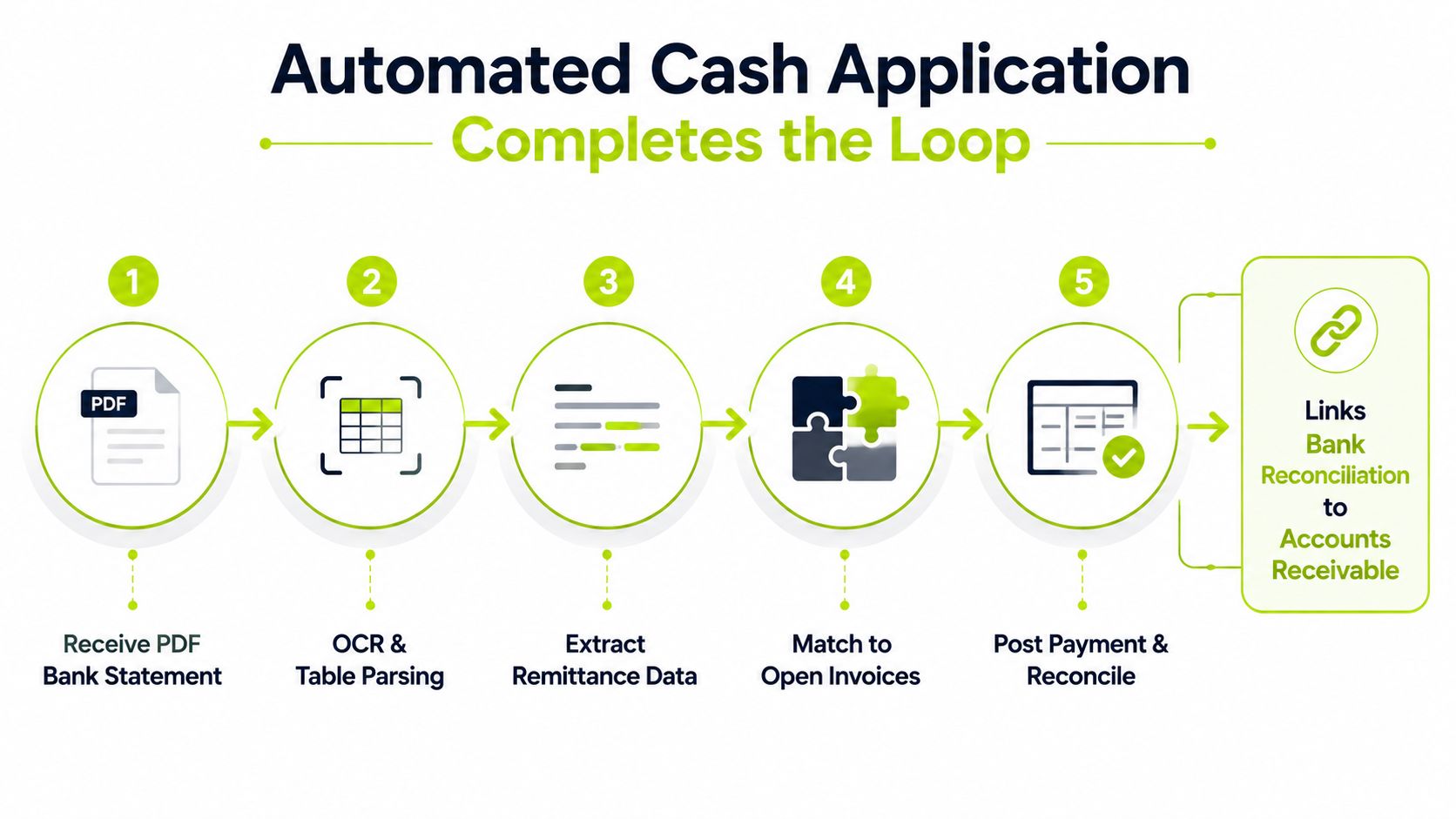
How Automated Cash Application Completes the Reconciliation Loop
A bank feed can show that a client payment arrived. It cannot, by itself, determine which invoice, retainer, project, or deduction the payment covers. That distinction becomes harder to manage when a professional services client has several open balances.
Cash application supplies the business context. It identifies the customer, connects the payment with the appropriate receivable, applies the amount, and passes the accounting result into reconciliation. Reconciliation then checks whether the bank activity, ledger entry, and AR balance agree.
Start with usable transaction data
The matching process is only as reliable as the transaction data entering it. Bank statements may arrive as PDFs or scans, so OCR and table parsing can extract dates, amounts, descriptions, and references before invoice matching begins. A bank-statement OCR benchmark reports up to 80% processing-time reduction, error rates declining from about 5% to under 1%, and a standard reconciliation workflow shrinking from roughly 3 hours to about 15 minutes. The bank-statement OCR benchmark supplies those figures.
Treat extraction as a control point, not a clerical shortcut. Validate that each row contains a usable date, amount, and reference, then normalize formats before applying rules. Otherwise, the system moves flawed data through the process faster and leaves finance with a larger exception queue.
QuickBooks Online imports transactions through connected financial-institution feeds. It also compares uploaded bank-statement data with records already in the platform and generates a reconciliation report when accounts are completed. QuickBooks Online banking documentation describes these functions.
For smaller and mid-sized firms, that provides a familiar starting point. The broader design must connect billing, payment status, remittance details, and collections activity. An unapplied receipt should become a visible AR exception, with an owner and reason, rather than remain stranded in the bank feed.
Link payment visibility to DSO
E-invoicing and AR automation connect invoice delivery, buyer AP matching, reminders, payment status, and cash application. One industry source reports that e-invoicing with AR automation typically reduces DSO by 5–10 days, while best-in-class automated AR organizations operate at 28–35 days DSO on standard 30-day terms. Accounts receivable automation practices provides that benchmark.
The operating chain has five points:
- The bank or payment processor reports the cash movement.
- OCR or a direct feed converts it into normalized transaction data.
- Remittance information identifies the customer and open invoice.
- Cash application posts the payment or routes it for review.
- Reconciliation verifies that the bank, ledger, and AR records agree.
Collections design can also draw on OilGasFactoring.com AR practices. Across industries, the operating lesson is consistent: payment identification, collections follow-up, and reconciliation need shared status and exception ownership.
A detailed explanation of the payment-side workflow appears in automated payment reconciliation. The purpose is to give finance staff cleaner inputs and fewer judgment-based exceptions, while preserving review for partial payments, deductions, and ambiguous remittance.
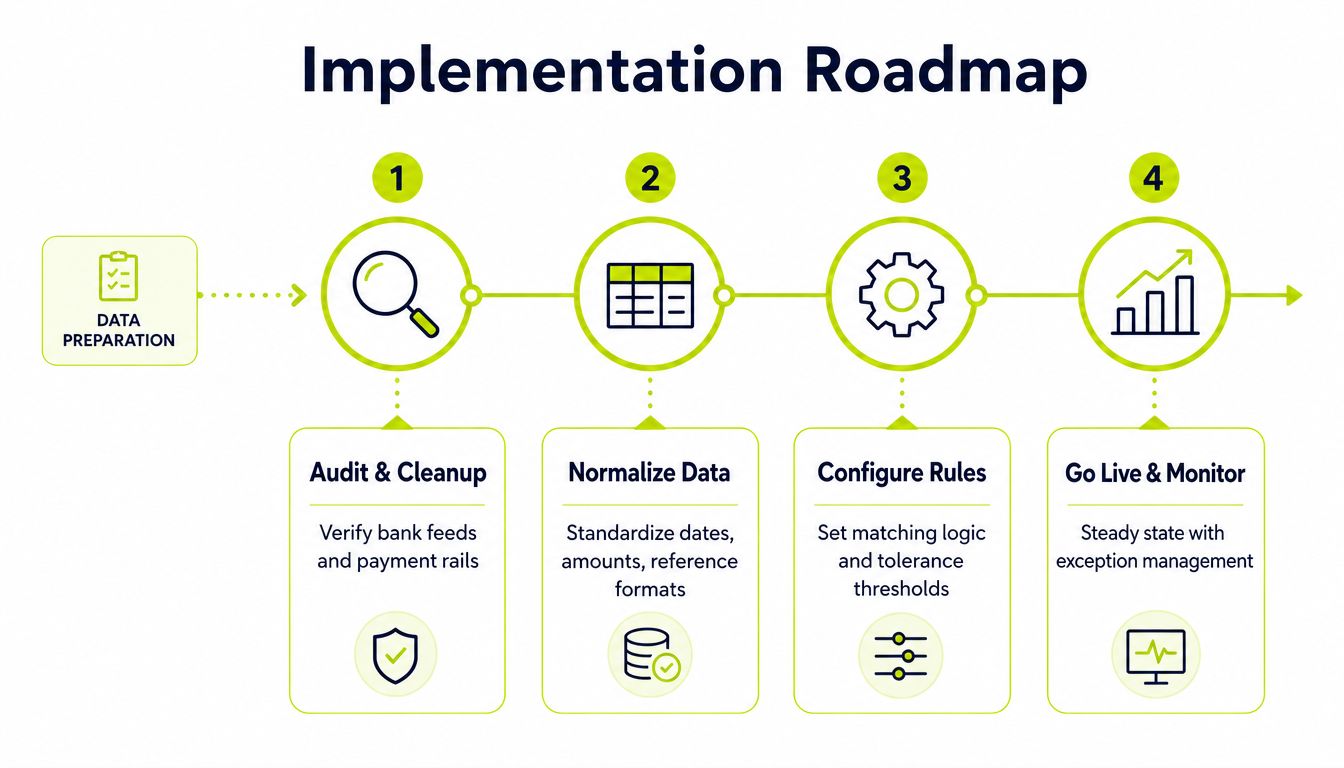
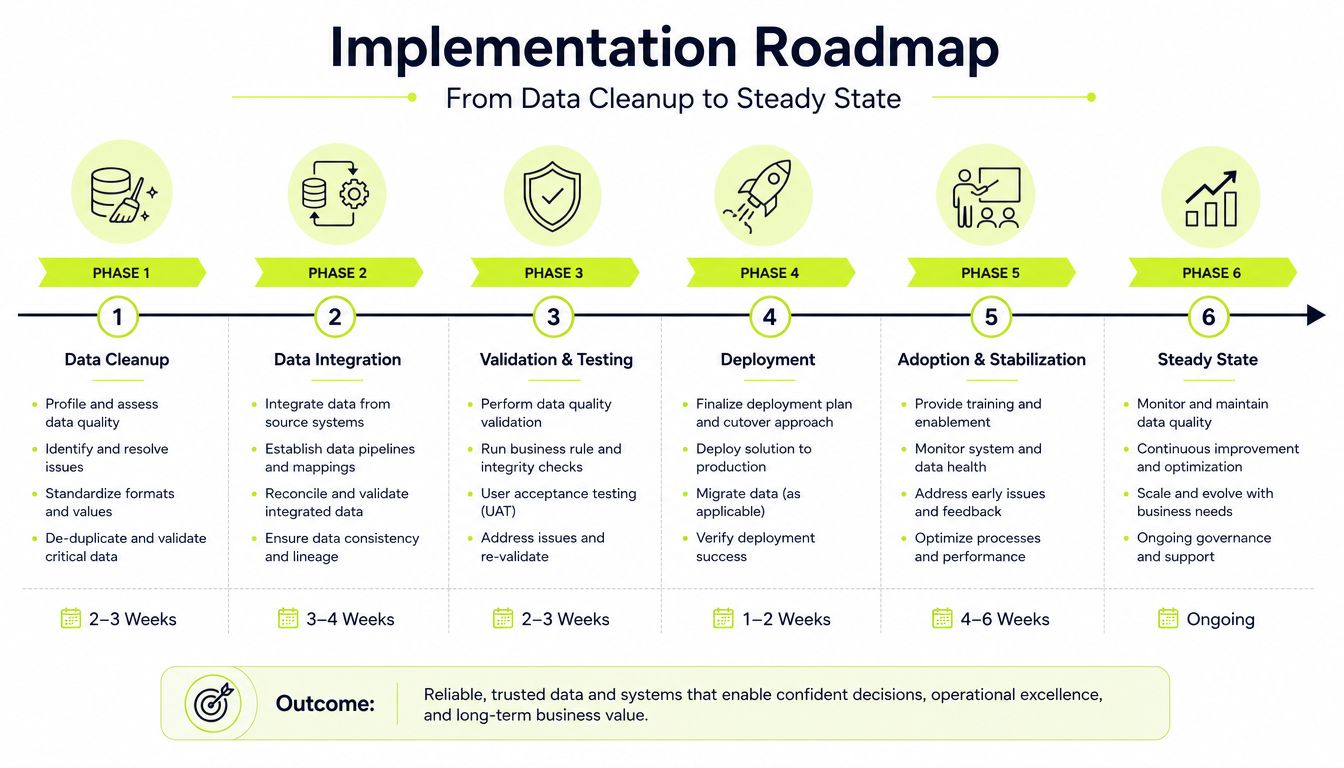
Implementation Roadmap from Data Cleanup to Steady State
Software selection should come after workflow inspection. A firm that automates a fragmented process without correcting its inputs may produce faster exceptions, not a faster close.
Begin with an evidence-based audit
List every bank account, payment processor, card program, legal entity, and payment rail in scope. For each source, record the format, refresh pattern, available identifiers, ownership, and what happens when the connection fails.
Include ACH, wires, cards, RTP, and FedNow where they apply. Also document PDF and CSV fallback procedures. The audit should answer a practical question: can the team reliably obtain complete activity, or are analysts compensating for missing data manually?
Normalize before matching
Standardize dates, amounts, descriptions, reference formats, entity names, and customer identifiers. Confirm how the firm handles fees, timing differences, split payments, grouped deposits, refunds, and unapplied cash.
This step often requires collaboration between accounting, billing, operations, and whoever owns the bank or ERP integrations. A matching rule can't rescue a reference field that is missing at the point of payment.
Control principle: A clean input is a reconciliation control. Don't treat normalization as a technical detail that can wait until after launch.
Configure rules and tolerances
Start with high-confidence matches. Use identifiers, exact amounts, and dates before adding broader description-based or pattern-based logic. Define tolerance thresholds deliberately, with a named owner responsible for reviewing their effect.
Then design exception queues by root cause. An amount variance, a missing remittance record, and a broken feed shouldn't share the same workflow. Give each queue an owner, expected response, supporting evidence, and escalation path.
Pilot with human review
Early first-pass match rates can be low when teams skip workflow audits or foundation setup. Implementation guidance on reconciliation automation highlights this implementation reality.
Run a controlled pilot using representative accounts, not only clean transactions. Keep a human reviewer in the loop, inspect automatic matches, and record false matches separately from legitimate exceptions. The target is not maximum automation on day one. The target is a trustworthy process that improves as data and rules mature.
Move into steady state
After launch, review exception volume, root causes, approval timing, and feed completeness on a regular cadence. Retire rules that create noise, add rules only when evidence supports them, and train the team on why certain items remain manual.
Common Pitfalls and Why Early Automation Can Underperform
Automation often underperforms for reasons that have little to do with the matching engine. The upstream data may be incomplete, inconsistent, or unavailable at the moment the workflow needs it.
Payment rails create different patterns. ACH, wires, cards, RTP, and FedNow can produce different identifiers, settlement timing, descriptions, and fee treatments. A professional services firm operating across several banks and entities may also face brittle connections that fail without a clear owner.
When direct feeds break, teams often fall back to PDFs and CSVs. That fallback can be necessary, but it introduces extraction, mapping, and validation work. If the system receives a date in one format, an amount in another convention, and a truncated description, routine matches become false exceptions.
Recent coverage identifies upstream fragmentation as a central risk. Bank reconciliation automation and infrastructure risks describes the practical problem of differing transaction formats, broken multi-bank connections, and continued dependence on manual files.
Diagnose the failure at the right layer
A pilot that stalls in its first month may be showing one of four conditions:
- Feed failure: The bank or processor connection doesn't deliver complete activity.
- Normalization failure: Dates, amounts, references, or entities don't share a common format.
- Enrichment failure: The payment lacks remittance, customer, invoice, or project context.
- Workflow failure: Exceptions aren't categorized, assigned, or resolved consistently.
The fix isn't always a new tool. It may be a feed owner, a better input validation step, or a revised payment instruction that asks clients to include useful remittance details.
Diagnostic question: Is the transaction genuinely ambiguous, or did the system receive insufficient evidence to identify it?
That distinction protects the team from lowering controls just to increase match rates. A high automatic-match rate built on weak evidence can create more risk than a lower rate with transparent review.
KPIs Controls and Security That Keep Auditors Confident
A reconciliation dashboard should show whether the control system is working, not only whether staff saved time. Track straight-through processing, exception volume by root cause, time to reconcile, DSO movement, and close-cycle length each week. These measures connect feed quality and cash application to outcomes CFOs and Controllers can review.
For AR, the previously cited DSO range can serve as a reference for firms using standard 30-day terms, not as a universal target. The useful question is whether DSO is improving alongside cleaner remittance data, faster exception handling, and more payments applied to invoices.
Controls should answer five questions:
- Who can configure matching rules?
- Who reviews exceptions?
- Who approves adjustments?
- What evidence supports each resolution?
- Can the team reproduce the final reconciliation report?
Segregation of duties still matters when software performs the first pass. A user who sets a tolerance should not automatically approve every adjustment that rule creates. Each resolved exception should retain the transaction, decision, evidence, reviewer, and approval history.
QuickBooks Online generates a reconciliation report when an account is finished reconciling, offering smaller firms a familiar example of report-based close support. Broader systems should preserve bank-feed status, import history, matched items, unresolved exceptions, and posted adjustments so an auditor can follow the trail from source data to final balance.
Security belongs in the same review. Document access controls, bank connection methods, data retention, user permissions, and vendor incident procedures. Finance leaders can use this data security measures guide when documenting the control environment.
Putting It Together Best Practices and Next Steps
Professional services firms get more from automation when they standardize inputs before configuring rules. Prioritize reliable identifiers, exact amount and date matching, and exception queues organized by root cause. Then connect reconciliation to cash application so payments are applied to invoices instead of marked as bank activity.
Collections should remain professional and consistent. AI AR automation can handle timing, routing, and repetitive follow-up while finance or client-facing teams retain control over judgment-sensitive conversations. That balance helps firms reduce DSO and improve cash flow without weakening client relationships.
For practical guidance on how to handle bank exceptions efficiently, focus on ownership, evidence, and resolution time rather than chasing a perfect automatic-match rate.
Resolut automates AR for professional services by connecting collections workflows, payment visibility, cash application, and reconciliation support in one operating layer. If your firm wants a more consistent path from bank activity to applied cash and a cleaner close, visit Resolut to explore the next step.