
Billing Automation for Professional Services Firms
How billing automation reduces DSO, protects client relationships, and improves cash flow for professional services firms. A practical guide
Month-end arrives, and your AR team is still stitching together time entries, approved milestones, retainer drawdowns, expense receipts, and client-specific billing rules. Invoices sit in draft while someone checks a spreadsheet, a partner approves a write-up, or a client asks for a purchase-order reference that should have been captured earlier.
The invoice eventually goes out. The cash doesn't arrive on schedule. A payment lands without usable remittance detail, gets parked in an unapplied account, and waits for someone to investigate. That is the part of billing automation discussions that gets too little attention. Faster invoice delivery helps, but cash application, payment exceptions, disputes, and risk-based follow-up determine whether revenue becomes available cash.
For professional services firms with complex projects and relationship-driven accounts, accounts receivable automation should protect cash flow without making client communication feel mechanical. The right operating model automates repeatable work, gives finance reliable visibility, and preserves human judgment where commercial context matters.
Why Manual Billing Fails Professional Services Firms
A professional services CFO usually doesn't see one dramatic failure. The problem appears as a chain of small delays.
A project manager approves timesheets late. Finance waits for a milestone confirmation. An invoice coordinator copies data from a project system into an accounting platform, then drafts a client email. A partner wants to review the wording for a strategic account. By the time the invoice reaches the client, the firm has already surrendered valuable collection time.
The same pattern repeats during follow-up. One collector sends reminders early, another waits until an invoice is seriously overdue, and a third relies on personal notes. Clients receive inconsistent messages, while the AR manager can't easily distinguish a temporary administrative issue from a customer that is beginning to show payment risk.
The last mile creates the real drag
Invoice creation is only the front half of the process. The harder work starts after delivery.
A client may pay several invoices in one transfer, deduct a disputed expense, use an outdated invoice number, or send remittance information to a different mailbox. Someone must identify the payment, interpret the remittance, match the amount, record short pays, and route unresolved items to the right owner. If no one owns that workflow, the payment remains unapplied even though the client has technically paid.
Manual invoice processing commonly carries a 1–3% per-invoice error rate, according to data on AI invoice processing accuracy and manual error exposure. At 2,000 invoices per month, that equates to 20 to 60 discrepancies per cycle, each capable of creating rework, client friction, or a delayed payment. The same source reports that structured AI extraction can exceed 95% field accuracy, addressing the data-entry stage where many errors begin.
Practical rule: Don't measure billing automation by how quickly an invoice is generated. Measure how reliably the process turns an approved bill into an applied payment.
Automation changes the operating rhythm
A useful platform connects time capture, project data, invoicing, payment collection, reminders, cash application, and exception handling. It can send a consistent follow-up sequence, surface an account that needs a collector's judgment, and keep a clear record of why a payment wasn't matched.
That shift matters because AI AR automation isn't just an email scheduler. It can support risk segmentation, suggest which accounts deserve attention, and separate clean transactions from exceptions that require a person. The finance team spends less time searching for information and more time resolving the issues that affect cash.
The OECD describes electronic invoicing as a major policy and operational priority across multiple markets in its report on tax administration and electronic invoicing. Germany's requirement for federal government suppliers to submit structured electronic invoices, beginning in 2014, illustrates how billing infrastructure has moved beyond a niche convenience. For a growing firm, that means billing automation increasingly supports compliance and interoperability as well as internal efficiency.
The Real ROI of Billing Automation
The financial case starts with working capital. Every day that an approved invoice remains undelivered, disputed, or unapplied extends the period between earned revenue and usable cash.
Benchmarks cited in accounts receivable statistics for 2026 reporting indicate that around 70% of companies have DSO above 46 days. The same benchmark set places the 25th percentile at 30 days or less, the median at 38 days or less, and the bottom quartile at 46 days or longer. These aren't promises for a particular firm, but they provide a useful way to frame the gap between ordinary collection performance and stronger execution.
Research summarized in that source reports that automating more than half of AR can reduce DSO by 32%, or about 19 days, and that 62% of firms implementing AR automation saw measurable DSO reductions. The mechanism is practical: invoices leave sooner, reminders follow a defined cadence, payments are matched faster, and disputes reach an owner instead of sitting in a queue.
Where the money leaks
The visible saving is reduced manual effort. The larger benefit often comes from releasing cash tied up in receivables.
For a firm with significant annual billings, even a qualitative improvement in collection timing can affect borrowing needs, investment flexibility, and the confidence of the cash forecast. Automation can also reduce rework caused by invoice errors, prevent collectors from spending time on low-risk accounts, and make payment promises easier to monitor.
Use a conservative model rather than treating every vendor claim as guaranteed. Start with current DSO, open receivables, invoice volume, exception volume, collector capacity, and the cost of implementation. Then model the cash released at different DSO outcomes and separately calculate labor and rework savings.
Metric | Manual process | Automated process | Improvement |
|---|---|---|---|
Invoice preparation | Data gathered and checked across systems | Rules gather approved billing inputs | Earlier, more consistent delivery |
Follow-up | Collector-dependent reminders | Scheduled and risk-aware workflows | Fewer missed follow-ups |
Cash application | Remittance reviewed manually | Matching engine proposes or completes matches | Less unapplied cash |
Exceptions | Informal email and spreadsheet queues | Routed cases with ownership and status | Faster visibility and resolution |
Management reporting | Periodic, manually assembled | Centralized operational dashboards | Better decisions during the cycle |
The guide to calculating ROI is useful for structuring this business case. Keep the analysis tied to operating mechanisms, not vague productivity language. If a proposed result can't be connected to faster invoice release, fewer touches, better matching, reduced disputes, or earlier intervention, it shouldn't sit in the headline ROI.
The client experience is part of the return
Professional services clients notice billing inconsistency. A clear invoice, a convenient payment path, and a reasonable reminder sequence reduce avoidable friction. A strong process also gives account leaders better information before a payment issue damages the relationship.
Billing automation won't eliminate commercial disputes. It can, however, ensure the firm identifies them quickly, supplies the right supporting detail, and assigns the conversation to someone who understands the account.
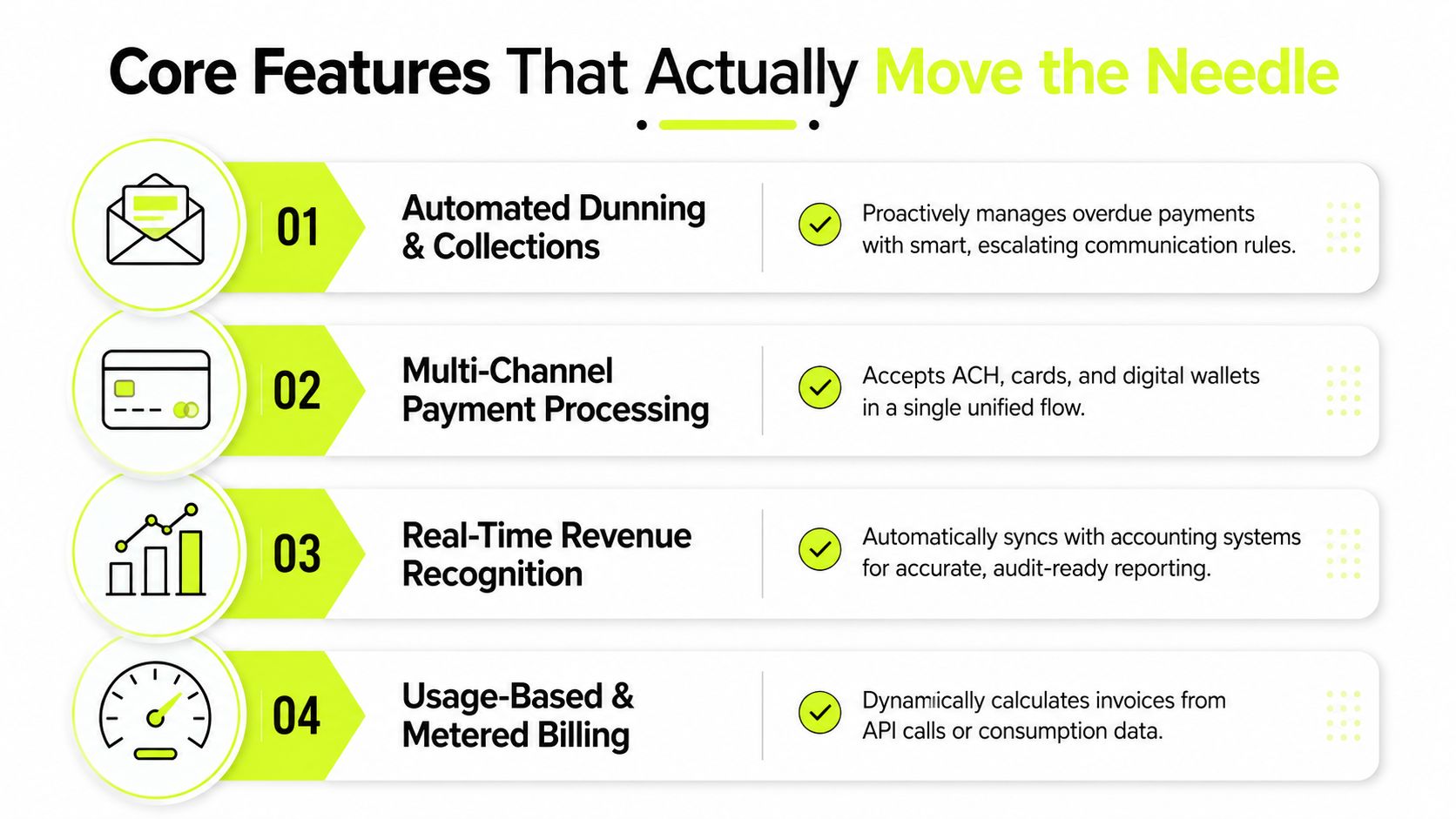
Core Features That Actually Move the Needle
Start with the full invoice-to-cash process, not the invoice template. A platform that only creates and emails invoices may improve the front end while leaving the finance team with the same unapplied cash, short pays, and dispute backlog.
The evaluation should follow the money.
Prioritize cash application
Payment matching needs to handle more than a clean transfer with one invoice number. Test the platform with partial payments, bundled remittances, deductions, customer aliases, and payments that arrive before remittance detail. The system should show its confidence, explain the proposed match, and route uncertain items for review.
That human checkpoint matters. Finance should be able to approve, reject, or correct a match without losing the audit trail. A useful AR software for professional services platform makes exceptions visible by age, value, account, and reason.
Use AI to focus collector attention
Risk segmentation should combine payment history, dispute patterns, invoice age, promises to pay, and account context. The purpose isn't to let a model make unreviewable decisions. The purpose is to help collectors spend time where judgment has the greatest effect.
A lower-risk account might receive a standard reminder and a self-service payment option. A strategic client with a new short pay may need a coordinated discussion between AR, the account partner, and project leadership. The system should support both paths and allow finance to override a classification.
Close the payment loop
Look for intelligent dunning, multi-channel payment processing, dispute workflows, and real-time visibility into invoice and payment status. A QuickBooks workflow described in this practical guide to QuickBooks AR automation can generate recurring invoices, include a Pay Now link, accept card, ACH, or PayPal payments, reconcile the result to QuickBooks in real time, and send overdue reminders on a preset schedule.
Those capabilities matter only if they work together. A reminder should reflect the latest payment status. A disputed invoice shouldn't continue through an aggressive sequence without review. A settled payment should leave the collection queue promptly.
For teams assessing conversational support and workflow orchestration, automated billing agents offer useful context on how AI can assist repetitive billing interactions. Treat agents as controlled operators with defined permissions, escalation rules, and review points.
A detailed overview of automated billing software can also help frame the difference between invoice delivery and full-cycle AR. Your checklist should include:
- Source integration: Connect project management, time tracking, CRM, ERP, and payment systems.
- Exception handling: Route short pays, missing remittances, failed payments, and disputes with clear ownership.
- Auditability: Preserve the data, rule, approval, and communication history behind every action.
- Human controls: Let collectors pause sequences, adjust risk, and approve sensitive communications.
- Standards support: Use structured transport, validation, and routing where customer or public-sector requirements demand it.
The UK has announced that Peppol will be the core interoperability network for eInvoicing, as described in the Peppol coverage of the expected UK mandate. Email and PDF remain familiar, but they can't be the entire technical strategy for firms serving markets that require standards-based exchange.
How to Choose the Right Billing Automation Platform
Vendor demos often start with invoice templates, scheduling, and payment buttons. Those features are table stakes. The buying decision should turn on what happens after the invoice is sent.
Ask each vendor to demonstrate a partial payment against several invoices, a bundled remittance, an unapplied transfer, and a disputed expense line. Watch whether the system proposes a match, exposes its reasoning, and gives your team a clean way to resolve the exception.
Compare the operating model
Evaluation criteria | Basic invoice tool | Full-cycle AR platform |
|---|---|---|
Invoice creation | Generates and sends invoices | Pulls approved data from connected systems |
Follow-up | Uses fixed reminders | Adjusts workflows by status, risk, and context |
Payment matching | May require manual posting | Automates or proposes cash application |
Exceptions | Managed outside the platform | Routed, tracked, and escalated in one queue |
ERP integration | Often one-way or batch-based | Bidirectional synchronization with operational context |
Human oversight | Limited approval controls | Configurable review, override, and escalation points |
Integration depth deserves specific scrutiny. A connector to NetSuite, Sage, or QuickBooks isn't enough if it only exports a file at the close of business. Ask which records move in each direction, how corrections flow back, how failed syncs appear, and whether finance can see the system of record without reconciling separate spreadsheets.
AI claims also need operational testing. Request match behavior for partial payments, short pays, bundled remittances, and ambiguous customer references. Ask how risk segmentation works, which variables finance can adjust, and whether the platform records why a recommendation changed.
Implementation risk is equally important. A system that requires a long deployment, extensive custom development, or scarce IT capacity may delay the cash benefits it was supposed to create. Your AR team should receive exception dashboards and practical support, not just a user login and generic documentation.
For owner-led firms comparing broader workflow tools, an AI agent platform for founders can provide useful perspective on how automation may fit into a wider operating model. Keep the finance decision grounded in the controls and integrations your billing process needs.
Implementation Checklist for Finance Teams
A phased rollout reduces disruption and gives the finance team evidence before a full cutover. The first task isn't configuration. It's process discovery.
Map every billing scenario your firm handles, including milestone invoices, retainers, expense pass-throughs, recurring services, credits, write-downs, multi-entity billing, and client-specific approval requirements. Document where each input originates, who approves it, and what happens when the expected data is missing.
Phase one is discovery
Use a short discovery sprint to build a transaction map and an exception register. Include the invoices that are easy to automate and the cases that regularly break the current process.
Ask the AR team to show real examples of unapplied cash, disputed time, missing purchase orders, duplicate invoices, and client requests for revised documentation. These examples should shape the workflow design more than the vendor's standard demonstration.
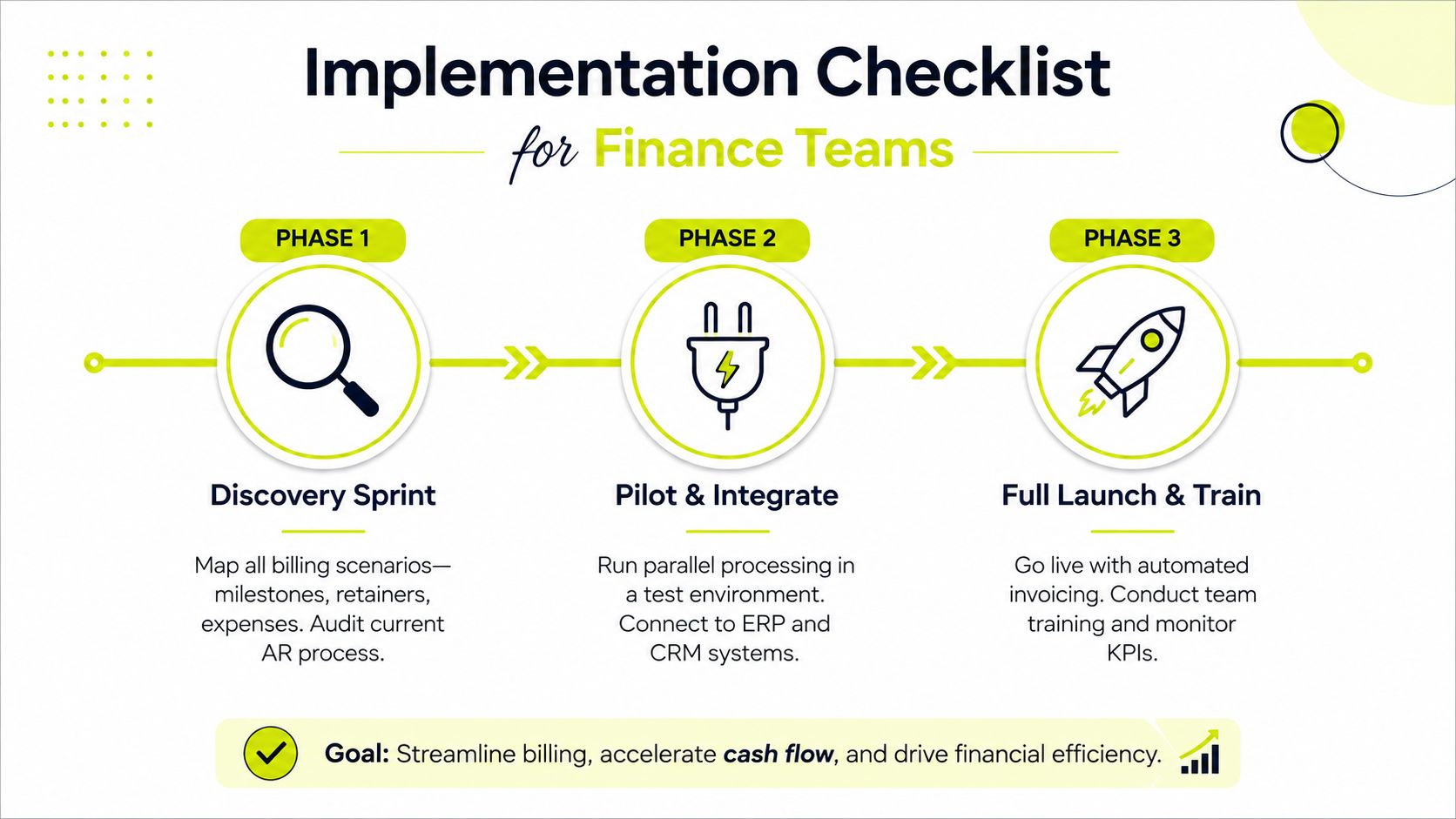
Phase two is integration and parallel operation
Validate ERP integration in a sandbox with three months of historical transaction data. Stress-test cash application with clean payments and difficult remittance scenarios, then compare proposed matches against known outcomes.
Run the automated process alongside the legacy process for at least one full month. Reconcile invoice totals, payment status, credit notes, exceptions, and general-ledger postings before you retire the old workflow. Parallel processing takes effort, but it gives the controller a defensible cutover decision.
Phase three is controlled launch
Define human-in-the-loop checkpoints before go-live:
- Payment exceptions: Specify which unmatched or short-paid transactions require manual review.
- Collection escalation: Decide when a sequence pauses and a collector or partner contacts the client.
- Strategic accounts: Keep relationship-sensitive customers on a review path until the team trusts the rules.
- Risk overrides: Give authorized users a way to change segmentation with a documented reason.
- Training: Teach the exception dashboard, investigation process, and override controls, not just the successful invoice path.
After launch, use a 30-60-90 day review cadence to recalibrate risk thresholds, reminder timing, and routing based on actual client behavior. Adoption improves when the team sees that automation removes repetitive work rather than hiding problems.
KPIs That Drive Smarter AR Decisions
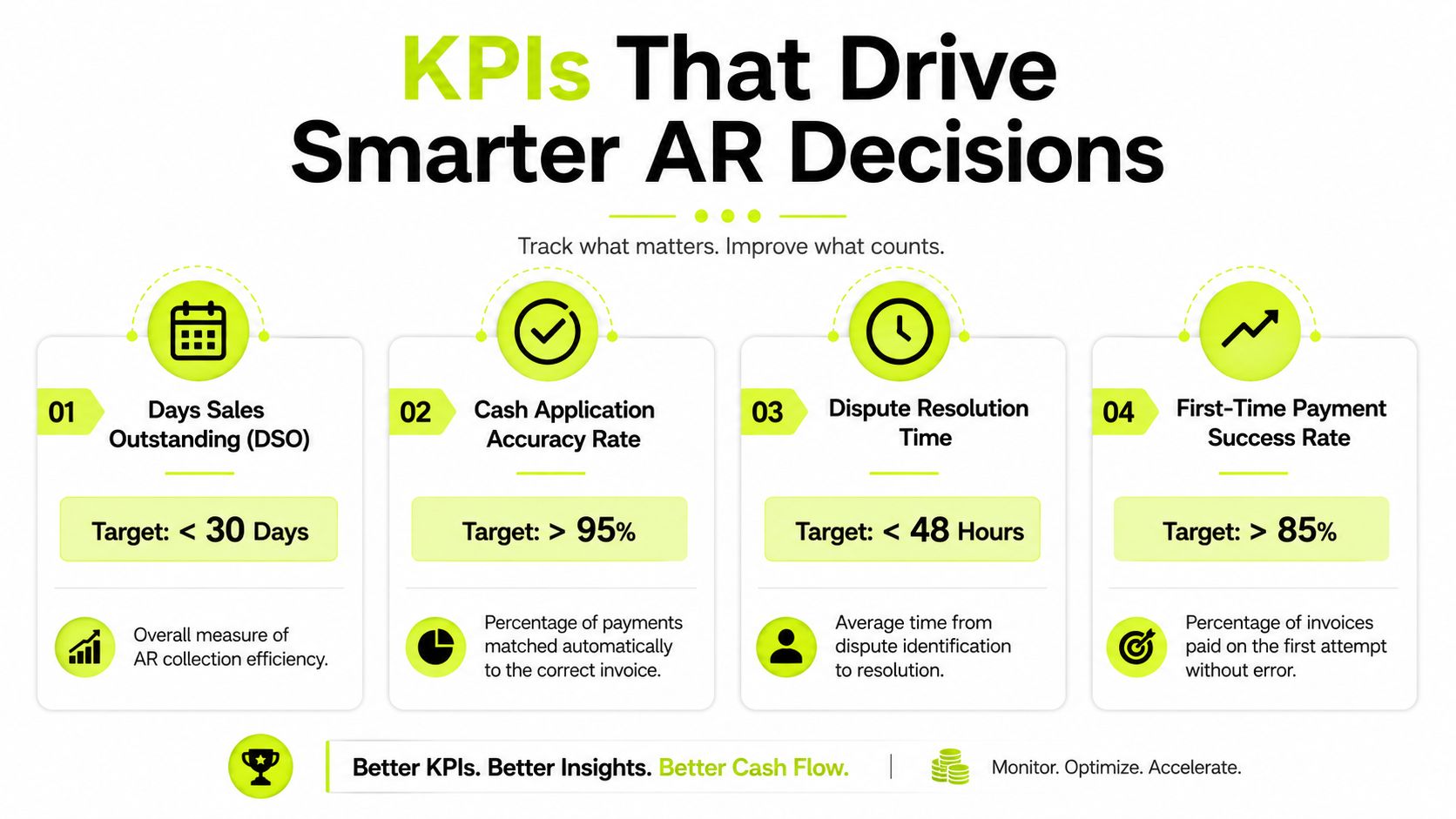
DSO tells you the result, not the cause. A finance leader needs a KPI stack that shows whether cash is delayed by invoice production, customer behavior, payment matching, disputes, or weak follow-up.
Start with DSO by client tier, project type, billing method, and account owner. A firm-wide number can improve while one valuable segment deteriorates, especially when billing mix changes.
Build decision triggers into the dashboard
Cash application accuracy shows whether the platform is removing manual work or just shifting it to an exception queue. When accuracy falls below 92%, investigate remittance parsing, customer master data, payment references, and bundled settlement behavior. That threshold is an operating trigger, not a universal benchmark.
Manual intervention rate reveals whether risk rules are too broad. If more than 15% of invoices still require manual intervention after automation, review segmentation, billing data quality, and exception definitions before adding more staff.
Track average days to dispute resolution, not just dispute count. A low dispute count can conceal a backlog if cases remain open. Segment the result by dispute category so the team can distinguish unclear invoices from project approval delays or unauthorized deductions.
Payment promise fulfillment rate adds a behavioral measure. If clients regularly promise payment and miss the date, the collector needs a different strategy, stronger escalation, or a revised account risk classification.
Use benchmarks carefully
A 2025 AR automation survey found that 78% of respondents identified poor cash flow or high DSO as the most significant consequence of inefficient AR operations, while 65% reported average DSO between 31 and 60 days and 17% achieved DSO under 30 days, according to the 2025 AR Automation Survey Report. Use those figures as context, not as a substitute for your own baseline.
The dashboard should answer a practical question: what should the team do next? Escalate the account, correct the data, pause the sequence, contact the project owner, or let the automated path continue.
Automate AR Without Losing the Human Touch
The strongest billing automation programs don't remove finance judgment. They reserve it for work that needs context.
Systems can generate invoices from approved data, send reminders, process payments, match remittances, and identify anomalies. They shouldn't decide unilaterally how to handle a strategic client that disputes a milestone, a long-standing customer facing a temporary cash issue, or an account where a partner relationship affects the collection approach.
That is why human review belongs inside the workflow, not outside it in an emergency spreadsheet. The team should see the evidence behind an AI recommendation, approve or change the next action, and leave a record that explains the decision. This is the operating principle described in human-in-the-loop automation guidance.
A 2025 survey found that 80% of organizations rated AR automation as important, high priority, or critical, but only 23% said payment processing was mostly or fully automated, and only 3% reported fully automated AR, according to survey findings on the AR automation gap. The gap is understandable. Payment exceptions, disputed charges, and client-specific terms are harder to automate than invoice emails.
The practical answer is not to automate everything at once. Automate clean transactions, standard reminders, and repeatable matching. Put uncertain payments, high-risk accounts, and relationship-sensitive disputes into a controlled review queue. Resolut brings credit risk assessment, collections workflows, payment options, and cash application into one AR operating layer, with automation and human review available within the same process.
For CFOs and Controllers, that balance matters. The goal is to automate the process without automating the relationship. A reliable system gives the AR team fewer repetitive tasks, better exception visibility, and more time for the conversations that protect both cash flow and client trust.
Resolut automates AR for professional services, including invoice follow-up, payment processing, cash application, and risk-based exception handling. Visit Resolut to see how a focused platform can help your team reduce DSO, improve cash flow, and manage the messy last mile with consistent, accurate, and human workflows.