ERP System Integration: Reduce DSO in 2026
Master ERP system integration to reduce DSO and improve cash flow. Learn patterns, data mapping, and AR automation tools.
Month-end closes get ugly fast when invoice data sits in one system, cash receipts in another, and collections notes live in spreadsheets no one fully trusts. The finance team spends hours reconciling balances, sales asks for status updates, and leadership still can't see which receivables are slowing cash.
That's the pressure behind ERP system integration for professional services firms. The goal isn't cleaner software architecture, it's fewer manual handoffs, faster invoice-to-cash cycles, and better control over working capital.
For firms in the $3M to $50M range, the issue usually shows up first in accounts receivable. A bill gets issued, a payment arrives, someone matches it later, and by the time the books are tidy, the collection window has already drifted. Integration matters because it connects the systems that create, track, and clear that cash.
Why ERP Integration Matters for Professional Services
A controller at a growing agency, consultancy, or accounting firm usually knows the pattern. Billing is in one tool, the ERP holds the ledger, and the collections team is chasing reminders from a separate system. By the time everyone agrees on what's outstanding, the month is already half over.
That disconnect costs more than time. It weakens visibility into receivables, slows follow-up, and forces finance to rely on spreadsheets to answer basic questions about who owes what and when. In a services business, where cash depends on accurate invoices and timely client responses, that's not a back-office inconvenience, it's a working-capital issue.
ERP becomes the control point
ERP only works as a true system of record when it's connected to the tools around it. Eurostat reports that in 2023, 43.3% of EU enterprises used ERP software applications. That installed base has to connect with invoicing, collections, payments, and analytics if finance leaders want consistent reporting and faster collections. The same Eurostat source shows CRM and BI adoption alongside ERP, which reinforces how normal multi-system environments already are in enterprise operations. Eurostat's enterprise software integration data
For professional services firms, that means the ERP can't sit isolated from accounts receivable automation, billing workflows, and client communication. If it does, the team spends more time reconciling than collecting. If it's integrated well, invoice status, payment status, and customer records move together.
A practical resource worth reviewing is ERP integration by Bridge Global, especially if you're trying to map the business case before you involve IT. The point isn't more technology, it's making sure the finance process has one coherent view of the truth.
Practical rule: If your team can't answer “what's overdue, what's disputed, and what's already been paid” without opening three systems, the integration isn't serving finance yet.
The finance operator's test is simple. If the integration doesn't shorten the path from invoice to cash, or at least remove a manual reconciliation step, it's probably not the first connection that deserves budget.
Common Integration Patterns and Their Trade-Offs
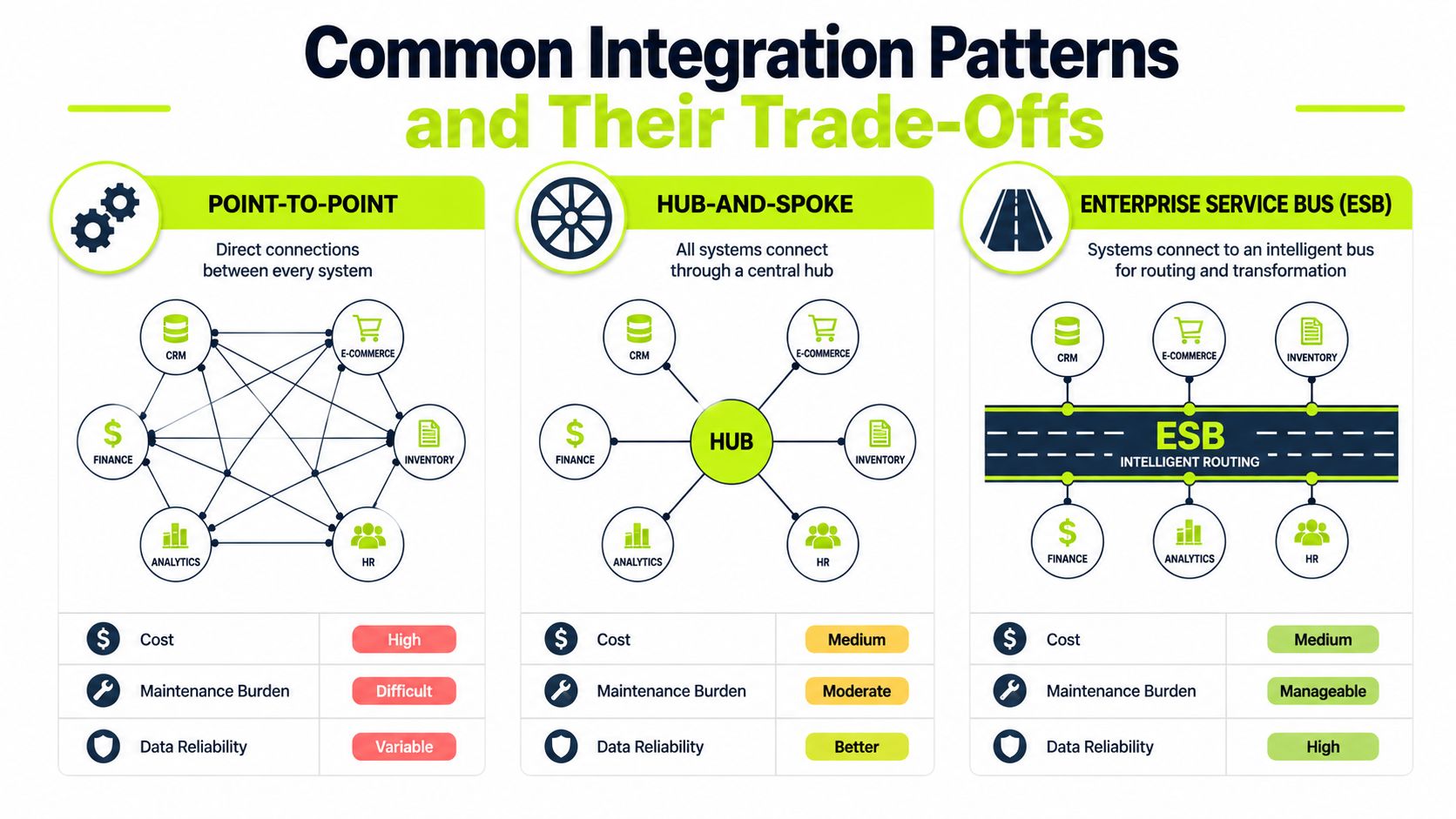
The pattern you choose shapes everything downstream, from cost to reliability to how many late-night fixes your team inherits later. For a firm with a modest stack, point-to-point can get an urgent receivables workflow moving. For a growing firm, that same approach can become brittle fast.
Point-to-point works, until it doesn't
Point-to-point links are direct and easy to understand. One system talks to another, and that's fine when you only need to move a narrow set of records, like syncing open invoices from QuickBooks into an AR workflow.
The weakness shows up when every new system needs a new connection. Each link becomes its own maintenance problem, and each change in field structure can break something downstream. Finance teams feel that pain when invoice status doesn't match payment status, or when a client record is updated in one place but not another.
Middleware gives control, with more overhead
Middleware, or an iPaaS layer, sits in the middle and orchestrates the flow. It's a better fit when your firm has several applications that must share data consistently, especially if you're trying to standardize finance workflows across billing, collections, and reporting.
The trade-off is operational attention. Middleware reduces connection sprawl, but it introduces a platform that someone must govern, monitor, and maintain. That's the price of flexibility.
API-based integration is modern, but vendor-dependent
API-based integration is usually the cleanest long-term approach when vendors support it well. It's especially useful when you want systems to exchange data in near real time without heavy custom code.
The catch is obvious to anyone who's inherited an ERP upgrade. APIs change, rate limits exist, and not every business rule is exposed cleanly. That's why ERP integration mechanics typically rely on middleware, APIs, or custom connectors, with governance around authoritative data sources, field mapping, and testing before go-live. OpenText's overview of ERP integration mechanics
Pattern | Best For | Implementation Cost | Maintenance Burden | Scalability |
|---|---|---|---|---|
Point-to-Point | Narrow, urgent workflows | Lower at first | High as systems multiply | Limited |
Hub-and-Spoke | Firms standardizing a few core workflows | Moderate | Moderate | Good |
Enterprise Service Bus | Larger, multi-system environments | Higher upfront | Moderate to high | Strong |
A useful comparison for people thinking beyond finance is optimising HR integration for UK businesses. The logic is the same across functions, but finance usually feels the operational fallout first because cash shows up in the numbers quickly.
For teams that want a technical reference point, the internal overview on API connectivity is helpful when you're deciding whether to use APIs directly or route them through middleware.
Data Mapping and Master Data Governance
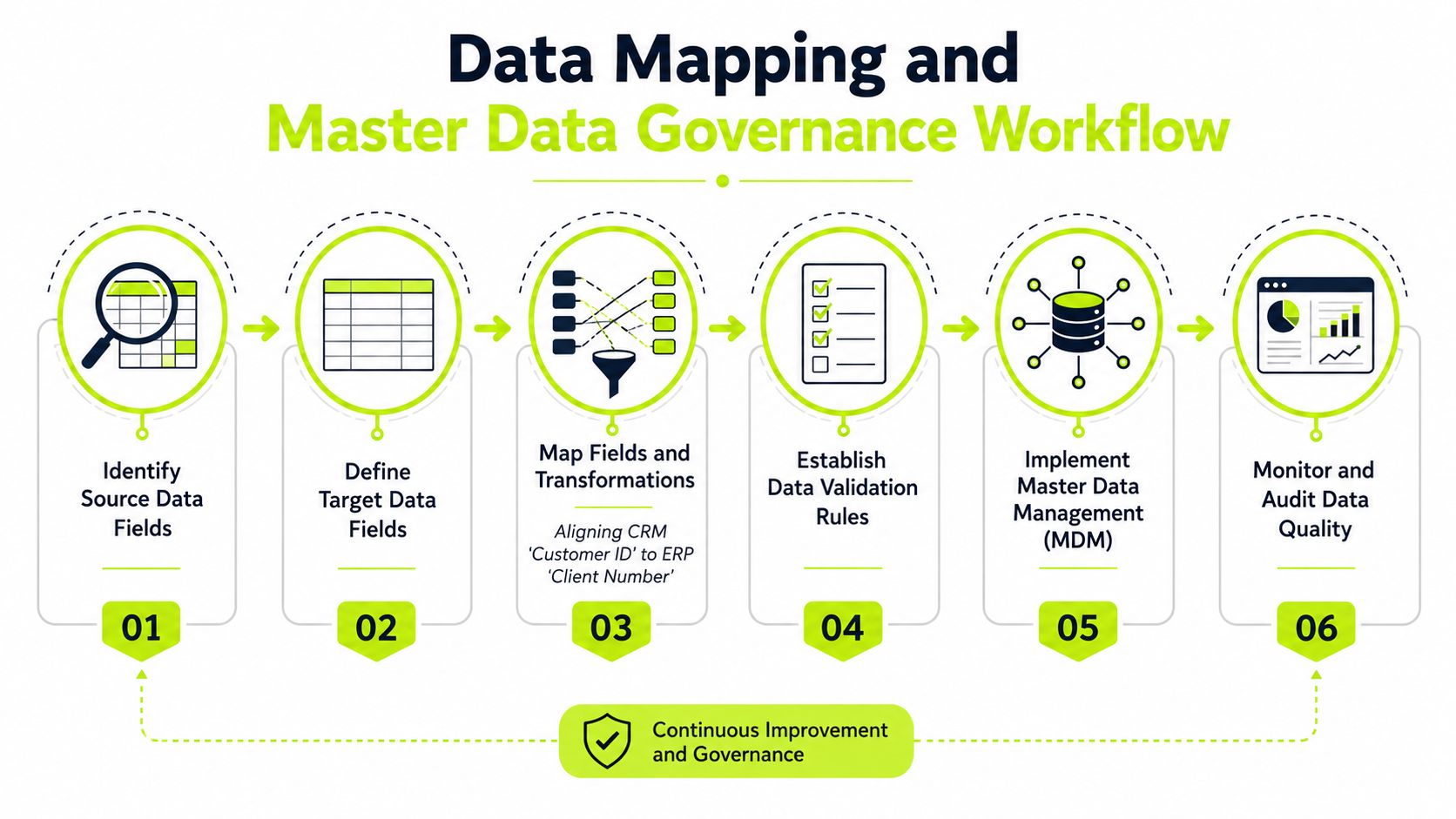
The hardest integration failures usually aren't software failures. They're meaning failures. One system says “client_id,” another says “customer_number,” and a third stores the same account under an old legacy ID that finance still recognizes.
Start with definitions, not interfaces
A technically sound integration has to solve data-model harmonization. Systems don't just differ in field names, they differ in formats and semantics, which is why successful work requires explicit mapping, transformation, and governance rather than simple field copying. Folio3's ERP integration guidance
That matters most in AR workflows. If payment terms, invoice status, and customer contact information aren't normalized across your billing system and ERP, collections staff end up working from incomplete or contradictory records. The result is awkward follow-up, duplicate outreach, and slower dispute resolution.
The best master data decision is usually the boring one. One authoritative field, one owner, one rule for updates.
Build the rules before the sync
Master data governance sounds abstract until you inherit a messy customer file. Then it becomes practical very fast. Someone has to decide which system owns the customer record, which fields can be edited downstream, and how legacy identifiers map to current ones.
A single source of truth doesn't mean every system stores everything. It means every system knows which record is authoritative. For receivables, that usually includes customer identity, invoice numbers, payment terms, and open-balance status.
The internal guide on cash application automation is useful here because cash matching only works well when identifiers and invoice references are clean. If the ERP and AR tools disagree on the account key, automation becomes guesswork.
A disciplined mapping process also needs version controls. If one team updates a customer name in the CRM while another updates billing terms in the ERP, synchronization rules have to decide which change wins and when. Without that, you don't have integration, you have a race condition with financial consequences.
Prioritizing Integrations by Cash Flow Impact
Budget pressure forces a simple question. Which connection improves cash flow first?
That's where many programs get fuzzy. Most content explains the mechanics of ERP integration, then treats every connection as equally valuable. But a finance leader needs to prioritize the links that remove the most manual work from invoicing, collections, billing, or cash application before anything else. AppseConnect's ERP integration best-practices guidance makes the same point, noting that many teams discuss common challenges without clearly separating critical from nice-to-have connections.
Compare the workflow, not the department
If the immediate pain is slow collections, an AR integration usually beats a broad HR integration. That doesn't mean HR is unimportant. It means cash gets tied up in receivables, not in employee records.
A useful way to judge priority is to ask three questions:
- Does this integration remove a manual reconciliation step?
- Does it speed invoice visibility or payment matching?
- Does it reduce the chance of a dispute being missed?
If the answer is yes to one of those, it's a serious candidate. If it only improves reporting aesthetics, it can wait.
Narrow wins usually beat broad programs
The highest-ROI integrations are often narrow workflows. Syncing open invoices into an AR automation platform can be more valuable than a broader ERP-wide project because it targets the exact bottleneck slowing cash. That's especially true in professional services, where a handful of delayed invoices can distort month-end visibility.
Finance rule: Don't fund integrations for completeness. Fund them for the first cash movement they unlock.
There's also a sequencing advantage. When you solve one painful workflow well, you create a template for the next one. That usually beats trying to connect everything at once and ending up with partial visibility across all of it.
The true measure is whether the integration helps collections act sooner, billing reduce back-and-forth, and controllers close faster. If it doesn't change one of those three, the cash impact is probably too small to matter now.
Implementation Checklist and Realistic Timelines
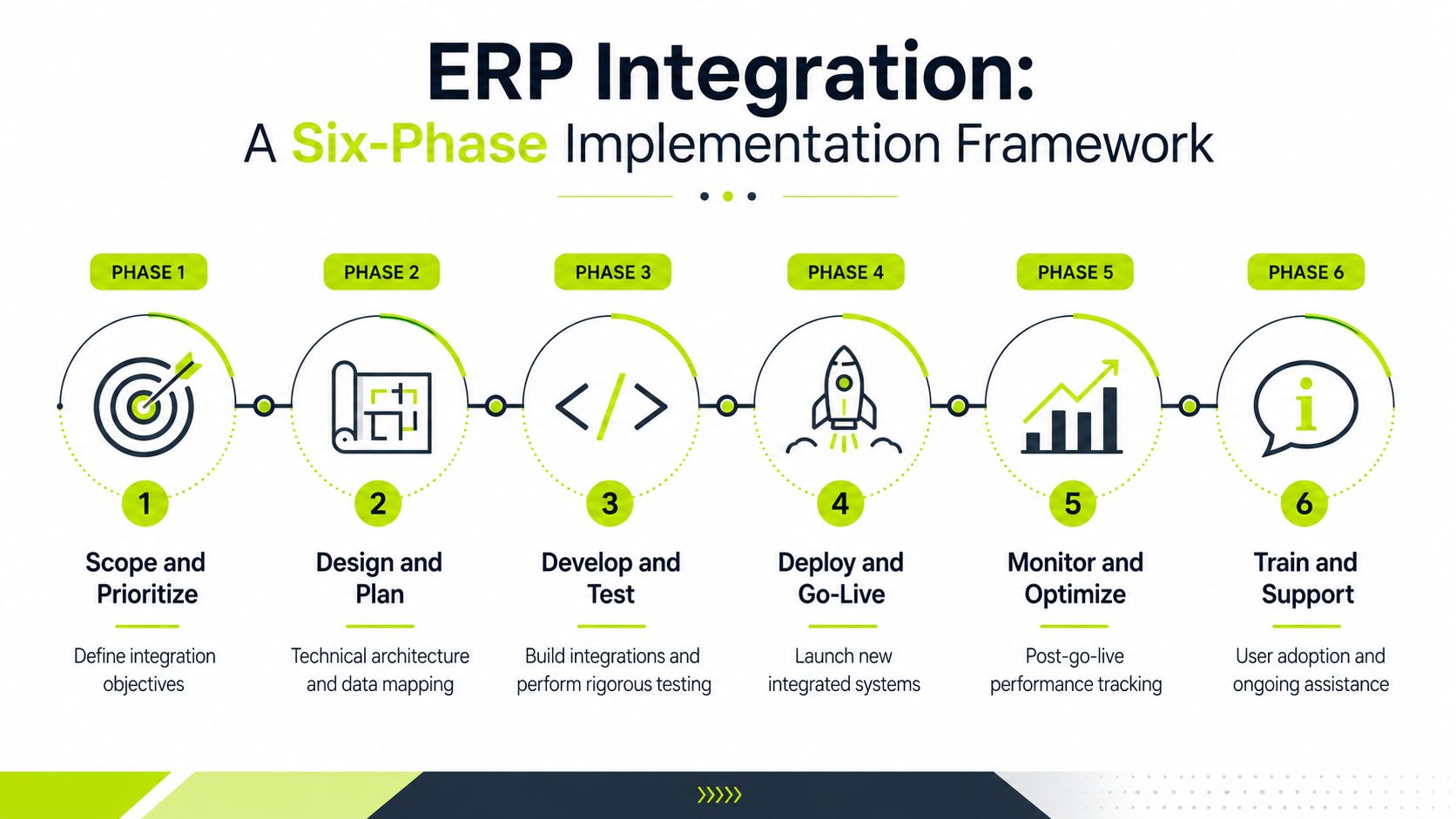
ERP integration works best when finance treats it like an operational control project, not a one-time IT deployment. The cleanest implementations I've seen start with a narrow scope, then move through mapping, testing, and production monitoring with a clear owner for each phase.
One widely cited framework recommends six phases, scope and prioritize integrations, audit source data, map fields and transformation logic, build the connections, test with real data, then cut over, reconcile, and monitor in production. CompareSoft's six-phase ERP integration framework is a good fit for teams that want structure without overcomplicating the plan.
A realistic project rhythm
A focused AR integration usually moves faster than a full ERP transformation because the scope is narrower. The work still needs discipline, though, especially when finance data must match across systems from day one.
Phase | Duration | Key Activities | Owner | Deliverables |
|---|---|---|---|---|
Scope and Prioritize | 1 to 2 weeks | Define business pain points, pick the first workflow | CFO or Controller | Approved scope |
Audit Source Data | 1 to 2 weeks | Review fields, identifiers, and exceptions | Finance Ops and IT | Data inventory |
Map Fields and Logic | 1 to 2 weeks | Define transformations, rules, and ownership | Finance, IT, vendor | Mapping sheet |
Build Connections | 2 to 4 weeks | Configure APIs, middleware, or connectors | IT or implementation partner | Working integration |
Test with Real Data | 2 weeks | Validate invoices, payments, exceptions | Finance and AR team | Test results |
Cut Over and Monitor | Ongoing | Reconcile, fix edge cases, track errors | Finance Ops | Production controls |
The point of the timeline isn't to force every project into the same box. It's to prevent the common mistake of building first and clarifying business rules later. That always costs more.
Test the ugly cases
Clean test data rarely exposes problems. Issues surface when a partial payment lands, an invoice gets disputed, or a customer record has a legacy identifier no one remembered to map correctly.
That's why testing with real business data matters so much. It forces the team to see how the integration behaves when the data isn't neat. The best-run projects also keep monitoring after go-live, because the handoff doesn't end at launch. It continues in production with reconciliation, exception handling, and review.
For finance leaders, the control question is simple. Who checks the integration every week, and what happens when it drifts?
Measuring Success Beyond Go-Live
A successful integration doesn't just move data, it improves how finance operates. If invoice records are flowing but collections still spends half a day reconciling exceptions, the project hasn't earned its keep.
The right metrics are practical. Track Days Sales Outstanding, payment cycle times, reconciliation rates, and manual collections effort before you touch the system, then compare the same measures after launch. That baseline matters more than a polished go-live dashboard.
Measure what finance actually feels
Professional services teams should watch for fewer manual handoffs in cash application, faster visibility into overdue balances, and less time spent chasing status updates. If those numbers don't improve, the integration is probably just shifting work around.
The broader pattern is clear in industry guidance, because integration problems are not one-time events. They require ongoing monitoring and reconciliation in production, not a single sign-off at launch. DCKAP's ERP integration guidance makes that point explicitly, and it matches what finance teams see in practice when data drifts after initial setup.
A few practical dashboard elements help more than a long report:
- Aging exceptions list showing invoices that failed to match automatically.
- Collections queue with payment status and next action.
- Integration health view for failed syncs, delayed updates, and field mismatches.
- Reconciliation summary that shows what changed after go-live.
The numbers above only matter if someone owns them. A dashboard without an owner is just décor.
Watch for drift, not just failure
Most integration issues don't arrive as a dramatic outage. They appear as small inconsistencies, a customer name changed in one place, a payment reference missing in another, a status update that arrives late and throws off the collections call list.
That's why post-launch governance matters as much as build quality. The finance team should know which errors trigger immediate review, which ones can wait, and which ones indicate a broken mapping rule. Over time, that discipline protects reporting accuracy and keeps the AR process from gradually slipping back into manual work.
Common Pitfalls and How to Avoid Them
The biggest mistake is assuming integration success equals go-live success. It doesn't. A system can be live, connected, and still produce poor financial outputs if ownership, testing, and reconciliation are weak.
The failures repeat for a reason
Unclear ownership of master data causes duplicate records and conflicting updates. Insufficient testing lets broken invoice mappings slip into production. Underestimating maintenance leaves finance dependent on a connector no one actively monitors.
Security and compliance deserve early attention too, especially in professional services where client data is sensitive. If access controls and audit trails are added late, the integration can create more risk than it removes. That's not a hypothetical problem, it's the normal consequence of treating controls as an afterthought.
Avoid this trap: If no one can explain who approves field changes after go-live, the integration is already drifting toward failure.
Fix the operating model, not just the script
A predecessor's “working” integration often hides a pile of exceptions. Finance can inherit something that technically syncs data but still requires manual edits every week. In that case, the goal isn't to preserve the old setup, it's to restore control.
The cleanest response is to document the authoritative source for each critical field, assign a business owner, and schedule reconciliation reviews. That gives controllers a way to catch data issues before they distort receivables visibility, cash application, or reporting accuracy.
If the integration is already live and messy, start with the records that affect cash first. Clean up invoice identifiers, payment status logic, and exception handling before expanding to lower-priority connections. That sequence is usually the fastest path back to reliable reporting.
Integrating AR Automation Platforms with Your ERP
For professional services firms, the most valuable connection is often the one between the ERP and an AR automation platform. That link brings customer records, invoice data, payment status, and collections activity into one working loop so the finance team isn't stitching information together by hand.
Where the workflow tightens up
In practice, the integration supports synced open invoices, automated follow-up, and cleaner cash application. It can also support omnichannel outreach, dynamic billing, and human-in-the-loop review when an account needs a careful touch rather than a generic reminder.
If you want a useful operational reference, practical AR management strategies help frame the collections side of the process, especially when you're aligning reminders with dispute handling. On the automation side, the internal overview of what AR automation is explains the mechanics behind cleaner invoice-to-cash workflows.
The point for finance is straightforward. When the ERP and AR platform share data well, the collections team sees the same invoice state as the controller, and cash application can reconcile payments without end-of-month scramble. That reduces manual work and keeps the follow-up cadence consistent.
Resolut is one option in this category. It automates accounts receivable for professional services by syncing invoice and customer data, supporting outreach across channels, and reconciling payments back into the workflow with less manual intervention.
If you're evaluating ERP system integration for a services firm, start with the workflow that's holding cash hostage, not the one that looks best on an implementation slide. Resolut helps finance teams automate AR with consistent, accurate, human-led workflows, and it's worth a look if you want to reduce DSO without adding more spreadsheet work to the month-end close.