Customer Communications Management Solution for AR Teams
Learn what a customer communications management solution does, which features matter for AR teams, and how to check fit before you buy.
Your aging report says the invoice is unpaid. The client says they paid yesterday. Meanwhile, an automated reminder has gone out, the project partner has promised to pause collections, and someone in finance is drafting another email.
For a professional services firm, that's more than an awkward exchange. You need the cash, but you also need the client to trust your records. A customer communications management solution should give finance control over that conversation, not just make it easier to send more reminders.
What a Customer Communications Management Solution Does
Say an overdue invoice receives three conflicting reminders: a routine email, a firmer text, and a call from someone who doesn't know the client has disputed the expense charges. Each sender followed their own process. Nobody had the complete account history.
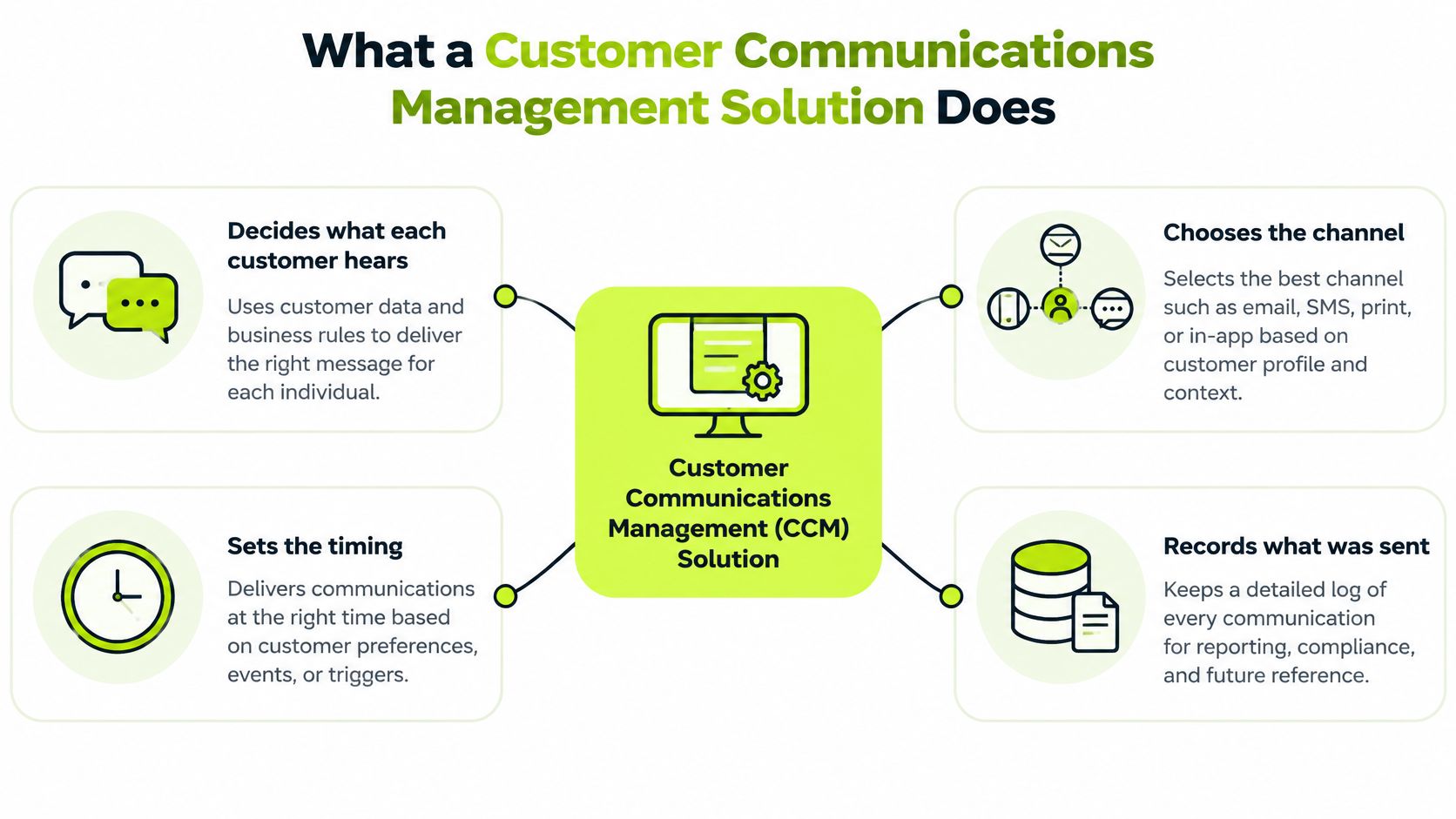
A customer communications management (CCM) solution is the software layer that decides what each customer hears, in which channel, at what time, and then records what happened. For receivables, its value comes from connecting those decisions to the invoice, the relationship, and the latest account status.
Think of it as a dispatch desk that checks an account's history before sending anyone out. A plain email sender delivers the message you give it. A CCM platform should choose the appropriate communication and preserve the context for whoever acts next.
The CCM solution decides, sends, and remembers.
From document production to account conversations
CCM has expanded beyond standardized paper statements and notices to personalized interactions across email, SMS, phone, messaging applications, websites, portals, and mobile apps. The channel matters because customers don't all conduct business in the same place.
In Twilio's global survey of 3,900 consumers, 91% expected brands to engage through their preferred channels, but only 54% of brands consistently met that expectation, as reported in Sinch's discussion of channel preferences. That's consumer research, not a collections benchmark, but it supports a practical principle: don't assume your preferred sending channel is the customer's preferred receiving channel.
For finance, personalization starts with accuracy rather than a friendly greeting. The message should reflect the correct balance, the right billing contact, any agreed extension, and whether someone has already raised a question.
One poorly timed demand can undermine a carefully managed client relationship. A shared history lets the controller, project partner, and collections owner work from the same facts without forwarding email chains.
Test your current setup with an actual invoice: can it show every message sent and how the customer replied? If you need to search separate inboxes, phone notes, and portal exports, you have delivery tools, but not yet a dependable communications control system.
Core Features to Compare Across CCM Platforms
Use this scorecard to separate features your receivables process needs from conveniences that merely make a demonstration look polished.
Core CCM features and what they do for receivables
Feature | What It Does | What AR Teams Gain |
|---|---|---|
Omnichannel messaging | Sends and tracks email, SMS, voice and portal messages from one record | One view of every reminder and reply |
Personalization | Fills tone, invoice detail and payment options for each customer | Reminders that fit the client relationship |
Workflow triggers | Starts messages from due dates, aging buckets or payment events | Consistent cadence without manual follow-up |
Consent and preference management | Records opt-ins and opt-outs by channel | Fewer complaints and support for compliant outreach |
Audit trail and retention | Logs every message, template version and outcome | Evidence for disputes and compliance reviews |
Human approval and escalation | Routes exceptions to staff before anything is sent | Control over sensitive accounts |
The consent row doesn't mean software makes outreach compliant by itself. Your team still needs appropriate policies, lawful channel use, and a process for correcting bad records.
Score the features against an invoice
Consider a hypothetical invoice 31 days overdue. The workflow needs the contractual due date to identify its age, the current balance to populate the reminder, and a usable payment link. When the customer replies, that response must attach to the invoice and reach the person responsible for resolving it.
A feature only counts if it works through that chain. A messaging tool that can insert a customer's name but can't recognize a disputed balance hasn't solved the difficult part.
This integration deserves substantial weight: 44% of businesses report difficulty connecting customer data across channels, sources, and platforms, according to Twilio's State of Customer Engagement discussion of connected data. Give particular attention to the audit-trail row and the payment synchronization behind workflow triggers.
An attractive interface can hide expensive operating work. Someone may still need to import payments, classify replies, resolve duplicate contacts, or manually release held messages. Establish who will perform those tasks before treating automation as a staffing benefit.
Make the vendor demonstrate the exceptions
Use your own invoice scenarios rather than accepting a prepared sequence:
- Show the history. Open an invoice and display outbound messages, incoming replies, delivery failures, and staff decisions together.
- Post a payment mid-sequence. Establish what happens to a reminder that's already queued and how synchronization failures become visible.
- Identify separate licenses. Confirm which channels, connectors, approval controls, and archive functions require additional commercial arrangements.
The strongest comparison isn't the longest feature checklist. It's the clearest account of what your team will still have to reconcile every morning.
Matching Channels and Response Times to Customer Behavior
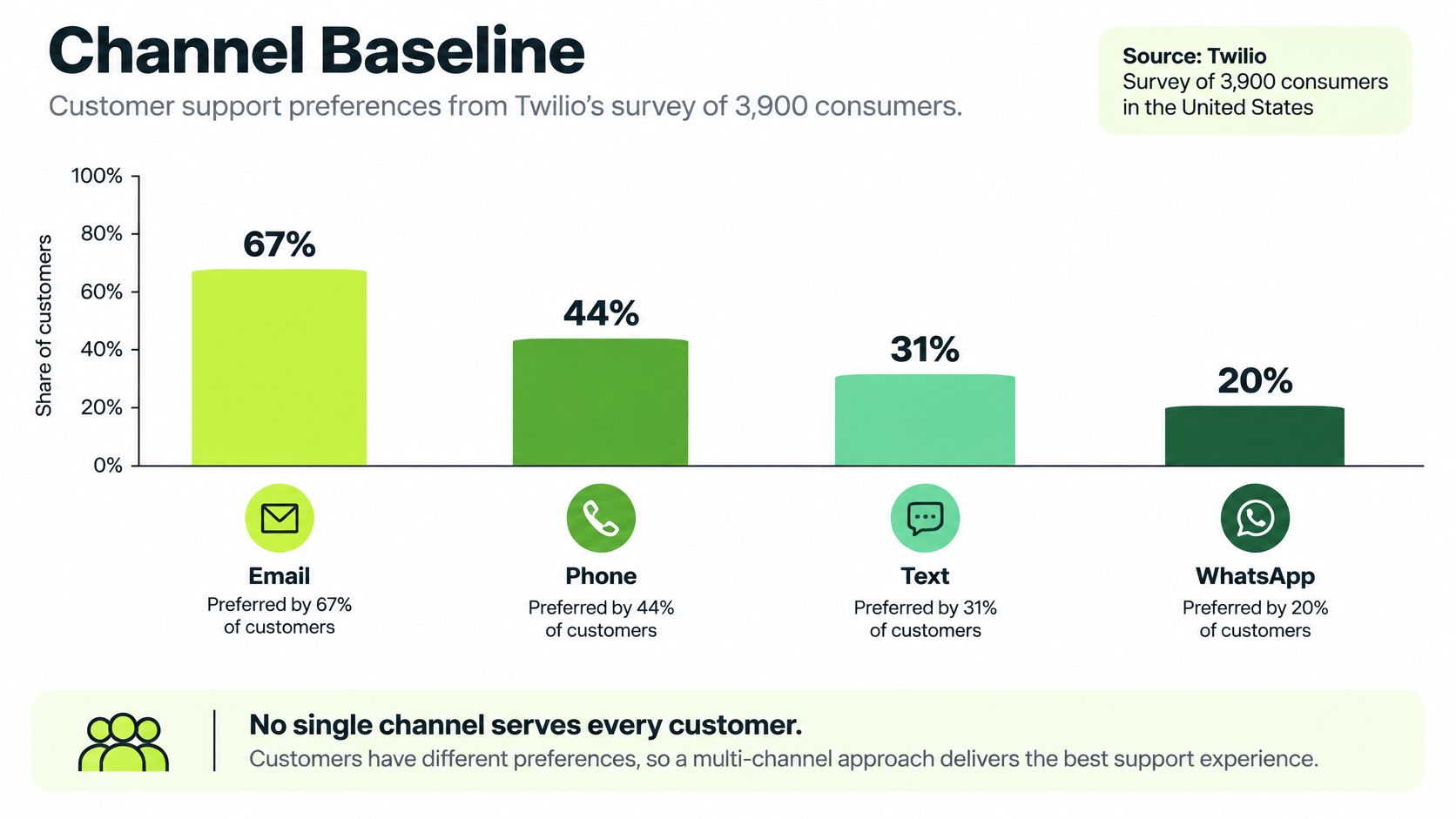
A reminder can be delivered successfully and still miss the person who approves payment. Email is a useful baseline, but customer-support preferences suggest testing other channels. Twilio's global survey of 3,900 consumers found preferences of 67% for email, 44% for phone, 31% for text, and 20% for WhatsApp; the same consumer-preferences report also presents Sinch findings that 85% of consumers check email at least twice daily, while contact preferences were 40% email, 23% phone, and 22% SMS.
These findings describe consumer behavior, not business-client collections policy. Use them to question email-only assumptions, then check how your own billing contacts respond and whether the chosen channel reaches the person authorized to pay.
Set service standards by channel
A billing contact asking a question through live chat expects a quick conversation. Someone emailing supporting documentation may accept a longer investigation if you acknowledge receipt and give a clear next step.
The Gorgias customer-service benchmarks provide approximate first-response benchmarks. Treat them as service references, not contractual AR response commitments.
First-response benchmarks by channel
Channel | Typical First Response | Customer Expectation |
|---|---|---|
About 12 hours or more | About 30 minutes | |
Live chat | Under 2 minutes | About 1 minute |
Don't offer live chat unless someone can staff it. An unattended instant channel can create more frustration than a clear email response standard.
Measure the queue, not just the average
Timestamp receipt, automated acknowledgment, first human response, resolution, and each handoff. Report p50 and p95 latency, the median and slower end of the response distribution, by channel, customer tier, issue type, and business hours.
Keep automated acknowledgments separate from substantive replies. Otherwise, an immediate receipt notice can make an unresolved billing queue look healthy.
A multi-channel outreach approach uses customer behavior to choose where to communicate, while a shared receivables record helps prevent contradictory messages across channels. Channel choice determines where the conversation happens. The collections policy determines when another action is justified.
How an Escalation Sequence Protects Cash and Relationships
For an illustrative $10 million firm, a 16% late-payment rate applied to evenly distributed invoice values means roughly $1.6 million of billings may need follow-up; UK government late-payment research found services-sector customers paid an average of 16% of invoices late, while 52% of surveyed businesses with business customers said customers paid within contractual terms.
The working-capital exposure is separate. APQC's accounts-receivable analysis places top performers at 30 days or less, the median near 38 days, and bottom performers at 46 days or longer; for the same hypothetical revenue base, approximately $27,400 per DSO day makes that 16-day gap roughly $438,000.
These aren't forecasts for your firm. They explain why a controller should manage follow-up as an operating process rather than an occasional cleanup exercise.
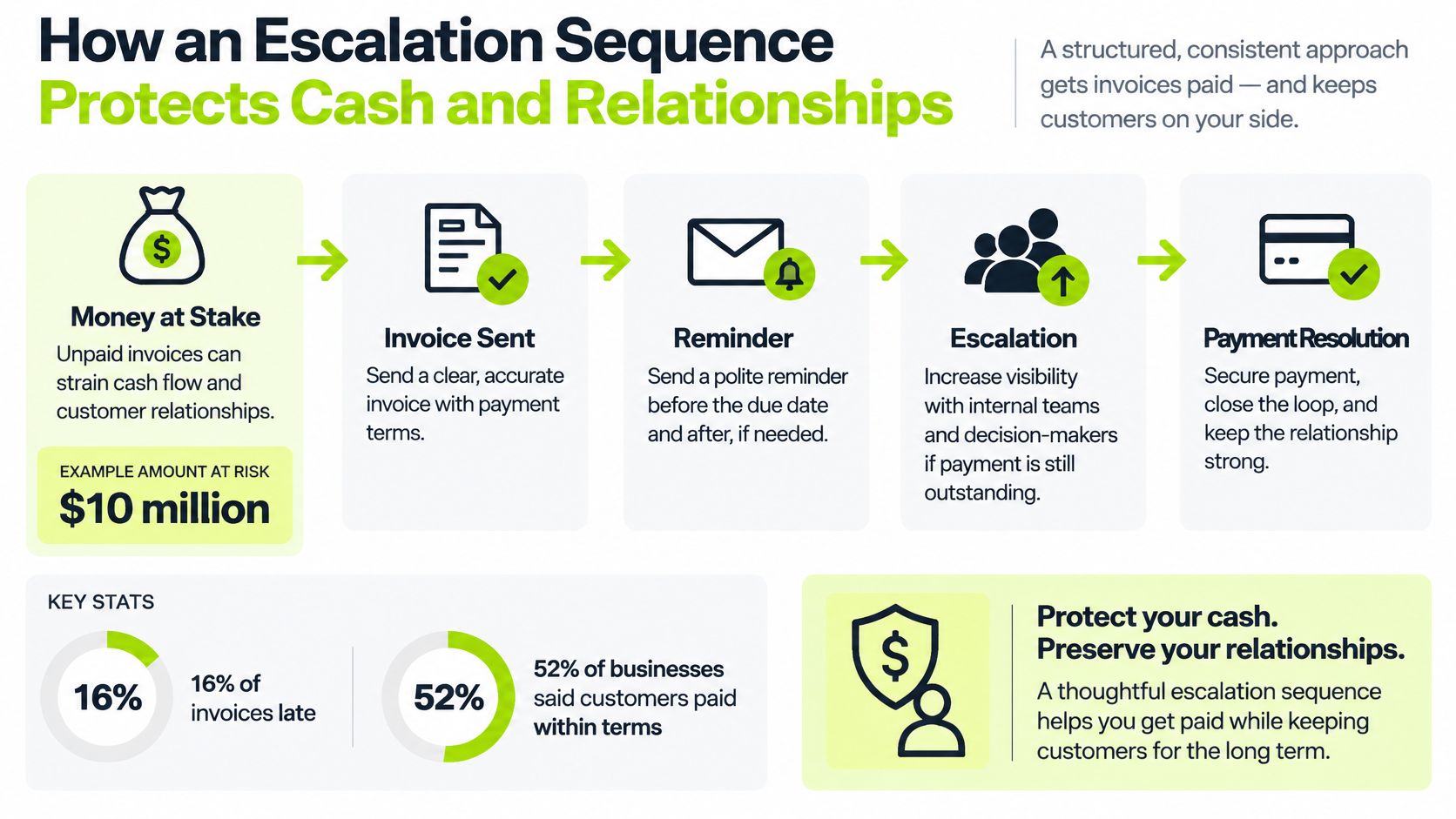
Use a cadence with deliberate changes in action
The following timings are recommended starting points, not industry benchmarks. Tune them against contractual terms, customer behavior, and your aging report.
- Three days before due, send an email reminder. Include the invoice and payment link. Before the deadline, you can resolve missing documentation without turning the exchange into a collection demand.
- On the due date, confirm the balance and payment options. Keep the wording factual. Don't imply delinquency before the customer has missed the agreed deadline.
- Three days after due, follow up in new wording. Cite the invoice number and ask whether anything is preventing approval. Repeating the original message adds little diagnostic value.
- Seven days overdue, use an SMS nudge where consent exists. Keep sensitive billing detail out of the text and direct the customer to the appropriate payment or support route.
- Fourteen days overdue, assign a call to the relationship owner. A project partner may uncover an approval problem that another automated reminder won't resolve.
- Thirty days overdue, review a payment plan or account hold. Finance should approve the decision against policy and contract terms rather than letting the messaging engine decide.
Escalate the decision, not just the tone
For help translating overdue stages into practical follow-up actions, the invoice chasing advice from Truespeak is a useful companion when drafting your team's playbook.
Collection rule: A stronger message isn't a substitute for a different action.
Accounts receivable automation should assign the next useful task. Once an account needs a credit decision, service hold, or negotiated arrangement, another increasingly stern email is usually the wrong substitute.
When Automated Messages Should Hand Off to a Person
More automation doesn't automatically mean faster cash. A system can send reminders efficiently while making it harder for a customer to resolve the reason they haven't paid.
The Verint State of Customer Experience report reports that 85% of surveyed consumers are open to automation when it resolves their issue, while nearly half still value access to a human agent. Acceptance of automation isn't permission to remove judgment from a sensitive account.
Communication cases and who handles them
Case | Automate | Human Review |
|---|---|---|
Reminder before due date | Yes | No, unless the account is flagged |
First overdue notice | Yes, using approved templates | Only if the client has an open dispute |
Dispute or billing question | No, pause the sequence | Yes, owner responds promptly |
Payment plan request | No | Yes, approved against policy limits |
High-value or long-standing client | Partly, drafts only | Yes, relationship owner signs off |
Hardship or vulnerable customer | No | Yes, with a documented hold |
Define authority before enabling AI
For AI AR automation, establish confidence thresholds for classification and drafting. If the system can't confidently distinguish a payment confirmation from a dispute, route the message to a person rather than guessing.
Tone controls matter just as much. Approved wording should prohibit invented consequences, unsupported legal claims, and threats that the firm hasn't authorized.
A workable human-in-the-loop automation policy also needs named escalation owners, channel-consent rules, and a fallback when the assigned employee is unavailable. A handoff isn't complete because software created a task.
Measure payment conversion, dispute resolution time, and complaint rate together. An aggressive sequence might accelerate a particular collection while putting several years of future client fees at risk.
Automate the routine reminder. Give a person authority over the dispute.
Review sequences that generate complaints even when they produce payments. The finance objective is collectable cash with a defensible process, not the highest possible volume of automated activity.
Governance, Consent and Audit Trails Finance Teams Need
A client disputes a demand while another payment reminder is queued. The control question is whether you can show what was sent, to whom, through which channel, and what the receivables record showed at the time.
Keep evidence without keeping everything forever
For each communication, retain the message or a verifiable content hash, sender and recipient, channel, timestamps, consent status, template version, delivery outcome, and escalation history. Link each event to the relevant customer, invoice, and workflow decision.
Use an event history that preserves prior entries when corrections are made. Set retention periods according to the records rules that apply in your jurisdiction, contracts, and industry, and confirm them with legal counsel. Establish a controlled process for deletion.
For phone conversations, distinguish a call log from an audio recording. Call recording options explained by VoxNote can help you assess technical choices. Consent and recording requirements need separate review.
Put these controls into the operating checklist
- Channel consent. Record the basis for using each channel and make withdrawals visible to everyone managing the account.
- Sequence suppression. Apply opt-outs across active and future workflows, not just the message that received the request.
- Version history. Preserve the approved template and the actual content sent.
- Queue reconciliation. Check payment and dispute status before releasing a queued demand.
- Retention controls. Define deletion permissions, legal holds, and recovery procedures.
- Restricted access. Set least-privilege permissions and use encryption and audit logs for administrative actions.
A payment received while a message is queued is a routine control test. If the system cannot reconcile the change, it should hold the message and show the exception.
Establish ownership and contractual boundaries
Clarify who owns the records, how the provider may use them, and who can export or delete them. Resolut acknowledges that the customer owns its Customer Data.
Users can withdraw consent to receive SMS messages from Resolut by replying STOP to any message. Check that consent changes are reflected in the receivables workflows your team operates.
A provider's policy statement does not prove that your configuration works. Before launch, test permissions, suppression, exports, and holds against representative account scenarios.
How CCM Connects to AR Automation and Orchestration
CCM manages customer communications. Accounts receivable automation determines which invoices need action using aging, promised payment dates, and risk signals. Orchestration connects those decisions to the ledger, payment activity, and the people responsible for exceptions.
That distinction matters when evaluating AR software for professional services. Messaging quality won't compensate for an incorrect receivables balance, and an accurate aging report won't collect an invoice unless someone acts on it.
Compare the operating models
Architecture | How It Works | Main Trade-off |
|---|---|---|
CCM beside the ledger | Connectors exchange invoice, contact, and payment information | Flexibility, with reconciliation and connector ownership to manage |
Combined AR and communication platform | Collections, outreach, and cash application share an operating record | Fewer handoffs, but broader implementation scope and dependency on the platform |
With QuickBooks AR automation, a separate CCM tool can work well if your team has clear ownership of connector errors and refresh delays. Don't reject that architecture merely because it uses multiple systems.
A combined platform reduces intermediate handoffs, but it doesn't excuse poor source records. Customer identity, invoice allocation, and payment exceptions still need accountable owners.
Follow a payment through the workflow
Consider a hypothetical invoice 31 days overdue. Aging rules flag it, an approved reminder goes out with a payment link, and the customer pays overnight.
In the combined model, cash application updates the invoice and cancels the queued SMS in the same operating workflow. Demonstrate that behavior with a live invoice rather than relying on an integration logo.
Resolut combines collections workflows, omnichannel outreach, and automatic cash application. Use a live walkthrough to establish how those functions handle your actual payment and exception scenarios.
A useful explanation of AR automation should lead to measurable operating tests. Compare similar customer groups on DSO trend, promise-to-pay conversion, and messages sent after payment to establish whether orchestration helps reduce DSO and improve cash flow.
Confirm These Checks Before Choosing a CCM Solution
In 2025, 59% of surveyed businesses said their customer-communication channels were fully integrated with their technology stack, according to Sinch's State of Customer Communications report. Don't assume a familiar accounting integration means the entire communication process is connected.
Prepare the operating process before expanding the sending capability. Otherwise, automation will distribute existing errors more efficiently.
Complete the readiness checks in order
- Map the dependent data sources. Include the ledger, customer records, billing contacts, payment portal, and any project system that records billing disputes. Assign an owner to each source and each failed transfer.
- Clean contacts before launch. Merge duplicate client records and confirm the accounts-payable contact on open invoices. Keep the commercial relationship owner distinct from the person responsible for processing payment.
- Configure consent and opt-outs. Test suppression across every applicable sequence. Include a customer who changes preference while a reminder is waiting to send.
- Approve templates with finance and legal. Give each approved version an identifier and restrict changes to payment instructions. Before sending from your domain, use mailX to verify your DMARC policy, while keeping authentication checks separate from content approval.
- Pilot a single aging bucket for a recommended 30-day evaluation period. Track response rate and DSO against a comparable control group, and account for differences in invoice terms and customer mix. Don't expand just because the system successfully delivered the messages.
- Name an exception owner. Establish a response standard, backup coverage, and authority to pause outreach. A shared inbox without an accountable decision-maker isn't an escalation process.
Judge the pilot on cash and control
If response rate rises but DSO doesn't move, treat the sequence as noisy until you understand why. Customers may be replying to correct errors rather than arranging payment, or the pilot may be too short to establish a collection effect.
Also examine staff effort and inappropriate messages. A tool that improves delivery while increasing reconciliation work may not be the right fit for a lean finance team.
Choose a customer communications management solution on demonstrated account accuracy, manageable exceptions, and cash outcomes. Feature count comes after that.
Resolut automates AR for professional services, consistent, accurate, and human. Visit Resolut to explore how connected collections, communications, and cash application could fit your firm, and bring an overdue-invoice scenario to test the workflow from reminder to reconciled payment.