Customer Payment Portal: The Finance Leader's Guide
How a modern customer payment portal reduces DSO, automates reconciliation, and protects client relationships in professional services firms.
A mid-sized consulting firm can deliver excellent work, issue a polished invoice, and still wait weeks for payment. The client's AP team may need a W-9, prefer a different payment method, or lose the PDF in an inbox. Meanwhile, the controller is matching partial wires, answering balance questions, and writing another careful follow-up.
That friction sits between billing and cash application. A customer payment portal closes the gap by putting invoice context, payment options, status, receipts, and client questions in one branded workflow. It isn't a checkout widget. Properly implemented, it becomes an accounts receivable automation layer that helps finance teams reduce DSO, improve cash flow, and preserve the client experience.
Why Your Firm Needs a Customer Payment Portal
Professional services billing creates friction that standard ecommerce checkout tools weren't built to handle. A law firm may bill against a retainer. An engineering practice may issue milestone invoices. A consulting firm may need several client stakeholders to review one invoice before AP can release payment. Sending a PDF and a generic payment link leaves too much of that context outside the transaction.
A portal gives the payer a clear record of what they owe, why they owe it, and how to resolve the next step. The client can review invoice details, see payment history, select an approved method, and retrieve receipts without asking your AR team to recreate information already held in the accounting system.
That self-service model reflects a broader shift in digital payments. One independent 2026 industry analysis reports that biller-direct channels accounted for 80% of online payments, up from 62% in 2010, while payment portals expanded to include invoices, payment history, and transaction details in one place. The analysis connects that movement to branded channels where the biller controls payment instructions, customer experience, and reconciliation workflow. View the documented payment-history portal feature.
The finance value sits after the click
The payment itself is only one event. The operating benefit appears when the portal captures the invoice number, payer identity, remittance information, payment status, and receipt in a structure your accounting team can use.
That reduces the handoffs that create unapplied cash. It also gives your collections team a more credible conversation with clients. Instead of asking, “Can you confirm what this payment was for?” the team can address a specific disputed line, missing approval, or agreed payment date.
Practical rule: If the portal makes payment easier but leaves your team to reconcile the transaction manually, you've purchased convenience, not AR automation.
The strongest design also protects the relationship. Clients get a professional, branded experience that matches the quality of the engagement. Finance gets a controlled path from invoice delivery to settlement. IT gets a defined integration boundary rather than another disconnected application.
ROI of a Modern Payment Portal
A portal's return should be measured against your own AR economics. In a professional services firm, the material value pools are working capital, labor capacity, and collectability. The portal functions as an AR orchestration layer, connecting invoice approval, client action, settlement, and follow-up without leaving finance to rebuild the trail afterward.
Start with DSO. An improvement releases cash held in receivables, but the model needs your annual credit revenue, average daily revenue, current DSO, and a conservative improvement assumption. Establish the baseline before claiming an outcome. Compare invoices using the portal with invoices still moving through legacy processes, while accounting for differences in client mix and billing type.
Labor is the second pool. Controllers should map time spent on cash application, remittance research, reminder emails, balance inquiries, receipt requests, and payment-method changes. A portal can reduce these tasks without removing exceptions. Count the hours redirected to analysis, client escalations, and close support, then test whether those hours improve team capacity.
The third pool is write-off avoidance. Older professional services receivables become harder to collect when the engagement team changes, the client disputes scope, or the original approver is no longer involved. Automated reminders, invoice-level history, and accessible payment methods shorten the gap between an issue appearing and someone resolving it. Measure the result through aging migration and recovered balances. Treat avoided loss as an observed outcome, not guaranteed savings.
Use the methodology in how to calculate AR automation ROI to separate cash impact, labor savings, and avoided loss.
ROI Pillar | Current State Cost | Portal-Enabled Savings | Key Driver |
|---|---|---|---|
DSO and working capital | Cash remains tied up while clients request information or payment alternatives | Faster movement from invoice approval to settlement | Invoice context, reminders, and convenient payment methods |
AR labor | Staff manually apply cash, research remittance, and answer balance questions | Fewer repetitive interactions and cleaner exception queues | Structured payment data and self-service history |
Write-off avoidance | Aging balances receive delayed attention and become harder to resolve | Earlier visibility into nonpayment, disputes, and approval gaps | Timely prompts and defined escalation paths |
Model the value by billing type
Milestone invoices need approval visibility. Retainers need drawdown history and an accurate remaining balance. Recurring advisory work needs dependable payment credentials and clear renewal communication. A blended ROI estimate can conceal where the portal produces value and where it adds little.
Build the model by client segment and invoice type. Include transaction fees, implementation effort, support time, and the cost of maintaining legacy methods. Review actual results through the monthly close, including reconciliation exceptions and client escalations.
A portal earns its place when it improves cash conversion, gives clients clear payment context, and leaves finance with fewer manual corrections. Convenience matters, but the measurable return comes from a controlled path between billing, client action, settlement, and the ledger.
Essential Features Every Finance Team Should Demand
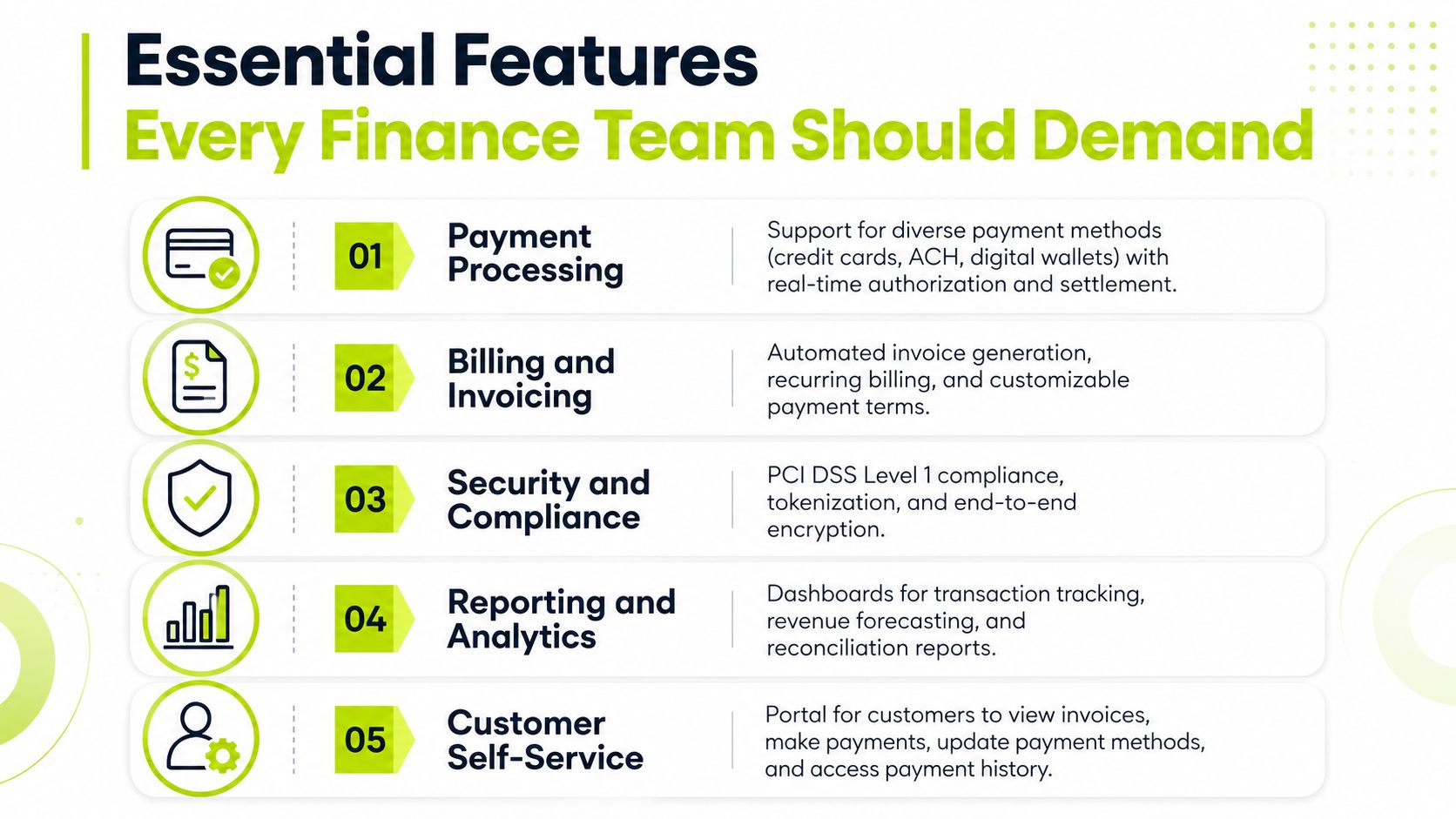
Finance teams should evaluate a portal as an operating control, not as a web page. The checklist below focuses on capabilities that determine whether the system helps AR or just adds another place for payments to occur.
Payment processing
Support for ACH, credit cards, wire transfers, and digital wallets gives clients a realistic path to payment. The portal should display methods based on client policy, currency, invoice type, and transaction economics where applicable. It should also provide authorization, settlement, failure, refund, and receipt status to the finance team.
For repeat clients, tokenized payment storage matters. PCI Security Standards Council guidance explains that a token replaces the payment card number and is useless if exposed outside the issuing merchant context. That lets a merchant support recurring billing or refunds with a token rather than directly handling the primary account number. Review PCI guidance on securing ecommerce payments.
Billing and invoicing
A services portal needs more than a “pay now” button. Test whether it supports:
- Partial payments: Record an approved amount without forcing AR to manipulate the invoice outside the workflow.
- Payment plans: Capture agreed installments, dates, and outstanding balances.
- Retainer drawdowns: Show how payments and applied amounts affect the client's remaining retainer.
- Status synchronization: Push paid, partially paid, disputed, failed, and refunded states back to QuickBooks, NetSuite, Sage, or another ERP.
If invoice status doesn't sync reliably, staff will update two systems and clients will see contradictory information.
Reconciliation and exceptions
Look for remittance capture, configurable matching rules, and an exception queue. Real-time cash application is useful only when the team can see why a transaction matched, what confidence the rule has, and who owns an unmatched item.
Your AR manager should be able to distinguish a genuine exception from a missing remittance detail. That distinction determines whether the next action is an automated request, an internal research task, or a client escalation.
Client experience and control
The client view should be mobile-responsive, branded, and usable without mandatory account creation when a secure invoice link is sufficient. It should show invoice-level detail, payment history, receipts, contact options, and the ability to update payment methods.
Security must cover more than a badge on a sales page. Ask for PCI DSS scope documentation, SOC 2 controls, role-based access, audit trails, encryption practices, and evidence of how administrators are governed. Finance leaders assessing broader control environments may also find this SOC2Auditors Vanta assessment useful when structuring vendor due diligence.
Hosted payment pages and embedded hosted fields can reduce the merchant's PCI burden. By contrast, server-side collection and tokenization can leave the merchant in a full card-data environment scope, requiring heavier controls, scans, and testing. Compare PCI DSS architecture choices for application developers.
For payment-gateway selection criteria, use this guide to payment gateways for business.
Integration and Implementation Checklist for Finance Teams
A customer payment portal should be led by finance, with IT supporting access, data flow, security, and testing. The rollout works best when the team treats invoice data, payment rules, and exception ownership as one operating design.
Phase one, prepare the records
The controller owns the policy decisions. The AR manager cleans customer master records, verifies billing contacts, removes duplicate accounts, confirms legal entities, and identifies clients that require purchase orders or special remittance instructions. The IT liaison documents the fields that must move between the portal and the accounting system.
Map customer IDs, invoice IDs, payment terms, tax codes, departments, projects, retainers, credit memos, and chart-of-accounts destinations before configuration begins. Poor source data will produce cleanly automated errors.
Phase two, configure the workflow
Select the payment gateway after reviewing client preferences, fees, settlement timing, refund controls, and ERP compatibility. Align portal invoice templates with the approved invoice format, then configure payment plans, partial-payment rules, dispute categories, receipts, and reminder triggers.
Define reconciliation rules with real examples from your ledger. Include full payments, short pays, combined payments, unapplied wires, credit memos, and duplicate submissions. The AR manager should own exception categories, while the controller approves write-off and escalation policies.
Phase three, test and validate
Use a controlled test environment where possible. Run successful payments, declined payments, refunds, partial payments, and payments with missing remittance. Compare the portal result with the ERP result, then audit the cash application record and customer-facing status.
A practical rollout commonly takes 60 to 90 days, depending on data quality, integration complexity, client requirements, and the discipline of user acceptance testing. Set expectations with the finance team using the AR automation implementation timeline, then assign a named owner for every open issue.
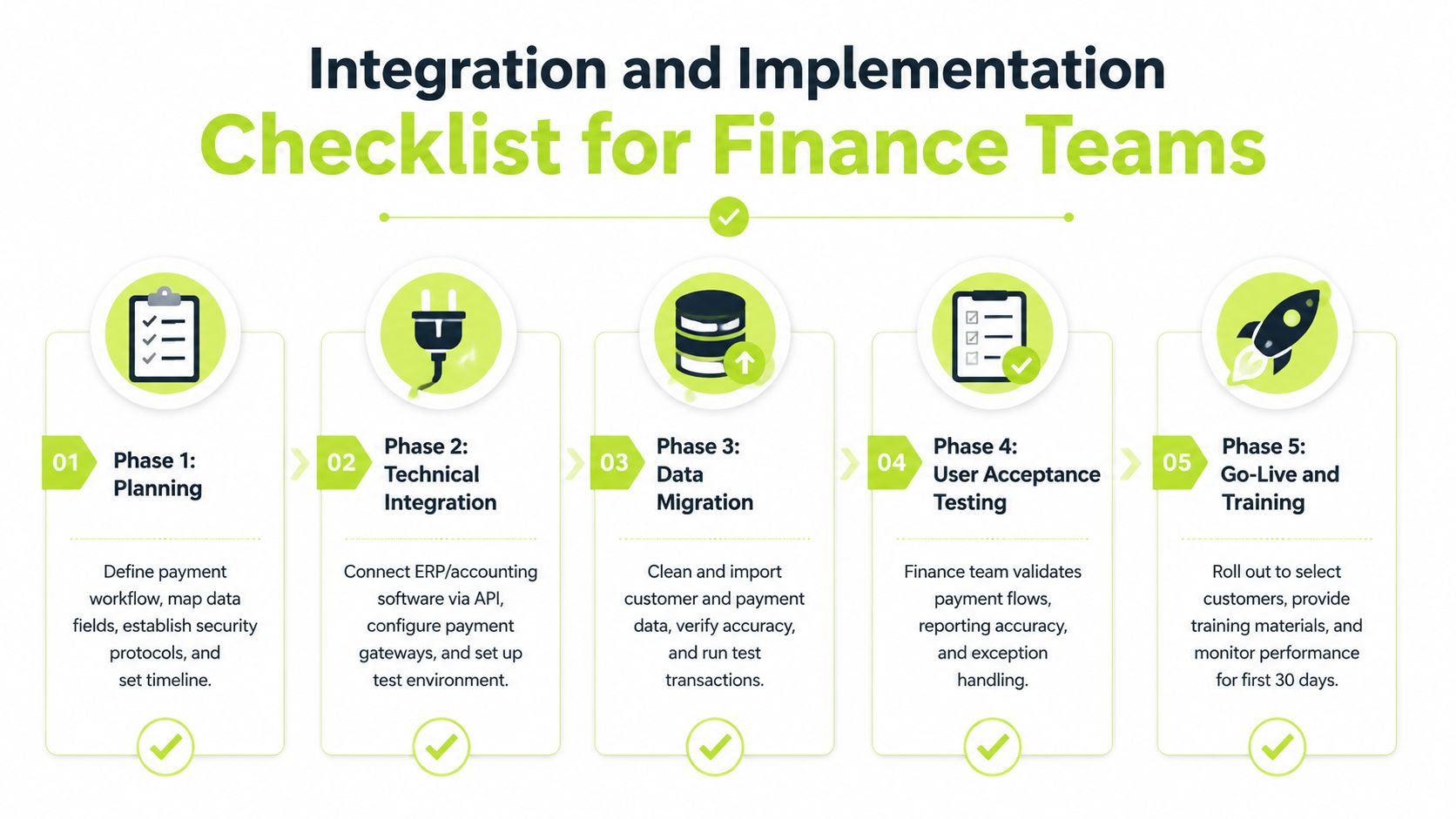
Phase four, onboard clients carefully
Don't switch every client without notice. Explain what changes, what remains available, how to access invoice history, and where billing questions go. Offer self-service enrollment for regular payers, but keep a parallel path for clients whose procurement rules require a legacy method.
The controller should review the first close after launch. The AR manager should inspect adoption, unmatched cash, failed payments, and dispute volume. The IT liaison should monitor integration errors and access controls. A short parallel-run period gives clients confidence and gives your team evidence before the portal becomes the default.
KPIs That Prove Your Portal Is Working
A portal without measurement is a convenience feature. Finance leaders should put its results into the existing monthly close package, using the ERP as the financial source of truth and portal analytics as the behavioral layer.
Track five measures. DSO shows whether cash conversion is improving. Portal payment share shows adoption. Cash application accuracy tests whether automation is creating clean accounting records. Cost per collection interaction exposes labor efficiency. Customer payment satisfaction tests whether the process protects the relationship rather than pressuring the payer.
Don't invent a universal target. Establish your baseline from the prior billing cycle, then set targets based on your invoice mix, client tier, and payment policy. Enterprise accounts may need procurement workflows and purchase-order validation, while smaller clients may respond more readily to self-service links and cards.
KPI | Typical Baseline | 90-Day Target | 180-Day Target | Data Source |
|---|---|---|---|---|
DSO | Current monthly-close result | Improvement against the documented baseline | Sustained improvement across comparable invoice cohorts | ERP receivables report |
Invoices paid through the portal | Share currently using digital self-service | Higher adoption among onboarded clients | Broader adoption across priority client tiers | Portal analytics and ERP payment records |
Cash application accuracy | Current rate of correct invoice matching | Fewer manual exceptions | Stable matching with documented exception reasons | ERP cash application and portal remittance data |
Cost per collection interaction | Staff time and communication cost per action | Lower effort for routine follow-up | Lower routine workload with clear escalation capacity | Time tracking, AR activity logs, and messaging records |
Customer payment satisfaction | Existing survey or service feedback | Feedback collected consistently | Improvement tracked by client segment | Portal survey and client-service records |
Present the result in one executive view
A useful monthly summary has four lines: current DSO versus baseline, portal adoption by client tier, unapplied cash and exception volume, and client feedback with the top recurring issue. Add a short management note explaining what changed and who owns the corrective action.
The board doesn't need another dashboard. It needs a controlled explanation of whether the portal improves cash flow, reduces manual work, and maintains client trust.
Common Pitfalls and How to Avoid Them
Technology doesn't solve an undefined AR process. The failures below usually come from weak ownership, incomplete data, or a rollout that treats clients as an afterthought.
- Launching with dirty customer data. Duplicate legal entities and outdated billing contacts create misapplied payments. The controller should approve a customer-master cleanup, and the early warning is a growing exception queue tied to identity or invoice matching.
- Treating the portal as set-and-forget. Adoption can stall when nobody reviews which clients use it or why others avoid it. Assign the AR manager a recurring adoption review and investigate invoices still paid through manual channels.
- Ignoring partial payments and disputes. A portal that accepts only full payment sends clients back to email when a milestone or line item is contested. Configure partial-payment rules, dispute categories, and an escalation owner before launch.
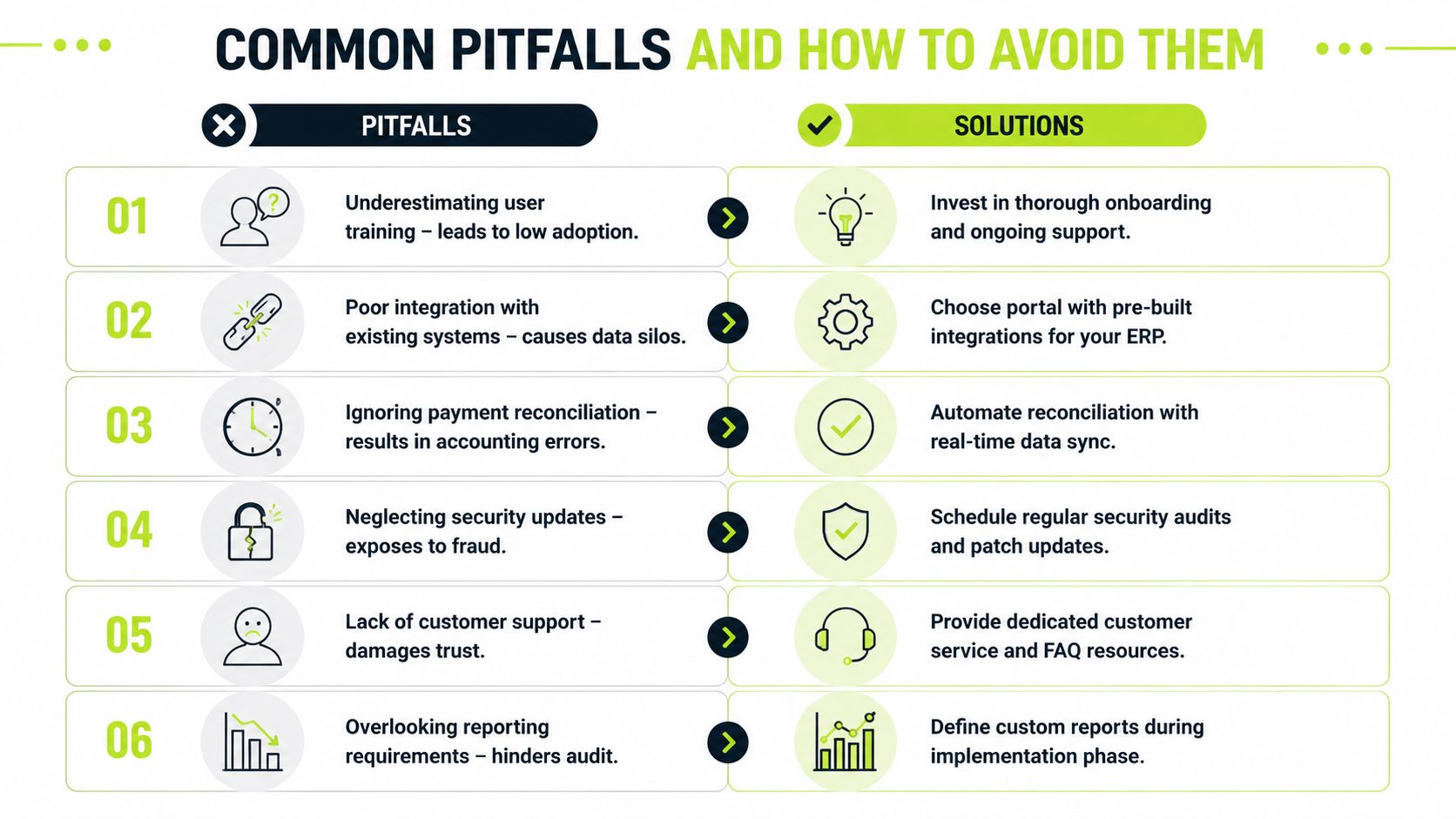
- Neglecting tokenization and PCI scope. Custom card handling may create avoidable compliance work and increase operational exposure. Prefer hosted collection or hosted fields when they fit the workflow, and document the responsibility boundary with the provider.
- Over-customizing the client interface. A heavily modified portal may match an internal preference but make upgrades harder. Keep the brand treatment and invoice language deliberate, while preserving standard payment and accessibility patterns.
- Skipping the parallel run. Removing familiar payment routes overnight can make procurement teams distrust the change. Communicate the rollout, provide support materials, and keep an approved fallback while the team validates settlement and reconciliation.
Control point: Train AR staff on exceptions, not just successful payments. The value of automation appears in how quickly people resolve the cases the system can't close.
Set escalation rules for billing disputes, missing approvals, tax questions, and suspected fraud. Client onboarding should explain response times and ownership, while internal training should show staff how to review the audit trail and communicate without sending clients between departments.
The Future of AR Automation and Client Relationships
The next stage of the customer payment portal is an AI AR automation layer that coordinates decisions before and after the payment event. Predictive reminders can use payment behavior to choose timing and channel. Dynamic discounting can present an approved commercial option without requiring a manual calculation. Automated dispute routing can send a question to the right project, billing, or finance owner before the balance ages further.
Those capabilities should support judgment, not replace it. A finance leader still needs controls around discount authority, client segmentation, data quality, and human review for sensitive accounts. The useful system is the one that makes the next action clearer while preserving the relationship managed by the account team.
Embedded finance will also move more decisions into the portal. Clients may receive approved installment or flexible-term options alongside the invoice, turning AR into a more responsive part of the commercial experience. That can help a firm protect cash flow without forcing every payment conversation into an uncomfortable collection email.
The control environment must mature with the workflow. Invoice verification, tax validation, and identity checks deserve a defined place in the process. Finance teams reviewing fraud controls can use this practical resource on preventing VAT fraud when assessing invoice integrity and verification steps.
For a firm using QuickBooks, NetSuite, Sage, or another ERP, the benchmark is straightforward. The portal should help finance see risk earlier, prompt clients appropriately, capture secure payment data, route exceptions, and apply cash with less manual intervention. Resolut offers a hosted payer portal with invoice visibility and ACH or card payment options as part of its broader AR automation and orchestration platform.
--- Resolut automates AR for professional services with consistent, accurate workflows that combine collections, payment options, and cash application while keeping human oversight where it matters. Review your current customer payment portal against these controls, then visit Resolut to see how the platform can support a more predictable, client-friendly AR operation.