Follow Up Automation: Boost Cash Flow & Reduce DSO
Implement accounts receivable follow up automation to reduce DSO, improve cash flow, and boost efficiency for professional services firms.
Most advice about follow up automation is aimed at sales teams. That's fine if your problem is lead response time.
It's the wrong lens if your problem is cash.
For CFOs, Controllers, and firm owners in professional services, the point of follow up automation isn't more touches. It's control over receivables, fewer manual collection gaps, cleaner escalation, and a shorter path from invoice sent to cash received. If you run a firm in the $3M to $50M range, that matters more than any sales funnel tactic.
A collections process that depends on staff memory, inbox triage, and awkward one-off emails will drift. Some clients get nudged too late. Others get chased after they've paid. The result is avoidable DSO pressure, inconsistent client experience, and finance time wasted on coordination instead of cash forecasting. That's exactly where accounts receivable automation, AI AR automation, and better AR software for professional services earn their place.
The Overlooked Revenue Engine in Your AR Ledger
Collections follow-up is often treated like an administrative afterthought. It isn't. It's a revenue protection system.
That distinction matters because sales follow up automation and AR follow up automation are solving different problems. Sales is trying to create demand and move prospects forward. AR is trying to collect on an obligation that already exists, without damaging a client relationship that may still be valuable next quarter.
Sales logic breaks in collections
A generic sales sequence can tolerate more experimentation. Collections can't.
When an invoice is open, tone, timing, payment status, dispute status, and account history all matter. A reminder sent too early can irritate a good client. A reminder sent too late can normalize delay. A payment-chasing sequence that ignores an open billing issue will make your finance team look disorganized.
Good AR automation doesn't behave like a drip campaign. It behaves like a controlled operating process.
The market talks constantly about automating sales follow-ups. It rarely deals with receivables. Yet the gap is costly. 1 in 10 invoices go unpaid, costing enterprises $200B annually, and the divide between sales lead automation and accounts receivable follow-up automation is still rarely addressed, as noted in Monday.com's discussion of automated sales follow-up and the AR gap.
What finance leaders should automate
If you're running a professional services firm, your receivables process usually has three recurring failure points:
- Inconsistent timing: One collector follows up on day three, another on day ten.
- Poor segmentation: A strategic client and a chronic late payer get the same message.
- Weak escalation control: Nobody knows when to shift from automated reminder to human intervention.
That's why I view follow up automation as a financial control layer, not just a labor saver.
A controlled AR workflow should do four things well:
- Trigger outreach based on invoice status and due date
- Adapt tone by customer segment and risk
- Pause automatically when payment or dispute activity occurs
- Escalate to a person when judgment is required
The operator's mindset
Collections works best when it's predictable. Clients know what to expect. Your team knows when to intervene. Leadership can see whether the process is reducing friction or producing more email volume.
For firms trying to reduce DSO and improve cash flow, that's the shift that matters. You're not automating reminders. You're standardizing cash conversion behavior.
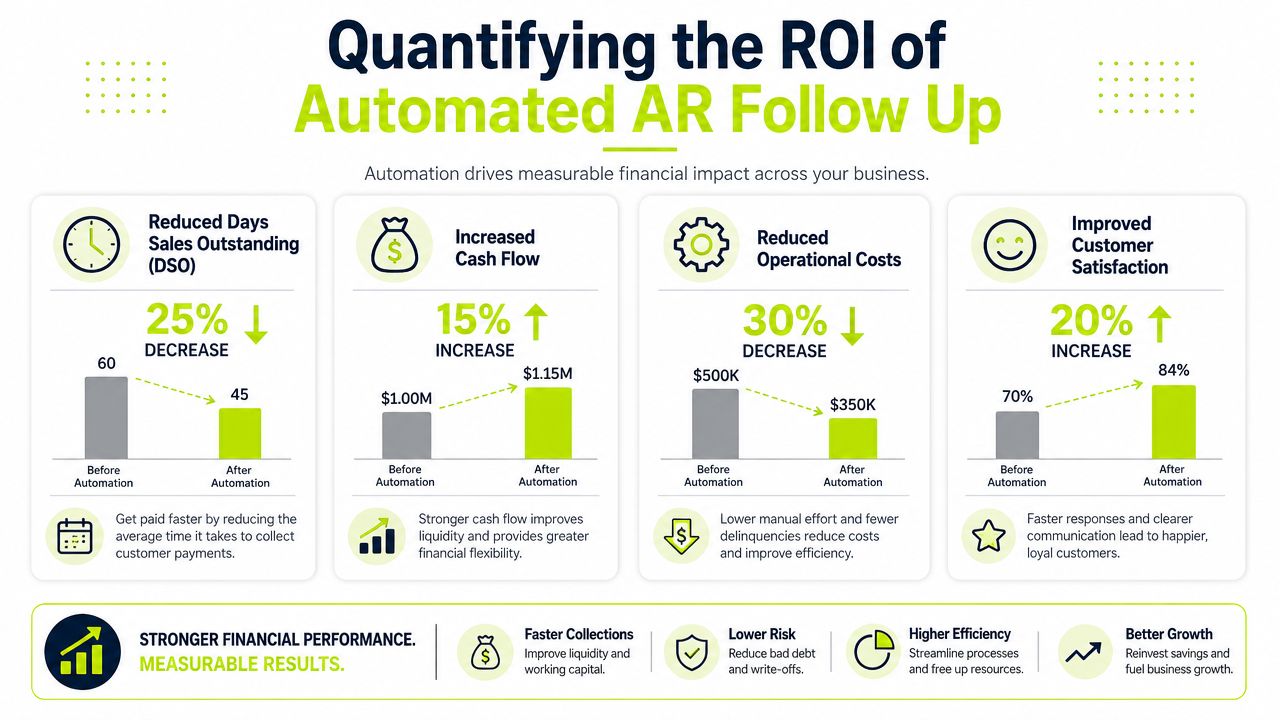
Quantifying the ROI of Automated AR Follow Up
Finance leaders don't need another vague promise about efficiency. They need a clear answer to one question. Does automation change cash performance in a measurable way?
The answer is yes, if the system is built around receivables rather than generic outreach.
What the ROI case actually rests on
The strongest financial case for accounts receivable automation is simple. It improves payment speed, reduces manual follow-up effort, and gives finance teams better visibility into collection performance.
There's credible support for that position. 100% of finance professionals using AR automation software report measurable gains, including faster payments and accelerated cash flows, and highly automated users achieve a 40%+ reduction in Days to Pay (DTP) according to Billtrust's analysis of AR automation ROI.
That's the kind of result a CFO can work with because it ties operational change directly to liquidity.
Where the return shows up
The return on follow up automation in AR doesn't sit in one line item. It shows up across several financial and operating outcomes.
KPI | What changes | Why it matters |
|---|---|---|
Days Sales Outstanding | Invoices move through the collection cycle faster | Cash arrives sooner and borrowing pressure falls |
Days to Pay | Customer payment behavior improves under consistent cadence | Forecasting becomes tighter |
Collector workload | Manual chasing declines | Staff can focus on disputes, risk, and exception handling |
Collection quality | Follow-ups become timely and auditable | Fewer missed touchpoints and fewer inconsistent decisions |
That's also why AI AR automation is getting attention inside finance functions. Used correctly, it doesn't replace accountability. It removes the low-value repetition that keeps teams stuck in inbox work.
Practical rule: If your team spends more time deciding who to email than resolving why an invoice is unpaid, your process is under-automated.
The indirect ROI is often larger than the direct ROI
Most firms underestimate the administrative waste inside collections. Someone exports aging. Someone checks QuickBooks. Someone drafts a reminder. Someone else notices the client already paid. Then a senior finance person gets pulled into a preventable client call.
Automation fixes more than speed. It fixes sequencing.
That matters in professional services because billing is rarely uniform. You may have retainers, milestone invoices, time-and-materials billing, change orders, or partner-approved exceptions. A manual process breaks under that complexity. Good AR software for professional services doesn't.
For CFOs presenting the business case internally, the message should be blunt. If cash collection depends on heroic effort, the process is broken. If a system can standardize timing, improve status visibility, and shorten payment cycles, that system isn't overhead. It's a cash flow instrument.
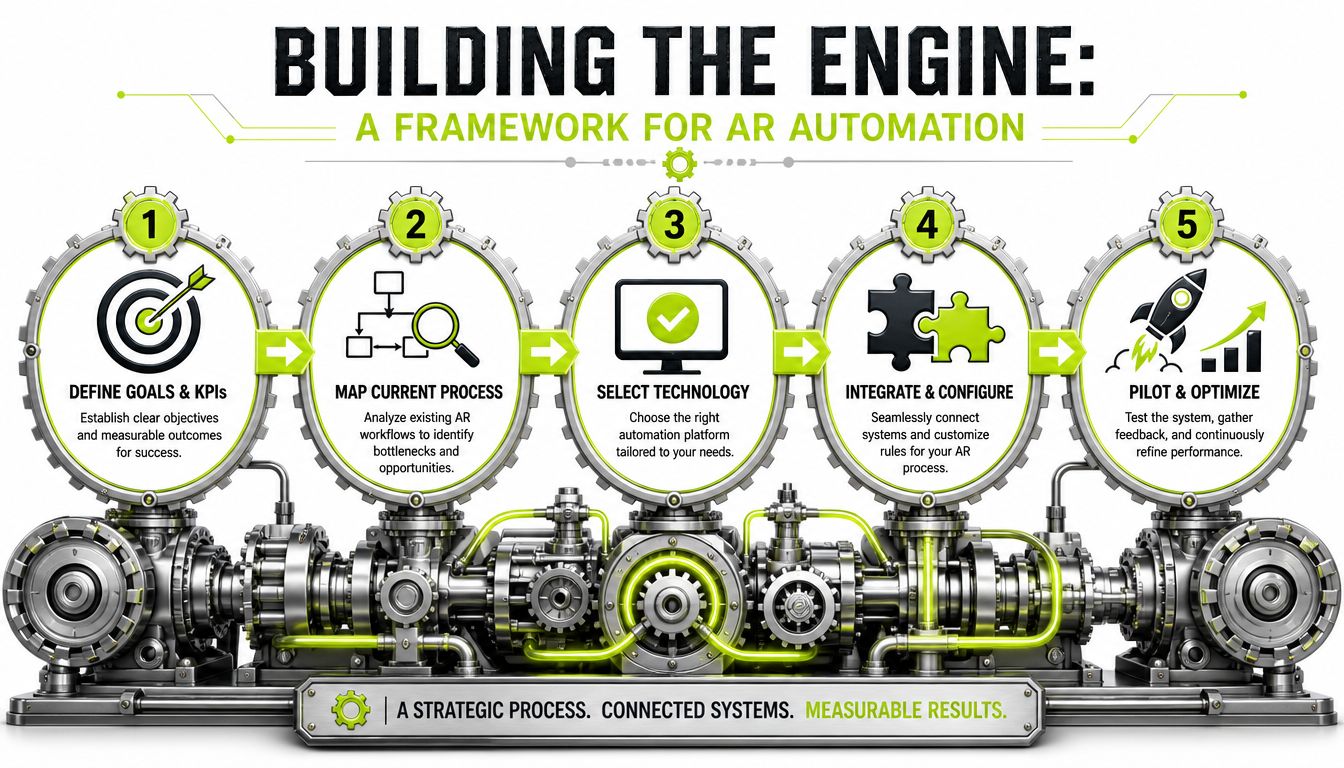
Building the Engine A Framework for AR Automation
Automation fails when firms start with templates instead of process design. Build the operating model first. Then configure the tooling.
Start with a finance workflow, not a software demo
The most useful implementation pattern comes from a disciplined automation framework. A strong sequence starts by consolidating records, qualifying accounts before a workflow begins, defining clear triggers, drafting the full communication sequence in advance, mapping human handoff points, separating follow-up from broader nurturing, and building reporting from day one, as outlined in this step-by-step automation methodology from WorksBuddy.
That framework was framed for lead follow-up, but the operating principle carries over cleanly into AR. The difference is the trigger logic and message purpose.
In receivables, the system should trigger off invoice issuance, due date, payment promise, dispute flag, broken promise, and risk level. Not “opened email three times.”
Five design decisions that matter
Segment clients before you automate
Don't run one sequence for everyone.
A strategic long-term client with occasional payment slippage should receive a different cadence than a customer with repeated lateness or unresolved deductions. Your automation should reflect account value, payment history, current aging position, and dispute behavior.
A simple segmentation model can look like this:
- Core clients: Reliable payers who need light-touch reminders
- At-risk accounts: Repeatedly late or operationally disorganized customers
- Disputed accounts: Payment is blocked by a billing issue, not willingness
- Escalation accounts: Broken promises, silence, or policy breach
Define start, pause, and exit triggers
Many teams lose control here.
Your workflow should start when an invoice posts or approaches due date. It should pause when a payment is received, a dispute is logged, or a payment promise is confirmed. It should exit when cash is applied, the invoice is credited, or the account moves to formal escalation.
That discipline keeps the process from embarrassing your firm.
To sharpen your process design, it helps to review how automation can cut denials and speed cash flow in adjacent revenue cycle environments. The mechanics differ, but the lesson is the same. Tight workflow control beats manual chasing.
Draft the communication ladder before configuring tools
Teams often write collection emails one at a time. That creates inconsistency.
Write the full ladder first. Include pre-due reminders, due-date notices, short post-due follow-ups, firmer escalation language, and exception paths for disputes. Decide in advance which messages are informational, which ask for confirmation, and which request immediate payment action.
Use channel rules too. Email handles routine reminders. SMS can support urgent, light-touch nudges where appropriate. Phone calls belong at specific exception points, not as a default replacement for process.
Here's a useful video on automation mechanics before you lock the sequence:
Decide when humans take over
Automation should carry the standard path. Humans should handle judgment.
That means you need explicit handoff rules, such as:
- Promise broken twice
- Large balance with no response
- Client raises service or billing dispute
- Partner or account lead requests review
- Legal or contractual risk appears
The handoff point is where finance control is won or lost. If nobody owns it, automation becomes noise.
If you're mapping these workflows internally, a useful primer is this overview of what AR automation is. It's helpful for aligning finance, operations, and firm leadership on system scope.
Choose software that matches professional services billing reality
In such cases, generic tools often disappoint.
You need a system that can work with invoice-level status, customer-level segmentation, promise tracking, payment application, and accounting integrations. If you're evaluating QuickBooks AR automation, test the workflow against partial payments, unapplied cash, disputed invoices, and multi-contact accounts before rollout.
Tools like QuickBooks can anchor core accounting records. Dedicated platforms can add orchestration, messaging logic, and exception management. Resolut is one example of a platform built around AR workflow orchestration, including omnichannel outreach and human-in-the-loop controls.
Measuring Success Beyond DSO
DSO gets all the attention because it's easy to explain. It's not enough to manage a collections operation.
A professional services firm needs a fuller view. If DSO improves while disputes rise, client friction increases, or promises-to-pay keep breaking, you haven't fixed the system. You've just moved a headline number.
Watch leading indicators, not just lagging ones
The better approach is to pair outcome metrics with operating metrics. That gives you a dashboard for control rather than a report card after the fact.
Predictive analytics within AR software use machine learning to forecast customer payment behaviors, allowing finance teams to proactively monitor real-time metrics such as DSO and Collection Effectiveness Index (CEI), according to Thomson Reuters on AR automation and predictive analytics.
That matters because CEI tells you something DSO can't. It shows how effectively your team converts available receivables into collected cash during a defined period.
For teams that need the formula and strategic use case, this guide to Collection Effectiveness Index is worth keeping in your operating playbook.
A practical dashboard for finance teams
If I were reviewing AR performance weekly, I'd want these measures on one screen:
- DSO: The headline liquidity indicator
- CEI: A clearer measure of collection execution
- Average days delinquent: Whether overdue balances are aging deeper
- Promise-to-pay kept rate: Whether commitments are credible
- Dispute cycle visibility: Which invoices are delayed by process failure, not customer intent
Each metric answers a different management question.
Metric | What it tells you |
|---|---|
DSO | How quickly receivables turn into cash overall |
CEI | How effective your collection process is within the period |
Average days delinquent | Whether overdue invoices are getting older |
Promise tracking | Whether collector commitments and customer commitments are reliable |
When CEI weakens before DSO moves, that's an early warning. Use it.
Don't confuse visibility with action
Dashboards are only useful if they change behavior.
If a customer repeatedly opens reminders and doesn't pay, the workflow should escalate. If a billing dispute stalls invoices from the same engagement manager, leadership should intervene upstream. If one collector consistently gets paid faster on similar account types, capture that playbook and standardize it.
That's the value of AI AR automation. It isn't just message generation. It's pattern detection that helps finance act earlier, with better context.
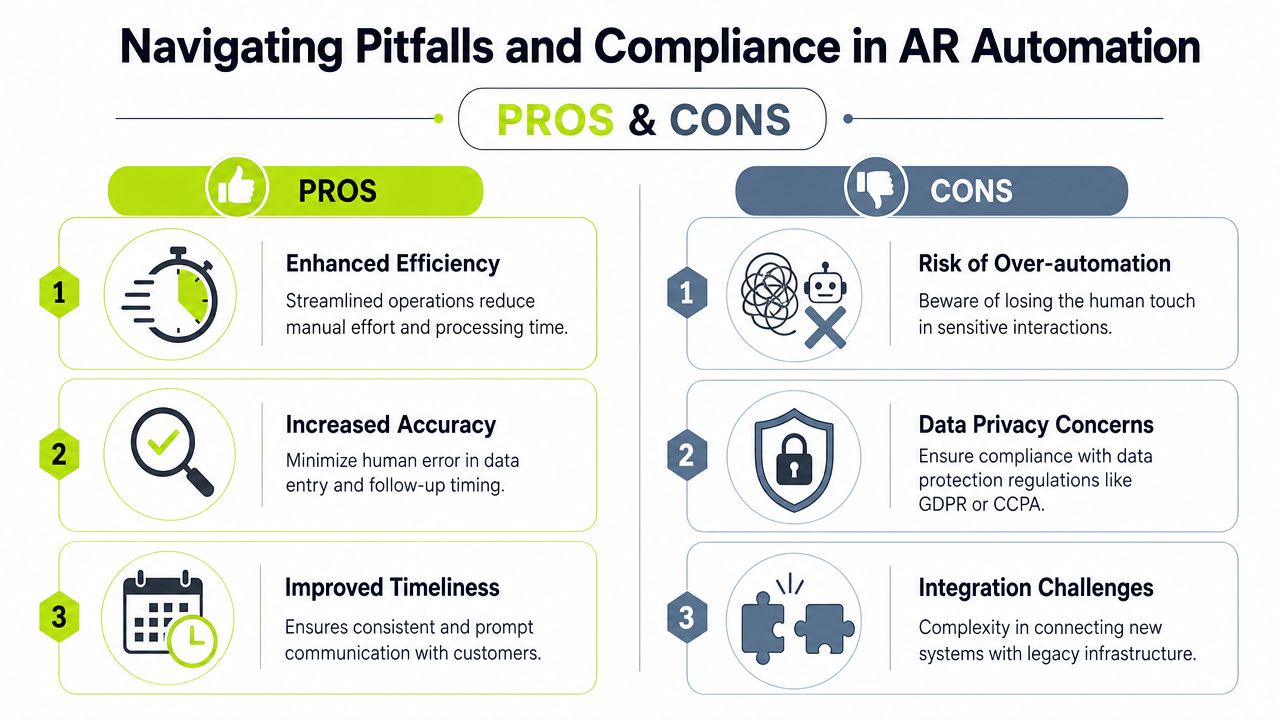
Navigating Pitfalls and Compliance in AR Automation
The biggest mistake in follow up automation is assuming more automation always means better performance.
It doesn't. Bad automation scales bad judgment.
Static templates create avoidable friction
Receivables is a tone-sensitive process. Clients don't delay only because they can't pay. Sometimes they delay because your outreach is confusing, too aggressive, or disconnected from the actual issue.
That's why the co-pilot model is the right answer for most firms. The co-pilot automation model, where AI drafts messages and suggests timing but humans intervene for high-risk cases, improves recovery rates by 32% while reducing DSO by 19 days. It also addresses the 68% of customers who delay payments due to confusing or aggressive outreach, based on the discussion of automation and human balance in AR follow-up.
The lesson is straightforward. Don't hand sensitive collection decisions to static templates and hope for the best.
Where systems usually break
The common failure points are boring, but expensive:
- Data hygiene problems: The system follows up on paid invoices because cash application lags.
- No timezone discipline: Messages arrive at the wrong time and train clients to ignore them.
- Weak personalization: Every client receives the same language regardless of context.
- No behavior-based routing: Silent risk accounts and active dispute accounts sit in the same path.
There's also a rollout problem. Teams often launch automation across the full book without testing. A smaller pilot is usually safer because it exposes gaps in invoice status, approval flows, and message timing before the process goes firm-wide.
A set-it-and-forget-it collections workflow is a governance failure, not an efficiency gain.
Compliance needs operating discipline
In AR, compliance isn't just a legal review at the end. It's embedded in how your workflow stores contact data, tracks consent where relevant, logs communication history, and limits who can alter message rules or escalation thresholds.
That means your automation should create an auditable trail. Who sent what. When. Based on which trigger. With what result.
For firms handling international client data or stricter privacy obligations, your controls need to align with principles covered in this guide to GDPR compliance.
The right model is supervised automation
The best finance teams don't choose between manual collections and full autopilot. They split the work properly.
Workflow type | Best owner |
|---|---|
Routine reminders | Automation |
Payment confirmation and pauses | Automation tied to accounting status |
Disputes and exceptions | Human review |
High-risk or strategic accounts | Human-led with system support |
That's how you keep consistency without becoming robotic. It's also how you protect client relationships while still pressing for payment with discipline.
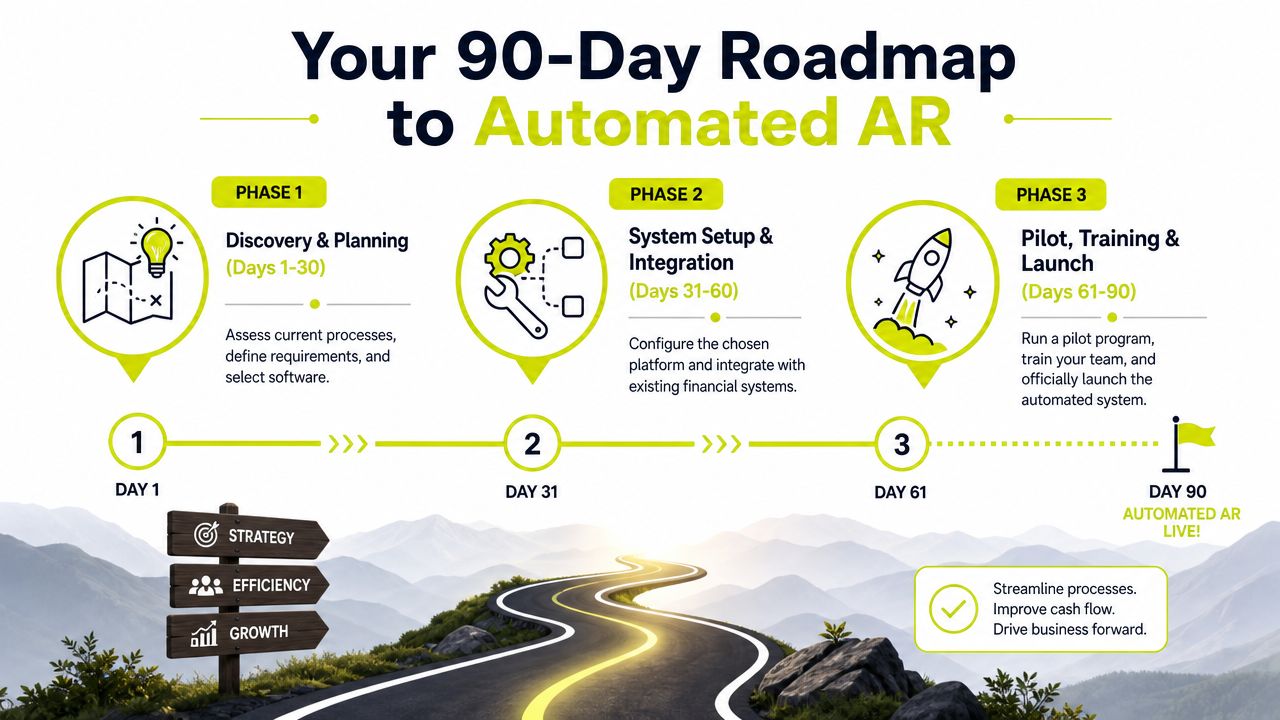
Your 90-Day Roadmap to Automated AR
A clean implementation doesn't require a year-long transformation project. It requires a controlled sequence and executive ownership.
For most professional services firms, a 90-day rollout is enough to move from manual chasing to a reliable automation baseline.
Days 1 to 30
Start by documenting the current process exactly as it operates, not as people claim it operates.
Map invoice creation, delivery, due-date monitoring, reminders, dispute handling, cash application, and escalation. Pull a sample of paid, late, disputed, and written-off invoices. You're looking for failure patterns, especially where manual handoffs create silence or duplicated outreach.
At the same time, define the KPIs that matter to finance. DSO belongs on the list. So do CEI, aging by segment, and promise-to-pay performance. If you use QuickBooks AR automation as part of the stack, confirm where invoice status and payment status will be sourced, and where messaging rules will live.
Days 31 to 60
Now configure the pilot.
Use a limited account group. Segment by risk and client type. Build your reminder sequence, your pause rules, your exception routing, and your approval rights. Keep one finance owner accountable for message logic and one operational owner accountable for data integrity.
A short pilot works better than a broad launch. In automation practice, teams that pilot with a small group for 2 to 4 weeks before full rollout report higher adoption and better-refined sequences, according to Keap's guidance on automated follow-up success factors.
Days 61 to 90
Scale only after the pilot exposes the underlying issues.
Expand by segment, not all at once. Start with routine accounts that have stable billing patterns. Add complex accounts after the team has tested dispute handling and payment-pause logic. Formalize your reporting cadence so finance leadership reviews the data weekly during rollout.
This is also the point where software integration matters. AR automation tools directly reduce Days Sales Outstanding by enabling faster invoicing and eliminating manual billing bottlenecks, which improves cash flow and profitability for professional services firms, as explained in Versapay's overview of AR automation for professional services.
A practical 90-day checklist
- Assign one executive owner Usually the Controller or CFO. Someone has to own policy, not just software setup.
- Standardize client segments Don't let every collector decide ad hoc treatment rules.
- Connect accounting data before launch If the invoice and payment status is unreliable, the automation will be unreliable too.
- Write escalation rules in plain language If a collector can't explain when an account moves to human review, the system isn't ready.
- Train partners and account leads In professional services, relationship owners often create exceptions. Include them early.
- Review results weekly during rollout Focus on response quality, payment timing, disputes, and workflow exceptions.
The first goal isn't perfect automation. It's controlled automation you can trust.
The right sequence produces a predictable outcome. Invoices go out on time. Follow-ups fire when they should. Paid invoices stop getting chased. Exception accounts move quickly to human review. That's how you reduce DSO, improve cash flow, and make collections less dependent on individual effort.
Resolut automates AR for professional services, with workflows designed to keep follow-up consistent, accurate, and human. If you're evaluating how to bring more control to collections without turning client communication into a robot script, Resolut is worth a look.